Teenage Engineering labelled the EP-40 Riddim “Original Layering Machine.” The Riddim lives up to its mission — jammin’.
The first question I asked is “How are the factory songs?” The EP-40 comes pre-loaded with nine projects:
 #  Abbrev   Artist         Sub-genre                   Key  BPM
--  --------------------------------------------------  ---- ---
 1  JAMMY    King Jammy     Dancehall                   E     85
 2  MPROF    Mad Professor  Dub                         Fmin  86
 3  DRSKL    DRE Skull      Dancehall and electronic    Amin  81
 4  MFLUX    Mafia & Fluxy  Dancehall and reggae        Gmin 134
 5  MPC                     MPC layout                  Fmin  82
 6  RIGO     Rigo Fuego     Electronic dancehall/Latin  A     94
 7  CROWN    Mighty Crown   Reggae and dancehall        Dmin  88
 8  BABY G   Baby-G         Dancehall                   Dmin  71
 9  PO                      Pocket Operator             D     81
TE credits several other artists, but doesn’t associate their names with specific samples or songs. At least their contributions are recognized.
EP-40 has a few different major modes. One of these modes — LIVE STATE — is made for jammin’. You get into LIVE STATE by pressing the [SOUND] and [MAIN] buttons together at the same time. You’ll see “LIV” in the display and the icon next to the MAIN icon will flash.
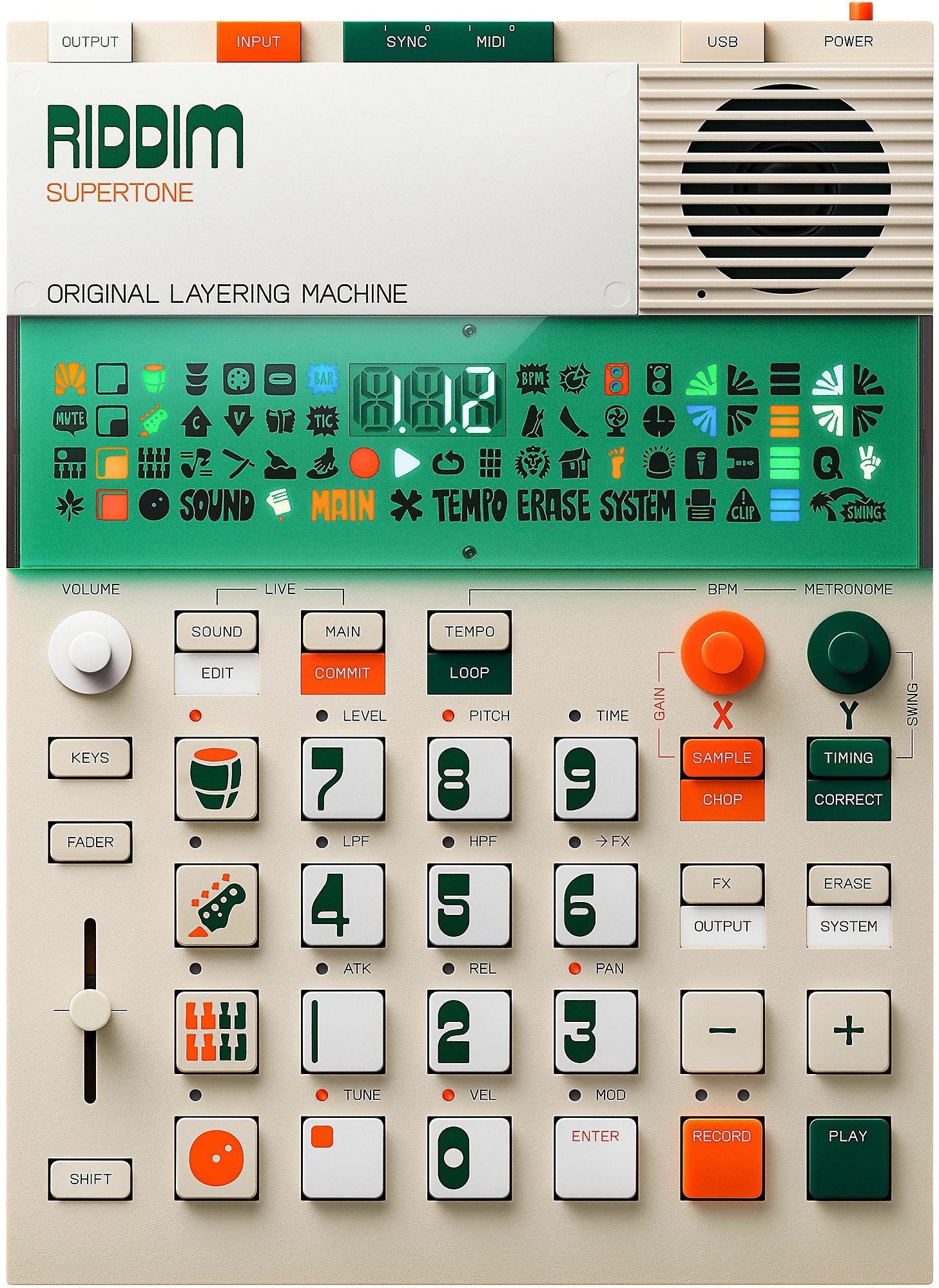
Teenage Engineering EP-40 Riddim
It’s easy to change the project: Press and hold [MAIN] and a numbered button from [1] to [9]. Hold that number button down! I was “clicking” the number button and then wondering why the project didn’t change. 🙂 If you’re successful, the display will show “P” and the selected project number.
Eventually, you’re going to want to mix and match or play a melody on an external MIDI controller. Here is a table with project key, tempo and chords:
 #  Abbrev     Key  BPM  Chords       Loop sample #'s
--  --------  ----  ---  -----------  ----------------
 1  JAMMY        E   85  | E  |       824 to 835
 2  MPROF     Fmin   86  | Fm | Eb |  849 to 861
 3  DRSKL     Amin   81  | Am | Em |  812 to 823
 4  MFLUX     Gmin  134  | Gm | Dm |  862 to 873
 5  MPC       Fmin   82  | Fm | Eb |  874 to 885
 6  RIGO         A   94  | A  |       886 to 898
 7  CROWN       Dm   88  | Dm | C  |  836 to 848
 8  BABY G      Dm   71  | Dm |       800 to 811
 9  PO          D    81  | D  | G  |
Feel free to mash things together. Reggae/dub typically uses simple chords — no jazz extensions, so don’t get too cute.
Project 9 is kind of a ringer. It’s meant to be a placeholder for your first project (assuming that you don’t want to throw projects 1 to 8 away). The project imitates the sound of a TE Pocket Operator (PO).
You have to take the BPMs with a grain of salt. MFLUX at 134 feels like 67 BPM — it certainly doesn’t feel like trance or garage!
The four basic layers are selected using the [DRUM], [BASS], [MELODY] and [PLATE] buttons on the left hand side of the button matrix. Select a layer and then play the other nine buttons in the 4×4 matrix. You’ll quickly discover a common layout across factory projects. (MPC is an exception and follows the MPC layout.) For example, here are the pad assignments for each layer in the JAMMY project:
Drum Pads
   JAMMY DRMS A 85   JAMMY DRMS B 85    JAMMY DRMS C 85
   JAMMY HH          JAMMY OH           MUD TOM B
   JAMMY KICK        JAMMY RIM A        JAMMY RIM B
   JAMMY FILL A 85   JAMMY FILL B 85    JAMMY FILL C 85

Bass Pads
   JAMMY BASS A 85   JAMMY BASS B 85   JAMMY BASS C 85
   SUPERTONE 6       SUPERTONE 6       SUPERTONE 6
   SUPERTONE 6       SUPERTONE 6       SUPERTONE 6
   SUPERTONE 6       SUPERTONE 6       SUPERTONE 6

Melody Pads
   JAMMY MEL A 85    JAMMY MEL B 85    JAMMY MEL C 85
   SUPERTONE 4       SUPERTONE 4       SUPERTONE 4
   SUPERTONE 4       SUPERTONE 4       SUPERTONE 4
   SUPERTONE 4       SUPERTONE 4       SUPERTONE 4

Spin Plate
   SUPERTONE 8       SUPERTONE 8       SUPERTONE 9
   RIGO FX A         WHAP              DRSKL FX C
   SYREN             WIRE              ONE
   BACKSPIN M        XPLOSION          FOGHORN
The top three buttons are loops. The bottom three drum buttons are fills. The inner bass and melody 3×3 pads play tones. The spin plate 3×3 buttons trigger one shots like sirens. You can use any custom layout, of course. I’ll stick to TE’s convention in order to keep my mind straight.
The looping is neat. The EP-40 keeps loops in sync, so you can switch in and out of loops without dropping the beat. If you prefer to fade a layer in or out, press and hold the layer’s button ([DRUM], [BASS], [MELODY] or [PLATE]) and move the slider.
When the drum layer is selected, you can add extra hits (and fills) while playing a loop. Simply hit one of the lower 9×9 pads.
You have two options when playing a melody: KEYS mode or no KEYS mode. Press the [KEYS] button to enable (or disable) KEYS mode. When KEYS mode is enabled, all 12 number pads play a tone. Disable KEYS mode and the pads behave according to their assignments (e.g., loops, one shots, Supertone, etc.)
If you’re with me so far, everything is kind of dry-ish. We need to add effects and dub this motha out. Drop everything out except the drum layer. Press and hold the [FX] button along with one of the number pads. The display visually animates an effect when the effect is triggered. The default effect is delay (DLY). You’ll hear stutters, repeats, pans and the stock-in-trade deep echo reverb. Some of the effects mess with the stereo field so patch into stereo monitors when possible!
I hope that’s enough to get you started.
TE EP-40 Riddim: Opinion
I’m having fun and I’m happy with the EP-40. Mostly, I’ve played and jammed with the factory projects.
The factory content is pretty darned good (cleanly recorded). One might say, it’s tame when compared to deep, heavily processed dub (fully expressed commercial tracks). On the other hand, simplicity gives us the opportunity to add and mangle as we see fit.
The performance workflow is free and easy. If you like the sound of reggae or dub, you will enjoy the factory songs. You will also appreciate the ability to interact with the prerecorded loops, sirens and other sounds. A reggae enthusiast should be happy if they don’t mind splashing out $300 USD for eight songs.
A reggae or dub song is often built on one or two chords, like the Riddim factory loops. Be prepared to do serious work, however, if you want to write and record more complicated chord progressions. For example, Psalm 95 If Today by Trevor Thomson.
Stay tuned for my experiments with Supertone and Ting. Check out the Riddim and Ting unboxing.
Copyright © 2026 Paul J. Drongowski