
After rummaging through the AN200 crate, I cherry-picked eight favorite patterns and converted them to Yamaha Seqtrak. Yamaha Seqtrak doesn’t have an AN synthesis engine, so you only get a close approximation. Still, why not?
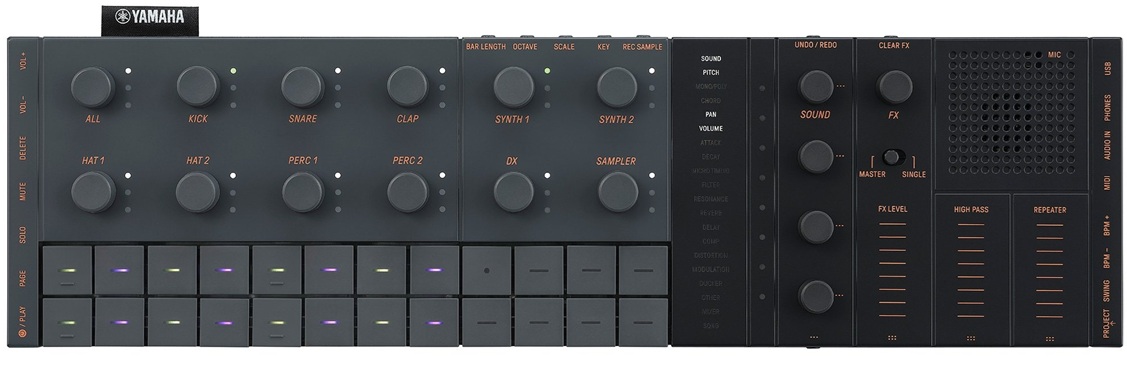
Converting Yamaha’s AN200 patterns to Seqtrak is labor intensive. As I noted in my AN200 crate digging article, the AN200 has four tracks: Synth, Rhythm 1, Rhythm 2 and Rhythm 3. The Synth track is the easiest to deal with. It contains MIDI notes and no continuous control messages. That’s pretty raw and kind of disappointing (no automation tricks). The biggest conversion issue is finding a suitable Seqtrak voice — a voice with dynamism and life — to replace the AN voice.
The rhythm tracks are truly a bear to convert. The AN200 doesn’t have drum kits in the sense of a conventional Yamaha synth. Rather, the rhythm tracks contain notes that hit a vocabulary of AN200 percussion instruments, bass notes, found sounds and whatnot. A single AN200 rhythm track might contain only high hats, if you’re lucky. Often, a rhythm track contains patterns for several percussion instruments and you need to find a way to explode the track into individual Seqtrak drum tracks. Ouch.
The AN200 Owner’s Manual has a table listing the instrument for each MIDI note number. If you are going to do conversions yourself, you must have this table!
I did all the MIDI whacking in (ancient) Cakewalk SONAR Home Studio (circa 2006). Once I had the individual SONAR tracks set up, I exported the individual instrument patterns to MIDI files. SONAR is cool that way — just drag the pattern clips and drop them into a directory. SONAR writes the clips as Standard MIDI Files (SMF).
With individual SMF patterns in hand, activity shifts to the Yamaha Seqtrak app. First thing is to assign Seqtrak voices to the drum and synth tracks. Sometimes I spend too much time finding the ideal voice only to change the voice later. Better to make initial picks quickly and get on with the fun stuff.
After choosing voices and creating the project, it’s time to import patterns. You need to crack open the pattern editor for each track one at a time and drag the appropriate MIDI file into the pattern box.
This is where you may hit a major issue — time alignment. During export, SONAR truncates the outgoing MIDI clip to the first MIDI event in the clip. Seqtrak imports from the beginning of the MIDI file and uh-oh, what was aligned in the original pattern is no longer aligned with the first beat. I got into the habit of adding a super-quiet (velocity 1) note to the start of clips without a pattern note on the one. The quiet note forces SONAR to create a properly aligned clip during export. [I said conversion is work, didn’t I?]
Finally, you get to the funner stuff — tempo, effects, automation and all that. The Seqtrak mixer is really spiffy with just one gotcha. If you change a track voice, be aware that Seqtrak will change the effect send levels to those stored with the new voice. You will need to restore the reverb send level, for example. This is kind of a pain.
There is another thing that might drive you mad. Seqtrak tries to be helpful by saving your project on start-up and shut-down. [Read the manual.] Soon you will have multiple back-ups for the project. Back-ups are dated, but don’t display a creation time. Thus, you won’t know which project back-up is the latest one.
If you export a project from the app, look out for a garbage character before the file extension dot in the file name. You won’t see it, but it’s there. ZIP and other applications will find the garbage character in the file name and complain in some irrational way.
Once again, what do we have for our guests? All of the pieces and parts are in this ZIP file (27MB). You’ll find the original AN200 patterns, MP3 demos, Seqtrak projects, and working notes (README.TXT, etc.)
Before leaving, here is a brief MP3 demo. You’ll hear eight converted AN200 patterns in the following order: ElecHop, Funky, Jazzwonka, Mushroom, Naja, Tribal, TribeGathr and Trippin. Enjoy!
Copyright © 2026 Paul J. Drongowski