Reface DX acoustic instruments for ya

One of my long-term projects is to collect and prepare acoustic instrument voices for Yamaha Reface DX. There aren’t as many high-quality acoustic voices as there are tons of bleeps and bloops. Most people associate FM synthesis with aggressive EDM sounds, but even 4-op FM is capable of so much more!

The project has come along pretty well. I’m now in the programming and tweaking phase to see if I can do better. However, the initial set of voices ain’t bad. Here is a table showing the voices and bank layout:

Bank 1

    1-1 Rhodes    1-2 Wurlitzer    1-3 LegendEP   1-4 E. Organ 3
    1-5 P. Organ  1-6 LargePipes   1-7 Cathedral  1-8 GentlePipe

Bank 2

    2-1 WarmPad    2-2 Wash3Strng  2-3 Wood+Horn   2-4 Woodwindy
    2-5 Warm&Cozy  2-6 RealStrngs  2-7 Horn 2 +1   2-8 FluteVoice

Bank 3

    3-1 HornSwell  3-2 SoftBrass   3-3 WoodEns. 4  3-4 Oboe 1 
    3-5 TrumpetMel 3-6 Trombone 2  3-7 Clarinet    3-8 Bassoon

Bank 4

    4-1 Wood EP    4-2 DynaString  4-3 Warm&Cozy   4-4 Violin -1
    4-5 WoodEnsFlt 4-6 Wash3Strng  4-7 HamB3       4-8 Real flute

The “+1” and “-1” are reminders to change the OCTAVE slider before playing. To do: Add and store transpose changes in the voice SysEx (SYX). Next version!

The first three banks are relatively stable. Bank four voices are experiments in progress, back-ups or patches that I don’t want to lose. To do: I need to collect and tweak a few solid Hammond-ish B-3 sounds.

I drew on multiple sources. Many voices come from Yamaha Soundmondo and the Reface DX Legacy Project. If you’re looking for raw material to start patches of your own, I recommend the converted YS200 voices at the Legacy Project.

The DX11 conversions seem to have a few issues, i.e., strings don’t sound like strings (even remotely). Fortunately, the YS200 and DX11 are based on the same synthesis engine (Yamaha YM2414). Go for the YS200 first.

Here is a link to a ZIP file with Reface DX acoustic instrument patches. Each voice is a separate SYX file, i.e., a file containing one or more MIDI System Exclusive dump messages. I use MIDI-OX to download patches to Reface DX. If I like a patch, I hit the Reface STORE button, choose a target voice slot, and confirm the store operation.

Have fun!

Interested in Reface DX? Here are a few more links:

Copyright © 2025 Paul J. Drongowski

Everybody likes new stuff

Everybody likes new stuff. Unfortunately, the pickins have been slim as of late. I suspect that the global tariff situation has made manufacturers cautious. It’s tough to price products in a dynamic, uncertain business climate.

Here’s a couple of new products that caught my attention.

Boss RT-2 Rotary Ensemble

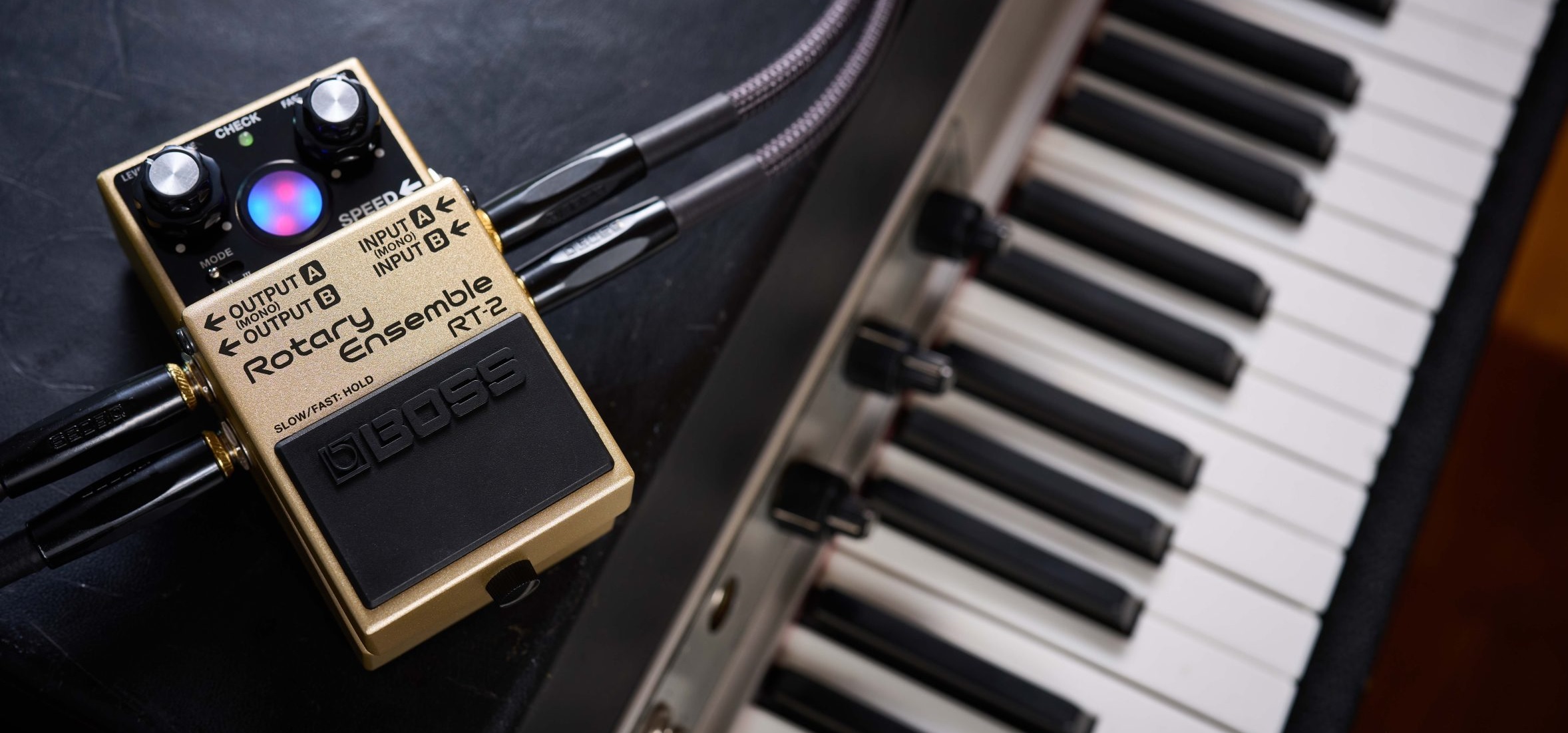
Boss (Roland) have announced the Boss RT-2 Rotary Ensemble — “authentic spinning speaker effect” in a compact pedal. It has three tones (modes): 1. vintage (warm Leslie 122), 2. wide frequency response, and 3. aggressive spin (presence) with increased drive. Sample rate is 48kHz and conversion is 24 bits.

Boss RT-2 Rotary speaker pedal

The RT-2 has a few cool features. In addition to concentric level and drive knobs, concentric knobs control SLOW to FAST and FAST to SLOW transition times. There is a SPEED jack which takes either a foot switch or an expression pedal (e.g., EV-30 or EV-5). The treadle switch is over-loaded with four different kinds of effect ON/OFF and SPEED control configurations. Switches on the back further tune the transition time and drive balance.

Visual feedback (animation) is provided by a multi-color LED-based display, AKA the “Virtual Rotor”. The red LED animates the treble/horn while the blue LED animates the bass/drum.

The pedal has stereo INs and OUTs with the usual one lead mix-down to MONO. The RT-2 can send Wet and Dry independently (phase-corrected) to outputs A and B, respectively. Having independent Wet and Dry can be handy.

You can power the RT-2 with a standard 9V battery! Access to the battery compartment is reminiscent of Behringer’s low-end, plastic fantastic pedal line. Current draw is 115mA and alkaline battery life is approximately 2.5 hours.

No doubt, Roland want to sell this pedal to guitar players. But, hold on! The promotional video shows the RT-2 in use with a Fantom 07. Will miracles ever cease? Check the Boss article about effect pedals for keyboards.

If you want the inside dope, Boss/Roland published an interview with the RT-2 development lead, Takeshi Mitsuhashi. The RT-2 supersedes the 2005 RT-20.

To enhance the RT-2’s three-dimensional stereo sound, we modeled a Leslie 122 in our anechoic chamber at the Roland headquarters using a pair of high-quality, flat-response microphones. We experimented with various angles and set them at the position that captured the best dynamics. [Takeshi Mitsuhashi]

The Boss RT-2 is available for pre-order at $239.99 USD. At that price, if the sound is truly “authentic,” the RT-2 will give the Neo Instruments Vent a run for the money.

Sonicware Liven Evoke

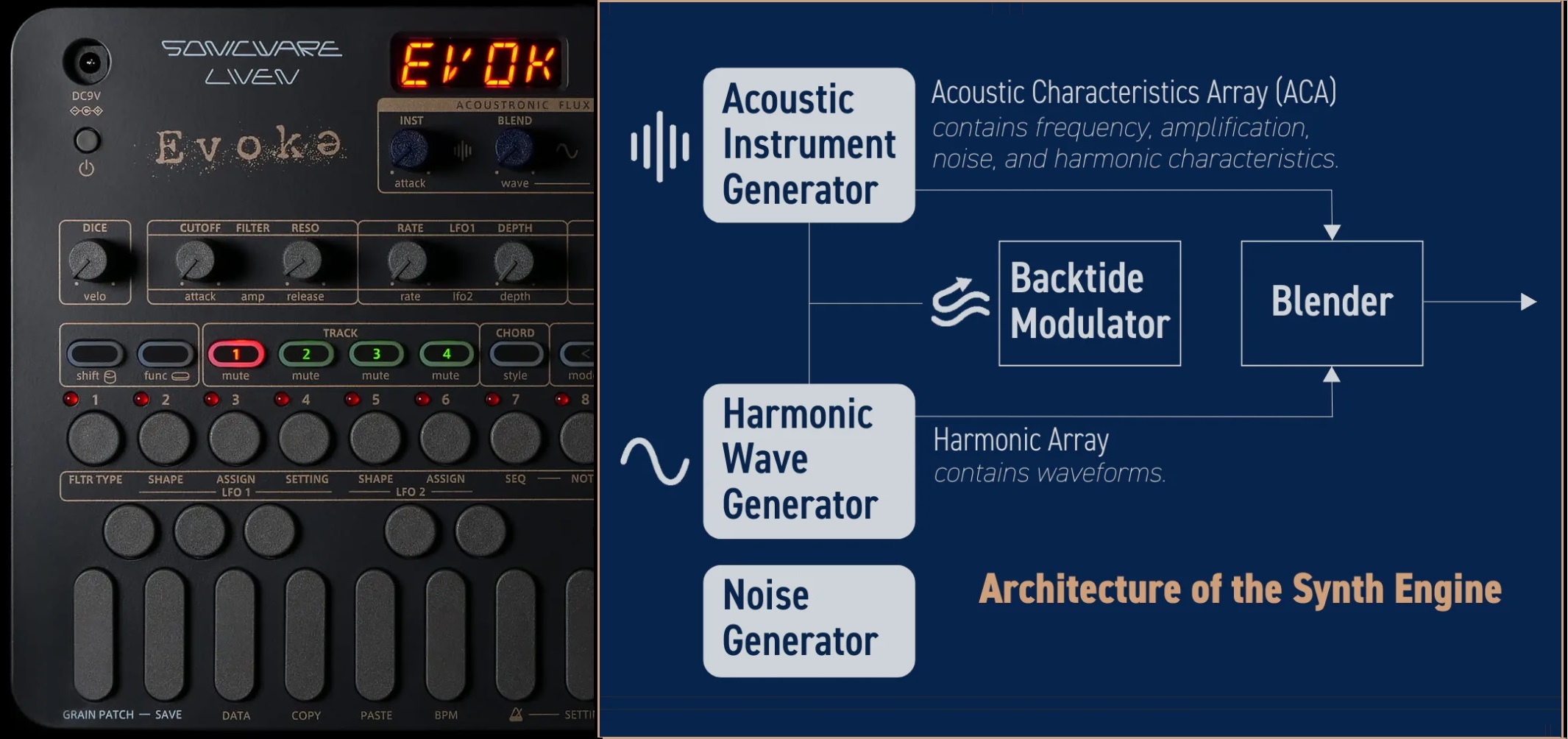
The Sonicware Liven Evoke mines the ambient music space. The Evoke complements its sister, the Liven Ambient 0, with more natural, acoustically-rooted sounds. The Ambient 0 tilts synthetic. Between the pair, I’d choose the Liven Evoke.

Sonicware Liven Evoke

It features the Back to the Future Acoustronic Flux Oscillator. Check out Dr. Endo at the controls: EXPR Residue, RISE Again, Tear, and his how to make cinematic ambient music video.

And, it looks like I am not alone in liking the Evoke. [I have friends everywhere.] Sonicware has sold out the third production run!

Quite frankly, I don’t know how Dr. Endo and company can develop and manufacture a nifty box like the Liven Evoke for $239 USD. The hardware is made in Malaysia and I don’t know how the USA tariff situation will affect the price or the import duty.

It’s not just a groove box, it’s a relaxation machine.

Copyright © Paul J. Drongowski

Adafruit Feather: Megavoice key switching

More experiments and I have the initial cut of a simple key switching program for Yamaha MODX and Genos/PSR guitar Megavoices. The program is written in CircuitPython and runs on an AdaFruit Feather M4 Express. Here is a link to the ZIP file with the code.

Megavoice: Background information

MODX, Genos and mid-range PSR keyboards have Yamaha Megavoices. Megavoices combine several waveforms into a single voice (assigned to a single MIDI channel). They are intended mainly for arpeggios (Montage/MODX) and styles (Genos and PSR).

Generally, a Megavoice uses velocity switching to trigger waveforms. Some of the waveforms play ordinary notes, some play articulation notes, and others plays special instrument effects. Let’s take a look at the Nylon Guitar voice, which is implemented on both MODX and Genos. [Megavoice technology dates back to the early Motif and Tyros era, so I won’t be listing all of the models with Megavoice!] Many other guitar Megavoices (e.g., Concert Guitar, Clean Guitar) have the same velocity layout. Megavoice Nylon Guitar has the following velocity layers:

    Vel Lo  Vel Hi  Waveform      Key range
    ------  ------  ------------  -------------
       1      20    Open soft     C6 and below
      21      40    Open medium   C6 and below
      41      60    Open hard     C6 and below
      61      75    Dead          C6 and below
      76      90    Mute          C6 and below
      91     105    Hammer        C6 and below
     106     120    Slide         C6 and below
     121     127    Harmonics     C6 and below
       1     127    Strum noise   Above C6
       1     127    Fret noise    Above C8

MIDI note numbers 0 (C-2) to 96 (C6) comprise “playable” notes. Note numbers above 96 are instrumental effects: strum and fret noise. The strum and fret noises include the sound of a pick crossing the strings, body knocks, and sleeve noise (fingers sliding on strings).

As you can tell from the layout, if you try to play a Megavoice from the keyboard, you’ll have an interesting and maybe frustrating experience. No one really has the skill to control their key touch to reliably play an open hard note versus a dead note, etc. However, a sound designer can program different sounds into a MIDI track with precision, thereby making an expressive, realistic guitar part in a style or arpeggio. [Historical note: Many of the Motif ES/XS arpeggios were taken from PSR Megavoice styles!]

Genos, Tyros and PSR have a way of making the base waveforms playable: Super Articulation (SArt). The SArt engine monitors the incoming key strikes and, in real-time, chooses a destination waveform for each note. If you play in a detached manner, SArt triggers one of the open string waveforms (depending upon your strike velocity). If a second note occurs within a fourth with a slightly higher velocity, SArt plays a slide (up). SArt plays a body knock in response to the ART.1 and ART.2 buttons.

Clavinova CSP and CVP do not have articulation buttons. However, you can still join the fun. Select an S.Art guitar voice and tromp on the foot pedals!

Montage and MODX have Expanded Articulation (XA). It plays open notes as expected and relies on the ASSIGN 1 and ASSIGN 2 buttons to bring in an articulation like Slide or Harmonics. (Element programming allows more flexibility than this simple example, BTW.)

Feather MIDI event processor

In order to implement key switching, we need to break into the path from keyboard to tone generator. We want a chance to respond to incoming notes (key strokes) before the notes go to the tone generator (TG).

We can’t hack the hardware in MODX or Genos, but we can send MIDI messages from the keyboard (e.g., MODX MIDI OUT) to an external MIDI event processor which sends a modified MIDI message stream back to the instrument (e.g., MODX MIDI IN).

I described the hardware for an AdaFruit Feather-based MIDI event processor in an earlier post. The event processor consists of an AdaFruit M4 Express processor, MIDI I/O FeatherWing, OLED FeatherWing and Joystick FeatherWing. Up to this point, I haven’t exploited the OLED or joystick, so you could get away with a very tiny Processor plus MIDI I/O combination. It’s small and efficient enough to be powered by a LiPo battery!

The hook-up looks like this:

    ----------------         --------------       --------------
   |                |       |              |     |              |
   |         MIDI OUT ----> MIDI IN        ----> RX             |
   | MODX6          |       |  FeatherWing |     |  Feather M4  |
   |          MIDI IN ----> MIDI OUT       ----> TX             |
   |                |       |              |     |              |
    ----------------         --------------       --------------

The MIDI FeatherWing communicates with the Feather M4 Express over the serial I/O RX and TX ports. The Feather M4 Express communicates with the Mu editor and development environment on a Windows PC (not shown). Code is written in CircuitPython which is loaded into the Feather M4 from the PC over a USB communication link. The code can print status information via USB to the Mu environment — very handy when debugging.

Since this is a prototype, I’m trying to keep things simple. The MODX6 requires a little bit of manual configuration:

  • MIDI I/O directed to/from the 5-pin DIN connectors
  • MIDI LOCAL OFF (i.e., key events are not sent directly to the TG)
  • Nylon Guitar or other compatible guitar Megavoice selected on Part 1

That’s not too much to ask.

Key switching

It may be said that neither SArt or XA bring together all of the available articulation waveforms in a factory preset single voice (part). That’s where key switching can play a role.

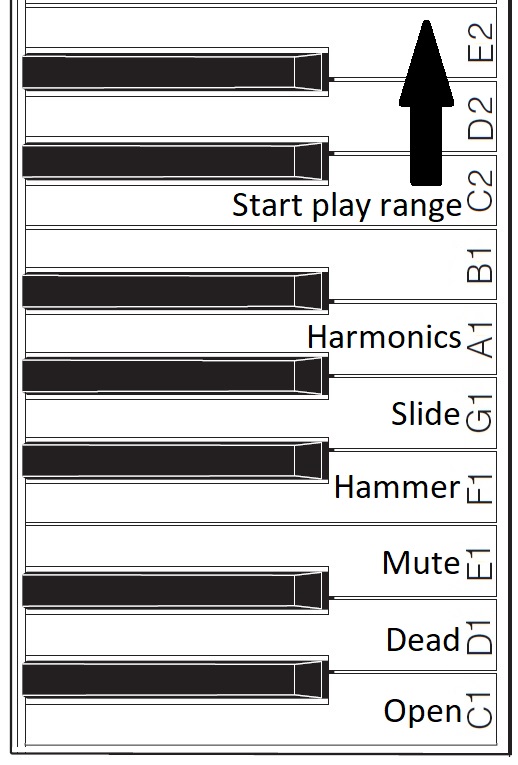
Basically, I want to assign a range of keys to switch between articulations and sounds. For my initial experiments, I assigned MIDI notes 36 to 47 to key switching duties. On MODX6 (61 keys), this key range covers the lowest octave of physical keys (the power-up default, without internal octave switching enabled). Articulations are assigned to keys as shown below.
Assigned key switch articulations

For now, I’m holding the black keys and B1 in reserve. One possibility, for example, is to assign body knocks to F#1, G#1 and A#1. We’ll see!

The articulation keys enable the assigned articulation. All keys from C2 and above play notes using the selected articulation. The articulation keys latch. So, if I strike E1 (Mute) and then strike a key in the play range, a muted guitar note will sound. All subsequent notes will be mute notes until I strike C1 (Open) and return to playing open strings.

I spent some time experimenting with Genos SArt voices in order to get ideas for enhancements. I will summarize my notes in a future post. Suffice it to say, Yamaha have some good ideas! It’s all a matter of code. 🙂

Copyright © 2025 Paul J. Drongowski

MIDI Event Processor — Round 2

I’ve got a stable MIDI event framework up and running. Time to summarize a few lessons learned.

CircuitPython

The CircuitPython libraries are pretty decent overall. AdaFruit did a good job with on-line documentation and I can usually find a helpful example to copy, paste and modify.

Python itself is a PITA. I don’t know why or how anyone calls it a “beginner’s language”. Three big bug-a-boos jump out:

  • Spacing. Zealots say, “Oh, you don’t need brackets; indentation handles everything.” I haven’t seen such idiotic enforcement of spacing rules since 1960s FORTRAN. Give me brackets, give me free-form layout.
  • Run-time type checking. Python does not do a lot of compile-time type checking. So, you’ll get a clean compile and then stumble on a type compatibility issue during the first run.
  • Type conversion. Type conversion can be very weird. Thanks to run-time type checking, it might take several runs to get conversion right.

I’m going to finish the job in CircuitPython out of a spirit of self-discipline. Please teachers, do not inflict this language on new programmers.

AdaFruit hardware

The AdaFruit Feather hardware is solid. No complaints. The AdaFruit Feather M4 Express is a speedy little bugger compared to Arduino UNO! The OLED display is bright and clear. The MIDI ports work. Other than testing, the joystick FeatherWing hasn’t gotten much use yet.

MIDI library

I wanted to love the MIDI library. It offers pre-defined MIDI message types (classes) and necessary send/receive operations. All good.

Unfortunately, I don’t think the MIDI library was tested with a real-world synth. I’m using Yamaha MODX6 for testing. Yamaha uses MIDI running status extensively. Hit and release a key, and MODX sends a NOTE ON status byte followed by two key/velocity pairs:

    0x90 0x48 0x73 0x48 0x00

The first pair is NOTE ON and the second pair is effectively NOTE OFF (i.e., velocity is 0x00).

That’s not so bad in itself. However, MODX sends real-time Active Sensing messages (MIDI status byte 0xFE) and Active Sensing may appear in the middle of a MIDI message, running status or not.

Using the MIDI library, notes and controller events were getting dropped everywhere. At first, I thought CircuitPython was too slow to keep up with the incoming MIDI. Nope. When I switched to reading and dispatching bytes from the UART, I could handle everything without straining processor resources.

Bottom line: Bag the MIDI library as it could have bugs with running status.

OLED display and REPL

The OLED display and CircuitPython REPL have been very handy for debugging. The UART implements the MIDI IN/OUT ports leaving USB serial I/O available for debugging. (You need Arduino Leonardo to get separate UART and USB serial I/O.) I like to drop in the occasional “print” statement until I’m sure of the control flow and internal values.

Example: Knowing what the MODX is sending. It is easy to whip up a MIDI monitor sending byte values to either the OLED or the Mu Editor REPL. Knowing that I had to handle Active Sensing and running status together, made the task clear.

The task

Now I realize that the event processing application needs to map note ON/OFF events and to echo all other events (messages) unmodified. My current message processing framework reflects this simplicity. It took a few experiments to get here.

Initial code

If you need a quick start for your own Feather-based MIDI event processor, here is a ZIP file with my initial CircuitPython code. It doesn’t handle complete SysEx messages. The code framework will probably change in the next version.

Copyright © 2025 Paul J. Drongowski