Mark Isham is one of my all-time favorite composers and artists. I first heard him play with Group 87 (1980) soon followed by his debut solo album, Vapor Drawings. Since then, he has contributed to many recordings and has composed over 200 scores.
I listen to the local KING-FM classical radio station — the HD2 Calm (“evergreen”) channel, in particular. I need calm, these days. Every now and again, a track from October Sky, AKA “Rocket Boys”, will pop up. October Sky (1999) is one of those 200+ scores by Mark Isham.
Unfortunately, scores or reductions are not available for all of this work, including the “Rocket Boys” cue from October Sky. So, what the heck, let’s put zplane deCoda to work. As I wrote in my review, deCoda is a tool to help learning and notating.
I’ve used deCoda to notate a number of small, simple songs. My review shows one example, Space Rock by the Baskerville Hounds. You might know this tune as 2120 South Michigan Avenue, so we’re not talking high art, here. 🙂
deCoda analyzes an audio song much the same way as Yamaha Chord Tracker. Chord Tracker (and Yamaha Smart Pianist) identifies tempo, measures, structure and chords. I ran Rocket Boys through Chord Tracker, and yep, it found the basic chords in the piece.
Chord Tracker, however, does not extract melody lines. That’s where deCoda comes in. deCoda paints squiggles in a kind of piano-roll chart where time unfolds in the horizontal direction and pitches (notes) are arranged in the vertical direction. The squiggles show the pitch and duration for the various tones found by deCoda’s analysis phase. deCoda identifies chords, too, and displays chord names across the top of the piano-roll.
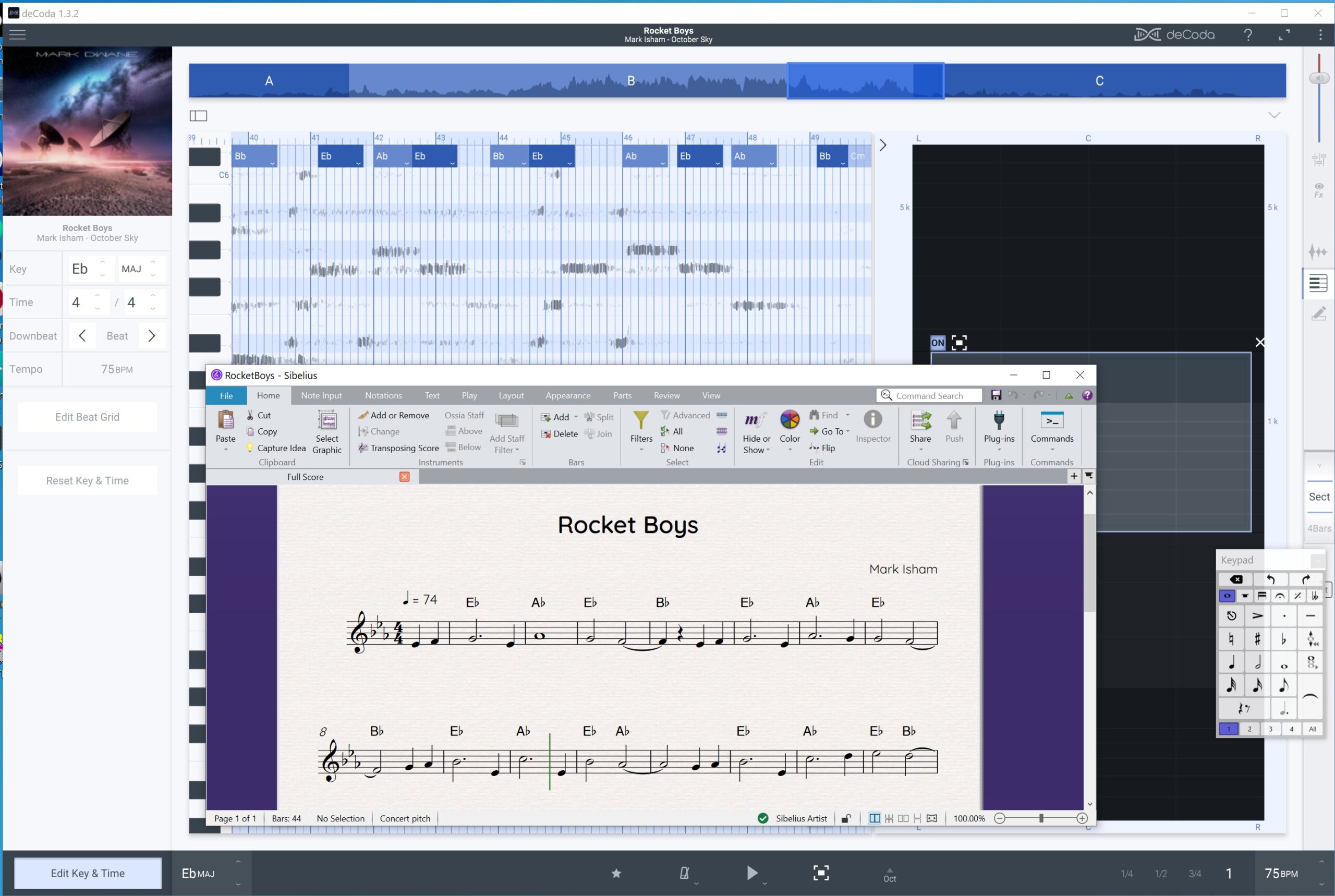
zplane deCoda and Avid Sibelius
A minute or two into the track, a flute plays the main theme. deCoda has a windowing feature that lets you zoom into a range of pitches and a region of the stereo field. I used this feature to close in around the flute line.
I could have used deCoda’s draw tool to mark the individual notes. These notes can be exported as MIDI. Instead, I decided to draw notes directly into an Avid Sibelius score. I resized the Sibelius window so I could compare the deCoda squiggles against the notation. That technique worked out pretty well!
I entered chord symbols based upon deCoda’s analysis. There is a lot going on in the recording, especially when other instruments and sections are brought into play. deCoda gets a bit more “distracted” than Chord Tracker and one needs to use their ears when notating chords. Chord Tracker forces chord changes to beat boundaries and its chord charts are simpler and, thus, cleaner.
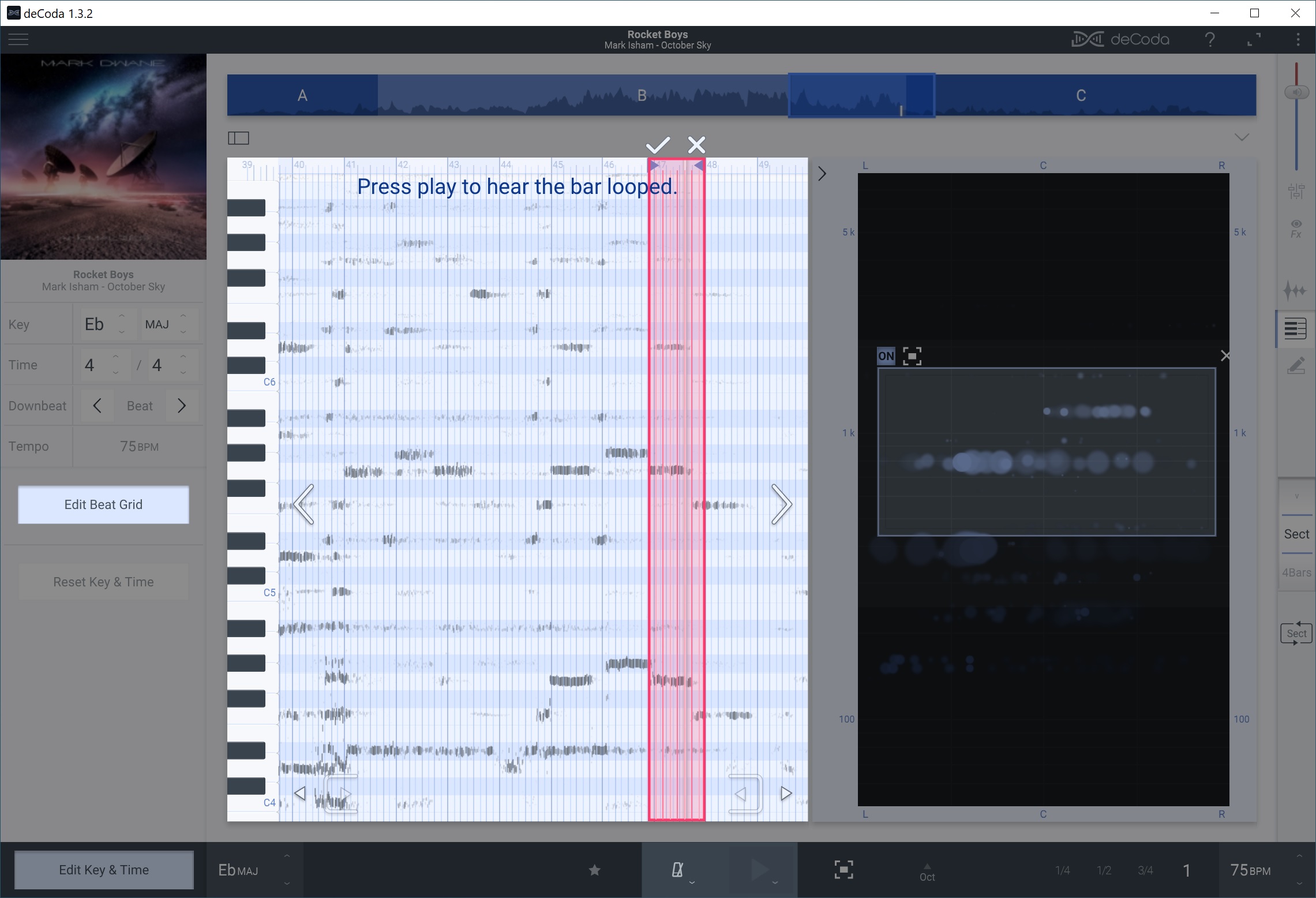
zplane deCoda editing the beat grid
Underscores are often written and/or conducted to picture in order to hit specific images. “Rocket Boys” has a lot of rubato and the tempo shifts throughout the piece. Quite often, the deCoda squiggles did not line up with its beat grid.
The deCoda project panel has a button to edit the beat grid. Press this button and you can draw a measure that aligns the grid with the audio music. Thanks to this feature, I didn’t have to guess note starts, stops and durations. Henceforth, I will make frequent use of beat grid editing!
Overall, this has been a fun afternoon project. The process was good for ear training and I have a very simple lead sheet for “Rocket Boys”. Chalk another win for zplane deCoda (and Sibelius).
Copyright © 2025 Paul J. Drongowski