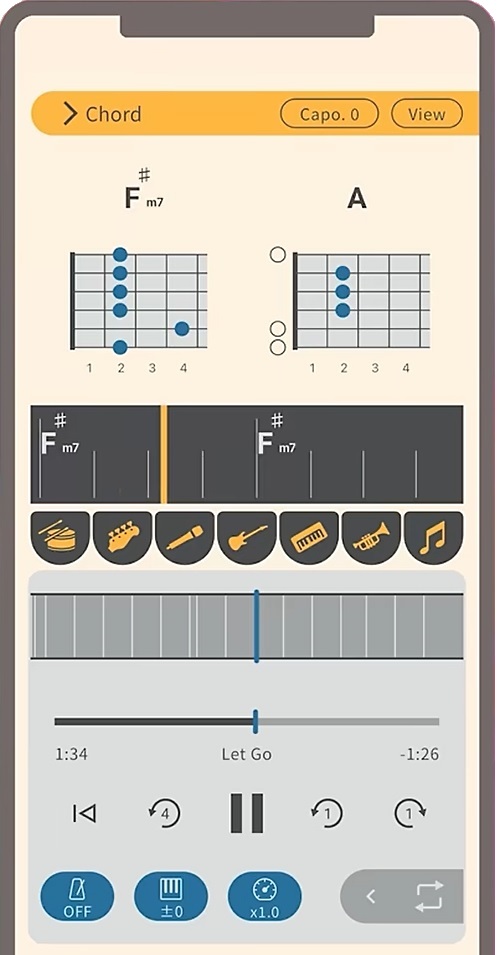
Yamaha Extrack app now in the USA

Yamaha have announced the Extrack app in Europe and the USA. As I mentioned in my preview, Extrack is a practice buddy and a stem extraction tool. More from Yamaha itself:

Yamaha Corporation announced today the U.S. and European launch of Extrack, an iOS/Android music app that allows users to practice and play their instruments along with their favorite songs as if they are part of the band, following its successful debut in Japan.

Built by musicians for musicians, Extrack makes it easy and fun for a user to learn, practice and play along with their own library of songs. Extrack uses proprietary stem separation technology to automatically extract individual instrumental parts such as guitar, drums, bass, piano or vocals from the user’s own audio files on a mobile device, making it possible to adjust the volume, mute or isolate individual instruments.

Extrack automatically transcribes chords for guitar and piano, helping users learn their favorite songs with confidence. It also features song structure analysis, allowing users to repeat sections, skip by measure, and adjust playback speed.

Extrack subsumes much of the Yamaha Chord Tracker application.

There are two levels: free and subscription. An Extrack subscription is called “Extrack Pass” and it gives you:

  • Unlimited song analysis (Free: 5 songs per month)
  • Up to 50 favorite songs (Free: 3 favorite songs)
  • Seven instrument separation (Free: 4 instruments)
  • Up to 50 songs in your Extrack Library (Free: 5 songs)
  • Fine tune tempo to two decimal places (Free: One decimal place)

An Extrack Pass subscription is $39.99 USD per year or $5.99 per month. A 7-day free trial is available in either case.

The current USA IOS version is v1.1. I’ve downloaded the app and I’m very curious about the stem separation process and results.

In use

Here are four short stems extracted from Fleetwood Mac’s “Go Your Own Way”. No tweaking and tweezing. Simply import the track from my music library and analyze. The Extrack analysis phase takes a minute or two. Then, I played each stem into Sound Forge.

There are four stems (Vocal, Drum, Bass and Others) because I’m cheap and I’m running the free edition of Extrack. 🙂

Even though I saved the audio to MP3, the MP3 files are a reasonably accurate portrayal of what I heard through the monitors during record. The Vocal, Drum and Others stems have audible artifacts. The Vocal and Drum extractions aren’t too bad although you would want to bury the artifacts in the mix. The Bass stem seems to be missing the low-mids that give an electric bass punch.

Mixing three or four stems together and you get an acceptable music-minus-one practice experience. Extrack gets the job done as a practice buddy. I don’t think pro re-mixers are going to give up their high-end tools for Extrack, however. I should crank “Go Your Own Way” through SpectraLayers and hear what I get. Get what you pay for?

Copyright © 2025 Paul J. Drongowski

Extrack manual

The following images are the embedded Extrack manual (Copyright Yamaha, thank you). Click on an image to enlarge it.

Yamaha Extrack manual (1)
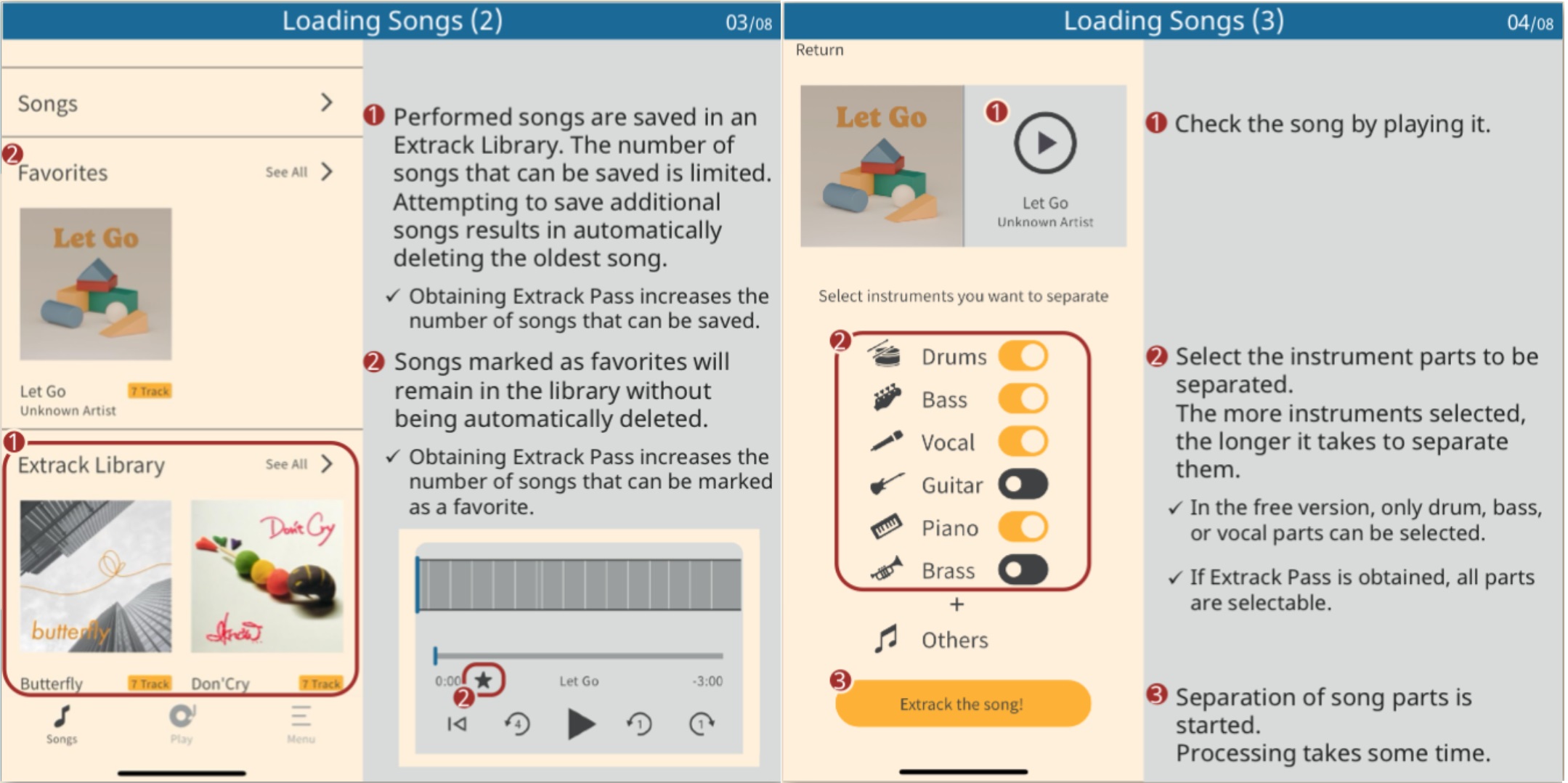
Yamaha Extrack manual (2)
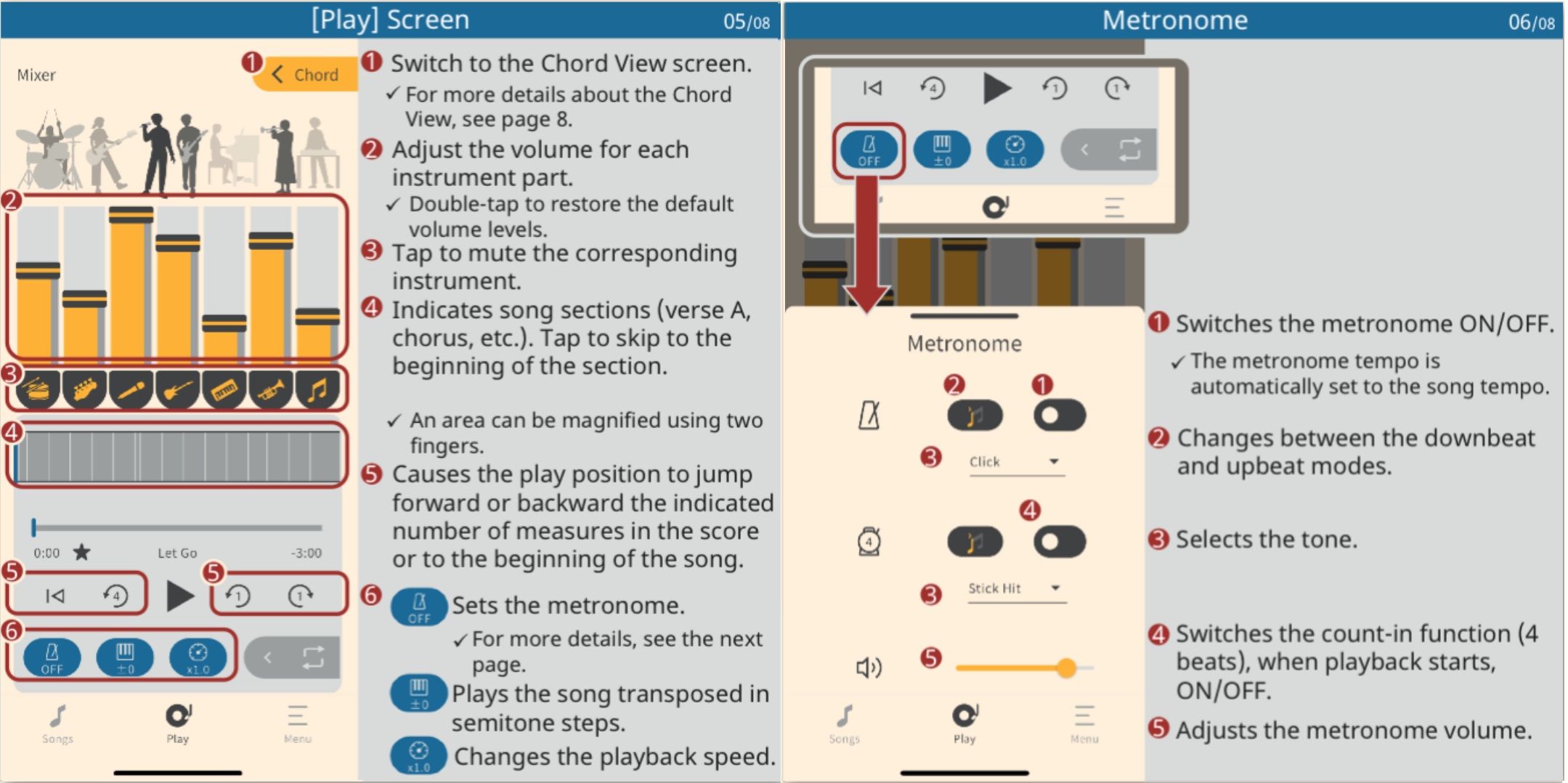
Yamaha Extrack manual (3)
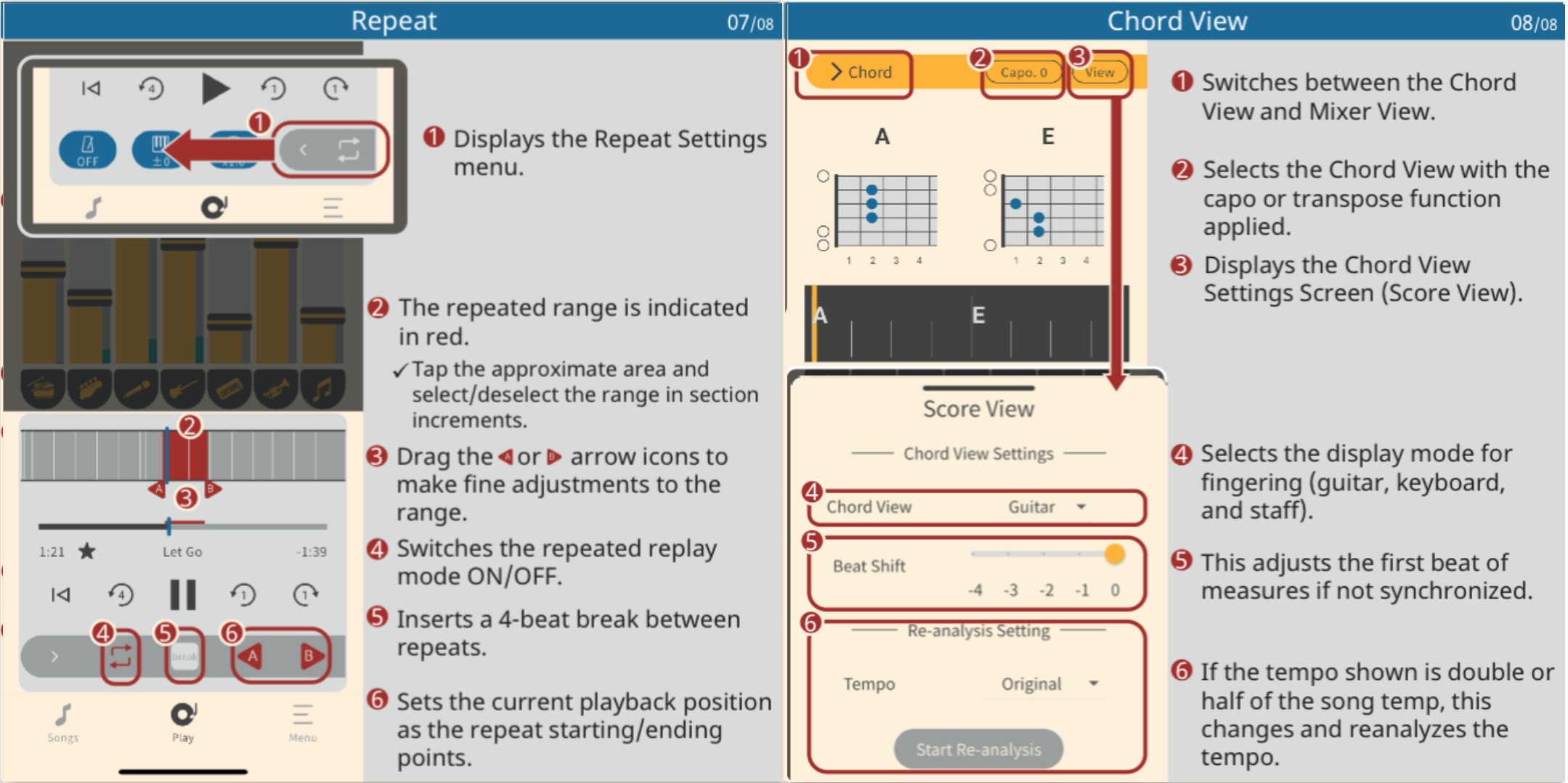
Yamaha Extrack manual (4)
Review: TalentCell 12V battery pack

The wind-up

First, let me explain… Our church was designed and built long before architects anticipated the switch from (pipe) organ to acoustic piano for liturgy. Nor did they ever expect guitars, drums, brass, woodwinds or electronic instruments. To add insult to injury, the original “church organ” — rarely used — consumes a huge amount of real estate. Oh, and forget about storage space for music stands, mic stands, etc. It’s non-existent.

Thus, I play in an insanely small space on a choir riser. No two- or three-tier rig; MODX6 barely fits.

There are two aging electrical outlets (mains) to one side of the choir area. We musicians must fumble over choir members — mere singers! — to access the wall outlets. Set-up is like playing a game of Twister.

The pitch

I’ve tried a number of battery-powered rigs and none have been fully satisfactory — until now. Thanks to two Youtube videos, I sprang for a TalentCell rechargeable 12V 6000mAh lithium ion battery pack. $32 USD and it’s going to the gig with MODX6 and a Yamaha Stagepas 100BTR.

The littlest Stagepas deserves a review of its own someday. Briefly, the Stagepas 100BTR is 100W (Class-D), 120dB SPL, 70Hz-20kHz, and weighs 12.1 pounds. It contains its own rechargeable battery.

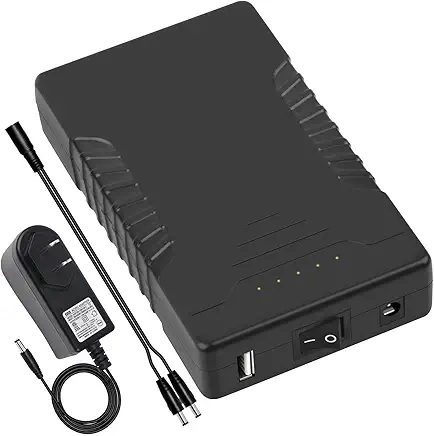
The TalentCell has two output ports: +12V (nominal) and +5V USB-A. The +12V connector takes a 5.5mm x 2.1mm jack just like MODX. The 12V port doubles as the charge port. The TalentCell has its own power switch, thank you.

TalentCell 12V 6000mAh battery pack

MODX6 power consumption is 16 Watts at 12V. That puts typical current draw at (16W / 12V) ~ 1.33 Amps. With a 1.33 Amp draw, the TalentCell should be good for (6000mAh / 1333mA) = 4.5 hours. You may or may not get 4.5 hours of power. I would never run a battery to its ragged edge! However, you can, should and will get 2 hours and that is good enough to cover a Sunday service plus rehearsal. I think if I played a four hour gig, I’d buy a second TalentCell and bring it along.

I am definitely not the trusting type, so I’ve been running on battery power while practicing this week. I feel pretty good about achieving a two hour run-time. I have not experienced any power glitches or drop outs. I would not deploy this rig if there was even the hint of unreliability.

If you watch the videos or read reviews, you will hear and see comments about the TalentCell’s nominal 12V output. Fully charged, my digital meter reads 12.1 Volts (unloaded). After two hours use (3 of 5 power LEDs lit), the meter reads 11.3 Volts. Yes, that is a tad less than 12 Volts, but it is also typical behavior for a battery pack.

With a few minor exceptions, the MODX digital (+5V, +3.3V) and analog (+9V) electronics operate on power which is internally regulated. The internal regulators require minimums of 10 Volts (regulated down to 9V) and 8 Volts (regulated down to 5V and 3.3V).

Thus, the slightly lower nominal voltage has not been an issue for the sensitive stuff.

The TalentCell comes with its own 12.6V power adapter and Y-cable in the box. The Y-cable supports charge while in use. The Y-cable is rather short, so I bought a 3 foot 5.5mm x 2.1mm extension cable. With the TalentCell on the floor, the 3 foot extension cable is long enough to reach the MODX6 power input while the MODX6 is resting on its stand. I play sitting, BTW, so you will need a longer extension cable if you play standing and want to leave the TalentCell on the floor.

I feel pretty good about this solution and I hope that my reasoning and analysis are helpful. As always when it comes to power, think thrice. Check voltages, current, operating time and polarity. Don’t leave anything to chance.

The final score

The gig went according to plan with no issues. I played through my trusty Bose SoundLink® Color II speaker — just enough to blend with the voices on this outing.

I ran the MODX6 on the Talentcell battery pack for roughly 90 minutes, start to finish. The pack registered four out of five LEDs capacity-wise. I measured the output voltage at home: 11.3 Volts DC.

I intend to make this my standard set-up. I simply unpacked everything, set the MODX6 on its stand, hook up the cables and play. I don’t have to crawl around looking for outlets and I don’t trip over choir members. I’m taking the win. 🙂

Copyright © 2025 Paul J. Drongowski

Yamaha Extrack playing partner

EXTRACK is a Yamaha app which hasn’t yet broken surface in the United States. It was released in Japan about five months ago. My guess — Yamaha is in the process of “globalizing” the app for international release, including the subscription Extrack Pass service.

In Yamaha’s own words (translated from Japanese):

Extrack is a music app for iOS and Android that lets you practice and jam with your favorite songs, experiencing the immersive experience of playing along with a real artist. The basic features are free with no expiration date. By paying for a subscription, you can enjoy even more features.

Yamaha is always looking for ways to enhance instrument sales. Extrack is a music-minus-one practice partner on steroids.

Yamaha Extrack stem mixing

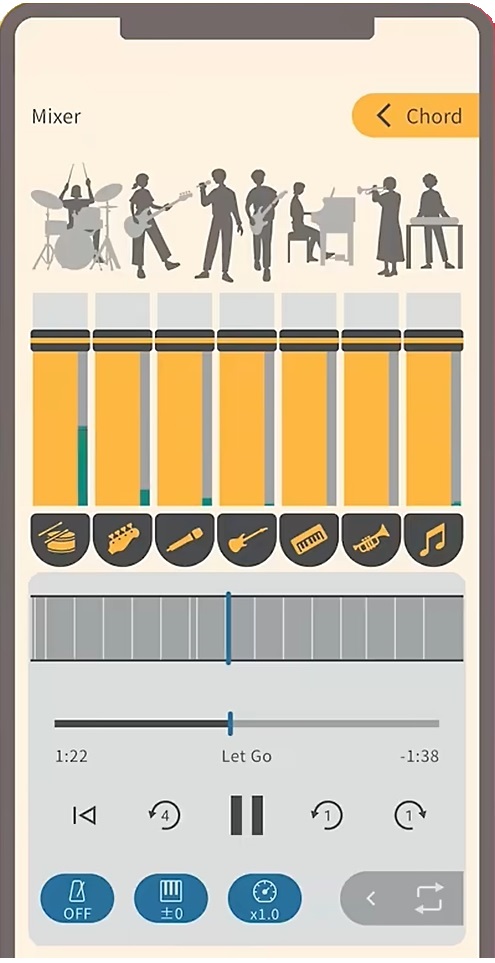
Extrack uses stem extraction technology to separate an audio song into individual instrument parts, e.g., vocals, guitar, piano, bass, drums and wind instrument. You can adjust the volume of individual parts and remix the song, either enhancing a part to be learned or suppressing a part so you can take over (minus-one). Yamaha also throws in chord analysis, variable playback speed (tempo change), transposition (key change) and partial repeat.

Here’s the Extrack Quick Start video for ya.

Yamaha keeps getting better at IOS integration. You can analyze songs on your phone (tablet), or songs saved on iCloud drive, Google Drive, Dropbox or OneDrive. Extract handles songs encoded in MP3, AAC and FLAC. Songs from streaming services cannot be loaded (restricted rights). Analyzed songs are stored in an “Extrack Library”. The number of songs in the Extrack Library is limited, but the number can be increased through a paid subscription (Extract Pass).

Speaking of which, only basic app functionality is free. The Japanese Extrack Pass subscription service (available through in-app purchase) is ¥7,000 ($47USD) for one year and ¥900 (about $6USD) per month.

Yamaha Extrack chord analysis

Extrack possesses Chord Tracker-like features. You can choose chord symbol, TAB, keyboard, and notation views. Guitarists will appreciate the CAPO feature. There are a few refinements over Chord Tracker such as the ability to shift the beat in order to align chord changes with bars. (Chord Tracker sometimes loses “the one.”) There is a metronome which syncs with playback.

Like Chord Tracker, Extrack identifies song sections (intro, verse, chorus, etc.) You can navigate within a song by section.

On a different front, Yamaha’s piano evoce ß application has dropped from sight. The dedicated web site is nowhere to be found. Here is Yamaha’s brief description of the application:

“piano evoce ß” is an application that analyzes music data and provides a function that plays back vocal parts in sync with the user’s performance. By connecting a keyboard instrument such as an electronic piano or keyboard to your Mac and playing along with the chords displayed on the application screen, the AI ensemble technology will play back the vocal parts in sync with your performance, allowing you to easily enjoy the feeling of playing in an ensemble.

I captured a little bit of information from the initial announcement.

As I’ve said time and again, Yamaha experiments with technologies and tools with no guarantee that any of it will appear in an actual product. Maybe Extrack aced piano evoce ß?

Copyright © 2025 Paul J. Drongowski