Gettin’ the itch to chop

I’m always in the mood for tiny noise makers and, possibly, mods. My latest fantasy is a good-sounding add-on module to be controlled by a Novation Launchkey 49 Mk4 or Arturia Keylab Essential 49 (both in my clutches).

So, round up the usual suspects! I thought about taking the Mototool to the Yamaha PSS-A50 since it has good mod potential. I’d like to keep the main board and front panel intact, ditching the mini-keyboard, After listening to the A50 sounds, I got cold feet! If I did go Dr. Frankenstein on it, the front panel plus main board combo would be larger than my goal.

I browsed through a zillion Yamaha and Casio service manuals and teardown videos. The now discontinued PSS series keyboards are the smallest having only two internal PCBs. The PSR-F50+ relatives have as many as five PCBs. Even the simplest looking Casios (e.g., CT-S1, CT-S100) have three boards or more. Nope.

Pocket Miku, AKA NSX-39, is a good candidate although one must be willing to sacrifice MIDI channel 1 to that atrocious Miku voice. I did a little deep diving on Japanese NSX sites and found a Real Acoustic Sound (RAS) sax demo that is every bit as good as an Articulated Element Modeling voice on Tyros. It’s a shame that Yamaha never pursued the RAS tech. NSX is pretty much dead to Yamaha, too, because every NSX link to a Yamaha site is a 404.

I A/B tested PSS-A50 voices against NSX-39. Same waveforms, I’m sure. The NSX-1 chip (YMW820) is a kissing cousin to the Yamaha SWLL (YMW830) in the now defunct PSS series. The NSX-1 has better effects, a full GM sound set, and a more capable XG implementation. Goes to show that Yamaha could be making a killer E-series machine, but chooses to make dumb marketing decisions.

The main drawbacks to either A50 or NSX-39 is MIDI communication. Both devices would require a 5-pin MIDI hack or a MIDI host.

SAM, where are you?

I also compared Dream SAM against the Yamaha SWLs. Specifically, I A/B’ed the Yamaha sounds against the MIDIPLUS miniEngine USB. The miniEngine combines a USB MIDI host, 2,500mAh rechargeable battery, and Dream SAM2553 synthesizer chip.

I honestly want to like the miniEngine, however, a few of its flaws are hard to overlook: serial (5-pin) MIDI doesn’t work, the audio output is a bit noisy and the SAM2553 sound doesn’t quite rise to Yamaha. The SAM has a nice Roland GS implementation, providing access to certain high-want parameters via MIDI CC and NRPN messages. Yamaha XG requires SysEx to access key parameters like REVERB type and CHORUS type, effectively putting those parameters out of the reach of most MIDI controllers (including mine).

Still, I can’t quit SAM. M5Stack sell the U187 MIDI unit for $14.50 USD. The U187 is tiny, has two 5-pin MIDI DIN connectors and is based on the SAM2695. After I threw in GROVE connectors, etc. and an M5Stack buck converter, the dust settled around $60 including tax, tariff and shipping. I’ll let you know how it goes.

CME H2MIDI Pro

And, speaking of MIDI hosts. I tried driving the A50 and NSX-39 through a DoReMiDi USB MIDI HOST UMH-20 from Yamaha MODX6. No Joy. I think the Active Sensing messages from the MODX make the DoReMiDi crazy and message transmission was sporadic.

I’ve had issues with the UMH-20 before. At this juncture, I cannot recommend the DoReMiDi.

I ordered and tried the CME H2MIDI Pro instead. No issues. CME know how to make MIDI devices! Plus, the H2MIDI can be configured to filter out Active Sensing, an important feature because Yamaha refuses to provide a software switch that turns off Active Sensing (despite many customer requests).

CME is a strong recommend.

SWLL update

A few intrepid investigators are deep-diving the Yamaha SWLL (and related) processors. The SWL processors are used extensively in the entry-level E-series keyboards. The SWLL is a super-low cost system on a chip which combines an AWM tone generator and an ARM7TDMI core.

In previous posts, I’ve danced around the specific host core in the SWL series. We now know, conclusively, it’s an ARM7TDMI core. Yamaha has been phasing out the old SH architecture cores in favor of ARM (and Linux). BTW, the CSP-100 series may be the last product based on SH. The CLP-800 employs the newest member of the SWX family, the SWX-100F. No doubt, it’s an ARM, too. CVP, on the other hand, is RIP.

Copyright © 2025 Paul J. Drongowski

Yamaha MODX M waveforms vs. MODX

So begins the tedious task of comparing Yamaha MODX M waveforms versus MODX waveforms. New waveforms are genuine, objective improvements to the AWM2 sound set.

Yamaha MODX M6 synthesizer [Yamaha]

The table below summarizes the acoustic piano waveforms.

MODX M         MODX         Velocity levels
-----------    -----------  ----------------------
CF3 Stretch    CF3 Stretch  3 levels  stereo, mono
CF3 Flat       CF3 Flat     3 levels, stereo, mono
S6 Stretch     S6 Stretch   4 levels, stereo, mono
S6 Flat        S6 Flat      4 levels, stereo, mono
CFX            CFX          9 levels
CFX 2022                    9 levels
C7                          5 levels
Nashville                   5 levels
S700           S700         3 levels
Brite Piano    Brite Piano
Imperial                    8 levels
Hamburg Grand              10 levels
U1 Upright                  5 levels
Felt Piano                  4 levels
Upright        Upright      3 levels
CP80-2         CP80-2       4 levels
CP80           CP80         5 levels
CP80 Stage                  5 levels
CP70           CP70

MODX M has an updated CFX grand piano. The Hamburg Grand is brand new. The “freebie” piano libraries are now in factory waveform memory. All in all, a nice collection of instruments. MODX M does not implement Virtual Resonance Modeling (VRM).

Next up, electric pianos:

MODX M         MODX         Velocity levels
-----------    -----------  ----------------------
67Rd                        9 levels
73Rd Studio                 8 levels
74Rd Stage                 10 levels
78Rd Studio                10 levels
EP1            EP1          3 levels
EP2            EP2          2 levels, 1&2
EP3            EP3          2 levels, 1&2
EP4            EP4          5 levels
Rd Soft        Rd Soft      5 levels
Rd Hard        Rd Hard      4 levels
Rd73           Rd73         5 levels
Rd78           Rd78         5 levels
Wr Warm                    12 levels
Wr Wide                    10 levels
Wr1            Wr1          3 levels
Wr2            Wr2          4 levels
Wr3            Wr3          5 levels
Clavi B                     4 levels
Clavi S                     4 levels
Clav1          Clav1 
Clav2          Clav2
Clav3          Clav3
Clav4          Clav4        2 levels
Clav5          Clav5        3 levels

At this time, MODX M does not have the ClavD6 CA and ClavD6 DA waveforms which are part of the Montage M OS 3 release.

Unfortunately, no new waveforms in the organ, acoustic guitar, electric guitar and stringed bass categories. Montage M neglected to add new pipe organ waveforms and MODX M is no different. [Important to worship music.]

The orchestral woodwinds remain the same as MODX. MODX M adds new ensemble string section waveforms, Cinema Strings:

MODX M
-------------------
CinemaStr Vn
CinemaStr Vn Legato
CinemaStr Vn Spic
CinemaStr Vn Trem
CinemaStr Va
CinemaStr Va Legato
CinemaStr Va Spic
CinemaStr Va Trem
CinemaStr Vc
CinemaStr Vc Legato
CinemaStr Vc Spic
CinemaStr Vc Trem
CinemaStr Cb
CinemaStr Cb Legato
CinemaStr Cb Spic

These sounds are called “Kino Strings” on Genos and recent high-end Yamaha arranger keyboards. Yes, Yamaha reuses waveforms… The MODX orchestral solo and ensemble strings, Celtic Harp and orchestral harps are carried into MODX M.

For you chimpanzees, MODX M adds a zoo of new percussion noises. There are too many to mention. To get started, search the MODX M Data List for waveform names beginning with “OP “. There are new cowbell waveforms. 🙂

I will add new tables here. Stay tuned.

Copyright © 2025 Paul J. Drongowski
Yamaha MODX M update (v1.10)

I’m pretty excited about the new Yamaha MODX M series. My original MODX6 gets played almost every day and is getting a little beat out. I have developed tons of Performances and content for MODX6 and a MODX M6 or M7 replacement would be a logical choice.

The MODX M series Quick Guide, Operation Manual and Data List PDFs are available at your favorite Yamaha web site. Thank goodness Yamaha released the Data List in PDF as well as EXCEL format. I absolutely detest reading the Genos Data List in spreadsheet form.

Yamaha have also released a MODX M update v1.10. The release notes identify the following changes:

New features
    * Now supports Rec’n’Share.
Fixed problems
    * Improved stability of USB (audio, MIDI) connections with 
      computers and smart devices.
    * Fixed an issue where more than 17 libraries could not be 
      loaded correctly.
    * Fixed other minor problems.

Glad to see the Rec’n’Share support and would love to see more integration with Yamaha apps.

I will add more comments here as I learn. In the meantime, I recommend reading Blake’s Take Introducing MODX M. Blake is an excellent writer. If you’re like me, you don’t have gobs of time to watch videos. Blake’s Take should answer most of your immediate questions.

Yamaha MODX M6 synthesizer [Yamaha]

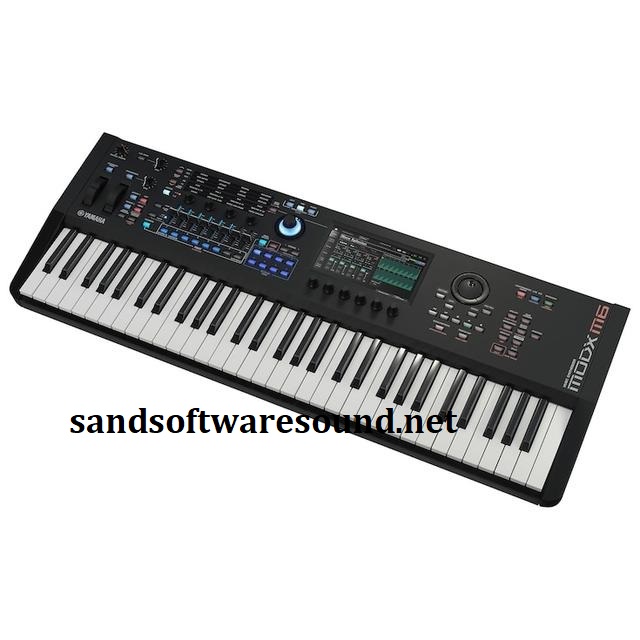
First, we need a proper MODX M6 picture! [Click images to enlarge.] The “leak” image came from a really sketchy site. I don’t have a clue how they obtained it.

Yamaha MODX M comparison [Yamaha]

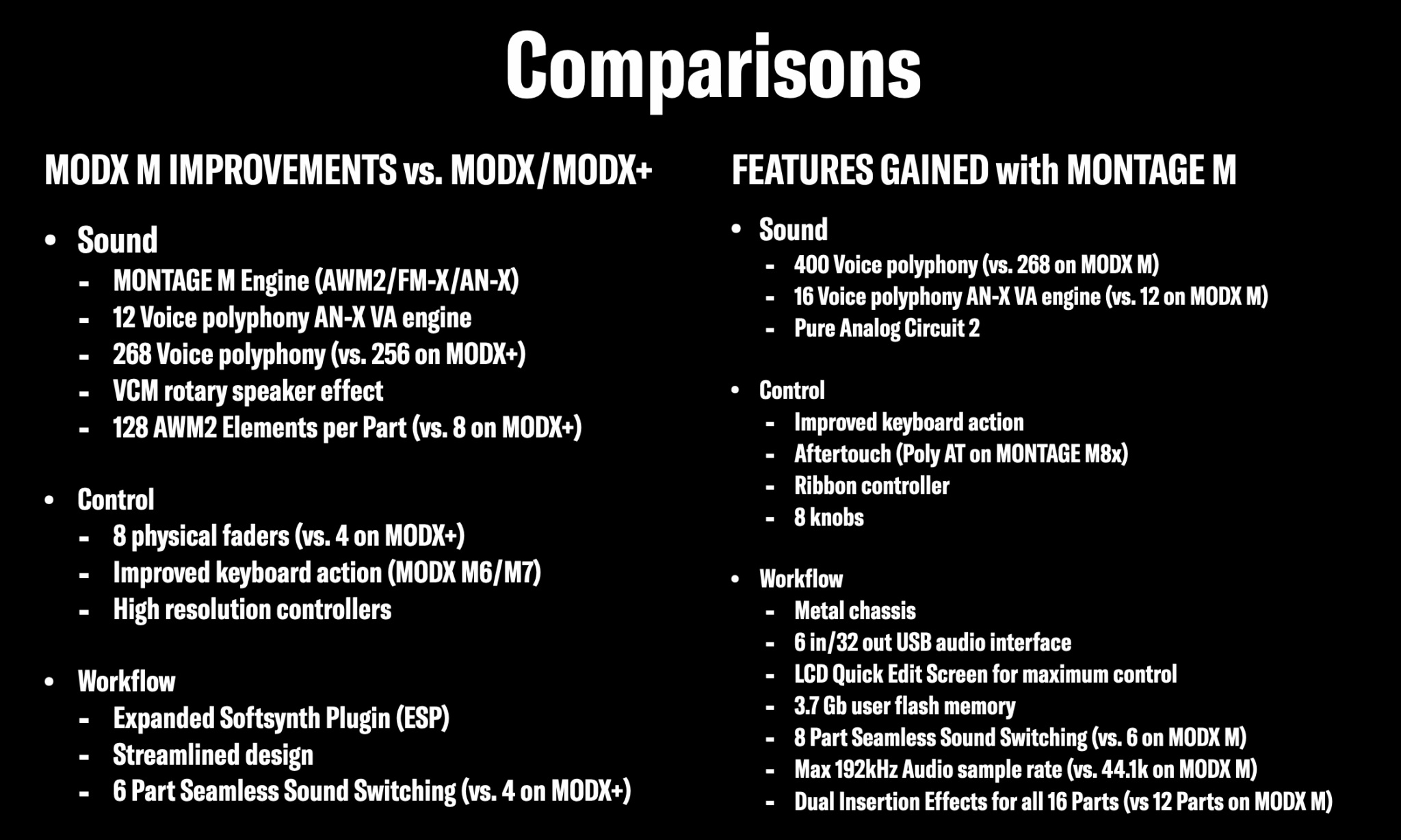
Next, I have reproduced an image from Blake’s Take. This image compares the MODX M against the original MODX and Montage M series. I will be referring back to this comparison often while I weigh a MODX M purchase.

As a reminder, MODX M has 1.9GB of User Wave memory versus the 1GB of User Wave memory in the original MODX. The MODX M inherits most (all?) of the Montage M preset waveform DNA (10.7 GB when converted to 16-bit linear format). I will study the list of preset waveforms carefully.

Yamaha MODX M virtual drawbars [Yamaha]

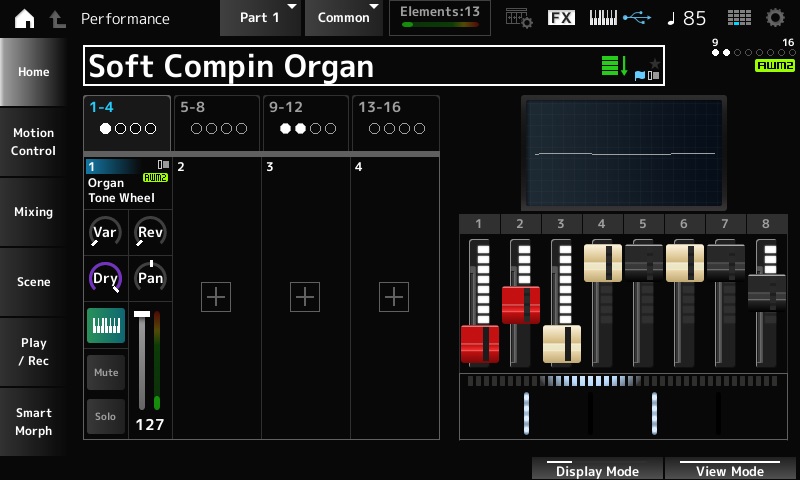
My only criticism of Blake’s Take — he buried the lead! MODX M has the shimmer reverb and the VCM rotary speaker sim. That shimmer reverb is sweet. Need I say how many organ players have awaited eight sliders and the VCM rotary speaker? And the MODX M display shows virtual drawbars. Hurray!

Copyright © 2025 Paul J. Drongowski
Yamaha announce MODX M synthesizers

Well, it turns out, yesterday’s picture was not fake. 🙂 So, yes, eight sliders and six additional knobs (under the touch display).

From what I’ve been able to gather, Yamaha MODX M is a nice slimmed down version of the Montage M series. Spiffy. It has three engines — AN-X, FM-X, AWM2 — and, ta-da!, has the VCM Rotary Speaker effect.

Here are a few key specifications:

  • Tone generator: Motion Control Synthesis Engine AMW2: 128 Elements (max.), FM-X: 8 Operators, 88 Algorithms, AN-X: 3 Oscillators, 1 Noise
  • Polyphony: AWM2: 128 (max.; stereo/mono waveforms), FM-X: 128 (max.), AN-X: 12 (max.)
  • Waveform memory: Preset: 10.7 GB (when converted to 16-bit linear format), User: 1.9 GB
  • Display: 7″ TFT Color Wide VGA LCD touch screen
  • Live Sets: Preset: 256, User: 2,048

The AWM2 engine has the Montage M upgrade allowing 128 Elements Per Part. Knobs, Super Knob, pitch bend, mod wheel and sound engine are now high resolution, another get from Montage M. MIDI 2.0 is supported. The eight sliders and Part/Scene buttons control 8 Parts per Performance.

As to ESP, I will quote Yamaha directly:

EXPANDED SOFTSYNTH PLUGIN (ESP) — AVAILABLE EARLY 2026: Free for all registered MODX M owners, the Expanded Softsynth Plugin (ESP) replicates MODX M in your favorite Digital Audio Workstation (DAW).

The 88-key model has a GHS keyboard and the 76- and 61-key models have a semi-weighted FSB keyboard. Sorry, none of the models have aftertouch.

Weights and measures are:

     Model    Weight       Dimensions (W x D x H)
    -------  --------  -------------------------------
    MODX M8  29.9 lbs  51-9/16" x 15-3/8"   x 5-15/16"
    MODX M7  16.7 lbs  42-7/9"  x 13-11/16" x 4-5/8"
    MODX M6  14.6 lbs  34-3/4"  x 13-11/16" x 4-5/8"

Right now, I’m playing MODX6 mainly for its weight. I could see slipping up to the MODX M7 at its modest weight.

USA prices are:

     Model     MSRP     MAP
    -------  -------  -------
    MODX M8   $3,099   $2,500
    MODX M7   $2,499   $2,000
    MODX M6   $2,199   $1,800

My, tariffs and inflation have taken a toll. On-line retailers already show “IN STOCK” status.

More to come. It’s getting late, here!

Copyright © 2025 Paul J. Drongowski

Yamaha MODX M — Witching Hour?

With Halloween fast approaching, Yamaha announced new Yamaha MODX M models. We are heading into the Fall holiday sales season and YamahaSynth.com has scheduled a special Tech Talk on Wednesday, October 15, 1:00 PM PDT/10:00 PM CET. [PDT — Go Mariners!]

Yamaha MODX M6 (unverified, possibly fake)

Here is a picture to whet your appetite. I can verify it’s authenticity. Eight sliders, six knobs under the touch screen, and a re-designed data wheel.

Thanks to tariffs, USA customers should brace themselves for a stiff price increase. USA MSRP pricing is M6 $2,199 (MSRP), M7 $2,499 (MSRP) and M8 $3,099 (MSRP).

Copyright © 2025 Paul J. Drongowski
Yamaha swallows Steinberg hardware

Well, you could see this one coming — eventually — and eventually arrived. Yamaha has subsumed the Steinberg hardware business (quoting Yamaha):

Yamaha Corporation has decided to transfer the hardware product business previously handled by its wholly owned subsidiary, Steinberg Media Technologies GmbH to Yamaha. As a result, Yamaha will take over Steinberg’s hardware product planning and development functions, which will be marketed under the Yamaha brand going forward. Meanwhile, Steinberg will focus on software development and sales.

With this business transfer, Steinberg will focus on software development such as Cubase and Nuendo. Additionally, the IXO12, IXO22, UR22C, and UR44C models previously sold under the Steinberg brand will be rebranded under the Yamaha brand as the UR12MK3, UR22MK3, URX22C, and URX44C, respectively, and released with the same specifications. Sales of all Steinberg-branded hardware products other than these four models will be phased out, but product support and driver provision will continue for the time being.

In some ways, the move makes sense. Some Yamaha-branded products like the AG06 are a UR combined with a small-format mixer. Going the other way, Montage audio handling is most of a UR.

Steinberg always seem faster moving and more willing to take chances than Yamaha corporate. I hope the transfer of hardware product planning and development to corporate does not stifle innovation.

Copyright © 2025 Paul J. Drongowski
Yamaha Extrack app now in the USA

Yamaha have announced the Extrack app in Europe and the USA. As I mentioned in my preview, Extrack is a practice buddy and a stem extraction tool. More from Yamaha itself:

Yamaha Corporation announced today the U.S. and European launch of Extrack, an iOS/Android music app that allows users to practice and play their instruments along with their favorite songs as if they are part of the band, following its successful debut in Japan.

Built by musicians for musicians, Extrack makes it easy and fun for a user to learn, practice and play along with their own library of songs. Extrack uses proprietary stem separation technology to automatically extract individual instrumental parts such as guitar, drums, bass, piano or vocals from the user’s own audio files on a mobile device, making it possible to adjust the volume, mute or isolate individual instruments.

Extrack automatically transcribes chords for guitar and piano, helping users learn their favorite songs with confidence. It also features song structure analysis, allowing users to repeat sections, skip by measure, and adjust playback speed.

Extrack subsumes much of the Yamaha Chord Tracker application.

There are two levels: free and subscription. An Extrack subscription is called “Extrack Pass” and it gives you:

  • Unlimited song analysis (Free: 5 songs per month)
  • Up to 50 favorite songs (Free: 3 favorite songs)
  • Seven instrument separation (Free: 4 instruments)
  • Up to 50 songs in your Extrack Library (Free: 5 songs)
  • Fine tune tempo to two decimal places (Free: One decimal place)

An Extrack Pass subscription is $39.99 USD per year or $5.99 per month. A 7-day free trial is available in either case.

The current USA IOS version is v1.1. I’ve downloaded the app and I’m very curious about the stem separation process and results.

In use

Here are four short stems extracted from Fleetwood Mac’s “Go Your Own Way”. No tweaking and tweezing. Simply import the track from my music library and analyze. The Extrack analysis phase takes a minute or two. Then, I played each stem into Sound Forge.

There are four stems (Vocal, Drum, Bass and Others) because I’m cheap and I’m running the free edition of Extrack. 🙂

Even though I saved the audio to MP3, the MP3 files are a reasonably accurate portrayal of what I heard through the monitors during record. The Vocal, Drum and Others stems have audible artifacts. The Vocal and Drum extractions aren’t too bad although you would want to bury the artifacts in the mix. The Bass stem seems to be missing the low-mids that give an electric bass punch.

Mixing three or four stems together and you get an acceptable music-minus-one practice experience. Extrack gets the job done as a practice buddy. I don’t think pro re-mixers are going to give up their high-end tools for Extrack, however. I should crank “Go Your Own Way” through SpectraLayers and hear what I get. Get what you pay for?

Copyright © 2025 Paul J. Drongowski
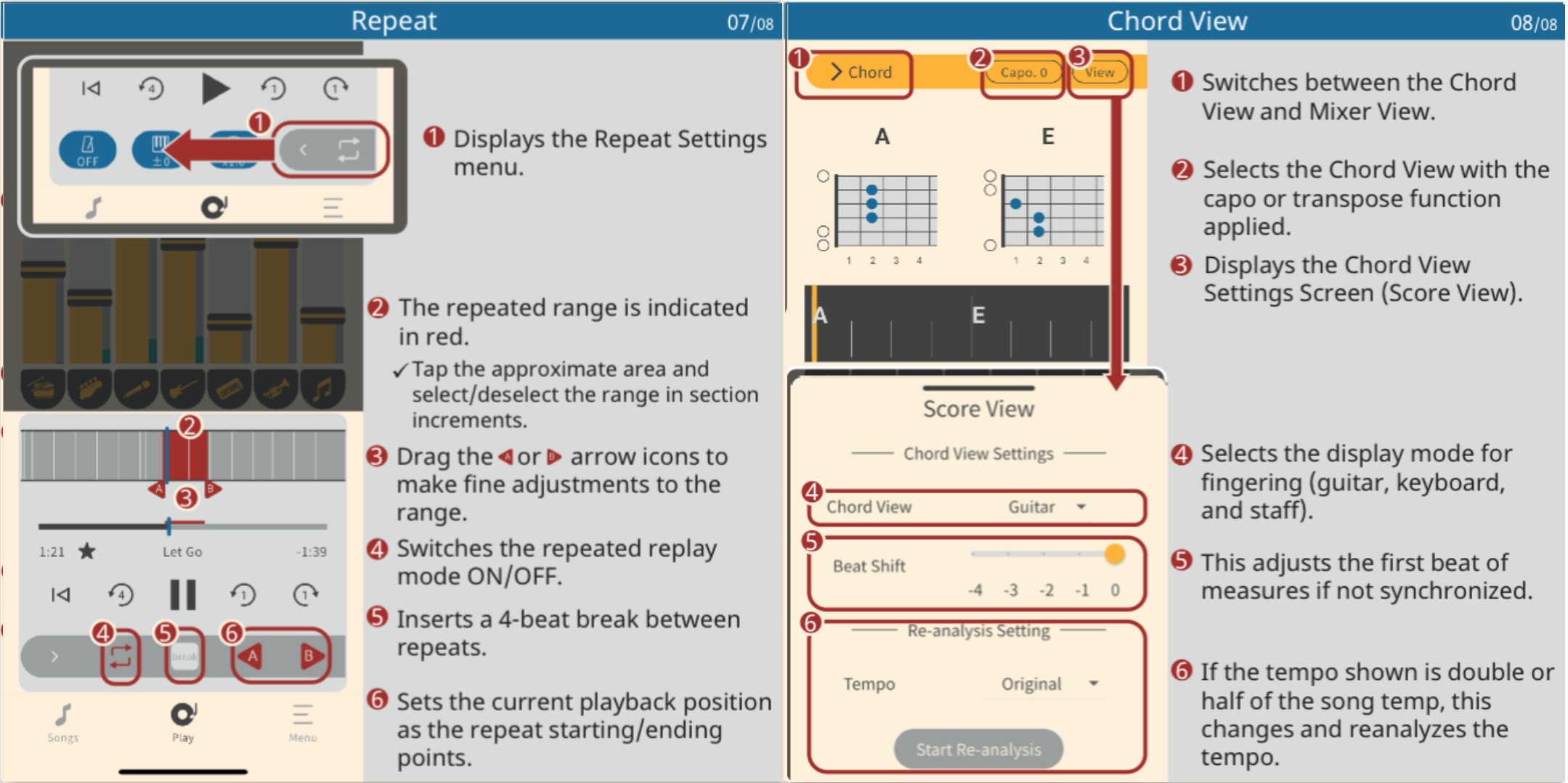
Extrack manual

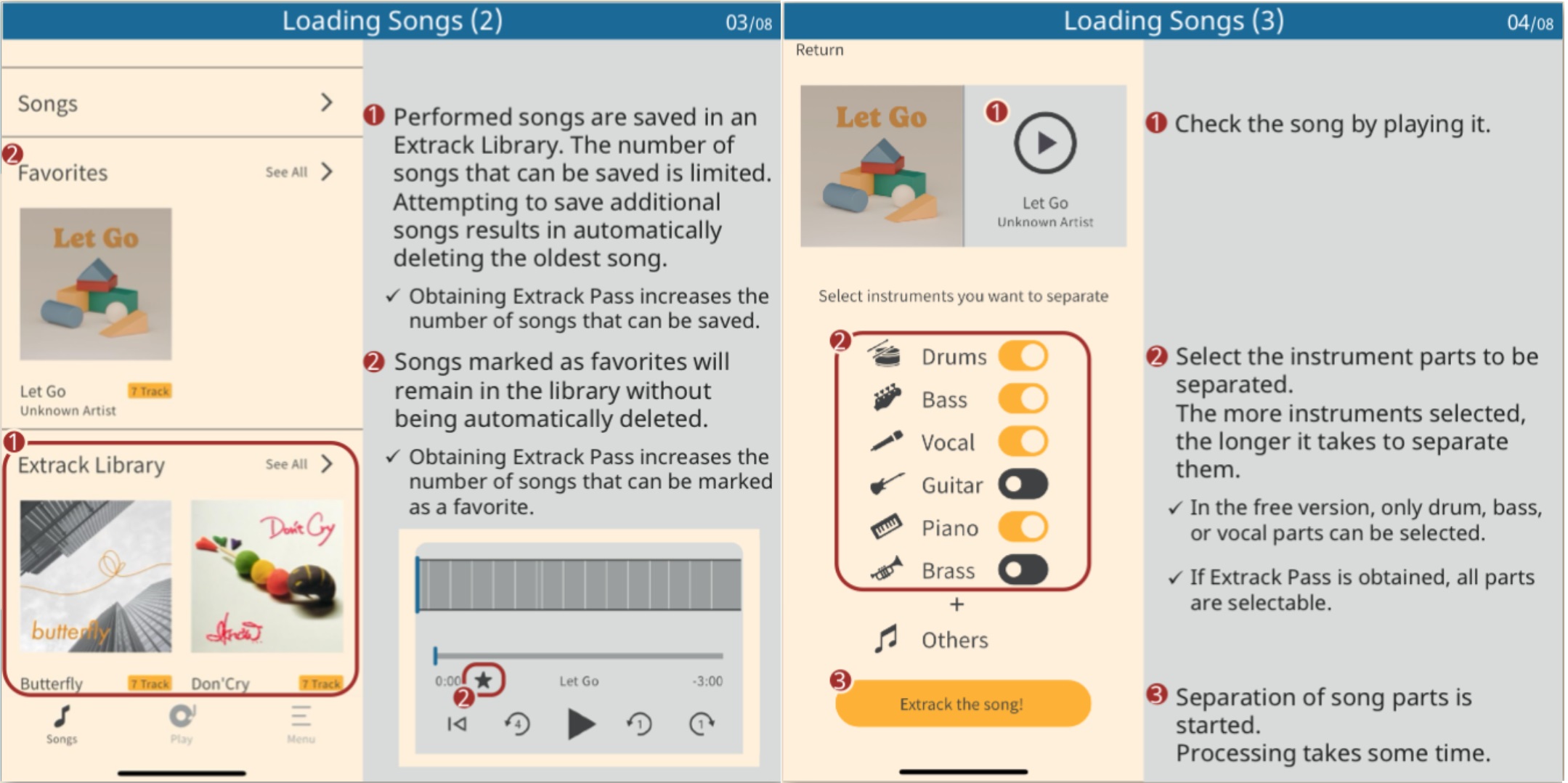
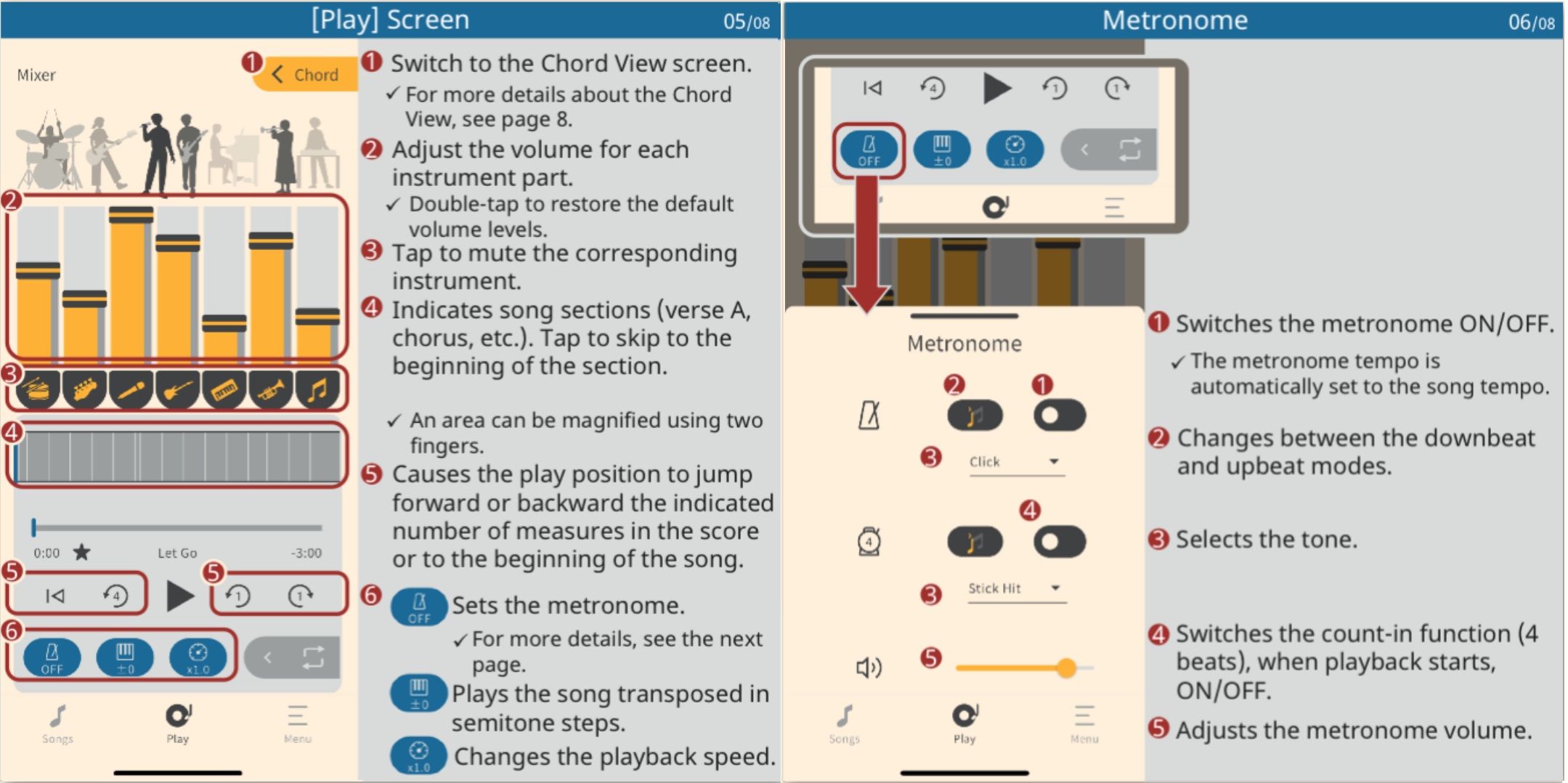
The following images are the embedded Extrack manual (Copyright Yamaha, thank you). Click on an image to enlarge it.

Yamaha Extrack manual (1)

Yamaha Extrack manual (2)

Yamaha Extrack manual (3)

Yamaha Extrack manual (4)

Review: TalentCell 12V battery pack

The wind-up

First, let me explain… Our church was designed and built long before architects anticipated the switch from (pipe) organ to acoustic piano for liturgy. Nor did they ever expect guitars, drums, brass, woodwinds or electronic instruments. To add insult to injury, the original “church organ” — rarely used — consumes a huge amount of real estate. Oh, and forget about storage space for music stands, mic stands, etc. It’s non-existent.

Thus, I play in an insanely small space on a choir riser. No two- or three-tier rig; MODX6 barely fits.

There are two aging electrical outlets (mains) to one side of the choir area. We musicians must fumble over choir members — mere singers! — to access the wall outlets. Set-up is like playing a game of Twister.

The pitch

I’ve tried a number of battery-powered rigs and none have been fully satisfactory — until now. Thanks to two Youtube videos, I sprang for a TalentCell rechargeable 12V 6000mAh lithium ion battery pack. $32 USD and it’s going to the gig with MODX6 and a Yamaha Stagepas 100BTR.

The littlest Stagepas deserves a review of its own someday. Briefly, the Stagepas 100BTR is 100W (Class-D), 120dB SPL, 70Hz-20kHz, and weighs 12.1 pounds. It contains its own rechargeable battery.

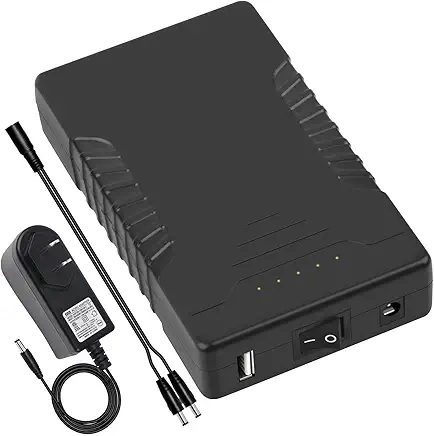
The TalentCell has two output ports: +12V (nominal) and +5V USB-A. The +12V connector takes a 5.5mm x 2.1mm jack just like MODX. The 12V port doubles as the charge port. The TalentCell has its own power switch, thank you.

TalentCell 12V 6000mAh battery pack

MODX6 power consumption is 16 Watts at 12V. That puts typical current draw at (16W / 12V) ~ 1.33 Amps. With a 1.33 Amp draw, the TalentCell should be good for (6000mAh / 1333mA) = 4.5 hours. You may or may not get 4.5 hours of power. I would never run a battery to its ragged edge! However, you can, should and will get 2 hours and that is good enough to cover a Sunday service plus rehearsal. I think if I played a four hour gig, I’d buy a second TalentCell and bring it along.

I am definitely not the trusting type, so I’ve been running on battery power while practicing this week. I feel pretty good about achieving a two hour run-time. I have not experienced any power glitches or drop outs. I would not deploy this rig if there was even the hint of unreliability.

If you watch the videos or read reviews, you will hear and see comments about the TalentCell’s nominal 12V output. Fully charged, my digital meter reads 12.1 Volts (unloaded). After two hours use (3 of 5 power LEDs lit), the meter reads 11.3 Volts. Yes, that is a tad less than 12 Volts, but it is also typical behavior for a battery pack.

With a few minor exceptions, the MODX digital (+5V, +3.3V) and analog (+9V) electronics operate on power which is internally regulated. The internal regulators require minimums of 10 Volts (regulated down to 9V) and 8 Volts (regulated down to 5V and 3.3V).

Thus, the slightly lower nominal voltage has not been an issue for the sensitive stuff.

The TalentCell comes with its own 12.6V power adapter and Y-cable in the box. The Y-cable supports charge while in use. The Y-cable is rather short, so I bought a 3 foot 5.5mm x 2.1mm extension cable. With the TalentCell on the floor, the 3 foot extension cable is long enough to reach the MODX6 power input while the MODX6 is resting on its stand. I play sitting, BTW, so you will need a longer extension cable if you play standing and want to leave the TalentCell on the floor.

I feel pretty good about this solution and I hope that my reasoning and analysis are helpful. As always when it comes to power, think thrice. Check voltages, current, operating time and polarity. Don’t leave anything to chance.

The final score

The gig went according to plan with no issues. I played through my trusty Bose SoundLink® Color II speaker — just enough to blend with the voices on this outing.

I ran the MODX6 on the Talentcell battery pack for roughly 90 minutes, start to finish. The pack registered four out of five LEDs capacity-wise. I measured the output voltage at home: 11.3 Volts DC.

I intend to make this my standard set-up. I simply unpacked everything, set the MODX6 on its stand, hook up the cables and play. I don’t have to crawl around looking for outlets and I don’t trip over choir members. I’m taking the win. 🙂

Copyright © 2025 Paul J. Drongowski
Yamaha Extrack playing partner

EXTRACK is a Yamaha app which hasn’t yet broken surface in the United States. It was released in Japan about five months ago. My guess — Yamaha is in the process of “globalizing” the app for international release, including the subscription Extrack Pass service.

In Yamaha’s own words (translated from Japanese):

Extrack is a music app for iOS and Android that lets you practice and jam with your favorite songs, experiencing the immersive experience of playing along with a real artist. The basic features are free with no expiration date. By paying for a subscription, you can enjoy even more features.

Yamaha is always looking for ways to enhance instrument sales. Extrack is a music-minus-one practice partner on steroids.

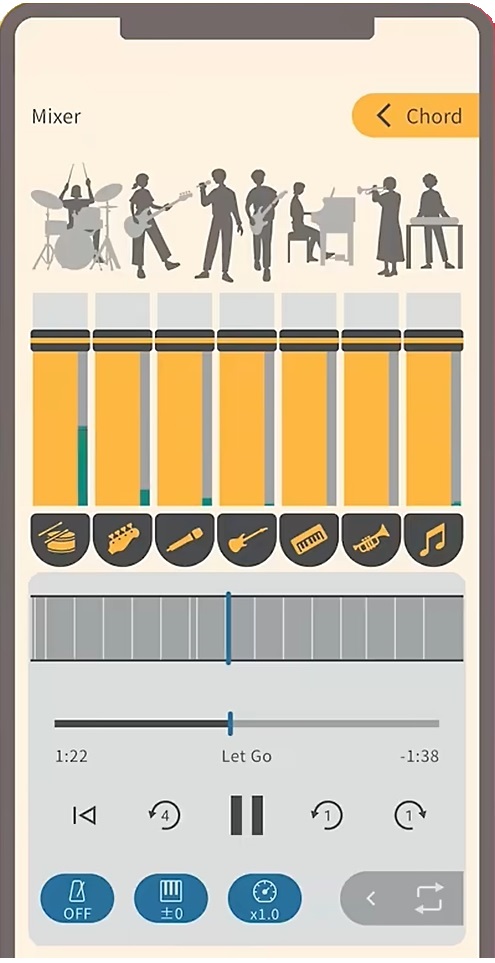
Yamaha Extrack stem mixing

Extrack uses stem extraction technology to separate an audio song into individual instrument parts, e.g., vocals, guitar, piano, bass, drums and wind instrument. You can adjust the volume of individual parts and remix the song, either enhancing a part to be learned or suppressing a part so you can take over (minus-one). Yamaha also throws in chord analysis, variable playback speed (tempo change), transposition (key change) and partial repeat.

Here’s the Extrack Quick Start video for ya.

Yamaha keeps getting better at IOS integration. You can analyze songs on your phone (tablet), or songs saved on iCloud drive, Google Drive, Dropbox or OneDrive. Extract handles songs encoded in MP3, AAC and FLAC. Songs from streaming services cannot be loaded (restricted rights). Analyzed songs are stored in an “Extrack Library”. The number of songs in the Extrack Library is limited, but the number can be increased through a paid subscription (Extract Pass).

Speaking of which, only basic app functionality is free. The Japanese Extrack Pass subscription service (available through in-app purchase) is ¥7,000 ($47USD) for one year and ¥900 (about $6USD) per month.

Yamaha Extrack chord analysis

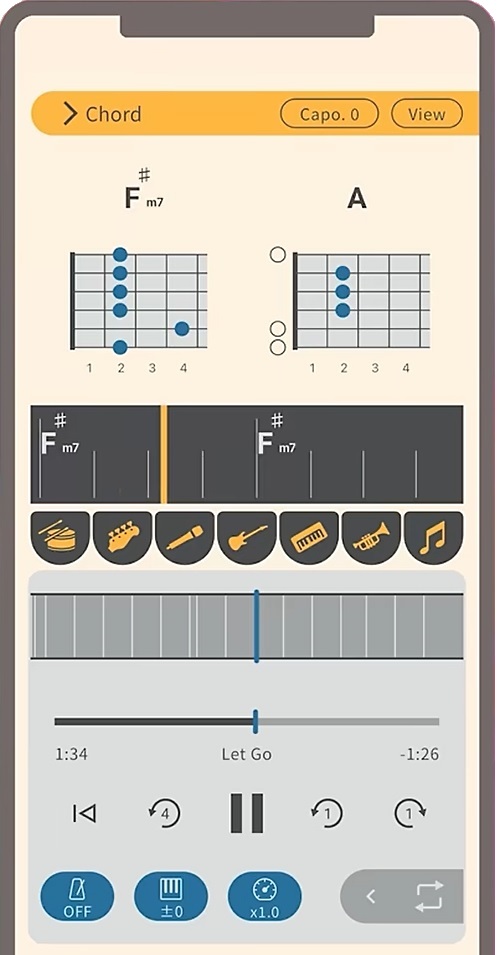
Extrack possesses Chord Tracker-like features. You can choose chord symbol, TAB, keyboard, and notation views. Guitarists will appreciate the CAPO feature. There are a few refinements over Chord Tracker such as the ability to shift the beat in order to align chord changes with bars. (Chord Tracker sometimes loses “the one.”) There is a metronome which syncs with playback.

Like Chord Tracker, Extrack identifies song sections (intro, verse, chorus, etc.) You can navigate within a song by section.

On a different front, Yamaha’s piano evoce ß application has dropped from sight. The dedicated web site is nowhere to be found. Here is Yamaha’s brief description of the application:

“piano evoce ß” is an application that analyzes music data and provides a function that plays back vocal parts in sync with the user’s performance. By connecting a keyboard instrument such as an electronic piano or keyboard to your Mac and playing along with the chords displayed on the application screen, the AI ensemble technology will play back the vocal parts in sync with your performance, allowing you to easily enjoy the feeling of playing in an ensemble.

I captured a little bit of information from the initial announcement.

As I’ve said time and again, Yamaha experiments with technologies and tools with no guarantee that any of it will appear in an actual product. Maybe Extrack aced piano evoce ß?

Copyright © 2025 Paul J. Drongowski
Notating with deCoda and Sibelius

Mark Isham is one of my all-time favorite composers and artists. I first heard him play with Group 87 (1980) soon followed by his debut solo album, Vapor Drawings. Since then, he has contributed to many recordings and has composed over 200 scores.

I listen to the local KING-FM classical radio station — the HD2 Calm (“evergreen”) channel, in particular. I need calm, these days. Every now and again, a track from October Sky, AKA “Rocket Boys”, will pop up. October Sky (1999) is one of those 200+ scores by Mark Isham.

Unfortunately, scores or reductions are not available for all of this work, including the “Rocket Boys” cue from October Sky. So, what the heck, let’s put zplane deCoda to work. As I wrote in my review, deCoda is a tool to help learning and notating.

I’ve used deCoda to notate a number of small, simple songs. My review shows one example, Space Rock by the Baskerville Hounds. You might know this tune as 2120 South Michigan Avenue, so we’re not talking high art, here. 🙂

deCoda analyzes an audio song much the same way as Yamaha Chord Tracker. Chord Tracker (and Yamaha Smart Pianist) identifies tempo, measures, structure and chords. I ran Rocket Boys through Chord Tracker, and yep, it found the basic chords in the piece.

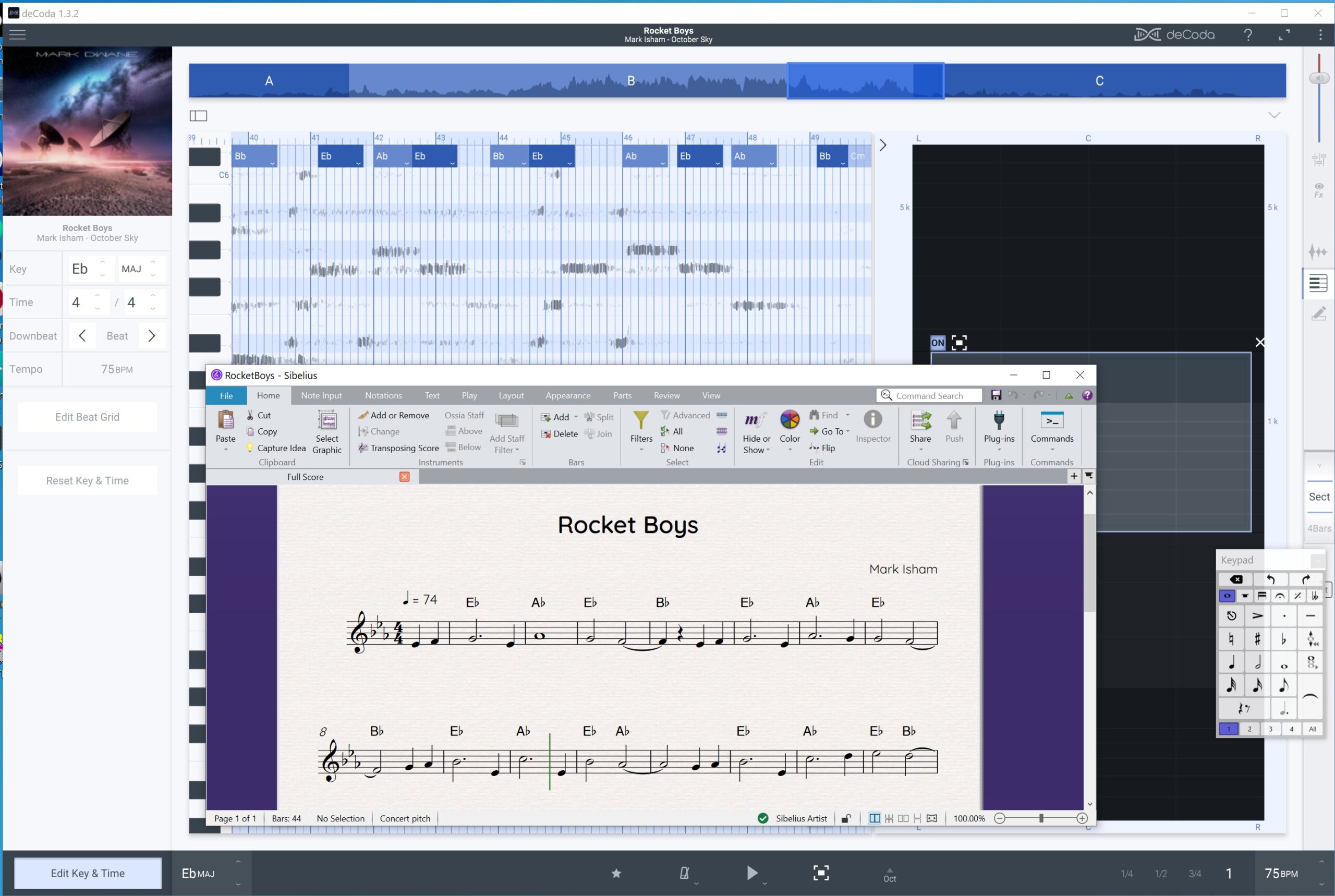
Chord Tracker, however, does not extract melody lines. That’s where deCoda comes in. deCoda paints squiggles in a kind of piano-roll chart where time unfolds in the horizontal direction and pitches (notes) are arranged in the vertical direction. The squiggles show the pitch and duration for the various tones found by deCoda’s analysis phase. deCoda identifies chords, too, and displays chord names across the top of the piano-roll.

zplane deCoda and Avid Sibelius

A minute or two into the track, a flute plays the main theme. deCoda has a windowing feature that lets you zoom into a range of pitches and a region of the stereo field. I used this feature to close in around the flute line.

I could have used deCoda’s draw tool to mark the individual notes. These notes can be exported as MIDI. Instead, I decided to draw notes directly into an Avid Sibelius score. I resized the Sibelius window so I could compare the deCoda squiggles against the notation. That technique worked out pretty well!

I entered chord symbols based upon deCoda’s analysis. There is a lot going on in the recording, especially when other instruments and sections are brought into play. deCoda gets a bit more “distracted” than Chord Tracker and one needs to use their ears when notating chords. Chord Tracker forces chord changes to beat boundaries and its chord charts are simpler and, thus, cleaner.

zplane deCoda editing the beat grid

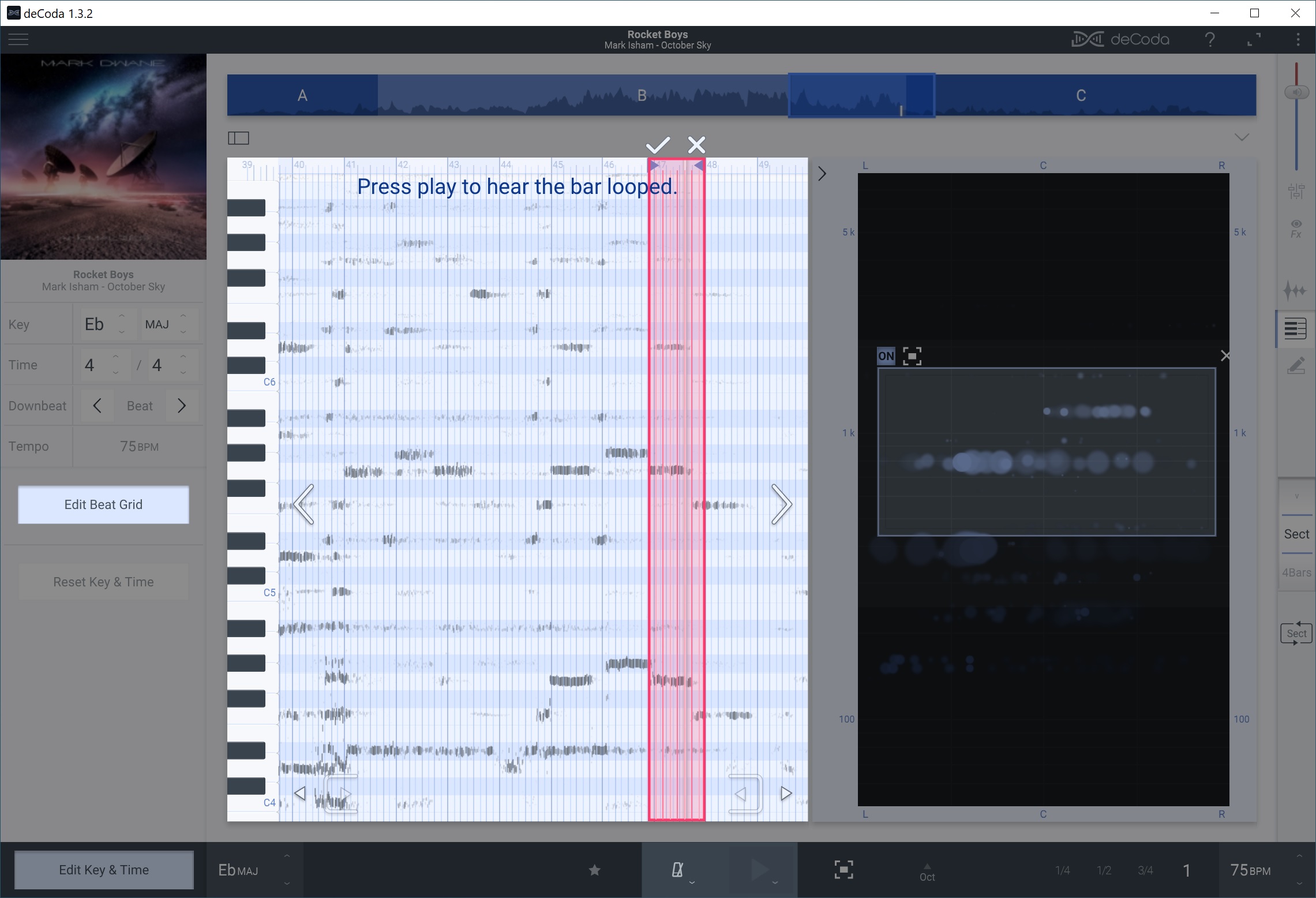
Underscores are often written and/or conducted to picture in order to hit specific images. “Rocket Boys” has a lot of rubato and the tempo shifts throughout the piece. Quite often, the deCoda squiggles did not line up with its beat grid.

The deCoda project panel has a button to edit the beat grid. Press this button and you can draw a measure that aligns the grid with the audio music. Thanks to this feature, I didn’t have to guess note starts, stops and durations. Henceforth, I will make frequent use of beat grid editing!

Overall, this has been a fun afternoon project. The process was good for ear training and I have a very simple lead sheet for “Rocket Boys”. Chalk another win for zplane deCoda (and Sibelius).

Copyright © 2025 Paul J. Drongowski