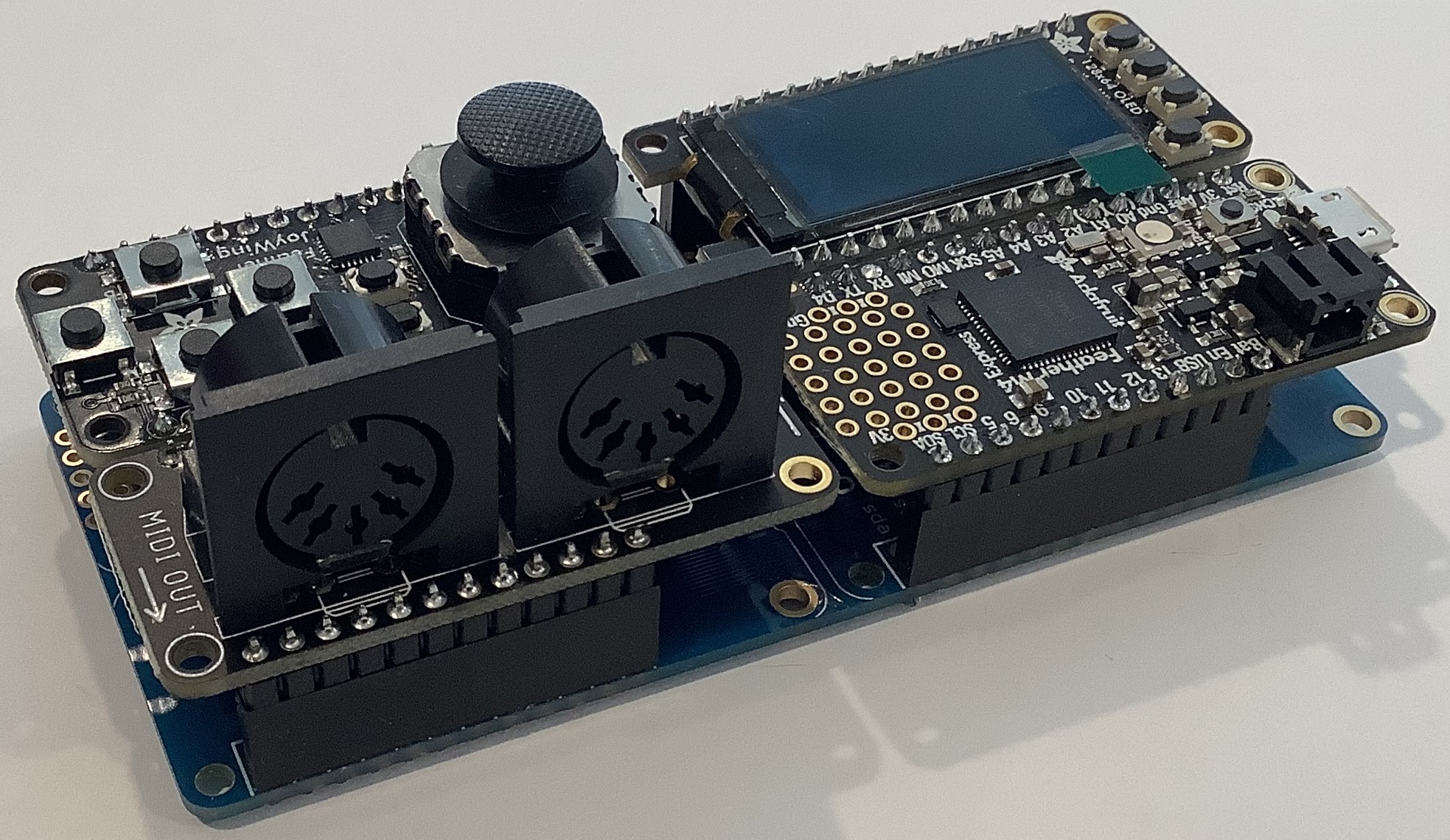
Adafruit Feather: Megavoice key switching

More experiments and I have the initial cut of a simple key switching program for Yamaha MODX and Genos/PSR guitar Megavoices. The program is written in CircuitPython and runs on an AdaFruit Feather M4 Express. Here is a link to the ZIP file with the code.

Megavoice: Background information

MODX, Genos and mid-range PSR keyboards have Yamaha Megavoices. Megavoices combine several waveforms into a single voice (assigned to a single MIDI channel). They are intended mainly for arpeggios (Montage/MODX) and styles (Genos and PSR).

Generally, a Megavoice uses velocity switching to trigger waveforms. Some of the waveforms play ordinary notes, some play articulation notes, and others plays special instrument effects. Let’s take a look at the Nylon Guitar voice, which is implemented on both MODX and Genos. [Megavoice technology dates back to the early Motif and Tyros era, so I won’t be listing all of the models with Megavoice!] Many other guitar Megavoices (e.g., Concert Guitar, Clean Guitar) have the same velocity layout. Megavoice Nylon Guitar has the following velocity layers:

    Vel Lo  Vel Hi  Waveform      Key range
    ------  ------  ------------  -------------
       1      20    Open soft     C6 and below
      21      40    Open medium   C6 and below
      41      60    Open hard     C6 and below
      61      75    Dead          C6 and below
      76      90    Mute          C6 and below
      91     105    Hammer        C6 and below
     106     120    Slide         C6 and below
     121     127    Harmonics     C6 and below
       1     127    Strum noise   Above C6
       1     127    Fret noise    Above C8

MIDI note numbers 0 (C-2) to 96 (C6) comprise “playable” notes. Note numbers above 96 are instrumental effects: strum and fret noise. The strum and fret noises include the sound of a pick crossing the strings, body knocks, and sleeve noise (fingers sliding on strings).

As you can tell from the layout, if you try to play a Megavoice from the keyboard, you’ll have an interesting and maybe frustrating experience. No one really has the skill to control their key touch to reliably play an open hard note versus a dead note, etc. However, a sound designer can program different sounds into a MIDI track with precision, thereby making an expressive, realistic guitar part in a style or arpeggio. [Historical note: Many of the Motif ES/XS arpeggios were taken from PSR Megavoice styles!]

Genos, Tyros and PSR have a way of making the base waveforms playable: Super Articulation (SArt). The SArt engine monitors the incoming key strikes and, in real-time, chooses a destination waveform for each note. If you play in a detached manner, SArt triggers one of the open string waveforms (depending upon your strike velocity). If a second note occurs within a fourth with a slightly higher velocity, SArt plays a slide (up). SArt plays a body knock in response to the ART.1 and ART.2 buttons.

Clavinova CSP and CVP do not have articulation buttons. However, you can still join the fun. Select an S.Art guitar voice and tromp on the foot pedals!

Montage and MODX have Expanded Articulation (XA). It plays open notes as expected and relies on the ASSIGN 1 and ASSIGN 2 buttons to bring in an articulation like Slide or Harmonics. (Element programming allows more flexibility than this simple example, BTW.)

Feather MIDI event processor

In order to implement key switching, we need to break into the path from keyboard to tone generator. We want a chance to respond to incoming notes (key strokes) before the notes go to the tone generator (TG).

We can’t hack the hardware in MODX or Genos, but we can send MIDI messages from the keyboard (e.g., MODX MIDI OUT) to an external MIDI event processor which sends a modified MIDI message stream back to the instrument (e.g., MODX MIDI IN).

I described the hardware for an AdaFruit Feather-based MIDI event processor in an earlier post. The event processor consists of an AdaFruit M4 Express processor, MIDI I/O FeatherWing, OLED FeatherWing and Joystick FeatherWing. Up to this point, I haven’t exploited the OLED or joystick, so you could get away with a very tiny Processor plus MIDI I/O combination. It’s small and efficient enough to be powered by a LiPo battery!

The hook-up looks like this:

    ----------------         --------------       --------------
   |                |       |              |     |              |
   |         MIDI OUT ----> MIDI IN        ----> RX             |
   | MODX6          |       |  FeatherWing |     |  Feather M4  |
   |          MIDI IN ----> MIDI OUT       ----> TX             |
   |                |       |              |     |              |
    ----------------         --------------       --------------

The MIDI FeatherWing communicates with the Feather M4 Express over the serial I/O RX and TX ports. The Feather M4 Express communicates with the Mu editor and development environment on a Windows PC (not shown). Code is written in CircuitPython which is loaded into the Feather M4 from the PC over a USB communication link. The code can print status information via USB to the Mu environment — very handy when debugging.

Since this is a prototype, I’m trying to keep things simple. The MODX6 requires a little bit of manual configuration:

  • MIDI I/O directed to/from the 5-pin DIN connectors
  • MIDI LOCAL OFF (i.e., key events are not sent directly to the TG)
  • Nylon Guitar or other compatible guitar Megavoice selected on Part 1

That’s not too much to ask.

Key switching

It may be said that neither SArt or XA bring together all of the available articulation waveforms in a factory preset single voice (part). That’s where key switching can play a role.

Basically, I want to assign a range of keys to switch between articulations and sounds. For my initial experiments, I assigned MIDI notes 36 to 47 to key switching duties. On MODX6 (61 keys), this key range covers the lowest octave of physical keys (the power-up default, without internal octave switching enabled). Articulations are assigned to keys as shown below.
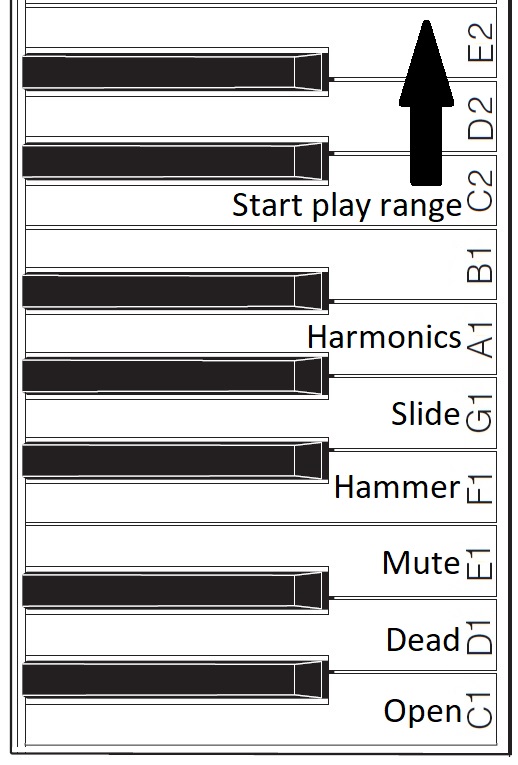
Assigned key switch articulations

For now, I’m holding the black keys and B1 in reserve. One possibility, for example, is to assign body knocks to F#1, G#1 and A#1. We’ll see!

The articulation keys enable the assigned articulation. All keys from C2 and above play notes using the selected articulation. The articulation keys latch. So, if I strike E1 (Mute) and then strike a key in the play range, a muted guitar note will sound. All subsequent notes will be mute notes until I strike C1 (Open) and return to playing open strings.

I spent some time experimenting with Genos SArt voices in order to get ideas for enhancements. I will summarize my notes in a future post. Suffice it to say, Yamaha have some good ideas! It’s all a matter of code. 🙂

Copyright © 2025 Paul J. Drongowski

MIDI Event Processor — Round 2

I’ve got a stable MIDI event framework up and running. Time to summarize a few lessons learned.

CircuitPython

The CircuitPython libraries are pretty decent overall. AdaFruit did a good job with on-line documentation and I can usually find a helpful example to copy, paste and modify.

Python itself is a PITA. I don’t know why or how anyone calls it a “beginner’s language”. Three big bug-a-boos jump out:

  • Spacing. Zealots say, “Oh, you don’t need brackets; indentation handles everything.” I haven’t seen such idiotic enforcement of spacing rules since 1960s FORTRAN. Give me brackets, give me free-form layout.
  • Run-time type checking. Python does not do a lot of compile-time type checking. So, you’ll get a clean compile and then stumble on a type compatibility issue during the first run.
  • Type conversion. Type conversion can be very weird. Thanks to run-time type checking, it might take several runs to get conversion right.

I’m going to finish the job in CircuitPython out of a spirit of self-discipline. Please teachers, do not inflict this language on new programmers.

AdaFruit hardware

The AdaFruit Feather hardware is solid. No complaints. The AdaFruit Feather M4 Express is a speedy little bugger compared to Arduino UNO! The OLED display is bright and clear. The MIDI ports work. Other than testing, the joystick FeatherWing hasn’t gotten much use yet.

MIDI library

I wanted to love the MIDI library. It offers pre-defined MIDI message types (classes) and necessary send/receive operations. All good.

Unfortunately, I don’t think the MIDI library was tested with a real-world synth. I’m using Yamaha MODX6 for testing. Yamaha uses MIDI running status extensively. Hit and release a key, and MODX sends a NOTE ON status byte followed by two key/velocity pairs:

    0x90 0x48 0x73 0x48 0x00

The first pair is NOTE ON and the second pair is effectively NOTE OFF (i.e., velocity is 0x00).

That’s not so bad in itself. However, MODX sends real-time Active Sensing messages (MIDI status byte 0xFE) and Active Sensing may appear in the middle of a MIDI message, running status or not.

Using the MIDI library, notes and controller events were getting dropped everywhere. At first, I thought CircuitPython was too slow to keep up with the incoming MIDI. Nope. When I switched to reading and dispatching bytes from the UART, I could handle everything without straining processor resources.

Bottom line: Bag the MIDI library as it could have bugs with running status.

OLED display and REPL

The OLED display and CircuitPython REPL have been very handy for debugging. The UART implements the MIDI IN/OUT ports leaving USB serial I/O available for debugging. (You need Arduino Leonardo to get separate UART and USB serial I/O.) I like to drop in the occasional “print” statement until I’m sure of the control flow and internal values.

Example: Knowing what the MODX is sending. It is easy to whip up a MIDI monitor sending byte values to either the OLED or the Mu Editor REPL. Knowing that I had to handle Active Sensing and running status together, made the task clear.

The task

Now I realize that the event processing application needs to map note ON/OFF events and to echo all other events (messages) unmodified. My current message processing framework reflects this simplicity. It took a few experiments to get here.

Initial code

If you need a quick start for your own Feather-based MIDI event processor, here is a ZIP file with my initial CircuitPython code. It doesn’t handle complete SysEx messages. The code framework will probably change in the next version.

Copyright © 2025 Paul J. Drongowski

AdaFruit Feather: MIDI Event Processor

Just want to report about a work in progress.

My favorite bugaboo is the lack of scripting in MIDI controllers and devices. Yeah, they’re OK for 90 percent of the common use cases. However, you’ll eventually run into the need for System Exclusive (SysEx) message support or some other MIDI functionality which doesn’t fit the fixed, built-in usage model.

I’ve wanted a flexible, scriptable MIDI event processor for quite some time. The MIDI Solutions Event Processor Plus handles the most common filter and mapping use cases, but lacks scripting. In particular, I want to build a MIDI event processor that handles key switching like a VST software instrument. I want to be able to invent my own “Super Articulation” voices that use key switching, for example. [More about this idea another day.]

Arduino-based solutions are sort of OK. The Sparkfun MIDI shield coupled with a standard Arduino UNO is a good start. However, if you want to stack a display on top of the MIDI shield, you’re out of luck (the MIDI connectors prevent stacking).

Feather-based MIDI event processor (front)

The AdaFruit Feather family of boards is feeling like a good solution. The Feather form factor is very small. The Feather M4 Express processor board (ID: 3857), by itself, is much smaller than Arduino UNO. There’s a lot packed on that tiny board: a 120MHz ARM Cortex-M4 processor (ATSAMD51), a Neopixel, the usual micro USB connector, a JST connector with LiPo charge support, and all the usual ins/outs (digital, analog, I2C, SPI, etc.)

Feather-based MIDI event processor (rear)

The FeatherWing expansion boards have the same small, stackable form factor and the range is staggering. I have the following FeatherWings at hand:

  • FeatherWing 128×64 OLED display (ID: 4650)
  • MIDI FeatherWing (ID: 4740)
  • Joy(stick) FeatherWing (ID: 3632)
  • FeatherWing NeoKey mechanical key switches (ID: 4879)

The whole lot can be had for less than $100 USD. Together with the M4 Express, the FeatherWings make for a powerful MIDI processing platform.

Of course, a vertical stack of Feather boards would be quite unweildy. AdaFruit offer three “motherboards” for arranging Feather boards horizontally:

  • FeatherWing Doubler (ID: 2890)
  • FeatherWing Tripler (ID: 3417)
  • FeatherWing Quad (ID: 4253)

The horizontal layout provides convenient access/visibility to the joystick, display and 5-pin MIDI ports. This is so much better than vertical stacking.

Feather MIDI event processor (top)

I have the Doubler and Quad, and intend to use the Quad for my MIDI event processor. Even though I used the word “motherboard”, the Doubler and Quad are completely passive and merely route the Feather signals across two or four slots, respectively.

Software is, of course, an important ingredient. The Feather M4 Express supports both the Arduino IDE (C programmeing) or CircuitPython. I decided to try CircuitPython in order to learn something new. The best and fastest way to go is the Mu Editor (environment). The Mu workflow is a bit quirky if you’re accustomed to the Arduino IDE or Java environments. Once you get with its flow, you’re good.

The FeatherWings are all supported by one or more CircuitPython libraries. You’ll need to chase down the libraries and copy them to the M4’s internal flash memory. Fortunately, the M4 presents itself as a flash drive, so it’s simple to copy the libraries to the M4 Express from a Windows PC or Mac.

As to project status, the headers are soldered on, Mu and the libraries are installed, and I’ve run example code for the OLED display, joystick, and MIDI ports. AdaFruit has quite a bit of development information on-line — all well-written with downloadable PDFs. Still, you should expect to modify the example code for your specific boards and use cases (e.g., SH1107 display, 5-pin MIDI instead of USB MIDI).

I haven’t done much Python programming, so that is another learning curve. Given Python’s formatting requirements and syntax, I don’t really see how Python is an easy beginner’s language. Somebody is smokin’ somethin’. I’m going to stick with CircuitPython unless I run into execution speed issues. Take your medicine, boy. 🙂

Copyright © 2025 Paul J. Drongowski