
More experiments and I have the initial cut of a simple key switching program for Yamaha MODX and Genos/PSR guitar Megavoices. The program is written in CircuitPython and runs on an AdaFruit Feather M4 Express. Here is a link to the ZIP file with the code.
Megavoice: Background information
MODX, Genos and mid-range PSR keyboards have Yamaha Megavoices. Megavoices combine several waveforms into a single voice (assigned to a single MIDI channel). They are intended mainly for arpeggios (Montage/MODX) and styles (Genos and PSR).
Generally, a Megavoice uses velocity switching to trigger waveforms. Some of the waveforms play ordinary notes, some play articulation notes, and others plays special instrument effects. Let’s take a look at the Nylon Guitar voice, which is implemented on both MODX and Genos. [Megavoice technology dates back to the early Motif and Tyros era, so I won’t be listing all of the models with Megavoice!] Many other guitar Megavoices (e.g., Concert Guitar, Clean Guitar) have the same velocity layout. Megavoice Nylon Guitar has the following velocity layers:
    Vel Lo  Vel Hi  Waveform      Key range
    ------  ------  ------------  -------------
       1      20    Open soft     C6 and below
      21      40    Open medium   C6 and below
      41      60    Open hard     C6 and below
      61      75    Dead          C6 and below
      76      90    Mute          C6 and below
      91     105    Hammer        C6 and below
     106     120    Slide         C6 and below
     121     127    Harmonics     C6 and below
       1     127    Strum noise   Above C6
       1     127    Fret noise    Above C8
MIDI note numbers 0 (C-2) to 96 (C6) comprise “playable” notes. Note numbers above 96 are instrumental effects: strum and fret noise. The strum and fret noises include the sound of a pick crossing the strings, body knocks, and sleeve noise (fingers sliding on strings).
As you can tell from the layout, if you try to play a Megavoice from the keyboard, you’ll have an interesting and maybe frustrating experience. No one really has the skill to control their key touch to reliably play an open hard note versus a dead note, etc. However, a sound designer can program different sounds into a MIDI track with precision, thereby making an expressive, realistic guitar part in a style or arpeggio. [Historical note: Many of the Motif ES/XS arpeggios were taken from PSR Megavoice styles!]
Genos, Tyros and PSR have a way of making the base waveforms playable: Super Articulation (SArt). The SArt engine monitors the incoming key strikes and, in real-time, chooses a destination waveform for each note. If you play in a detached manner, SArt triggers one of the open string waveforms (depending upon your strike velocity). If a second note occurs within a fourth with a slightly higher velocity, SArt plays a slide (up). SArt plays a body knock in response to the ART.1 and ART.2 buttons.
Clavinova CSP and CVP do not have articulation buttons. However, you can still join the fun. Select an S.Art guitar voice and tromp on the foot pedals!
Montage and MODX have Expanded Articulation (XA). It plays open notes as expected and relies on the ASSIGN 1 and ASSIGN 2 buttons to bring in an articulation like Slide or Harmonics. (Element programming allows more flexibility than this simple example, BTW.)
Feather MIDI event processor
In order to implement key switching, we need to break into the path from keyboard to tone generator. We want a chance to respond to incoming notes (key strokes) before the notes go to the tone generator (TG).
We can’t hack the hardware in MODX or Genos, but we can send MIDI messages from the keyboard (e.g., MODX MIDI OUT) to an external MIDI event processor which sends a modified MIDI message stream back to the instrument (e.g., MODX MIDI IN).
I described the hardware for an AdaFruit Feather-based MIDI event processor in an earlier post. The event processor consists of an AdaFruit M4 Express processor, MIDI I/O FeatherWing, OLED FeatherWing and Joystick FeatherWing. Up to this point, I haven’t exploited the OLED or joystick, so you could get away with a very tiny Processor plus MIDI I/O combination. It’s small and efficient enough to be powered by a LiPo battery!
The hook-up looks like this:
    ----------------         --------------       --------------
   |                |       |              |     |              |
   |         MIDI OUT ----> MIDI IN        ----> RX             |
   | MODX6          |       |  FeatherWing |     |  Feather M4  |
   |          MIDI IN ----> MIDI OUT       ----> TX             |
   |                |       |              |     |              |
    ----------------         --------------       --------------
The MIDI FeatherWing communicates with the Feather M4 Express over the serial I/O RX and TX ports. The Feather M4 Express communicates with the Mu editor and development environment on a Windows PC (not shown). Code is written in CircuitPython which is loaded into the Feather M4 from the PC over a USB communication link. The code can print status information via USB to the Mu environment — very handy when debugging.
Since this is a prototype, I’m trying to keep things simple. The MODX6 requires a little bit of manual configuration:
- MIDI I/O directed to/from the 5-pin DIN connectors
- MIDI LOCAL OFF (i.e., key events are not sent directly to the TG)
- Nylon Guitar or other compatible guitar Megavoice selected on Part 1
That’s not too much to ask.
Key switching
It may be said that neither SArt or XA bring together all of the available articulation waveforms in a factory preset single voice (part). That’s where key switching can play a role.
Basically, I want to assign a range of keys to switch between articulations and sounds. For my initial experiments, I assigned MIDI notes 36 to 47 to key switching duties. On MODX6 (61 keys), this key range covers the lowest octave of physical keys (the power-up default, without internal octave switching enabled). Articulations are assigned to keys as shown below.
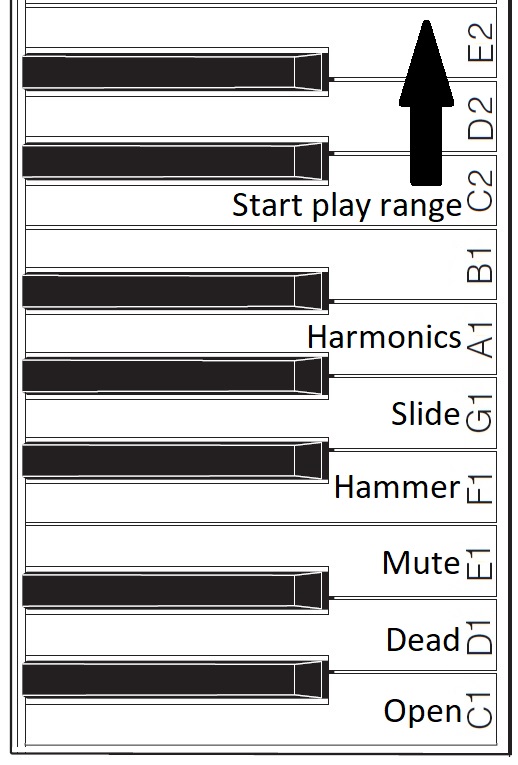
Assigned key switch articulations
For now, I’m holding the black keys and B1 in reserve. One possibility, for example, is to assign body knocks to F#1, G#1 and A#1. We’ll see!
The articulation keys enable the assigned articulation. All keys from C2 and above play notes using the selected articulation. The articulation keys latch. So, if I strike E1 (Mute) and then strike a key in the play range, a muted guitar note will sound. All subsequent notes will be mute notes until I strike C1 (Open) and return to playing open strings.
I spent some time experimenting with Genos SArt voices in order to get ideas for enhancements. I will summarize my notes in a future post. Suffice it to say, Yamaha have some good ideas! It’s all a matter of code. 🙂
Copyright © 2025 Paul J. Drongowski