Yamaha CE20 FM synthesizer (RIP?)

I took a whack at repairing my 1982 Yamaha CE20 FM synthesizer. No joy, I’m afraid. I didn’t spot any obviously bad (fried) components, e.g., leaking electrolytic capacitors. I re-seated two fuses on the main logic (DM) board. Nope.

Well, the next step is to test the output voltage from the three voltage regulators. Fortunately, the regulator leads are exposed and I won’t need to disassemble the DM and symphonic modulator (SA) boards, again.

The CE20 service manual sadly lacks circuit schematics or a concept of operation. A few LEDs light up, but I don’t hear the familiar click of the muting relay. I wish Yamaha had published a schematic or start-up flow-chart. That information would assist signal tracing and diagnosis.

If I can’t find anything easy to fix, I’ll have to give the CE20 a proper burial. 🙂 The Yamaha Reface DX beats the old CE20 in many ways except for the CE20’s aftertouch keyboard, which was a real pleasure to play. Here’s how the CE20 and Reface DX FM implementations stack up:

                         CE20        Reface DX
                     ------------  ------------  
    Keys             49 full size  37 mini keys
    Key response      Vel sense     Vel sense
                      Aftertouch
    Polyphony
        POLY voices       8             8
        MONO voices       1             1
    Patches
        POLY voices       6          32 total
        MONO voices      14
    Ops per voice         2             4
    Effects               1             7
    Display              No            Yes
    Programmable         No            Yes
    MIDI                Nope           Yes
    Pedals           Exp, Sustain    Sustain
    Speakers             No          2 x 3cm
    Battery power        No            Yes

The CE20 voices are preset-only and cannot be reprogrammed. The Reface DX, on the other hand, has a spiffy user interface and 32 patch locations.

Even mentioning MIDI is a bit of a joke (1982!) and USB wasn’t born yet. Aside from the technical challenge, it’s hardly worth the repair. I ain’t gonna spend money on it…

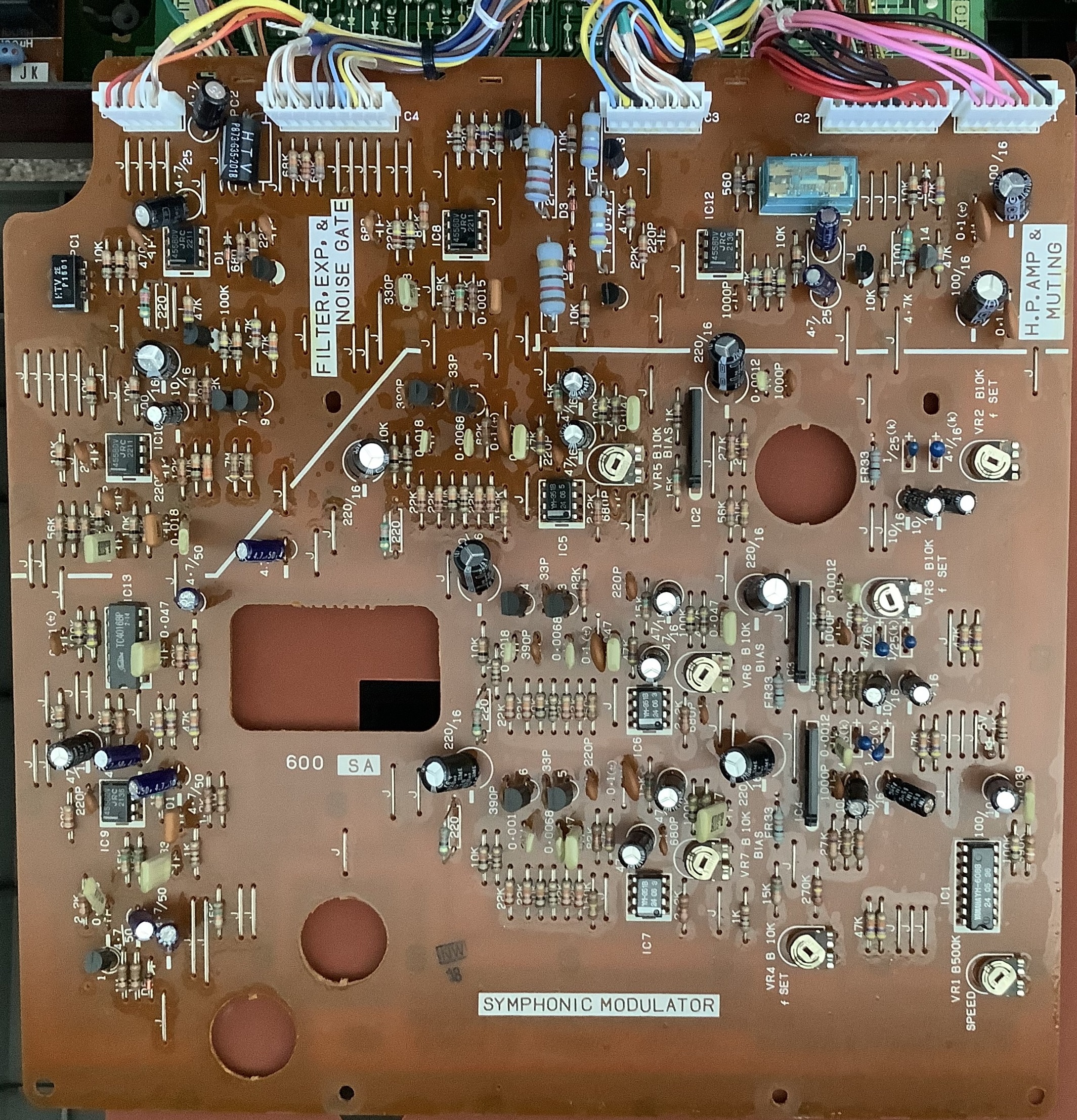
I took pictures of the main DM board and the SA symphonic modulator board. Enjoy! No surface-mount devices inside. The SA board has the muting relay, BTW, in the upper right corner of the picture. Enjoy the view!

Yamaha CE20 main logic (DM) board

Yamaha CE20 symphonic modulator (SA) board

Copyright © 2025 Paul J. Drongowski

Bored ape: Go:keys revisited

All I can remember from grade school religion classes: “Avoid the near occasion of sin.”

Thus, I rolled into my local music store with trepidation. I had to get out of the house. 🙂

First, I want to say a few good words about Kennelly Keys, our local musical instrument chain. They have a decent selection of bread and butter keys on the floor. I always have fun chatting with their staff. Kennelly hires true laid-back PNW types.

I would say, “Go to Patchwerks for synths.” Unfortunately, Patchwerks has closed. Major bummer, that was one sweet store. RIP.

I wanted to check out Roland Go:keys 5 (or 3). When the August dolldrums hit, we go in search of new adventures.

Kennelly has a Go:keys 3 on the floor. The 3 has the same keybed, styling, sounds and patterns as the 5. The 5 adds two passive radiators (better bass), 1/4″ stereo OUT, and microphone IN. The 3 is good enough for me because, today, I just want to touch the keys and hear the tones.

Roland Go:keys 3

Tone-wise, the gen 2 Go:keys does not disappoint. If you want Roland tones, the gen 2 Go:keys delivers them on the cheap (3: $385-ish, 5: $550 USD). The featured acoustic and electric piano voices are quite good for this price range. The patterns (styles?) are relatively hip and current by typical arranger standards. (Yamaha take note.)

The gen 2 keybed is much improved since my close encounter with gen 1 Go:keys. The keys are piano-shaped, but in no way feel like a piano. At this price point, were you expecting linear-graded with escapement? Roland kept the nice texturing. I’m not sure if I could bide the slight sponginess in the long run. Still, the Go:keys keybed is good competition for the Casio CT-S1000V.

The Go:keys 3 and 5 styling is very contemporary. I could see having one in a living room or family room. My only knock is the front panel legends. I tried a turquoise Go:key3 and the legends were very hard to read — not enough contrast. Roland should change the legends to black and save our eyesight.

Well, that was pleasant. I spent a few moments with a Yamaha CK88 and that was pleasant, too. Yamaha have developed two fine instruments in the CK61 and CK88. The CK61 FSB keybed feels better than MODX6. The CK88 GHS felt connected to the main CFX grand piano voice. All good. For their respective price range, I see why the CKs appeal to a lot of players.

Still, I’m awaiting the mark 2 Stage YC61. The CK secondary sounds surpass the current Stage YC series and I hope mark 2 does better. Overall, I wonder if I could live with Live Sets as the sole means to layer/split? The MODX (Montage) Performance organization is far more flexible and satisfying. Also, the CK MIDI implementation seems limited and rigid as far as external control is concerned. I hope Yamaha take note of forum comments and make gen 2 Stage YC MIDI as flexible as possible.

I was struck by the aesthetic difference between Go:keys and CK. Go:keys looks very modern; Yamaha looks industrial. One can accept an all-business look for a professional instrument. However, I hope Yamaha ups its game in the next E-series models for home. The current E-series looks tired next to the Rolands.

Well, I didn’t buy an instrument. I did buy a cool LEGO Ninjago Ice Tank Set (30427) at Bricks and Minifigs. At least I didn’t go home empty-handed. 🙂

Copyright © 2025 Paul J. Drongowski

Reface DX acoustic instruments for ya

One of my long-term projects is to collect and prepare acoustic instrument voices for Yamaha Reface DX. There aren’t as many high-quality acoustic voices as there are tons of bleeps and bloops. Most people associate FM synthesis with aggressive EDM sounds, but even 4-op FM is capable of so much more!

The project has come along pretty well. I’m now in the programming and tweaking phase to see if I can do better. However, the initial set of voices ain’t bad. Here is a table showing the voices and bank layout:

Bank 1

    1-1 Rhodes    1-2 Wurlitzer    1-3 LegendEP   1-4 E. Organ 3
    1-5 P. Organ  1-6 LargePipes   1-7 Cathedral  1-8 GentlePipe

Bank 2

    2-1 WarmPad    2-2 Wash3Strng  2-3 Wood+Horn   2-4 Woodwindy
    2-5 Warm&Cozy  2-6 RealStrngs  2-7 Horn 2 +1   2-8 FluteVoice

Bank 3

    3-1 HornSwell  3-2 SoftBrass   3-3 WoodEns. 4  3-4 Oboe 1 
    3-5 TrumpetMel 3-6 Trombone 2  3-7 Clarinet    3-8 Bassoon

Bank 4

    4-1 Wood EP    4-2 DynaString  4-3 Warm&Cozy   4-4 Violin -1
    4-5 WoodEnsFlt 4-6 Wash3Strng  4-7 HamB3       4-8 Real flute

The “+1” and “-1” are reminders to change the OCTAVE slider before playing. To do: Add and store transpose changes in the voice SysEx (SYX). Next version!

The first three banks are relatively stable. Bank four voices are experiments in progress, back-ups or patches that I don’t want to lose. To do: I need to collect and tweak a few solid Hammond-ish B-3 sounds.

I drew on multiple sources. Many voices come from Yamaha Soundmondo and the Reface DX Legacy Project. If you’re looking for raw material to start patches of your own, I recommend the converted YS200 voices at the Legacy Project.

The DX11 conversions seem to have a few issues, i.e., strings don’t sound like strings (even remotely). Fortunately, the YS200 and DX11 are based on the same synthesis engine (Yamaha YM2414). Go for the YS200 first.

Here is a link to a ZIP file with Reface DX acoustic instrument patches. Each voice is a separate SYX file, i.e., a file containing one or more MIDI System Exclusive dump messages. I use MIDI-OX to download patches to Reface DX. If I like a patch, I hit the Reface STORE button, choose a target voice slot, and confirm the store operation.

Have fun!

Interested in Reface DX? Here are a few more links:

Copyright © 2025 Paul J. Drongowski

Everybody likes new stuff

Everybody likes new stuff. Unfortunately, the pickins have been slim as of late. I suspect that the global tariff situation has made manufacturers cautious. It’s tough to price products in a dynamic, uncertain business climate.

Here’s a couple of new products that caught my attention.

Boss RT-2 Rotary Ensemble

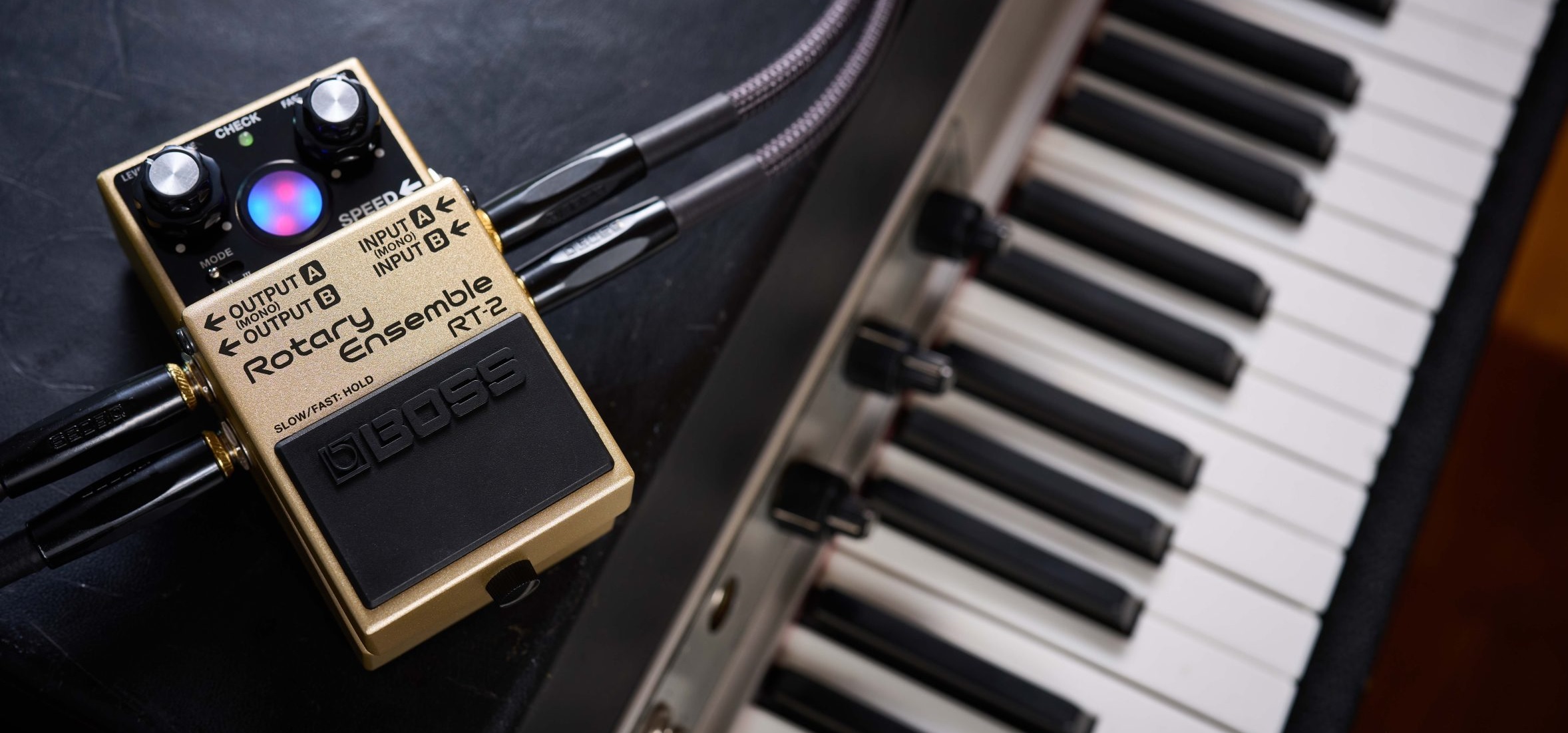
Boss (Roland) have announced the Boss RT-2 Rotary Ensemble — “authentic spinning speaker effect” in a compact pedal. It has three tones (modes): 1. vintage (warm Leslie 122), 2. wide frequency response, and 3. aggressive spin (presence) with increased drive. Sample rate is 48kHz and conversion is 24 bits.

Boss RT-2 Rotary speaker pedal

The RT-2 has a few cool features. In addition to concentric level and drive knobs, concentric knobs control SLOW to FAST and FAST to SLOW transition times. There is a SPEED jack which takes either a foot switch or an expression pedal (e.g., EV-30 or EV-5). The treadle switch is over-loaded with four different kinds of effect ON/OFF and SPEED control configurations. Switches on the back further tune the transition time and drive balance.

Visual feedback (animation) is provided by a multi-color LED-based display, AKA the “Virtual Rotor”. The red LED animates the treble/horn while the blue LED animates the bass/drum.

The pedal has stereo INs and OUTs with the usual one lead mix-down to MONO. The RT-2 can send Wet and Dry independently (phase-corrected) to outputs A and B, respectively. Having independent Wet and Dry can be handy.

You can power the RT-2 with a standard 9V battery! Access to the battery compartment is reminiscent of Behringer’s low-end, plastic fantastic pedal line. Current draw is 115mA and alkaline battery life is approximately 2.5 hours.

No doubt, Roland want to sell this pedal to guitar players. But, hold on! The promotional video shows the RT-2 in use with a Fantom 07. Will miracles ever cease? Check the Boss article about effect pedals for keyboards.

If you want the inside dope, Boss/Roland published an interview with the RT-2 development lead, Takeshi Mitsuhashi. The RT-2 supersedes the 2005 RT-20.

To enhance the RT-2’s three-dimensional stereo sound, we modeled a Leslie 122 in our anechoic chamber at the Roland headquarters using a pair of high-quality, flat-response microphones. We experimented with various angles and set them at the position that captured the best dynamics. [Takeshi Mitsuhashi]

The Boss RT-2 is available for pre-order at $239.99 USD. At that price, if the sound is truly “authentic,” the RT-2 will give the Neo Instruments Vent a run for the money.

Sonicware Liven Evoke

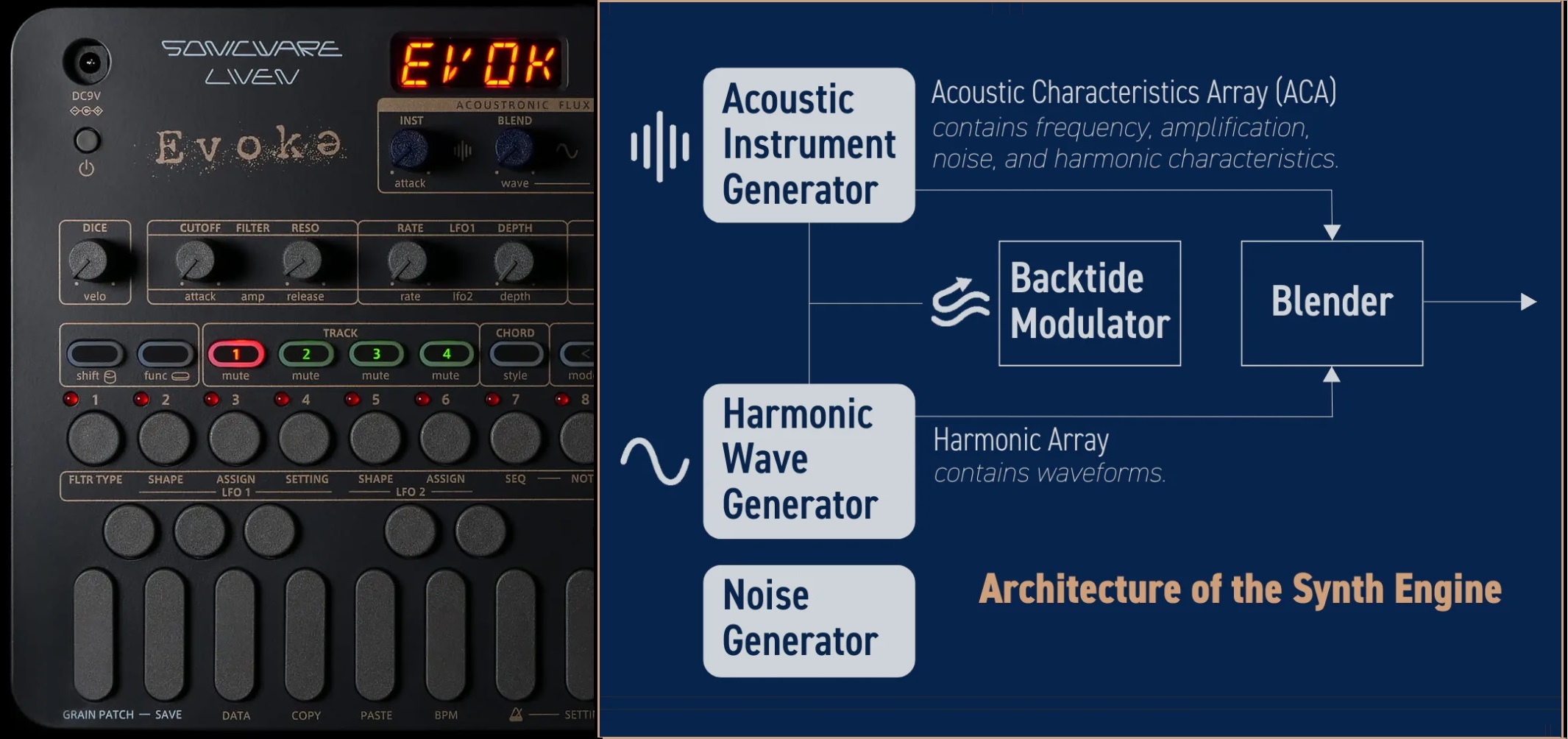
The Sonicware Liven Evoke mines the ambient music space. The Evoke complements its sister, the Liven Ambient 0, with more natural, acoustically-rooted sounds. The Ambient 0 tilts synthetic. Between the pair, I’d choose the Liven Evoke.

Sonicware Liven Evoke

It features the Back to the Future Acoustronic Flux Oscillator. Check out Dr. Endo at the controls: EXPR Residue, RISE Again, Tear, and his how to make cinematic ambient music video.

And, it looks like I am not alone in liking the Evoke. [I have friends everywhere.] Sonicware has sold out the third production run!

Quite frankly, I don’t know how Dr. Endo and company can develop and manufacture a nifty box like the Liven Evoke for $239 USD. The hardware is made in Malaysia and I don’t know how the USA tariff situation will affect the price or the import duty.

It’s not just a groove box, it’s a relaxation machine.

Copyright © Paul J. Drongowski

Adafruit Feather: Megavoice key switching

More experiments and I have the initial cut of a simple key switching program for Yamaha MODX and Genos/PSR guitar Megavoices. The program is written in CircuitPython and runs on an AdaFruit Feather M4 Express. Here is a link to the ZIP file with the code.

Megavoice: Background information

MODX, Genos and mid-range PSR keyboards have Yamaha Megavoices. Megavoices combine several waveforms into a single voice (assigned to a single MIDI channel). They are intended mainly for arpeggios (Montage/MODX) and styles (Genos and PSR).

Generally, a Megavoice uses velocity switching to trigger waveforms. Some of the waveforms play ordinary notes, some play articulation notes, and others plays special instrument effects. Let’s take a look at the Nylon Guitar voice, which is implemented on both MODX and Genos. [Megavoice technology dates back to the early Motif and Tyros era, so I won’t be listing all of the models with Megavoice!] Many other guitar Megavoices (e.g., Concert Guitar, Clean Guitar) have the same velocity layout. Megavoice Nylon Guitar has the following velocity layers:

    Vel Lo  Vel Hi  Waveform      Key range
    ------  ------  ------------  -------------
       1      20    Open soft     C6 and below
      21      40    Open medium   C6 and below
      41      60    Open hard     C6 and below
      61      75    Dead          C6 and below
      76      90    Mute          C6 and below
      91     105    Hammer        C6 and below
     106     120    Slide         C6 and below
     121     127    Harmonics     C6 and below
       1     127    Strum noise   Above C6
       1     127    Fret noise    Above C8

MIDI note numbers 0 (C-2) to 96 (C6) comprise “playable” notes. Note numbers above 96 are instrumental effects: strum and fret noise. The strum and fret noises include the sound of a pick crossing the strings, body knocks, and sleeve noise (fingers sliding on strings).

As you can tell from the layout, if you try to play a Megavoice from the keyboard, you’ll have an interesting and maybe frustrating experience. No one really has the skill to control their key touch to reliably play an open hard note versus a dead note, etc. However, a sound designer can program different sounds into a MIDI track with precision, thereby making an expressive, realistic guitar part in a style or arpeggio. [Historical note: Many of the Motif ES/XS arpeggios were taken from PSR Megavoice styles!]

Genos, Tyros and PSR have a way of making the base waveforms playable: Super Articulation (SArt). The SArt engine monitors the incoming key strikes and, in real-time, chooses a destination waveform for each note. If you play in a detached manner, SArt triggers one of the open string waveforms (depending upon your strike velocity). If a second note occurs within a fourth with a slightly higher velocity, SArt plays a slide (up). SArt plays a body knock in response to the ART.1 and ART.2 buttons.

Clavinova CSP and CVP do not have articulation buttons. However, you can still join the fun. Select an S.Art guitar voice and tromp on the foot pedals!

Montage and MODX have Expanded Articulation (XA). It plays open notes as expected and relies on the ASSIGN 1 and ASSIGN 2 buttons to bring in an articulation like Slide or Harmonics. (Element programming allows more flexibility than this simple example, BTW.)

Feather MIDI event processor

In order to implement key switching, we need to break into the path from keyboard to tone generator. We want a chance to respond to incoming notes (key strokes) before the notes go to the tone generator (TG).

We can’t hack the hardware in MODX or Genos, but we can send MIDI messages from the keyboard (e.g., MODX MIDI OUT) to an external MIDI event processor which sends a modified MIDI message stream back to the instrument (e.g., MODX MIDI IN).

I described the hardware for an AdaFruit Feather-based MIDI event processor in an earlier post. The event processor consists of an AdaFruit M4 Express processor, MIDI I/O FeatherWing, OLED FeatherWing and Joystick FeatherWing. Up to this point, I haven’t exploited the OLED or joystick, so you could get away with a very tiny Processor plus MIDI I/O combination. It’s small and efficient enough to be powered by a LiPo battery!

The hook-up looks like this:

    ----------------         --------------       --------------
   |                |       |              |     |              |
   |         MIDI OUT ----> MIDI IN        ----> RX             |
   | MODX6          |       |  FeatherWing |     |  Feather M4  |
   |          MIDI IN ----> MIDI OUT       ----> TX             |
   |                |       |              |     |              |
    ----------------         --------------       --------------

The MIDI FeatherWing communicates with the Feather M4 Express over the serial I/O RX and TX ports. The Feather M4 Express communicates with the Mu editor and development environment on a Windows PC (not shown). Code is written in CircuitPython which is loaded into the Feather M4 from the PC over a USB communication link. The code can print status information via USB to the Mu environment — very handy when debugging.

Since this is a prototype, I’m trying to keep things simple. The MODX6 requires a little bit of manual configuration:

  • MIDI I/O directed to/from the 5-pin DIN connectors
  • MIDI LOCAL OFF (i.e., key events are not sent directly to the TG)
  • Nylon Guitar or other compatible guitar Megavoice selected on Part 1

That’s not too much to ask.

Key switching

It may be said that neither SArt or XA bring together all of the available articulation waveforms in a factory preset single voice (part). That’s where key switching can play a role.

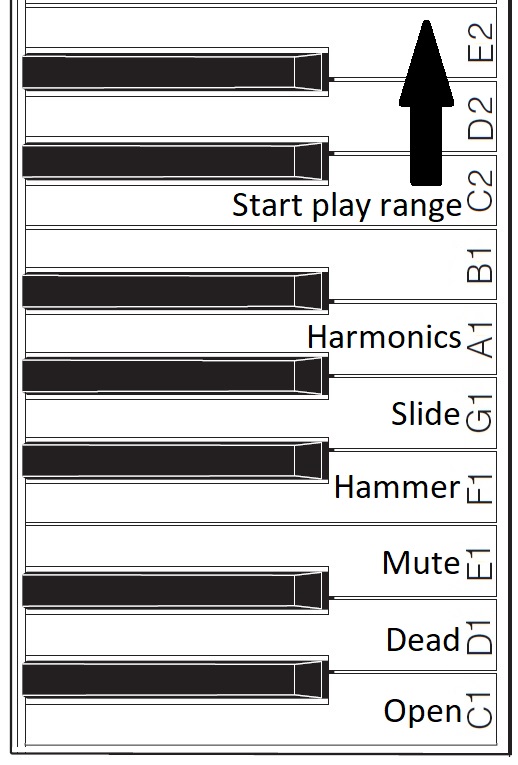
Basically, I want to assign a range of keys to switch between articulations and sounds. For my initial experiments, I assigned MIDI notes 36 to 47 to key switching duties. On MODX6 (61 keys), this key range covers the lowest octave of physical keys (the power-up default, without internal octave switching enabled). Articulations are assigned to keys as shown below.
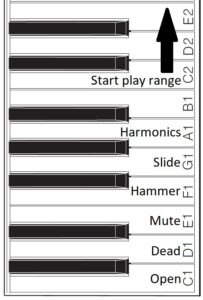
Assigned key switch articulations

For now, I’m holding the black keys and B1 in reserve. One possibility, for example, is to assign body knocks to F#1, G#1 and A#1. We’ll see!

The articulation keys enable the assigned articulation. All keys from C2 and above play notes using the selected articulation. The articulation keys latch. So, if I strike E1 (Mute) and then strike a key in the play range, a muted guitar note will sound. All subsequent notes will be mute notes until I strike C1 (Open) and return to playing open strings.

I spent some time experimenting with Genos SArt voices in order to get ideas for enhancements. I will summarize my notes in a future post. Suffice it to say, Yamaha have some good ideas! It’s all a matter of code. 🙂

Copyright © 2025 Paul J. Drongowski

MIDI Event Processor — Round 2

I’ve got a stable MIDI event framework up and running. Time to summarize a few lessons learned.

CircuitPython

The CircuitPython libraries are pretty decent overall. AdaFruit did a good job with on-line documentation and I can usually find a helpful example to copy, paste and modify.

Python itself is a PITA. I don’t know why or how anyone calls it a “beginner’s language”. Three big bug-a-boos jump out:

  • Spacing. Zealots say, “Oh, you don’t need brackets; indentation handles everything.” I haven’t seen such idiotic enforcement of spacing rules since 1960s FORTRAN. Give me brackets, give me free-form layout.
  • Run-time type checking. Python does not do a lot of compile-time type checking. So, you’ll get a clean compile and then stumble on a type compatibility issue during the first run.
  • Type conversion. Type conversion can be very weird. Thanks to run-time type checking, it might take several runs to get conversion right.

I’m going to finish the job in CircuitPython out of a spirit of self-discipline. Please teachers, do not inflict this language on new programmers.

AdaFruit hardware

The AdaFruit Feather hardware is solid. No complaints. The AdaFruit Feather M4 Express is a speedy little bugger compared to Arduino UNO! The OLED display is bright and clear. The MIDI ports work. Other than testing, the joystick FeatherWing hasn’t gotten much use yet.

MIDI library

I wanted to love the MIDI library. It offers pre-defined MIDI message types (classes) and necessary send/receive operations. All good.

Unfortunately, I don’t think the MIDI library was tested with a real-world synth. I’m using Yamaha MODX6 for testing. Yamaha uses MIDI running status extensively. Hit and release a key, and MODX sends a NOTE ON status byte followed by two key/velocity pairs:

    0x90 0x48 0x73 0x48 0x00

The first pair is NOTE ON and the second pair is effectively NOTE OFF (i.e., velocity is 0x00).

That’s not so bad in itself. However, MODX sends real-time Active Sensing messages (MIDI status byte 0xFE) and Active Sensing may appear in the middle of a MIDI message, running status or not.

Using the MIDI library, notes and controller events were getting dropped everywhere. At first, I thought CircuitPython was too slow to keep up with the incoming MIDI. Nope. When I switched to reading and dispatching bytes from the UART, I could handle everything without straining processor resources.

Bottom line: Bag the MIDI library as it could have bugs with running status.

OLED display and REPL

The OLED display and CircuitPython REPL have been very handy for debugging. The UART implements the MIDI IN/OUT ports leaving USB serial I/O available for debugging. (You need Arduino Leonardo to get separate UART and USB serial I/O.) I like to drop in the occasional “print” statement until I’m sure of the control flow and internal values.

Example: Knowing what the MODX is sending. It is easy to whip up a MIDI monitor sending byte values to either the OLED or the Mu Editor REPL. Knowing that I had to handle Active Sensing and running status together, made the task clear.

The task

Now I realize that the event processing application needs to map note ON/OFF events and to echo all other events (messages) unmodified. My current message processing framework reflects this simplicity. It took a few experiments to get here.

Initial code

If you need a quick start for your own Feather-based MIDI event processor, here is a ZIP file with my initial CircuitPython code. It doesn’t handle complete SysEx messages. The code framework will probably change in the next version.

Copyright © 2025 Paul J. Drongowski

AdaFruit Feather: MIDI Event Processor

Just want to report about a work in progress.

My favorite bugaboo is the lack of scripting in MIDI controllers and devices. Yeah, they’re OK for 90 percent of the common use cases. However, you’ll eventually run into the need for System Exclusive (SysEx) message support or some other MIDI functionality which doesn’t fit the fixed, built-in usage model.

I’ve wanted a flexible, scriptable MIDI event processor for quite some time. The MIDI Solutions Event Processor Plus handles the most common filter and mapping use cases, but lacks scripting. In particular, I want to build a MIDI event processor that handles key switching like a VST software instrument. I want to be able to invent my own “Super Articulation” voices that use key switching, for example. [More about this idea another day.]

Arduino-based solutions are sort of OK. The Sparkfun MIDI shield coupled with a standard Arduino UNO is a good start. However, if you want to stack a display on top of the MIDI shield, you’re out of luck (the MIDI connectors prevent stacking).

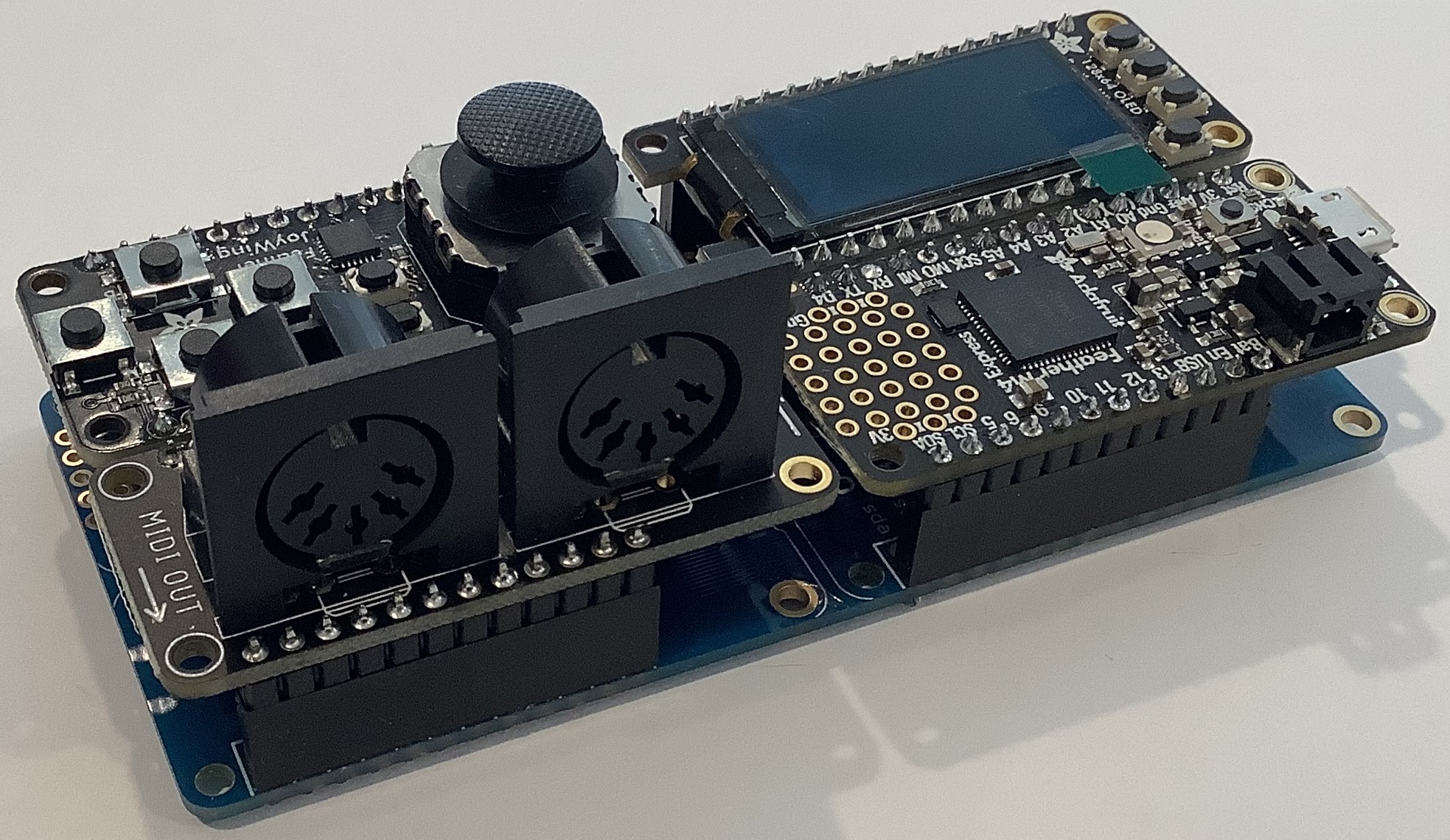
Feather-based MIDI event processor (front)

The AdaFruit Feather family of boards is feeling like a good solution. The Feather form factor is very small. The Feather M4 Express processor board (ID: 3857), by itself, is much smaller than Arduino UNO. There’s a lot packed on that tiny board: a 120MHz ARM Cortex-M4 processor (ATSAMD51), a Neopixel, the usual micro USB connector, a JST connector with LiPo charge support, and all the usual ins/outs (digital, analog, I2C, SPI, etc.)

Feather-based MIDI event processor (rear)

The FeatherWing expansion boards have the same small, stackable form factor and the range is staggering. I have the following FeatherWings at hand:

  • FeatherWing 128×64 OLED display (ID: 4650)
  • MIDI FeatherWing (ID: 4740)
  • Joy(stick) FeatherWing (ID: 3632)
  • FeatherWing NeoKey mechanical key switches (ID: 4879)

The whole lot can be had for less than $100 USD. Together with the M4 Express, the FeatherWings make for a powerful MIDI processing platform.

Of course, a vertical stack of Feather boards would be quite unweildy. AdaFruit offer three “motherboards” for arranging Feather boards horizontally:

  • FeatherWing Doubler (ID: 2890)
  • FeatherWing Tripler (ID: 3417)
  • FeatherWing Quad (ID: 4253)

The horizontal layout provides convenient access/visibility to the joystick, display and 5-pin MIDI ports. This is so much better than vertical stacking.

Feather MIDI event processor (top)

I have the Doubler and Quad, and intend to use the Quad for my MIDI event processor. Even though I used the word “motherboard”, the Doubler and Quad are completely passive and merely route the Feather signals across two or four slots, respectively.

Software is, of course, an important ingredient. The Feather M4 Express supports both the Arduino IDE (C programmeing) or CircuitPython. I decided to try CircuitPython in order to learn something new. The best and fastest way to go is the Mu Editor (environment). The Mu workflow is a bit quirky if you’re accustomed to the Arduino IDE or Java environments. Once you get with its flow, you’re good.

The FeatherWings are all supported by one or more CircuitPython libraries. You’ll need to chase down the libraries and copy them to the M4’s internal flash memory. Fortunately, the M4 presents itself as a flash drive, so it’s simple to copy the libraries to the M4 Express from a Windows PC or Mac.

As to project status, the headers are soldered on, Mu and the libraries are installed, and I’ve run example code for the OLED display, joystick, and MIDI ports. AdaFruit has quite a bit of development information on-line — all well-written with downloadable PDFs. Still, you should expect to modify the example code for your specific boards and use cases (e.g., SH1107 display, 5-pin MIDI instead of USB MIDI).

I haven’t done much Python programming, so that is another learning curve. Given Python’s formatting requirements and syntax, I don’t really see how Python is an easy beginner’s language. Somebody is smokin’ somethin’. I’m going to stick with CircuitPython unless I run into execution speed issues. Take your medicine, boy. 🙂

Copyright © 2025 Paul J. Drongowski

Steinberg Etude vs. CSP-170: Quick demo

This post is a quick comparison between the main Yamaha CSP-170 grand pianos (CFX and Bösendorfer) and two patches from the new Steinberg Etude grand (Concert Grand and Gospel presets).

Please pardon my under-caffeinated playing. You can tell that my fingers and brain got warmer from CFX to Gospel. 🙂 Simple set-up — plug the CSP-170 into a Roland Micro-BR, set levels and go. Tune is the old classic “Jesus Is On the Mainline”.

The Gospel preset came through a little hotter than the CSP-170 CFX and Bösendorfer. I apologize for the slight clipping grit in the right channel.

I hope this brief comparison demonstrates the difference in tone between the pianos.

Copyright © 2025 Paul J. Drongowski

Free stuff from Steinberg

I’m looking into the new Steinberg Etude (sampled Yamaha C3X) piano VST instrument. As usual, I’m trying to keep costs low and found a few free Steinberg downloads that may help you out.

First, there is the free Steinberg Halion Sonic player. Like Halion Sonic, the player can run stand-alone. I don’t feel like diving into Cubase simply to host a piano VST instrument. The Halion Sonic player can run as a stand-alone VST host that does the business.

Next, you need pianos. 🙂 Steinberg offers three free pianos: Lo-Fi, Taped Vibes, and Sonic Atoms Novel. Each piano has its own character and potential uses. Lo-Fi is a messed up lo-fi upright piano for chillhop, cozy or retro. Taped Vibes follows in a similar vein, but it’s a sampled Wurli 200A. Novel is an upright piano from Sonic Atoms suitable for effected cinematic or straight piano.

While you’re at it, you might as well scan the VST instruments for other free instruments (including synths).

If you need or want conventional instruments, download and install the free Steinberg Dorico SE notation program. Dorico SE comes with a 3GByte library including a General MIDI (GM) sound set. Plus, you get to try Dorico.

One frequently asked forum question is “Are there any free notation programs?” Obviously, the answer is “Yes, Dorico SE”. I spent a few minutes with Dorico SE and it is highly featured for a free application. It makes me want to try the Dorico app for IOS, too.

Wow, that’s a lot of high-quality, free content!

Copyright © 2025 Paul J. Drongowski
Yamaha Montage M OS 3.0 update

The Yamaha Montage M series is getting another update:

  • New Waveforms “ClavD6”, sampled with different pickup positions
  • New VCM Effect “GS1 Ensemble & Tremolo” from the Yamaha GS1
  • New VCM Effect “CS Ring Modulator” from the Yamaha CS80
  • New VCM Effect “Mid/Side EQ Compressor”
  • Extension of the Scenes with the parameters “Note Limit” and “Note Shift”
  • Scene parameters can also be saved for Parts in “External” Mode
  • Additional Effect parameters accessible via Quick Edit
  • Parameters from the AN-X and FM-X Engines as Destinations in the Part LFO
  • “Insert” function in the Live Set
  • “Delete & Move” function in the Live Set
  • DAW Remote extended to include ESP control
  • New “SSS Time” parameter for seamless switching of sounds
  • Maximum number of Libraries increased from 16 to 24
  • New “Ribbon View” Display variant
  • Sixty new Performances featuring new OS 3.0 functions

I’m happy to see Yamaha releasing updates for their major platforms. Hope your Ideascale suggestion made the cut! Availability is “Summer 2025”. [Engineers do not like being pegged down.]

You’ll find all of the details in the latest Music Production Guide (March 2025, from Easy Sounds). Overall, there are some nice, small enhancements unless you’ve been pining for a new Clav and specialist vintage effects. The Mid/Side compressor and parametric equalizer add to Montage M’s “studio in a box.”

The description of the Seamless Sound Switching (SSS) time parameter is interesting on a few different levels:

Seamless Switching (SSS) allows you to switch Performances without interruption. In particular, Release Times and Effect components (Reverb, Delay) of the last Performance played are retained throughout the change and decay natural afterwards. The remaining signals of the first Performance played are only interrupted when switching to a further, third Performance. Permanent signals that do not have an ending Release Time, e.g. from special Effects such as “Digital Turntable” or the “Noise Level” of the VCM Rotary Speaker, remain active beyond the first Performance change. The “SSS Time” can now be set for such or similar cases.

The first sentence helps clarify why SSS is needed on SWP70 architecture Yamaha synths (and arrangers, if they ever add it). Pushing release and other aspects of synthesis into the chorus/reverb stages reduces latency through the rather long synthesis pipeline.

If you want to play a cruel joke on your sound guy, engage the Digital Turntable effect. I never saw a board engineer dive for faders as when they heard this effect over the PA. 🙂

Gosh, OS 3.0 and I’ve barely read up about OS 2.0. OS 2.0 included new CFX Grand Piano waveforms, new CP80 waveforms, and AN-X Smart Morph. The new CFX grand is a 200MByte (compressed) package. The CP80 waveforms are taken from the Stage YC series keyboards.

All that aside, OS 2.0 added a new Shimmer Reverb effect type:

  • New high quality Reverb that already sounds great without using the Shimmer feature
  • Numerous parameters integrated in the Control Assignment
  • Low and High-Pass Filters for the feedback signal
  • Two finely tunable Pitch Shift parameters, each spanning four octaves, that can interact
  • Panorama and Balance of the Pitch Shift signals can be set separately
  • Comprehensive modulation options
  • “Color” parameter for “coloring” the overall signal [Duh!]

I heard a few Shimmer Reverb demos and it sounds fabulous. I want to try to create a similar effect on MODX and possible Genos (gen 1).

Copyright © 2025 Paul J. Drongowski