
SAM2695, A50 and NSX-39 thoughts

I’m still kicking around ideas for small, ultra-low cost MIDI tone modules. Random thoughts to follow…

I completed the SAM2695 project using the M5Stack U187 MIDI module. Using a nibbling tool and utility knife, I cut a few holes along the edge of a Hammond 1591CSBK plastic project box. I packed the MIDI module and cabling into the Hammond box and strung cables through the holes. There are three cables:

  • An in-line barrel connector switch cable
  • A 3.5mm stereo cable (6 feet)
  • A CME MIDI cable (3 feet)

The audio and MIDI cables are thin and flexible. Overall, this proved to be a better construction method than drilling holes for external connectors and so forth. I’m not the best fabricator…
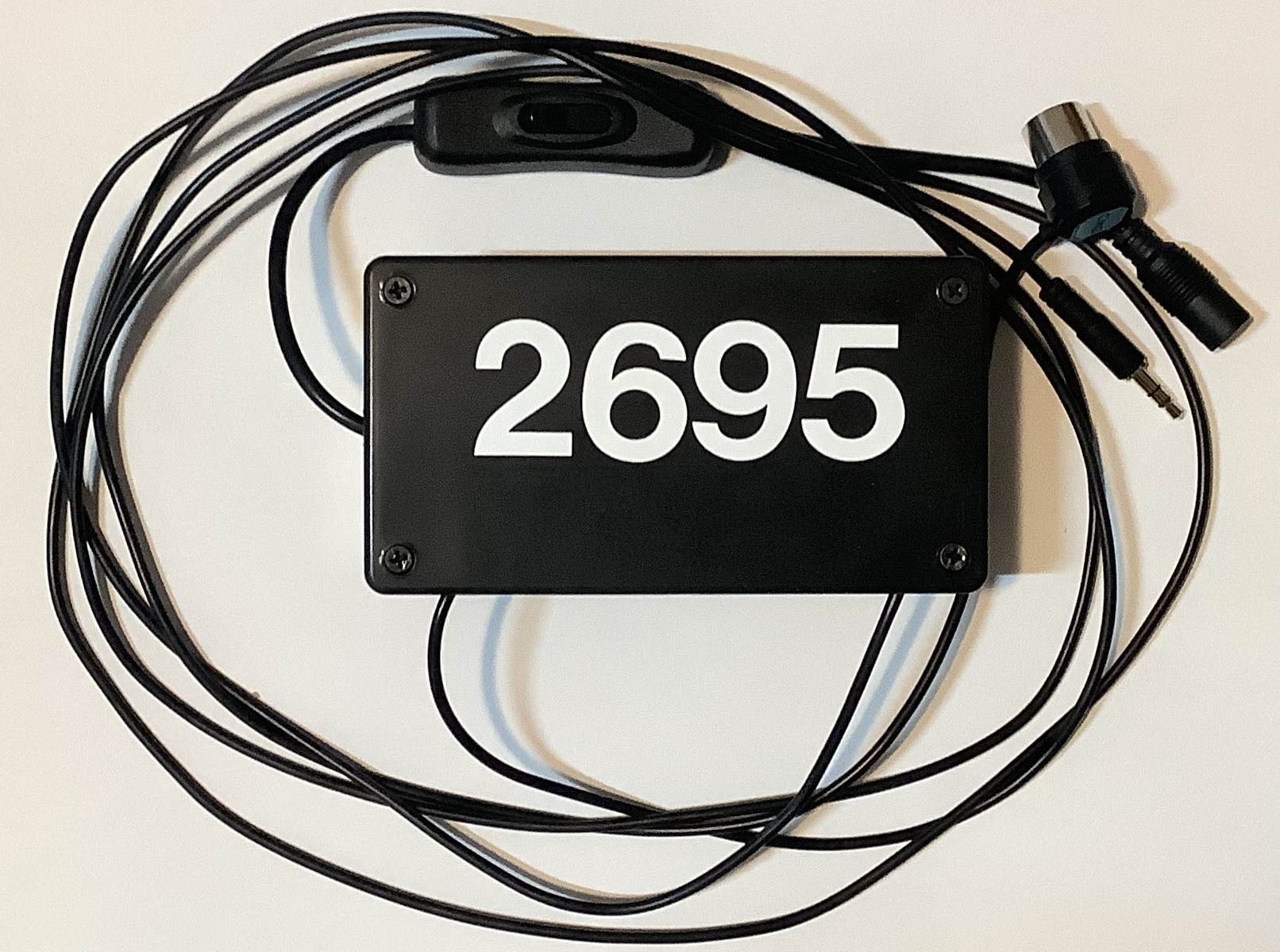
SAM2695 General MIDI tone module

The end result is a GS-compatible General MIDI module which is the size of a guitar pedal. I configured a Novation Launchkey 49 (Mk4) to select 16 GM voices through the pads and to tweak/tweeze a basic set of GM parameters. The Mk4 supports two zones (Part A and Part B), is flexible, and deserves a blog post of its own.

I put the SAM2695 through its paces and confirmed my impressions. (See my post comparing the SAM2695 against the Yamaha PSS-A50.) Not a bad GM module for $50 (total). Still, it won’t have people selling their Nords, Montages, Kronos, whatever. 🙂 There are some decent playable voices and then there are some crap voices.

The SAM2695 effects, in particular, leave me wanting. The 2695 exposes reverb and chorus parameters, but most tweaking requires System Exclusive (SysEx) messages. More ranting about SysEx in a minute.

Relatively speaking, the Yamaha PSS-A50 is not harsh and its effects are better. The PSS-A50 also uses a one-chip solution, the Yamaha YMW830. On the other hand, the A50 MIDI implementation is truly spartan. For example, one cannot change either the reverb or chorus type. The stock A50 is mono (not stereo), so the Yamaha engineers decided not to implement MIDI CC#10 Pan.

Thus, I have really cooled to the idea of hacking the A50 into a module. Why begin a project when you know that the end result will be deficient in a major way?

Which brings me to the third option — chopping up Gakken NSX-39, better known as “Pocket Miku.” The NSX-39 is based upon a different one-chip Yamaha solution, the YMW820 (NSX-1). The YMW820 is a more than decent XG MIDI implementation. It supports the full GM sound set (A50 has 40 selected GM voices) and it has a fair to middling variation effect unit, including rotary speaker!

With all that going for it, the NSX-39 should be a no brainer. Nope. There is no clear, direct way to hack MIDI onto the YMW820. So, it’s likely to be MIDI over USB all the way and the USB port is implemented by an ARM media processor chip fronting MIDI to the YMW820 over SPI. The NSX-39 is already a small board/package and there isn’t much to cut away.

Then there is the issue of that insipid Miku voice. MIDI channel 1 is dedicated to Miku and, without writing the flash ROM, you can’t get rid of it. Yamaha had envisioned Real Acoustic Sound (RAS) as an alternative to Miku, but they never released a ROM image. RAS is a form of Articulation Element Modeling (AEM), also known as “Super Articulation 2“. Here is a video demo (AEM saxophone) of what could have been. [Video courtesy of Ken Fujimoto.]
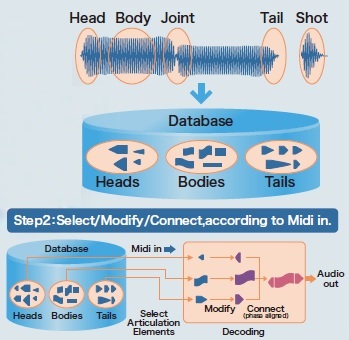
YMW820 Real Acoustic Sound (RAS)

A big issue hanging over all three design options is the inability to send SysEx from the Launchkey. Or, another way of stating the requirement, critical settings need SysEx when most inexpensive MIDI controllers are incapable of sending SysEx. Really, how hard would it be to add SysEx support to a MIDI controller? SAM2695 has two MIDI CCs — CC#80 and CC#81 — which set the reverb type and chorus type, respectively. This capability is very unusual, however.

Yamaha arrangers keep voice set-up data in a few different places. Every voice has a basic set-up in its internal meta-data. One level up in abstraction, each panel voice has a so-called VCE (Voice Edit) file. (“VCE” is one of several file name extensions which denote a Voice Edit file.) The VCE is a MIDI file which selects the base-level voice and then changes EQ, filter characters, attack/release, and insert effect among other things. Styles contain something like a VCE in One Touch Setting (OTS) locations. Registrations can store VCE-like data, too.

The arranger voice design got me thinking. Why not map MIDI Program Change messages to a group of VCE-like MIDI messages in order to set up the SAM2695 (or whatever), i.e., choose reverb and chorus type, tweak EQ, and so forth? My AdaFruit Feather MIDI event processor would be a good platform given the appropriate custom code. A future project?

Copyright © 2025 Paul J. Drongowski

Real Acoustic Sound

As mentioned in my earlier post, the Yamaha NSX-1 integrated circuit implements three sound sources: a General MIDI engine based on the XG voice architecture, eVocaloid and Real Acoustic Sound (RAS). RAS is based on Articulation Element Modeling (AEM) and I now believe that eVocaloid is also a form of AEM. eVocaloid uses AEM to join or “blend” phonemes. The more well-known “conventional” Vocaloid uses computationally intensive mathematics for blending which is why conventional Vocaloid remains a computer-only application.

Vocaloid uses a method called Frequency-domain Singing Articulation Splicing and Shaping. It performs frequency domain smoothing. (That’s the short story.)

AEM underlies Tyros Super Articulation 2 (S.Art2) voices. Players really dig S.Art2 voices because they are so intuitively expressive and authentic. Synthesizer folk hoped that Montage would implement S.Art2 voices — a hope not yet realized.

Conceptually, S.Art2 has two major subsystems: a controller and a synthesis engine. The controller (which is really software running on an embedded microcomputer) senses the playing gesture made by the musician and translates those gestures into synthesis actions. Gestures include striking a key, releasing a key, pressing an articulation button, moving the pitch bend or modulation wheel. Vibrato is the most commonly applied modulation type. The controller takes all of this input and figures out the musician’s intent. The controller then translates that intent into commands which it sends to the synthesis engine.

AEM breaks synthesis into five phases: head, body, joint, tail and shot. The head phase is what we usually call “attack.” The body phase forms the main part of a tone. The tail phase is what we usually call “release.” The joint phase connects two bodies, replacing the head phase leading into the second body. A shot is short waveform like a detached staccato note or a percussive hit. A flowing legato string passage sounds much different than pizzicato, so it makes sense to treat shots separately.

Heads, bodies and tails are stored in a database of waveform fragments (i.e., samples). Based on gestures — or MIDI data in the case of the NSX-1 — the controller selects fragments from the database. It then modifies and joins the fragments according to the intent to produce the final digital audio waveform. For example, the synthesis engine computes joint fragments to blend two legato notes. The synthesis engine may also apply vibrato across the entire waveform (including the computed joint) if requested.

Whew! Now let’s apply these concepts to the human voice. eVocaloid is driven by a stream of phonemes. The phonemes are represented as an ASCII string of phonetic symbols. The eVocaloid controller recognizes each phoneme and breaks it down into head, body and tail fragments. It figures out when to play these fragments and when bodies must be joined. The eVocaloid controller issues internal commands to the synthesis engine to make the vocal intent happen. As in the case of musical passages, vibrato and pitch bend may be requested and are applied. The NSX-1 MIDI implementation has three Non-Registered Parameter Number (NRPN) messages to control vibrato characteristics:

  • Vibrato Type
  • Vibrato Rate
  • Vibrato Delay

I suspect that a phoneme like “ka” must be two fragments: an attack fragment “k” and a body fragment “a”. If “ka” is followed immediately by another phoneme, then the controller requests a joint. Otherwise, “ka” is regarded as the end of a detached word (or phrase) and the appropriate tail fragment is synthesized.

Whether it’s music or voice, timing is critical. MIDI note on and note off events cue the controller as to when to begin synthesis and when to end synthesis. The relationship between two notes is also critical as two overlapping notes indicate legato intent and articulation. The Yamaha AEM patents devote a lot of space to timing and to mitigation of latency effects. The NSX-1 MIDI implementation has two NRPN messages to control timing:

  • Portamento Timing
  • Phoneme Unit Connect Type

The Phoneme Unit Connect Type has three settings: fixed 50 msec mode, minimum mode and velocity mode in which the velocity value changes the phoneme’s duration.

As I mentioned earlier, eVocaloid operates on a stream of phonetic symbols. Software sends phonetic symbols to the NSX-1 using either of two methods:

  1. System Exclusive (SysEx) messages
  2. NRPN messages

A complete string of phonetic symbols can be sent in a single SysEx message. Up to 128 phonetic symbols may be sent in the message. The size of the internal buffer for symbols is not stated, but I suspect that it’s 128 symbols. The phoneme delimiter is ASCII space and the syllable delimiter is ASCII comma. A NULL character must appear at the end of the list.

The NRPN method uses three NRPN message types:

  • Start of Phonetic Symbols
  • Phonetic Symbol
  • End of Phonetic Symbols

In order to send a string of phonetic symbols, software sends a start NRPN message, one or more phonetic symbol NRPN messages and, finally, an end of phonetic symbols NRPN message.

Phonetic symbols are stored in a (128 byte?) buffer. The buffer lets software send a phrase before it is played (sung) by the NSX-1. Each MIDI note ON message advances a pointer through the buffer selecting the next phoneme to be sung. The SEEK NRPN message lets software jump around inside the buffer. If software wants to start at the beginning of the buffer, it sends a “SEEK 0” NRPN message. This capability is really handy, potentially letting a musician start at the beginning of a phrase again if they have lost their place in the lyrics.

When I translated the Yamaha NSX-1 brochure, I encountered the statement: “eVocaloid and Real Acoustic Sound cannot be used at the same time. You need to choose which one to pre-install at the ordering stage.”. This recommendation is not surprising. Both RAS and eVocaloid must have its own unique database; RAS has instrument samples and eVocaloid has human vocal samples. I don’t think, therefore, that Pocket Miku has any RAS (AEM) musical instrument samples. (Bummer.)

Speaking of databases, conventional Vocaloid databases are quite large: hundreds of megabytes. eVocaloid is intended for embedded applications and eVocaloid databases are much smaller. I’ll find out how big once I take apart Pocket Miku. Sorry, Miku. 🙂

I hope this article has given you more insight into Yamaha Real Acoustic Sound and eVocaloid.

Copyright © 2017 Paul J. Drongowski