SAM2695, A50 and NSX-39 thoughts

I’m still kicking around ideas for small, ultra-low cost MIDI tone modules. Random thoughts to follow…

I completed the SAM2695 project using the M5Stack U187 MIDI module. Using a nibbling tool and utility knife, I cut a few holes along the edge of a Hammond 1591CSBK plastic project box. I packed the MIDI module and cabling into the Hammond box and strung cables through the holes. There are three cables:

  • An in-line barrel connector switch cable
  • A 3.5mm stereo cable (6 feet)
  • A CME MIDI cable (3 feet)

The audio and MIDI cables are thin and flexible. Overall, this proved to be a better construction method than drilling holes for external connectors and so forth. I’m not the best fabricator…
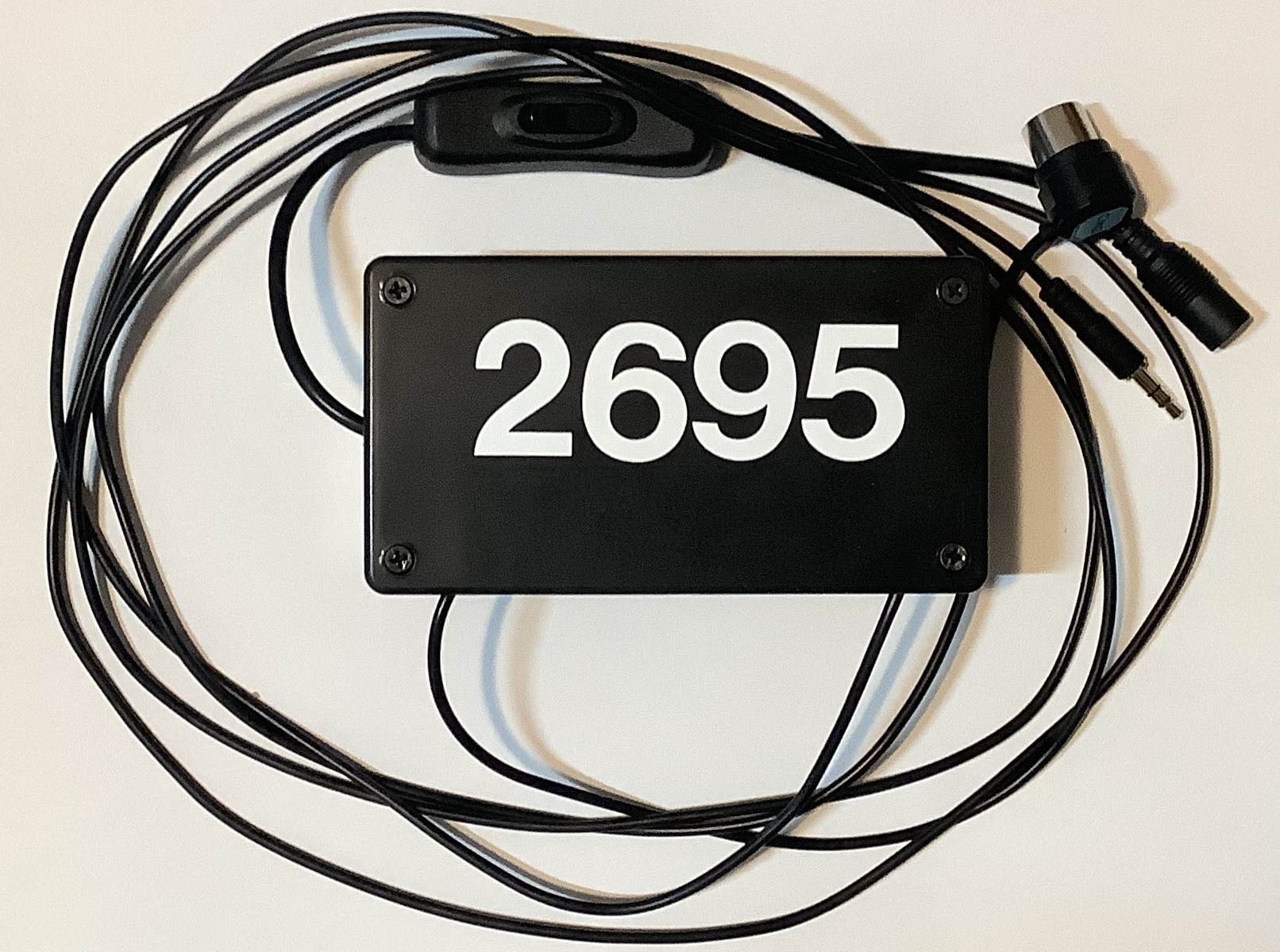
SAM2695 General MIDI tone module

The end result is a GS-compatible General MIDI module which is the size of a guitar pedal. I configured a Novation Launchkey 49 (Mk4) to select 16 GM voices through the pads and to tweak/tweeze a basic set of GM parameters. The Mk4 supports two zones (Part A and Part B), is flexible, and deserves a blog post of its own.

I put the SAM2695 through its paces and confirmed my impressions. (See my post comparing the SAM2695 against the Yamaha PSS-A50.) Not a bad GM module for $50 (total). Still, it won’t have people selling their Nords, Montages, Kronos, whatever. 🙂 There are some decent playable voices and then there are some crap voices.

The SAM2695 effects, in particular, leave me wanting. The 2695 exposes reverb and chorus parameters, but most tweaking requires System Exclusive (SysEx) messages. More ranting about SysEx in a minute.

Relatively speaking, the Yamaha PSS-A50 is not harsh and its effects are better. The PSS-A50 also uses a one-chip solution, the Yamaha YMW830. On the other hand, the A50 MIDI implementation is truly spartan. For example, one cannot change either the reverb or chorus type. The stock A50 is mono (not stereo), so the Yamaha engineers decided not to implement MIDI CC#10 Pan.

Thus, I have really cooled to the idea of hacking the A50 into a module. Why begin a project when you know that the end result will be deficient in a major way?

Which brings me to the third option — chopping up Gakken NSX-39, better known as “Pocket Miku.” The NSX-39 is based upon a different one-chip Yamaha solution, the YMW820 (NSX-1). The YMW820 is a more than decent XG MIDI implementation. It supports the full GM sound set (A50 has 40 selected GM voices) and it has a fair to middling variation effect unit, including rotary speaker!

With all that going for it, the NSX-39 should be a no brainer. Nope. There is no clear, direct way to hack MIDI onto the YMW820. So, it’s likely to be MIDI over USB all the way and the USB port is implemented by an ARM media processor chip fronting MIDI to the YMW820 over SPI. The NSX-39 is already a small board/package and there isn’t much to cut away.

Then there is the issue of that insipid Miku voice. MIDI channel 1 is dedicated to Miku and, without writing the flash ROM, you can’t get rid of it. Yamaha had envisioned Real Acoustic Sound (RAS) as an alternative to Miku, but they never released a ROM image. RAS is a form of Articulation Element Modeling (AEM), also known as “Super Articulation 2“. Here is a video demo (AEM saxophone) of what could have been. [Video courtesy of Ken Fujimoto.]
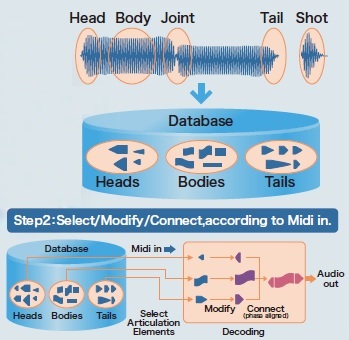
YMW820 Real Acoustic Sound (RAS)

A big issue hanging over all three design options is the inability to send SysEx from the Launchkey. Or, another way of stating the requirement, critical settings need SysEx when most inexpensive MIDI controllers are incapable of sending SysEx. Really, how hard would it be to add SysEx support to a MIDI controller? SAM2695 has two MIDI CCs — CC#80 and CC#81 — which set the reverb type and chorus type, respectively. This capability is very unusual, however.

Yamaha arrangers keep voice set-up data in a few different places. Every voice has a basic set-up in its internal meta-data. One level up in abstraction, each panel voice has a so-called VCE (Voice Edit) file. (“VCE” is one of several file name extensions which denote a Voice Edit file.) The VCE is a MIDI file which selects the base-level voice and then changes EQ, filter characters, attack/release, and insert effect among other things. Styles contain something like a VCE in One Touch Setting (OTS) locations. Registrations can store VCE-like data, too.

The arranger voice design got me thinking. Why not map MIDI Program Change messages to a group of VCE-like MIDI messages in order to set up the SAM2695 (or whatever), i.e., choose reverb and chorus type, tweak EQ, and so forth? My AdaFruit Feather MIDI event processor would be a good platform given the appropriate custom code. A future project?

Copyright © 2025 Paul J. Drongowski
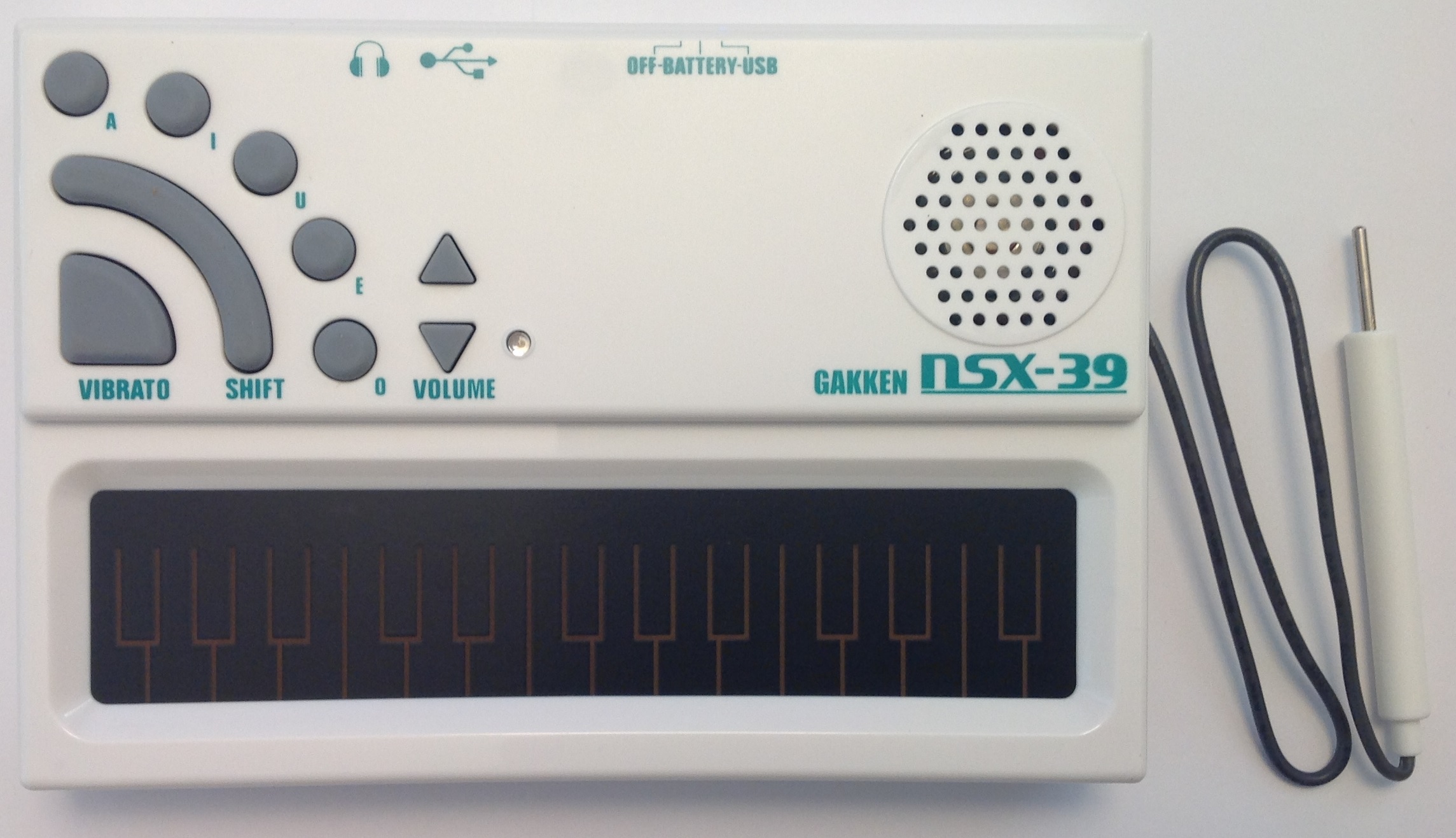
Pocket Miku: Module review

So far, I’ve posted several articles with resources for the Yamaha NSX-1 eVocaloid integrated circuit and the Gakken Pocket Miku (NSX-39), which is based on the NSX-1 chip. (See the bottom of this page for links.) This post pulls the pieces together.

Pocket Miku is both a vocal stylophone and a Yamaha XG architecture General MIDI (GM) module. There are plenty of Pocket Miku stylophone demos on the Web, so I will concentrate on Pocket Miku as a module.

Pocket Miku connects to your PC, mobile device or whatever over USB. The module implements sixteen MIDI channels where channel one is always assigned to the Miku eVocaloid voice and channels 2 to 16 are regular MIDI voices. As I said, the module follows the XG architecture and you can play with virtually all of the common XG features. The NSX-1 within Pocket Miku includes a fairly decent DSP effects processor in addition to chorus and reverb. The DSP effect algorithms include chorus, reverb, distortion, modulation effects, rotary speaker and a lot more. Thus, Pocket Miku is much more than a garden variety General MIDI module.

My test set up is simple: Pocket Miku, a USB cable, a Windows 7 PC, Cakewalk SONAR and a MIDI controller. Pocket Miku’s audio out goes to a pair of Mackie MR5 Mk3 monitors. The MP3 files included with this post were recorded direct using a Roland MicroBR recorder with no added external effects.

The first demo track is a bit of a spontaneous experiment. “What happens if I take a standard XG MIDI file and sling it at Pocket Miku?” The test MIDI file is “Smooth Operator” from Yamaha Musicsoft. Channel 1 is the vocal melody, so we’re off to a fast start right out of the gate.

One needs to put Pocket Miku into NSX-1 compatibility mode. Simultaneously pressing the U + VOLUME UP + VOLUME DOWN buttons changes Pocket Miku to NSX-1 compatibility mode. (Pocket Miku responds with a high hat sound.) Compatibility mode turns off the NSX-39 SysEx implementation and passes everything to the NSX-1 without interpetation or interference. This gets the best results when using Pocket Miku as a MIDI module.

Here is the MP3 Smooth Operator demo. I made only one change to the MIDI file. Unmodified, Miku’s voice is high enough to shatter glass. Yikes! I transposed MIDI channel 1 down one octave. Much better. Pocket Miku is singing whatever the default (Japanese) lyrics are at start-up. It’s possible to send lyrics to Pocket Miku using SysEx messages embedded in the MIDI file. Too much effort for a spontaneous experiment, so what you hear is what you get.

Depending upon your expectations about General MIDI sound sets, you’ll either groan or think “not bad for $40 USD.” Miku does not challenge Sade.

One overall problem with Pocket Miku is its rather noisy audio signal. I don’t think you can fault the NSX-1 chip or the digital-to-analog converter (DAC). (The DAC, by the way, is embedded in the ARM architecture system on a chip (SOC) that controls the NSX-1.) The engineers who laid out the NSX-39 circuit board put the USB port right next to the audio jack. Bad idea! This is an example where board layout can absolutely murder audio quality. Bottom line: Pocket Miku puts out quite a hiss.

The second demo is a little more elaborate. As a starting point, I used a simple downtempo track assembled from Equinox Sounds Total Midi clips. The backing track consists of electric piano, acoustic bass, lead synth and drums — all General MIDI. Since GM doesn’t offer voice variations, there’s not a lot of flexibility here.

I created an (almost) tempo-sync’ed tremolo for the electric piano by drawing expression controller events (CC#11). My hope was to exploit the DSP unit for some kind of interesting vocal effect. However, everything I tried on the vocal was over-the-top or inappropriate. (Yes, you can apply pitch change via DSP to get vocal harmony.) Thus, Miku’s voice is heard unadulterated. I eventually wound up wasting the DSP on a few minor — and crummy — rhythm track effects.

I created four lyrical phrases:

A summer day           Natsu no hi
f0 43 79 09 00 50 10 6e 20 61 2c 74 73 20 4d 2c 6e 20 6f 2c 43 20 69 00 f7

Your face              Anata no kao
f0 43 79 09 00 50 10 61 2c 6e 20 61 2c 74 20 61 2c 6e 20 6f 2c 6b 20 61 2c 6f 00 f7

A beautiful smile      Utsukushi egao
f0 43 79 09 00 50 10 4d 2c 74 73 20 4d 2c 6b 20 4d 2c 53 20 69 2c 65 2c 67 20 61 2c 6f 00 f7

A song for you         Anata no tame no uta
f0 43 79 09 00 50 10 61 2c 6e 20 61 2c 74 20 61 2c 6e 20 6f 2c 74 20 61 2c 6d 20 65 2c 6e 20 6f 2c 4d 2c 74 20 61 00 f7

The Japanese lyrics were generated by Google Translate. I hope Miku isn’t singing anything profane or obscene. 🙂

I did not create the SysEx messages by hand! I used the Aides Technology translation app. Aides Technology is the developer of the Switch Science NSX-1 Arduino shield. The application converts a katakana phrase to an NSX-1 System Exclusive (SysEx) message. Once converted, I copied each HEX SysEx message from the Aides Tech page and pasted them into SONAR.

Finally, the fun part! I improvised the Miku vocal, playing the part on a Korg Triton Taktile controller. What you hear in the MP3 Pocket Miku demo is one complete take. The first vocal section is without vibrato and the second vocal section is with vibrato added to long, held notes. I added vibrato manually by drawing modulation (CC#1) events in SONAR, but I could have ridden the modulation wheel while improving instead.

The overall process is more intuitive than the full Vocaloid editor where essentially everything is drawn. Yamaha could simplify the process still further by providing an app or plug-in to translate and load English (Japanese) lyrics directly to an embedded NSX-1 or DAW. This would eliminate a few manual steps.

Overall, pre-loaded lyrics coupled with realtime performance makes for a more engaging and immediate musical experience than working with the full Vocaloid editor. If Yamaha is thinking about an eVocaloid performance instrument, this is the way to go!

The pre-loaded lyric approach beats one early attempt at realtime Vocaloid performance as shown in this You Tube video. In the video, the musician plays the melody with the right hand and enters katakana with the left hand. I would much rather add modulation and navigate through the lyrics with the left hand. This is the approach taken for the Vocaloid keytar shown on the Yamaha web site.

Here is a list of my blog posts about Pocket Miku and the Yamaha NSX-1:

I hope that my experience will help you to explore Pocket Miku and the Yamaha NSX-1 on your own!

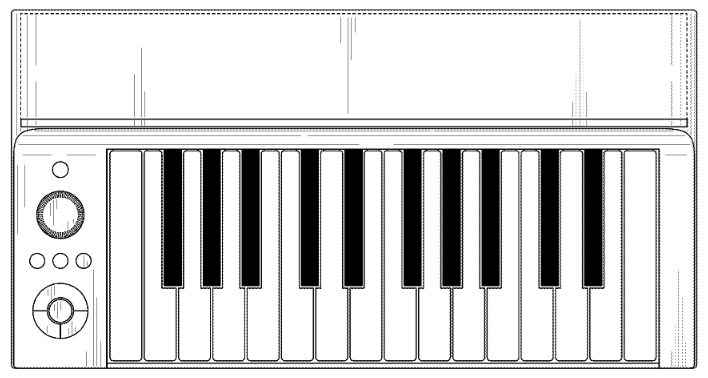
Before leaving this topic, I would like to pose a speculative question. Is the mystery keyboard design shown below a realtime eVocaloid instrument? (Yamaha U.S. Patent number D778,342)

The E-to-F keyboard just happens to coincide with the range of the human voice. Hmmmm?

Copyright © 2017 Paul J. Drongowski