About pj

Now (mostly) retired, I'm pursing electronics and computing just for the fun of it! I'm a computer scientist and engineer who has worked for AMD, Hewlett Packard and Siemens. I also taught hardware and software development at Case Western Reserve University, Tufts University and Princeton. Hopefully, you will find the information on this site to be helpful. Educators and students are particularly welcome!

Yamaha QY-70 anatomy

My ancient Yamaha QY-70 is a handy XG-compatible MIDI module. Quite useful when knocking out a track or two in the dining room. [Table space is tight.]

After 21 years, the back-up battery is nearly kaput and the dreaded “Back-up battery low” message appears whenever I turn on the QY. Fortunately, I’m paranoid as heck about data loss and I’m ready for low battery conditions, a massive cosmic ray burst from outer space, or the apocalypse.

I couldn’t pass up this perfect occasion to take a screwdriver to my beloved partner in musical crime…

First, the service manual. The QY-70 appeared in 1997 followed by its younger and bigger brother, the QY-100, in 2000. The QY-70 service manual is difficult to find on the Web. Fortunately, I had scavenged a somewhat poorly scanned copy two years ago, the original source since forgotten.

               QY-100    QY-70
               ------   ------
    Year         2000     1997
    Polyphony      32       32
    Voices        547      519
    Drum kits      22       20
    Reverb         11       11
    Chorus         11       11
    Variation      43       43

Thank goodness, disassembly is easy — remove the five screws on the back and the QY-70 splits into two halves, top and bottom. Beware if you are doing this yourself as the top and bottom are connected by two relatively flimsy power wires from the battery compartment to the main digital electronics board. (Yamaha always call the main digital board “DM”, by the way.)

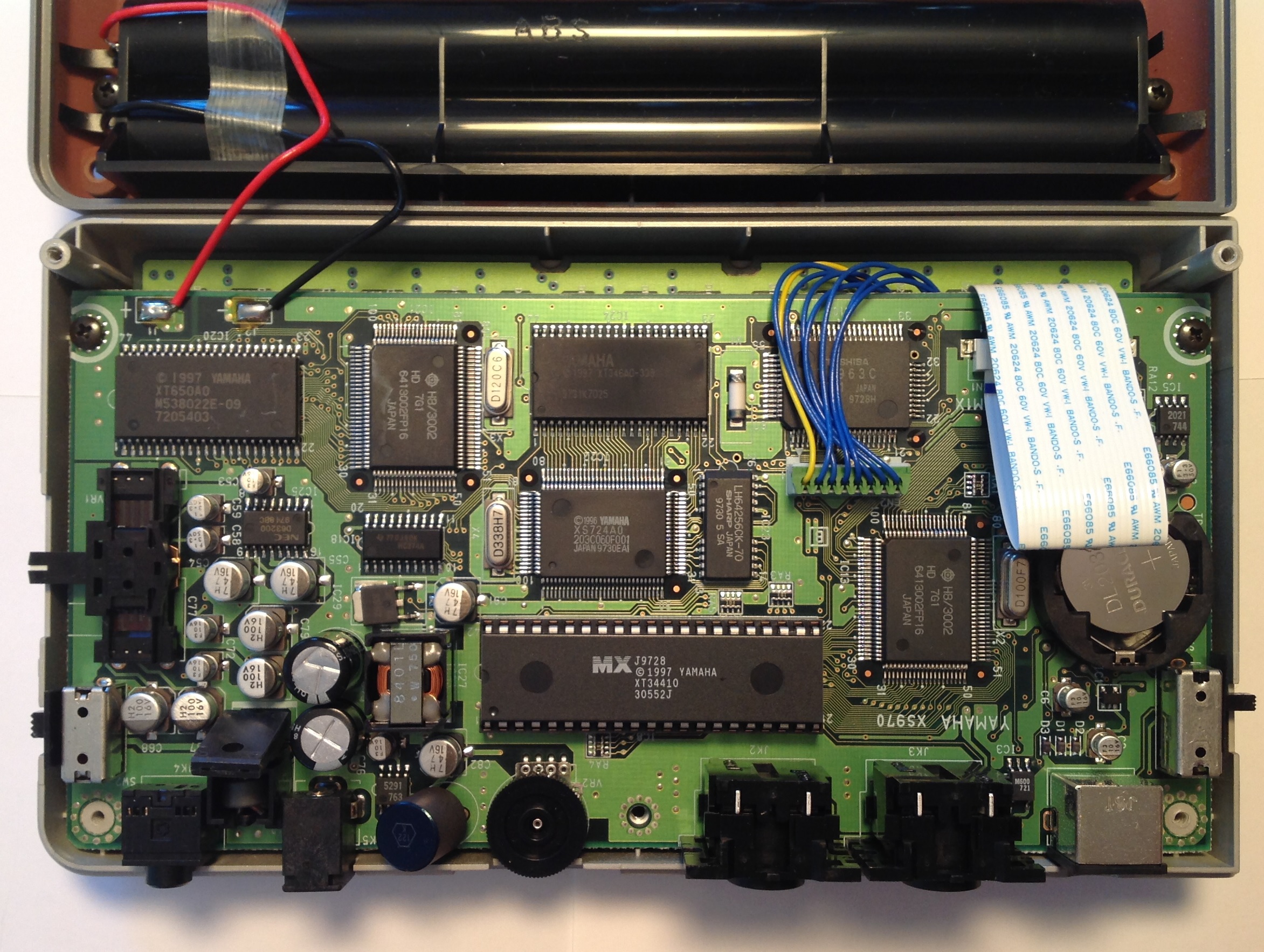
Like any good surgeon or forensic anatomist, I took a picture! [Click to enlarge.]

I blew a sigh of relief when I saw the easily accessed button battery, a CR2032 just like the QY-100. [In case you were wondering.] I don’t like to disassemble devices any more than I absolutely have to and didn’t relish pulling the DM board with its connections to the button/LCD board.

So, what is this stuff inside? Here are a few notes from the Yamaha service manual:

    Main CPU         HD6413002FP16      Hitachi H8 3002 10.0 MHz
        Program ROM  341MV030           16Mbits
        SRAM         M5M5256DFP-70LL    256Kbits (32Kx8-bits)
        SRAM         HM628128BLFP-7SL   1Mbits

    Sub CPU          HD6413002FP16      Hitachi H8 3002 12.0 MHz
        Program ROM  MSM538022E         8Mbits
        SRAM         M5M5256DFP-70LL    256Kbits (32K x 8-bits)

    Tone Generator   TC203C060AF-001    SWP00 33.8688 MHz
        Wave ROM     uPD23C32000-12     32Mbits (2M x 16-bits)
        DRAM         LH64256CK-70       Sharp 1Mbits

    DAC              uPD63200GS-E1      NEC 18/16 bit stereo DAC

I’ll bet that you didn’t know that the QY-70 (or QY-100) are multiprocessors?

Renesas was originally established as a joint venture between Hitachi and Mitsubishi Electric. Eventually, NEC Electronics joined the party, too. Thus, the H8 has its origins with Hitachi. Yamaha have been steady users of Hitachi (Renesas) processors for main- and sub-CPUs, having only recently taken a turn toward ARM (Reface, Montage and Genos).

The tone generator (TG) integrated circuit (IC) is smack in the middle of the DM board. It is the component marked “XS724A00”. The tone generator is the first Standard Wave Processor, SWP00M, in a long series of SWPs, culminating with the latest and greatest SWP70. The essential architecture is the same: a controlling host CPU like the H8, wave memory in ROM, and a dedicated RAM for effects processing.

The Sharp LH64256CK-70 is the 128KByte DRAM for effects processing. The component marked “XT346A00”, just above the tone generator, is the wave ROM.

The big dual in-line device (MX) below the tone generator, marked “XT34410”, is program ROM for the main CPU, located just to the right of it. The surface mount component in the upper left corner of the DM board, marked “XT650A0”, is the program ROM for the sub-CPU right next to it.

The NEC DAC is in the same neighborhood. The DAC operates in 18-bit mode and is the same DAC used in the Roland SC-88 Pro Sound Canvas, BTW. The likely sample rate is 44,100Hz as the SWP00 clock frequency is an even multiple of 44,100:

    33.8688MHz = 768 * 44,100Hz

Yamaha schematics state memory size in bits, not bytes. Thus, the wave memory is 4 MBytes organized as 2M x 16-bit words. Let’s reflect on that for a moment. The entire XG sound set — drums and all — fits into 4MBytes. Flash-forward to today when people belly ache about 2 gigabytes being just not enough. Yamaha are truly masters at sound design and compression. Let’s hope that its institutional memory and skill live on!

The QY-100 was yet another step ahead in technology, coming just three years after the QY-70. In the QY-100, Yamaha integrated the H8 and tone generator onto a single chip, the SWX00B, first in a long line of SWXs. The QY-100 has a bigger wave memory, 64Mbits organized as 4M x 16-bit words. The memory contains both TG programming and waveforms:

    TG program    1Mbyte
    Waveforms     7MBytes

As noted in the specs, the QY-100 has more voices and drum kits than the QY-70.

Well, I hope you enjoyed the nickel tour. Time to insert a new battery and then to button up the chassis. Have fun!

Copyright © 2018 Paul J. Drongowski

Insertion effects for MIDI songs

The new Yamaha Genos™ platform greatly expands the number of DSP insertion effects for styles and MIDI songs. No doubt, you would like to put these insertion effects to work in your own styles and MIDI songs. This blog post should help you get started.

There are 28 insertion effect units at your disposal:

  1. Insertion Effect 1 to 19: Keyboard parts (RIGHT1, etc.) and Song channels 1 to 16.
  2. Insertion Effect 20: Microphone and Song channels 1 to 16.
  3. Insertion Effect 21 to 28: Style Parts (except Audio Styles).

Within the constraints of these three groups, any Insertion Effect unit within a group may be assigned to any audio source associated with the group.

I will use the terms “Insertion Effect” and “DSP effect” interchangeably. This is true when you delve into the Yamaha XG parameters, too.

With all this flexibility, effect resource management can easily get out of control. I’ve developed a few personal guidelines to help keep things organized:

  • Genos assigns RIGHT1, RIGHT2, RIGHT3, and LEFT to Insertion Effects 16, 17, 18 and 19. Avoid using these Insertion Effect units in a MIDI Song.
  • Assign the remaining Insertion Effect units on a 1-to-1 corresponding basis: DSP unit 1 to Song part 1, DSP unit 2 to Song part 2, etc.

These simple guidelines make it easier to manage track DSP usage when doing the busy-work of Song editing.

Genos also provides a Variation Effect which can be configured as either a System effect or an Insertion Effect. Let’s not even go there for now. The Variation Effect offers additional opportunities for signal routing and control. Unfortunately, opportunity comes at the cost of complicated configuration.

If you want more information about using the Variation Effect, here’s a pair of blog posts for you: PSR/Tyros XG effects and XG effects: SYSTEM mode.

It’s simple then — each DSP unit (Insertion Effect) corresponds to a single Song part. Each unit and its part have the same identifying number.

If you’re sequencing on the Genos itself, you can assign Insertion Effects to Style and Song parts using the Mixer. Go to the Mixer, touch the “Effect” tab at the Left of the screen, and then touch the “Assign Part Setting” button. Genos displays the insertion effect assignment dialog box where you can make assignments. This dialog box is a good way to check that your MIDI sequence is making the correct assignments, too.

I do my MIDI sequencing and editing in BandLab Technologies SONAR (formerly Cakewalk SONAR). This means configuring DSP effects via System Exclusive (SysEx) MIDI messages. Many people fear SysEx because the messages are encoded in hexadecimal numbers. Fear not! I’m going to give you a head start.

At a minimum, we need to create two SysEx messages for each Insertion Effect:

  1. One message to assign the DSP unit to the Song part, and
  2. One message to select the DSP effect type (e.g., British Legend Blues).

This is enough to assign a DSP effect preset (and its algorithm) to a Song part. Once assigned and the MIDI sequence is loaded, you can edit the effect parameters in the Genos GUI by spinning the faux knobs and such. When you hear a setting that you like, you can translate the settings into additional SysEx messages and incorporate the messages into the sequence using a DAW like SONAR.

First things first. The SysEx message to assign the DSP unit to a Song part has the form:

F0 43 10 4C 03 XX 0C YY F7

where XX is the DSP (Insertion Effect) unit number and YY is the Song part number. The only potential gotcha is MIDI unit and part numbering — it starts from zero instead of one. For example, let’s assign DSP unit 6 to MIDI part 6. (I’m assuming that the MIDI part and channel numbers are the same; the usual default situation.) In this example, XX=5 and YY=5, so the final SysEx message is:

F0 43 10 4C 03 05 0C 05 F7

Straightforward.

You may already be aware that hexadecimal (hex) is a way of counting (i.e., representing numeric quantities) in base sixteen. The hex digits 0 to 9 have their usual meaning. Hex digits A, B, C, D, E, and F represent the numeric quantities 10, 11, 12, 13, 14, and 15, respectively, when those quantities are written in base 10, decimal notation. You’ll need those hex digits when connecting DSP units 10 to 16 and Song Parts 10 to 16.

In case you’re still unsure of yourself, here’s a simple table to help you out:

DSP#  Part#   SysEx message
----  -----   -----------------------------------
   1      1   F0 43 10 4C 03 00 0C 00 F7
   2      2   F0 43 10 4C 03 01 0C 01 F7
   3      3   F0 43 10 4C 03 02 0C 02 F7
   4      4   F0 43 10 4C 03 03 0C 03 F7
   5      5   F0 43 10 4C 03 04 0C 04 F7
   6      6   F0 43 10 4C 03 05 0C 05 F7
   7      7   F0 43 10 4C 03 06 0C 06 F7
   8      8   F0 43 10 4C 03 07 0C 07 F7
   9      9   F0 43 10 4C 03 08 0C 08 F7
  10     10   F0 43 10 4C 03 09 0C 09 F7
  11     11   F0 43 10 4C 03 0A 0C 0A F7
  12     12   F0 43 10 4C 03 0B 0C 0B F7
  13     13   F0 43 10 4C 03 0C 0C 0C F7
  14     14   F0 43 10 4C 03 0D 0C 0D F7
  15     15   F0 43 10 4C 03 0E 0C 0E F7
  16     16   F0 43 10 4C 03 0F 0C 0F F7

Find the row in the table for the Insertion Effect (DSP unit) number and Song Part that you want to configure. The third column is the SysEx message to use.

Once the DSP unit is assigned to the Song Part, you need a SysEx message to choose the DSP effect type (e.g., British Lead Dirty). The SysEx message to accomplish this job has the form:

F0 43 10 4C 03 XX 00 MM LL F7

where XX is the DSP unit number, MM is the MSB of the effect type and LL is the LSB of the effect type. The effect types are listed in the Genos Data List PDF file. Look under the “Variation/Assertion Block” section of the Effect Type List. British Lead Dirty is a distortion effect with MSB=102 and LSB=32.

The next step is to convert the MSB and LSB to hexadecimal. I think this is the part that scares some folks the most. Actually, Yamaha have made it easy. While you’re in the Geno Data List PDF file, go to the first “MIDI Data Format” page. You’ll find a table that converts between decimal, hexadecimal and binary. Look up 102 and 32 in the table. The equivalent hex values are 0x66 and 0x20. (The “0x” is my way of marking hexadecimal values.)

After converting, it’s time to select the DSP effect type for unit 6 (and by way of assignment, Part 6). Plug XX=5, MM=66 and LL=20 into the template message above, producing:

F0 43 10 4C 03 05 00 66 20 F7

This message sets the effect type of DSP (Insertion Effect) 6 to British Lead Dirty.

That’s it. At this point, you’re ready to assign DSP preset effects to any of the Song parts. Style parts work the same way. No calculator involved, just a few easy tables.

Changing the DSP effect parameters via SysEx is a little bit more complicated. I’ll save that topic for another day.

Copyright © 2018 Paul J. Drongowski

Summer snoozer?

Summer NAMM 2018 starts in a few days and so far it looks like a snoozer. I haven’t found many preliminary announcements of interest. I’m tempted to predict Yamaha’s MOXF replacement (or upgrade), again. However, at some point, one starts to look like a broken clock being right twice a day. 🙂

Yamaha have announced a new product in the P-series digital pianos. The new model P-515 replaces the P-255 as the P-series flagship.

The P-515 is a slab that incorporates much of the new digital piano technology that was introduced with the CSP series (Smart Pianist and Piano Room). The P-515 includes NWX natural wood white keys with synthetic ebony and ivory key tops. Piano sounds include the Yamaha CFX and Bösendorfer Imperial. It has forty panel voices plus a 480-voice XG sound set. The CFX Grand Voice has binaural sampling which recreates the perspective of the player position. Other goodies include key-off samples, smooth release, Virtual Resonance Modeling (VRM), and half pedaling. VRM includes damper, string, Aliquot, and body resonance. Bluetooth audio/MIDI is built-in. Speakers are built-in: Oval 15W (12cm by 6cm) and dome 5W (2.5cm). [Two of everything, of course.] Weight is 48.5 pounds and MSRP is $1,999 USD and MAP (street) is $1,500 USD. A little too heavy for regular gigs out, but its compact size, sound and action make the P-515 a winner for home, especially at $1,500 street. [Manuals now available.]

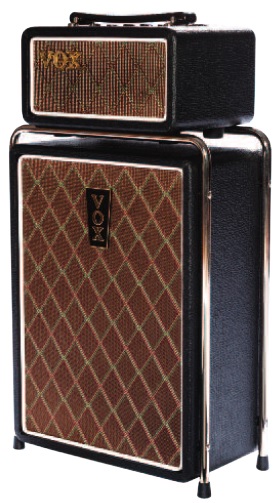
60s retro is always in with me, so I’m charmed by the Vox Mini SuperBeetle. (Yes, they are using that abominable spelling.) Vox hit the real Super Beatle with a shrink ray, producing a small version that should have some punch. The Mini puts 50 Watts into a 10″ Celestion speaker (or other 4 ohm cab). It has a Korg NuTube tremolo circuit for warmth and 60s reverb.

The Mini has the distinctive Super Beatle chrome stand. I wish Korg/Vox would reissue the Continental in retro form instead of the form factor and stand that everybody pretty much hates. No pricing information yet.

Although it was announced in May, the IK Multimedia UNO analog synth looks like a good time. For a $200 USD synth, the specs aren’t too bad: two independent VCOs, 2-pole multi-mode VCF, LFO, VCA, step sequencer, battery or USB power, and it’s tiny. The UNO has four control knobs which are mapped to synth parameters through a 4 by 4 matrix. Plus, it has five performance buttons. Wisely, the UNO supports old school MIDI IN and OUT via 2.5mm jacks.

If only IK Multimedia had the presence of mind to add 5-pin MIDI to the iRig Keys I/O (25 or 49). Systems thinking, people. Systems thinking.

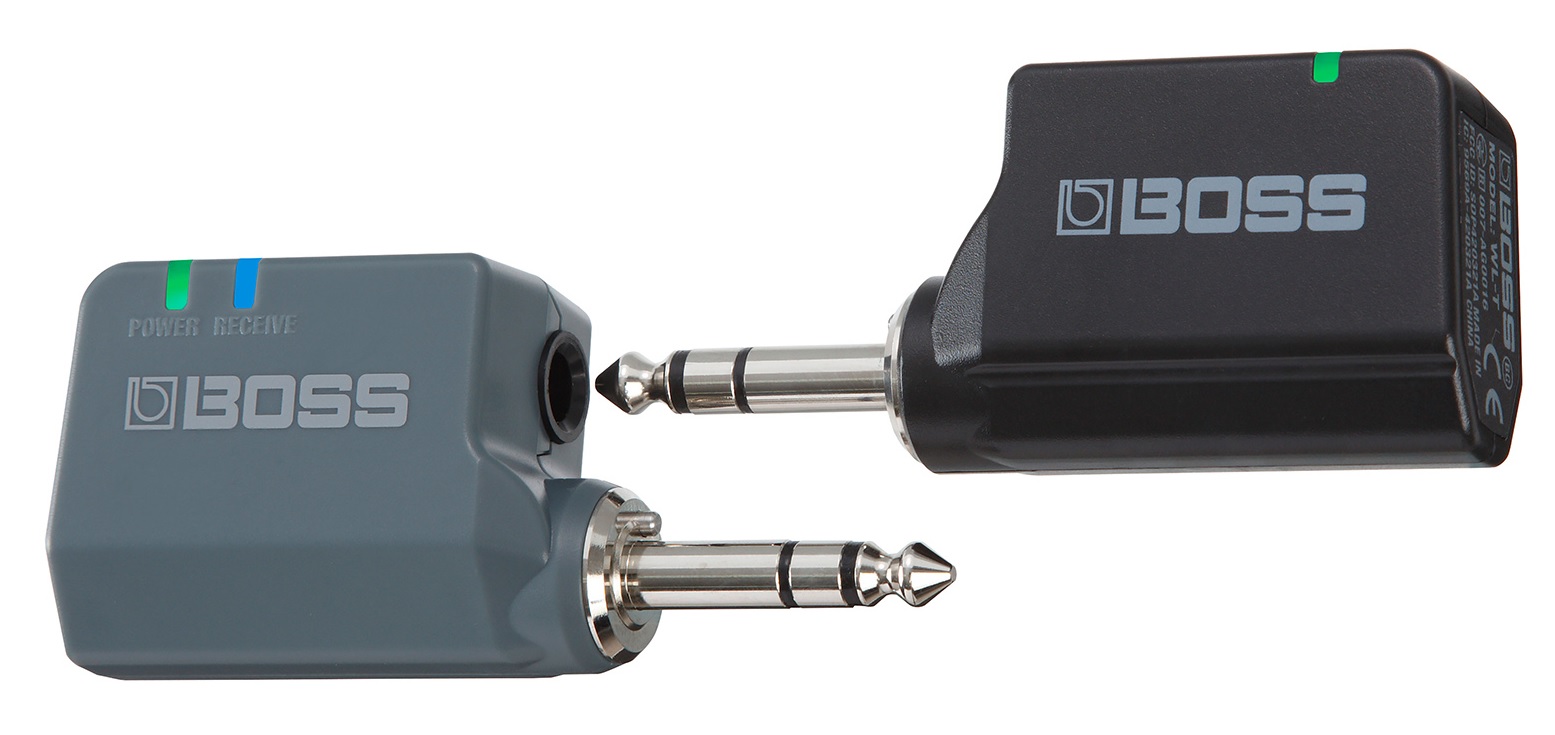
Roland (and Boss) have announced a new wireless audio system for guitar and other instruments. Two products are aimed at guitar players: the WL-20 and the WL-50. The WL-20 is a very compact transmitter and receiver pair — transmitter for the guitar and receiver for the amp. The WL-50 is a wireless receiver for the pedal board and has additional functionality like providing pedal board power, transmitter recharging, etc. The WL-20L is like the WL-20, but it’s for electronic instruments with line-level audio outputs. Other features include low latency, automatic rendezvous between transmitter and receiver (10 second rendezvous time) and up to 20 meter range. The WL system operates in the 2.4GHz band. I’m interested in the low-latency aspect because Bluetooth doesn’t cut it in this application.

The WLs will be sold under the Boss brand.

News you can use. Avid has announced and released a free version of Sibelius® | First. Sibelius | First is my go-to notation tool for lead sheets, deconstructing MIDI solos, etc. For sure, I will be downloading it and will appreciate the update. (My current copy is rather old, having been part of an M-Audio bundle.) You need to create an Avid account in order to download the free version. Might as well download Pro Tools® | First for free, too.

The modular synth trend has inspired a lot of great products such as the Moog Grandmother. Expect to see new announcements in the Roland System-500 line and literal “plug and play” products in other realms like the Finegear mixerblocks series.

Well, there is always the Moog One rumor. (Save your pennies.)

Copyright © Paul J. Drongowski

Time stretching applied to rotary speaker sound

“Sí, sí, I am very intrigued.”

With Summer NAMM 2018 one week away, I cast the net to see what I can catch. I did a quick sweep of recent patents and came up with a good ‘un.

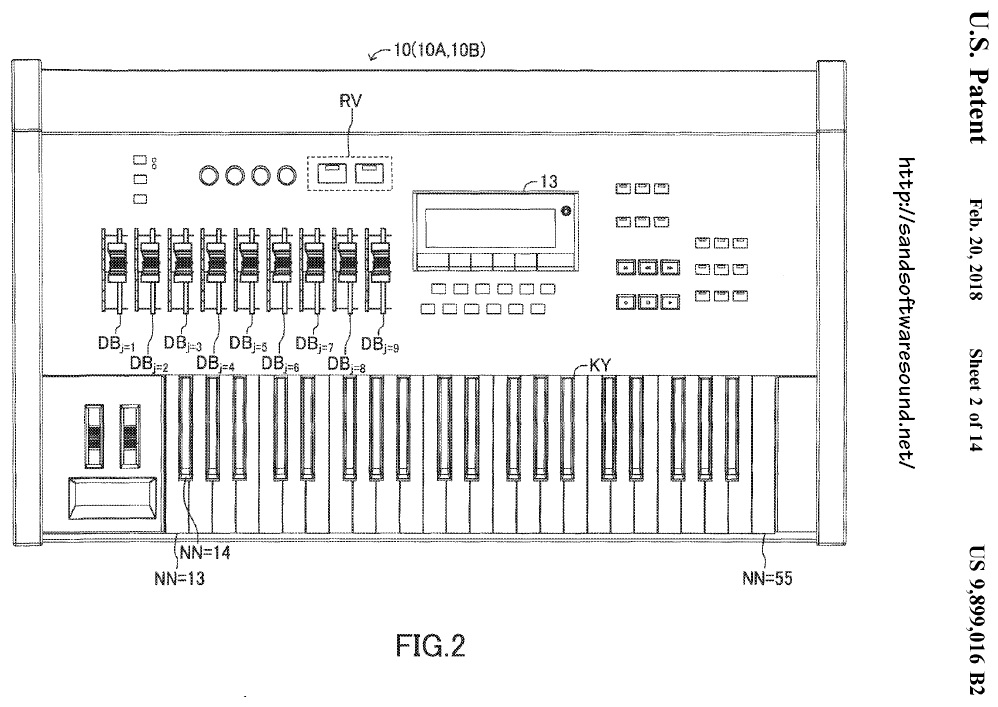
When folks mention Yamaha, “tonewheel clone” does not immediately come to mind. Other players like Nord, Hammond Suzuki, etc. seem to be ahead in the clone market. So, I was a little surprised to find US Patent 9,899,016 B2, “Musical sound signal generation apparatus that generates sound emulating sound emitting from a rotary speaker.” This patent was issued and assigned to Yamaha on February 20, 2018. It is based on the Japanese patent 2015-171065 issued August 31, 2015.

Yamaha currently use two sample-based methods to generate the basic organ sound:

  • Playback and mix of waveforms for each individual tone wheel. On Montage and Genos, for example, the musician can adjust the level of each footage using the sliders to mimic drawbars. The generated sound is passed through a rotary speak DSP effect.
  • Playback of waveforms for “full up” organ registrations with and without the rotary speaker effect “sampled in.” The resulting sound may also be passed through a rotary speaker DSP effect.

In the first case, especially, the overall impression of a genuine B-3 depends upon the quality of the DSP rotary speaker effect. The up-side of the DSP effect is the ability to ramp up and ramp down the rotary speaker speed. So far, reaction to Yamaha’s rotary speaker effects has been mixed.

In the second case, one is not likely to put the sound through a rotary DSP effect — the swirling mass would just not be realistic. The “sampled in” approach can sound more realistic than the rotary DSP effect, but it has two major drawbacks:

  1. The rotary speaker speed cannot ramp up and down between slow and fast rotation.
  2. Sample playback does not align (synchronize) the rotary speaker position, so some noted are “rotating” faster than others and the true spatial characteristics of the horn and rotor are lost.

The second drawback is perhaps the worst of the two since it introduces audible artifacts which are not part of the true rotary speaker sound.

The method in the patent is a different take on sample-based synthesis of tone wheel sound which seeks to eliminate these problems. The notes are sampled for each tone wheel footage after a real world rotary speaker rotating at a particular rate. In each case, wavfeorms are sampled and saved for various rotational angles of the rotary speaker. Thus, the rotary speaker effect is “sampled in.”

Let’s quote from the patent:

Also, the electronic musical instrument has a time stretching function. The time stretching function is a function of changing the length of a sound while maintaining the pitch and formant of the sound. In other words, with the time stretching function, it is possible to extend and shorten a sound in a time axis direction, or in other words, it is possible to change only the reproduction speed (speed with which time advances) of the musical sound signal. The electronic musical instrument uses the time stretching function to extend and shorten each piece of waveform data in the time axis direction by the same extension and shortening rates.

Time stretching is applied to each of the tone wheel samples during playback. Thanks to time stretching, the instrument can reproduce the SLOW and FAST sound, and everything in between when the rotation speed ramps up or down. “A known pitch synchronous overlap and add method is used to achieve the time stretching function.”

The rest of the method — and it is both exhaustive and exhausting! — deals with the synchronization of the waveforms during playback, that is, the alignment of each waveform in accordance with the current virtual position (rotational angle) of the rotary speaker. Throw in separate treatment of the horn and rotor, stereo channels, etc.

The end result is a unique sample-based method that eliminates the problems of “sampled in” rotary speaker effects. I wish that patents came with audio demo files as it would be a treat to hear the method in action and to judge with one’s own ears. Maybe someday in a product?

Copyright © 2018 Paul J. Drongowski

Boston Music Expo 2018

After having so much fun last year, I couldn’t pass up the 2018 Boston Music Expo (Saturday, June 9). Music Expo brings people together — artists, producers, engineers, composers, tech companies — the whole panoply of folks at the intersection of musical art and technology.

Sound On Sound Magazine is the chief sponsor. This year’s gold sponsors are Yamaha and Steinberg. Of course, both Steinberg and Yamaha were showing their wares along with many other companies big and small.

Loïc Maestracci — the founder of Music Expo — was at the door with the chance for a quick “Hello!” Let’s get started and go in.

Boston Music Expo 2018 was hosted by The Record Co., located in Boston’s South Bay. The Record Co. has the ambitious mission “to build a sustainable, equitable music scene in Boston.” Although Boston already has a busy scene, it isn’t easy for all artists to grow, collaborate and record. The Record Co. provides subsidized studio space, gear and production resources, thereby lowering the financial barrier for artists looking to record.

The Record Co. has two studios, both kitted out with top-notch gear. Rates are very reasonable. The Studio A live room is quite large and was the venue for one of the two parallel seminar tracks running at Music Expo. Studio A held 40 to 50 seats with space to spare. Studio B is smaller and more intimate.

The thing that I like best about Music Expo is the surprises. While getting my bearings, I was blown away to find people soldering! I had stumbled into the Audio Builders Workshop sponsored by the Boston Chapter of the Audio Engineering Society (AES).

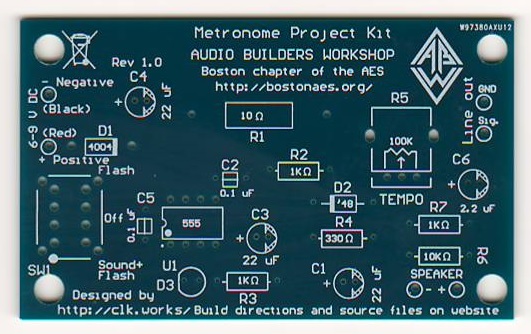
The Audio Builders Workshop offers seminars and group builds to encourage and inspire people to make their own audio electronics. I had a great chat with Brewster LaMacchia (Clockworks Signal Processing) who was leading the group build. The workshop participants were building a small metronome kit ($10 donation). The kit consists of a circuit board, 555 timer, speaker, battery connector, and a handful of discrete components. It’s all through-hole construction and looks like a great way to get started with soldering. If you’re in the Boston area and have an interest in audio electronics, then I definitely recommend getting in touch with this organization.

I bought one of the kits and will eventually build and review it. Sometimes I just like to soldering something up on a rainy day.

Another organization at Music Expo that deserves recognition and support is Beats By Girlz. BBG is a “music technology curriculum, collective, and community template designed to empower females to engage with music technology.” BBG sponsors workshops and other events (hardware and software provided!) to get women and girls into music production, composition and engineering.

That last “E” for “engineering” gets me fired up! Music technology, for me, is the gateway drug to Science, Technology, Engineering and Mathematics (STEM) education and careers. Women are so woefully underrepresented in STEM that I wholeheartedly support groups like Beats By Girlz. In addition to Boston, BBG has chapters in Minnesota, Los Angeles, New York and Chicago. I recommend Women In Music, too, BTW.

I arrived at Music Expo a little later than expected due to a traffic tie-up on the expressway. (Saturday morning? Really?) However, I did manage to catch the two sessions in which I was most interested.

Since it was first announced, I wanted to see and hear Audionamix Xtrax STEMS in action. I’ve tried to spice up my backing tracks with vocal snippets and found center extract (and center cancel) techniques lacking. My first “must-hear” session at Music Expo was an Xtrax STEMS plus Ableton Live presentation by Venomisto. Venomisto used Xtrac STEMS to pull a vocal stem from an existing song and then inserted the vocals into his own remix. Xtrax STEMS is not perfect, but it’s darned good for the money ($99 USD).

I really dug Venomisto’s latin remix, Havana. Toe tappin’, head noddin’. I love this stuff on a Saturday in the city! [I’m listening to it right now and can’t get back to work.] Cruise over to his site and you’ll hear Xtrax STEMS in action, too.

My second “don’t miss” session was “From Score To Stage” by Paul Lipscomb joined by Pieter Schlosser via Skype. Paul ran through the process of sketching and delivering the “Destiny 2” game soundtrack (Bungie Software). Wow, this session could have been a full day.

Although Paul wanted to show people that there are many ways to work and create as an artist, we’re talking “Production” here with a capital “P”. The Destiny 2 soundtrack is a AAA (big) budget production with multiple composers, orchestrators and an orchestra. All I can say, if you want to do this kind of work, be good at the hang and collaboration. Be prepared to work in a geographically dispersed team: client (Bellevue/Seattle), co-writers (Los Angeles, Seattle), orchestrator (The Berkshires in Massachusetts).

Paul classifies music (and the process of getting there) as either linear or interactive. Music for film or video is linear, having a start point, several intermediate points one after another and an end. Game music is interactive and must adapt and re-structure itself to fit the actions of the player.

He demonstrated how one can start with a simple motif (or two) and build your way to a 250 track behemoth. Thanks to the wonderful orchestral libraries available today, composers can put together a rather complete mock-up to present to a client for approval. Even on a big budget job, some of the parts in the mock-up may make it to the final mix simply because there isn’t enough money available to fund everything live (e.g., you can have the orchestra, but not the choir).

Paul uses Steinberg Nuendo and swears by it. Pieter uses Cubase. Nuendo is the bigger brother to Cubase and is geared for post-production and scoring. Paul exports MIDI tracks and provides them to the orchestrator for notation. Yep, good old MIDI.

Paul and Pieter’s presentation was thought provoking, especially about the current state/direction of orchestral music for film, video and games. A discussion about clients and aesthetics would be more appropriate for the “Notes From The Deadline” column in Sound On Sound. [My favorite SOS column, BTW.] However, I’m pondering the age-old question of how to raise our clients to a higher level of musicality. Like Paul, many of us listen to a wide range of music including traditional and modern classical music. (Paul’s advice: “Listen to everything!”) How can we move our clients beyond the limited scope of their own musical experience?

Well, shucks, that’s just two of the fifteen Boston Music Expo sessions on offer. Several sessions dealt with the business side — promotion, social media and collaboration — in addition to the artistic side.

I spent time cruising the exhibitor booths. Here’s a few short-takes and shout-outs:

  • Scott Esterson at Audionamix demonstrated Instant Dialog Cleaner (IDC) as well as XTrax STEMS. He humored a lot of my crazy questions and comments. Thanks.
  • The Yamaha folks had Montage6, MX88, MOXF8 and a clutch of Reface keyboards available for trial. Friendly as ever, it was good to touch base. I had an extended conversation with Nithin Cherian (Product Marketing Manager, Steinberg) and I quite appreciate the time that he spent talking with me.
  • The IK Multimedia iLoud Micro Monitors are excellent for the price. Not quite up to the Genelec studio monitors on show in the room next door, but much more affordable. A definite covet.
  • Speaking of IK, the iRig Keys I/O have a decent, solid feel and touch. The 25 key model is seriously small and still has full size keys. Suggestion to IK Multimedia: Please bring out a 5-pin MIDI dongle for us dinosaurs with old keyboards. I’d love to hook up an iRig Keys I/O 49 to Yamaha Reface YC.

A special shout-out to Derrick Floyd at the IK Multimedia booth. He epitomizes “good at the hang.”

I said it last year and I’ll say it again, Music Expo bridges the widening gap between customers and technically advanced products. On-line ads and videos just aren’t the same as playing with a product and experiencing it for one’s self. Brick and mortar stores cannot devote much space, inventory or expertise to the broad range of fun tools and toys that are up for sale. With on-line sales as perhaps the dominant sales channel, whoof, tactile customer experience is utterly lost. Music Expo closes the gap.

If Music Expo is coming to your corner of timespace, please don’t hesitate to attend and participate. I’m sure that you will enjoy the experience and will make valuable connections.

Copyright © 2018 Paul J. Drongowski

Which guitar is which?

I hope my recent post about single coil and double coil guitar tone and amp simulators was helpful. Today, I want to further reduce theory to practice.

A quick recap

Guitar pickups are important to overall guitar tone. There are two main types of pickup: single coil and double coil. Players generally describe the sound of a single coil pickup as bright or thin and describe the sound of a double coil pickup as warm or heavy. Double coil pickups are also called “humbuckers” because the design mitigates pickup noise and hum. Pickup tone tends to favor certain styles of music:

  • Single coil: Blues, funk, soul, pop, surf, light rock and country styles
  • Double coil (Humbucker): Hard rock, metal, punk, blues and jazz styles

Of course, there are no hard and fast rules and exceptions abound!

Fender guitars frequently use single coil pickups while Gibson favors double coil. Three guitar models are favorites and are in wide use:

  • Fender Telecaster (Usually 2 single coil pick-ups): Bright, banjo-like tone, twangy.
  • Fender Stratocaster (3 single coil pick-ups): Bright, cutting tone.
  • Gibson Les Paul (2 humbucker, dual coil pick-ups) Warm tone with sustain.

The Telecaster was originally developed in 1951 for country swing music. It was quickly adopted by early rock and rollers. The Stratocaster appeared in 1954, but is usually associated with 60s rock. It is often used in rock, blues, soul, surf and country music. The darker tone and sustain of the Les Paul make it suitable for hard rock, metal, blues and jazz styles.

These aren’t the only (in)famous guitars around. The Rickenbacker solid and semi-acoustic models are also classic. Think about the chime-y Beatles and Byrds radio hits from the 1960s. Single coil Ricks are not uncommon.

If you would like to hear the difference in raw tone between Fender Telecaster (single coil), Fender Stratocaster (single coil) and Gibson Les Paul (double coil humbucker), cruise over to this comparison video. The demonstrator compares raw tone starting at roughly 7 minutes into the video, ending at about 11 minutes. The first part of the video is the usual yacking and the last part of the video puts the guitars through an overdrive effect with the demonstrator playing over a backing track. The last part is less informative because our ears need to sort out the guitar from the backing track. Plus, once you put a guitar into a distortion effect, all bets are off. Are you hearing the true guitar tone or just an effected, synthesized tone?

Method to the madness

My ultimate goal is to identify and classify synth and arranger guitar voices, single coil vs. double coil, in order to quickly chose an appropriate guitar voice (patch) for MIDI sequencing. I work with Yamaha gear (Genos workstation, PSR-S950 arranger, and MOX6 synthesizer), so the following discussion will focus on Yamaha. However, you should be able to apply the same method (and guesswork about names!) to Korg, Nord, whoever.

Yamaha provides some major clues as to the origin of its guitar samples, but they are quite reticent to use brand names. Arranger (Genos and S950) voice names are especially opaque. Therefore, the best we can do is to use the clues when possible and to always, always use our ears.

Fortunately, the deep voice editing of the MOX6 lets me dive into the guts of a guitar patch to find the base waveform information including waveform name. In order to get the analysis started, I went into the Mega Voice patches to find the underlying waveforms. When Yamaha sample a guitar, they sample multiple articulations (open string, slap, slide, hammer on, etc.). The waveforms for a particular instrument are a family and share the same root name like “60s Clean.” Given the base waveforms, I then can identify regular synth voices which use the same waveforms. The regular voices are more easily played on the keyboard than Mega Voices, making it easier to perform A/B testing.

Mega Voices are a good entry point for analysis because the MOX, Motif and Montage family have roughly equivalent Mega Voices as the S950, Tyros and Genos product family. This allows A/B testing across and within product lines.

Development history is important, too. I took note of new Mega Voices added to each product generation. Each new Mega Voice is a new waveform family. Given a Mega Voice, I look for new Super Articulation (SArt) voices which were also added at the same time and try to find the SArt voices which are based on the Mega Voice. The chosen SArt voices become reference sounds for further A/B testing and starting points for voice selection when sequencing a song.

When A/B testing, all EQ, filter and DSP effects (including reverb and chorus) must be turned OFF. We need to reveal the sound of the underlying raw waveforms (samples). Even so, there may still be sonic differences due to VCF and VCA programming. I found that this kind of critical listening is quite tiring and it’s better to work for 30 minutes, walk away and come back later with fresh ears. Otherwise, everything starts to sound the same!

Breakdown

Enough faffing around, get to the bottom line.

First up is a correspondence table between Montage (Motif, MOX) Mega Voice guiters and Genos (Tyros, PSR S-series) Mega Voice guitars.

       Genos name            Motif/MOX name        Motif/MOX waveform
---------------------------  --------------------  ------------------
8 10 4 60sVintage                                  n/a [Strat]
8 11 4 60sVintageSlap                              n/a [Strat]
8  4 4 50sVintageFinger                            TC Cln Fing *
8  5 4 50sVintageFingerSlap                        TC Cln Fing Slap
8  6 4 50sVintagePick                              TC Cln Pick *
8  7 4 50sVintageSlap                              TC Cln Pick Slap
8  8 4 SlapAmpGuitar       
8  3 4 SingleCoilGuitar      Mega 1coil Old R&R    1Coil *
8  1 4 SolidGuitar1          Mega 60s *            60s Clean *
8  2 4 SolidGuitar2          Mega 60s *            60s Clean *
8  0 4 CleanGuitar           Mega 1coil *          Clean *
8  0 7 JazzGuitar            Mega Jazz Guitar      Jazz *
8  0 5 OverdriveGuitar       Mega Ovdr Fuzz        Overdrive *
8  0 6 DistortionGuitar      Mega Ovdr Distortion  Distortion *

A star (“*”) in the table is a placeholder for all of the voices and variants within a family. Motif/MOX have many variants of “Mega 60s” and “Mega 1coil” voices. They all use the “60s Clean” and “Clean” waveforms in different ways, including different stomp box and amplifier effects. A star in the waveform column denotes a waveform family, i.e., collectively a group of waveforms for all of the articulations sampled from the same instrument.

A few observations. Montage did not add any new guitar Mega Voices. Montage does not have a Stratocaster waveform. [A future upgrade for Montage?] Finally, I couldn’t quite work out where “SlapAmpGuitar” fit into the voice universe.

“Slap,” by the way, is a playing technique borrowed from bass players. The thumb hits a string instead of a pick or finger. Usually the lowest string is slapped because it is the most easily hit by the thumb. The slap may be combined with palm or finger muting to prevent other notes/strings from sounding with the slap.

Beyond Mega Voice

Folks know by now that Mega Voices are for styles and arpeggios. Yamaha never intended them to be played using the keyboard. It’s darn near impossible to play with the kind of precision required to trigger the appropriate articulation (waveform) when needed. They’re good for sequencing (styles, arpeggios) because a sequence can be edited in a DAW with precise control over note velocities.

None the less, musicians wanted to be able to play these great sounding voices and Yamaha responded with Expanded Articulation (Motif XS and later) and Super Articulation (Tyros 2 and later). I won’t dive into Expanded Articulation here. Super Articulation, however, effectively puts a software script in front of a Mega Voice. The script translates each player gesture to one of the several articulation waveforms which comprise a Mega Voice.

This description is notional. I doubt if the software uses an actual Mega Voice as the target. Some gestures like legato technique are handled in the AWM2 engine à la Expanded Articulation.

If you followed my suggestion to audition the Mega Voices without EQ, effects, etc., then you surely know how difficult it is to play a Mega Voice from the keyboard. Should you try this, I recommend setting the touch curve to HARD in order to hit those ultra low key velocities. Or, set RIGHT1, RIGHT2 and RIGHT3 to a fixed velocity. By changing the velocity level, you’ll be able to play a specific waveform within a Mega Voice precisely and reliably. Please refer to the Mega Voice maps in the Data List file to see the correspondence between velocity levels and waveforms.

To audition without Mega Voice and to select Genos (Tyros, S950) voices for sequencing, it’s far easier and fun to play a Super Articulation (SArt) voice. Problem is, with Yamaha’s opaque voice naming, it’s difficult to know the exact waveform family you’re triggering. So, I built a table of SArt reference voices by matching SA voices with their Mega Voice equivalent.

Genos Mega Voice      SArt reference   Waveform
--------------------  ---------------  ------------------------
60sVintage            60sVintageClean  [Strat]
60sVintageSlap        TBD              [Strat]
50sVintageFinger      CleanFingers     TC Cln Fing *
50sVintageFingerSlap  FingerSlapSlide  TC Cln Fing Slap
50sVintagePick        VintageWarm      TC Cln Pick *
50sVintageSlap        TBD              TC Cln Pick Slap
SlapAmpGuitar         TBD              TC Cln Fing Slap Amp/Lin
SingleCoilGuitar      SingleCoilClean  1Coil *
SolidGuitar1          WarmSolid        60s Clean *
SolidGuitar2          WarmSoild        60s Clean *
CleanGuitar           CleanSolid       Clean *
JazzGuitar            JazzClean        Jazz *
OverdriveGuitar       TBD              Overdrive *
DistortionGuitar      HeavyRockGuitar  Distortion *

Single coil vs. double coil? That’s easy. The only double coil guitars are SolidGuitar1, SolidGuitar2, and any SArt voice built on the 60s Clean waveform. All other guitars are single coil.

Hmmm. I’ll bet that a double coil Gibson Les Paul and/or Gibson SG are in the works. Yamaha will eventually fill the gap!

A few entries in the table are TBD, “to be determined.” Definitively identifying slap guitar has eluded me so far. I can hear a difference between non-slap and slap, but finger slap vs. picked slap, my ears aren’t there yet.

All in all, it was a useful exercise to strip away the effects and EQ. It reminds me of the scene in the documentary “It Might Get Loud” in which The Edge demonstrates his effects pedal board. First, the plain tone of the guitar, then the huge sound with all of the effects piled on. Thanks to the tech built into our keyboards, we can be a little bit like The Edge.

Copyright © 2018 Paul J. Drongowski

Single coil, double coil

Today’s exploration is practical even if it is excessively wonk-ish.

Last week, I decided to update MIDI sequences for a few classic tunes by The Alan Parsons Project. Parsons and Eric Woolfson laid down 70s progressive rock tracks with serious groove: “I Wouldn’t Want To Be Like You,” “What Goes Up”, and “Breakdown”. Classic in their own right are the guitar solos by Ian Bairnson. Bairnson contributed electric guitar (and the occasional saxophone!) to the Parsons/Woolfson wonder duo.

I’m striving for authenticity, so one of the first questions to ask is “What guitars and amplifiers did Bairnson use for the I Robot and Pyramid albums?” Fortunately, Ian has a page dedicated to his gear. Very likely, he played a Les Paul Custom through a Marshall 50 head driving a 4×12 Marshall angle-front cabinet. Thanks for posting this information, Ian!

The next hurdle is searching through the many tens (or hundreds) of synth guitar patches, amp simulators and speaker cabinet sims to find the most authentic audio waveforms and signal processing effects. Bang, we run into a practical and wonk-ish problem: Which of these many digital choices are likely candidates and which choices can we ignore? Unfortunately, manufacturers (at the very least, their attorneys) make the search difficult by avoiding any use of brand names (e.g., Gibson, Fender, Les Paul, etc.) in patch and effect names. Sometimes the patch/effect names are suggestive euphemisms, most times not.

For these kinds of sequencing jobs, I’m arranging on Yamaha gear, either PSR-S950 or Genos. Although I love their sound, it’s seems that Yamaha have deliberately gone out of their way to divorce patch/effect names from their real-world, branded counterparts. The number of candidates is small in organ-land, i.e., “Organ flutes,” as Yamaha calls them, mean Hammond B-3. The number of candidates in guitar-land is much, much larger and harder to discern.

Here’s some info that might help you out. Kind of decoder for guitar instrument and amp/cabinet sim names. Even though I looked to authoritative sources, there’s still guesswork involved. So, apologies up front if I’ve led anyone astray.

Single vs. double coil

This is a biggy. Guitarists are ever in pursuit of “tone.” Of course, a big part of tone is the electric guitar at the front-end of the signal chain. In this analysis, I’m concentrating mainly on solid body guitars and I’m ignoring acoustic, hollow-body and semi-hollow instruments.

Some might argue that player style, articulations and dynamics are the true front-end. If you want to argue that point, please go to a guitar forum. 🙂

For solid body, the choice of pick-up is important. If you’re not familiar with electric guitars, the pick-up is the set of wire coils beneath the guitar strings that sense vibrating strings and convert mechanical vibration to electrical vibration. The electrical signal is sent to a volume/tone circuit and then on to a guitar amplifier. A guitar may have more than one pick-up, say, one pick-up by the neck, one under the bridge and one in the middle between the two. The pick-ups may be switched into alternative combinations. Along with the volume/tone controls, the tonal possibilities are nearly endless.

Seems kind of pathetic to rely on only one or a few guitar waveforms (samples), doesn’t it?

There are two main kinds of pick-up: single coil and double coil (humbucker). The humbucker was invented and patented by Gibson as a means of mitigating the noise (hum) present produced by a single coil pickup. The sound of a single coil pick-up is often described with terms like “bright,” “crisp,” “bite,” “attack.” Double coil pick-ups are described as “thick,” “round,” “warm,” “dark,” “heavy.”

Due to parentage, Gibson guitars usually have double coil pick-ups. Fender guitars usually have single coil pick-ups. Naturally, the quest for tone has led to hybrids using both kinds of pick-up, regardless of manufacturer.

Reducing these observations to practice, when Ian Bairnston says he used a Gibson Les Paul Custom for his work with The Alan Parsons Project, we should be looking for samples (waveforms) of a double coil electric guitar, of which the Les Paul is an excellent example. Even if you couldn’t give two wits about synth patch names, use your ears an listen for a thick, round, warm, dark, heavy tone.

Detective work

OK, I’m a wonk and did a little detective work.

Yamaha arranger patch names are obtuse about single vs. double, etc. Worse, the voices are pre-programmed with DSP effects which mask the characteristics of the fundamental waveform. So, step zero is to be aware of the masking and turn off all EQ, DSP, chorus and reverb effects when listening and making comparisons.

Doubly worse is the lack of deep voice editing where we can deep dive a voice and discover the basic waveforms underlying a voice patch, including the waveform names. This is where my trusty Yamaha MOX6 synthesizer comes into play. I use the MOX6 to deep dive its patches and then compare patch elements against candidate voices on the PSR-S950 arranger. This always leads to interesting discoveries.

Although I refer to the MOX specifically, please remember that the MOX is a member of the Motif/MOX family. Comments can be extrapolated to the Motif XS on which the MOX is based, and the Motif XF/MOXF which are a superset of the Motif XS/MOX.

A large number of MOX programs have “Dual Coil” in their name. These programs are based on the “60s Clean” waveforms. Think of “60s Clean” as a family of waveforms with multiple articulations: open strings, slide, slap, FX, etc.

Other MOX programs are “Single Coil”. These programs are based on the “Clean” family of waveforms. If you listen and compare “60s Clean” versus “Clean,” you can hear the difference between single coil and double coil. The voice programming switches between the waveforms depending on key velocity, articulation buttons, and so forth.

The “60s Clean” and “Clean” waveform families make up the “Mega 60s Clean” and “Mega 1coil Clean” MOX megavoices, respectively. Please recall that a MegaVoice uses velocity switching, articulation switches (AF1 and AF2) and note ranges to configure a versatile voice suitable for arpeggio and style sequencing. Given the underlying waveforms, we can conclude that Mega 60s Clean is dual coil and Mega 1coil Clean is single coil.

Mid- and upper-range Yamaha arranger workstations also have MegaVoices, albeit they may have small differences in patch programming. The fundamental waveforms, however, are the same. Yamaha, like all manufacturers, recycle waveforms (samples). It’s not that older waveforms are bad; they provide backward compatibility and legacy support. Ever increasing waveform memory capacity makes it easy and inexpensive to include legacy waveforms and voices.

Given that conceptual basis, I did a little A/B testing between the MOX synth and the S950 arranger. Here is a summary of the correspondence between guitar voices:

    PSR-S950 Voice     MOX6 Voice
    -----------------  ---------------------
    MV CleanGuitar     Mega 1coil Clean

    MV SolidGuitar1    Mega 60s Clean
    MV SolidGuitar2    Mega 60s Clean

    MV SingleCoil      n/a
    MV JazzGuitar      n/a

    MV OverdriveGtr    Mega Ovdr Fuzz
    MV DistortionGtr   Mega Ovdr Distortion

    MV SteelGuitar     Mega Steel
    MV NylonGuitar     Mega Nylon

This is what my ears tell me when all of the EQ, DSP, chorus and reverb effects OFF.

MV SolidGuitar1 and MV SolidGuitar2 are based on the same waveform. The patch programming is different: different EQ, VCF and VCA parameter values. The default DSP effects are different, too.

Naturally, you’re curious about the missing S950 MV SingleCoil and MV JazzGuitar voices in the MOX6 column of the table. The MOX does not have equivalent voices. However, the Motif XF eventually added “Mega 1coil Old R&R” and “Mega Jazz Guitar”, both patches based on new single coil and jazz guitar waveform families. Indeed, the MV SingleCoil is great for that old rock’n’roll twang.

Hey, S950 owners! I’ll bet that you didn’t know that you have a piece of the Motif XF under your fingertips.

[I’m still categorizing SArt voices as single or double coil. Watch this space.]

Amplify this!

That’s it for the front-end of the signal chain. What about amp simulation?

The riddle of amp sim names is difficult to solve. Fortunately, guitarists are positively obsessive about vintage amps and the Web has many informative sites. (Too many, perhaps?) Armed with a few clues from the Yamaha Synth site, I forged out onto the Web and arrived at these educated guesses about amp simulators:

    DSP effect/sim      Real-world
    ------------------  ---------------------------------
    US Combo            Fender (Bassman?)
    Jazz Combo          Roland Jazz Chorus
    US High Gain        Boutique (Mesa Boogie Rectifier?)
    British Lead        Marshall Plexi
    British Combo       Vox (AC30)
    British Legend      Marshall (Bluesbreaker? JCM800?)
    Tweed Guy           Fender 55 Tweed Deluxe
    Boutique DC         Matchless DC30 (Boutique AC30)
    Y-Amp               Yamaha V-Amp
    DISTOMP             Yamaha stomp pedal FX
    80s Small Box       No specific make/model
    Small Stereo Dist   No specific make/model
    MultiFX             No specific make/model

The list compares quite favorably with Guitar World’s 10 most iconic guitar amplifiers:

    Vox AC30 Top Boost (1x12, 2x12)                 1958
    Fender Deluxe (1950s tweed)                     1955-1960
    Mesa/Boogie Dual Rectifier                      1989
    Marshall JCM800                                 1981
    Marshall 1959 Super Lead 100 Watt Plexi (4x12)  1965
    Roland JC-120 Jazz Chorus (2x12)                1975
    Peavey 5150 (2004: 6505)                        1992
    Fender Twin Reverb                              1965-1967
    Fender Bassman (4x10)                           1957-1960
    Hiwatt DR103 (4x12)                             1972

Several of the amp sims include cabinet simulation, too. Here are my guesses:

    DSP Sim  Real-world
    -------  --------------------------------
    BS 4x12  British stack (Marshall)
    AC 2x12  American combo (Fender?)
    AC 1x12  American combo (Fender?)
    AC 4x10  American combo (Fender?)
    BC 2x12  British combo (Vox?)
    AM 4x12  American modern (Mesa Boogie?)
    YC 4x12  Yamaha
    JC 2x12  Roland Jazz Chorus
    OC 2x12  Orange combo
    OC 1x8   Orange combo

The abbreviations “BS” and “AC” are potentially confusing. “AC” suggests the (in)famous AC series of Vox amps. “BS” suggests “Bassman”. However, I don’t recall a Vox AC 4×10, while the Fender 4×10 is iconic. A Yamaha site spelled out “BS” as “British Stack,” so I’m sticking with “A” for American and “B” for “British”.

Back to Bairnson, I’m trying the British Legend amp sim with a BS 4×12 cabinet first, then tweak.

I hope you enjoyed this somewhat wonk-ish walk through synthesizer and simulated guitar-ville. In the end, it’s tone that matters and let the ears decide.

Copyright © 2018 Paul J. Drongowski

Review: Business class air service

Ah, life has been busy. I’ve spent a fair amount of time traveling over the last few months. Soon, I’ll be posting code for a major new project that I’ve had in the works.

My post today is somewhat out of character for this site. However, I’d like to take the opportunity to review and compare recent experience on airlines.

In the last few years, my spouse and I have made several long-haul trips (5 or more hours airborne). After spending so many hours in coach on business, we decided that retired life should be easier and more pleasant. Thus, we have been fortunate to fly first- or business-class on long-haul flights.

My comments here compare JetBlue Mint, Virgin Atlantic, Delta and Alaska Airlines.

The Delta and Alaska flights offered what I would call “Mark I first class” which is typical for narrow-body (e.g., Boeing 737) ETOPS and domestic U.S. travel. Seating consists of the usual wide, partially reclining seats with which we are all so familiar. These seats are distinct from the lie-flat seats provided by Virgin Atlantic and JetBlue Mint. In comparison, the Delta and Alaska seats are suitable for daytime travel and are woefully insufficient for red-eye flights when extended sleep is desirable or required. The seat pitch (i.e., row-to-row spacing) is also critical. We have found that it’s easier to navigate in and out of a JetBlue Even More economy plus seat than the Delta first class seat.

The JetBlue Mint and Virgin Atlantic Upper Class seating is at a much higher level. Racking out in Mint or Upper Class reminds me of sleeping in a European semi-private couchette. In both cases, you have a small cubby for your stuff and the lie-flat seat. You can fully recline the Mint seat yourself while the Upper Class seat requires a little assistance from a flight attendant. VA provides a lower pad, pillow and duvet; Mint provides a pillow and duvet. The seats are comfortable enough for sleeping.

Mint seats are arranged facing forward in either pairs or a single “suite.” Upper Class seats (A330-300 and 787) are arranged in a herringbone such that you’re not absolutely facing forward. The herringbone makes it somewhat difficult to look out the window although VA keeps the windows dark during much of its flights (out of respect for those who wish to sleep, presumably).

Privacy in a Mint pair or Upper Class seat is moderate. People walking up and down the aisle(s) can easily look into your cubby. Privacy in the Mint suite is quite good; it even has a sliding door to close you off from the world. Quite frankly, flying in a Mint suite is about as close to the experience of a personal aircraft that you will get in a commercial plane. Kudos.

There are two bugaboos that I have with the lie-flat seats: where to put your stuff and what to do with your feet. All of the seats have (mesh) storage pockets, etc. I like the Mint pockets for stashing eyeglasses and the handy water bottle nook. The Mint suite adds a storage bin with sliding door and the ability to stash a day pack along side the seat although it’s underfoot when entering or leaving the suite. On VA, one can stash a day pack under the ottoman footrest. Otherwise, one is forced to dig into the overhead bin.

Feet. As mentioned in passing, the VA Upper Class seat has an ottoman for your feet (day or night). The ottoman has a safety belt and someone could join you for dining. (I haven’t see anyone do this except in jest.) VA insist on buckling this belt during take-off and landing. Undo the belt! It kept getting in the way while sleeping and is uncomfortable. On both Mint and Upper Class, foot space is kind of small (“cozy” at best). If you’re really tall and/or have big feet, good luck. Expect to wear socks and ditch your shoes for longer rest.

Virgin Atlantic offer sleep suits which are simply PJs. The fabric is a cotton/poly blend and the PJs can get quite warm in combination with the duvet. I recommend ducking into the restroom while on-the-ground boarding is in progress and changing into the sleep suit while the lav is still fresh. I changed into the upper, preferring to sleep in cargo pants with plenty of pockets to hold my stuff (especially tissues). Keep the suit and donate it after the flight.

Both JetBlue and VA give business class customers a small amenities kit which includes eye shade, socks, toothbrush, etc. I’m not ga-ga about amenity kits, so let’s just say that they do the business. The VA pouch is quite reusable for microphones and other electronic kit!

Speaking of electronic kit, if you want to play and record while you’re in the air, fly in a Mint suite. You have the usual fold-out table, but also two very useful side surfaces. The suite is positively loaded with USB and power ports and one could set up quite a large airborne studio.

The JetBlue in-flight entertainment system is pretty decent, supporting Sirius XM radio, DirectTV and a selection of movies. Unlike coach, Mint flyers have a touch screen and hand-held remote for navigation. The only niggle is there are so many DirectTV channels that scrolling from one end to the other takes a long time.

The Virgin Atlantic system looks and feels dated. It needs a major upgrade. The screen folds out into the center of the cubby. Although the screen responds to touches, I found it easier to navigate through the hand-held remote. The remote has a built-in screen which can display the flight map — handy for keeping tabs on flight progress when snoozing. The A330 for the return flight had an even older in-flight set and the remote, in particular, felt and operated like a poorly designed and worn video game controller.

Alaska Airlines have two options: an inflight tablet and GoGo Entertainment. The tablet is pre-loaded with shows and movies. I went with the tablet. Nothing super memorable other than the interface being kind of laggy.

Delta offer TV, movies and music through the touch-screen Delta Studio. Unfortunately, Delta Studio was down on the day we flew. So, I had to resort to Delta’s second option, GoGo Entertainment. GoGo Entertainment is an app that runs on your own device — in my case, an iPad. My only complaint is that the flight crew waited so long to announce the unavailability of Delta Studio that I barely had time to down the GoGo app to my iPad before take-off. Yep, once you’re in the air, you cannot download the app. The progress bar was literally racing the aircraft to the runway hold line!

Let’s get to the food. 🙂

There is nothing remarkable about the food on Delta or Alaska, with one exception. Alaska Airlines featured regional foods: salmon in the Northwest and Hawaiian on the legs to/from the Big Island. Nice. I noticed that Alaska has revamped its first class food service, so they’re trying. Stay tuned.

Wish I could say the same about Delta or any of the other large American carriers, save JetBlue. Domestic U.S. service has declined to the point where food service in South African Airways coach is better than most in the U.S. Very sad compared to the old days (late 60s and 70s) when first class service came on linen with a split of wine. Or, fond memories of the lox and bagels flight from San Francisco to the East Coast. Yes, folks, a self-serve, deli buffet in the galley of a DC-10 — in coach! U.S. coach has gone from economy to total rip-off. Revolt.

JetBlue Mint food impresses. After an opening bite, flyers have a choice of three items from a menu of five mains. Each item is a small plate. Presentation is quite good with each bite arriving in its own ceramic bowl/plate. The mains are followed by a sweet bite. Espresso and cappuccino are available and are prepared fresh (no instant!) in the galley. I tried the low-cal (call ahead) meal and found it to be OK although not as special as the regular menu.

A note to chefs: We need low-sodium meals as well as vegan, gluten-free, low cal, etc. Also, please pay attention to the dietary needs of people taking warfarin (Coumadin). There are a lot of us. Four of the five main entrées offered by JetBlue in May 2018 are high in vitamin K. I ordered the low cal meal in order to pass my monthly PRO-TIME test the day after my return. Vitamin K counters warfarin.

A note to JetBlue Mint customers: If you pre-order a special menu, your request will apply to all flights on the same itinerary. Flexibility here would be welcome.

VA’s Upper Class meal service is also good, but I put Mint above it. The food is good (for the English 🙂 ) although presentation could be improved. One chooses from a menu of options. I like an English-style breakfast and you could request an exceptionally hearty meal including a bacon sarnie. Unfortunately, the sarnie has been off the menu for me since the heart attack. How do the British eat this and survive? 🙂

Where Virgin Atlantic shines, of course, is its international Upper Class lounges. The lounge at London Heathrow is the mothership surrounded by smaller, cozy satellites (Boston and Johannesburg, in our case). The lounges are (almost) reason enough to fly VA. The food is good in all locations, consisting of small plates, salads and deli. I quite enjoyed the (South Asian) Indian food — on par or better than our local restaurants. The plates are cooked to order. The cooking staff at the Boston lounge are especially friendly and helpful. We dined early in Boston, making it possible to skip the in-flight dinner (not dessert!) and go directly to sleep on the relatively short, eastbound trans-Atlantic flight. Frankly, we couldn’t have made the trip to and from South Africa without the help and comfort of VA lounges.

As you can tell, I’m a fan of JetBlue Mint. JetBlue is trying very hard to offer a premium service for long-haul domestic flights. Their service compares quite favorably with business class service on international carriers. Further, they are providing a good experience without letting the ticket price get out of control. I hope that JetBlue puts a spur to the competition. Nice work, JetBlue!

Copyright © 2018 Paul J. Drongowski
Audio Style file format

Yamaha introduced audio styles in the PSR-S950 arranger workstation. Audio styles are both loved and hated. Loved when they sound good, but hated when people try to change or repurpose them in new styles.

The term “audio style” is a bit of an overstatement. Only the percussion track is audio. At least, that’s how audio styles have been developed and used to this day. Yamaha just released the Audio Phraser application for creating and editing the basic skeleton of an audio style, so this situation may change now that people can more freely create, edit and share their own audio styles.

Audio style file internal format

Ever since Yamaha distributed the audio styles for Genos, I’ve been meaning to take a look inside of an audio style file. Here’s a little preliminary information.

An audio style file is an IFF-like container just like a Standard MIDI File (SMF). In fact, an audio style file has the same internal organization as a regular style file which we know to be a Type 0 SMF with extra chunks.

An audio style file has the following chunks (in order):

    Type    Purpose
    ----    ------------------------------------
    MThd    SMF header chunk
    MTrk    SMF track chunk
    CASM    Yamaha CASM chunk
    AASM    Audio assembly (descriptor) chunk
    AFil    Audio file (waveform) chunk
    OTSc    Yamaha OTS chunk

The AASM and AFil chunks are new, additional chunks beyond the known MIDI, CASM and OTS chunks. All chunks have a four byte chunk identifier and a four byte chunk size. The chunk size does not include the identifier or chunk size bytes, as usual.

The AASM chunk is relatively small, about 2,500 bytes. It consists of 15 variable length ASEG subchunks. The ASEG subchunk has a four byte subchunk size. Each ASEG corresponds to a style section; that’s why there are fifteen of them.

An ASEG subchunk has three parts:

    Type    Purpose
    ----    ------------------------------------
    Adec    Identifies the style section
    Atab    Identifies the audio file; other functions unknown
    AMix    Function unknown

The Adec part is variable length, having an explicit four byte size. The Atab and AMix parts appears to be fixed length (101 and 28 bytes, respectively) and do not have an explicit size field.

The Adec part is ASCII text and is a style section name like “Main A” or “Fill In DD”. That is the only information in Adec.

I don’t know exactly what the Atab does. The Atab part contains an ASCII string which identifies the audio file associated with the style section. This string is clearly visible in a dump. (Example below.) All of the Atab and AMix parts in the test audio file have the same values except for the audio file names.

File Offset:       36965
Subchunk type:     'ASEG'
Subchunk size:     151
Section name:      Main D
Atab type:         'Atab'
   0    0    0   97    0   32   32   32 | 00 00 00 61 00 20 20 20 | ...a.
  32   32   32   32   32   41   56   48 | 20 20 20 20 20 29 38 30 |      )80
 115   67   97  110   97  100  105   97 | 73 43 61 6E 61 64 69 61 | sCanadia
 110   82  111   99  107   95   77   97 | 6E 52 6F 63 6B 5F 4D 61 | nRock_Ma
 105  110   32   68    0    0    0    0 | 69 6E 20 44 00 00 00 00 | in D....
   0    0    0    0    0    0    0    0 | 00 00 00 00 00 00 00 00 | ........
   0    0    0    0    0    0    0    0 | 00 00 00 00 00 00 00 00 | ........
   0    0    0    0    0    0    0    0 | 00 00 00 00 00 00 00 00 | ........
   1   15   -1    7   -1   -1   -1   -1 | 01 0F FF 07 FF FF FF FF | ........
   0    0    0  127    0    0    0    0 | 00 00 00 7F 00 00 00 00 | ........
 127    0    0    0    0    0  127    0 | 7F 00 00 00 00 00 7F 00 | ........
   0    0    0    0  127    0    0    0 | 00 00 00 00 7F 00 00 00 | ........
   0    0    0    0    0    0    0    0 | 00 00 00 00 00 00 00 00 | ........
AMix type:         'AMix'
   0    0    0   24    7 -128    0   -1 | 00 00 00 18 07 80 00 FF | ........
  88    4    4    2   24    8    0  -80 | 58 04 04 02 18 08 00 B0 | X.......
   7   71    0   10   64    0   91    0 | 07 47 00 0A 40 00 5B 00 | .G..@.[.
   0   -1   47    0    0    0    0    0 | 00 FF 2F 00 00 00 00 00 | ../.....

Etienne from the PSR Tutorial Forum points out that the AMix subchunk contains MIDI event codes:

AMix : header
00 00 00 18 : length of data
07 80 : 0780 hex = 1920 decimal (PPQN ?)
00 : delta time
FF 58 04 04 02 18 08 : meta event Time signature 4/4
00 : delta time
0B 07 70 : controller volume
00 : delta time
0A 40 : controller Panpot
00 : delta time
5B 00 : Controller Reverb send level
00 : delta time
FF 2F 00 : end of MTrk trunk

Nice catch, Etienne! The AMix content makes sense because something needs to set up the channel volume, pan and reverb level for the audio phrase. Yamaha love to use MIDI events for other purposes (like voice files, OTS, etc.) Why not?

The AFil chunk has substructure, too. The AFil chunk consists of ADSg chunks. As you might guess, the AFil chunk is pretty big because it contains waveform data.

The following table shows the offset and length information for the first ADSg in the example’s AFil:

    AFil     37287  15261858
    ADSg     37295   1219275      Container for an audio file
    ANdc     37303        50      File name
    AWav     37361   1219209      Container for audio waveform
    WAVE     37369       n/a      Marker (no subchunk size)
    Afmt     37373        16      Audio format information
    Sfmt     37397       217      Container for section information
    Sdec     37608         6      Section name, e.g., Main A
    Adat     37622   1218300      Waveform data
    AInf   1255930       640      Container for audio information
    BPnt   1255938       136
    OPnt   1256082       240
    APnt   1256330       232
    ATmp   1256570         0      Empty, subchunk size is 0
    ADSg   1256578                Container for the next audio file
    ....

The container relationships are important because the containers and subchunks are nested:

    AFil contains ADSg
    ADSg contains ANdc, AWav
    AWav contains WAVE, Afmt, Sfmt, Sdec, Adat, AInf
    AInf contains BPnt, OPnt, APnt, ATmp

The nesting is a bit of a pain in the patootie when writing code to parse a style file.

ADSg is the container chunk holding audio waveform (meta-)information. Like ASEG, there are fifteen ADSg chunks — one for each audio file. The ANdc subchunk inside contains the audio file name which matches up with the name in the ASEG. AWav is the container holding the audio waveform data itself.

The audio “file” format is WAV-like, but it is not exactly WAV (Microsoft RIFF). I was able to playback the audio by importing the audio style file as a raw (untyped) audio file. The audio format seems to be 44,100Hz, 16-bit stereo, big endian. No compression or encryption. It isn’t be too hard to dump the audio.

Yamaha Audio Phraser

Now that you know a little bit about what’s inside of an audio style file, here is brief overview of what the Audio Phraser program generates.

Audio Phraser generates an MThd MIDI file header chunk, a single MTrk chunk (Type 0), an ASEG chunk for each audio waveform, an AFil chunk (containing an ADSg subchunk for each audio file) and a CASM chunk.

The MIDI tempo and time signature are the same as the tempo set in Audio Phraser. The MIDI song title is set to “Audio Phraser”.

The MIDI track contains the usual markers at the beginning: SFF2 and SInt. A single SysEx message is generated after SInt: General MIDI System ON (F0 7E 7F 09 01 F7). The key signature is set to C/Am, followed by:

  • SMPTE Offset
  • Sequencer specific metadata: ff 7f 04 43 00 01 00 00

Oddly, MIDI channel 4 has four, whack-looking MIDI OFF events:

    NOTE OFF G#9
    NOTE OFF G5
    NOTE OFF C0
    NOTE OFF C0

A bug? The remaining markers indicate the start of the style sections. The section length corresponds to the length of the audio waveform for the section. Thus, if the audio waveform for “Main A” is 2 bars, then the MIDI section for “Main A” is 2 bars long.

The CASM chunk is minimal and sets NTR/NTT for MIDI channel 9 (Subrhythm). NTR is “Root Fixed” and NTT is “Bypass/Bass Off”. No NTR/NTT is given for channel 10 (rhythm/drums).

Audio Phraser does not generate an OTSc (One Touch Settings) chunk.

Audio Phraser creates an AWI file for each waveform that it imports into an audio style file. The AWI file most likely holds the results of Audio Phraser’s analysis (i.e., beat detection and so forth). It would be interesting and informative to compare the contents of an AWI file against the ASEG and AInf chunks in the resulting audio style file. I’m guessing that the AWI file is the “prototype” for the ASEG and AInf chunks.

Java source code

If you would like to explore audio style files, then download the source code for a simple audio style dump program. The code is relatively brittle and expects to encounter chunks in a certain order and/or quantity. Thus, be prepared to modify the code. This is an experimenter’s kit, after all. 😉

Copyright © 2018 Paul J. Drongowski
Back in the U.S.

If you sense a dearth of recent posts, you’re right. February and March have been insanely busy, including two long trips. The first trip took us to Seattle to see our grandson who grows by leaps and bounds every day. The second trip was to South Africa where we married off our nephew and welcomed a wonderful South African lass into our extended family.

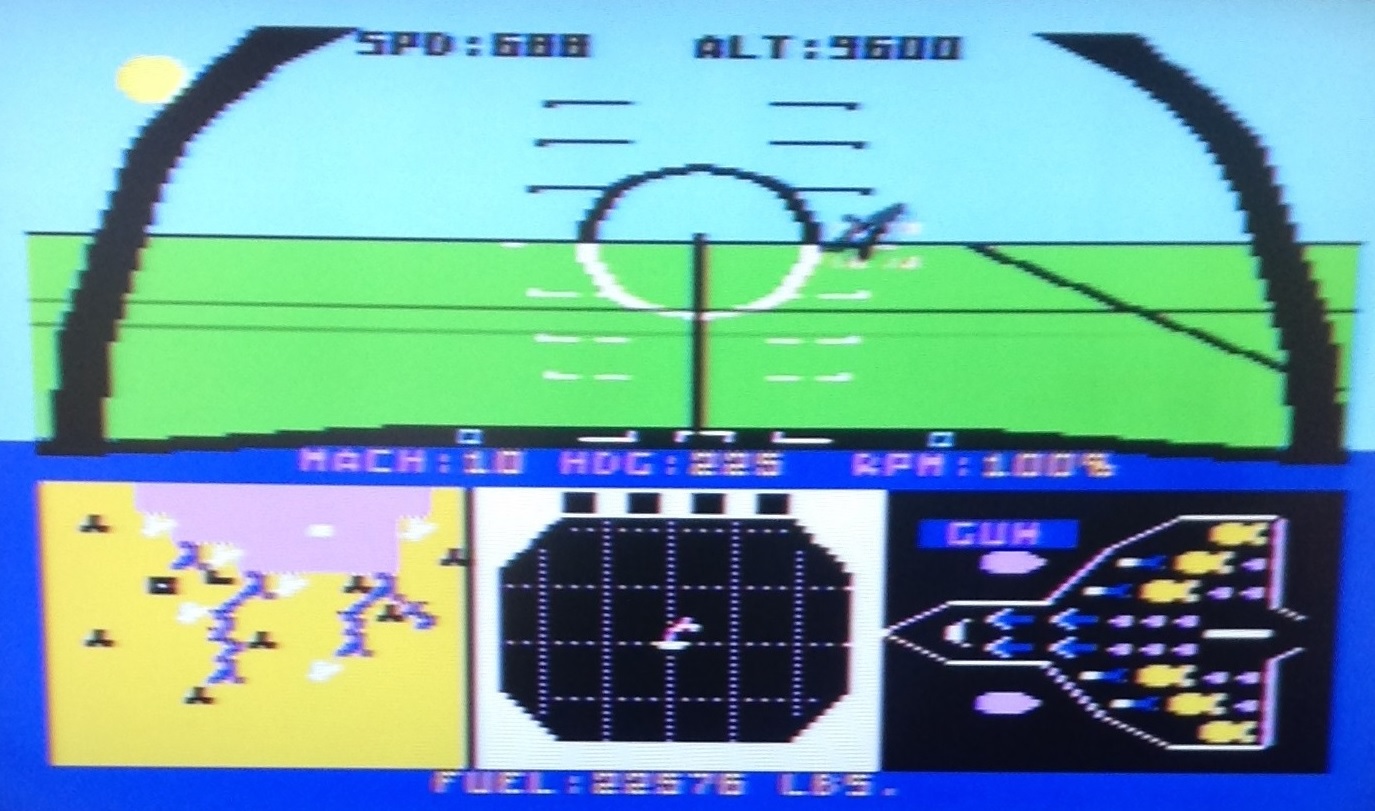
Naturally, computer science and history always lurk in the background, occasionally coming center stage. In February, I completed a second donation to Living Computers in Seattle. I donated two working Atari computers (a 400 and an 800XL) to their collection. Everything went — peripherals, joysticks, touch pad, and software. I played a few rounds of Missile Command, etc. before sending off the entire lot. I can’t believe that I spent hours (days!) playing F-15 Strike Eagle with its cheesy graphics. 🙂 If you want to play old Atari machines and much more, please visit. You’ll have a good time!

Right on the heels of the donation, we stopped into Living Computers for a visit. We had a fun chat with Aaron Alcorn who is the Museum’s curator. He let us in about some of the Musuem’s plans as well as swapping photos of our kids (and grandkid). We saw our donated — now theirs — Apple Performa 6400 VEE in the second floor workshop/open storage. The Museum is planning a major exhibit for that space. (Restoration of an historically important mainframe. Stay tuned.)

After a few brief weeks at home, we took off for South Africa via London. Our original itinerary allowed for a day trip to Bletchley Park and the The National Museum of Computing. Unfortunately, the plan was dashed by the weather. A nor’easter hit Boston on the departure date and we had to shorten our stay in London to an over-nighter.

Nonetheless, we walked over to London’s Science Museum on Exhibition Road, bagging yet another science museum in yet another city. (We also wanted to see how many holes it took to fill the Albert Hall.) The mathematics and information age exhibits helped to make up for losing Bletchley Park.

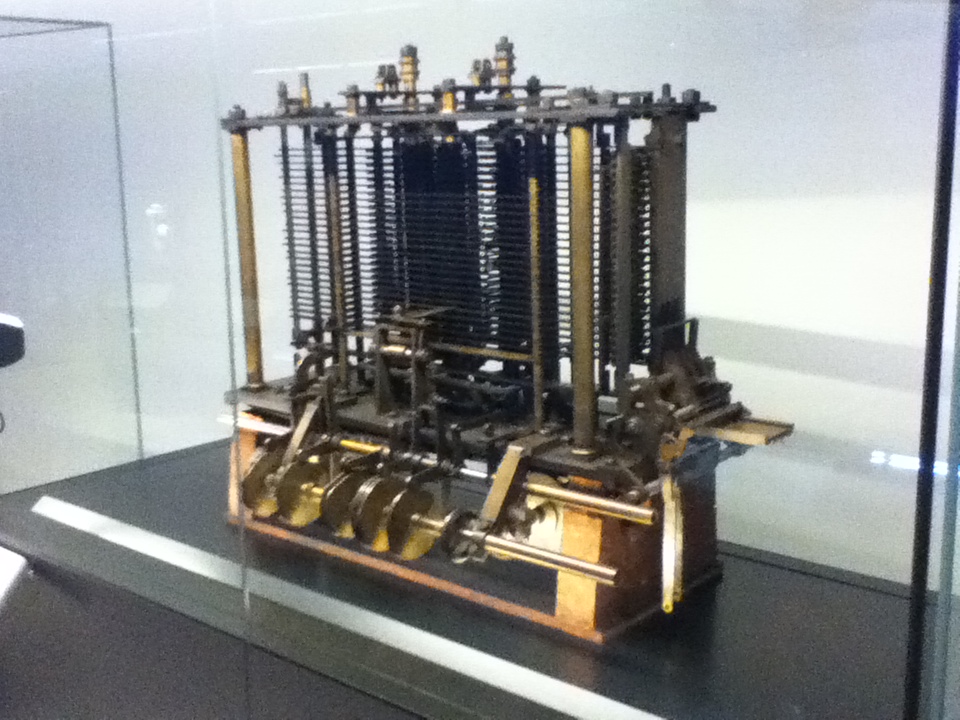
The Science Museum has an excellent collection of mechanical computing devices including Charles Babbage’s analytical engine (trial model, 1871). It took a little digging to find any reference to Lady Ada Lovelace whose contributions, I dare say, were longer-lasting than Babbage’s. Mechanical computing engines precede electronic computing, using physical machines (or even water flow!) to model other real-world phenomena by mathematical analogy. These devices, including so-called analog computers, filled the need for high(er) speed computation before digital computing really took wing. (By the way, electronic analog computing seems underrepresented at both the Science Museum and Living Computers. Just sayin’.)

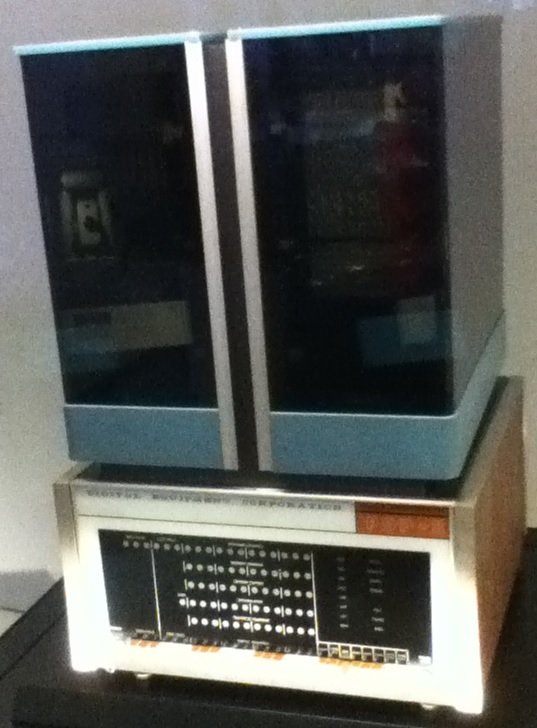
My photography skills and the iPod camera were not up to snuff. I had hoped to include many images here. However, we did see quite a number of historically significant machines: Hollerith card sorter, EDSAC-1, Pilot ACE, LEO II, Besem-6, Newton Clamshell, Xerox PARC Alto, and early PDP-8 among the finds. A number of machines/artifacts are on loan from the Computer History Museum in Mountain View, California. (Not far away from where I once lived, BTW.)

Seeing the PDP-8 in a glass case at the Science Museum, really made me “get” the concept behind Living Computers. Here was a poor old machine trapped in a glass cage. At Living Computers, you can use a PDP-8! This isn’t meant to be a slam on the Science Museum because preservation of early computing artifacts is incredibly important, especially in a society and culture which is all too willing to throw away the last generation of shiny thing. It does highlight the unique aspect and mission of Living Computers: Museum + Labs. Please join and visit.

Copyright © 2018 Paul J. Drongowski