About pj

Now (mostly) retired, I'm pursing electronics and computing just for the fun of it! I'm a computer scientist and engineer who has worked for AMD, Hewlett Packard and Siemens. I also taught hardware and software development at Case Western Reserve University, Tufts University and Princeton. Hopefully, you will find the information on this site to be helpful. Educators and students are particularly welcome!

Scat voices the newest Yamaha arrangers

The original Jazz Scat voices expansion pack for the Yamaha PSR-S950 arranger workstation remains a popular part of the site. With the Tyros5, Yamaha took a different direction and format for expansion packs. The new approach to expansion pack development and use is embodied in the Yamaha Expansion Manager, or “YEM” for short. Up to now, Tyros5 users have not been able to load and use the original Jazz Scat voices expansion pack.

That’s all changed! I’m pleased to announce the alpha test version of the Jazz Scat voices expansion pack for YEM-compatible Yamaha arranger workstations. The list of YEM-compatible arrangers include the Tyros5, PSR-S670, PSR-S770 and PSR-S970 workstations.

Why “alpha test?” At this time, I do not have access to a YEM-compatible workstation in order to do my own testing. (I’m happy with the S950, thanks.) In response to requests, however, I have produced a new YEM-compatible expansion pack. I’ve done as much testing as I can in YEM. Now, it’s your turn!

The expansion pack is in YEM project file format, sometimes called a “PPF file” because of its file extension. The PPF file must first be loaded into YEM. Once it is in YEM, you can send it to your keyboard, generate an install file (PPI format), copy voices to your own custom pack and even edit the voices themselves. That’s a lot of flexibility!

If you encounter problems, please post your issues to the PSR Tutorial Forum . If you are a PSR/Tyros user, you really should participate at the forum anyway. It’s a great place to meet other PSR/Tyros users and to learn new techniques.

Here is a link to the expansion pack. You need to download and UNZIP this file, read the README_PACK_YEM.TXT file, and then load the pack into the Yamaha Expansion Manager.

Both the scat voice expansion pack and the scat voice samples are released under a Creative Commons Attribution 4.0 International License.

Creative Commons License
ScatVoices and ScatVoice samples by Paul J. Drongowski are licensed under a Creative Commons Attribution 4.0 International License.

You are free to use the expansion pack voice or samples (even for commercial purposes) as long as you provide a link to http://sandsoftwaresound.net from your own web site AND/OR explicitly credit me in your creative work, e.g., “Scat samples/voice by Paul J. Drongowski”.

If you would like to know more about the sampling and voice design process, please read this post. The original S750/S950 compatible pack is here. Or, feel free to listen to the MP3 demo.

XG effects: SYSTEM mode

The last time that I took a look at Yamaha XG effects, I discussed using the VARIATION effect as a channel insertion effect. I’m now working on a PSR/Tyros style where I would like to apply an amp simulation effect to two channels. So, it’s time to learn about the configuration of VARIATION effects in SYSTEM mode. Even though I’m working on a style, you can apply these techniques to any Standard MIDI File (SMF) for play-back on an XG sound engine.

XG insertion effects are relatively easy to configure as the VARIATION effect is added to the signal chain of a single MIDI channel (XG part). Configuration of the VARIATION block as a SYSTEM effect takes more effort (i.e., more System Exclusive messages), but is well worth it. Now that I understand SYSTEM mode better, I may set up a DAW template for SYSTEM mode and use that template as my default effect configuration.

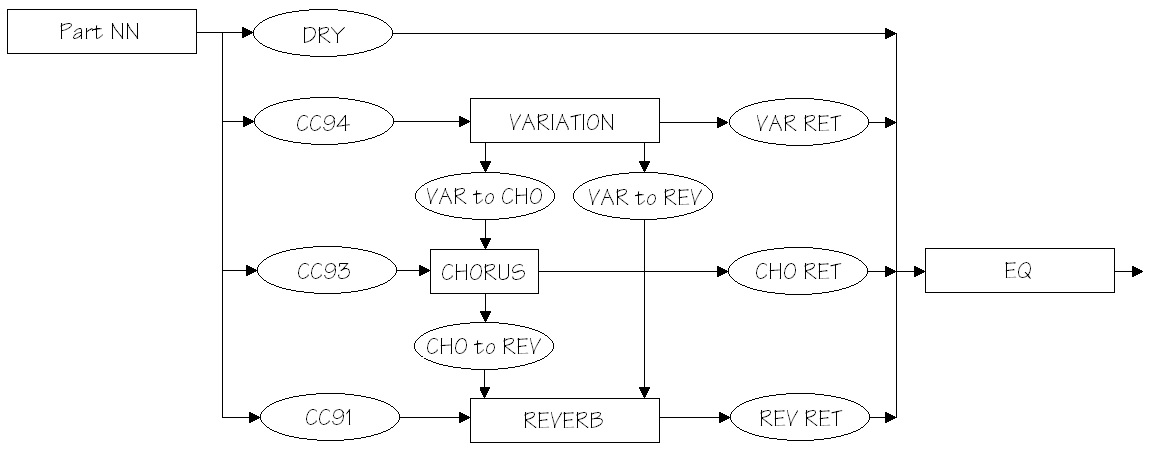
The diagram below shows the signal flow for the VARIATION, CHORUS and REVERB effect blocks when VARIATION is configured for SYSTEM mode. I show only one channel (Part NN) entering from the left in order to keep the diagram simple. Control “knobs” are drawn as ovals; these are XG/MIDI parameters under your control. The first four knobs — CC91, CC93, CC94 and DRY — are per-part parameters and need to be set for each of the sixteen channels (parts). The MIDI Continuous Controller (CC) knobs set the reverb, chorus and variation send levels for the part, respectively. In my project, I set the variation send (CC94) for two parts to non-zero levels and set CC94 for the remaining parts to zero. The non-zero levels pass the signal to the VARIATION block.

XG_System_Mode

The reverb, chorus and variation send levels are configured using MIDI Continuous Controller messages, but the DRY level is set using an XG System Exclusive (SysEx) message. Although this looks inconsistent, it follows Yamaha’s XG recommendations, i.e., use CC messages in preference to SysEx where possible. DRY level must be controlled using SysEx as no corresponding MIDI CC message is defined.

Please see the table at the end of this post for further message programming details.

The rest of the effect blocks and knobs are global (system-wide). The REVERB, CHORUS and VARIATION return levels (REV RET, CHO RET, and VAR RET) along with the DRY levels determine the amount and balance of effected and un-effected (dry) sound. All of the return levels default to 0dB (decimal 64 or 0x40 in hexadecimal notation). The default for each per-part DRY level is the maximum (decimal 127 or 0x7F). These default values enable signal flow right from the beginning and are a good starting point for experimentation and tuning. At least you are guaranteed to get some sound out of the effect section!

The VARIATION, CHORUS and REVERB blocks need to be configured through the usual XG SysEx voodoo. You need to select at least the effect type and be sure to configure the VARIATION effect for SYSTEM mode. In actual practice, you should do this before setting any send levels as the change to SYSTEM mode changes the level parameters to new default values.

Now the fun begins! The default configuration puts the three effect blocks in parallel. The inter-block send levels:

  • Send VARIATION to CHORUS (VAR to CHO)
  • Send VARIATION to REVERB (VAR to REV)
  • Send CHORUS to REVERB (CHO to REV)

establish serial effect routings between blocks. The level values determine the degree to which a series connection is made (i.e., how much signal is passed). Initially, all of these knobs are set to zero and the effects are full parallel. You can change these values to add reverb and/or chorus to the effected variation signal, for example, in the same way that you add reverb and/or chorus to a part.

The higher end arranger workstations offer a rich choice of CHORUS block effects — everything from chorus, phaser and flange to rotary speaker. Thus, you can create a long effect chain from VARIATION to CHORUS to REVERB, if you so desire. Want to phase a distorted guitar sound? You can!

The following tables summarize the low level details of effect programming. The addressable XG parameters must be set with the usual SysEx magic, e.g., F0 43 10 4C 02 01 40 4B 01 F7 to set the effect type.

Continuous Controller (Per part/channel)                    "Knob"

  CC91  Part/Channel REVERB SEND                            (CC91)
  CC92  
  CC93  Part/Channel CHORUS SEND                            (CC93)
  CC94  Part/Channel VARIATION SEND                         (CC94)

MULTI PART (per part/channel NN)

  Address   Parameter             Default
  --------  --------------------- -------
  08 NN 11  DRY LEVEL             0x7F                      (DRY)
  08 NN 12  CHORUS SEND           0x00
  08 NN 13  REVERB SEND           0x28 (decimal 40)
  08 NN 14  VARIATION SEND        0x00

REVERB effect block (global)

  Address   Parameter             Default
  --------  --------------------- -------
  02 01 00  REVERB TYPE           0x01, 0x00 (HALL1)
  02 01 0C  REVERB RETURN         0x40 (off:0x00, 0dB:0x40) (REV RET)
  02 01 0D  REVERB PAN            0x40 (center)

CHORUS effect block (global)

  Address   Parameter             Default
  --------  --------------------- -------
  02 01 20  CHORUS TYPE           0x41, 0x00 (CHORUS6)
  02 01 2C  CHORUS RETURN         0x40 (off:0x00, 0dB:0x40) (CHO RET)
  02 01 2D  CHORUS PAN            0x40 (center)
  02 01 2E  Send CHORUS to REVERB 0x00 (off, 0dB:0x40)      (CHO to REV)

VARIATION effect block (global)

  Address   Parameter             Default
  --------  --------------------- -------
  02 01 40  VARIATION TYPE        0x05, 0x00 (DELAY LCR2)
  02 01 56  VARIATION RETURN      0x40 (off:0x00, 0dB:0x40) (VAR RET)
  02 01 57  VARIATION PAN         0x40 (center)
  02 01 58  Send VAR to REVERB    0x00 (off, 0dB:0x40)      (VAR to REV)
  02 01 59  Send VAR to CHORUS    0x00 (off, 0dB:0x40)      (VAR to CHO)
  02 01 5A  VARIATION CONNECTION  0x00 (insert:0, system: 1)
  02 01 5B  VARIATION PART #      0x7F (off: 0x7F)

Arranger memory: One more time!

OK, OK, not everyone reads service manuals and schematics for their keyboard. However, I do get a little frustrated when posters compare apples to oranges, and make statements like “I can buy 1GByte for $1 (USD), so why is Yamaha so stingy with wave memory?”

Here is some information from the S750/S950 and Tyros5 service manuals and product data sheets. Please keep in mind that there are many different kinds of memory in an arranger. I’m going to focus on tone generation because that is the most relevant to wave memory size.

Both the S750/S950 and Tyros5 use proprietary Yamaha tone generator integrated circuits designated “SWP51L”. The S750/S950 designs use one SWP51L and the Tyros5 has two SWP51L chips. Each SWP51L has two dedicated memory ports (called “HIGH” and “LOW”) where each port consists of an address bus and a 16-bit parallel data bus.

In the S750/S950, each port is connected to a WAVE ROM:

    S750 WAVE ROM-L 1Gbit IC308   JS28F00AM29EWLA
    S750 WAVE ROM-H 1Gbit IC302   JS28F00AM29EWLA

That’s 128MBytes per device for a total of 256MBytes (2 times 128MBytes).

The Tyros5 microarchitecture is a little more complicated — the memory devices are shared between two SWP51Ls via separate shared address and data busses. There are six WAVE ROM integrated circuits:

    Tyros5 WAVE ROM-L0 1Gbit IC702   S29GL01GS10TFI020
    Tyros5 WAVE ROM-H0 1Gbit IC716   S29GL01GS10TFI020
    Tyros5 WAVE ROM-L1 1Gbit IC703   S29GL01GS10TFI020
    Tyros5 WAVE ROM-H1 1Gbit IC717   S29GL01GS10TFI020
    Tyros5 WAVE ROM-L2 1Gbit IC704   S29GL01GS10TFI020
    Tyros5 WAVE ROM-H2 1Gbit IC718   S29GL01GS10TFI020

That’s a total of 768MBytes (6 times 128MBytes).

Those cryptic names in the tables above identify the specific memory component. The components come from two vendors: Micro Technology and Spansion. Here are the gory details.

    Micron Technology JS28F00AM29EWLA  56-pin TSOP
        Parallel NOR Flash Embedded Memory
        Configurable width data bus (8- or 16-bits)
        Asynchronous random/page read
            Page access speed: 25ns
            Random access speed: 110ns
            Page size: 16 words or 32 bytes

    Spansion S29GL01GS10TFI020 56-bit TSOP

        GL-S MirrorBit Eclipse Flash Non-Volatile Memory
        S29GL01GS 1 Gbit (128 Mbyte)
        16-bit parallel data bus
        Asynchronous 32-byte page read
            Page access speed: 25ns
            Random access speed: 100ns
        Program and erase rates (i.e., write speed)
            Buffer Programming (512 bytes) 1.5 MB/s
            Sector Erase (128 kbytes) 477 kB/s

The read speed (25ns per 16-bit word in page mode) is much faster than write speed, and that’s OK in this application because the data is always read once it’s loaded/initialized. The SWP51L probably operates in page mode since the samples are accessed sequentially. Dunno ’bout you, but 25 nanoseconds per 16-bit word is darned fast. The access speed is MUCH higher than a typical USB flash drive.

Two 27-bit address busses and two 16-bit data busses are sent to/from the plug-in expansion board. These busses extend the two shared WAVE ROM busses. The expansion board needs to keep up with the high read rate.

Please note that the CPU does not get anywhere near the sample streams. That work is assigned to the SWP51Ls.

Hope this helps to clarify.

Crunchin’ da drums

In my last post, I discussed Motif/MOX eight zone (8Z) drum kits. The eight zone concept lets you assemble eight different percussion sounds into a custom kit. The waveforms are assigned to voice elements and are stretched/limited to eight different keyboard (MIDI note) zones. The Motif/MOX have matching arpeggios that work with the 8Z kits.

By the way, the 8Z drum kits were first introduced with the Motif XS. My notes on the 8Z kits and this note on effects apply to all later models including the Motif XF and MOXF.

If you have ever tried the percussion sounds alone without effects, the drum sounds are kind of “plain Jane” without a lot of impact. This post deconstructs a couple of effects which can be applied to break beats and other styles that require crunch and animation.

The first effect chain is taken from the Voice PRE8:060 “8Z Romps.” The voice has two insert effects connected in series. INSERT A is a Lo-Fi algorithm with the following parameters (effect preset “Max Lo-Fi”):

    #  Parameter              Value    Numeric
   --  ---------------------  -------  -------
    1  Sampling Freq Control  4.01KHz  (10)
    2  Word Length            93       (93)
    3  Output Gain            +7 dB    (14)
    4  LPF Cutoff             20.0KHz  (60)
    5  Filter Type            Radio    (2) 
    6  LPF Resonance          10.0     (100)
    7  Bit Assign             2        (2)
    8  Emphasis               On       (1)
   10  Dry/Wet                D<W63    (127)
   15  Input Mode             Stereo   (1)

The parameter number, name, values, etc. are taken from the MOX Data List. (See the section titled “Effect Parameter List” in the PDF file). The numeric values — given here in decimal — are what you need to program the effect through System Exclusive MIDI messages. More about this in a minute.

The Lo-Fi effect adds a lot of crunch and crush. But, wait! There’s more. The INSERT B effect is the AmpSim 1 amp simulator. Its parameters are:

    #  Parameter              Value    Numeric
   --  ---------------------  -------  -------
    1  Over Drive             54%      (54)
    2  Device                 dst1     (2)
    3  Speaker                Combo    (2)
    4  Presence               +10      (10)
    5  Output Level           34%      (34)
   10  Dry/Wet                D<W63    (127)

This is the “Beat Crunch” effect preset.

Please remember that my goal is to use the 8Z break beats in a PSR/Tyros style. In order to do accomplish this, I found the equivalent effects algorithms for the Yamaha PSR-S950 arranger workstation. Here are the equivalent algorithms:

    MOX            PSR-S950
    --------       -----------------------------
    Lo-Fi    --->  Lo-Fi DRUM1 (MSB:94 LSB:18)
    AmpSim 1 --->  V_DIST CRUNC (MSB:98 LSB:18 )

Unfortunately, the XG effects architecture supports at most one system-wide variation effect or one per-part insert effect. So, I decided to use the Lo-Fi algorithm because it seemed to provide most of the grit and nastiness that I was seeking.

It took a little detective work to find and match up the corresponding effect algorithms between the Motif/MOX and the PSR/Tyros. The effect type is enough to get into the same neighborhood. The rest of the sleuthing involves comparing the parameter lists in order to find the exact (or best) match. The MOX has Virtual Circuit Modeling (VCM) effects and the S950 does not. Therefore, you may not always be able to find an exact match.

With the S950 Data List in hand, I translated the effect parameters into the hexadecimal System Exclusive (SysEx) messages to configure the Lo-Fi effect on the PSR:

    F0 43 10 4C 02 01 40 5E 12 F7   Variation Type
    F0 43 10 4C 02 01 5A 01 F7      Variation Connection (SYSTEM)
    F0 43 10 4C 02 01 42 00 0A F7   PARAMETER 1 Sampling Freq Control (10)
    F0 43 10 4C 02 01 44 00 5D F7   PARAMETER 2 Word Length (93)
    F0 43 10 4C 02 01 46 00 0E F7   PARAMETER 3 Output Gain (14)
    F0 43 10 4C 02 01 48 00 3C F7   PARAMETER 4 LPF Cutoff (60)
    F0 43 10 4C 02 01 4A 00 02 F7   PARAMETER 5 Filter Type (2)
    F0 43 10 4C 02 01 4C 00 64 F7   PARAMETER 6 LPF Resonance (100)
    F0 43 10 4C 02 01 4E 00 02 F7   PARAMETER 7 Bit Assign (2)
    F0 43 10 4C 02 01 50 00 01 F7   PARAMETER 8 Emphasis (1)
    F0 43 10 4C 02 01 54 00 7F F7   PARAMETER 10 Dry/Wet (127)
    F0 43 10 4C 02 01 74 01 F7      PARAMETER 15 Stereo  (1)

I configured the effect as a system-wide variation effect such that multiple percussion parts may be sent to the effect. I inserted the SysEx messages into the set-up measure of the PSR style file using SONAR (my usual DAW/sequencer). Yow, the difference between the percussion sounds without and with this effect is like night and day!

The MOX insert effects are followed by a system-wide Tempo Cross Delay effect (effect preset “4beat Echo”). This effect adds a nice bit of animation to the overall sound. The MOX effect parameters are:

    #  Parameter              Value    Numeric
   --  ---------------------  -------  -------
    1  Delay Time L>R         4th      (11)
    2  Delay Time R>L         8th.     (10)
    3  Feedback Level         16       (80)
    4  Input Select           L        (0)
    5  Feedback High Dump     0.5      (5)
    6  Lag                    0ms      (64)
   10  Dry/Wet                D<W63    (127)
   13  EQ Low Frequency       250Hz    (22)
   14  EQ Low Gain            0dB      (64)
   15  EQ High Frequency      4.0KHz   (46)
   16  EQ High Gain           0dB      (64)

The equivalent S950 effect is TEMPO CROSS1 (MSB:22 LSB:0). I assigned this effect to the system-wide CHORUS block.

Here are the S950 (XG) SysEx messages to configure the delay effect in the CHORUS block:

    F0 43 10 4C 02 01 20 16 00 F7  Chorus Type TEMPO CROSS1
    F0 43 10 4C 02 01 22 0B F7     PARAMETER 1 Delay Time L<R     (11)
    F0 43 10 4C 02 01 23 0A F7     PARAMETER 2 Delay Time R<L     (10)
    F0 43 10 4C 02 01 24 50 F7     PARAMETER 3 Feedback Level     (80)
    F0 43 10 4C 02 01 25 00 F7     PARAMETER 4 Input Selection    (0)
    F0 43 10 4C 02 01 26 05 F7     PARAMETER 5 Feedback High Dump (5)
    F0 43 10 4C 02 01 27 40 F7     PARAMETER 6 Lag                (64)
    F0 43 10 4C 02 01 2B 7F F7     PARAMETER 10 Dry/Wet           (127)
    F0 43 10 4C 02 01 32 16 F7     PARAMETER 13 EQ Low Frequency  (22)
    F0 43 10 4C 02 01 33 40 F7     PARAMETER 14 EQ Low Gain       (64)
    F0 43 10 4C 02 01 34 2E F7     PARAMETER 15 EQ High Frequency (46)
    F0 43 10 4C 02 01 35 40 F7     PARAMETER 16 EQ High Gain      (64)

A little bit of delay on a busy drum part goes a long way. The send level (not shown here) is relatively low — just enough to add a little animation to the sound without creating a lot of clutter. It sounds OK, but I might adjust the send level dynamically and add more delay to exposed parts like the break while keeping the MAIN sections clean.

I hope this short effects clinic helps you out!

Groovin’ in eight zones

I heard a great interpretation of Chris Isaak’s “Wicked Game” by Groovy Waters. Their work inspired me to create a down-tempo PSR/Tyros style with break beats that would let me jam over the changes (Bm-A-E-E).

And that led me into a whole new exploration in Motif/MOX and PSR/Tyros styles!

While goofing around with the Yamaha MOX6 workstation, I stumbled into some break beats with “8Z” in the name. I noticed that the “8Z” arpeggios are targeted for voices with “8Z” in their names. So, what is this “8Z” business?

The Motif XS (and MOX) added 8-zone drum kits and arpeggios, hence, the “8Z” in the names. A conventional drum kit has dozens of individual percussion sounds laid out across the MIDI note range (AKA “the keyboard”). An 8-zone kit is an extension of a regular synth voice where each voice element is assigned a percussion sound. The usual upper and lower note limits determine the key range for each sound. Here is the element information for the PRE8:060 “8Z Romps” voice:

                            Name        Note#
                         ----------   ---------
    Waveform             Low   High   Low  High
    ----------------     ----  ----   ---- ----
    BD T9-4               C0    C1     24   36  
    SD Elec7              C#1   F1     37   41  
    China St              F#1   C2     42   48  
    SD Rim SE             C#2   C3     49   60  
    Bd Jungle 2           C#3   F#3    61   66  
    Bd Distortion4        G3    C4     67   72  
    Bd Distortion RM      C#4   C5     73   84  
    Bd D&B2               C#5   C6     85   96  

Each waveform is stretched across a multi-key zone. Thus, each of the notes within a zone have a slightly pitch-shifted tone, allowing for tonal variation in patterns where repeated notes are played in sequence. Since these are basically regular synth voices, you are also free to mess about with the filter, amplitude envelope and all the usual sound design goodies.

The arpeggios designed for the “8Z Romps” voice do just that. (See “MA_8Z Romps” and so forth.) The pitch shift, etc. breaks up the monotony of repeated notes.

The “8 zone” idea makes it easy to cobble new drum kits together from the diaspora of waveforms in the regular drum kits. You probably don’t need more than eight different percussion sounds for a set of basic beats. A quick survey of other “8Z” kits shows this to be true:

    8Z HeavyHearts      8Z Chilly Breakz    8Z Gated Beatz
    --------------      ----------------    --------------
    Bd T9-1             Bd HipHop6          Bd Gate
    Bd Hard Long        Sd HipHop9          Bd HipHop9
    SD Elec12           Sd T8-1             Sd HipHop6
    Sd HipHop6          HH Closed T8-2      Sd Hip Gate
    HH Closed D&B       HH Open T8-2        HH Closed T8-1
    HH Open T9          Electric Perc1      HH Open T8-1
    Clap AnSm           Sleigh Bell         Noise Burst
    Shaker Hip 2        Shaker Hip 1        Shaker Hip 1

These kits have a different key layout than “8Z Romps”. In fact, these 8Z kits have a few zones that resemble the conventional kit layout — the bass drums (Bd) cover the notes where bass drum is usually found, the snare drums (Sd) cover the usual notes for snare drum, etc. Thus, you can play “regular” drum arpeggios through these 8Z voices and they sound just fine. The upper range elements cover a wide range of notes and are the “catch all” for the usual percussion spice such as conga, shakers, guiro, triangle and the like. With the pitch shifting, the “catch all” approach can produce some hip patterns.

There is far more fun to be had. I came across the “8Z” kits and arpeggios while playing the Performance USR2:102(G06) Ibiza Growl Sax. This Performance had the feel that I was looking for, although I wasn’t too pleased with the sax voice. (A problem that is easily fixed.) The Performance assigns “8Z Romps” to the first voice, but, wait! It plays break beats through “8Z Romps” that were not designed for “8Z Romps”, having different zones, etc. Cool. Yamaha sound designers are not only good at following the rules, they are equally adept at breaking the rules, too.

I decided to go ahead with the break beats from Ibiza Growl Sax even though the PSR/Tyros do not have “8Z” drum kits. I had to unwind all of the 8Z-ness and map the percussion voices to standard PSR-S950 drum kits. Unfortunately, the repetitive patterns are a little bit plain even though the musical feel is still good.

Next up, crushing the drums and bouncing them around.

Performance styles for PSR-E443

The PSR-E443 folks don’t get enough love, so here is a collection of performance styles for the E443 and the E433.

So, what is a “performance style?”

The Yamaha Motif/MOX series of synthesizer workstations have hundreds of factory “Performances” to to help a composer get started with a new song. A Performance has up to four independent voices (drum, bass, guitar, etc.) and up to six sets of related musical phrases — “arpeggios” in Motif-speak. The arpeggios are drawn from a built-in library of several thousand musical phrases in a slew of contemporary genres. Each set of phrases has a role (main section, fill, break) and the composer switches between sets while playing in order to lay down a basic arrangement or backing track. Even if you’re not a songwriter, the Motif Performances are just plain fun for jamming or practice.

I recorded and translated 22 of my favorite Motif/MOX Performances to PSR/Tyros styles — Performance styles. They play just like regular styles (follow chords in the left hand, play fill-ins when changing main sections, etc.) The styles are stripped down and are meant to be played. A few of the styles have only bass and drum, so there isn’t a lot of elaborate orchestration to get in the way. The introductions and endings are very simple.

This first collection targets the PSR-E443 and E433. The styles are SFF1 and should work on other arrangers supporting SFF1 although you may need to substitute different drum kits. The styles in this collection do not use Mega Voices. A more advanced collection with SFF GE and Mega Voices is being developed.

Since these are my favorite performances, the styles come from a funky, jazzy, fusion kind of place.

For more information, check out the README page. Then, download the ZIP file and have fun!

MOX interview: Follow up

Here’s a quick follow up after my interview with Yamaha marketing.

First, the word “conversation” is a better description than “interview.” I had a really enjoyable, high-bandwidth conversation with fellow gear-heads. What could be better than that? The Yamaha team members are friendly, extremely knowledgeable and open. They are also good listeners and had read my pre-interview MOX retrospective.

So, thanks to Yamaha for listening!

I also learned some things that I intend to put into practice going forward. We discussed how I created the voices that I use on my church gig and the issue of sound dropping across voice changes in MOX Voice Mode. One way to avoid sound cut-off is to use Song Mode instead of Voice Mode. Assign a voice to each part in Song Mode and then select parts on the fly. I’ll have to give this a try. I also want to experiment with the assignable knobs for drawbar control and Song Mode may be part of this solution, too.

Since the conversation was relatively short — about 25 minutes with my MacBook Air crashing due to a thermal overload part way through (Yikes!) — I went blank on some of the reasons and history for my work style. For example, I created the voices for the church gig through the front panel and didn’t use either the PC- or iPad-based editors. I since reconstructed my mind-set from way-back-when. I’m sure that I was sooooo anxious to use the MOX at the gig that I just dove into the front panel. I had programmed a TG-500 back in the day and the Yamaha voice architecture was still familiar to me. (The Motif/MOX effects structure is way easier to understand than the old TG, thankfully.) The last thing I needed was a software editor to get between me and the gig!

I didn’t have an iPad when I bought the MOX6 and wasn’t aware of the Yamaha apps for Motif/MOX. The apps — once I learned about them — motivated me to budget for and to buy the iPad. Aside from Web-browsing and e-mail, my iPad is almost entirely devoted to music-making tools (no cat videos). I have both Cubasis and Mobile Music Sequencer (MMS) installed. MMS gets used; Cubasis not so much. Cubase is one of those tools that I want to learn — kind of like my current explorations in Ableton Live.

Starting today, I would use the iPad apps. Heck, I should (would) check out the Yamaha PC-based editor and the fine Motif/MOX tools by John Melas.

Well, there you have it. A positive experience all the way around!

If you’re curious about how I use the MOX for content creation, please check out the following posts and pages:

Yamaha MOX6: Retrospective

Yamaha are inviting MOX/MOXF owners to sign up for interview sessions about their experience with the MOX/MOXF series instruments. Participants must fill out a pre-interview survey. I decided to sign up and just completed the pre-interview survey. (It’s not too different from the recent public Motif/MOX customer survey, BTW.) This got me thinking about playing, programming and using the MOX6 and I realized that I have never posted retrospective comments about the MOX6. So, here goes.

The MOX6 is currently my “go to” keyboard for live performance. I like the portability of the MOX6 (a major pre-sales consideration) and take it to my weekly church gig. The MOX6 replaced my previous go to keyboard, the Roland XP-60.

Our church group plays a wide spectrum of liturgical music. About one third of our repertoire is “soft pop”, one third is “contemporary classical,” and the remaining third is split between Gospel and traditional church music. I use sounds that range from soft pads, to strings, to classical woodwinds, to B-3 and pipe organ. That’s a lot of sonic territory and the MOX6 does a good job covering it. I would definitely recommend the MOX6 and its younger sisters in the MOXF series.

I have two banks of Voice Mode patches. I rarily, if ever, use Performance Mode or Master Mode live. The 16 voices in each bank are the sounds that I rely on for 95% of the repertoire. Sounds in the Favorites Category handle the remaining 5% of the tunes. I need to make quick voice changes while playing and the next sound I need is only one button press away. This is great!

There is one major downside to changing voices. The MOX6 cuts off the notes being played with the current voice when the next voice is selected (i.e., when the voice selection button is pressed). This is really bad. For example, I might be playing and holding a string pad at the end of a verse while selecting the voice for an upcoming solo. Nothing shouts “Phony” like a string section that gets turned off like a light switch!

I use quite a few classical instruments such as oboe, French horn, string section and brass. Generally, these instrument sounds are very good. The classical flute, however, could use some work. I would love to have Super Articulation voices come to the MOX/MOXF series. Yes, yes, I know I can program my own SA-like voices using Extended Articulation (XA), but SA and SA2 voices are so darned playable and expressive right out of the box. I wonder how many musicians have either the technical expertise or time to program SA-like voices? Providing the tools to make an SA-like voice is good, but it is really only part of Yamaha’s job. Yamaha’s sound designers are much better and clever than we are.

I generally don’t use factory voices. At the very least, I reduce the effect levels to get a cleaner sound for the natural acoustic environment of the church. I also build a set of layered voices (e.g., horns+woods, flute+clarinet) that I’ve come to depend upon over the years. Deep voice editing is essential.

I realize that I could create layers using Performance Mode and then select either voices or performances through Master Mode. Voice Mode layers may be a case of personal inertia although it means that I do not need to learn or deal with Master Mode. Yeah, laziness could be at play, here.

Quite a bit of repertoire is Gospel-inspired or flat out Gospel. That means B-3 organ. The MOX6 organ is sample-based, not modeled. I have several go to patches that have “my B-3 sound”. These patches use the Assignable Function (AF) buttons to bring in additional footages. The assignable foot pedal controls the rotary speaker speed. By and large, this gets the job done.

I still own and play a Nord Electro 2 (NE2). Ideally, I would have both the MOX6 and NE2 at the gig. Unfortunately, I do not have much time to set up and tear down, plus there is the added schlep factor of a second keyboard. I genuinely miss being able to play the drawbars. The NE2 rotary speaker effect is more visceral than the MOX6 rotary speaker effect even though the NE2 is an older and less current keyboard. Kicking the Leslie on the NE2 lights up faces; the MOX6, not so much. I hope that Yamaha migrates the Reface YC technology and controllability into the Motif/MOX workstations. We desperately need “scanner vibrato” emulation and rotary speaker improvements are always welcome. I would love to see the next Yamaha workstation threaten B-3 clones.

Speaking of organs, the MOX6 pipe organ is weak. It sounds fine on its own for relatively mellow organ pieces. Unfortunately, the sound gets lost in the rest of our ensemble (especially when we have two 12-string guitars drenching the spectrum). The Yamaha synth engineers need to visit the folks that produced the Church Organ expansion pack for the S-series arrangers or the folks who created the Tyros Organ World. These are some pretty fine pipe organs!

My other main use for the MOX is producing styles for the PSR/Tyros arrangers. The Motif/MOX series have a wonderful, built-in library of musical phrases (arpeggios). The factory performances (based on the library phrases) are well-programmed and are darned fun to play. Occasionally, a comment will pop up on a user forum wishing that the MOX was more “arranger like” with auto fill-in, etc.

This user-want prompted me to translate and create PSR/Tyros styles from MOX performances. I use Performance Record to put down the patterns for the four main tracks in the style and write the result to a Standard MIDI File (SMF). I transfer the SMF to a PC-based DAW (SONAR) where I insert the markers, program change, and effect selection MIDI messages for the style. Finally, I use a few of the third party tools available on the Web to insert proprietary style-specific information (e.g., the CASM and/or OTS sections) into the style file. The end result is a performance that plays like a style — on the target arranger, of course.

I enjoy this kind of “content creation” as much as playing. (This feeling should be plain from the posts and content on this site.) Each activity exercises different parts of my brain. I also get to explore the funkier, jazzier corners of my cranium.

One thing that is clear in either the synth or arranger user communities, is that people want to be able to add new musical content like phrases (arpeggios) or styles. A musician can create an MOX6 arpeggio, but this process is not for the faint of heart. Nor is this process at all efficient when a new “full” performance needs 24 new arpeggios! Future workstations should have an easier path for adding new user phrases.

The Motif/MOX Performance Editor app for iPad is a real boon for creating performances. This app lets me pull together a set of arpeggios in a user friendly and fun way. I would really miss this app because the MOX display is rather small and sometimes crowded. There is also a well-known learning curve when it comes to navigating the screens, menus and buttons. The app recreates much of the information and control implemented in the Motif series with its larger screen. (I have tried editing through the Motif screen recently and it is much better than the MOX. You get what you pay for.)

Performance Record is a great feature for song creation. Once learned, one can work really work fast. Currently, the musician switches arpeggios using the special function (SF) buttons below the display. The position of the buttons makes for awkward gestures when recording. It’s much easier to switch sections on an arranger where the buttons are located at the bottom left just above the keyboard. Perhaps synth workstations need a (programmable) row of buttons just above the keyboard, too.

My work process produces an SMF that I transfer to PC via USB flash drive. Clearly, I’m not using the DAW integration features of the MOX6. I think the market has passed by this aspect of the MOX6. There are many inexpensive MIDI controllers (like the Korg Taktile) that have a larger number of programmable buttons, sliders, knobs and pads. Further, these controllers integrate with DAWs like Ableton Live and are not focused on Cubase. If the DAW features were removed from the MOX6, I wouldn’t miss them. (I’m currently learning Ableton Live and use a Korg Triton Taktile as a controller.)

The MOX6 has been ultra reliable. Many people complain about “plastic synths.” The MOX has been robust enough although I try not to handle it too roughly. (Good advice for any electronics.) Metal may be reassuring, but that sense of security is heavy! I schlep the MOX6 at least once a week and often move it in and out of my studio. I like its light weight. The only reliability concern has been making sure that the AC adapter plug cannot be pulled out during performance. I usually wrap the power chord around the keyboard stand once or twice.

Overall, I’m a satisfied customer. I purchased the MOX6 approximately one year before the release of the MOXF series. MOXF features that I would appreciate are the additional options for assigning the knobs and the sample expansion memory. I purchased the PSR-S950 knowing that I could expand its sound set through its expansion memory and that its Church Organ expansion pack is first rate. If I had a MOXF, I would add pipe organ samples/voices. (BTW, I created and distribute a “scat voice” expansion pack for the S750/S950.)

I really enjoy playing the MOX6! Since I skipped the MOXF, I’m keenly interested in the next generation of Yamaha synth workstations.

Yamaha Reface (No, I haven’t played it)

It’s Internet de rigueur to comment on the new Yamaha Reface keyboards — whether you’ve played them or not! So, here goes…

I’m in fat city with an original AN-200 (Prophet-5 plus beat machine in a box), a P-50m (pianos in a box), a CS-01 (monophonic analog synthesizer) and a Nord Electro 2. Although a few of these pieces are gathering dust, they pretty much cover the sonic territory of Reface. DX-wise, I had more than enough FM in the 80’s, thank you, and could always get my old CE-20 repaired, if the urge to frequency modulate should ever overcome me again. Overall, I’m unlikely to take the plunge and buy a Reface keyboard just out of necessity.

First off, I genuinely wish Yamaha all the success in the world with these products. This is the first time that Yamaha have strayed from the AWM2 mainstream in some years. I would hate to see this innovative product line tank and make Yamaha risk-averse. The Reface product line started out as an after-hours skunk works engineering project. The fact that Yamaha committed to manufacturing and marketing Reface is significant and shows real effort to shift their corporate culture. Further, if Reface makes scads of money for Yamaha, then its profits will lift other boats within Yamaha.

Sonically, Reface sounds pretty darned good. The CP and YC are my favorites because they fit with the musical genres that I work in. I hope that some of this technology will migrate into future synthesizer and arranger workstation products. Spectral Component Modeling (which includes Virtual Circuit Modeling) grew from VL technology. The VCM effects in the MOX/Motif are quite good, so please give me more of that! I am pleased to see Yamaha work on organ emulation and would like to see the drawbar control, vibrato/chorus and rotary speaker effects in a new workstation. Both the Motif/MOX and higher-end arrangers are missing the Hammond “vibrato scanner” effect — a significant omission.

So, why am I not buying? Apparently, “mini” keyboard sales are making money for Novation and others, and Yamaha wants a piece of this market. The decision to use mini-keys strongly bifurcates the marketplace — you either like (accept, tolerate) mini-keys or you don’t. I’m a “don’t.” I have tried mini-keys in the past and, well, no thanks. This is not an “anti-Yamaha” position — I lost all interest in the Korg Odyssey, for example, when I learned that it had mini-keys.

The Reface is touted as a portable, take-it-anywhere keyboard. If you’ve been reading this blog, then you know that I’ve put together a portable rig based on the Korg Triton Taktile (TT.) The TT has 49 full-size keys and is not much bigger or heavier than a Reface. The TT key bed is excellent and four octaves is enough room to roam. Although the TT is missing the up-to-date tone generation and effects technology in Reface, it’s a very playable alternative to Reface.

Finally, there is the issue of the $500 street price. I suspect that Yamaha is looking to make a few extra bucks from the early adopters. Korg may have pursued the same strategy with the TT. They brought the TT out at a higher street price and then eventually reduced the price to the current $350 USD. The TT comes with a superb bundle of software plug-ins and offers, making it a terrific bargain. Unfortunately, for Yamaha, this is the competition facing Reface (pun intended) and a $500 street price looks mighty steep for an ax with mini-keys and no free software incentives.

Internet reaction from Reface detractors has been vehement — far over the top, in my opinion. It seems like some people have taken Reface as a personal affront! Please, settle down. Yamaha is a big company and they will surely roll out new products for the rest of us. The Motif refresh is overdue, for example, and must be in the works. It’s good to see Yamaha releasing new products that are out of its mainstream offerings. All the best!

Free DJX-II styles/patterns for PSR/Tyros

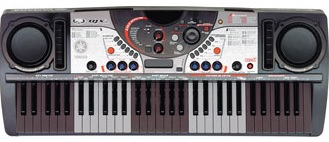
Once upon a time (around the year 2000), Yamaha was into beat boxes and other spiffy tools for creating dance, hip hop, and other forms of “electronic” music. The DJX-II groove machine was an entry-level keyboard designed for budding DJs and musicians. It combined a funky looking 61-key keyboard, pattern-based sequencer and basic sound engine into an all-in-one, battery-powered instrument with built-in amplifier and speakers. Genres included techno, trance, garage, hip hop, old skool and trip hop.

DJX-II

The musician or DJ could select from 70 preset patterns, each pattern with ten variations. The variations were further categorized into six MAIN patterns and four FILL patterns. The keyboard was divided into five 12-key zones where each octave performed a specific performance function. One of the zones selected the current variation allowing the player to switch between pattern variations. Another zone transposed the pattern into the current root key.

Yamaha still makes the original DJX-II patterns available through its support site. Each of the files is a standard MIDI file (SMF) containing a single pattern. Although they are in SMF format, the files are not immediately useable. The rhythm tracks are programmed for some truly ancient and arcane Yamaha drum kits, none of which adhere to GM or XG layout conventions. Further, the files cannot be imported and played as an arranger workstation style, i.e., they do not contain the information and format needed by a PSR/Tyros style.

Last December, I developed a process for converting a DJX-II pattern file to a PSR/Tyros style file. I wrote and posted an earlier article on the DJX-II style format and conversion process. I then got to work and converted fifteen patterns to PSR/Tyros style format.

The patterns are all on the jazz tip and they include some pretty hip chord changes! I quickly found that I needed to transcribe the chord changes and bass lines in order to play along. I used Sibelius First to notate the MIDI data in each pattern and saved the lead sheets in PDF files. Knowing the changes makes jamming easier and a lot more fun.

At long last, I’m ready to distribute the converted patterns. Here is a link to the the ZIP file. The ZIP file contains fifteen style files (one for each DJX-II pattern), fifteen PDF lead sheets and a README.TXT file with performance tips.

Update: Check out version 2 of the DJX-II style collection. It’s still free!

I strongly recommend reading the README.TXT file before using the new styles. The converted patterns behave like the new Yamaha DJ styles on the PSR-S670. You only need to play a single note in the left hand accompaniment. No chords are necessary because the chord progressions are cooked into the patterns. The note sets the root note for the progression and the arranger and DJ style take over from there.

Current and recent workstation arrangers should play these styles without problem, save the occasional kit or voice substitution. Good news for musicians with entry-level models (e.g., PSR-E443) as the style files are SFF1 and no OTS. Thus, entry-level arrangers should load and play these pattern styles, too.

Please enjoy playing with these “DJ styles.” In terms of the future, the DJX-II trip hop styles are genuinely sick and I hope to convert them one of these days!