Review: KMI QuNexus

So. KMI QuNexus RED. What happened?

Ever since I started playing SWAM software instruments on iPad, I wanted to begin experimenting with MIDI Polyphonic Expression (MPE). Like most folks on a budget, I established a price threshold — $200 or less — and cast around for likely candidate controllers. $200 is a bit more than “impulse purchase.” $300 is definitely too much for a trial. (Sorry Lumi.)

A note on budget, toys and reviews. I don’t get free products for review. Like you, I spend my hard-earned cash. No B.S., here.

I considered using an iPad app like GeoShred, but screen-based controllers don’t have the tactile feel of a physical instrument. I tried the Roli 5D app, too, and found the virtual keyboard to be too small for my fat fingers, although I get why people dig Seaboard.

There are several “alternative” controllers implementing MPE and I decided against them. Give me keys or at least a keypad. Budget and key considerations narrow the field of candidates considerably.

Keith McMillen and Keith McMillen Instruments have been designing and making electronic instruments for 35+ years. They offer two products for $200 or less: QuNexus RED ($199USD MAP) and K-Board-C ($119USD MAP). The two models are physically similar: a small form factor (12.8″ by 3.3″), a two octave keypad, a group of control buttons to the left of the keypad and USB-C connectivity.
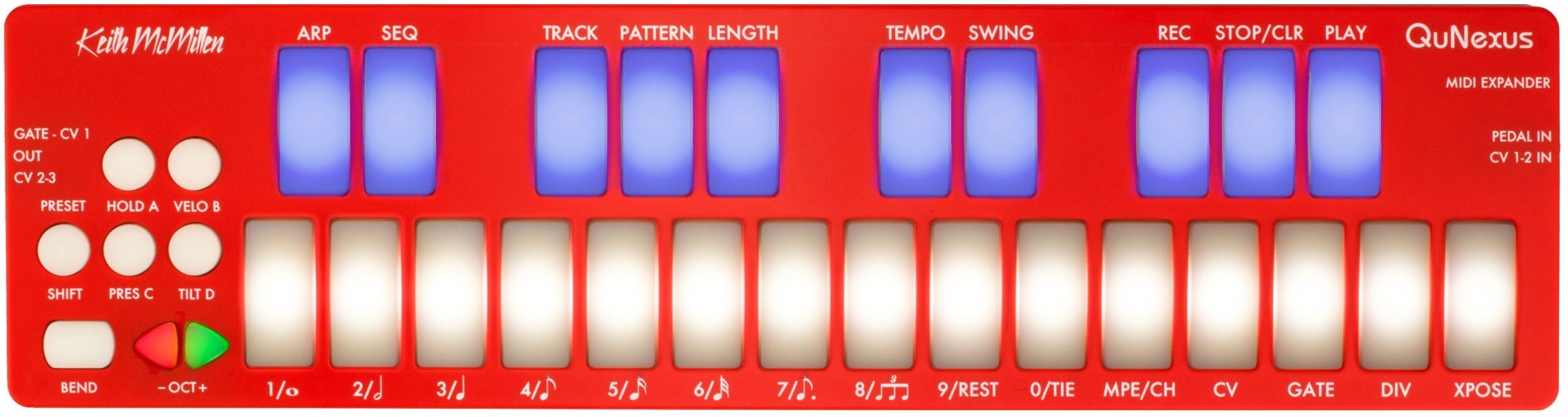
Keith McMillen QuNexus RED

The QuNexus is the older and more capable brother to the K-Board-C. QuNexus sports additional connectivity options including control voltage (CV) IN/OUT and a MIDI expansion port. KMI supply a compatible 5-pin MIDI expansion dongle with the QuNexus. The extra connectivity swayed me in favor of the QuNexus over the K-Board-C. The QuNexus is smarter, too, and has a multi-track sequencer, arpeggiator, etc.

A word about styling. I love the K-Board-C colors. I may need to buy one just because they are so cute. A number of on-line reviews complain about the QuNexus RED. In person, the RED is more “grapefruit orange” than “fire truck.” It’s rather attractive and I wouldn’t let the color put you off.

I purchased QuNexus RED from Patchwerk‘s in Seattle. Delivery was delayed by snow, so I was very excited when it finally arrived. I played QuNexus with Korg Module and Audio Modeling SWAM Flute.

The keys and buttons resemble fat chicklets. They have a pleasant, solid feel. They are not squishy in the way Roli Seaboard is squishy. There’s a fair bit of resistance. I have several concerns with the keypad:

  • Its short width precludes two-fisted playing.
  • The sharp/flat keys are not raised, i.e., higher than the “white” keys.
  • The key layout and size conspires against certain chord fingerings, e.g., playing F# and A together with my 3rd and 5th fingers didn’t work for my hand.

Of course, one shouldn’t be surprised by these concerns; just look at a picture or two.

If you’ve read some of my other posts, you’ll know that two octaves is not enough. I played Christmas music while testing and found myself out of keys at the bottom and at the top. If a manufacturer must make a two octave keyboard, I strongly recommend an F-to-F layout which better covers the range of the human voice (most melodies).

Knowing all that, I was fully prepared to shed with QuNexus. Being no stranger to mini-keys, I quickly learned to play melody lines without looking down at my hands. Although the QuNexus fits neatly on one’s lap (angled for comfort), it is more at home on a desktop.

QuNexus has four preset configurations. The first two configurations (non-MPE) worked quite well in Korg Module and SWAM Flute. The third configuration implements MPE. I tested the first three configurations in SWAM Flute. I did not test the fourth configuration, drums.

Again, the first two non-MPE configurations played well with SWAM Flute. MPE (the third configuration) was a bit alarming. SWAM Flute responded to all gestures, but the response to tilt (mapped to flute flutter) was too much right out of the box. As to tilt, the key pads seemed to be rooted at the bottom. Striking and holding keys near the bottom tamed tilt and the flutter. Playing and pressing near the top of the keys brought in much more tilt. Clearly, this is going to take some practice!

So. KMI QuNexus RED. What happened?

My QuNexus suffered from a few sensor defects that made it unusable. Three keys (Eb, A and middle C) spontaneously triggered ON or would trigger with the slightest touch. The notes did not turn OFF by themselves. (All verified using MIDI OX.) The end result was random stuck notes. Unacceptable.

I contacted KMI support and they very quickly analyzed the problem as a “hot sensor.” Well, I’d say there are three hot sensors. To their credit, KMI offered a replacement should I not get a quick turn-around response from Patchwerks. Patchwerks came through. Both companies deserve props for customer service.

In the end, I returned the QuNexus for a refund. I agonized over this decision. My policy (philosophy?) in regard to key-related issues is to pass on a replacement unit which possibly comes from the same production run.

Will I give KMI another try in the future? Yes. The K-Board-C is closer to “impulse purchase” and the colors are gorgeous. I will go in wiser knowing that I will need to woodshed in order to play melodies with confidence on a K-Board-C . Also, I will need to tweeze and tweak MPE parameter sensitivity to match controller with synthesizer (and vice versa). When we play an ax like MODX, KRONOS, etc., professional sound designers have done the tweaking for us. When starting with MPE, expect to do some work.

I need to mention another reason to choose KMI. KMI and GeoShred are offering discounts on GeoShred and GeoSWAM for K-Board Pro 4, QuNexus and K-Board-C users. Discount codes are provided by KMI. The offer is good Nov 20, 2022 to Nov 20, 2023. See this video for details.

Live, learn and prosper. Happy New Year!

Copyright © 2023 Paul J. Drongowski
Synthesizer heaven

I have seen synthesizer heaven and its name is “Patchwerks”.

Patchwerks was my go-to source for synthesizer gear during the pandemic. I have placed several on-line orders with them and each time their customer service was spot on.

I finally had an opportunity to visit their Seattle showroom at 4129 Stone Way North in Seattle’s Wallingford neighborhood. If you live in Seattle or visit Seattle, I strongly recommend a trip to the Patchwerks showroom. You won’t be disappointed!

The showroom seems to have one of everything. In addition to synths and beat boxes, you’ll also find patch cables galore, DIY kits, and of course, friendly staff. No one comes screaming “Don’t touch that!” and there aren’t any wannabe guitar gods. (You know which other brick and mortar retailer I have in mind…)

Don’t bring your Ford F-250 or RAM 2500 truck because you may need to park on a side street. Wallingford is old Seattle. Side streets are three cars wide and two of the “lanes” on either side of the street are filled with parked cars. It was a challenge parking my dinky Scion iM. 🙂

I’d like to say that the “opportunity” was to buy something new. Instead, I needed to return a troubled Keith McMillen QuNexus. Good on Patchwerks because they readily offered an exchange or return after seeing a video of the malfunction. These guys are on the level. (Regular returns are subject to a 10% restocking fee.)

I must give a shout-out to Keith McMillen Instruments (KMI), too. After getting the trouble report, they immediately stood behind their product and offered an exchange if Patchwerks was unable to resolve the issue/situation. Both Patchwerks and KMI responded to my initial trouble report within 24 hours. Very quick and to the point. It’s a pleasure to call out a positive customer service story.

I will continue to order from Patchwerks and I will likely give Keith McMillen Instruments another go, too. Even though the QuNexus didn’t work out, those colorful K-Board-C are quite appealing.

When you’re in Seattle, be sure to visit Patchwerks.

Copyright © 2023 Paul J. Drongowski
God Rest Ye, Merry Gentlemen (ChordPro)

“God Rest Ye, Merry Gentlemen” by Jon Batiste, Judith Hill, and Stay Human really grooves and I wanted to get in on the fun(k). So, I started with Yamaha Chord Tracker and worked out a similar chord progression.

Wanting to hear the progression and jam on it, I wrote the progression and lyrics in Extended ChordPro:

{title: God Rest Ye, Merry Gentlemen} 
{Artist: Jon Batiste}
{Key: Cm}
{Time: 4/4}
# Style: JazzGuitarClub
{stylecode: 3878}
{Tempo: 120}

{start_accomp}

# Intro [Cm][*IA]

# Verse 1
God [Cm:2][*MA] rest ye [Bb/D:2] merry, [Eb5:2] gentle [Fm:2] men,
Let [Gm:2] nothing [Ab:2] you dis- [Gm:2] may. [G7:2][*FA]
Re- [Cm:2][*MA] member, [Bb/D:2] Christ our [Eb5:2] Sa- [Fm:2] vior was
[Gm:2] Born on [Ab:2] Christmas [Gm:2][*FA] day. [C7:2]
To [Fm:2][*MA] save us [Bb:2] all from [Eb5:2] Satan's [AbMaj7:2] pow'r when

[Eb5:2] We were [Dm:2] gone a- [Bb/D:2] stray. [Bb:2]
O [Eb5:2] Ti- [Ab:2] dings of [Dm:2] com- [Gaug:2] fort and
[Cm:2] Joy, [Fm7:2] Comfort and [Bb7][*FA] joy.
O [Eb5:2][*MA] Ti- [Ab:2] dings of [Dm:2] com- [Gaug:2][*FA] fort and

# Funky interlude

[Cm7:2][*MB] joy. [F:2] ---- [Cm7:2] ---- [F:2] ----
[Cm7:2] ---- [F:2] ---- [Cm7:2] ---- [F:2][*FB] ----

# Ending
[Cm7-9][*EA] --------

Extended ChordPro adds auto-accompaniment features to the well-known and widely used ChordPro song format. I translated the ChordPro to a Yamaha-compatible auto-accompaniment file and played it on Genos™.

In “God Rest Ye,” you’ll notice the new extensions right away. There are a few more directives like: {stylecode: 3878} and {start_accomp}. Chord symbols are enhanced with a beat count, e.g., “[Cm:2]“, placing chord changes on beats within a measure. Annotations indicate auto-accompaniment section changes. For example, “[*MA]” and “[*FA]” mean “Main section A” and “Fill in A”, respectively.

Getting to hear the progression — not just play it by hand — was a huge help. I found a few places where a minor chord was required instead of a major. Play-back encouraged me to listen critically and to find a few hipper voicings.

If you would like a copy of the Java program (cp2mid) which translates Extended ChordPro to a Yamaha auto-accompaniment Standard MIDI File, here is a pointer to the ZIP file page. If you would like more information, please see the ChordPro auto-accompaniment example and demo and my article with ideas and uses for Extended ChordPro auto-accompaniment.

Copyright © 2022 Paul J. Drongowski

ChordPro auto-accompaniment

Before we close out the year, a Christmas gift!

Last January, I developed and wrote about “cp2mid“, a Java program to convert extended ChordPro files to a Yamaha accompaniment MIDI files. cp2mid lets someone compose in extended ChordPro format and play the composition on a Yamaha arranger in an auto-accompaniment style of your own choosing. If you don’t feel like composing, just grab one of the many ChordPro songs on the Web, clean it up, translate it, and play it.

You’ve probably seen ChordPro on the interwebs. It looks like:

# A simple ChordPro example 

{title: God Rest Ye, Merry Gentlemen}

God [Cm] rest ye merry, [Cm] gentlemen,
Let [Ab] nothing you dis[G7]may.
Re [Cm] member, Christ our [Cm] Savior
Was [Ab] born on Christmas [G7] day.

Extended ChordPro adds a few new directives (the things between curly braces) and tightens up the notion of musical time in order to mark measures and place chord changes within measures.

cp2mid translates the chords and lyrics into a Standard MIDI File (SMF). The SMF contains all the magic needed to play an auto-accompaniment on a supporting Yamaha arranger keyboard. (PSR E series, unfortunately, is out of luck.)

If you would like more information, here are some links to dive into:

The first three posts are essential reading for cp2mid users. The last two posts are intended for coders and other technically inclined folks.

Oh, yeah, you’ll need the ZIP file with example songs and cp2mid Java code.

Copyright © 2022 Paul J. Drongowski

Adding zones to Keylab Essential with EPP

My current light-weight rehearsal instrument is a Yamaha Reface YC. Although I have put the YC to work at many a rehearsal, the Reface YC has three major limitations:

  1. It’s organ all the way and I can vary tone color only with drawbars.
  2. The three octave keyboard is maddingly too short and chops either the melody or bass line.
  3. I can cope with the mini-keys, but really?

Thus, my quest for a light-weight rehearsal rig goes on.

The V3 Sound Yammex XXL module and its closely-related sister, the Grand Piano XXL module, have very good orchestral voices. The XXL modules are small and weigh only 0.5 pounds (1.2kg) each. Hmmm, I think we have a candidate here.

The other half of the rehearsal formula is a MIDI controller, of course. Fortunately, I have an Arturia Keylab Essential 49 in hand. The Arturia is a relatively compact 49-key controller with lots of pads (8), knobs (9) and sliders (9). The Keylab Essential 49 is a relatively light 6.6 pounds (3kg).

Seems like we should have a match…

I usually split the keyboard into LOWER and UPPER zones somewhere around G3 (AKA G below middle C). This split gives my left hand enough room to roam and accommodates melody lines that dip below middle C. Although I keep the LOWER sound simple (i.e., one patch), I often layer the right hand. Most synthesized acoustic instruments need a little thickening and timbral shaping. Two UPPER layers are a minimum; three layers are sufficient, four is too many.

Seems like a slam dunk — MIDI the Keylab Essential into the Yammex, make a few configurations, and go. Unfortunately, neither the Keylab Essential or Yammex module support the split and layer capability that I need.

Time to rant about the stupidity of most MIDI keyboard controllers. Only a few 49-key controllers have split, layer, or zone capability: Samson Graphite 49, Nektar Panorama P4, Novation SL MKIII, Roland A-500. In the case of the Yammex module, the controller must send a full Bank Select MSB, Bank Select LSB, Program Change message sequence. Many controllers fail even this basic requirement.

The Arturia Keylab Essential, at the very least, sends a complete patch change message sequence. And, I am not going to buy yet another controller!

Enter the MIDI Solutions Event Processor Plus (EPP). The EPP is a MIDI-powered microcomputer that receives MIDI messages on 5-pin, modifies messages as determined by a set of rules, and sends the modified MIDI stream out through 5-pin. The Keylab Essential has a 5-pin MIDI OUT which is electrically compatible with the EPP. (The Keylab Essential voltage is about 4.5V as measured with a digital multimeter.) The EPP sits between the Keylab Essential MIDI OUT and the Yammex XXL MIDI IN. The EPP is itself a light-weight unit and adds negligible weight to the rig.

I programmed the EPP to split note ON/OFF messages arriving on Channel 1. Destination MIDI channel is determined by key zone: UPPER1 (Channel 1), UPPER2 (Channel 2), UPPER3 (Channel 3), LOWER (Channel 4),

  • Channel 1 note ON/OFF at and above the split point are copied to outgoing Channels 1, 2 and 3.
  • Channel 1 note ON/OFF below the split point are copied to outgoing Channel 4.

I also created rules to respond to button presses sending continuous controller 83 (CC#83). These rules initialize the four channels by sending patch change and expression (CC#11) messages. The EPP-based solution should work with any MIDI controller and multitimbral (multi-channel) module as long as MIDI communication is 5-pin.

Early on, I auditioned the Yammex sound set and had identifed 15 or so favorite Yammex voices. The following four voices are assigned to Yammex channels 1 to 4 by the EPP when it receives CC#83:

  1. Channel 1: 63 / 116 / 7 Full Strings 2 Long
  2. Channel 2: 63 / 118 / 58 Flute EQ
  3. Channel 3: 63 / 117 / 49 Classic Horn Ensemble
  4. Channel 4: 63 / 116 / 7 Full Strings 2 Long

The idea is to use Channel 1 as the main solo voice and Channels 2 and 3 as optional orchestral coloring. Flute EQ and Classic Horn Ensemble are mellow, unobtrusive and mix well with other voices. Channel 4, of course, is the left hand.

Initially, Channels 1 (UPPER1) and 4 (LOWER) are assigned an ensemble string voice, a reasonable default. Expression values are set such that strings are heard, and Channels 2 (UPPER2) and 3 (UPPER3) are silent.

Voices are assigned in the following way to the eight Keylab Essential pads:

      Violin            Oboe           Flute           Eng Horn 
63 / 116 / 22 63 / 118 / 48 63 / 118 / 57 63 / 118 / 49

Full Strings 2 Cello Flugelhorn Bassoon
63 / 116 / 7 63 / 116 / 24 63 / 117 / 15 63 / 118 / 50

Normally, these are the main solo voices to be assigned to UPPER1 (Channel 1). However, using Arturia’s USER MIDI channel feature, these voices can be assigned to UPPER2 (Channel 2), UPPER3 (Channel 3) and LOWER (Channel 4), too. That allows for a lot of game-time flexibility!

Wait, there’s more. I assigned MIDI expression to Sliders 5 through 8:

  • Slider 5: UPPER1 (Channel 1) expression/level
  • Slider 6: UPPER2 (Channel 2) expression/level
  • Slider 7: UPPER3 (Channel 3) expression/level
  • Slider 8: LOWER (Channel 4) expression/level

The sliders let me mix voices dynamically. A voice is silenced when I pull its Slider all the way down.

The table below summarizes the Keylab Essential knob, slider, pad and button MIDI assignments:

Knob #1  Cutoff     CC#74 Brightness 
Knob #2 Resonance CC#71 Timbre
Knob #3 Vib Rate CC#76 Vibrato rate
Knob #4 Vib Depth CC#77 Vibrato depth
Knob #5 Vib Delay CC#78 Vibrato delay
Knob #6 Port Time CC#05 Portamento time
Knob #7 Chorus CC#93 Chorus level
Knob #8 Reverb CC#71 Reverb level
Knob #9 CC#17 free

Slider #1 Attack CC#73 Attack time
Slider #2 Decay CC#75 Decay time
Slider #3 Sustain CC#64 Sustain
Slider #4 Release CC#72 Release time
Slider #5 UPPER1 CC#11 Expression channel 1 Solo
Slider #6 UPPER2 CC#11 Expression channel 2 Flute EQ
Slider #7 UPPER3 CC#11 Expression channel 3 Classic Horn Ens
Slider #8 LOWER CC#11 Expression channel 4 Strings
Slider #9 CC#85 free

Pad #1 63 / 116 / 22 Violin
Pad #2 63 / 118 / 48 Oboe
Pad #3 63 / 118 / 57 Flute
Pad #4 63 / 118 / 49 English Horn
Pad #5 63 / 116 / 7 Full Strings 2 Long
Pad #6 63 / 116 / 24 Cello
Pad #7 63 / 117 / 15 Flugelhorn
Pad #8 63 / 118 / 50 Bassoon

Button #1 (Part1) CC#65 Portamento ON/OFF (toggle)
Button #2 (Part2) CC#82 Momentary (Generic ON/OFF)
Button #3 (Live) CC#83 Initialize voices (Momentary)

So far, I’m having fun mixing and matching voices on the fly and trying new timbral combinations. One drawback is having to carry around a mental map to find, select and mix voices. I wish there was a way to display the current voice assignments! I plan to add stickies to the Keylab Essential to assist navigation and reduce pilot workload.

I hope this article has sparked ideas for your own control set-ups. The general principles should apply to most MIDI keyboard controllers and multi-timbral tone modules.

Copyright © 2022 Paul J. Drongowski

Audio Modeling: Camelot and SWAM Flute

I hope you took advantage of Audio Modeling’s Black Friday sale. I took the plunge and bought Camelot Pro and SWAM Flute for IOS. Why did I wait all these years? 🙂

Camelot Pro (IOS)

Obviously, I’ve only been working with Camelot Pro for a short time. However, I now get why many iPad musicians are into it. Camelot Pro is feature rich including an audio player, music score reader, etc. I’ll get into those features someday. My primary purpose now is a smart MIDI-routing host for software and hardware instruments.

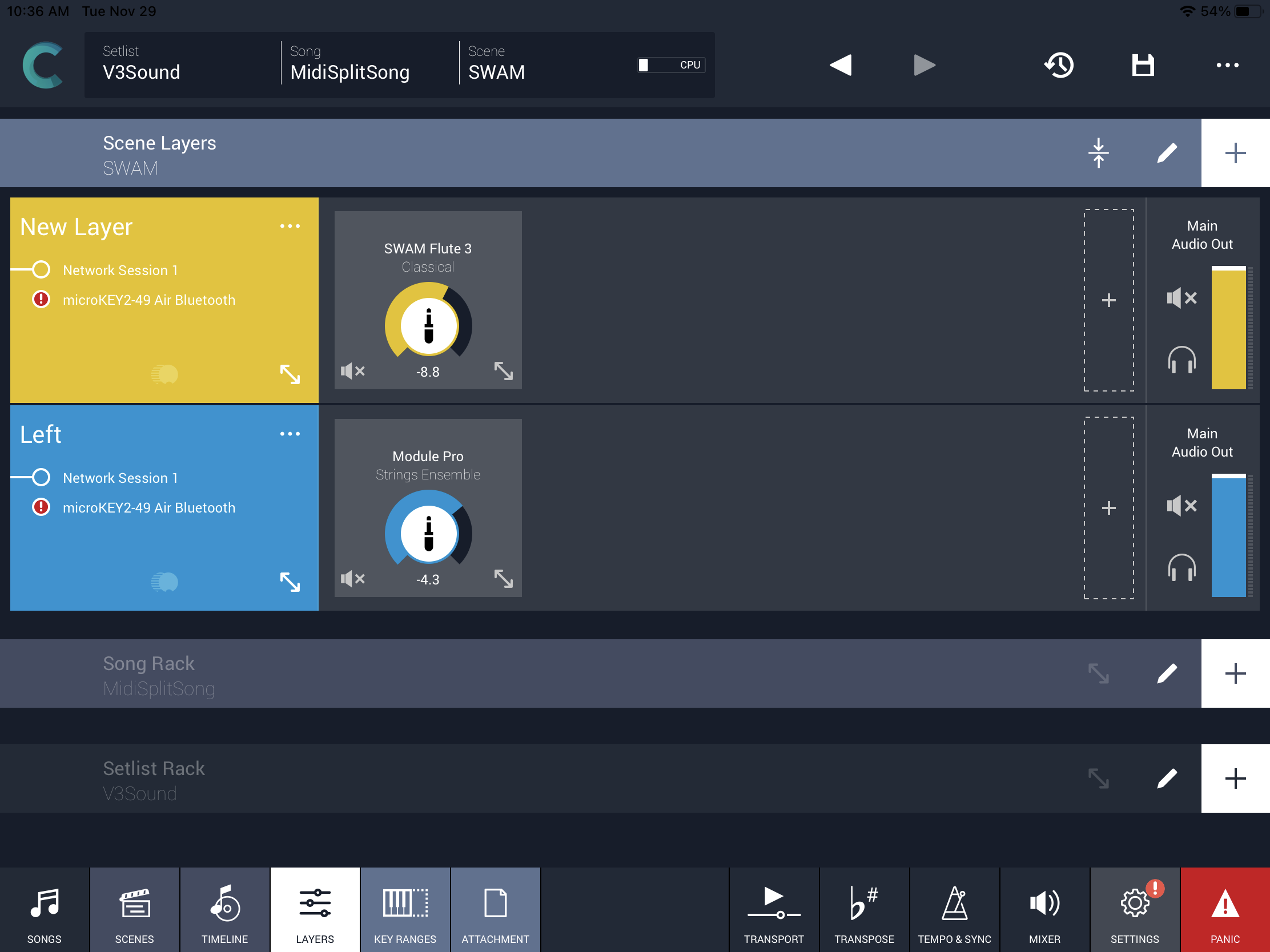
My first experiment was a split and dual layer combi for the V3 Sound Yammex module. Camelot Pro comes with many pre-defined patch maps for popular instruments like the Yamaha MODX. Since the V3 Yammex is a niche product, Yammex ain’t lucky enough to have a pre-defined map. With a little menu digging, I found the Bank Select and Program Change parameters for each patch for the split and layer. With a little more menu digging, I found sliders for bread-and-butter patch parameters like cutoff and resonance, reverb send, and so forth.

Camelot Pro simple example

My second experiment was a split and dual layer combi for SWAM Flute and Korg Module. Having the first experiment under my belt, it was much easier to set up the software instruments. Double-tapping a software instrument box gives access to patch selection.

I sometimes use a wired Arturia Keylab Essential and other times I play a Korg Microkey Air wireless. So, one needs to pay attention to the MIDI connection status icons in a layer in order to re-enable any missing connections. In the example above, please note the missing Microkey Air connection.

Not bad. My main quibble with Camelot Pro is Audio Modeling’s exaggerated claim of an intuitive interface that doesn’t need a manual. No, you do. At the very least, watch the Camelot introductory video and browse the on-line documentation.

No matter what your marketing people claim, don’t ever say your interface is so intuitive it doesn’t need documentation. This is the most idiotic remark a software engineer or vendor can make. I failed students for less…

In order to use Camelot Pro, you need to understand the structure and relationship of songs, scenes and layers — at the very least. You also need to know how to add instruments and change key ranges. Yep, the graphic controls are nicely done — once they are found and exposed.

Here’s another instance when the on-line documentation was helpful. I didn’t know that you could create your own user patch maps! If I continue to use Camelot with the V3 Sound Yammex XXL, I will surely create a map containing the twenty or so favorite Yammex patches. On the up-side, Camelot Pro has enough capability and parameter tweaking power to ditch my MIDI Designer user interface (UI) and just go Pro.

SWAM Flute (IOS)

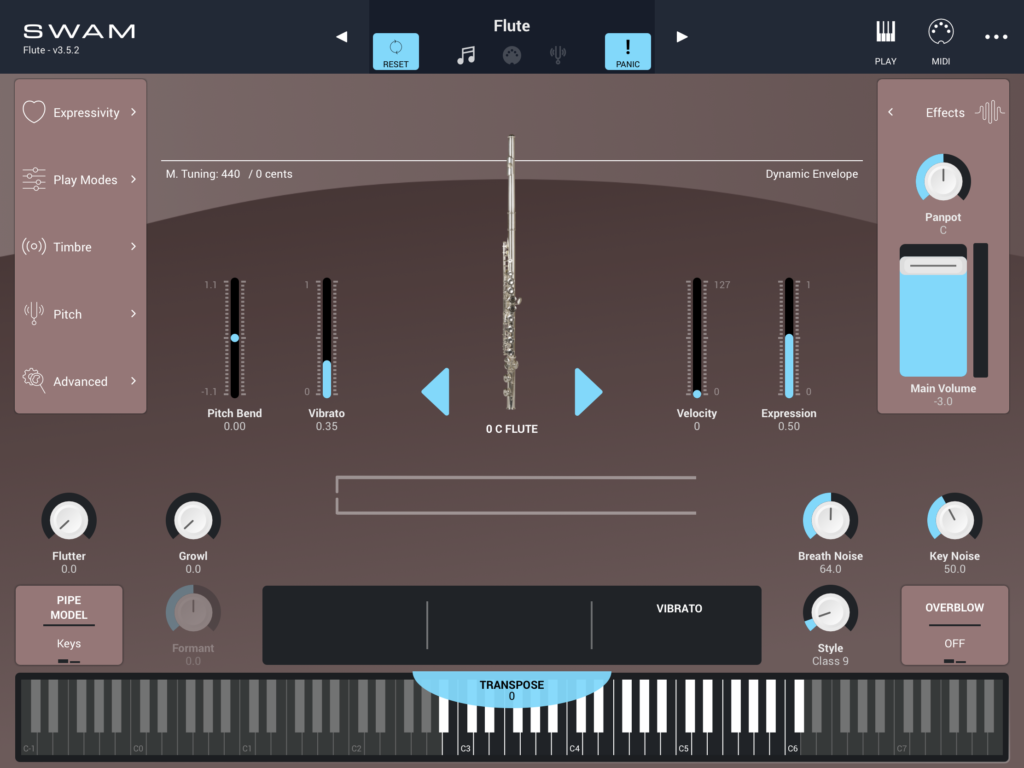
If you want to get your Herbie Mann or Brian Jackson on, you need one of these. SWAM Flute comes up configured as a jazz flute and, wow, is this thing expressive.

Audio Modeling SWAM Flute

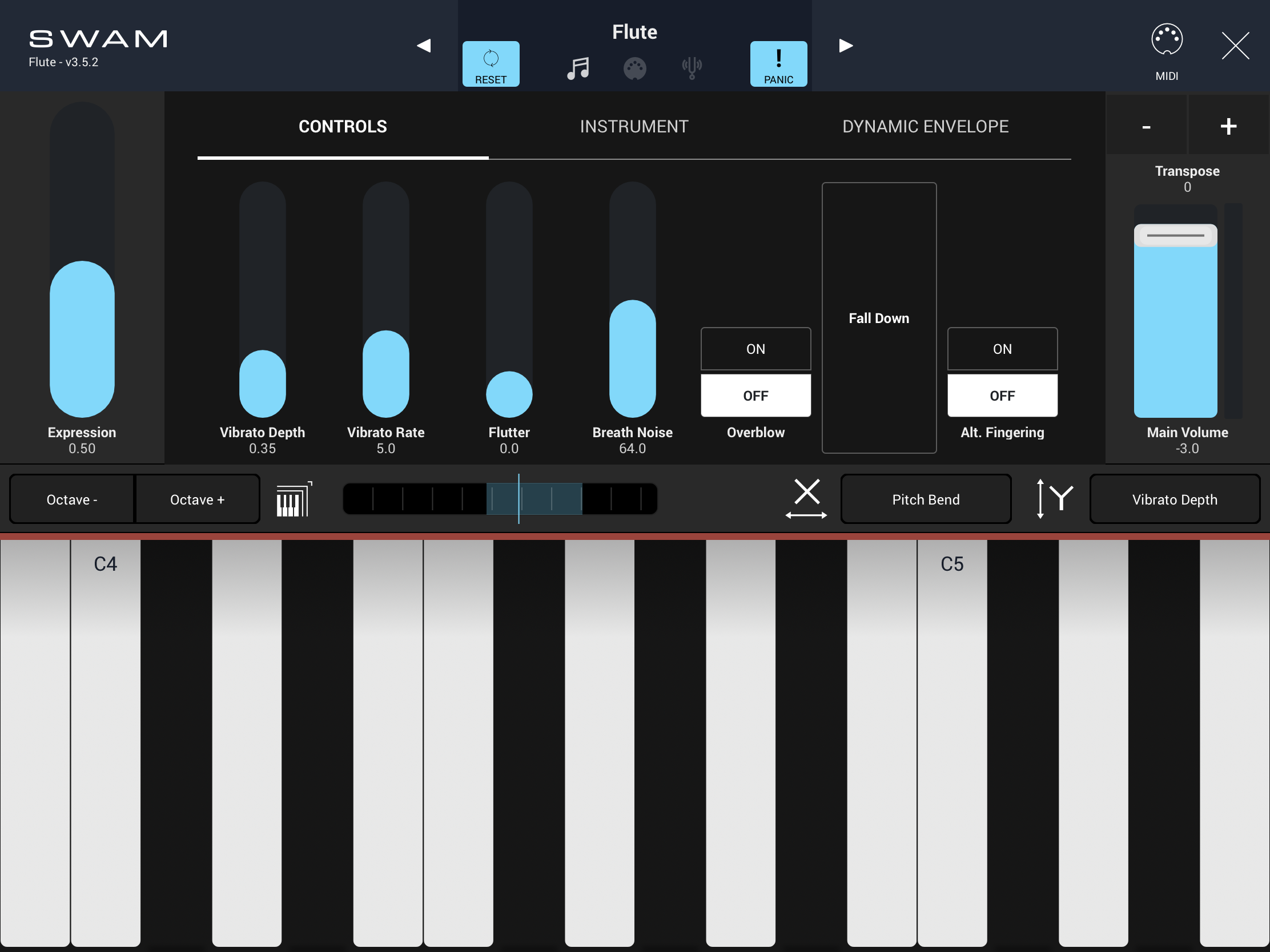
Be sure to hit the PLAY icon and play the flute using SWAM’s on-screen controls. Swiping left/right and up/down are probably as close as us cheapskates will get to a Roli experience. 🙂 I like the articulation status display which indicates legato, detached, etc. It’s a good tool for learning on-screen gestures.

Then dive into the advanced parameters through the tabs. There are a number of fun toys hidden in these treasure boxes. Growl! Flutter! Falls! Oh, my gosh, this is sweet!

SWAM Flute gestural PLAY interface

After all of that excitement, hooking up to the Arturia Keylab Essential felt like a let-down. The flute still sounds darned good — among the best one can find in a hardware synth. But, I misses all of the fun on-screen articulations. There is solace in the MOD wheel which adds spot-on vibrato. With the snow beginning to fly, it’s time to put those Arturia knobs and sliders to work…

The SWAM flute is a beautiful solo instrument. This is true of all current SWAM instruments. Ensembles are a DIY affair and, unfortunately, the individual solo instruments are pricey. Putting together a woodwind section will set you back a pretty penny. So, I will await SWAM ensembles because they are my primary need and I’m cheap.

On the other hand, if you need a few instruments for exposed solos, definitely give Audio Modeling SWAM a try. I don’t regret buying SWAM Flute (IOS) as it is fun to play and it opens the door for advanced, expressive control. WX-11?

Copyright © 2022 Paul J. Drongowski

V3 Sound YAMMEX: Progress report

Here’s a quick update on my progress with the V3 Sound YAMMEX XXL sound module.

The V3 Sound XXL series are very compact, light-weight MIDI sound modules based on the Dream S.A.S. SAM5716B synthesis engine. The YAMMEX and its sister, the V3 Sound Grand Piano XXL, have hundreds of high quality voices — 3GBytes of factory samples in a 4GByte waveform memory. The modules also provide two multi-effect (MFX) pipelines which enrich the sound.

V3 Sound YAMMEX XXL expansion module

The XXL modules do not have a built-in user interface (UI) having no display or buttons for selecting voices. All sounds and effects are selected through the MIDI and USB-A ports. V3 Sound provide the tablet-based V3 Sound Control app and two comprehensive MIDI Designer UI templates. The V3 Sound Control app, unfortunately, does not support the YAMMEX. V3 Sound considers the YAMMEX as a Genos/PSR expansion only and expect users to control YAMMEX through a set of predefined voice (VCE) files and the normal Genos/PSR voice selection process.

Well, those VCE files do send MIDI Bank Select MSB, Bank Select LSB and Program Change messages. I can now assure you that these messages are enough to select YAMMEX voices even if you are not using a Genos or PSR.

Yamaha MODX Zone Master works quite well. You need to build MODX Performances consisting of external MIDI zones. Thanks to Zone Master you can select, split and layer YAMMEX voices. The trick is to assign a separate YAMMEX voice to each MIDI channel and use Zone Master channel and note ranges to affect splits and layers.

I have also successfully used the Arturia Keylab Essential with YAMMEX. It took only 15 minutes work to make a control template using Arturia’s MIDI Control Center application. I assigned eight of my favorite YAMMEX voices to the eight Keylab pads and assigned the most common MIDI continuous controllers to the knobs and sliders.

Both of these scenarios are dirt-simple involving a direct 5-pin MIDI connection. Unfortunately, Keylab Essential by itself cannot do splits and layers over 5-pin MIDI. Keylab Essential does not provide the functional equivalent of Zone Master. Keylab Essential can send on only one MIDI channel at a time and doesn’t implement the concept of key ranges (zones). Keylab Essential also restricts the number of selectable voices to what you can programmed into its key pads.

All is not lost, however, as MIDI Designer once again comes to the rescue. First, you need to make connections:

                                 iPad 
|
Keyboard controller --> iRig MIDI --> YAMMEX

The keyboard controller sends MIDI over a 5-pin cable to the iPad which, in turn, sends MIDI to the YAMMEX over a second 5-pin cable. Bonus: I successfully tested Bluetooth MIDI input from Korg Microkey Air. The iPad acts as a Bluetooth wireless interface to YAMMEX.

The iPad runs two applications: StreamByter and MIDI Designer:

    MIDI IN --> StreamByter --> MIDI Designer --> MIDI OUT

Incoming note messages are passed THRU StreamByter and MIDI Designer. StreamByter remaps (rechannelizes) the MIDI notes to three zones/streams:

    Channel 1: UPPER1 
Channel 2: UPPER2
Channel 4: LOWER

UPPER1 and UPPER2 form a two-voice layer above the split point. LOWER is a solo left-hand voice below the split point. I borrowed this simple zone structure from the Casio CT-S1000V. It’s intuitive and is quite powerful even in its simplicity.

StreamByter maps and mangles MIDI data according to user-defined rules. The rules are rather cryptic, so I refer you to the StreamByter documentation. Currently, I am using the following rules to split/layer:

    NX 00-3A = X3 
NX 3A-7F = X0
NX 3A-7F = X1 +C

Yes, the UPPER and LOWER zones have a one note overlap. I’m still experimenting and may make the overlap larger, if a bigger overlap is useful. I don’t like abrupt breaks between upper and lower zones.

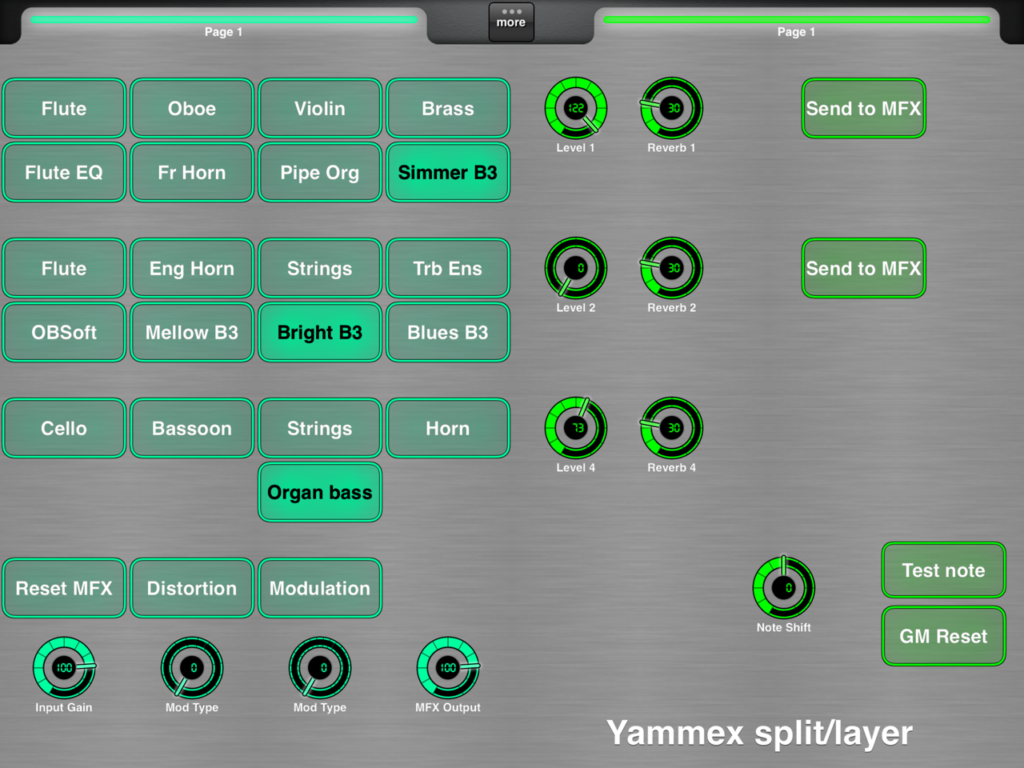
Well, the rest of the work is done by MIDI Designer and my YAMMEX control template. The V3 Sound templates struck me as too complicated — the main reason why I went with “the Casio voice structure” and my own template. Here is the first prototype, work-in-progress template:

MIDI Designer template for YAMMEX (work in progress)

There are eight radio buttons to select the UPPER1, UPPER2, and LOWER voices. [Well, I need to add three more voices to LOWER, as you can see.] These are my favorite YAMMEX voices and they will let me build my most frequently used combinations. Knobs set the voice and reverb level for each zone.

The MFX controls do not function correctly at this time. I seem to be missing some magic; YAMMEX is not responding to the MIDI messages sent by the template even though the V3 Sound “factory” template sends the same darned messages! At this point, I need to ask V3 Sound for advice.

All in all, things are coming along — many successes, a few failures. That’s to be expected at this stage!

Copyright © 2022 Paul J. Drongowski


New Fall 2022 Products

A few products of interest…

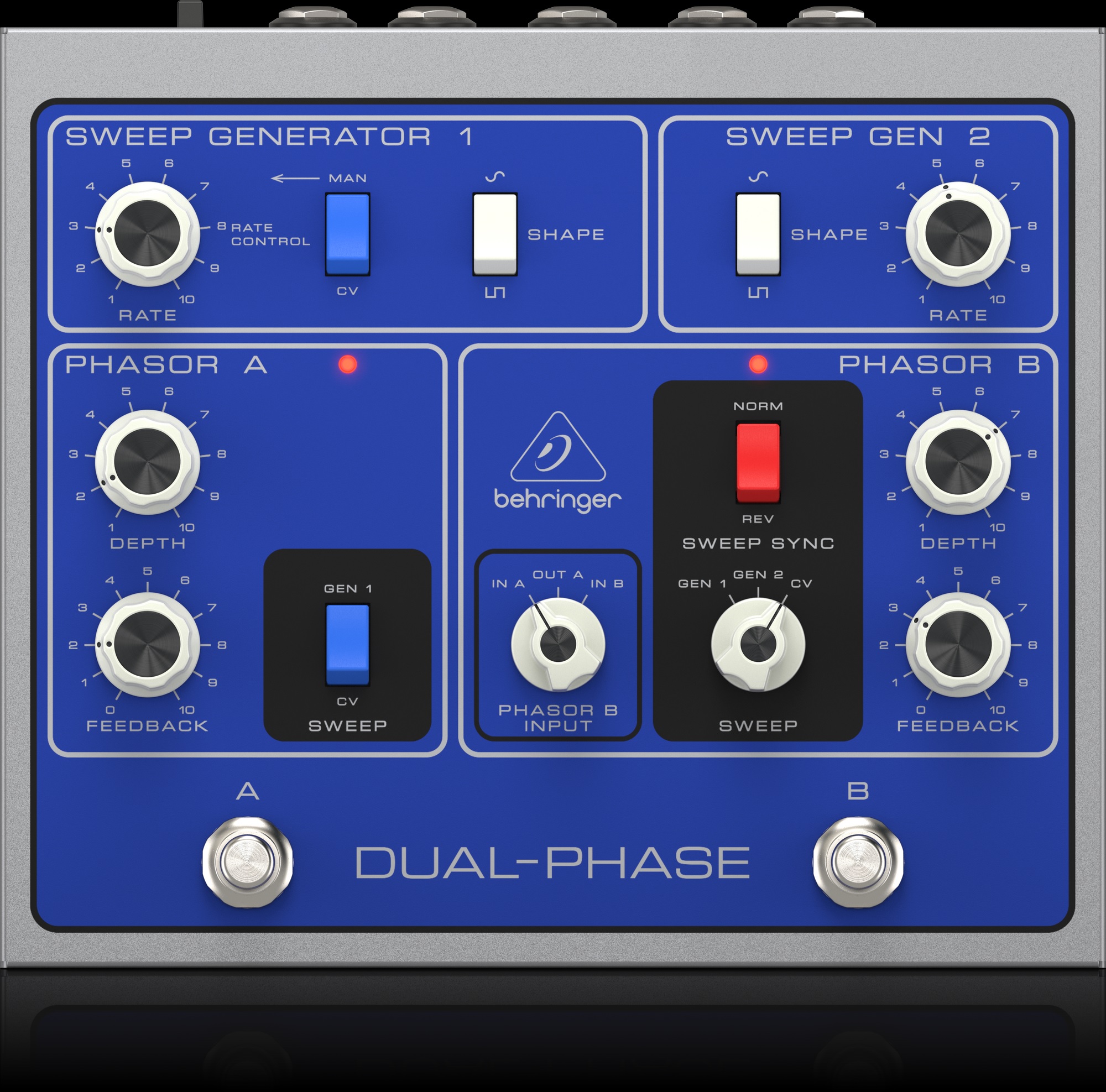
The Behringer Bi-Phase has done its Houdini act and has returned as the Behringer “Dual-Phase”.

I was a lover of all things Mu-tron back in the day. I still have a Musitronics MU-TRON Micro V poor man’s envelope-controlled filter, a MU-TRON C-200 volume-wah pedal, and an original MU-TRON T-shirt! The C-200 is robust enough to double as a storm shelter. The Micro V and C-200 have achieved heirloom status since I await a puff of smoke every time I apply power to either device. Old electronics is just that way.

Behringer Dual-Phase (nee Bi-Phase)

I never could afford a MU-TRON Bi-Phase and always lusted after one. Thanks to Behringer ($159 USD), I may get my chance. I’m very glad that Behringer retained much of the original livery after their negotiations with [whomever].

I hope there is still love between Behringer and the Musitronics (MU-TRON) heirs as I would love to see an inexpensive MU-TRON III filter re-issue.

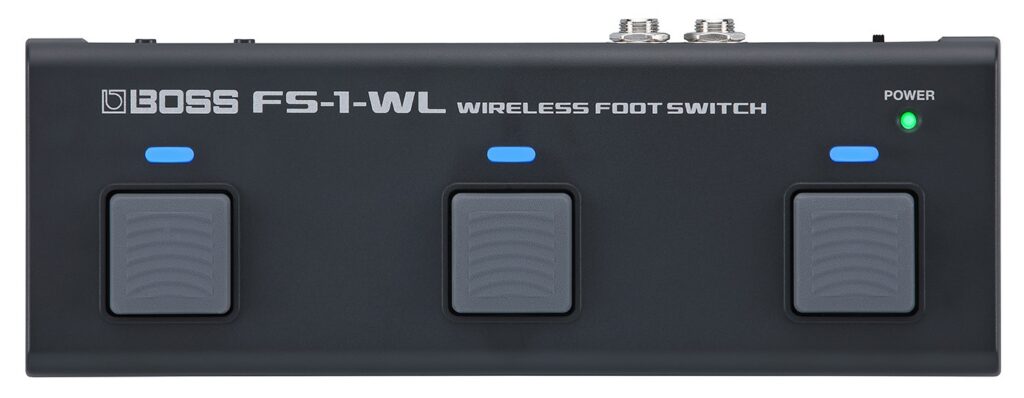
Roland/Boss are continuing along the Bluetooth wireless control path with the Boss FS-1-WL Wireless Footswitch. Here are the basic details in a nutshell:

  • Three footswitches
  • Configure via FS-1-WL app
  • Ports galore:
    • Full-size USB-B
    • MIDI OUT (3.5mm)
    • Expression (1/4″ TRS )
    • Control 1 and 2 (1/4″ TRS)
    • DC IN
  • Two AAA batteries or PSA adapter (optional)
  • Weight: 10 ounces (258 grams)
  • $129.99 USD

I have the Boss EV-1-WL wireless expression pedal which is integrated into my wireless iPad rig.

The new FS-1-WL goes beyond the EV-1-WL and I wish the FS was available before the EV. The FS adds proper footswitches to expression pedal capability. I have expression pedals in hand already and would have appreciated button control for page turns, patch changes, etc. Boss/Roland are finally thinking outside of the guitar player box.

Boss FS-1-WL Wireless Foot Switch

One potential drawback is the narrow spacing of the footswitches. I have trouble hitting footswitches accurately on the EHX Lester K with its closely spaced switches. Since I play in a sitting position, I can’t see my feet and need to hit switches with confidence. Looking down is not an option.

The other big question is how well the FS-1-WL would integrate with synths and software instruments. Most programming details are covered in the FS-1-WL editor user guide. Basic MIDI message types are supported: continuous controller (CC) and program change (PC). There is a third mode, “PC+CC”, and provision for BANK MSB and BANK LSB messages. What is not clear from the user guide is the ability to send a full BANK MSB, BANK LSB, PC message sequence which typically is needed to select a patch in a modern synth.

If anyone gets their hands on an FS-1-WL, please confirm the ability to send a full three message patch change sequence. [Thanks in advance.]

As a keyboard player, I would go straight to the FS-1-WL and use my own expression pedal. The quick start guide calls out the Roland EV-5 explicitly, so I would simply pull out one of my old Roland/Boss pedals and plug in.

I hope Roland continues to explore Bluetooth wireless control. Now, if we can get two synths to communicate over Bluetooth without the need of a computer (or USB host box) in between…

Copyright © 2022 Paul J. Drongowski

In the house: V3 Sound YAMMEX XXL

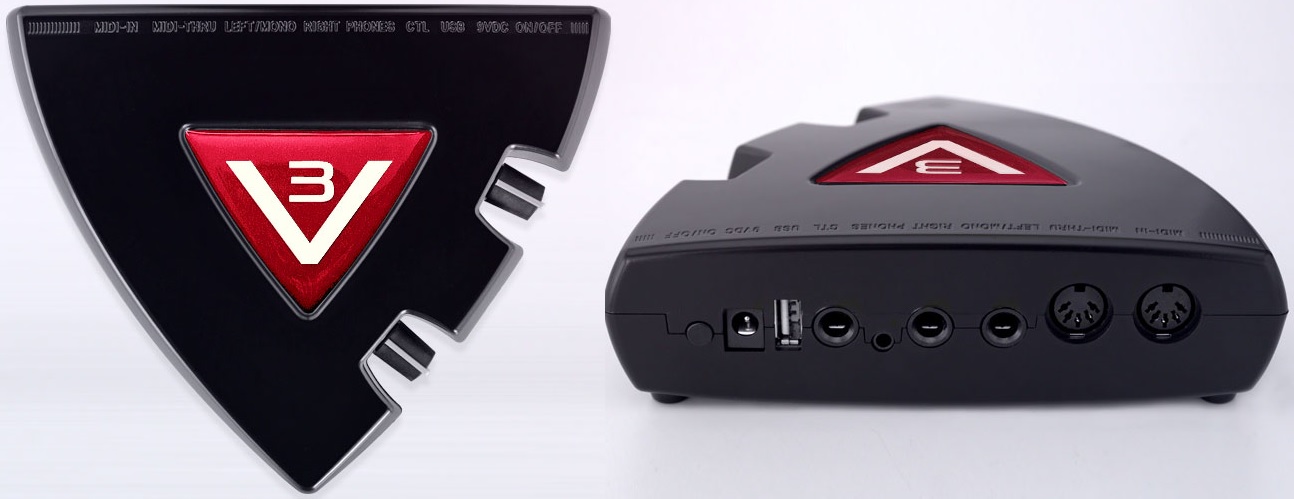
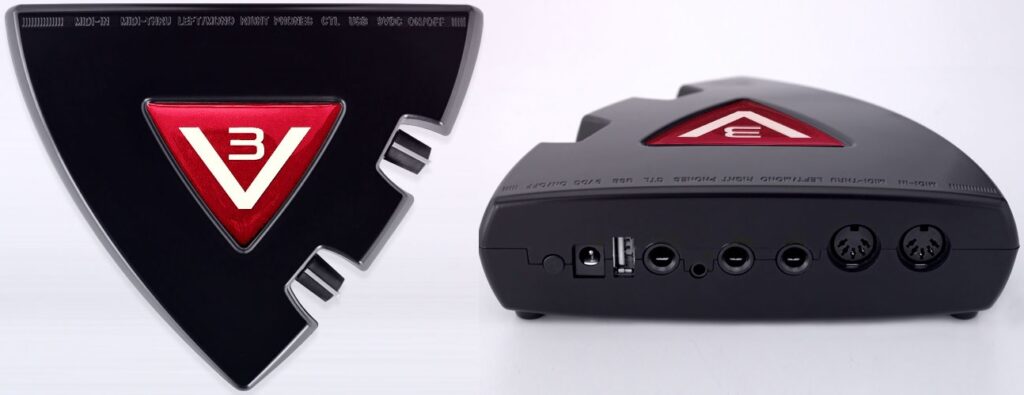
Thought I would post a quick note about the new unit under test — the V3 Sound YAMMEX XXL tone module. The YAMMEX is a member of the V3 Sound XXL family of tone modules. They all share the same triangular shape and are light as a feather:

V3 Sound YAMMEX XXL expansion tone module

The lump-in-the-middle power supply is roughly the same weight!

You might have seen and heard Piano Man Chuck demonstrate the V3 Sound Grand Piano XXL module. [Piano Man Chuck is a V3 Sound dealer, BTW.] Well, the YAMMEX has the same sound set as the Grand Piano XXL. The main differences are:

  • The MIDI bank and program change layouts are different: Grand Piano XXL for general use as an expander, YAMMEX XXL as a Genos/PSR expander.
  • Grand Piano XXL is supported by the V3 Sound Control app; the YAMMEX XXL is not.
  • Grand Piano XXL is supported by two different MIDI Designer templates; the YAMMEX is not.
  • YAMMEX XXL voices are selected using custom Genos/PSR user voices.

YAMMEX XXL arrives from the factory with a USB flash drive containing the custom user voices (VCE files) needed to select voices through Genos/PSR. It’s all described in the YAMMEX XXL manual. [Henceforth, “Yammex” means “YAMMEX XXL”.]

I found a Yammex on ebay at a price that was impossible to refuse. It would be a shame to confine Yammex to Genos duty alone, so I studied the heck out of its MIDI implementation. I also examined the VCE files available from the V3 Sound Web site. Hmmm, looks like it’s a simple matter of uttering the appropriate Bank Select MSB, Bank Select LSB and Program Change messages. We can do that!

An inquiry to V3 Sound about compatibility was answered quickly, but implied that Yammex was only for Genos/MIDI. If you know MIDI and your controller’s capabilities, and if you don’t mind a little work, Yammex definitely can do more than Genos/PSR.

I was sorely tempted by the V3 Sound XXL series because it is based on the Dream S.A.S. SAM5716B synthesis chip. After hearing the SAM2635 and its GM/GS sound set, I wanted to hear what a high-end Dream chip could do with 3GBytes of professionally produced instrument samples. Cut to the chase, V3 Sound do not disappoint especially at the price I paid.

Jeff’s Music Gear is Sweetwater!

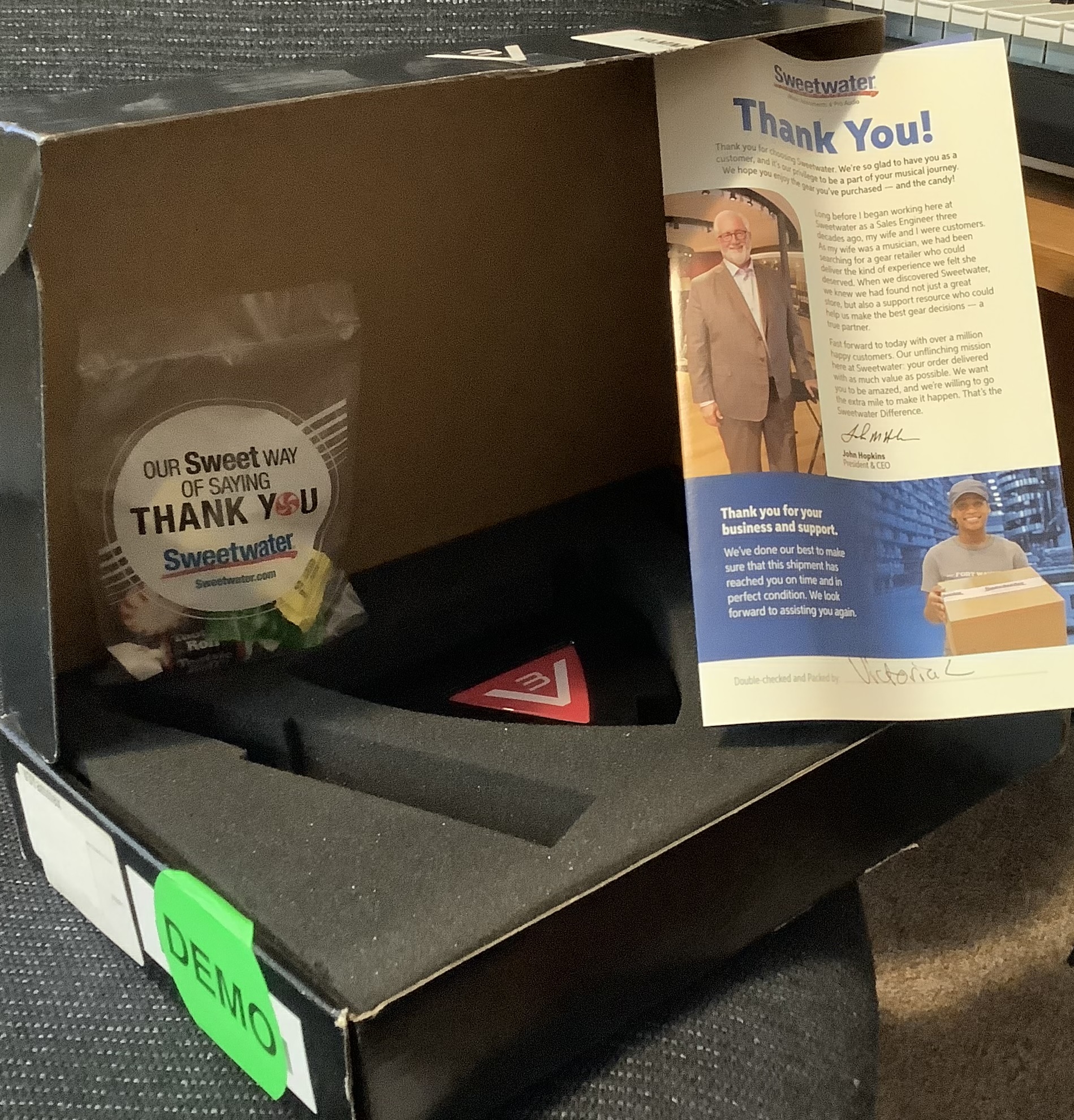
The box arrives. I open the shipping carton and what the? The Yammex box is in fine shape, but is covered in round “Demo” labels. I instantly smell “Sweetwater”. And there’s candy, and a Sweetwater “Thank You” card. The ebay seller is Jeff’s Music Gear. After a Google, I discover that Jeff’s Music Gear is Sweetwater’s ebay consignment shop! Nice to know that I was in good hands all along.

OK, then, plug everything up using Yamaha MODX as a controller. (See my article about Yamaha MODX Zone Master.) Ooops, no flashing MIDI light and no sound. I’m already composing a message to Jeff’s when I remember this note in the Yammex manual:

No sound? The YAMMEX XXL sound expander only creates a tone when you call up a sound from the V3 folder in your keyboard’s display. Just connecting it to your keyboard is not enough.

They aren’t kidding! I select a voice through the MODX Zone Master screen and suddenly the MIDI light starts flashing and Yammex starts talking. Delete the message to Jeff’s.

One other note from the manual is helpful during bring up:

Testing MIDI connections and settings. After connecting your MIDI cable and making sure your MIDI settings are correct, select a V3 User Voice. The MIDI LED on the YAMMEX XXL should now blink with every keystroke.

I find this behavior to be a dubious design decision. The purpose of a MIDI light is to indicate MIDI reception under any condition. While troubleshooting, I connected the Yammex THRU port to MIDI-OX on a PC and verified MIDI operation. Most of V3 customers will not be that savvy…

I’ve just begun auditioning sounds and already I’m pleased. I like and prefer the Bösendorfer Imperial 290 (Vienna) over the Steinway Model D (Hamburg). I fell in love with Bösendorfer when I first touched one in 1980. The electric pianos are good although too clean and polite. The organ samples are damned good. There are two flavors: No Leslie and Leslie sampled in. Sans-Leslie voices are meant to be dirtied up by an external pedal. I’ll try the Electro-Harmonix Lester K for spin and throw some overdrive on the EPs, too.

I like the Oberheim pads — another love. The classical strings are solid. That’s as far as I’ve gotten into the sound set. I’m looking forward to hearing the rest.

As to the supplied USB flash drive, the previous customer zorched the factory VCE files. I found an X6A file instead which I recognize as a Yamaha MOXF dump file. I guess the previous customer tried Yammex with MOXF and was disappointed. Fortunately, V3 Sound provide the Genos/PSR VCE files on their Web site. The supplied drive is only 64MB. [Not really a complaint.]

Experiments to come? Once I get my faves down to 8, 16 voices or so, I’ll configure the Arturia Keylab Essential. The extra knobs and sliders will come in handy. Also, I will whip up a simplified MIDI Designer template for the Yammex. The existing templates are comprehensive — yet overwhelming. I’m thinking about a UI similar to Korg Module. Those Korg folks are definitely on to something. Simplicity is king. MIDI Designer (with StreamByter) on iPad should give me splits and layers — maybe even a wireless Bluetooth interface to Yammex? Finally, Dream multi-FX.

Copyright © 2022 Paul J. Drongowski

Review: Korg Module General 128

Korg have released a new expansion pack for Korg Module — General 128.

General 128 is one of those expansions where you say “Why didn’t they release this on Day One?” Essentially, General 128 is a 108MB General MIDI sound set minus drums.

Most of us will not sequence MIDI tunes using Korg Module. However, General 128 covers all of the bases, making Korg Module generally useful in a flash. As GM sound sets go, all of the voices are reasonably pleasant and usable enough.

The only real knock on voice quality is their rather plain sonics. The effect programming is very ordinary. Once suitably dressed, individual voices are brought to life. For example, throw a little tremolo on that electric piano. Having a small memory footprint, one shouldn’t expect many (any?) velocity-switched multi-samples. To my ears, most of the voices are very “uni-dimensional” single level multi-samples which just get softer or louder with touch.

This isn’t all bad! I stumbled onto Korg’s introductory sale while casting around for new voices to layer within Module. [The introductory sale price, $9.99 USD, is good through Monday, 31 October 2022.] It’s much easier to layer up simple timbres than harmonically rich, dynamic sounds. For example, you wouldn’t use the oboe for an exposed solo, but it does add a reediness to a French horn producing a more WW section-like tone.

Allowing for the sound set limitations (i.e., one velocity layer), my favorite voices are the Acoustic Grand (warm), Electric Piano 1 (What’d I Say), Synth Strings 1 (warm, not too synthetic), French Horn (fanfare-ish), Bassoon (warm double reed), Flute (simple without devolving to Mellotron).

At the introductory price, the General 128 expansion is a no-brainer. In addition to Korg Module, the pack can be used in Korg Gadget Glasgow and as an AUv3 plug-in. General 128 might get me using Korg Gadget — maybe sequence a demo.

Big picture, I’m feeling quite comfortable with my iPad rig these days and I think it’s rehearsal ready. I would use either the Korg Microkey Air or Arturia Keylab Essential 49 depending upon my degree of laziness on any given day.

I tried going wireless with the Arturia Keylab Essential getting good results with the Yamaha MD-BT01 5-pin Bluetooth dongle. Only the MIDI OUT side is connected since the Arturia doesn’t have a 5-pin MIDI IN port. Connects up to Korg Module without problems. I don’t recommend the Yamaha UD-BT01 USB Bluetooth adapter for the Arturia; I get stuck notes.

I’m also getting more confident with the Roland (Boss) Ev-1-WL Bluetooth expression pedal, now that I understand its darned flashing lights and colors.

Copyright © 2022 Paul J. Drongowski