Yamaha MODX: Zone Master

If you mix and match your gear over MIDI, you will eventually need to send a program change message. Yesterday, I wanted to audition the sounds in my hacked Akai MPK Mini Play and needed to send a full Bank Select MSB (CC#0), Bank Select LSB (CC#32) and Program Change message sequence to the Akai MPK Mini Play.

Usually I scramble around looking for cables and hook up a MIDI controller like the Arturia Keystep or Keylab Essential. Inevitably, I scratch my head trying to remember how to send a full sequence of bank and program change messages from the controller. Maybe a trip through a PC-based control editor is required. It’s amazing that in this day and age, it is still difficult or impossible to send a full three message sequence in one go! [Grr.]

This time I said “Why not MODX?” and the best solution of all was in front of me.

The trick is to use the MODX Zone Master feature. I don’t intend to deep-dive Zone Master here and recommend the Mastering MONTAGE: Zone Master FAQ on the Yamaha Synth site. The MODX and Montage are enough alike such that the Montage tutorial applies to MODX, too.

The basic concept is simple. When Zone Master is enabled, a part in an MODX Performance can send MIDI messages over the 5-pin MIDI OUT. One needs to configure a few things before setting up a part and zone in a Performance.
Yamaha MODX MIDI I/O settings

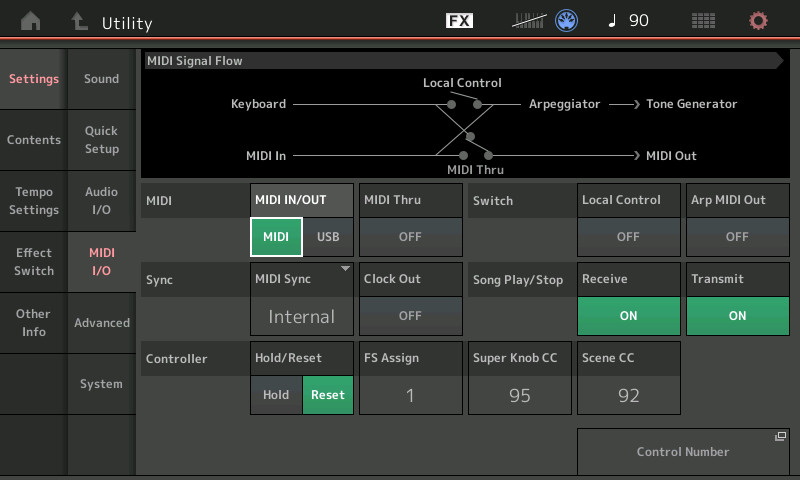
For my experiment, I hit the UTILITY button and tapped the MIDI I/O tab under Settings. There, I made two changes:

  • I changed MIDI IN/OUT to MIDI in order to send MIDI messages through the 5-pin MIDI OUT. If this parameter is USB, you won’t send or see messages on the 5-pin port.
  • I turned Local Control OFF. If MODX isn’t connected to a powered speaker (or whatever), this step is optional.

Don’t forget to change these settings back to what they were when you’re done. MODX remembers them across power down and you may be surprised to find a silent MODX when you turn it on again.
MODX advanced settings (including Zone Master)

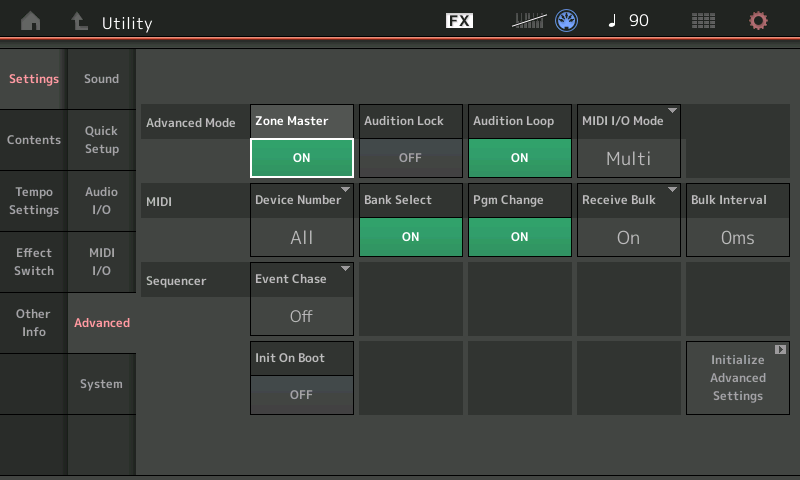
Next, tap the Advanced tab. Turn Zone Master ON. Zone Master is not enabled by default. If you don’t enable Zone Master, you will not see zone-related tabs and parameters when editing the Performance part.
Create an empty MODX Performance

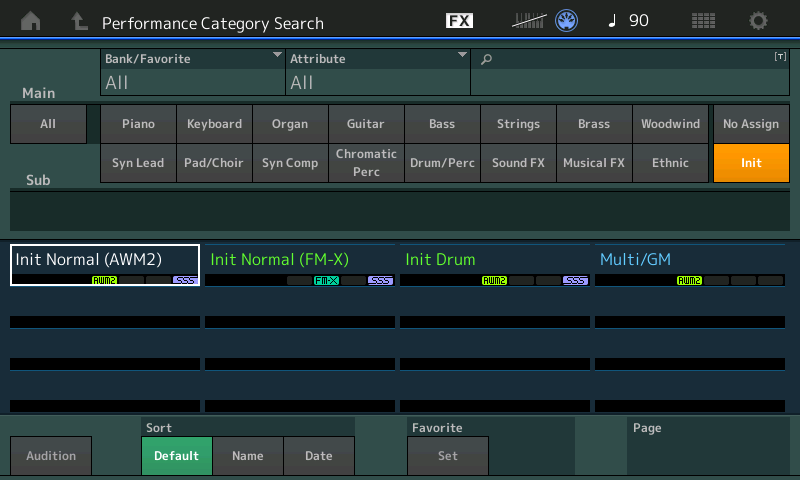
Hit the EXIT button and click CATEGORY. We’re going to create a new, empty Performance. Tap the Init category button. Then tap Init Normal (AWM2). This creates a new empty (AWM2) Performance.
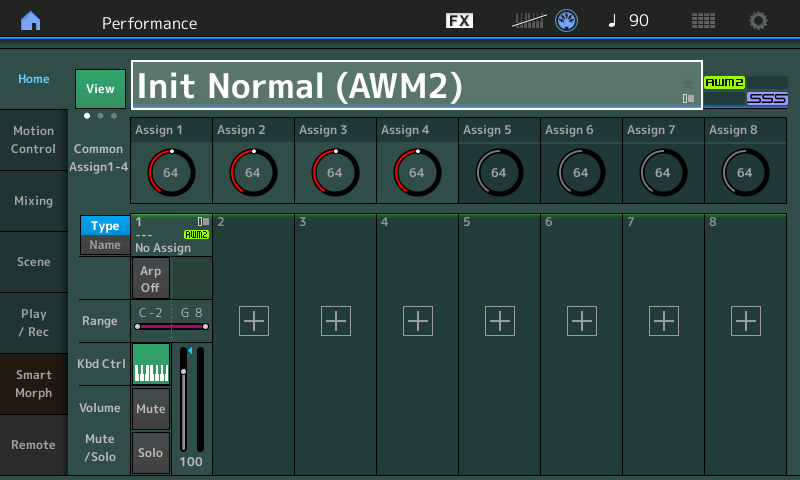
A brand new empty Performance to edit
MODX Zone Master settings

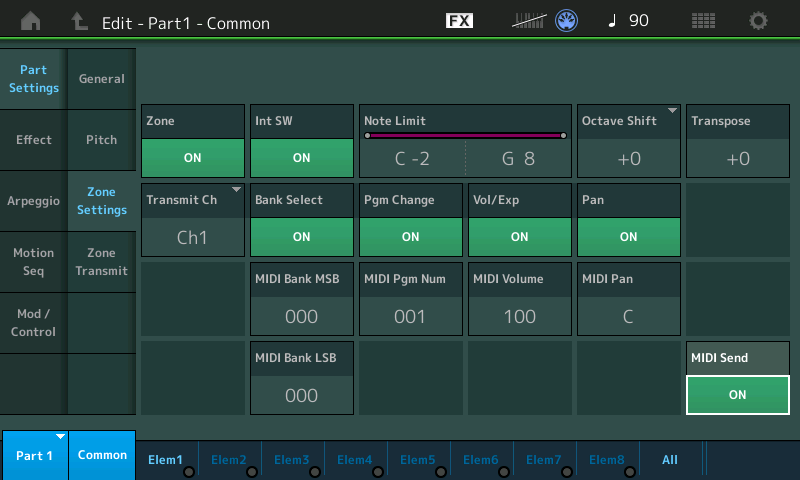
Cursor over to the part and hit the EDIT button. You should see two additional Zone Master tabs that normally aren’t displayed in Part Common Edit (i.e., when Zone Master is disabled). Tap the Zone Settings tab. Make the following changes:

  • Turn Zone ON.
  • Set the Transmit Channel to Channel 1 or your heart’s desire.
  • Turn MIDI Send ON.

Make sure Bank Select and Program Change are enabled (ON). Now you’re ready to send bank and program change messages to the target device. You did connect your target device to the 5-pin MIDI OUT port, right?

For those of you who are building a Performance to be saved and used in the future, check out the Internal Switch (Int SW) parameter. Turn it OFF if you don’t want MODX to send messages to the internal tone generator, that is, make this a locally silent part.

Cursor over to (or tap) the MIDI Bank MSB, MIDI Bank LSB and MIDI Program Number parameters to change values. MODX sends a full three message sequence when the Program Number is changed. So, if you change Bank MSB or LSB, you must send a Program Number to send the full sequence and make the actual patch change in the target device.
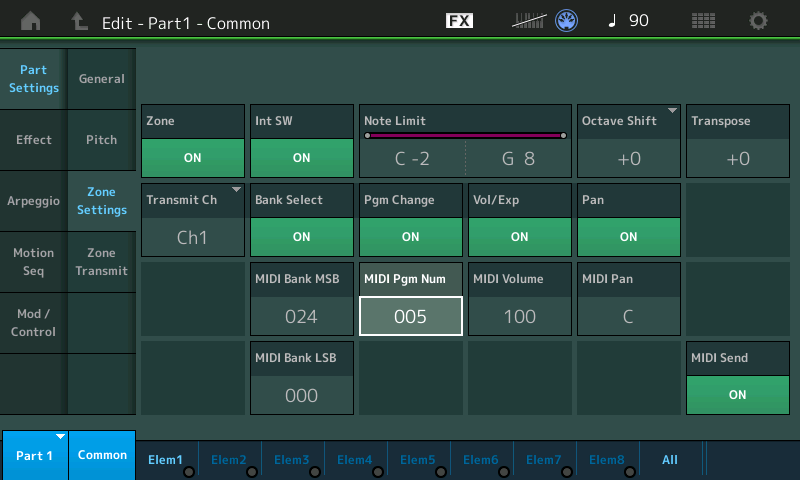
MODX bank select and program change example

In the screenshot above, Bank MSB 24, Bank LSB 0, and Program Change 5 selects the 60’s vintage electric piano (Wurli) in the Akai MPK Mini Play tone generator. Oh, you didn’t know the MPK Mini Play had a Wurli variation? Read on, below.

Conveniently, you can send MIDI volume (CC#7) and MIDI pan (CC#10) messages from this same screen. You can mess with local Octave Shift and Transpose. Pitch bend and mod wheel messages go out, too, and you can play away and freely audition sounds in the target device/module.

Overall, I find the MODX Zone Master method an easy way to experiment with a target device or tone module. If you’re a MODX owner, give it a try!

Hacked Akai MPK Mini Play?

In case you missed it, I added 5-pin MIDI to the Akai MPK Mini Play (Mk1) and gained full access to the Dream S.A.S. SAM2635 synthesizer chip within. The mod is fairly simple and relatively risk free as far as mods go. [Please remember that any mod has risk and voids your warranty.]

The MPK Mini Mod is functioning quite well and is stable. Just remember that only one source can send MIDI messages to the SAM2635 at a time, i.e., either the MPK Mini Play host microcomputer or the 5-pin DIN MIDI IN, not both. Messages are not merged and will collide electrically, leaving the SAM2635 confused.

The Dream SAM2635 is a full Roland GS implementation, not just General MIDI. The SAM2635 offers variation sounds including different organs and electric pianos. I really need to write a short run-down and review…

MODX screen capture

Just in case you’ve forgotten the steps to capture a MODX screen, here they are:

  1. Insert A USB flash drive into the USB To DEVICE port on the back panel.
  2. Press and hold the A/D INPUT ON/OFF button.
  3. Press and release the AUDITION button.
  4. Release the A/D INPUT ON/OFF button.

Simple, eh? And so easy to forget. 🙂 The screen shots are written to the USB flash drive in PNG files.

BTW, according to my web stats, my MODX split/layer tutorial remains popular. Take a look if you’re still puzzled about splits and layers. I also have a simple MODX Super Knob example.

Copyright © 2022 Paul J. Drongowski
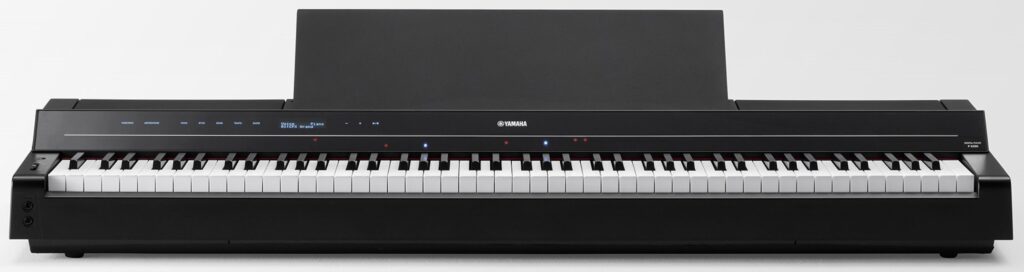
“P” is for “piano”: Yamaha P-S500 digital piano

While we’re distracted with “CK”, “AN”, and whatnot, Yamaha sneaks out a new P-series digital piano in Europe: the Yamaha P-S500.

Natch, you can read all about the P-S500 at Yamaha’s European web site. Physically, it’s a minimalist slab that’s designed primarily for the home or small studio market segments. Cost is about 2,100 Euro and I would expect it to retail for about $2000 USD in the States.

Yamaha P-S500 digital piano

Basic features [courtesy of Yamaha] are:

  • Compatible with Smart Pianist app installed to a smart device
  • Stream Lights feature helps you perform even if you can’t read music notation
  • Enjoy playing along with the 403 preset Songs, covering a wide range of genres from pop music to classical music
  • Audio To Score function converts your favorite audio songs into piano accompaniment scores
  • Authentic Yamaha CFX & Bösendorfer Imperial concert grand piano Voices
  • Virtual Resonance Modeling (VRM)
  • 88-note weighted GHS keyboard
  • Huge variety of 660 high-quality instrument Voices, including Super Articulation Voices
  • Built-in Auto Accompaniment features with 370 Styles
  • Microphone input and automatic Vocal Harmony

Auto-accompaniment, styles, Super Articulation voices? We’ve seen these features in the DGX series, notably, the most recent DGX-670 model. The table below compares the P-S500 against the DGX-670. The DGX-670, by the way, goes for considerably less dough: $850 USD.

                DGX-670           P-S500 
----------------- ---------------------------------
Main piano: Yamaha CFX CFX, Bösendorfer Imperial
VRM: Yes Yes
Key-off sound: Yes Yes
Action: GHS GHS
Piano Room: Yes Yes
PB wheel: Yes No
Dual/layer: Yes Yes
Split: Yes Yes
USB audio: Play/record Play/record
Bluetooth: Yes Not built-in (optional)
Amplification: 2 x 6W 2 x (20W + 6W)
Speakers: 2 x (12cm + 5cm) 2 x (12cm x 6cm oval+2.5cm dome)
Display: 480x272 color 80x16 mono LCD
Weight 47.2 pounds 48.1 pounds

Here’s the decoder ring for Yamaha acronyms: Virtual Resonance Modeling (VRM), Graded Hammer Standard (GHS), Super Articulation (SA), Cool (velocity switched), Live (stereo), Organ Flute (drawbar organ).

The P-S500 looks to be the upscale, uptown sibling of the DGX-670. At 48 pounds, I don’t think you’ll want to schlep the P-S500 out of the house very often. In terms of styles and voices, the P-S500 is superior:

                          DGX-670  P-S500 
------- ------
Total voices 601 660
VRM voices 9 13
SA voices 49 111
Natural voices 11 25
Sweet voices 26 27
Cool voices 53 47
Live voices 68 58
Organ Flute voices 0 29
Total styles 263 370
Pro styles 215 328
Session styles 19 25
Free Play styles 0 3
Pianist styles 29 13
Drum Kits 29 29

The P-S500 factory voice set includes many of my favorites. If you’re looking for a more than decent, mid-level keyboard with auto-accompaniment and a graded hammer keyboard, the P-S500 is worth a look. Versus a mid-level arranger keyboard, you’re still giving up a pitch bend wheel, multi-pads, style control buttons, MIDI record/edit, etc. If you just want to play and have a good piano experience, I’d go with the P-S500 in a heartbeat. (The DGX-670 is no slouch, either.)

There are many other differences that I’ve glossed over. So, if you’re trying to decide between DGX-670, an arranger or the P-S500, be sure to dig into the manuals and data list files. Yamaha doesn’t always make it easy to compare, especially as to your specific musical goals and use cases.

One enormous difference needs to be emphasized, however. The P-S500 front panel is utterly minimalist. If you want to exploit the P-S500 to its fullest, you must use the P-S500 with the Yamaha Smart Pianist app on a tablet (Apple or Android). In this respect, the P-S500 is more like the CSP series of digital pianos for the home. It’s like a CSP without the furniture. The CSP models have enhanced GH3X or NWX keybeds which improve the piano playing experience. Given that the Smart Pianist is almost a necessity, it’s kind of weird (cheap) to omit built-in Bluetooth.

Yamaha are certainly giving us choices!

A final, electronics nerd comment. While studying the internal design of current arranger, synth and digital piano products, the designs often seem like a deconstructed tablet connected to a keybed, tone generator and MIDI/USB interface. The digital electronics are remarkably similar. With the P-S500 and the CSP series, it’s like Yamaha said “Aw, the heck with it” and moved functionality out of the piano (arranger, synth) chassis into a stock, commercial tablet like iPad or Google Pixel tablet. I don’t think we have seen the end of this approach to instrument design…

Other reviews and comments about digital pianos:

Copyright © 2022 Paul J. Drongowski

Out Of The Shadows

I’ve been working on backing and lead instruments for the classic Del Shannon song “Keep Searchin'”.

Yamaha Genos™ is made for this tune. First off, its “ShadowedPop” style is the perfect fit for that old 1950s rock’n’roll vibe. It has just the right amount of swing and attitude.

Next, Genos has very good electric guitars for lead. Want clean Tele or Strat? Genos has them. Genos also has a suite of effects to obtain a complete, authentic guitar tone.

Yamaha arranger styles have “One Touch Settings” which are mini-registrations. Hit an OTS button and Genos will both change song section and bring up an appropriate voice. The Genos “ShadowedPop” style has two OTS mini-registrations that are worth deconstructing to see how the Yamaha sound designers got their Shadows guitar tone: “60sShadowLead” and “ShadowedGuitar”.

Of course, the “shadow” in all of these voice and style names refer to Hank Marvin and The Shadows — one of, or perhaps, THE iconic 1950’s guitar band and sound. The Shadows’ treatment felt absolutely right for the Del Shannon cover. Hank Marvin was perhaps the first English artist to pick up a Fender Strat, usually putting it through a Vox amp.

The PSR “ShadowedGuitar” voice goes back four or five years and is a standard factory preset. If your Yamaha arranger does not have “ShadowedGuitar”, choose a clean, 1960’s vintage guitar preset voice. Change the insert effect to Tempo Echo and set the insert effect send level to 30. Change the effect parameters to:

 Param#  Parameter name       Value 
------ ------------------- ------
1 Delay Time 8th
2 Feedback Level +28
3 Feedback High Damp 1.0
4 L/R Diffusion +14ms
5 Lag 0ms
10 Dry/Wet D34>W
13 EQ Low Frequency 500Hz
14 EQ Low Gain 0dB
15 EQ High Frequency 4.0kHz
16 EQ High Gain 0dB

Reverb is a big part of the 50’s vibe and you’ll need gobs of it on the guitar. Select a hall reverb and set the reverb send level to at least 50. If your arranger has it, I recommend the “Real Medium Hall+” preset. It’s one of Yamaha’s best reverbs, in my opinion.

Only Genos has the “60sShadowLead” voice voice. Fortunately, it’s easy to add a close sound-alike to your instrument. Start with “ShadowedGuitar” or a clean, 1960’s vintage guitar preset. Get into the mixer (or DSP effect page) and change the insert effect to Multi FX Vintage Echo and set the insert effect send level to 127 (if necessary). Then change the effect parameters to:

 Param#  Parameter name       Value 
------ ------------------- ------
1 Comp Sustain 2.9
2 Wah Switch Off
3 Wah Pedal 0
4 Dist Switch Clean
5 Dist Drive 5.0
6 Dist EQ Mid Boost
7 Dist Tone 3.5
8 Dist Presence 4.3
9 Output 110
11 Speaker Type Twin
12 LFO Speed 2.103Hz
13 Phaser Switch Off
14 Delay Switch Delay St
15 Delay Control 60
16 Delay Time 33

We met the Multi FX algorithm once before. This algorithm is like a virtual guitar pedal board:

Compressor -->  Wah --> Distortion --> Phaser --> Delay --> Spkr Sim 

The above parameter values dial in The Shadows’ guitar tone.

You’ll need gobs of reverb, again, to complete the scene. Choose the “Real Medium Hall+” preset and set the reverb send to at least 40.

The “60sShadowLead” OTS also configures the chorus system effect. Having listened to the overall tone with and without chorus, this step is optional. (Possibly some other style part may be affected by this change or a change to any other system-level effect including reverb.) Change the chorus type to “Celeste 1” and set the chorus send level to 12. 12 is not especially high, so you can see why this last step is optional; it’s just a little sweetener.

You might consider changing the chorus effect to tremolo (e.g., “E-Piano Tremolo”). Guitarists in the 50s and 60s didn’t have guitar pedals. (Sorry, Edge.) So, folks relied on guitar amp spring reverb and tremolo (often mislabeled “vibrato”) to get space-y effects. I still have the sound of an Ampeg Gemini going through my head. 😎

Select the “E-Piano Tremolo” effect preset, increase the AM Depth to max, and set the chorus send level to 127:

 Param#  Parameter name       Value 
------ ------------------- ------
1 LFO Frequency 5.38Hz
2 AM Depth 127
3 PM Depth 0
6 EQ Low Frequency 500Hz
7 EQ Low Gain 0dB
8 EQ High Frequency 4.0kHz
9 EQ High Gain 0dB
11 EQ Mid Frequency 2.0kHz
12 EQ Mid Gain 0.0dB
13 EQ Mid Width 1.0
14 LFO Phase Difference +39deg
15 Input Mode Mono
Return Level 127

You’re looking for that deep, “Spaghetti Western”, Ennio Morricone effect. Play the lead line an octave down. Have fun!

The EQ parameters in the tremolo algorithm make this a good guitar tone mangler — swept mid EQ with Q (width)! Mid boost or cut is right at hand.

Here are short demos (MP3) on Genos with tremolo and without tremolo. Yamaha Montage and MODX have the same effect algorithms, so you should be able to apply the same techniques on those instruments, too.

Links to a few other posts about chasing tone on Yamaha gear:

Copyright © 2022 Paul J. Drongowski

Mid-September new products

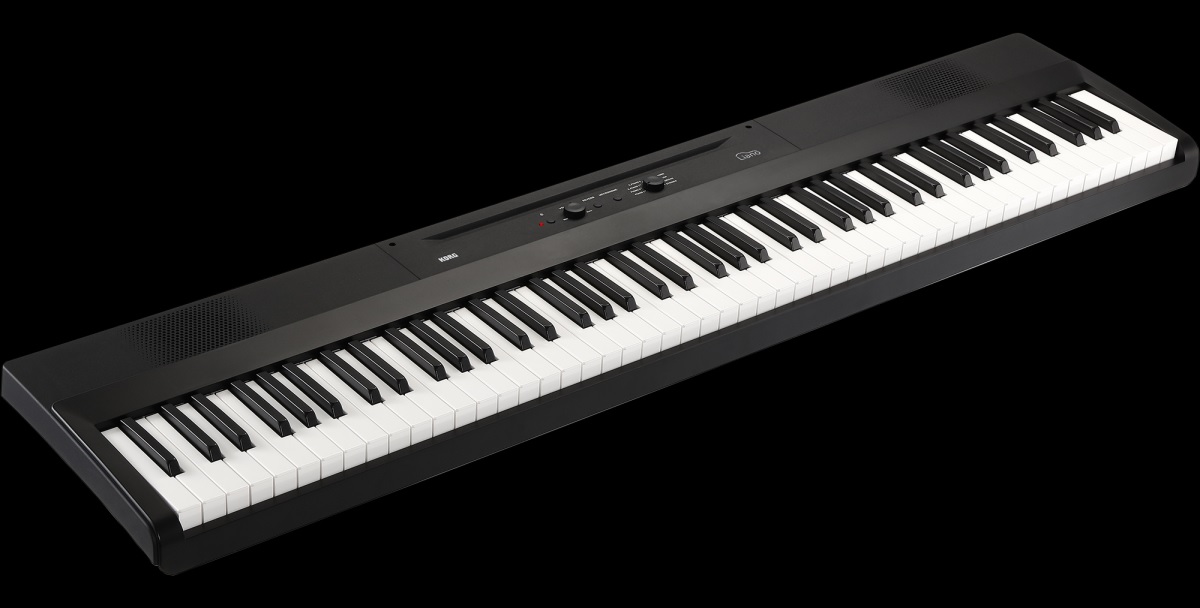
Korg dropped two new products for Fall 2022: The Liano digital piano and drumlogue hybrid drum machine

Korg Liano digital piano

The Liano is about as minimalist as it comes. The Liano is a sleek monolith with just a few simple controls. This keyboard absolutely does not require a user manual! You get the standard eight preset voices (two grands, a Rhodes, an FM EP, harpsichord, pipe organ, electric organ, strings), two effects (reverb and chorus), metronome, two built-in 8cm bass reflex speakers (8 Watts a side), USB-B, and sustain. That’s it.

This board is such a slab, Kubrick could have used it as the monolith in 2001: A Space Odyssey. 🙂 Imagine monkeys dancing around a Liano tipped on its side. You know, Korg, every search engine in the world will auto-correct “liano” to “piano”?

The Liano is super-light 6.0kg (13.2 pounds). The demos sound pretty decent. Aside from being a student piano, I could see using a Liano at choir rehearsals or any occasion requiring portability (six AA batteries). The down-side of the small sound set is that a given preset either fits the musical situation or it doesn’t. This is especially true of the pipe organ (uni-dimensional full pipes) or the electric organ. I hate to slag the Liano’s electric organ as it would be fine in a jazz setting, but forget rock or gospel.

Korg clearly are going head-to-head with Yamaha and Casio in the entry-level piano market. Liano’s minimum advertised price (MAP) is $399 USD.

I’m sure the Interwebs will be filled with drumlogue news. It’s analog! The Korg demos have punch! It accepts ‘logue synth plug-ins! It’s $599 USD MAP.

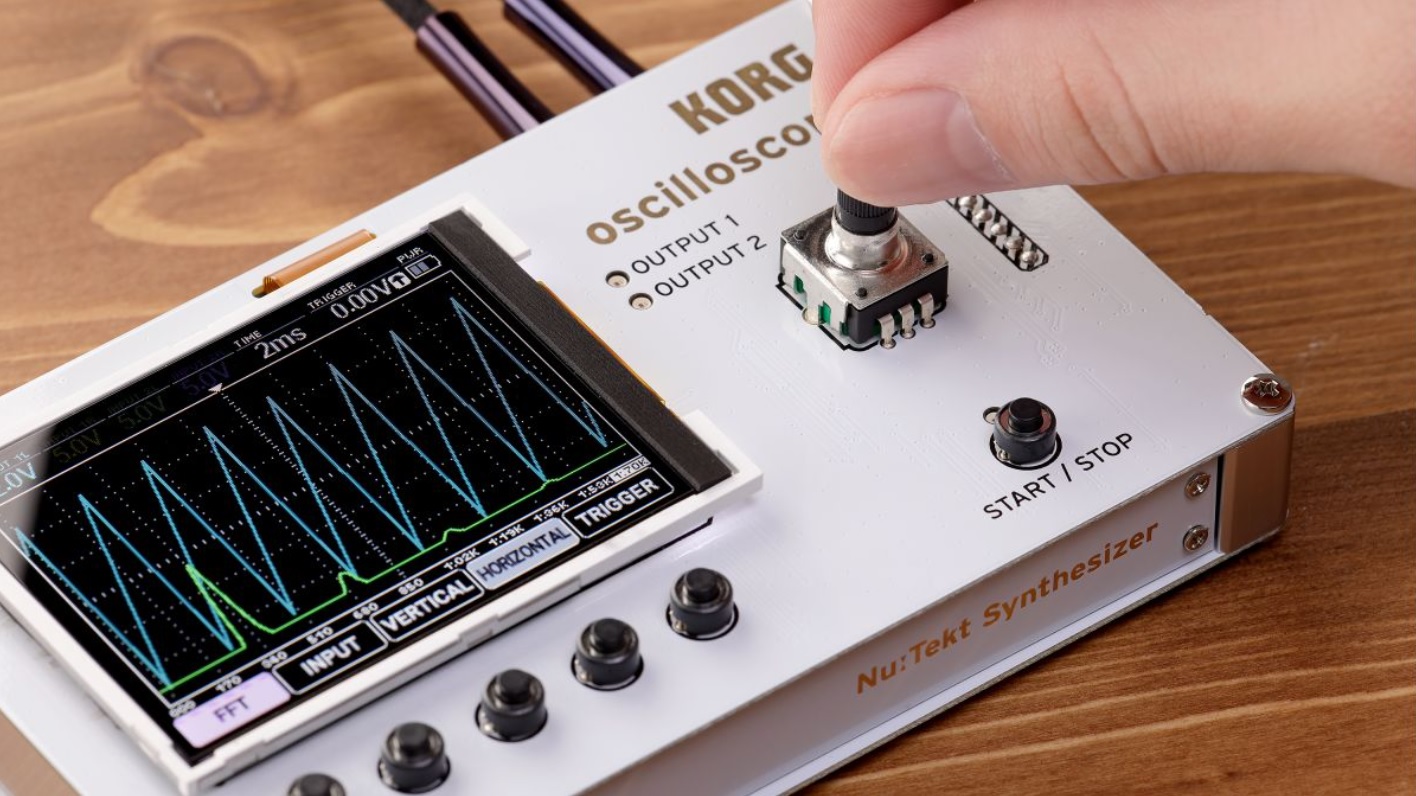
Korg Nu:tekt NTS-2 oscilloscope

Both the Liano and drumlogue are pre-order. I hope Korg gets a move on because I an still waiting for the Korg Nu:tekt NTS-2 oscilloscope ($230 USD MAP). Come on, man!

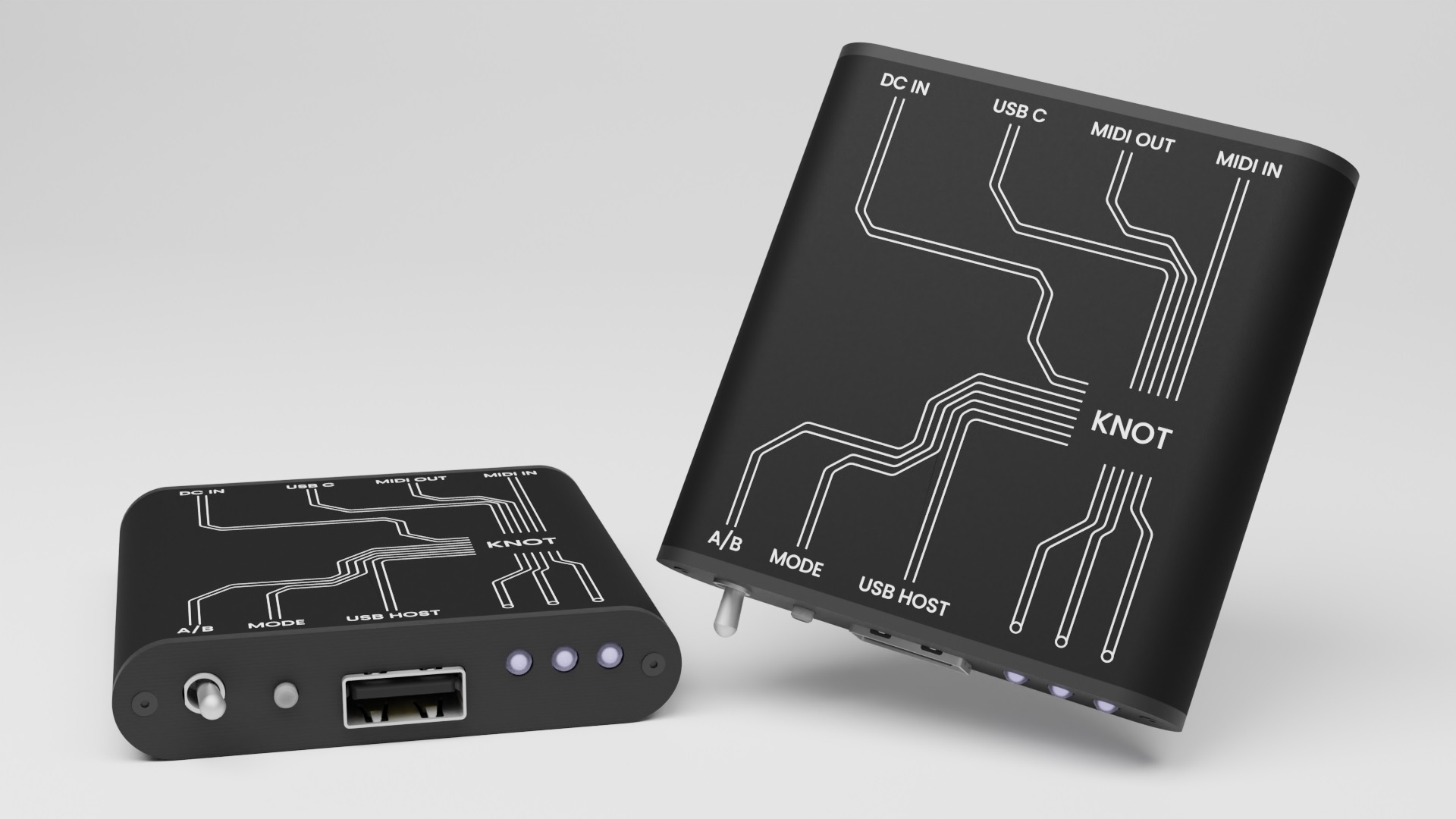
Not from Korg, the Intech Studio Knot is another USB host to MIDI bridge box (AKA stand-alone USB MIDI host). It is tiny and has an $89 pre-order price. (That’s 25% off.) Knot takes power from either USB-C or a DC adapter. External power is critical because some controllers draw enough current to power a small town. (Well, that’s exaggerating.)

Intech Studio Knot USB MIDI host

The down-side of its tiny size is 3.5mm MIDI IN and OUT ports instead of 5-pin DIN. Yes, you will need 3.5mm to DIN adapters.

Knot is an open source project and supports firmware updates.

If you need a MIDI bridge and have a Raspberry Pi, check out these articles:

All it takes are a few simple Linux commands. Admittedly, a dedicated bridge like the Knot is the better option for gigging.

Copyright © 2022 Paul J. Drongowski
What if CS and SK had a baby?

Got a PM from Jan, a long-time reader. Jan found a page on YamahaSynth about the Yamaha MX product line. The page features the phrase “CK — Classic Keyboards”. CK?

I suspect that CK61™ and CK88™ refer to a new line of keyboards, not a refresh of the MX series. I have to agree that the MX product line is in serious need of a refresh; It is based on the geriatric Yamaha Motif XS sound set.

Still, Jan’s comments got me thinking, especially about the early history of Yamaha synths.

The earliest Yamaha synths — SY-1 and SY-2 — Appeared in the mid-1970s. These 3-octave beasts provided a range of factory presets like trumpet, clarinet, guitar, piano, etc. and a small handful of sliders and knobs on a panel to the left of the keybed.

The SY-1 and SY-2 were quickly superceded by the more popular CS series. The CS series had monophonic and polyphonic models covering the range from the highly portable CS-01, through the Concertmate-like CS-5, to the revered altar of synthesis, the CS-80. The CS synths appeared in the late-70s and early-80s.

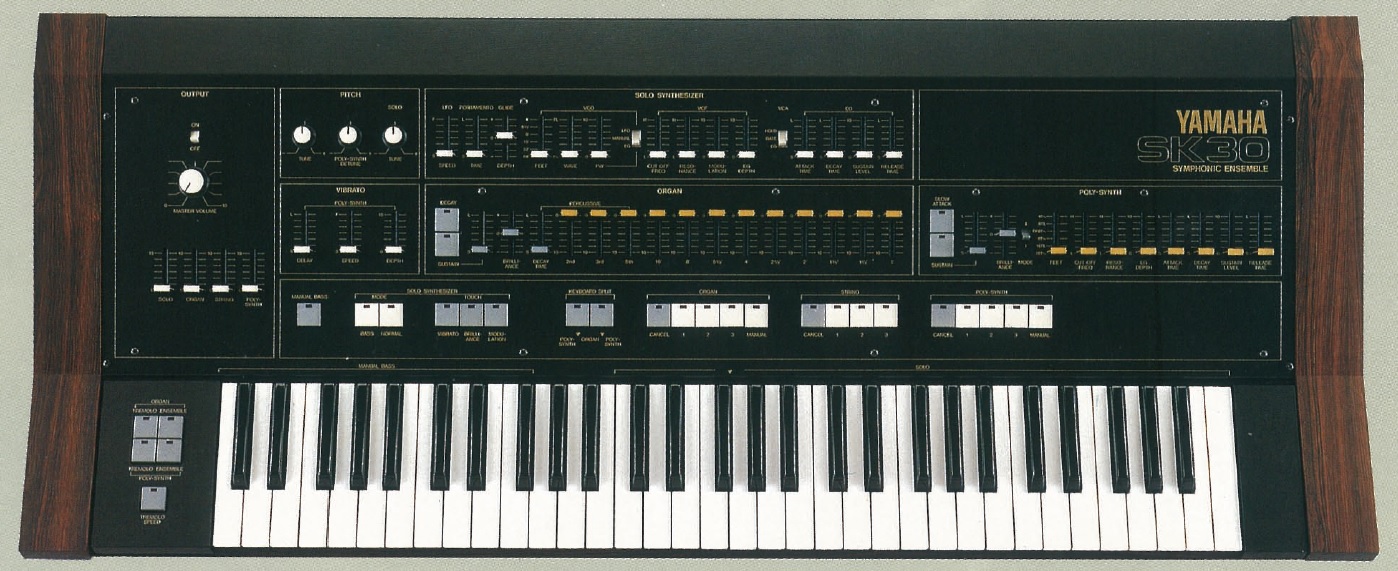
The Yamaha SK series appeared in roughly the same time-frame and were somewhat eclipsed by the CS synths. I remember playing both CS and SK keyboards in Salt Lake City, wearing out my welcome at local music shops around town. 🙂

Like the beefier end of the CS line, the SK keyboards sported beautiful — and heavy — wooden end-cheeks and cases. Yamaha have always found a way to spotlight their expertise in woodworking!

Yamaha SK-30 Symphonic Ensemble

Sonically, the SK series are an extension of digital organ technology. The SK-30, for example, had three independent sound generators: organ, poly synth and solo synth. The organ has footage tab stops and percussion. The poly synth is split into two subsections: string and poly synth. Each section is 7-note paraphonic. The monophonic solo synth consists of a VCO feeding a wave-shaper that sends a sawtooth or pulse into the VCF and VCA stages. The organ and poly synth sections each have their own timbre shaping circuitry akin to the tone shaping one finds in organ designs of the era.

Why two concurrent product lines, both ostensibly synthesizers? Engineers were fighting analog VCO pitch stability at that time. The SK series had better pitch stability overall than the CS series and offered polyphony to boot. Who knew that analog would be more popular than digital?

So, what if the CS series and the SK series had a baby? “C” from the “CS” series plus “K” from the “SK” series equals “CK”. Yamaha have been known to dip from their historic well for naming. Perhaps the new CK series are a poly/mono hybrid? Just guessing!

TMI

Looking at the service manuals for this old tech is a blast down memory lane. The SK series use several Yamaha proprietary chips from their electronic organ and CS synthesizer product lines.

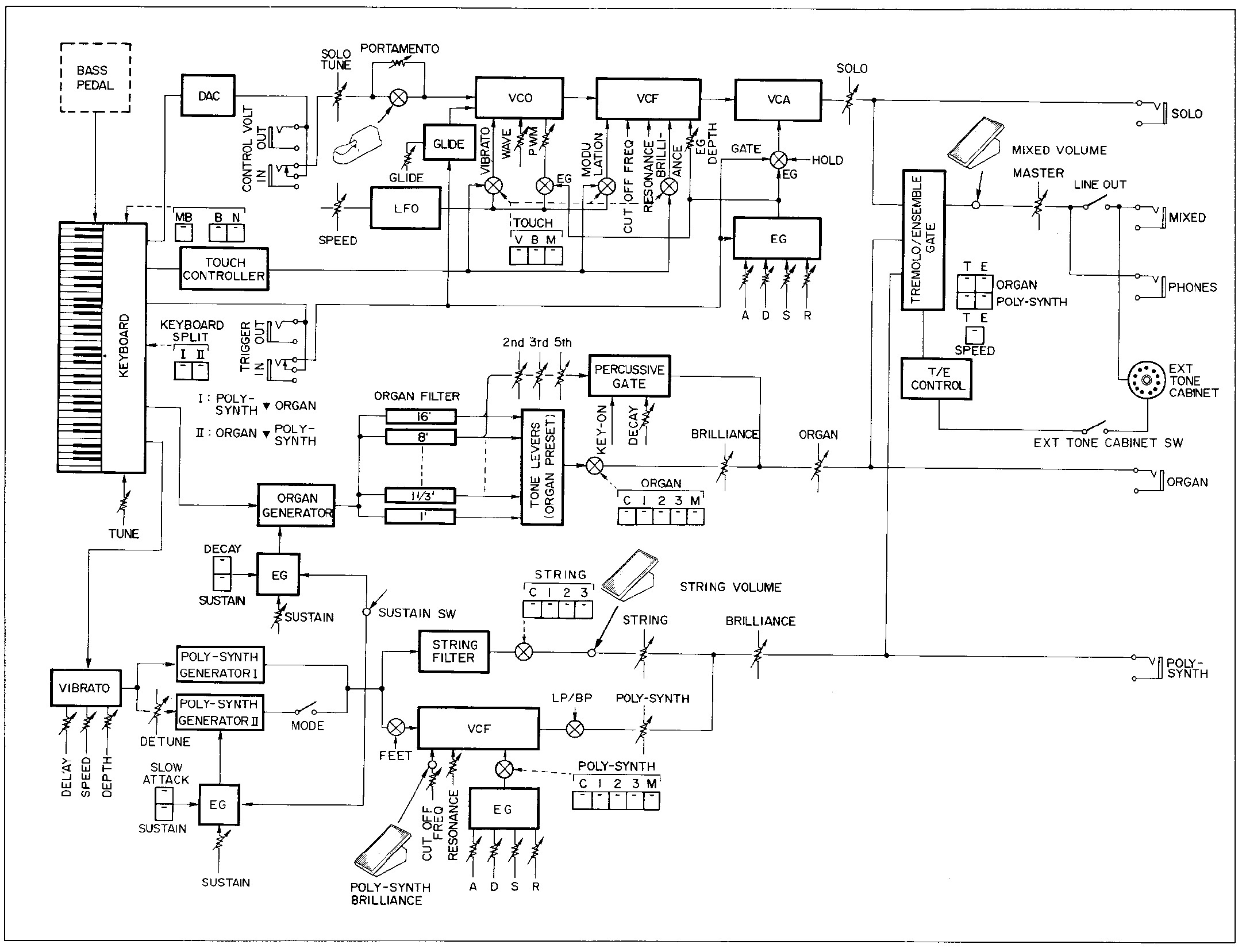
A number of on-line resources claim that the poly-synth tone generators use FM synthesis. This is incorrect. Specifically, the poly-synth uses YM70400 GOA integrated circuits (IC) based on Yamaha’s Pulse Analog Synthesis System (PASS). The YM70400 (and the other tone generators) receive a serial 4-bit key code from a key scanner/assigner IC. The key codes tell the tone generator(s) which notes to produce and trigger. The SK-30 has dual poly-synth generators which are each 7-note polyphonic, producing 8’/16′ square waves and 4′ sawtooth waves. Each side is routed through analog filters tailored for strings on one side and an EG-controlled VCF on the poly synth side.

Yamaha SK-30 block diagram

The SK-30 organ section consists of a YM62200 top-octave tone generator (TGC) and two YM70200 organ generators, GF1 and GF2. The organ section is 7-note polyphonic. GF1 and GF2 generate sine waves which are sent through the drawbar tabs for mixing and filtering. GF1 and GF2 support all common organ footages and percussion.

All three sections can take advantage of a tremolo/ensemble effect and/or a multi-pin Leslie connector. The effect is a bucket brigade device (BBD) delay/vibrato generator. [The term “Tremolo” is abused here.]

Much is described in the excellent article “Yamaha Symphonic Ensemble SK20”, Electronics & Music Maker, March 1981. Back in the day, electronic music magazines occasionally gave a detailed glimpse inside — sadly lacking in today’s review articles. sandsoftwaresound.net tries to fill that void.

Copyright © 2022 Paul J. Drongowski
Akai MPK Mini beauty products

Well, at first, I was going to strip it for parts. Then I changed my mind.

My original plan was to mod and customize an Akai MPK Mini Play (Mk1), making it a stand-alone synthesizer. As to cosmetics, I wanted to jazz it up with colorful knobs and a reverse white-on-black keybed. I would either find replacement keys or I would buy an Akai MPK Mini White Edition (Mk2), bust it down, and swap in the white-on-black keybed.

Hopes were dashed when I discovered the limitations of the MPK Mini Play’s implementation. Akai’s firmware blocks full access to the Dream S.A.S. SAM2635 synthesizer. I made a MIDI IN/OUT mod, letting me communicate with the Dream through 5-pin DIN MIDI. My original goal of a stand-alone synth, though, went down the tubes.

While the mod was playing out, I bought an Akai MPK Mini White Edition (Mk2) on ebay, ostensibly, for parts. BTW, if you’re looking for an MPK Mini, there are scads of them available on ebay for much less than retail. [If you’re OK with used.]

Gratefully, the previous owner had not registered the MPK Mini and I was able to download Akai’s software bundle. I installed MPC Beats — Akai’s MPC-style DAW — and the five expansion packs included in the bundle. I gave MPC Beats a try. Lo and behold, it was a lot of fun! I found the MPK Mini to be a better companion for MPC Beats than the MPK Mini Play. Suddenly, all desire to strip the White Edition was lost.

Now I want to keep using the MPK Mini (Mk2) as an MPC Beats controller and treat the MPK Mini Play as a MIDI module. Time to beautify the White Edition. [Spared from the chopping block.]

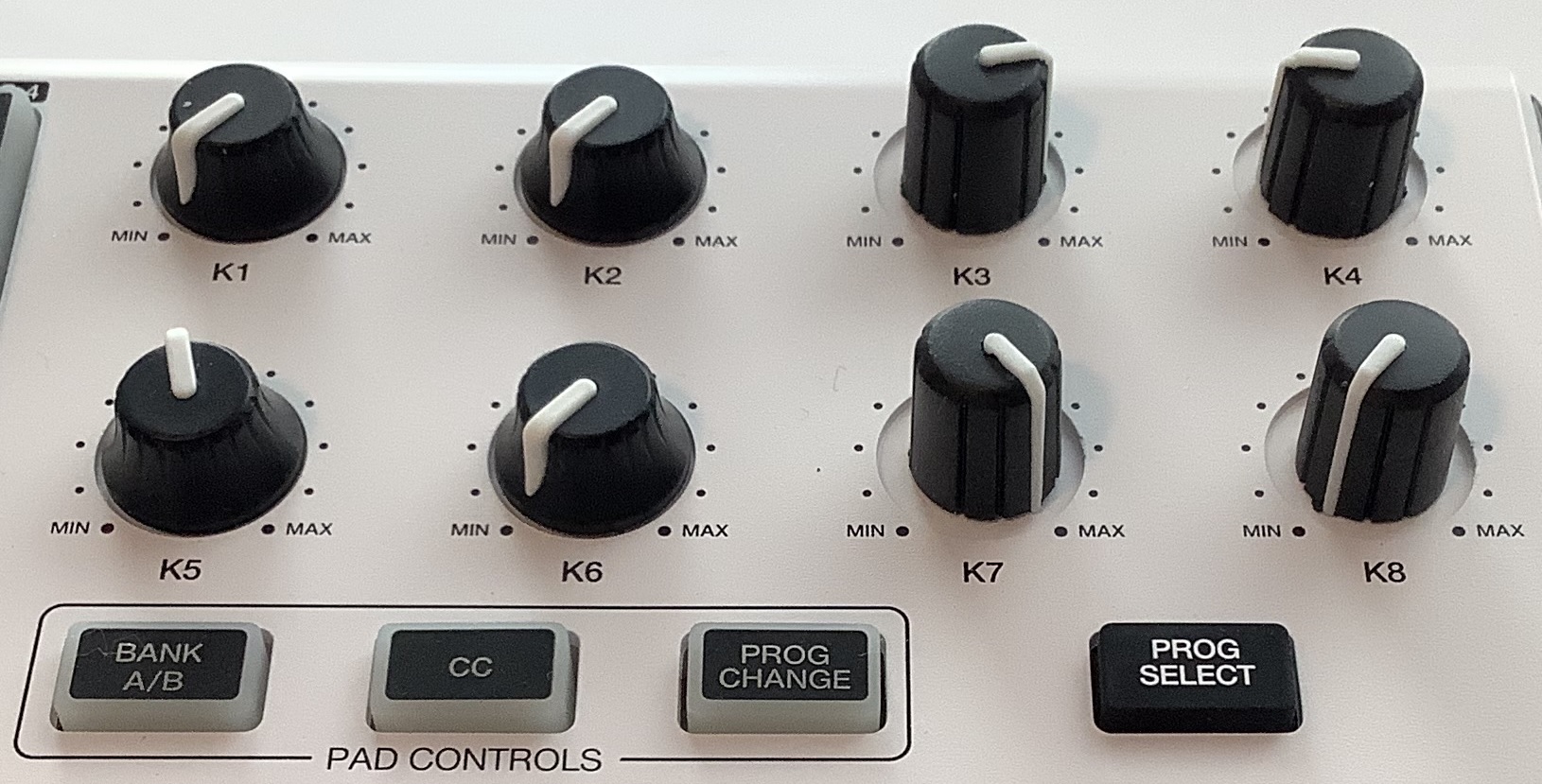
As to appearance and use, my one major quibble is the short, skirted knobs on both the MPK Mini and MPK Mini Play. I find these knobs hard to grab — more appropriate for small hands than my mitts.

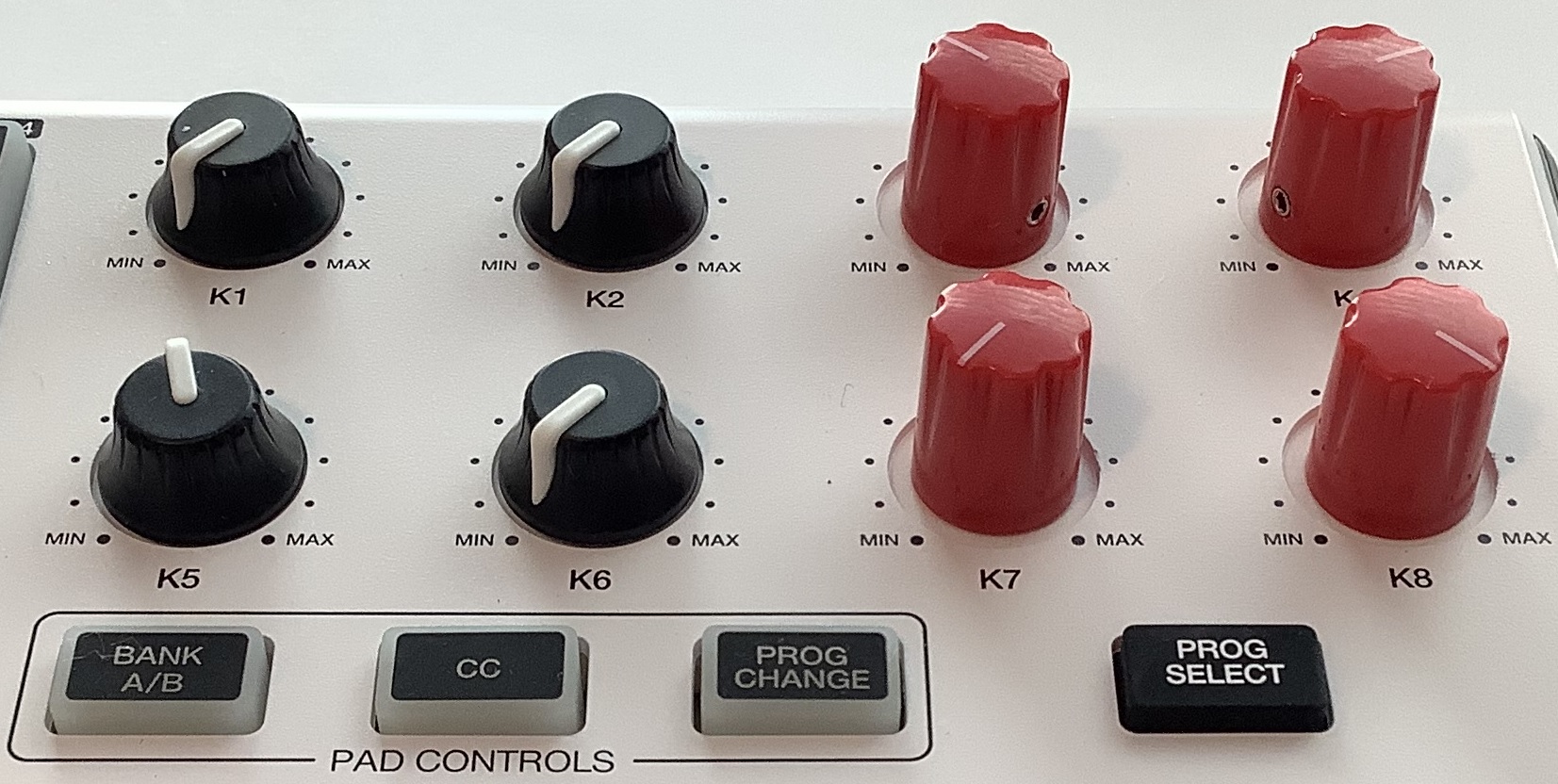
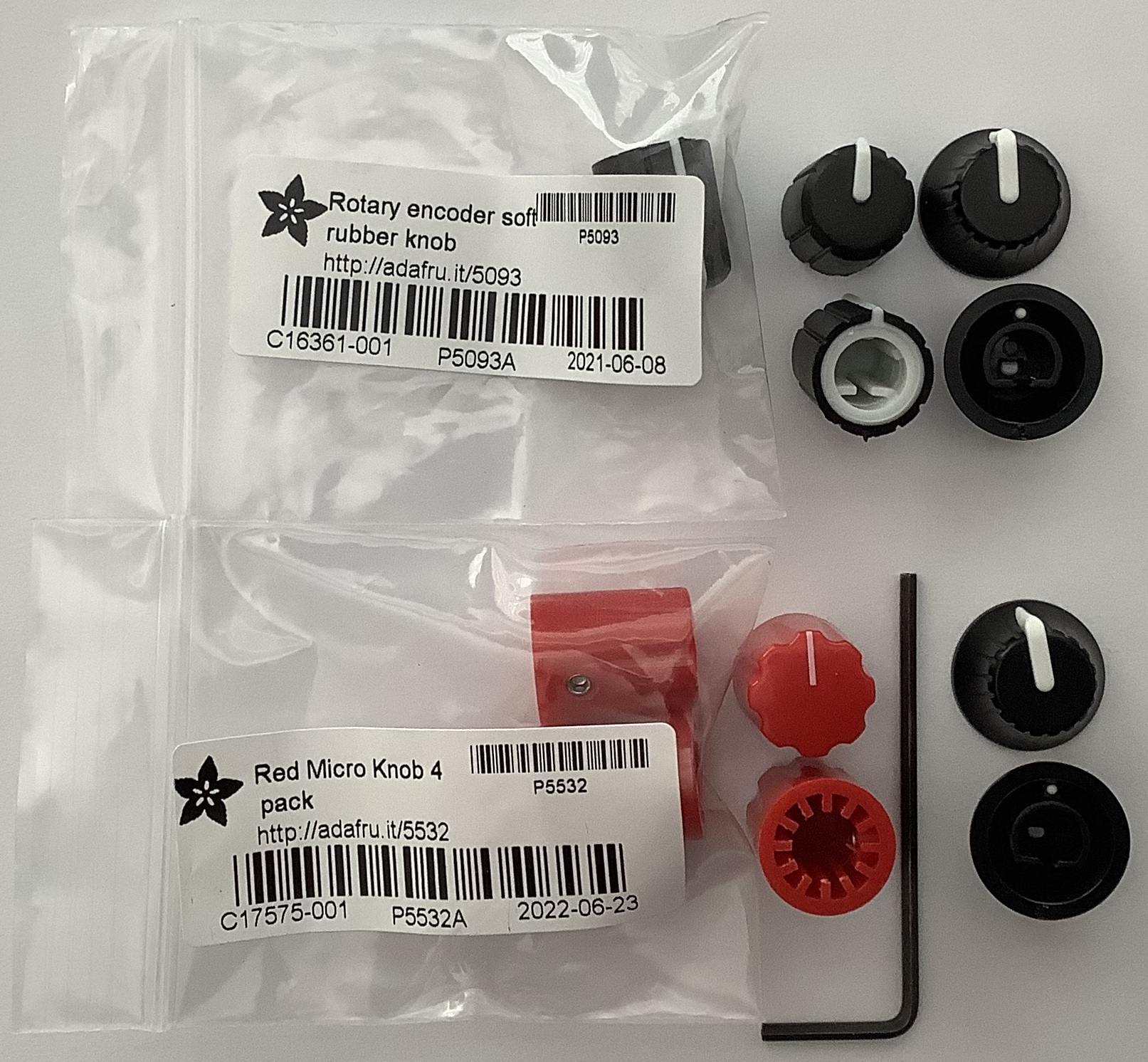
Adafruit knobs versus original Akai MPK Mini knobs

Short knobs mean short pot shafts. Due to the short potentiometer shafts and the front panel recess around the pots, any old knob will not due. Casting around on the Web, I found two candidate knobs at Adafruit:

  • Adafruit #5093 Slim rubber rotary encoder knob, 11.5mm by 14.5mm D-shaft
  • Adafruit #5532 Red micro potentiometer knob (4 pack)

The red knobs are part of a multi-colored family. If red isn’t your fancy, try blue, black, white, cream, green, etc. Individually, both knob types are about $.70 USD per knob — not bad. Adafruit’s shipping is a tad high (one pound weight minimum charge) and you should look around for a few other things to buy in the same order. If you’re thinking about a 5-pin MIDI mod, I suggest the Adafruit MIDI FeatherWing Kit.

First up, is the Adafruit #5093. These knobs are only available in black. They are rubber and have a very nice feel. They only fit D-shaft potentiometers (or encoders) and are not appropriate for knurled or round shafts. The rubber knobs just barely cover the panel holes, but should keep out dust.

Akai knobs (left) versus Adafruit rubber knobs (right)

The pointers are well-placed and hit the min and max positions exactly. The rubber knobs are twice as tall as the factory knobs and are easy to grab. They are just snug enough on the pot shaft and can be removed without much force. I like these knobs and recommend them. Buy ten and get a price break.

I tried a few different Yamaha knobs on the MPK Minis. Forget it. The pointers don’t align with the min and max positions. Avoid knobs where the inner opening or set screw is too high above the bottom. Such knobs will float above the darned short Akai shafts.

Next up, is the Adafruit micro pot knob family. I bought red, black, blue, white and cream. The cream knobs look especially handsome. Unfortunately, cream clashes with the White Edition. Better to go with bright white (which match the sharp keys) or best to go full contrast and a splash of color, red.

The micro pot knobs have a very small set screw. Adafruit recommend a 2mm hex wrench, but the 1.5mm hex wrench in my Craftsman set is the better fit. This set screw is freaking small! Fortunately, the set screw is down low enough to hit the flat face of the rather short D-shaft.

Akai knobs (left) versus Adafruit micro pot knobs (right)

The red knobs look great. The pointers align properly with min and max. The knobs are twice as tall as the factory knobs. The only down-side is the set screw. If you intend to open and close the MPK Mini case frequently, go with the rubber knobs. You will get tired for loosening and tightening the set screws on the micro pot knobs.

New knobs are a quick, inexpensive way to brighten up a front panel from dreary black. Tall knobs are easier to grab, too. There you have it.

Copyright © 2022 Paul J. Drongowski
MODX+: Glad that’s over!

Yamaha launched its MODX+ keyboards today. The MODX+ has a few modest improvements over the MODX (Mk1):

  • 1.75GB user waveform memory
  • Rubberized pitch and mod wheels
  • New livery (black end-cheeks)
  • 128 tone FM-X polyphony (maximum)

Seamless Sound Switching (SSS) is the same as MODX (limited to 4-part Performances). There are a few on-line videos that are incorrect. The USB audio spec has not changed either.

In case you missed it, Yamaha have a MODX+ Early Adopter Promo Rebate. Register your MODX+ and receive a free FC7 expression pedal and FC5 foot switch. The promotion ends 31 December 2022. That should take some of the sting out of the new prices: $1,499 MAP for the MODX6+ versus $1,399 for the MODX (Mk1). Look for a bundled gig bag, too.

Yamaha are promoting a downloadable Bösendorfer piano. Gotta fill up that expansion memory! Look for new additions to the Montage/MODX+ library in the future. Yamaha IdeaScale participants previewed a new CP-90 piano currently in development. Big multi-samples to drive MODX+ sales.

Anticipatory discussion was filled with wishful thinking and speculation concerning the addition of a second SWP70 tone generator chip and possibly AN-X™ virtual analog synthesis. Judging from the boost in FM-X polyphony, the MODX+ quite likely got the second SWP70.

Speculation about AN-X borders on fantasy. It is based on the premise that an SWP70 is even capable of virtual analog synthesis. Other than Yamaha, does anyone really know what is inside of an SWP70 tone generator?. I don’t.

Adding further doubt for the wet-blanket brigade, I offer the design decisions surrounding the Reface series. The Reface YC and CP are genetic sisters. Both are based on AWM2, both using the SWX08 processor with integrated AWM2 tone generation. Why then, did Yamaha deploy the SSP2 digital signal processor in the Reface CS? Surely, it would have been more cost effective to share the same logic board as Reface YC and CP. Thus, I have my doubts unless SWP70 has some hidden, yet-to-be revealed functional capabilities. Yamaha have the new SSP3 to play with, too.

Given the limitations of the Montage/MODX user interface, including relatively few front panel controls, AN-X on Montage/MODX+ is just putting a bag on the side of a fine product. [Apologies to Tracy Kidder.]

So, I don’t think Yamaha is finished with announcements. There are still CK61™ and CK88™ to account for. Marketing 101 says “Don’t muddy the waters with multiple product launches in a given lane.” Plus, Yamaha marketing is not that big and poor Blake needs to flog the MODX+ while it’s hot. Stay tuned, boys and girls.

Punters are trying to justify the small price increase in terms of component count, etc. Yamaha priced MODX+. Done. If they don’t shift boxes, Yamaha will drop the regional MAP. Currency fluctuation may have more to do with variations in price than component count. Unfortunately, the suits often win.

As to price, one more observation. MODX and MODX+ have crashed the psychological $1,000 USD barrier. Smash it. The MX series is the only sub-$1000 offering. (Reface don’t count with its mini-keys.) There is a big gap between MX and MODX. I don’t think Yamaha can raise prices on the current MX, so maybe something else is coming?

Copyright © 2022 Paul J. Drongowski
Where to put AN-X™?

Let’s not miss the forest for the trees…

Wishful thinking abounds — Let’s add an AN-X™ engine to the Yamaha Montage and/or MODX+. From the comments, you would think this is a done deal.

Well, the frenzied demand is certainly there. 🙂 With demand wafts the smell of money. How will Yamaha make money with AN-X?

Occasionally I see a forum comment that is so spot-on, it bears repeating. This comment comes from CyberGene on the Musicplayer Keyboard Corner:

The more I think about it (and knowing Yamaha of course, as well as owning and selling a MODX for being too awkward to work with) I have no high hopes for this hypothetical AN-X being integrated into anything intuitive and easy to use. 🙂 Most certainly it would need to be preprogrammed in advance rather then having a good hands on interface for real time manipulation. Yeah, you can route the knobs and faders to it as usual but still — I just think they should make a YC/CP type of instrument where they add the entire reface CS panel and engine. 😉 Why not add it to the YC73/88, so that it becomes a Nord Stage competitor. Call it a YCS73/88, bingo!

Amen. Could you imagine programming or controlling an AN-X engine within the context of the current Montage (MODX) user interface (UI)? Kill me now.

If Yamaha learned one thing from the YC and CP stage instruments, it’s “stage instruments with a focused user interface and engine (drawbar organ, piano, whatever) are desirable and sell.” [Ka-ching.]

Yamaha marketing folks are players as well as business people. The right way to do analog is to put the engine in a box that it is studded with knobs, buttons and analog controllers. Analog synthesis is meant to be interactive. Yamaha marketing surely knows this and the Reface CS — on a small scale –is proof.

So, AN-X on Montage and MODX+? How would that fit within a menu-based UI which many people find too complicated? In the case of MODX+, would you be happy with four sliders, four knobs and a Superknob for control? Would you enjoy menu-diving? [Sound of shrieking noises here.]

So, thanks, CyberGene for your insight. If Yamaha want to do AN-X right, they need to do it in a focused stage instrument. And make money.

Update: Yamaha have filed for a stylized (figurative) trademark in the European Union. See image below.

Yamaha trademark ANX (European Union, filing: 018741845)

Copyright © 2022 Paul J. Drongowski
Akai MPK Mini Play: GM/GS MIDI mod

In order to make your Aka MPK Mini Play (Mk1) into a GM/GS module, you must modify its hardware. As it is with all mods, modifications void the warranty, could damage the keyboard, and may affect resale value. The risk is yours alone.

That said, I’ve now thoroughly tested my Akai MPK Mini Play (Mk1) MIDI mod. Not only is a General MIDI module hiding inside, it does Roland GS, too!

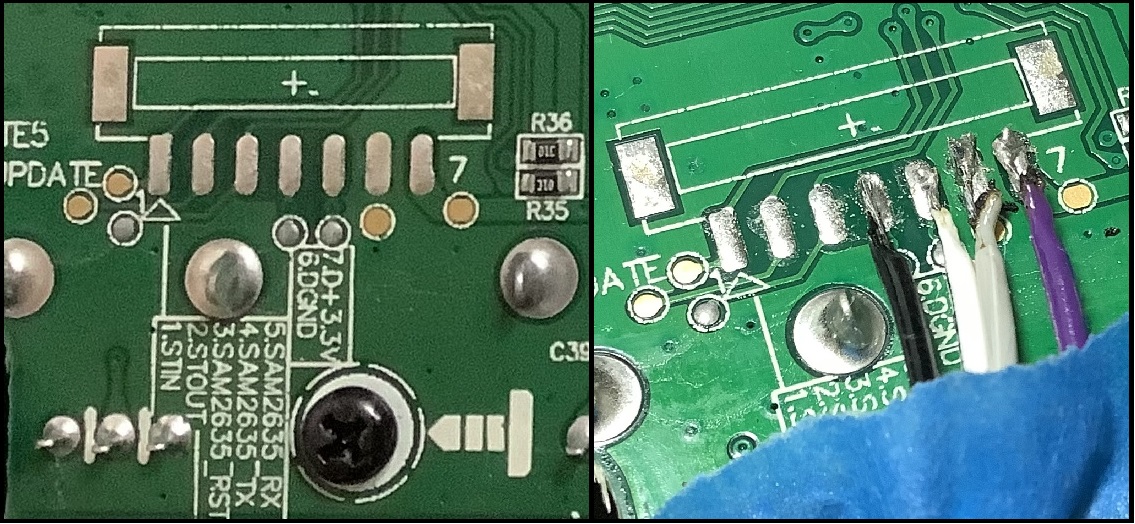
Recapping, the MPK Mini Play main printed circuit board has a group of test pads for the internal synthesizer. The test pads are bigger than surface mount (SMT) traces, which makes soldering much easier. I tapped four signals and brought them out from the board on a ribbon cable:

  • SAM2635_RX: MIDI IN (white wire)
  • SAM2635_TX: MIDI OUT (black wire)
  • D Ground: Ground for external power (grey wire)
  • D +3.3V: +3.3V for external power (purple wire)

“SAM2635” refers to the Dream S.A.S. SAM2635 synthesizer chip — the MPK Mini Play’s tone generator.

Akai MPK Mini Play (Mk1) test pads (before and after)

I did a reasonably thorough analysis of the internal MIDI messages and the Mini Play’s MIDI over USB implementation. The Akai software is much too limiting and I became determined to unleash the Kraken within (the SAM2635).

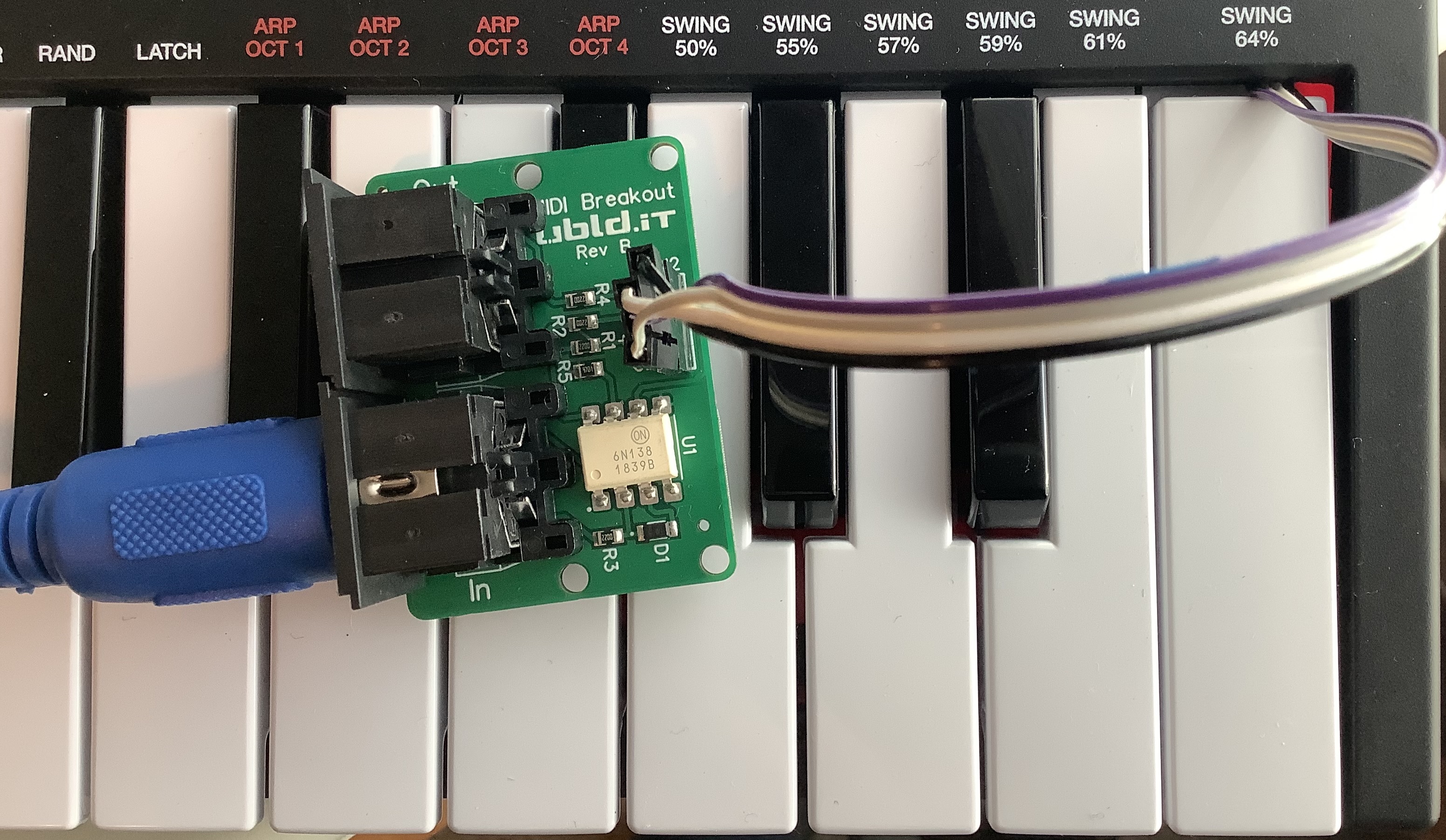
Akai MPK Mini Play (Mk1) connected to UBLD.IT MIDI breakout board

I connected the other end of the ribbon cable to a UBLD.IT MIDI breakout board. The UBLD.IT board provides Akai MPK Mini Play 5-pin MIDI IN and MIDI OUT ports to the Dream SAM2635. I recommend turning INTERNAL SOUNDS off so controller messages do not interfere (collide) with incoming 5-pin MIDI messages. Don’t expect signals/messages to merge.

What else do you need to start using the SAM2635 as a MIDI module? Documentation! The Dream S.A.S. web site has:

You can skip the datasheet, but you will definitely need the firmware and sound bank guides.

The firmware guide describes the GM/GS implementation including, of course, the supported MIDI messages. You’ll find a few interesting and useful enhancements beyond General MIDI and Roland GS:

  • Several selectable reverb and chorus effect types.
  • 1-, 2- or 4-band equalization.
  • A spatial effect.

Near as I can tell, the microphone and CODEC are not connected in the MPK Mini Play electronics. Maybe you’ll discover a hack of your own…

The sound bank guide describes the available voices and drum kits:

  • 128 General MIDI instruments.
  • Nine drum sets and one sound effects (SFX) set.
  • 225 variation instruments.

The variation instruments are a true bonus. You get additional electric pianos, organs, guitars, synth basses and orchestral instruments. The variations are a little light on synth leads and pads, but I think you are expected to roll-your-own by programming amplitude and filter characteristics via MIDI CC messages. The GS implementation offers many options that way.

How does it sound? Here is an MP3 of my standard GM test: Traffic’s Feelin’ Alright. Compare with the Yamaha PSS-A50 rendition. There is a decent piano solo during the last 30 seconds or so, if you want to skip ahead.

I pulled together links to all of my previous articles about the Akai MPK Mini Play (Mk1):

All in all, this has been a successful hack!

Copyright © 2022 Paul J. Drongowski
Yamaha MODX+ madness

Thanks to a few pages posted from the Yamaha MODX+ user manual, the new MODX+ is a bit of a nothing-burger — a product spiff. The MODX+ got a few bumps over MODX (Mark 1): more expansion memory (1.75GB), FM-X polyphony on-par with Montage (128), and a way to add rhythm patterns:

Also, the MODX+ has a new feature for instantly adding rhythm patterns so that the players can take their music creation forward with dynamic rhythm parts. With this feature, creating rhythmic changes in the “Motion Controls” is easier than ever! [Yamaha]

Just enough to keep MODX+ competitive in its price bracket. The bump in FM-X polyphony indicates the likely addition of a second SWP70 tone generator IC.

I suspect Yamaha will use new downloadable libraries to drive a few pack-rat punters to upgrade to MODX+. Recently, IdeaScale participants had a chance to preview a new CP-80 voice (and waveforms). Yamaha were soliciting opinions as to which voices/waveforms had the most sonic appeal. A flood of must-have content might create demand among current MODX (Mark 1) players, making that 1.75GB a necessity.

The forums are filled with speculation about AN-X™. Again, a lot of wishful thinking about AN-X coming to Montage and/or MODX+. Only Yamaha know for sure.

As yet, however, no one has solved the mystery of the other registered trademarks: CK61™ and CK88™.

Yamaha have moved on from the SSP2 signal processing chip to the SSP3. The SSP3 first appeared in the Yamaha AXR4U and Steinberg UR44C audio interfaces. Yamaha move ahead like a shark and the SSP2 is deprecated for new designs. In fact, the MODX+ refresh likely includes the SSP3 as SSP2 production inventories must be low or exhausted.

That turns my attention to the Reface DX and Reface CS. The Reface DX and CS are sisters, sharing the same internal design modulo screen interface and front panel gizmos. Both are based on SSP2 and, thus, both may be in need of a refresh — or replacement. The SSP2 signal processor provides the FM and VA synthesis horsepower.

Simply put, will CK61 and CK88 replace the Reface DX and CS? Will the CK61 and CK88 be the AN-X machine? How will Yamaha monetize AN-X? When it comes to business, Yamaha are not fools. Never sell one model when two will do as well! Ka-ching. 🙂

On a personal note, I started this site to inform players about music technology and what’s inside the tin. It’s gratifying to read the forums and see how much this site has influenced discussion, especially discussion about Yamaha products. Thank you for reading and please keep coming back! — pj

A few handy links:

Copyright © 2022 Paul J. Drongowski