About pj

Now (mostly) retired, I'm pursing electronics and computing just for the fun of it! I'm a computer scientist and engineer who has worked for AMD, Hewlett Packard and Siemens. I also taught hardware and software development at Case Western Reserve University, Tufts University and Princeton. Hopefully, you will find the information on this site to be helpful. Educators and students are particularly welcome!

Musing about Montage VA

There’s been an extended discussion in the YamahaSynth.com Montage Forum about the ability to add Virtual Analog (VA) synthesis to the current Montage and MODX platforms. It’s been a good discussion and it encouraged me to jot down a few musings about the hardware support for AWM2 and FM-X.

In case you don’t visit YamahaSynth.com, I reposted my musings here and added a diagram or two.

Before saying anything, I have to emphasize “Speculatively speaking.” With as much invested in AWM2/FM-X and their implementation in silicon, Yamaha have not published about the internal design. This whole discussion — including my own comments — would be on much sounder footing (no pun intended) if the micro-architecture were published. Yamaha are tight-lipped so “Hah!” to us all. 😀

BTW, we’re lucky that we can speculate at all since Korg, Nord, etc. have largely buttoned up their service manuals.

I’m skeptical

I’m skeptical about adding VA through an update given the current platform because of limitations in the current synthesis pipeline.

Yamaha regard their expertise in large scale integration as a strategically important asset. (Please see their annual financial reports.) The SWP70 is a major investment in the future. It’s a generational step and a design with a long expected life time. A long life is needed in order to recoup Yamaha’s investment. Thus, we haven’t seen all of its potential capabilities as yet.

At some point, the current hardware platforms (Montage and MODX) will limit the features which can be delivered solely through software. That will necessitate a new hardware model in each product line. Speculatively speaking, I’m not sure if the SWP70 is capable of CS-like VA synthesis. The Reface CS (and DX) employ a Yamaha SSP2 (SH-2 CPU core) for synthesis. The mere presence of an SSP2 in the Montage is not significant for VA because it clearly supports UR-like digital audio in the existing design.

Of course, business decisions will take precedence eventually. We all love the free updates and improvements in our instruments. (I certainly do!) Like cellphones, tablets and other high-end electronics which enjoy periodic updates, we will need to buy a new upgraded platform in order to fuel the future. Nobody rides for free forever.

My mental model

I suspect that we nerds (and I mean that as a compliment!) have different architectural models in mind as to the SWP70 internals. One model is the “standard DSP” model — a pipelined single instruction, single data (SISD) CPU. Naturally, there may be enhancements for vector processing instructions and so forth.

An example of such a generic model is the Yamaha SSP2, which consists of an SH-2 DSP core and several effect DSP processors. The SSP2 is the heart of Reface CS with an internal clock of 135.4752MHz (a multiple of 44,100Hz, BTW). Another example would be the DSP56362 in early Nord/Korg modeling keyboards. The Reface CS manages 8 voices of polyphony (using the word “voice” loosely) with the effects handled by the SSP2 effect DSP processors. (The effect DSP processors are mini, small core, reprogrammable processors.)

The architectural model which I think is used in the SWP70 is a SIMD architecture more akin to a GPU. The Montage/MODX DSP RAM and wave work RAM memory clock is 95.9616.MHz, also a multiple of 44,100Hz. The SWP70 pumps out a finished sample every 2,176 memory clock ticks. The internal clock is probably a small multiple (maybe two) of the memory clock. Everything needs to run in a modest power envelope without a heat sink, etc., so it’s not possible to run at GHz rates.

After writing this, I realized that the AWM2/FM-X synthesis core may not have an instruction stream at all. It might be a block of 1 to N dedicated pipelines where each pipeline is, roughly speaking, an AWM voice element.

I image a block of tone generation (TG) cores dedicated to AWM2/FM-X. Part of that “dedication” is a pipeline specifically tailored and tuned to AWM2/FM-X. (I believe this design IP (the basic core design) is re-used in other AWM2 products.) Yamaha are in the AWM2/FM-X business so it makes sense to design hardware specific to these tasks. It’s no simple feat to produce 128 channels of tone generation with low latency and no burps and hiccups.

I don’t know how much flexibility is built into the so-called “oscillator” part of a TG core pipeline. Could Yamaha write a new SIMD program for VA using the existing TG core design? I don’t know and hence, my doubt.

That said, since Yamaha haven’t published a darned thing and my job easier (Hah!), I could be totally wrong. Yamaha are smart engineers, especially at the hardware level.

The choices made for Reface may or may not be revealing. Reface YC/CP use the SWX08 for AWM2/SCM synthesis. The SWX08 — in my imagination — use a similar AWM2 TG core assist. Reface DX/CS use SSP2 and its SH-2 core. Was something missing in the SWX08 TG core which was available later in the advanced SWP70 cores? Did SWP70 become VA capable as well?

Example: Yamaha YMW820

The closest I’ve ever gotten to understanding Yamaha’s approach to AWM2 is by studying the datasheet and MIDI spec for the YMW820 (NSX-1). Admittedly, the YMW820 is a low-end device implementing a large subset of the XG voice architecture with only chorus, reverb and a single variation effect.
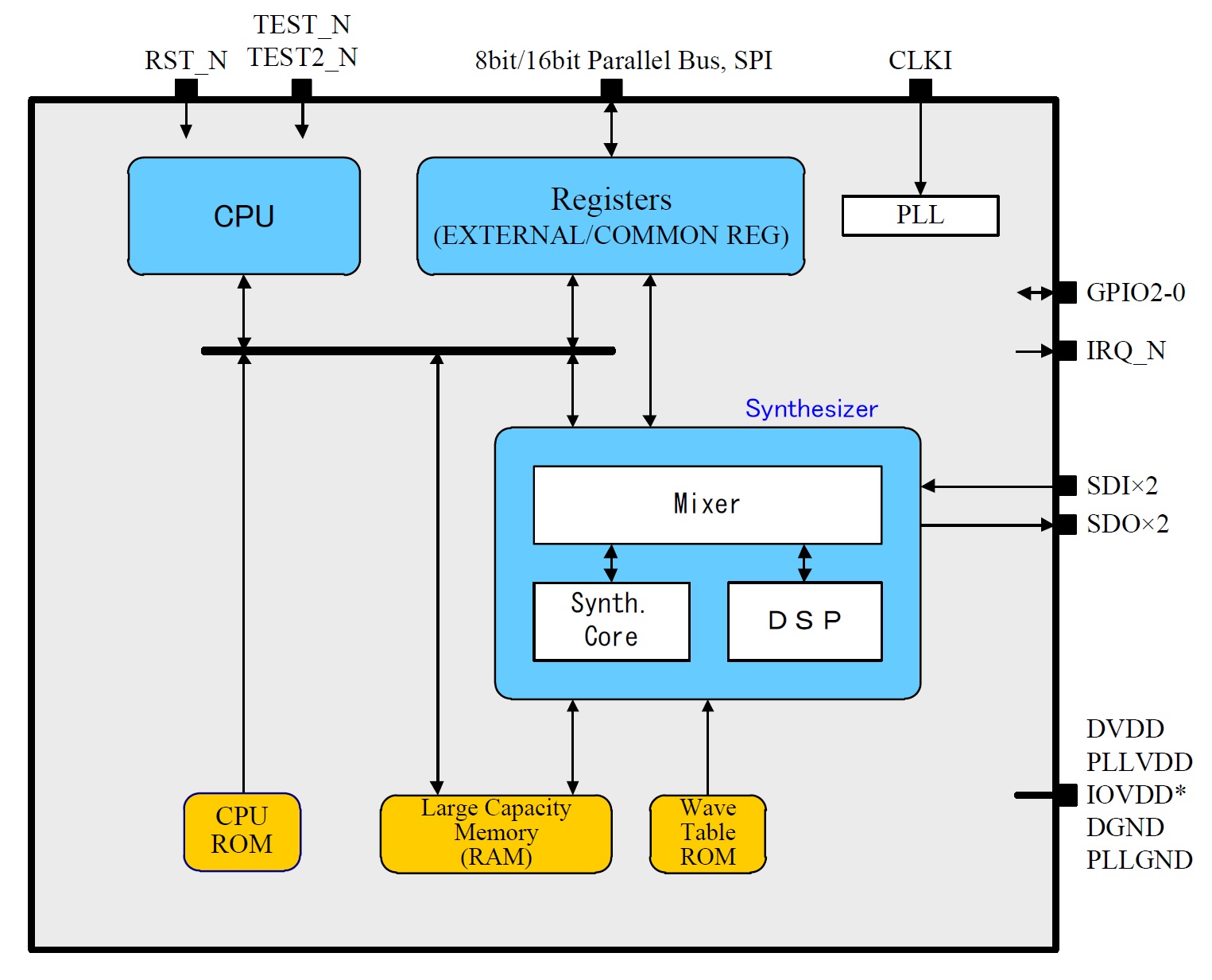
YMW820 (NSX-1) block diagram

The YMW820 has a control CPU (dual issue, 32-bit RISC), mixer hardware, DSP for effects, and a “wavetable synthesis core” (Yamaha’s exact terminology). Both the synthesis core and DSP are controlled by the CPU.

The wavetable synthesis core supports 64 channels (polyphony). The YMW820 has a 2MByte wavetable ROM which presumably contains the General MIDI waveforms. It also has a 3 MByte wave RAM which can be loaded with eVocaloid waveforms or Real Acoustic Sound (Articulation Element Modeling).

The 64 channel synthesis core is drawn as a distinct hardware subsystem from the effects DSP. Each channel is what we consider an element: pitch generator, oscillator, digitally controlled filter (DCF), envelope generator (EG), LFO. I suspect that other AWM2-based products have similar wavetable synthesis cores, including the SWP70. [Click image below to enlarge.]
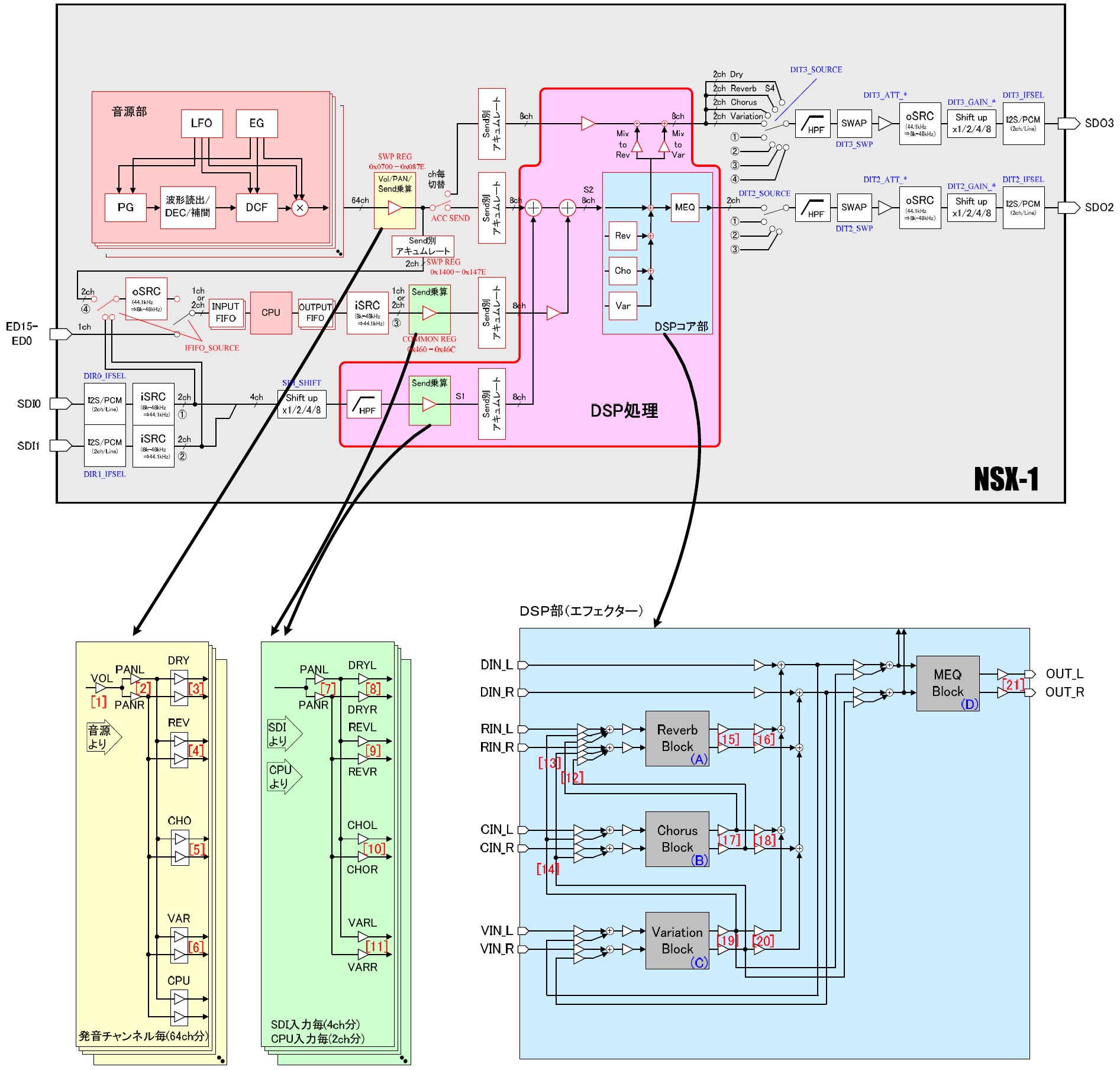
YMW820 (NSX-1) synthesis core and effect DSPs

Of course, the SWP70 synthesis core is the ultimate in the entire AWM2 family. It also has many effect DSPs for system and insertion effects.

Bottom line, Yamaha exploit massive parallelism for AWM2 synthesis where each channel is a wavetable synthesis element. A true DSP processor like the SSP2 is better suited for VA synthesis which is why the SSP2 is deployed in the Reface CS, not an AWM2-oriented SWX processor. (The SWX has an embedded wavetable synthesis core, too.) I believe that Yamaha will need to add another SSP2 (or some such) to the Montage in order to implement VA. There’s a reason why it’s called a “Standard Wave Processor” — it is hardware specifically designed for AMW2, FM-X, AEM, and SCM synthesis. It isn’t a general purpose programmable DSP. Maybe VA can be warped to the existing pipeline(s), maybe not.

BTW, the new VCM MINI FILTER and MINI BOOSTER are DSP effects. The effect DSPs are programmable — the AWM2 channel filters likely are not.

Big DSP vs. little effect DSPs

I tend to think of the internals as a tone generation front end followed by a flock of small DSP units in the mixer/effects back-end. This seems to be the canonical Yamaha pipeline. In Montage/MODX, some of the small DSPs are routed as insert effects and some as system/master effects. (The effect routing in Genos, BTW, is different and probably different in the high-end digital pianos.) I suspect that the data flow is predominantly (solely?) front to back.

I don’t really know if the small effect DSPs are general purpose or not.They are probably small simple cores because an SWP has at least 15 and real estate is limited. (Lower capacity parts like the SWXs and SWLs have far fewer small DSP cores.) A small core may not have much throughput and the front-to-back dataflow might prevent feeding data from the DSP cores back to the filters, etc. in the front-end.

There is also the issue of getting note and controller data to the effect DSPs in the back end. Note and controller data are delivered on the E-bus directly from the key, knob, slider, etc. scanning processor(s) to the tone generation core. Does all E-bus data get back to the small DSP cores? Certain some data gets through as knobs, sliders, etc. can tweak effect parameters in real-time.

Overall, even as a consumer, I would be happier with a dedicated SSP2 for VA. The VA SSP2 would inject its digital output stream into the existing mixer/DSP infrastructure. [The SSP2 vocal harmony processing does something like this in Tyros5.] The VA SSP2 gets its own DSP RAM and NOR flash for program, and the processing is totally out of the way of FM-X and AWM2. It would be possible to implement different VA algorithms without making compromises. Yamaha could periodically offer new engines as updates/upgrades.

If you’re an ARM aficionado, you might be thinking “big.LITTLE”. It’s a similar concept. Engineers need to make best use of limited real estate. Yamaha need lots of little DSPs for insertion effects. The SSP2 itself is organized as a big SH-2 DSP core and several little effect DSPs (plus a digital mixer). The mix of channel strip and guitar effects is limited.

Down memory lane

The discussion took me down memory lane to the venerable AN-200 and PLG150-AN. Both products use Yamaha’s AN (Analog Physical Modeling) daughter card. I love the old AN-200 and keep one handy. It is a pretty decent approximation of a five voice Prophet 5.

The daughter card contains two Yamaha LSI components:

  • YSS-236-F: An enormous 160 pin QFP for analog synthesis
  • YSS-233-F: A merely huge 128 pin QFP for mixing and effects

The 236 is also known as the “VOP3” and the 233 is known as the “MDSP”. The MDSP is deployed in the PLG150-DX daughter card, again in the mixing and effects role. The An1x, by the way, has two of each, implementing ten voice polyphony.

Some sites ascribe synthesis to the Hitachi H8/3002 on the daughter card. This is wrong. The H8/3002 is the microcontroller that issues commands and maintains digital communication with the mothership. The VOP3 does synthesis.

The VOP3 moonlights as the vocal harmony processor in early arranger keyboards like the PSR-9000. The VOP3 is the predecessor to the SSP and SSP2. The SSP and SSP2 subsume the mixing and effect DSP roles of the MDSP. Such is the march of large scale integration (LSI) fabrication technology.

Given this history, I’m not surprised that Yamaha chose the SSP2 for Reface CS.

I like surprises

Watch, Yamaha will come up with something completely different. 😀 Maybe an SWP71. There were different spins of the SWP50 family, so why not? 🙂 From the marketing point of view, demand for VA is sufficiently high that they may require everyone to buy a new platform anyway. Perceived value means “mo’ money.”

Copyright © 2019 Paul J. Drongowski
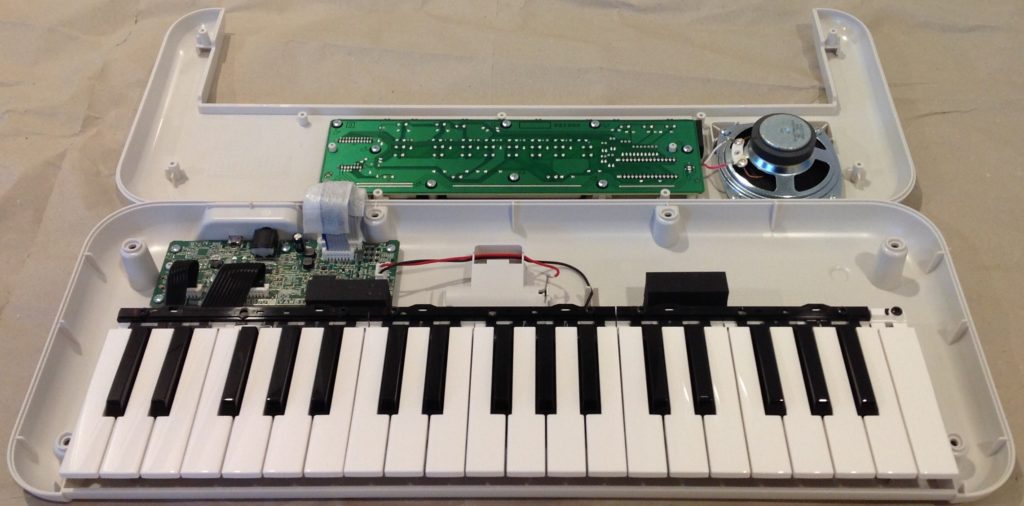
SHS-300: The PSS keytar?

I made a little more progress delineating Yamaha’s mini-key product lines. The PSS series is built for low manufacturing cost. Thanks to PSS-E30 (Remie) and PSS-A50 tear-downs, we know that the PSS series is based on the ultra-small, relatively inexpensive SWLL (YWM-830) processor.

So, what to make of the Yamaha SHS-300 and SHS-500 keytars?

The SHS-300 shares the same basic spec as the PSS series: 32 voice polyphony, 8cm speaker, only one effect (reverb), no MIDI, no Bluetooth, etc. Sound quality is comparable to the PSS series. I suspect that the SHS-300 is based on the SWLL, too.

The SHS-500, however, has a much better spec: 48 voice polyphony, MIDI and audio over USB, MIDI over Bluetooth BLE, 9 DSP effects, Master EQ, chorus, reverb, etc. A glance at the SHS-500 service manual shows that the SHS-500 has much in common with the current PSR E-series keyboards, including the SWX03 processor.

If I get the time, I’ll write a quick post about SHS-500 internals.

The SHS-500 is definitely a cut above the SHS-300 in build quality, sound, MIDI capability and tweak-ability. I’m sorely tempted to take a bite of the apple. NAMM, however, is fast approaching (16-19 January 2020) and good sense tells me to wait. Yamaha’s pre-show press release promises 75 new products including a new family-oriented home keyboard.

Modding the PSS series

I promised a few thoughts about modding the new Yamaha PSS series keyboards. Here goes…

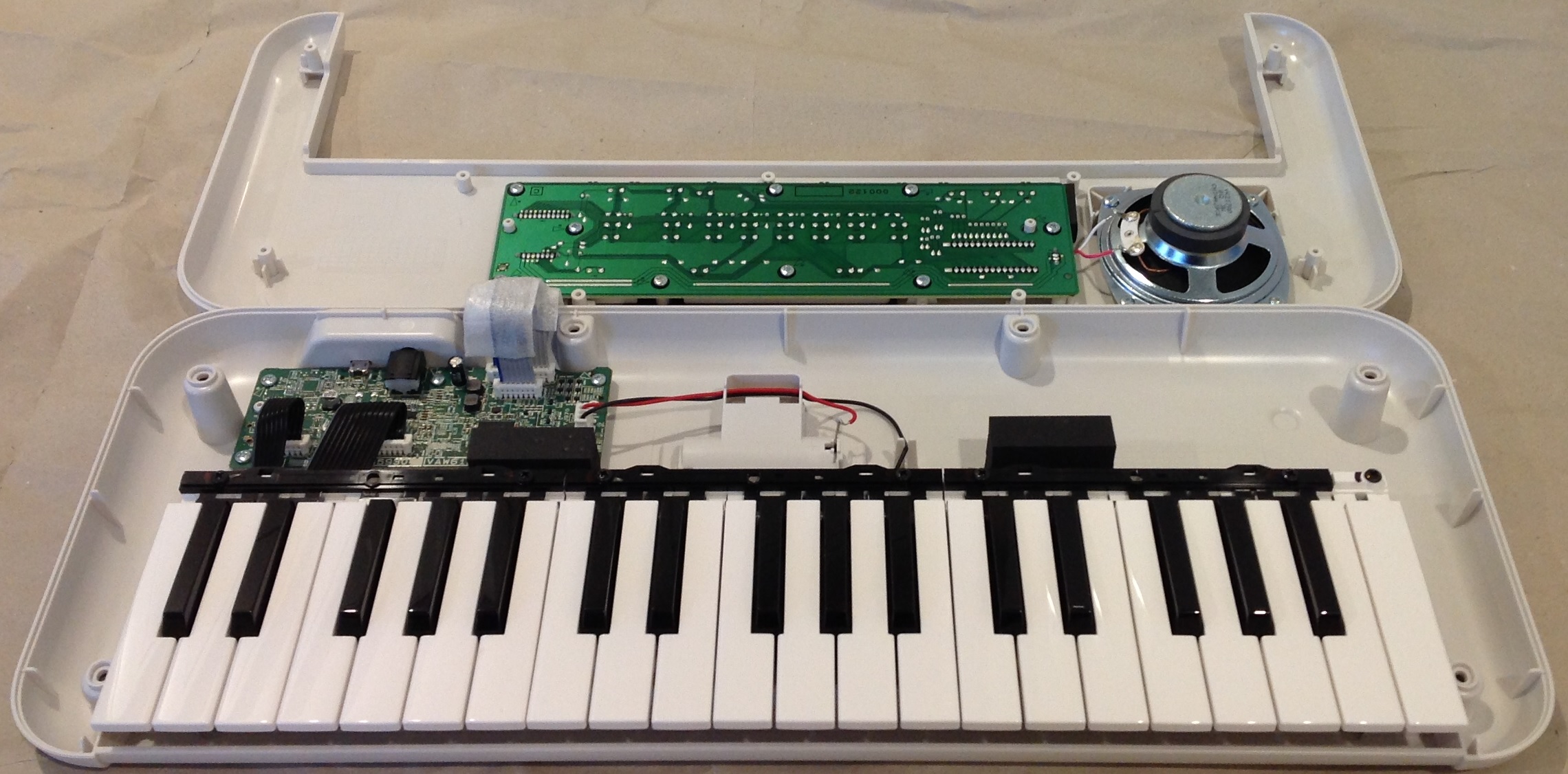
As shown in my PSS-E30 Remie tear-down, a PSS family keyboard consists of four major parts:

  • Mini keybed
  • Digital logic board (DM)
  • Front panel board
  • Plastic skin and parts

For comparison, I recommend this excellent PSS-A50 demo and tear-down on YouTube.

Product personality is determined by the plastic skin/parts, software in the embedded serial ROM, and the addition/absence of the USB interface integrated circuit (IC). There may be a few other minor differences, but it would be difficult to pin them down without the service manuals. Speaking of which, if you start a mod project, I strongly recommend reading the PSR-F50 Service Manual because the F50’s guts are very similar to the PSS series.

Unless you really want the F50 or E30 voices and functionality, the A50 is the best choice for a mod. The A50 has the USB interface IC and the necessary firmware supporting MIDI over USB. The A50 has a higher street price than the other models, but USB MIDI is worth it.

At the 100,000 foot level, there is plenty of empty space inside for a small microcontroller (e.g., Arduino) or sound mangling analog electronics. You could choose to either keep the speaker if you want portable sound or ditch the speaker and go solely with the headphone output to external amplification.

If keep the speaker, you could easily add some sound mangling circuits like a filter or effects. The littelBits filter might be a good start and is certainly small enough to fit in the empty space. Should be easy to tap into battery power as the battery leads are exposed.

If you ditch the speaker, you have a lot more space to work with. I’d be tempted to add the Korg NTS-1 once it’s available. The NTS-1 can process external audio and has digital effects. Previews have given the digital effects high marks. Unfortunately, the NTS-1 is spec’ed 12.9cm by 7.8cm by 3.9cm, which won’t fit directly into a PSS case. A lot depends upon the size of the NTS-1 electronics board. Even if we can’t fit the NTS-1 into a PSS case, the NTS-1 would be a nice complement to the A50.

Without the speaker, one could use the front panel real estate for additional controls. With all of the arpeggios and such, manual control over filtering and effects would be welcome (in addition to the A50’s fixed motion effects).

At the 50,000 foot level, any one of the PSS models could be stripped down for parts. The case and front panel may or may not float your boat, but you could use the shell and front panel for a keyboard project of your own. It would be easy to apply new graphics to the front panel. The front panel buttons are a switch matrix which can be easily mapped out and then scanned by your code. The front panel has a three digit 7 segment display that needs to be multiplexed and driven.

The keybed is quite useful. The keys are affixed to the bottom of the case, so unless you’re reusing the case, too, you probably will need to cut the keybed out of the case, leaving everything as a unit. The keys sit above a printed circuit board (PCB) with the rubberized switch contacts.

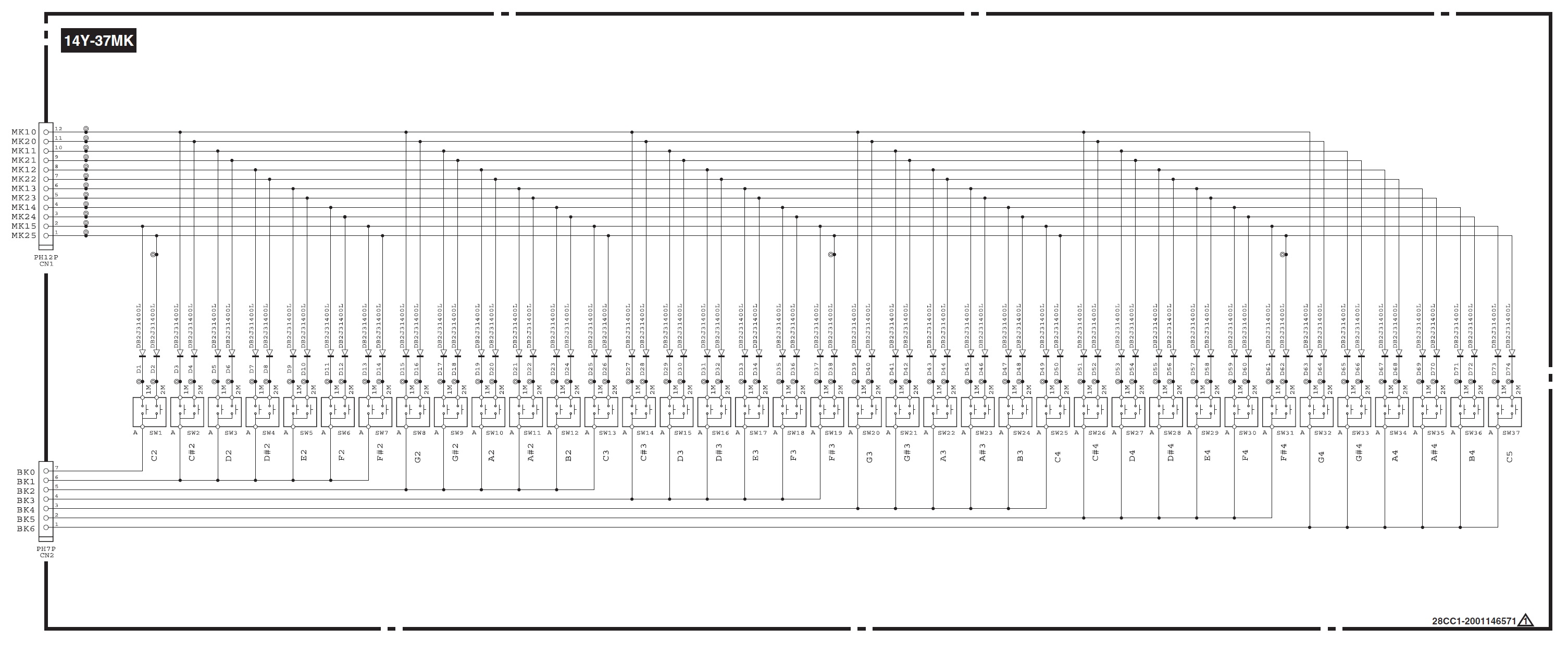
Reface YC switch matrix

I’ll make a leap of faith here and assume that it’s the same keybed as Reface. The schematic above is taken from the Reface YC Service Manual. The key matrix has seven select lines (BK0 to BK6) and twelve sense lines (MK10 to MK21). Your software needs to drive one of the select lines and immediately read the sense lines. There are two sense lines per switch for the “lower” and “higher” key contacts. Software can determine key velocity by measuring the time between contact closures for an individual key.

The most tasty enchilada is the digital logic (DM) board. The A50 board, in particular, could form the basis of a USB MIDI tone module. One could add 5-pn MIDI by bridging a 5-pin DIN and the USB micro-B port. The DM board is quite small: 13.5cm by 4.5cm. And clearly, the DM board can be battery powered. Even if you re-housed the DM board and front panel board, you still would get a very compact module.

Modding at the 10,000 foot level gets difficult. There are the usual difficulties tracing signals and soldering surface mount (SMT) devices and signal paths. Even if you strip out the SWLL (YMW-830) integrated circuit, I’m not sure what you would do with it!

Nor am I confident that the firmware can be easily by re-engineered. Yamaha have never documented wave chip internals, so you don’t have much guidance. There isn’t much code — firmware and waveforms reside together in the 2MByte serial ROM. I would guess that the firmware is SH architecture. Even so, reverse engineering would be a difficult task. I have my doubts about repurposing the code. At best, one might be able to add or change the waveforms?

Personally, I’m inclined to go the sound mangling route.

A few more thoughts before closing.

The A50 is not a General MIDI module. If you want a (mostly) GM/XG compatible Yamaha tone module, I suggest the Pocket Miku NSX-39. Also, while stumbling around the web, you might want to check out the Yamaha YMF-825. It’s a 4-op FM chip which Yamaha released for makers.

Copyright © 2019 Paul J. Drongowski
Except service manual excerpts which are copyright Yamaha.

SHS-500 Sonogenic voices

With Yamaha PSS-E30 Remie at hand, I’m still comparison shopping the PSS series against the Yamaha SHS-500 Sonogenic. The Sonogenic has better build quality, has 5-pin MIDI as well as MIDI over USB/Bluetooth, and integrates with Chord Tracker.

Then there is the issue of sound quality. Remie and the rest of the PSS series (PSS-F30 and PSS-A50) have only one main DSP effect: reverb. With the exception of the A50’s motion effects, there aren’t the means to tweak sounds.

As to preset voices, I would love to play Remie and Sonogenic side by side. However, in this day and age when brick and mortar stores do not stock inventory or demo units, that’s impossible. Gosh, I ordered Remie from the UK — I live in the big Seattle USA metro area — with the intention of gifting it to our grandson. (A good excuse. 🙂 ) The PSS series keyboards are so inexpensive that even an impulsive purchase is justifiable. I still haven’t seen a Sonogenic alive in the wild and don’t have hand-on experience with it (yet).

First some tech-head stuff. Remie has 32 voice polyphony and my teardown shows that it is based on the tiny Yamaha SWLL (YMW-830) system-on-a-chip (SOC). It stores its program and waveforms on a 2MByte ROM. Right away, I expect Remie’s sound quality to be compromised with respect to the current PSR E-series.

The current PSR E-series is based on the proprietary Yamaha SWX03 processor. The SWX03 is a much larger SOC with external RAM, ROM, digital to analog conversion (DAC), analog to digital conversion (ADC), and LCD display interface. The program/wave memory is 32MBytes (Spansion S29GL256) much larger than Remie. The SWX03 supports 48 voice polyphony and 10 DSP effects in addition to the usual PSR E-series reverb and chorus. Thus, I expect better sound quality from the E-series.

The SHS-500 also has 48 voice polyphony and 10 DSP effects. These characteristics alone make a strong case for the SWX03 as the main engine within the Sonogenic.

Hearing is believing, however. Without access to Sonogenic in the stores, I’m forced to compare Remie and PSR against YouTube videos. One of the best Sonogenic voice demonstrations is in Japanese by a laid-back jazzer. I also recommend this Sonogenic demonstration in Russian.

The Japanese demo gets rolling roughly 3:30 in. Our jazzer compatriot plays through the presets without a backing track or lots of effects. This is as close to factory stock as one can get. Thank you! Here are direct links to some of the Sonogenic instruments in the video:

These sound pretty good and much better than Remie. The electric piano can bark! The jazz guitar is decent. Many of the brass and woodwind instruments have vibrato sampled in.

The Sonogenic program change table gives us a major clue about the origin of the Sonogenic voices. Most of the Sonogenic voices match up with the PSR series:

 SHS-500            Bank  Bank
Sonogenic MSB LSB PC# PSR/Genos voice
----------------- ---- ---- --- -----------------------
Saw Lead 1 104 20 91 Gemini
Saw Lead 2 0 104 82 RS Saw Lead1
Quack Lead 0 112 85 Portatone
Bright Decay 104 21 85
Square Lead 0 112 81 Square Lead
Under Heim 104 51 88 Under Heim
Analogon 104 52 82 Analogon
Synth Brass 0 113 64 Ober Brass
Electric Piano 104 28 5
DX Electric Piano 0 112 6 DX Modern
Electric Guitar 104 3 31
Jazz Guitar 104 0 27 Cool! Slide Jazz Guitar
Acoustic Guitar 0 117 26 Steel Guitar
Electric Bass 104 6 34
Slap Bass 0 112 37 Slap Bass
Synth Bass 0 112 39 Resonance Bass
DX Bass 0 118 40 DX100 Bass
Piano 0 112 2 Bright Piano
Piano & Strings 104 39 1
Piano & Pad 104 40 1
Air Choir 0 112 55 Air Choir
Strings 0 116 49 Bow Strings
Brass 0 117 63 Pop Brass
Trumpet 0 115 57 Sweet! Trumpet
Flute 0 115 74 Sweet! Classical Flute
Alto Sax 104 2 66
Tenor Sax 104 3 67
Harmonica 0 112 23 Sweet! Harmonica

I verified the matches by comparing the YouTube video against the same voices on Genos. (Removing the Genos effects, of course.) The blank spots in the table are voices which Yamaha re-sampled from PSR or elsewhere. That’s why the electric piano is so darned good. The piano layer voices have a warmer, mellower timbre than the Bright Piano (which really lives up to its name).

So, there you have it. On the basis of sound quality, the Sonogenic SHS-500 wins over the PSS family. Yes, the Sonogenic is more expensive, but you do indeed get more for the money. If Sonogenic had even a single organ voice, it would be a no-brainer and I would have bought one by now. Oh, Yamaha, why do you leave these things out?

Copyright © 2019 Paul J. Drongowski
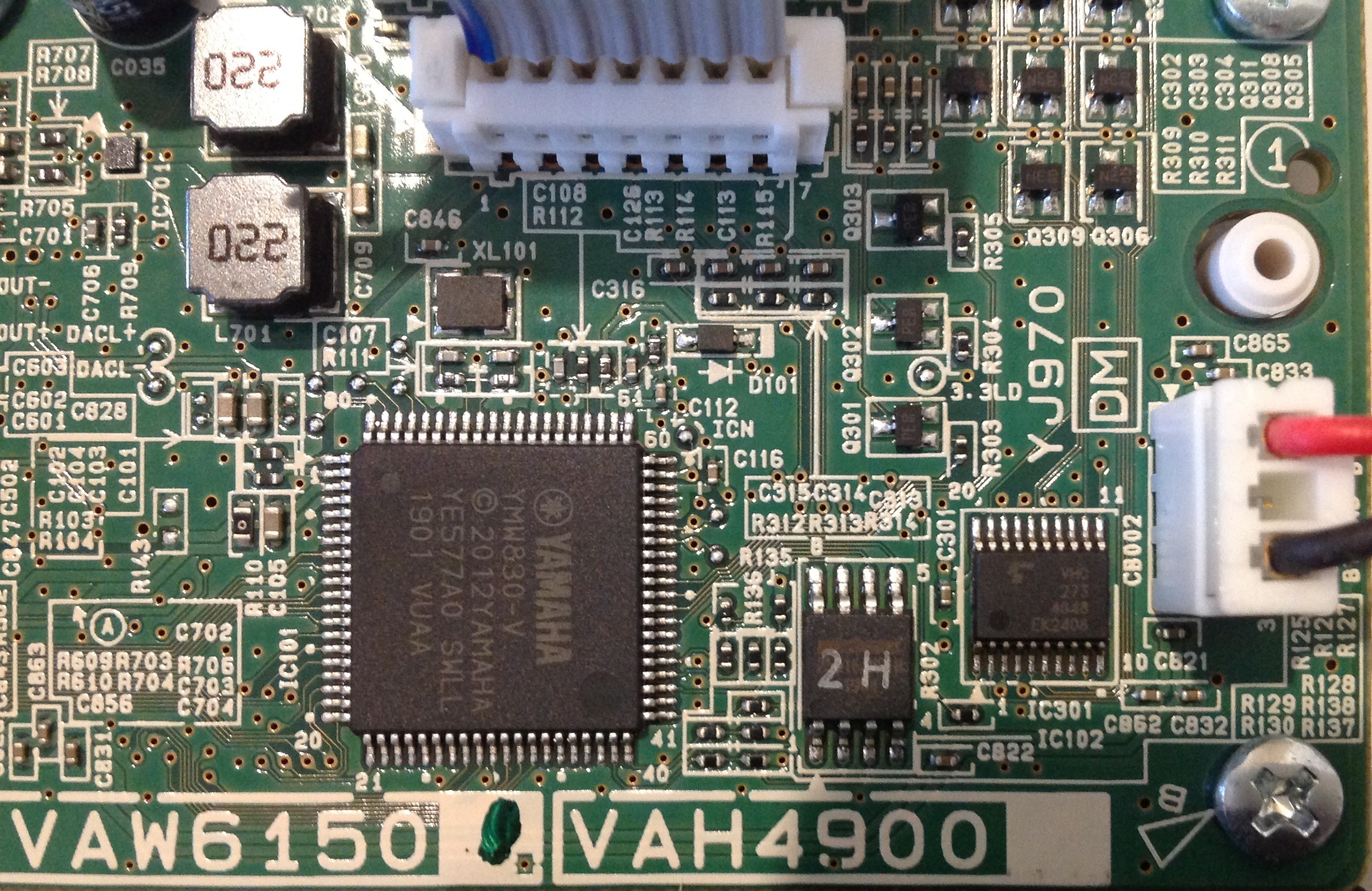
Inside Yamaha PSS-E30 Remie

Now let’s take a first look at Yamaha PSS-E30 Remie inside.

My Remie is a seasoned world traveller. It was designed in Japan, made in India, distributed by Rellingen, Germany, sold by Amazon UK and played in Washington state, USA. Physics and electrons are indeed universal.

The PSS-E30, PSS-F30 and PSS-A50 are essentially the same physical product. They are part of a family like Reface. The Reface family, BTW, is two pairs of fraternal twins: YC/CP and CS/DX. The PSS family are fraternal triplets and share the same printed circuit board (PCB). In fact, the PCB has three little check boxes. A mark in a check box denotes the specific product personality.

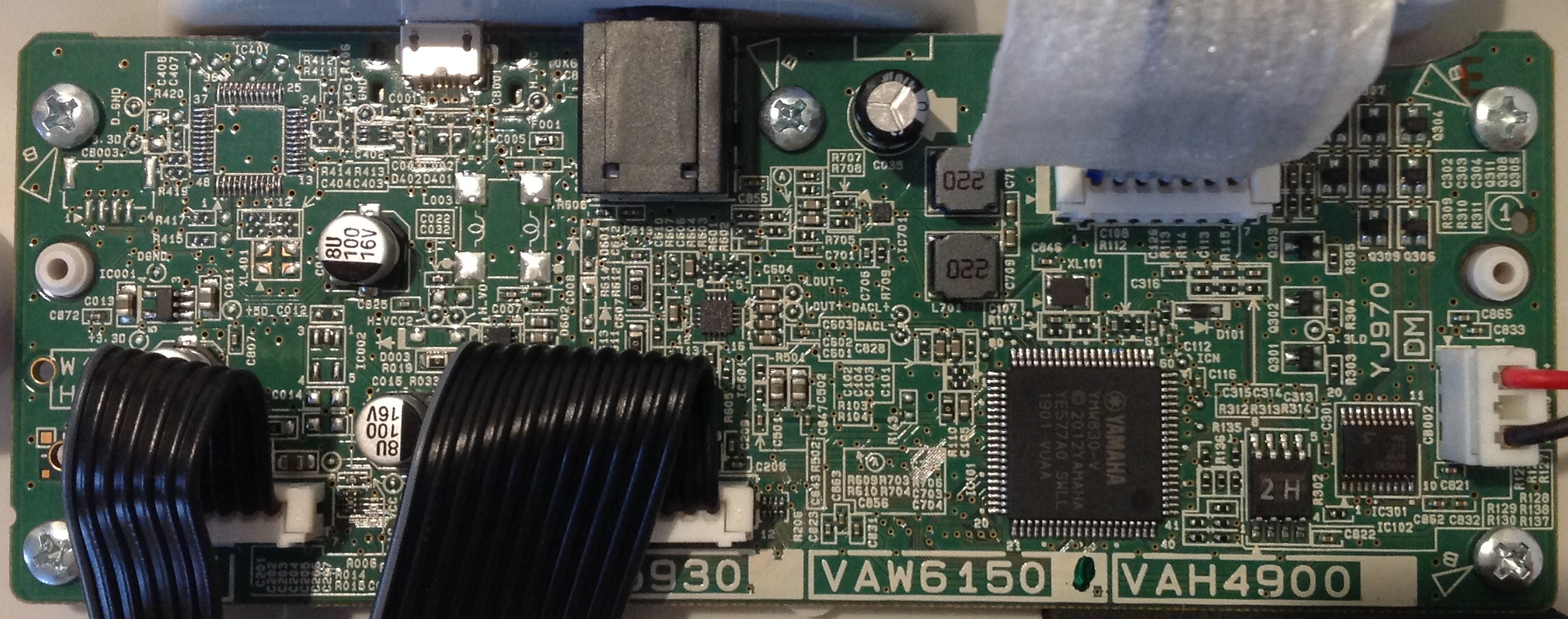
Yamaha PSS-E30 Remie digital logic board (DM)

Product personality is determined by four things: front panel graphics, software, content (voices, styles, etc.) and USB interface.

Line up the three PSS keyboards and you see that they all have the same panel layout. The buttons are all in the same physical place. Everything else that is external is just skin (case color and stick on panel graphics). The panel connections to the digital logic board (DM) are the same in all three products.

Next up, each member of the family has different code and content. The software and content are stored in a Winbond 2MByte serial ROM. The main CPU (SWLL) reads the binary code and waveforms from ROM at boot time. The ROM components are stamped with a product specific code: “2H” for Remie and “2I” for the PSS-A50.

The 2MByte ROM holds both code and waveforms. The small ROM harkens back to the day of the Yamaha QY-70 when XG voices and drum kits fit into 4MBytes. Given the small ROM, one shouldn’t expect super high voice quality in any of the models.

The SWLL is reminiscent of the YMW-820 NSX-1 integrated circuit. The NSX-1 is the engine behind Pocket Miku and eVocaloid.

Finally, the PSS-A50 is the only sibling with an active USB interface. Remie has an unpopulated IC site as you can see in the upper left corner of its PCB. This site is populated with a USB chip in the A50. Without the chip, Yamaha can build and sell Remie at a lower cost than the A50. Even if one carefully soldered the correct USB IC into the unpopulated site in Remie, I doubt if Remie’s software has the code to recognize it.

The PSS-F30 is a shrunken PSR-F50. For the rest of this discussion, I’m using the Yamaha PSR-F50 Service Manual as my guide to the electronics. As to the keybed, I’m using the Reface YC Service Manual.

Remie circuit boards and ribbon cables

Inside, each member of the PSS family consists of three circuit boards: the main logic board (DM), the front panel board and the keybed. The front panel board and keybed are each a switch matrix. The CPU scans both the front panel and keybed separately. It scans each board by asserting a switch group select signal and then reading the current state of each switch in the group.

There are twelve switches in a keybed group, two switches per key. The switch contacts are at two different heights and close at two different times when struck. The CPU measures the closure time between the first contact and the second conent in order to sense key velocity.

The panel PCB and the keybed PCB are each joined to the digital logic board by short ribbon cables. The loudspeaker signals hitch a ride through the front panel ribbon cable.

The main CPU and tone generator is a Yamaha proprietary integrated circuit — the YMW830-V or “SWLL”. The SWLL is the ultra-small brother to the SWL01. The chip is housed in an 80 pin surface mount quad pack which is only 1.3cm on a side. That’s tiny. The entire PCB is a tidy 13.5cm by 4.5cm.

The SWLL is a true system on a chip (SOC) containing the CPU, RAM, tone generation circuitry, UART, ADCs and DACs. Amazing. The chip inside is small, too, and Yamaha can print these like postage stamps in large volume. Everything about the SWLL screams “low cost”.

Using the PSR-F50 Service Manual, here is the SWLL pin-out:

     1   DACLPP    Left channel DAC output (positive)
2 DACLMM Left channel DAC output (minus)
3 DAC_VDD DAC Vdd
4 DAC_VSS DAC Vss
5 DACRMM Right channel DAC output (minus)
6 DACRPP Right channel DAC output (positive)
7 VSS Vss
8 KYN11 Key sense (input)
9 KYN12 Key sense
10 KYN13 Key sense
11 KYN14 Key sense
12 KYN15 Key sense
13 KYN16 Key sense
14 KYB1 Keyboard key group select (output)
15 KYB2 Keyboard key group select
16 KYB3 Keyboard key group select
17 KYB4 Keyboard key group select
18 KYB5 Keyboard key group select
19 KYB6 Keyboard key group select
20 KYB7 Keyboard key group select

21 KYB8 Keyboard key group select
22 KYB9 Keyboard key group select
23 KYB10 Keyboard key group select
24 KYB11 Keyboard key group select
25 IOVDD
26 VSS
27 LDOTSTO
28 KYN21 Key sense (input)
29 KYN22 Key sense
30 KYN23 Key sense
31 KYN24 Key sense
32 KYN25 Key sense
33 KYN26 Key sense
34 SWIN0 Panel scan input
35 SWIN1 Panel scan input
36 SWIN2 Panel scan input
37 SWIN3 Panel scan input
38 VSS
39 SDQ2 Serial ROM WP# (DQ2)
40 SDO Serial ROM DO (DQ1)

41 SCSN Serial ROM chip select (CS#)
42 IOVDD
43 SDQ3 Serial ROM NC (DQ3)
44 SCLK Serial ROM clock (CLK)
45 SDI Serial ROM DI (DQ0)
46 VSS
47 PORTB0 PSW0
48 PORTB1 (7seg_e0)
49 PORTB2 (7seg_e1)
50 PORTB3 (7seg_e2)
51 PORTB4 (7seg_lat)
52 PORTE0 /PSWI
53 PORTC0 (Sustain input)
54 TXD UART transmit data (output)
55 RXD UART receive data (input)
56 PLLBP
57 TEST
58 LDOTST
59 IC_ (Voltage detector)
60 VSS

61 ADC_VDD (+3.3V)
62 ADC_VSS (Ground)
63 AN0 Analog input
64 AN1 Analog input (battery check)
65 VSS
66 PLLVSS
67 PLLVDD
68 LDOC
69 LDOVDD
70 LDOVSS
71 VSS
72 XI Crystal input
73 XO Crystal output
74 VSS
75 IOVDD
76 TDO Test data out
77 TCK Test clock
78 TMS
79 TDI Test data in
80 TRST_ Test reset

I determined pin function by tracing signals in the PSR-F50 Service Manual. Yamaha may have changed things a bit in Remie and A50. I have not determined how the USB interface is connected to SWLL in the A50 nor have I even identified the component.

Yamaha PSS-E30 Remie LSI components

For the PSR-F50, the SWLL internal clock is 33.8688MHz and the master clock is 67.7376MHz. The clocks are generated from a 16.9344MHz crystal. All clocks are a multiple of 44,100Hz, the sample frequency. I can’t read the marking on Remie’s crystal, but there isn’t any reason to believe that it differs from F50.

The three digit LED display is both retro and cheap. Remie has the same eleven transistors driving the time-multiplexed seven segment display.

  • Under software control, transistors Q301 to Q303 (7seg_e0 to 7seg_e2) select one of the three digits.
  • Transistors Q304 to Q311 drive the individual segments.

Segment status is latched into an eight flip-flop SN74LV273 from the SWL KYB1 to KYB8 pins. The latch clock is produced by SWLL pin PORTB4 (7seg_lat). Note that the KYB pins do double duty as inputs from the keybed.

Whew! That leaves us deep in the weeds! Next time, I’ll outline a few ways to mod the new PSS keyboards.

Update: Compare Remie against my Yamaha PSS-A50 teardown.

Copyright © 2019 Paul J. Drongowski
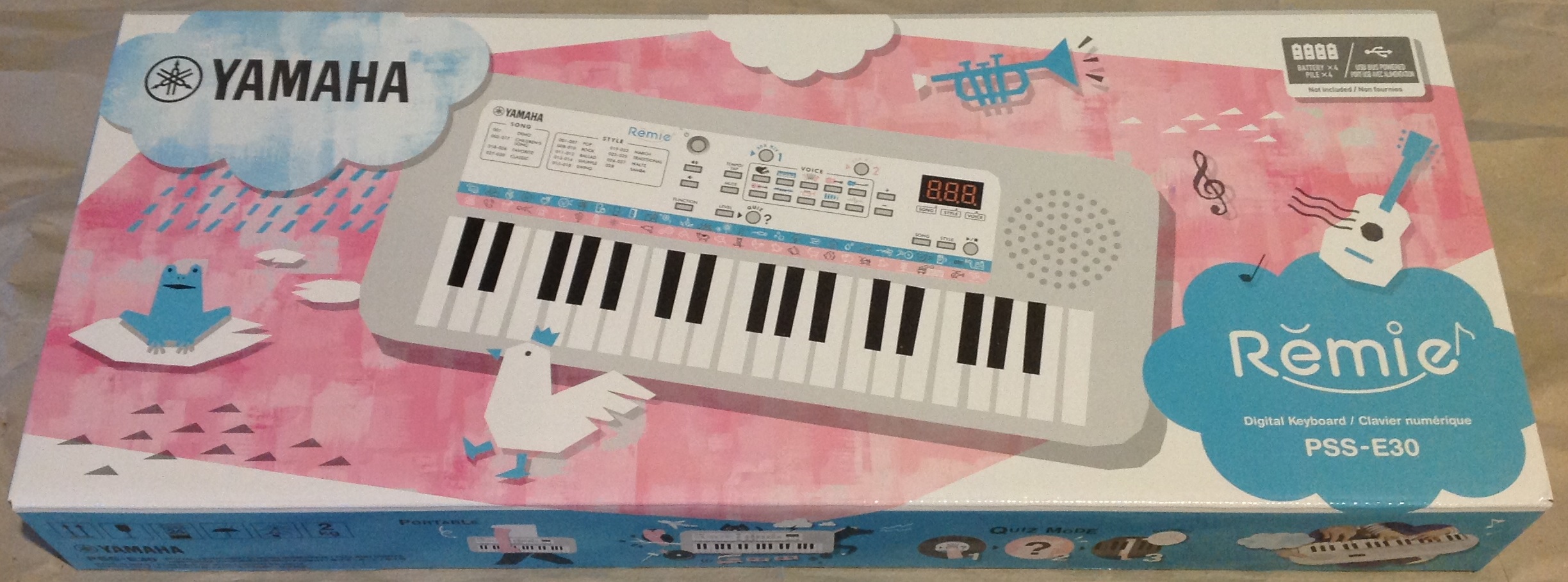
Review: Yamaha PSS-E30 Remie

One of the big benefits of moving out west is time with our grandson. The lad went to Kindermusik as a pre-toddler and already has a good sense of rhythm and an appreciation for music. I dropped a few quick beats with the MODX and he started dancing with a big smile on his face! Editorial: Folks, arts are an essential part of a child’s education.

Last Fall, Yamaha announced a trio of mini-sized PSS keyboards: PSS-E30 (Remie), PSS-F30, PSS-A50. The three products have distinct product markets: young kids, older kids, teens and young adults, respectively. Of course, those are mere marketing constructs since one or more of these ‘boards might appeal to jaded musicians and other folks, too.

Yamaha PSS-E30 Remie

There is another market segment which, perhaps, Yamaha did not explicitly intend — modders, AKA “hacks”. This article will focus on Remie (PSS-E30) as an instrument. I’ve already taken a screwdriver to Remie and will eventually post an article about Remie internals and other topics of interest to hacks.

“Keen On Keys” posted a nicely produced PSS-A50 demo on YouTube. The A50 appeals to musicians who want to put together simple tracks from arpeggios (musical phrases). Looks like fun! The A50 is the only member of the family which can record songs and, most importantly, the only member which sends/receives MIDI over USB. Neither Remie nor the PSS-F30 have a USB interface although they use a micro-B connector for power.

The PSS-F30 is the “Honey I Shrunk the PSR-F50” arranger keyboard. The F30 essentially has the same sounds, styles and songs as the F50/F51. The F30 could be the mini-keyboard for arranger enthusiasts on the go. That said, after taking a peak inside the A50 (see the YouTube demo) and the Remie, the program and waveform memory is quite small and the sound is not up to the same quality level of the current E-series arranger keyboards. Something had to be sacrificed to achieve such a small size, low cost and longer battery life (1.5 Watts versus 6 Watts). YMMV.

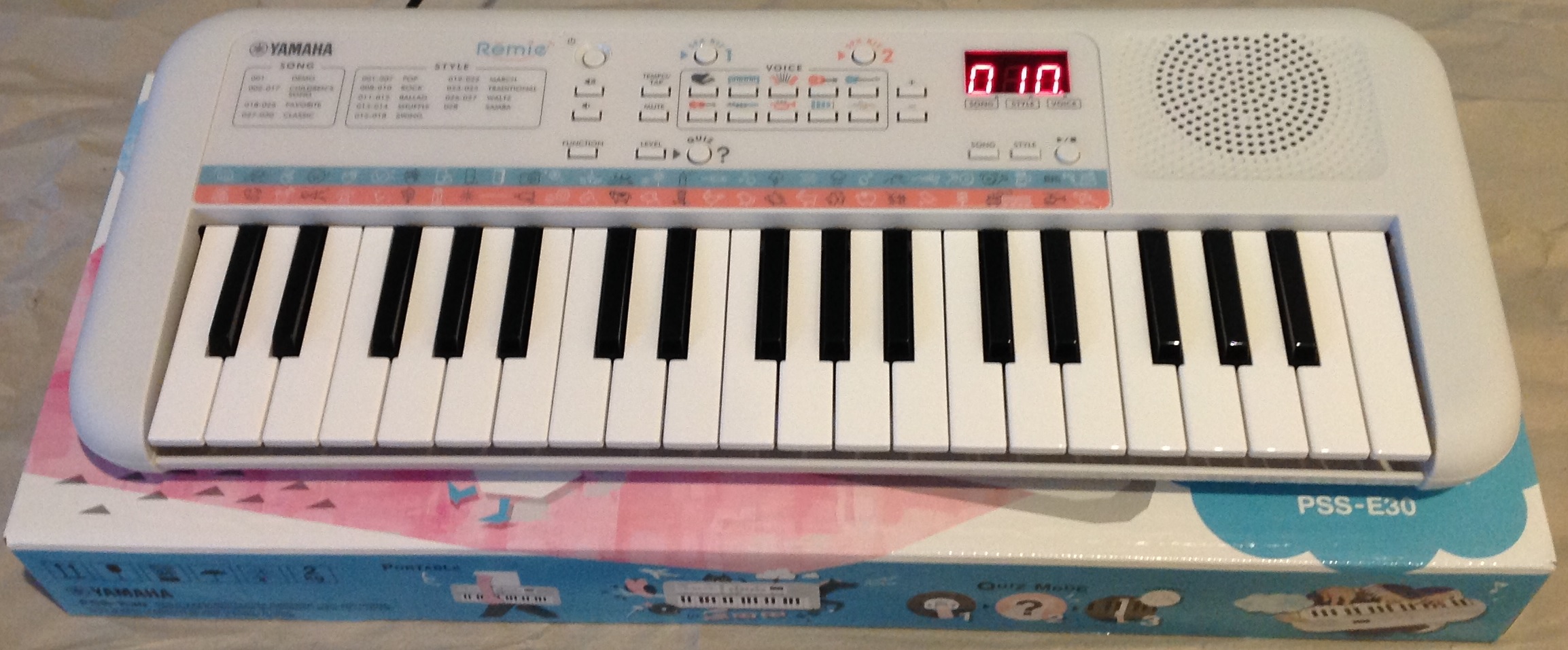
Yamaha PSS-E30 Remie

Circling back to Remie… I had to have one, er, buy one for our grandson. Naturally, I needed to check out Remie to make sure that it works on Christmas morning. 🙂 Oh, that includes a peak inside to make sure everything is in its place.

I wish that I could review Remie from a two year-old’s point of view. That review will wait for Christmas day. In the meantime, here’s my take from a musician’s perspective.

The keybed

Remie has 37 mini keys. To my touch, they are indeed the same as the Yamaha Reface series keyboards. I play the Yamaha Reface YC (drawbar and combo organs) at weekly choir rehearsal. I must say, Remie’s keybed feels better than the YC! Maybe I have worn in the YC’s keys or maybe manufacturing quality is better now. Bottom-line, the mini-keys are pretty darned good.

I think the keybed will hold up when kids go to work on it. Our grandson has watched older kids play piano, and he presses keys instead of whacking on them like most kids. [I trust him enough that we play side-by-side on MODX and Genos.] I haven’t been very gentle with the Reface YC and yet, the keys hold up. Parents shouldn’t worry about key quality. The mini-size should be good for kids, too; most adults find these mini-keys cramped.

I have one main complaint with 37 keys: the note range is sometimes too small for some songs. I wish the keybed was 49 keys with middle C in its rightful place. I like to play the left hand part in the two octaves below middle C. With 37 keys, that leaves only one octave above middle C for the melody and I often run out of keys in the right hand.

Remie is no different. Further, Remie does not have octave shift buttons which would alleviate the short range issue somewhat.

Sound

As I mentioned above, voice quality is comparable to early Yamaha portable keyboards, back in the day when waveform (sound) memory was tight. I’m sure Remie is using recycled sounds; that’s why it’s inexpensive.

The voices do not respond to touch. Thus, when you play the keys soft or hard, you get the same volume and timbre. One can make the overall volume louder and softer using front panel buttons. That’s it for dynamics.

So far, I’ve tested Remie through its built-in speaker, headphones (3.5mm stereo) jack and studio monitors. Of course, an 8cm speaker is not going to produce earth-shaking bass. It is adequate for the family room and reproduces the built-in voices surprisingly well. I think Yamaha learned a lesson with Reface and its disappointing built-in stereo speakers. As a result, I always play the YC through JBL Charge 2 speakers, not the YC’s built-in speakers. Unlike Reface, I could actually see myself using Remie’s speaker. BTW, the sound does not distort when pushed to the MAX.

Plugging into the headphone jack turns off the internal speaker. As expected, sound quality improves dramatically through decent headphones or external speakers. Parents should be careful when kids use headphones. Remie can drive headphones painfully loud. Fortunately, there is a “Volume Limit” function that sets the maximum Master Volume level. Parents should definitely set the “Volume Limit” before letting kids use headphones.

Sound quality through studio monitors is quite good! The sound is clear and is comparable to other entry- and mid-range arranger keyboards.

Overall, I’m tempted to take Remie to rehearsal to see if either the F30 or A50 might make a good ultra-portable rehearsal keyboard. I wouldn’t consider playing one of these keyboards in front of a congregation (audience), however. No such quality qualms about the YC which carried me through a few gigs during the move.

Styles and songs

The styles and songs are what we expect from a low-end Yamaha keyboard. The styles are pleasant enough. However, this isn’t a $5,000 Genos. 🙂 The styles do not have A and B sections or auto-fill. I wouldn’t expect kids to be arranging songs unless they are Mozart reincarnated.

The only concerns that I have in this area are operational. Can a young kid figure out how to play a song? Can a youngster play along with a style? I think adult supervision is needed here. I recommend that adults read the manual since operation is not intuitive, especially if you don’t have experience with Yamaha arranger keyboards.

The sound effects (SFX) shouldn’t be too hard to figure out. There are two dedicated front panel buttons to select either the blue kit or the pink kit. Kids shouldn’t have trouble with that.

Remie has a number of deep features controlled by the “FUNCTION” button. This is definitely beyond young kids. Parents should read the manual for more information. Functions include tuning, transpose, metronome, etc.

Yamaha arrangers usually apply effects like reverberation, chorusing, (guitar) distortion and so forth. Musos often complain about too much reverb. I’m happy to report that Yamaha has set the reverb to a pleasant level — a good thing because there isn’t any way to change the amount of reverb. Reverberation appears to be the only effect on Remie.

Musical scales and smart chords

Remie has a Smart Chord feature which is enabled right out of the box. Smart Chord is designed to keep chords within a chosen musical scale, i.e., the C scale AKA “all of the white keys.” Smart Chord lets a kid play one note chords.

If you’re a musician, however, the result may surprise you. Playing a I-IV-V (C-F-G in the C scale) progression sounds right, but hit that VII (B) and uh-oh. The VII chord plays Bm-flat5, the diminished chord. Play with Remie and you may raise a kid with an ear for “interesting” harmonies. Hope you like dissonance. 🙂

BTW, one of the functions sets the Smart Chord key in case you want to play with Smart Chords in some other key than C.

Summary

Well, Remie is a pretty good — although basic — keyboard instrument. It will be interesting to see what young, two year-old hands will do! It’s well-made and is a worthy impulse purchase.

If Remie isn’t what you’re looking for, maybe take a look at my review of the Yamaha PSS-A50? You might also want to take a peek inside of Remie, too.

Copyright © 2019 Paul J. Drongowski
Yamaha Genos V2.0 Update

The Yamaha Genosâ„¢ V2.0 update is available for download from your regional Yamaha musical instrument site.

Reading through the list of changes, the Yamaha engineers have changed many of the internal data structures and file formats in order to support new features. Thus, like the MODX update, you will need to save your user data before you install the update. Pay careful attention to these cautionary statements from Yamaha:

“After you’ve updated the firmware to this version, the System, MIDI, User Effect, and Registration data are initialized the first time you start up again.

  • Save the MIDI Setup File and User Effect Setup file before updating, and load after updating.
  • Save Registrations to a file before updating.
  • Even if you save the System Setup file before updating, it cannot be loaded after updating.
  • If you save the Backup data before updating and restore it after updating, the System, MIDI, User Effect and Registration data will not be restored.

Before executing the update, we recommend that you back up important data to an external drive using the backup function or data copy function, in case some trouble occurs.”

The list of changes and fixes is quite long and extensive. This is clearly a major update, if not an upgrade!

I keep everything backed up as I work. I put a lot of time and effort into voice and style programming, and just cannot bear the thought of doing it all over again. I honestly don’t mind making another back-up just in case.

While you’re at the download page, be sure to snag new copies of the Genos Owner’s Manual, Genos Reference Manual and Genos Data List. Also, grab the new version of Yamaha Expansion Manager (YEM) V2.6.0. You must use YEM V2.6.0 with Genos V2.0 firmware. Under the “Other Downloads” section, you’ll find a bonus playlist and documentation for the Genos V2.0 Superior Pack: Bonus Playlist for Genos V2.0 Superior Pack and GENOS V2.0 SUPERIOR PACK List.

A quick glance at the V2.0 Superior Pack List reveals the new EDM and bass voices from the PSR-SX900, the (expected) Super Articulation 2 (SA2) female voices, SA2 soft trombone, SA2 panflute, and a raft of “Alpen” voices. There are six new Mega Voices which signal new samples, too: Klarinette Mega, Trompete Mega, BariHorn Mega, Kontra Tuba Mega, Bass Tuba Mega and OberGtr Mega.

At the time that I’m writing this post (10AM PST), Yamaha have not updated the Genos pages to promote the V2.0 update. The European pages have info about V2.0 including a link to the V2.0 Superior Pack. If you can wait (!), here is a direct link to the V2.0 Superior Pack.

This is a lot to install and mentally unpack. Thank you, Yamaha!

Backed up, installed and running

It took a short while to fully understand Yamaha’s cautionary note. I decided to make a complete back-up file even though the System, MIDI and User Effect set-ups inside would not be reloaded by Genos V2.0. To fill the gap, I saved the MIDI Set-up and User Effect Set-up to files on a USB flash drive. Just to be ultra-safe, I copied my Registrations from the Genos internal USER area to the USB flash drive. I have a lot of time and effort invested in my Registrations and did not want to lose any recent edits. [I keep successive back-ups, so I can roll back to a previous, known-good state, if necessary.]

The System Settings are more of a problem. Genos V1.4 has a way to save the System Settings to a file, but V2.0 will not load pre-V2.0 save files. I followed Yamaha’s advice and studied the Parameter Chart in the Genos Data List PDF. The data stored with a System Set-up are clearly identified. I wrote down a short list of the parameters which I most likely had changed:

  • Compressor
  • EQ
  • Score, Text, etc.
  • Arpeggio
  • Registration Sequence
  • Metronome
  • Live Control
  • Assignable (Home shortcuts, Foot pedal, assignable buttons)

Your list might be different, so I recommend scanning the System Set-up column in the Parameter Chart. I wrote down the current settings in a text file using a personal computer.

After all of this prep, I was ready for the actual installation. I started with a blank USB flash drive and copied the Genos V2.0 update file (GENOSSETUP.PRG) to the USB drive. I plugged the USB drive into the rear HOST TO DEVICE port, held down the Style Control [START/STOP] button, and powered up. Genos found the update file and kicked into the installation process. Several minutes later, the installer said it was OK to power down and I did so.

On power up the first time, I saw a message like “Improper shutdown. Back up data … have been lost.” Gulp! That’s the Genos start-up code checking the consistency of the set-up data. As we were warned by Yamaha, the set-up data was initialized by the installer. After that, load the saved set-up files from the USB flash drive and ran through the System Settings, and started playing. Oddly, my assignable buttons were preserved, but I wouldn’t count on that happening to you. Back up before installing!

All appears to be good. I have music to rehearse, etc., and will eventually post about the Genos V2.0 Superior Pack, the Chord Looper and other new Genos features. I also need to install YEM V2.6.0, a prerequisite for the Superior Pack. Busy, busy.

Don’t forget auto power shutdown. I just heard Genos turn itself off…

Copyright © 2019 Paul J. Drongowski
Yamaha MODX: Inside stuff

Time for a quick look at the MODX internal hardware. I’m going to be brief, so please read my Yamaha Genos articles (main CPU and tone generation) and my Montage internals article for more details and background information.

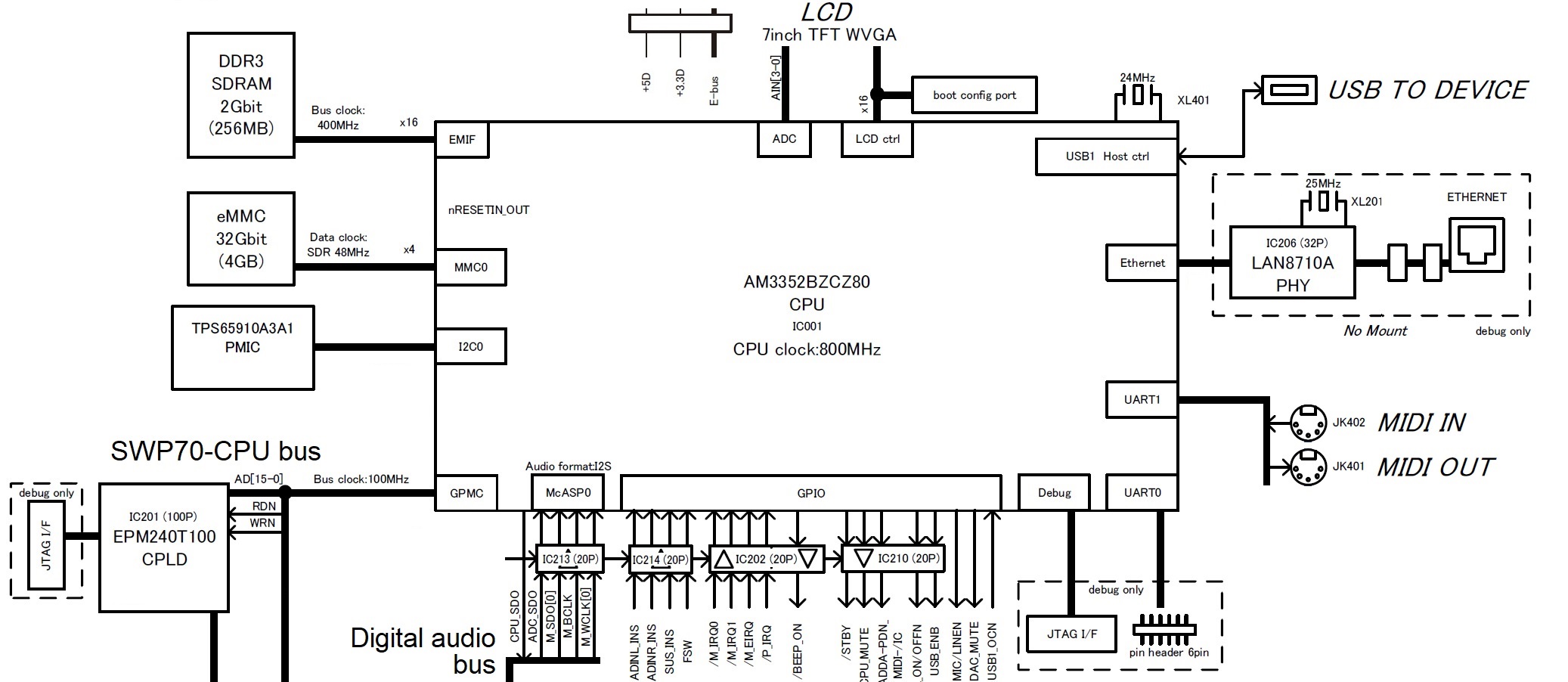
The MODX main CPU subsystem should look familiar. It is essentially the same as the Montage main CPU subsystem. Again, the Texas Instruments AM3352 Sitara ARM microprocessor is the star, providing many of the important internal device interfaces. The eMMC bulk storage device is still 4GBytes although the MODX eMMC data clock is slightly slower than Montage (48MHz instead of 52MHz). Deja vu all over again.

MODX Main CPU (Click to enlarge)

The MODX is a reduced-spec Montage. Although the MODX has the same waveforms and Performances as Montage, its polyphony is less:

  • AWM2: 128 (maximum; stereo/mono waveforms)
  • FM-X: 64 (maximum)

The keybed is lower quality (semi-weighted vs. FSX) and the MODX front panel is greatly simplified.

Both products employ an MB9AF141NA ARM microcontroller for user interface scanning assisted by an 89FM42AUG logic device (E-GKS) for keybed scanning. User input (e.g., controller messages) are sent to the Master SWP70 tone generator over the EBUS. The EBUS is a low-latency path for controller input and commands, making for a responsive instrument with excellent hand-to-sound connection.

MODX Tone Generation (Click to enlarge)

When we look at the MODX tone generation subsystem, we immediately see why the FM-X spec is lower. The MODX has only one SWP70 tone generator integrated circuit (IC). The Master SWP70 performs both AWM2 and FM-X synthesis. The MODX printed circuit board (PCB) has space and connections for a second SWP70 (in Slave mode), but the real estate is unpopulated (“No Mount”). Yamaha have planned ahead for a future model. They did the same thing with the MOX, BTW, leaving space and connections that were filled in the MOXF.

The extra computational capacity within a single SWP70 is surprising! The Master SWP70 provides 128 channels of AWM2 polyphony and 64 channels of FM-X polyphony. In order to pull off this trick, Yamaha utilize a second dedicated DSP RAM channel and SDRAM. Montage, on the other hand, utilizes only one DSP RAM channel on each SWP70.

Thus, the SWP70 can expand in two different dimensions:

  • DSP RAM (two dedicated channels max) with a corresponding boost in DSP computation, and
  • Wave RAM (two dedicated channels max) with an as-yet unexploited boost in AWM2 synthesis.

MODX illustrates the first case while Montage has an unpopulated position and connections for a second WAVE working memory channel. Your guess is as good as mine as to how Yamaha will expand and exploit these channels in future products.

The MODX serial digital audio bus is a subset of Montage. An SSP2 processor supports audio-over-USB through the USB TO HOST interface, just like Montage. However, the overall spec is substantially reduced. A single DAC drives the MAIN and PHONE outputs. A single ADC encodes incoming stereo audio from the A/D input. The SSP2 does not have a direct channel to an SSP2; the needed logic device is missing from MODX.

In case you’re wondering about serial audio bus clocking, the bus clock is 11.2896MHz. The clock speed is 256 * Fs, where Fs is 44.1kHz. In MODX and Montage engineering-land, this signal is known as M_SYSCLK. Genos engineers refer to this signal as mcasp-256fs. The different terminology doesn’t help comparison across product lines! Bottom line, the master clock is fast enough to support 32-bit 44.1kHz stereo audio. Currently, only the Genos has a 32-bit DAC for its MAIN out, BTW.

Our look inside MODX shows how Yamaha can manufacture the MODX at a lower price point. More significantly, perhaps, is the cost leverage gained by reusing the Montage software and sound content. I think sometimes arguments on the Web play up component cost while neglecting manufacturing, software and sound development costs. I suspect that software and sound development (waveforms, voices, arpeggios, styles, etc.) are a very large fraction of unit cost.

We also caught a glimpse of what’s in store for the future. SWP70 is in early childhood and Yamaha have left room to grow in both the MODX and Montage. In addition to unpopulated PCB sites, Yamaha can build out by using higher capacity NAND flash devices for waveform memory. I’ve said it before — the real limiting factor is Yamaha’s capacity to produce high-quality content — a labor intensive job. Ultimately, the payroll is more important than the cost of commodity NAND flash!

Montage digital audio clocking

I’m still thinking this through…

The Montage USB audio interface supports 44.1kHz, 48kHz and 96kHz sampling frequencies. The number of supported audio channels depends upon the chosen sampling frequency as defined in the specs:

“[Sampling Frequency = 44.1kHz] Input: 6 channels (3 stereo channels), Output: 32 channels (16 stereo channels)

[Sampling Frequency = 44.1kHz – 96kHz] Input: 6 channels (3 stereo channels), Output: 8 channels (4 stereo channels) “

The MODX USB audio interface is strictly 44.1kHz supporting:

“Input: 4 channels (2 stereo channels), Output: 10 channels (5 stereo channels)”

The digital audio bus master clock is a multiple of 44.1kHz, so how does Montage handle 48kHz and 96kHz?

The Montage SSP2 processor handles 44.1kHz, 48kHz, and 96kHz internally. The tone generators, however, are 44.1kHz only. A-ha! That explains the function of Montage’s SRC16 gate array. The gate array is clocked at 49.152MHz, which is a multiple of 48kHz. It converts the sample rates and samples between 48/96kHz and 44.1kHz in DAC-A format (2 channels per line).

The schematic notations on SRC16 match the Montage 48/96kHz spec:

Output: SWP->SRC->SSP2 8 channels (stereo 4 channels)
Input: :SSP2->SRC->SWP 6 channels (stereo 3 channels)

Someday I will explore the Montage/MODX subsystems in more depth.

Copyright © 2019 Paul J. Drongowski
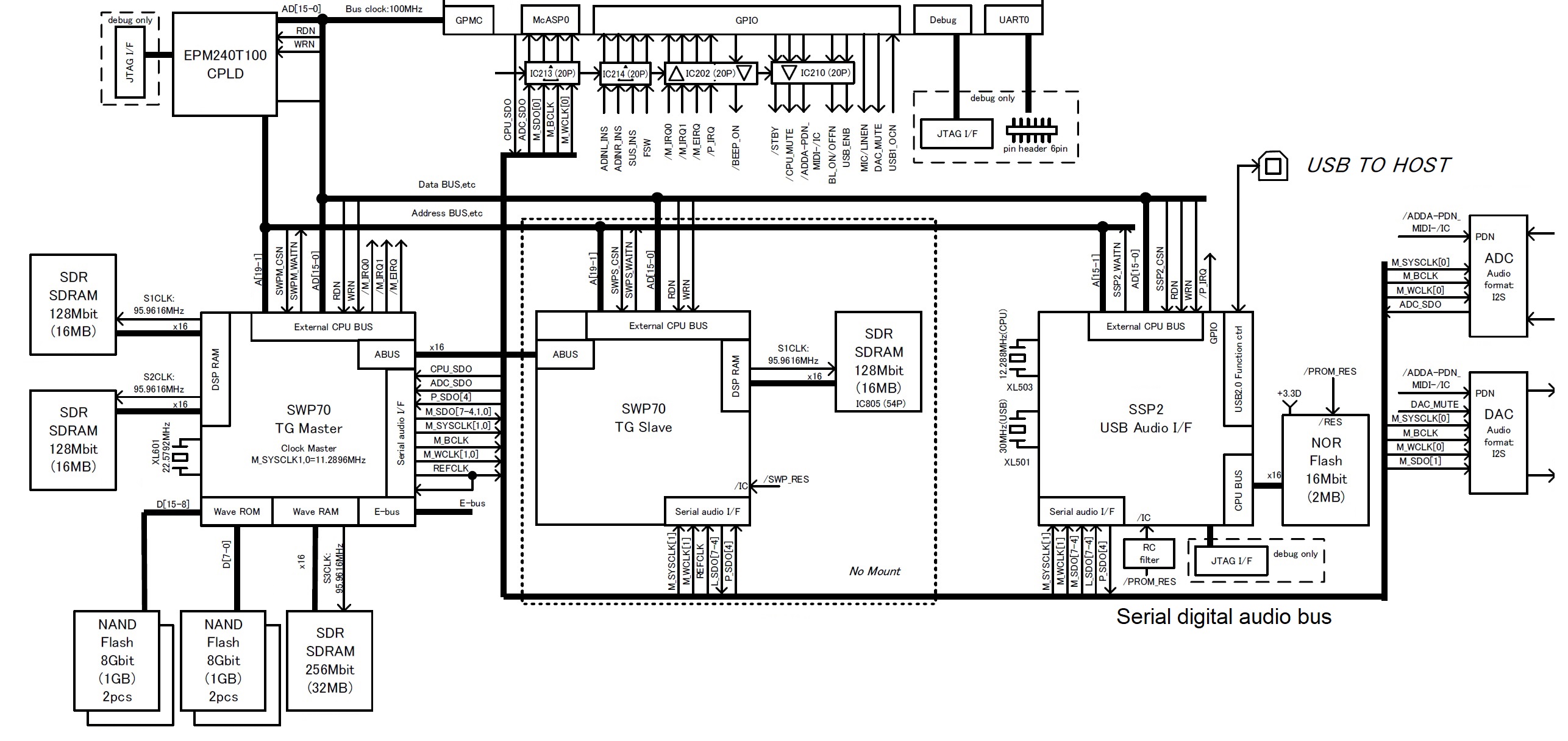
Diagrams are from the MODX Service Manual (copyright Yamaha) .

Just like starting over

I’m playing with a new group of liturgical musicians and am having great fun.

The two biggest challenges when playing with a new group are 1. listening and 2. picking up new music. Both challenges are opportunities for growth.

Listening is always key. As a synth player, I’m a bit of a frustrated orchestrator. Instruments like the Yamaha MODX and Genos offer a wide palette of acoustic and electronic sounds. The challenge is to listen carefully and find the right sound and part in the musical context. The context, of course, is the song and the other players — what the song needs, the instrumentation, what instrumentalists are playing, what singers are singing, dynamics and so forth. My goal is to select an instrument and improvise a part to complement the other instrumentalists while making the song stronger.

My last group was small: piano, acoustic guitar, sometimes drum, and me. That left a lot of musical space including exposed solos, fills, left-hand bass (as long as it didn’t interfere with the pianist) and foundation (e.g., pads, B-3 organ, etc.)

The new group is much larger: piano, guitar, drums, two flutes, viola, trumpet and trombone. There’s a lot going on! I’ve played with woodwinds and strings before; full-on brass is a new situation for me. There is still space, but careful listening is needed in order to find it. Obvious ideas include double reeds (oboe), French horn, woodwind ensemble, ensemble strings, cello, contrabass, pipe organ and B-3 organ (when the music calls for it).

With all of that going on already, it’s important to be part of the blend and to not overemphasize existing parts. Nor do I want to step on anyone’s part! For example, the flutists and viola contribute introductions and musical interludes such as an instrumental verse of a hymn. It’s going to take listening, time and experience to find the find complementary part(s). Conventional wisdom in scoring claims that acoustic instruments make it easier to fool the ear with electronic emulations. Thus, it makes sense to keep the real-deal acoustic instruments front and center.

Last Sunday, we did a rendition of “When the Saints Go Marching In” in remembrance of All Souls Day. Playing with the brass was a genuine kick. Challenge #2 — new music — I’ve never played New Orleans-style traditional jazz before. Although there are a lot of blue notes, the phrasing is unlike the gospel or Chicago-style blues that I’m used to playing.

So, hey, what to play? Clarinet and euphonium. New Orleans jazz is “lead and fill” or “call and response.” I downloaded a MIDI file to study and cop a few clarinet licks. I wrote out a simple clarinet part with a few fills and lines to harmonize what I thought the brass would play, assuming that the trumpet would take the lead. Euphonium-wise, an oom-pah alternating root (1 and 3) and fifth (2 and 3) was good enough to get started.

Try as I might, I just couldn’t get the two parts and hands going at the same time and settled for the clarinet line alone at the gig. Maybe next time… I think I may ditch the harmonization idea and play (around) the melody, too.

Patch-wise, you can’t always get what you want. I practiced the clarinet part on Genos using its Super Articulation 2 (SA2) clarinet which is darned sweet. I programmed a clarinet/eupohonium split on Yamaha MODX, but the MODX clarinet is not in the same league as the SA2. Compared to Genos, it sounds cheap. MODX (Montage) does have a decent euphonium, however, and maybe it’s better to go low than go high next time!

Yamaha, how ’bout a euphonium on Genos and SA2 on MODX?

That won’t stand in the way of the fun. In the meantime, there’s more than enough to keep me busy.

Copyright © 2019 Paul J. Drongowski

Update about the updates

Yamaha Genos V2.0 is on the way

Yamaha have updated their short video about the Genos V2.0 update. The release date is now specific: 15 November 2019. There was considerable squabbling on the forums as to what “Winter 2019” meant. I’m glad that Yamaha has put the question to rest.

The other big tidbit from the new video as to do with the “Genos V2.0 Superior Pack.” The new content will include 50 new styles and 68 voices including Super Articulation 2 voices. I’m not a big style hound, but new voices are always welcome! I’ve still got plenty of room in expansion memory and can’t wait for the new content. I’m looking forward to the Chord Looper, too.

[Update] The Yamaha Europe site has further details. The Genos Version 2.0 Superior Pack includes SArt2 Premium voices such as “Pan Flutes,” “Female Vocals,” and “Trombone.” The page shows thumbnails for the Yamaha Musicsoft Premium Expansion Packs of the same name. This might be a little disappointing to users who already own these packs. I have “Female Vocals” already. Of course, that’s just icing and we still need to taste the whole cake.

Improvements have been made to expansion pack installation (Yamaha Expansion Manager). Yamaha have also improved Genos Style Creator, which was looking rather long in the tooth. Other improvements include new portamento functionality, sorting playlists alphabetically, and an increase in the number of USER effects which can be stored.

Additional improvements flash by near the end of the video. (Look for the flying boxes!) Unfortunately, the English is a little rocky and its hard to tell what some of them actually mean! One useful improvement is the addition of USER voices to FAVORITES. (?) I hope they allow USER styles in chord step record because I didn’t see this mentioned.

Yamaha are listening. They cite user feedback as the source for many of these enhancements.

BTW, some folks have noted an increase in the USA Minimum Advertised Price (MAP). Please remember that all dealers cannot publicly advertise below MAP as part of their dealership agreement with Yamaha. That doesn’t mean selling at MAP because that would be illegal price fixing in the USA. If you want a good deal, be sure to call around, especially smaller focused dealerships like Audioworks CT. The large on-line retailers don’t have as much incentive to negotiate or to offer a better price below MAP. Smaller dealerships are often more flexible.

Yamaha MODX update V2.0 is here

Yay! The MODX V2.0 update has dropped! I’m downloading now and will be installing shortly.

Yamaha have posted a new MODX Supplementary Manual and a new MODX Data List PDF in the downloads section of the MODX Web pages. You’ve probably already seen the list of new features as implemented in the most recent Montage update:

  • New effect types have been added: VCM Midi Filter, VCM Mini Booster, Wave Folder.
  • 52 new Performances have been added.
  • The Pattern Sequencer function has been added.
  • You can now play songs, patterns and audio files from the Live Set display.
  • Super Knob Link has been added to the data that is recorded in the Scene function.
  • Keyboard Control has been added to the data that is recorded in the Scene function.
  • Increased the range of the LFO Speed parameter.
  • You can now connect MIDI equipment via the USB TO DEVICE terminal.
  • The Global Micro Tuning settings have been added.
  • The Audition Loop setting has been added.
  • Improvements have been made to the user interface.
  • The sequencer storage capacity (total User Memory) has been increased from about 130,000 to about 520,000 (for Songs) and about 520,000 (for Patterns).

The new Performances are listed on page 17 of the new Data List PDF (version c0). The new Performances are numbered from 2144 to 2195. Laser Trumpet?

Not going to the gym today… 🙂

Installing the MODX V2.0 update

The first thing to note: This is a major update.

I don’t just mean that as a compliment to Yamaha. The software engineers had to touch many, if not all, of the major internal data structures. You must perform a complete back-up before attempting installation as you will need to initialize all data and then reload your back-up file.

Please read the installation directions before starting. The directions clear state that all of User Memory (Library Data, User Data, etc.) will be initialized. Be sure to do a complete back-up following the directions on pages 60-61 of the Owner’s Manual and pages 201-202 of the Reference Manual. You want to write a back-up file, also known as an “ALL file” or “X8A” file by its extension. A back-up file saves the whole shee-bang including your libraries.

Follow the steps in the installation guide. The installation process takes about 4 to 5 minutes. If everything is successful, you will see messages like:

Searching for the updater ... OK

MODX updater 2.00.1

Preparing ... OK (current version 1.10.0)
Updating ... OK
Verifying ... OK
Finish.
Please turn off.

Turn MODX off, remove the USB drive with the updater, and turn MODX on again. Navigate to the System Settings by pressing [UTILITY] > [Settings] > [System]. I pressed the “Initialize All Settings” screen button first and then pressed the “Initialize All Data” button. (Deep breath.) Yamaha’s installation directions should be a little more specific here as to which buttons to press.

The initialization steps will, of course, wipe everything clean. Next, insert the USB drive with your back-up file. Navigate to the load contents page, i.e., [UTILITY] > [Contents] > [Load] and select the “Backup File” content type. Find your back-up file on the USB drive and re-load your content. If all goes well (modulo power failure, cosmic debris, pulsars, etc.), you should be good to go again.

Copyright © 2019 Paul J. Drongowski (excluding excerpts from Yamaha’s announcements)