Review: Arturia Keylab Essential

Oh, did I fail to mention, I added an Arturia Keylab Essential 49 to my iPad rig. I wanted a super light-weight MIDI controller with knobs, sliders, and a minimum of 49 keys with good action. The Keylab Essential 49 fits the bill at 6.6 pounds (3kg), eight pads, nine encoders and nine faders (sliders). The street price is attractive, too: $229 USD. I had a good experience with the Arturia Keystep 32 and decided to give the Keylab Essential a go.

I use the Keystep mainly for control voltage (CV) and gate with littleBits synth modules. Mini-keys are OK for experiments, but not for real playing. If your Keystep keys get dirty, here’s a guide to Keystep teardown and cleaning.

Why the Keylab Essential after Korg Microkey Air joy? I gave the Air’s mini-keys the old college try and then some. First off, most mini-key instruments are three octaves and too short for two-fisted playing. The Microkey Air 49 has four octaves, making it much easier to play most tunes without finger gymnastics. [If you’re a pianist, we’re not even having this conversation!] Although the Microkey Air has Bluetooth MIDI built-in and is battery-powered — genuine plusses — it doesn’t have knobs/sliders for VST control. And, well, it still has those mini-keys.

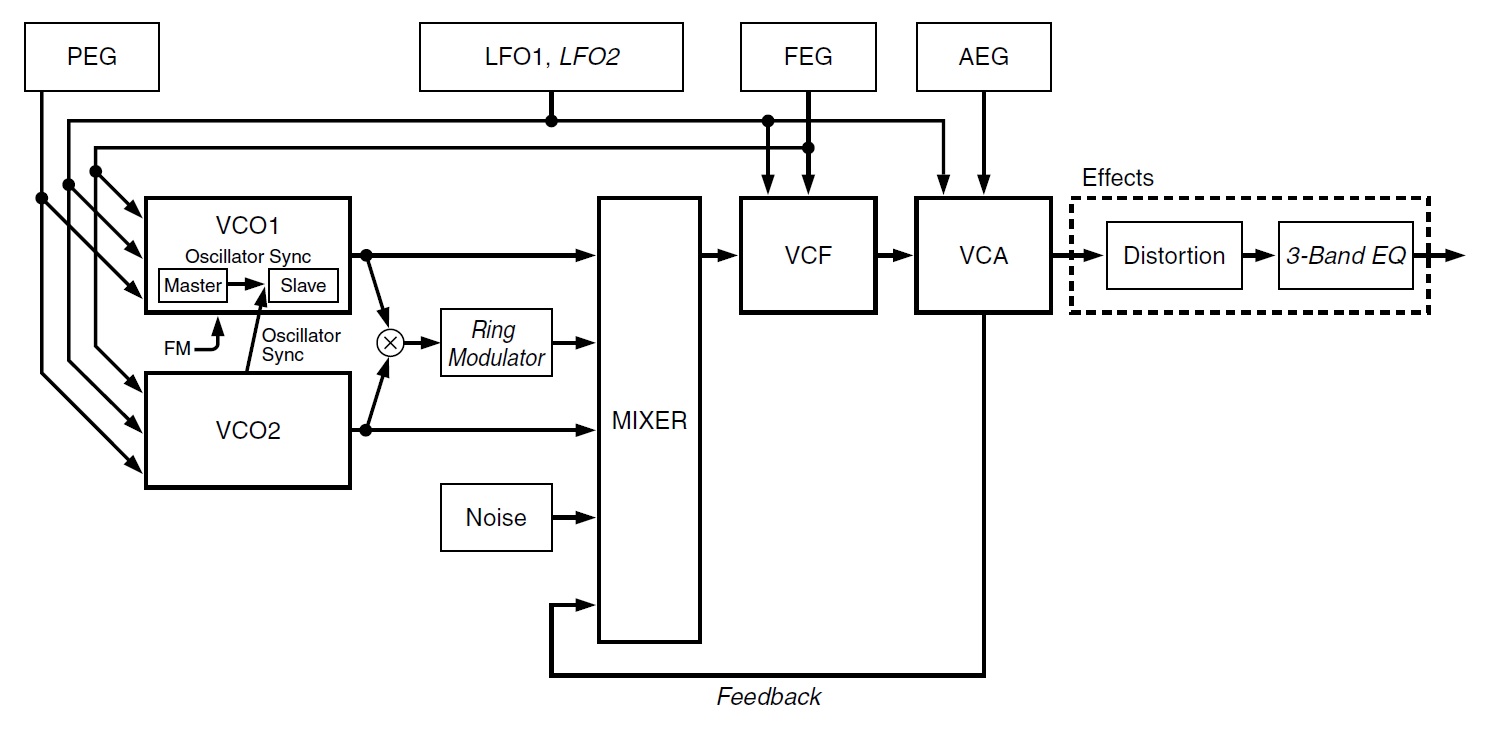
Arturia Keylab Essential 61

The Keylab Essential 49 is only three inches longer than the Microkey Air: 30.9″ versus 27.9″. Sure, the Keylab Essential is twice as deep, but them encoders and 30mm faders have to go somewhere! I will admit, the Keylab Essential is not a “lap board” like the Air; it needs a proper stand and power source.

The Keylab Essential key action is decent enough. Like the Keystep, it feels a bit soft. If you want a fast, crisp action, this isn’t the droid you’re looking for. Even though the Keylab Essentials are Arturia’s budget line, the encoders and faders feel sturdy with a reasonable amount of resistance.

I’m happy with the Keylab Essential and, yes, I’ll be keeping the Microkey Air, too. Here’s my short Keylab Essential wish list:

  • Battery power
  • Bluetooth MIDI
  • Expression input, not simply sustain (on/off)

Then again, the price would be higher and/or the build quality would be lower. No free lunch.

Analog Lab

I’m mainly interested in iPad (IK BX-3) and hardware (YC and Skulpt SE) control, not PC-based VSTs. However, Analog Lab is a fun leisure destination. Analog Lab and its integration with Keylab Essential are simply brilliant. Prepare to waste long hours jamming away with the best sounds of yester-year with lots of knob twisting and fader slamming.

Controlling Yamaha Reface YC

Yamaha Reface YC is one of my keeper keyboards. It’s been a handy companion at rehearsals and even a few church services. You’ve already heard my gripe about three octave mini-keyboards and Reface YC occupies that doghouse. No need to repeat.

Fortunately, Keylab Essential is almost made for Reface YC. [Dreamers, Yamaha has a full-size YC; forget a Reface re-issue.] Keylab Essential has a 5-pin MIDI OUT which links to the Reface YC dongle MIDI IN. Thank heavens for 5-pin MIDI.

Arturia provide their MIDI Control Center (MCC) app for configuration. The Keylab Essential has eight configuration slots: Analog Lab, DAW and six user slots. MCC communicates with Keylab Essential over USB. Fortunately, the 5-pin MIDI OUT operates concurrently with a USB connection back — no either/or.

Obviously, the faders map to the YC drawbars. Fortunately, the Keylab Essential faders have a drawbar mode, flipping low and high values. The Reface YC drawbars are controlled by MIDI continuous controller (CC) messages CC#102 to CC#110. It’s all right there in the Reface Data List PDF available on the Yamaha Web site.

Amazing how many people will ask a forum for such info. Please RTFM.

The rest of the front panel controls — waveform, rotary speed, vibrato/chorus, percussion, and effects — are under MIDI CC control, too. Keylab Essential has three switches (Part 1, Part 2, Live) which are mapped in the following way:

  • Vibrato/chorus select (CC#79)
  • Percussion on/off (CC#77)
  • Percussion harmonic (CC#112)

The switches are configured as toggles, so that the switch LEDs indicate individual switch state.

Rotary speed is interesting because Reface YC has four states: OFF, STOP, SLOW and FAST. By default, Reface YC modulation (CC#0) switches between SLOW and FAST. As an alternative to the wheel, I assigned OFF, STOP, SLOW and FAST to pads 5 through 8. It’s a shame that Keylab Essential doesn’t support radio buttons. If it did, one could make each pad in the group a toggle showing the current rotary speed state.

As I mentioned, Keylab Essential does not have an expression pedal input. Thus, I route a Yamaha FC-7 expression pedal to Reface YC directly. The Keylab Essential sustain input is still useful, however. I attach a sustain pedal and assign the sustain input to rotary speed (CC#19: SLOW and FAST). Momentary switch mode allows quick changes and speed bumps.

It’s worth noting here that rotary speed has four settings:

     CC#19       Value 
---------- -----
0 - OFF 0
1 - STOP 42
2 - SLOW 85
3 - FAST 127

Switching between SLOW and FAST means changing CC#19 between 85 and 127.

Making the rest of the story short, the remaining Reface YC parameters are assigned to the encoders. Waveform, vibrato/chorus depth and percussion length have five discrete settings each, i.e., they do not sweep continuously across 1 to 127. Expect to hear discrete changes (steps). The step values are: 0, 32, 64, 95, 127.

Vibrato/chorus does not have a Reface on/off switch. Vibrato or chorus are OFF when the vibrato/chorus depth is zero.

Here is a table which summarizes the control mappings:

--------------------------------  ---------------------------------------- 
Reface YC Arturia Essential 49
-------------------------------- ----------------------------------------
Rotary speed 19 0-127 Mod wheel, Pad 5-8 OFF, STOP, SLOW, FAST
Wave 80 0-127 Knob 1

16' 102 0-127 Slider 1
5 1/3' 103 0-127 Slider 2
8' 104 0-127 Slider 3
4' 105 0-127 Slider 4
2 2/3' 106 0-127 Slider 5
2' 107 0-127 Slider 6
1 3/5' 108 0-127 Slider 7
1 1/3' 109 0-127 Slider 8
1' 110 0-127 Slider Master

V/C type 79 0-63, 64-127 Switch Part 1
V/C depth 77 0-127 Knob 2
Perc on/off 111 0-63, 64-127 Switch Part 2
Perc harm 112 0-63, 64-127 Switch Part 3
Perc length 113 0-127 Knob 3

Effect Dist 18 0-127 Knob 7
Effect Reverb 91 0-127 Knob 8
Volume 7 0-127 Knob 9

Oh, yeah, don’t forget volume! With the Keylab Essential at hand, you’ll probably have the Reface YC out of reach at the end of its MIDI tether.

I intend to get into good trouble with the Arturia Keylab Essential. Expect future experiments with iPad, IK Multimedia BX-3 and Modal Skulpt SE.

Copyright © 2022 Paul J. Drongowski

New toys: Roland E-X50 and Moog Mavis

While Sud Claviers are teasing the release of a new arranger keyboard, Roland — of all manufacturers — have announced a new entry-level ($400) arranger: the Roland E-X50 arranger keyboard. And a new synth kit from Moog.

Arranger forums are anticipating a new Korg flagship arranger, the Korg Pa5x, on 30 June 2022. Sud Claviers France have taken the lead for European introductions before, as arranger keyboards are more popular in Europe and Asia than North America. Various Korg (and Yamaha!) forums have leaked images and video — a lot of it blurry. Fans are usually good at spotting fakes, but this time it looks to be real.

You’ll pay a high price for the Pa5x jewelry. The Roland E-X50 is for punters having an estimated $400 USD price. (The Pa5x will cost 10x that amount.)

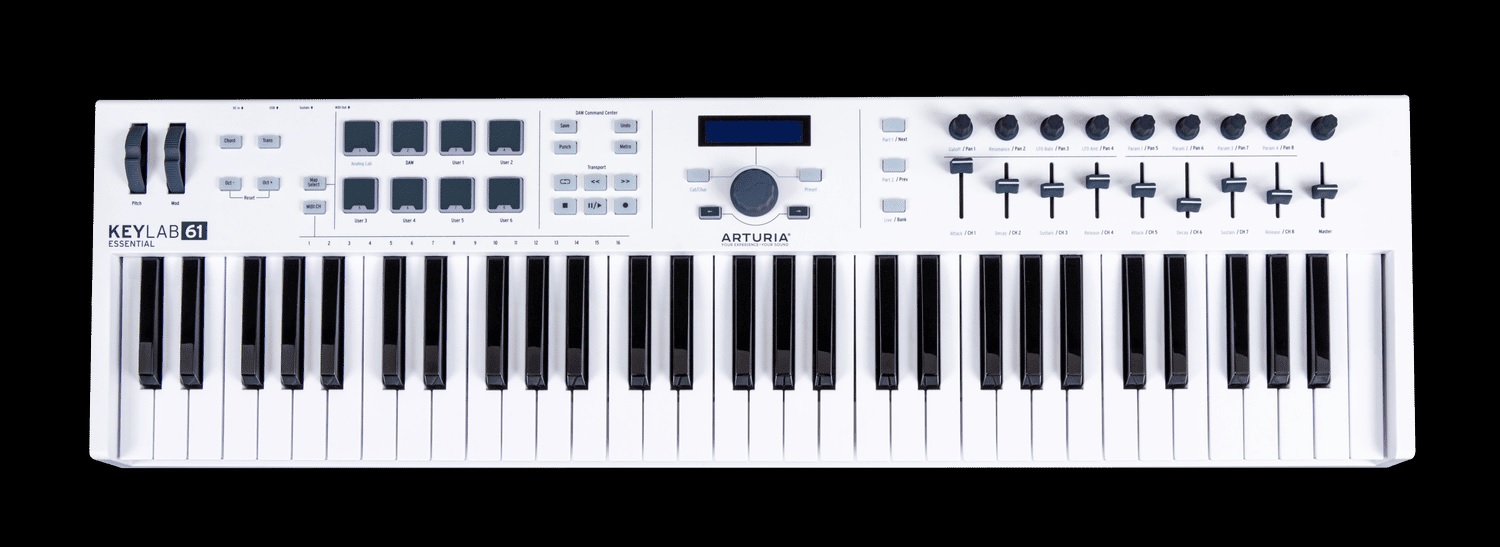
Roland E-X50 arranger keyboard

The E-X50 has a sleek, professional, squarish look to it, weighing 9.6kg (21.3 pounds). The new arranger kits out with 256 polyphony, 433 regular tones plus 256 GM2 tones and a total of 18 drum sets. Effects include equalization, chorus, reverb and delay. The stereo audio system is 10 Watts per side through a 12cm speaker and 3cm tweeter. With a 30 Watt power draw, it’s an AC adaptor; no battery power.

Bluetooth is built-in. The E-X50 has fixed formet LCD display which is typical for entry-level keyboards.

Auto-accompaniment and registration memory are on par with Yamaha, Casio, and Korg. Roland have not broken any new ground, here. The most novel feature is AUDIO PAD playback. The Scale Tune buttons are linked to WAV (or MP3) files on a USB drive. Striking one of the buttons plays back the associated audio file (one shot or loop). Unlike Yamaha arrangers which are notoriously picky about audio file format (16-bit, 44kHz stereo), the E-X50 supports a broad range of bit rates and sampling frequencies. (You’re still stuck with 16-bit samples, tho’.)

The E-X50 is supported by a free E-X Style Converter application (Windows and Macintosh), which converts a MIDI file to a style file compatible with the Roland E-X series.

Bottom line, the E-X50 offers an alternative to similar units from Korg and Yamaha. Every vendor has its own sound and this Roland may float your boat more so than Korg or Yamaha.

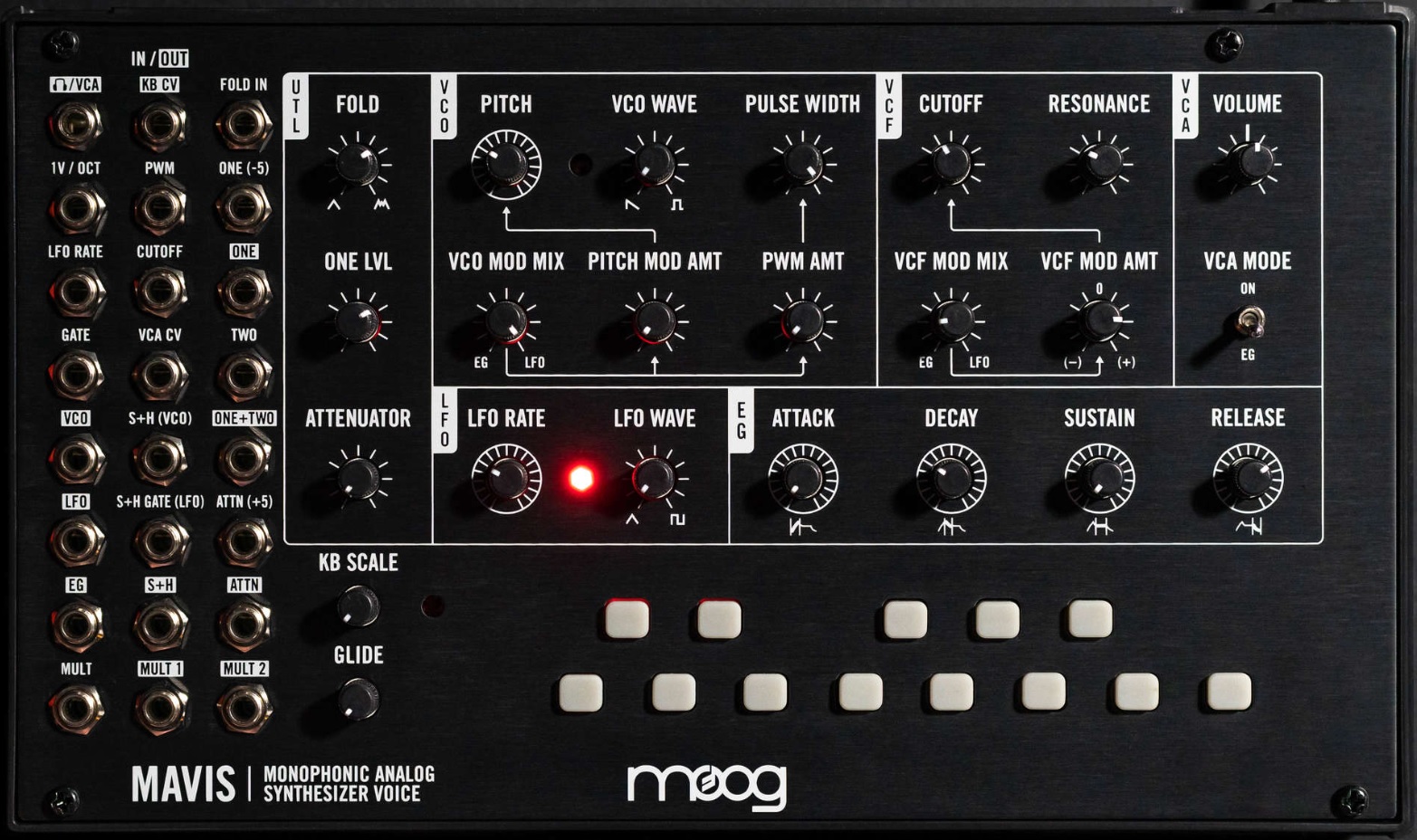
Moog Mavis is a new build-it-yourself monophonic analog synth kit from Moog. I rather like the looks of Mavis right off the top. The front panel screams “Moog”. It has a mess o’patch points (24-point CV controllable) on the left hand side of the front panel. The module is 44HP in case you want to rack it up. The Mavis form factor is compatible with earlier units like the DFAM.

Moog Mavis monophonic analog synth module

Mavis boasts the Moog “legendary oscillator and filter circuits,” adding a diode wave folder. The filter spec is -24 dB Moog Low Pass Ladder filter. Mavis has a built-in courtesy keyboard. Serious folk will be driving Mavis from external, 1 V/oct gear.

“Build-it-yourself” is more like assemble it yourself as the mainboard is fully wave soldered, etc. No soldering required.

Mavis is $349 USD. That seems a little price-y, but you get an entire monophonic synth signal chain. Near as I can tell, Mavis avoids the shortcomings of the Werkstatt-01. I almost bit on a Werkstatt-01 until I realized its interfacing limitations. And guess what? Mavis is already in stock at a few on-line retailers! Nice work, Moog.

Copyright © 2022 Paul J. Drongowski

NAMM 2022: Your guess is as good as mine

Update: If you’re looking for information about the new Yamaha CK61 and CK88, see my specification and snap review articles.

With NAMM 2022 coming up (June 3-5), it’s time for rumors. 🙂

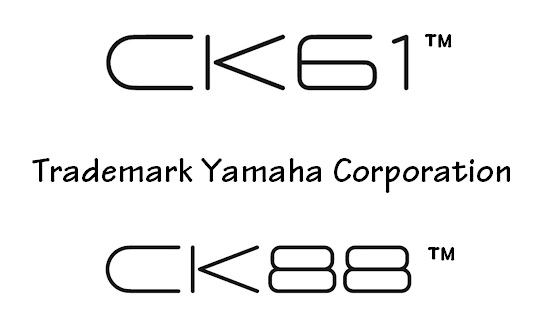
Yamaha filed for two new trademarks in June 2021. The trademarks are words in stylized form. The scope is “Musical instruments, namely, electronic musical keyboards, electronic organs, electronic music synthesizers, cases for musical instruments”.

Trademarks applied for and published soliciting opposition

The main marks are CK61™ and CK88™. The marks:

  • CK SIXTY ONE; CK SIX ONE; CK 61
  • CK EIGHTY EIGHT; CK EIGHT EIGHT; CK 88

are alternative forms.

The marks have been published, soliciting opposition as of 29 March 2022. Seems reasonable that a manufacturer would want the product identifier approved before making a zillion units with the name stamped on.

Let the speculation begin! Clearly, 61-key and 88-key keyboards are involved. Duh! “C” for “control”? Somewhat reminiscent of the old control synth product range? No 76 model?

The font is similar to the Yamaha Reface series marks. I’d love to see a merged all-in-one Reface-like keyboard with full-size keys. The MX series is getting a little long-in-the-tooth, so its replacement might be another possibility? Hope the price is reasonable…

When Reface YC and CP grew up, Yamaha kept the stylized names and font in the names of the YC and CP stage keyboards. Maybe a new stage keyboard in the Yamaha synth product group? A combined FM and virtual analog keyboard that doesn’t overlap the YC and CP models?

Copyright © 2022 Paul J. Drongowski

NAMM 2020: Casio sneak peek

Casio get arty!

Casio’s pre-NAMM 2022 press release mentions a few art projects to be released and shown during NAMM 2022, June 3-5.

Music Tapestry creates pictures from musical performances — a modern day color organ, for you old-timers like me. Music Tapestry is triggered by musical pitches and keyboard touch. Casio Sound Developer Hiroko Okuda — who helped developed Music Tapestry — will demonstrate it at the Casio booth.

Black and white example from U.S. Patent 10,803,844

Casio’s U.S. Patent 10,803,844 (October 2020) discloses a process to visualize musical performance. Hiroko Okuda is one of the inventors.

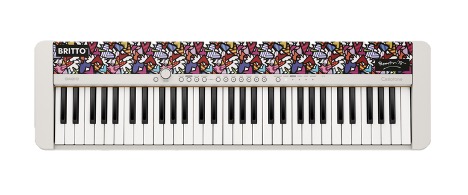
Casio CT-S1 FH limited edition — Britto Flowers & Hearts

If you think the Casio CT-S1 is too plain, try the “Flowers & Hearts” fabric by Brazilian pop artist Romero Britto. Casio will be selling a Limited Edition CT-S1 FH model (limited to 200 units at $500 USD).

Check out more of Britto’s work on-line!

Of course, Casio will be demonstrating their latest products including the Casio CT-S1000V with vocal synthesis. I’ll bet that the CT-S500 will be there, too. 🙂

Copyright © 2022 Paul J. Drongowski

CT-S1000V: Tremolo EP

I spent a little time with the Casio CT-S1000V this morning, trying to dial in a mellow Rhodes EP with tremolo. The Stage E.Piano tone is nice, but has auto pan instead of tremolo. I like tremolo since I usually go MONO into the live sound system.

Studying presets is always informative. The DSP tones, by default, have an Active DSP chain pre-configured. The Active DSP chain for Stage E.Piano is:

Amp Cab          -> Auto Pan         -> Auto Pan 
---------------- ---------------- ----------------
Type: RD-MK2-PRE Rate: 68 Rate: 62
Vari: 1 Depth: 80 Depth: 80
Wet Level: 127 Waveform: Sine Waveform: Sine
Dry Level: 0 Manual: 0 Manual: 0
Bypass: OFF Wet Level: 70 Wet Level: 70
Dry Level: 100 Dry Level: 118
Bypass: OFF Bypass: OFF

Two Auto Pan stages? Well, let’s find this chain in the list of DSP combinations. What the? The default “Tone” DSP chain doesn’t appear in the DSP List!

The Trem 60’s EP has tremolo, so let’s take a look at its default Active DSP chain:

Amp Cab          -> Tremolo          -> Tremolo 
---------------- ---------------- ----------------
Type: WR-200-PRE Rate: 92 Rate: 92
Vari: 3 Depth: 64 Depth: 64
Wet Level: 112 Waveform: Sine Waveform: Sine
Dry Level: 0 Wet Level: 100 Wet Level: 100
Bypass: OFF Dry Level: 100 Dry Level: 100
Bypass: OFF Bypass: OFF

Two Tremolo stages and once again, such a DSP combination is not listed User Guide DSP List!

Well, DSP combi number 33, Drive Amp 2, is close to what we need. Starting with the Stage E.Piano tone, I changed it’s Active DSP programming to:

Drive          -> Tone Control   -> Amp Cab          -> Tremolo 
-------------- -------------- ---------------- ----------------
Type: Crunch3 Low Freq: 400 Type: RD-MK2-PRE Rate: 82
Gain: 70 Low Gain: +3 Vari: 1 Depth: 120
Out Level: 70 Mid Freq: 2.5k Wet Level: 100 Waveform: Sine
Wet Level: 127 Mid Gain: +5 Dry Level: 0 Wet Level: 70
Dry Level: 0 High Freq : 5k Bypass: OFF Dry Level: 60
Bypass: ON High Gain: 0 Bypass: OFF
In Level: 127
Wet Level: 68
Dry Level: 0
Bypass: OFF

The Bypass parameter comes to the rescue. I didn’t like any of the Clean drive types, so I disabled (bypassed) the drive stage.

The Tone Control boosts the MIDs adding warmth. The Amp Cab model is a Rhodes Mk2 preamp — the same model in the stock Stage E.Piano tone. These Tremolo settings just sound right to me. Of course, you’re welcome to play with any of these settings.

I uploaded updated registration banks, including the Stage E.Piano tremolo. Please see the CT-S free registrations page for a link to the ZIP file.

Have fun!

Copyright © 2022 Paul J. Drongowski

Casio CT-S1000V: Free registration banks

I hope today’s post will help liturgical musicians who want to play the Casio CT-S1000V and CT-S500 at church services. I invested a fair amount of effort building patches and registrations which fit contemporary and traditional church music. The sounds would also be compatible with soft pop and gospel-tinged genres, too.

I’ve gig-tested there sounds, having played them at services. So, if you would like to try them yourself, please download the ZIP file. The ZIP contains six CT-S registration files:

  1. RegBank01.RBK: Woodwinds
  2. RegBank02.RBK: Strings
  3. RegBank03.RBK: Horns / Brass
  4. RegBank04.RBK: Drawbar organs
  5. RegBank05.RBK: Pipe organs
  6. RegBank06.RBK: Miscellaneous

The sixth bank is a work in progress. The first five banks cover most of my needs, but there are always a few miscellaneous sounds that pop up.

Each CT-S1000V and CT-S500 registration has four slots (patches). The following table summarizes the registration and patch layout.

       1              2              3              4 
-------------- -------------- -------------- --------------
Bank 1 Horn+Wood Flute+Cla Wood Sect ChamberWinds
Bank 2 MellowStrings StereoStrings SoloViolin ChamberStrings
Bank 3 FrenchHorns NobleHorns HighSchool Tp + Tb
Bank 4 MellowGospel SoftGospel BrightChurch Simmering
Bank 5 Pipe Organ 3 Chapel Organ Organ Flute Bandoneon
Bank 6 SoftPad VoiceEnsemble StageE.Piano StageE.Piano Trem

I usually pre-select a bank and patch before each musical piece. Then I switch to a different patch within the same bank in order to add a different color. I wish it was a little easier to change registration bank on the fly. Maybe I’ll get better with practice.

Patch details

The CT-S patches are based on combinations which I used on old Roland JV- and XV- series gear. The following tables show the CT-S tones in each patch and the level for each tone. You’re welcome to tweak the levels using the BALANCE menu.

Woodwinds      Upper1            Upper2             Lower           
---------------- ----------------- ----------------
Horn+Wood English Horn 100 Fr.Horn Sect 110 Mellow Str.2 127
Flute+Cla Flute 1 100 VeloClarinet 100 Mellow Str.2 127
Wood Sect Flute & Oboe 100 VeloClarinet 100 Mellow Str.2 127
ChamberWinds Flute & Oboe 95 VeloSopranoSax 85 Mellow Str.2 127

Strings Upper1 Upper2 Lower
---------------- ----------------- ----------------
MellowStrings SlowStreoStr 100 Warm Pad 120
StereoStrings SlowStreoStr 120
SoloViolin Slow Violin 75 Mellow Str.2 90
ChamberStrings Chamber 100

Brass Upper1 Upper2 Lower
---------------- ----------------- ----------------
FrenchHorns French Horn 100 Fr.Horn Sect 80
NobleHorns Fr.Horn Sect 100 Flugelhorn 80
HighSchool Clarinet 100 Glockenspiel 80 French Horn 80
Tp + Tb Flugelhorn 100 Trombone 80 Tuba 80

B-3 Organ Upper1 Upper2 Lower
---------------- ----------------- ----------------
MellowGospel GospelOrgan2 127 Organ Bass 100
SoftGospel Rock Organ 2 127 Organ Bass 110
BrightChurch Elec.Organ 1 100 Organ Bass 127
Simmering Elec.Organ 6 110 Organ Bass 127

Pipe Organ Upper1 Upper2 Lower
---------------- ----------------- ----------------
Pipe Organ 3 Pipe Organ 3 100
Chapel Organ Chapel Organ 100
Organ Flute Organ Flute 120
Bandoneon Bandoneon 120

Pads Upper1 Upper2 Lower
---------------- ----------------- ----------------
SoftPad Soft Pad 127
VoiceEnsemble VoiceEnsembl 120

I dialed down the reverb in all cases and settled on the ROOM2 reverb type. These patches are intended for live playing in a reverberant church hall, so additional reverb is unnecessary. You might find the pipe organ patches to be waaay dry when compared with the factory tones. I removed the initial reflections and delay which create the impression of a large space — totally unwanted in a live church.

I added 3-band EQ (ACTIVE DSP) to the woodwind patches to add warmth and to reduce harshness. Feel free to tweak away!

For string patches, Knob 1 and 2 are assigned to attack time and release time, respectively. I had to decrease the release time to reduce a simulated reverb tail. Knob 3 is usually modulation.

For drawbar organ patches, Knob 1 is rotary speaker speed, Knob 2 is scanner vibrato/chorus and Knob 3 is rotary speaker brake. Drive Rotary (ACTIVE DSP) is enabled with ACTIVE DSP HOLD. Here are the Drive Rotary DSP parameters:

                                       BrightChurch 
Param MellowGospel SoftGospel Simmering
------- ------------ ---------- ------------
Type 2 2 2
OD Gain 30 42 42
OD Level 30 42 42
Speed SLOW SLOW SLOW
Brake ROTATE ROTATE ROTATE
FallAcel 35 35 20
RiseAcel 40 40 35
SlowRate 45 45 65
FastRate 95 95 100
Vib/Cho OFF OFF OFF
WetLevel 100 110 110
DryLevel 0 0 0
Bypass OFF OFF OFF

I programmed Organ Bass in the left hand because I didn’t care for the sound of the rotary speaker on notes below middle C (or so). Drive Rotary does not have a parameter for the horn/rotor balance — maybe that would help.

I hope these patches help you to get started with your own registrations!

Copyright © 2022 Paul J. Drongowski
Casio CT-S1000V: Master EQ

Beware, this post is going to bury you in numbers. 🙂

I’ve been investigating master equalization in the Casio CT-S1000V. The CT-S500 has the same master EQ, so everything discussed here applies to the CT-S500, too.

The CT-S1000V master EQ is a four band, semi-parameteric equalizer. The four bands are: LOW, MID1, MID2, and HIGH. It’s possible to create and store a USER setting. The edit page let’s you set the center frequency and gain for each of the four bands. You cannot set the band quality factor, Q, which determines the bandwidth spread.

The CT-S1000V provides ten master EQ presets with suggestive names. Casio, unfortunately, do not publish the center frequencies and gains for the presets. Listening to each preset, one thinks “Yeah, that’s bright,” or whatever. Details are missing in action, however.

One can assign LOW, MID1, MID2, and HIGH gain levels to a knob. Thanks to the knob edit function, it’s possible to suss out the gain level for each band within a preset. After much button pushing and knob twiddling, here are the gain levels (dB) for each preset:

                LOW  MID1  MID2  HIGH 
--- ---- ---- ----
Standard 0 0 0 0
Loudness +3 +6 +1 +7
Treble + 0 0 +4 +6
Bass + +3 +4 0 0
Mellow -3 0 0 -8
Bright -4 0 +6 +4
Rock +3 +2 -6 +6
Jazz +3 0 +6 0
Dance +3 +4 +2 +8
Classic -2 +6 +2 0

As to the band frequencies, we turn to the published table of master EQ frequencies:

    LOW frequency range      50Hz to 800Hz 
MID1 frequency range 100Hz to 8.0kHz
MID2 frequency range 100Hz to 8.0kHz
HIGH frequency range 2.0kHz to 16.0kHz

That’s enough to get into the right ballpark.

Yamaha XG Multi EQ

Never content, I worked out a table for Yamaha XG Multi EQ. Multi EQ is an optional master EQ in the Yamaha XG effects chain. Multi EQ is fully parameteric and has five bands: LOW, LOW-MID, MID, HIGH-MID, and HIGH. The LOW and HIGH bands support a peak mode, but are usually configured for shelving.

Multi EQ has five presets: Flat, Jazz, Pops, Rock and Concert (AKA “Classic”).

           Flat          Jazz            Pops          Rock          Concert 
------------- ------------- ------------- ------------- -------------
Freq Q dB Freq Q dB Freq Q dB Freq Q dB Freq Q dB
------------- ------------- ------------- ------------- -------------
Low 80Hz 0 50Hz -6 125Hz +4 125Hz +7 80Hz +3
L-mid 500Hz 0.7 0 125Hz 0.3 +2 315Hz 2.0 -4 200Hz 0.7 +4 315Hz 0.7 +4
Mid 1.0kHz 0.7 0 900Hz 0.3 +4 1.0kHz 0.7 +3 1.2kHz 0.5 -4 1.0kHz 0.5 0
H-mid 4.0kHz 0.7 0 3.2kHz 0.5 -4 2.0kHz 2.0 -4 2.2kHz 1.0 +4 6.3kHz 0.7 +2
High 8.0kHz 0 6.3kHz -6 5.0kHz +6 6.3kHz +2 8.0kHz -3

None of the Q’s are high, so the peaks/curves are rather gentle. [I wish there was an easy way to plot the curves for each preset.]

Of course, you can plug these settings into the CT-S1000V and merrily tweak away.

Yamaha Genos Master EQ

The Yamaha Genos™ Master EQ is an eight band, parametric equalizer. The Low and High bands are shelving.

Yamaha Genos provides five presets: Flat, Mellow, Bright, Loudness and Powerful:

           Flat          Mellow         Bright        Loudness       Powerful 
------------- ------------- ------------- ------------- -------------
Freq Q dB Freq Q dB Freq Q dB Freq Q dB Freq Q dB
------------- ------------- ------------- ------------- -------------
Low 80Hz 0 80Hz 0 100Hz 0 100Hz +1 140Hz +3
1 250Hz 0.7 0 250Hz 0.7 0 250Hz 0.7 -1 250Hz 1.2 +1 315Hz 0.5 +2
2 500Hz 0.7 0 500Hz 0.7 0 500Hz 0.7 -1 450Hz 1.0 -2 560Hz 1.5 +2
3 630Hz 0.7 0 800Hz 1.0 +1 800Hz 0.7 -2 630Hz 0.5 -1 800Hz 0.5 +2
4 800Hz 0.7 0 1.8kHz 0.5 -1 1.0kHz 0.7 0 1.0kHz 1.3 0 1.6kHz 1.2 +1
5 1.0kHz 0.7 0 3.6kHz 1.0 -2 1.6kHz 1.7 +2 3.6kHz 1.0 +1 3.6kHz 1.6 +1
6 4.0kHz 0.7 0 6.3kHz 1.3 -2 4.0kHz 0.7 +1 6.3kHz 0.8 +1 5.6kHz 1.4 +2
High 8.0kHz 0 9.0kHz -1 7.0kHz +3 8.0kHz +2 10.0kHz +2

The settings match the names. Mellow knocks down the highs. Bright cuts the lows and boosts the highs. Loudness is a bathtub boosting both lows and highs. Powerful kicks all bands up a notch.

If I find a way to discover the CT-S1000V band frequencies, I will update its table. In the meantime, have fun!

Copyright © 2022 Paul J. Drongowski
Casio CT-S1000V: More tips

A few new Casio CT-1000V tips and observations. Hope they’re helpful.

Portamento

The CT-S1000V (CT-S500) has portamento. Control over portamento is quite flexible. Be prepared to experiment, however, as the interaction between portamento settings is not immediately obvious. Unfortunately, the User Guide is not super helpful as it refers to several terms with “portamento” in the name, e.g., “Upper Portamento,” “Part Portamento”, etc.

All of these tips apply to the CT-S500, too.

There are two different ways to access portameto-related settings: through the MENU button and through the Settings sub-menu.

The MENU parameters allow the following adjustments:

  • UPPER PORT: Turn on Upper Portamento.
  • PART PORT: Turn on Part Portmento for each part (Upper1, Upper2, Lower).
  • TIME: Change portamento time for Upper1, Upper2 and Lower, individually. Each part has its own time.

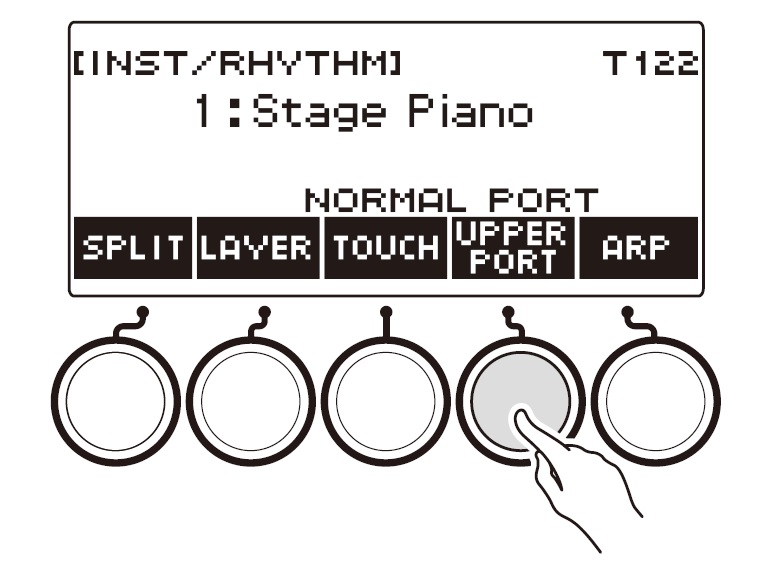
When Upper Portamento is enabled, you can enable/disable portamento on the Upper part using a front panel button.

Casio CT-S1000V/CT-S500 UPPER PORT soft button [Casio]

Ah, so which panel button is that? If you press the INSTRUMENT button, the CT-S1000V displays five soft buttons: SPLIT, LAYER, TOUCH, SUS and ARP. The SUS button controls sustain. If you want to control Upper Portamento instead, dive into the Settings sub-menu and scross to “SUS/UPPER PORT button”. Change the value from “SUS” to “UPPER PORT”. Now the INSTRUMENT button shows “UPPER PORT” instead of “SUS”. Pressing the “UPPER PORT” soft button applies portamento to the Upper part. This feature allows you to apply portamento selectively during a solo line.

I hope this brief overview helps when reading the User Guide. I recommend reading the fine print about Upper Portamento because Upper Portamento can override Part Portamento. (Surprise!)

Expression pedal

For some crazy reason, I didn’t hook up and configure an expression pedal on Day 1. In retrospect, one should probably tangle with pedal set-up early just in case pedal settings are saved in user memory locations like CT-S1000V registrations.

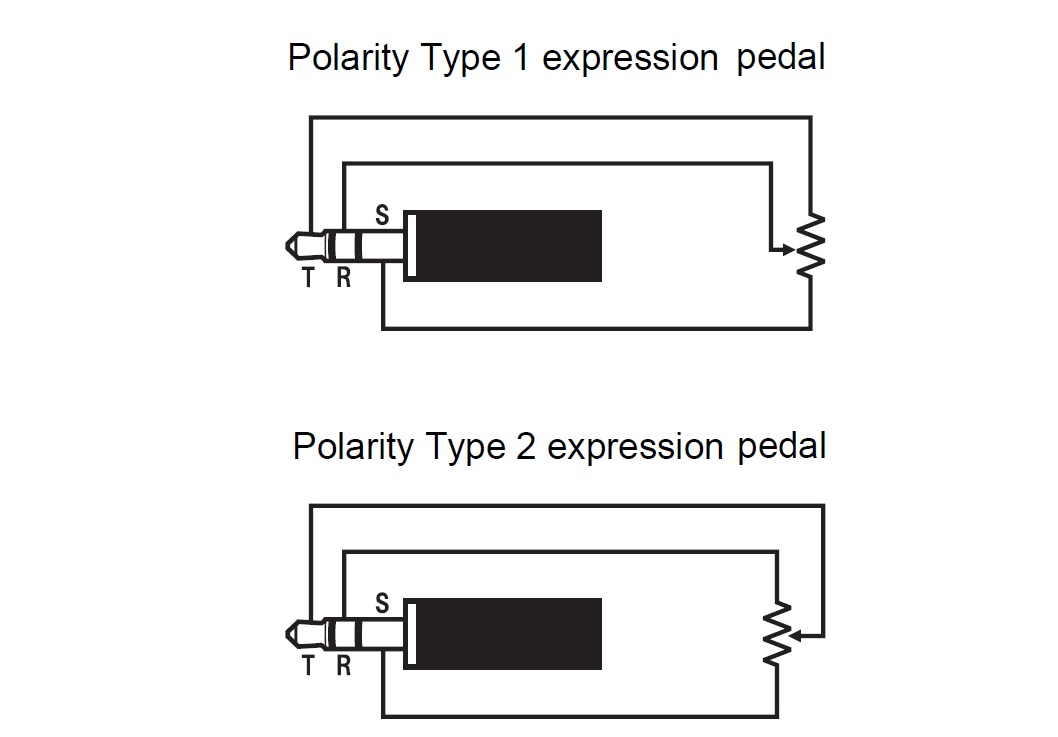
The User Guide gives good step-by-step directions concerning pedal set-up. The CT-S1000V is vendor agnostic, thankfully. I have three (!) Yamaha FC-7 pedals and didn’t want to buy another pedal. The CT-S1000V supports two TRS wiring schemes as shown in the diagrams below:

Casio CT-S1000V/CT-S500 pedal polarity types [Casio]

To make a long story short, the Yamaha FC-7 is polarity type 1. The FC-7 resistance is 50K ohms and be sure to go through the simple calibration steps in the User Guide. For reference, the FC-7 TRS signals are:

  • Tip: Reference voltage
  • Ring: Wiper
  • Sleeve: Ground

You wouldn’t believe how many forum posts get this wrong!

Roland, Kurzweil and Fata are polarity type 2. The User Guide confirms operation for the Roland EV-5, Kurzweill CC-1, Fatar VP-25 and Fatar VP-26. Type 2 TRS signals are:

  • Tip: Wiper
  • Ring: Reference voltage
  • Sleeve: Ground

The Roland FV-500L should work, too. Be aware that the EV-5 and FV-500L have a “minimum volume” potentiometer (variable resistor) in series with the main control potentiometer. Turn the minimum volume control to 0 before calibrating. The main control potentiometer resistance is 10K ohms; the minimum volume potentiometer resistance is 50K ohms.

Rant of the day: I have a nice, light-weight Boss EV-1-WL expression pedal. Wish I could use it with the CT-S1000V (and others). No device to device BLE, no 5-pin MIDI, no host compatibility. Arg.

Are pedal settings really stored?

I posted this question on the Casio Music Forums site. Even though the User Guide claims the pedal settings are stored in MY SETUP and registrations, I haven’t seen evidence. If you change the pedal settings and load a registration (or MY SETUP), the changed settings remain.

I hope that Casio will clarify.

Drawbar organ tones

As mentioned earlier, I pulled together a bank of drawbar organ registrations. I settled on the following tones:

    Gospel Organ 2    Mellow 
Rock Organ 2 Mellow
Elec.Organ 1 Bright church-y for hymns
Elec.Organ 6 Simmerin' for grease

In all four cases, I split the keyboard putting the “Organ Bass” tone in the left hand. I like the way Organ Bass holds down the low-end and doesn’t sound swirly. Split point is E4.

Movin’ on to pipe organs…

Copyright © 2022 Paul J. Drongowski
Casio CT-S1000V: Drawbar organ tones

I’m choosing and dialing in the Hammond B-3 organ tones for church tunes. The Casio CT-S1000V (and CT-S500) provides over thirty electric organ tones. Most of the organ tones incorporate an Active DSP effect.

Choosing tones is a process of selection and elimination. Some sounds just aren’t suitable for church, e.g., distorted rock organ, combo organ, or theatre organ. As to personal taste, I usually avoid voices with hard percussion. I often play in a group with piano, guitar or drums. There is already enough going on percussively that I don’t need to add another element to the on-going rhythm. In a typical situation, it’s more important to hold down or emphasize a left-hand bass.

Tone name        Description                     DSP effect 
--------------- ------------------------------ ------------
JS Organ Jimmy Smith, percussion AMP cab->Trem->3EQ
AMP Organ 1 First four, no percussion Phaser->Drive->AMP cab
Rock Organ 1 No percussion Phaser->Drive->AMP cab
Hard Rock Organ Chorus->Drive->AMP cab
Gospel Organ 1 Mellow-ish Rotary
Velo Organ Velocity brings in bars Drive rotary
F.Organ Farfisa combo organ Trem->AMP cab
V.Organ Vox combo organ Trem->AMP cab
RTF FD Organ Rotary fast, full drawbars Drive rotary
Rock OD Organ Drive rotary
Tremolo Organ Mellow, C3 sampled-in Auto pan
DP Organ Total Jon Lord Dist
Jazz Organ 1 Bright hard perc jazz Rotary
Jazz Organ 2 Darker hard perc jazz Rotary
Elec.Organ 1 Bright. church-y Rotary
Elec.Organ 2 Mellow-ish, key click Rotary
Elec.Organ 3 First four Rotary
Elec.Organ 4 Full drawbars Rotary
Elec.Organ 5 Mellow, soft perc Phaser
Perc.Organ 1 Bright hard perc Rotary
Perc.Organ 2 Darker soft perc Rotary
Gospel Organ 2 Mellow Rotary
Full Drawbar Full drawbar Rotary
Rock Organ 2 Church-y (swimming rotary) Drive rotary
Rock Organ 3 Mellow-ish very fast Drive rotary
Click Organ Low drawbars, key click Drive rotary
70's Organ Farfisa-like, key click Rotary
Organ Pad Weird No DSP effect
Theatre Organ No DSP effect
Perc.Organ 3 Hard perc, low drawbars Rotary
Elec.Organ 6 Low+high (16+1), click Rotary
AMP Organ 2 Rocky bars Tone->Drive->AMP cab->Trem
AMP Organ 3 Heavy OD Tone->Drive->AMP cab->Trem
Organ Flute Pipe organ flute No DSP effect
Puff Organ Chiffy organ flute No DSP effect
Reed Organ Portable reed organ Mono 3-band EQ
Rotary F-Organ Farfisa organ, rotary speaker Rotary
Rotary V-Organ Vox organ, rotary speaker Rotary

The table above are notes taken while auditioning CT-S1000V drawbar organ tones. The CT-S500 has the same complement of organ voices, so any comments made here apply to the CT-S500, too.

My goal is a registration bank of four tones that provide a range of timbres. I want to push a registration button while playing in order to match the current musical situation. So far, a few candidates stand out:

    Elec.Organ 6     Simmering 16+1 
Gospel Organ 2 Mellow, ballad-like sound
Gospel Organ 1 Brighter, hymn foundation
Rock Organ 2 Brighter still, hymn playing

I listened to all organ tones with Active DSP enabled and bypassed. “Rock Organ 2” has a church-y sound when the overdrive and rotary speaker are removed. I can knock the rock out of the preset by re-programming the Active DSP effect.

Most organ tones have a preset Active DSP effect as shown in the table. A few of the tones — like AMP Organ 1 — don’t use the rotary effect at all. (Surprise!)

As I mentioned in an earlier post, a few of the tones have a swirl-y or swimming fast rotary setting. Sometimes the rise acceleration and fall deceleration times are too short. The settings below are ballpark.

    Drive Rotary     PJD      Velo Org 
---------------- -------- --------
Type: 2 2
Overdrive Gain: 42 48
Overdrive Level: 42 31
Speed: Fast Fast
Brake: Rotate Rotate
Fall Accel: 40 10
Rise Accel: 60 18
Slow Rate: 40 17
Fast Rate: 100 111
Vib/chorus: C3 C2
Wet Level: 100 100
Dry Level: 0 44
Bypass: Off Off

I will use these parameter values as my starting point moving ahead. The wet/dry parameters could be helpful in a stereo mix avoiding hard left/right channel throb. BTW, the sim doesn’t have parameters for horn/rotor balance.

The Casio rotary speaker sims include a scanner vibrato/chorus option: Off, V1, V2, V3, C1, C2, C3. The presets assign overdrive to knob 2 (K2). I don’t usually adjust overdrive when I’m playing and will assign vibrato/chorus control instead. That way I can add or subtract chorus on the fly. Unfortunately, scanner off is at the knob’s full left position and C3 is at the full right position. That will make for a big gesture knob-spin when playing. Wish this could be assigned to a button…

As to reverb, I’ve settled on ROOM 2 with a send level of 20. This is just enough to add a little space when practicing, but it won’t muddy the sound too much when playing live.

Copyright © 2022 Paul J. Drongowski
Casio CT-S1000V: About them effects

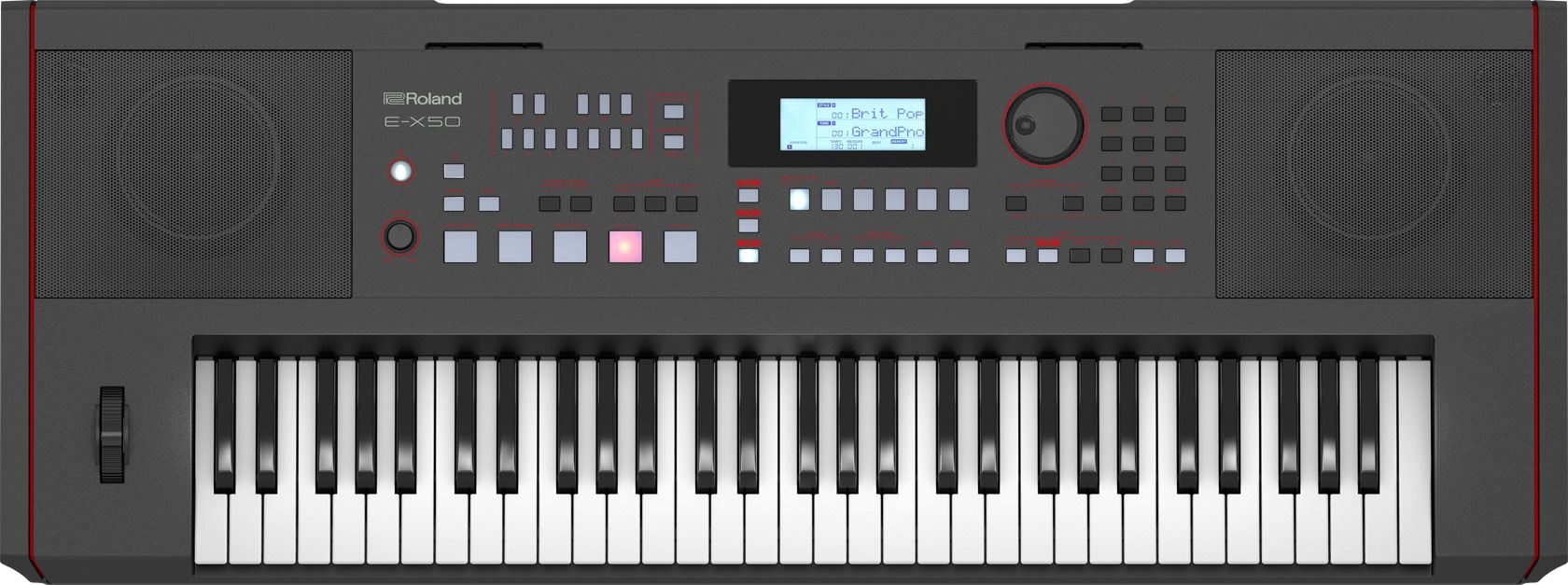
Casio gave the CT-S Casiotone series a major boost with the new CT-S500 and CT-S1000V models. The new models include the acclaimed CT-S1 voices. Even better, Casio added a wide range of editable DSP effects. The DSP effects are in addition to the three system effect units: reverb, chorus and delay. Up to two DSP effect chains can be applied to tones (voice) and auto-accompaniment parts.

Casio CT-S500 and CT-S1000V simplified [Casio]

Casio have their own way of organizing effects. DSP effects are organized into chains, where each chain consists of one to four DSP modules. A DSP module is a unit executing a particular effect algorithm like EQ, tremolo, compression, etc. There are 29 DSP module types.

As a user, you don’t work directly in terms of DSP modules. Instead, you select a chain from one of 100 preset DSP chains. The first 25 or so preset chains have only a single DSP module, just about covering the 29 DSP module types individually. The remaining 75 presets have two, three or four DSP modules. Many chains are obviously guitar-oriented while others are slanted toward keyboards, percussion and ambience. When it comes to effect applications, who am I to judge? 🙂

The CT-S approach may appear to be too restrictive, but each DSP module has a BYPASS parameter which lets you turn off its stage. If you can find a preset chain with effects in the desired order, you’re good to go, thanks to DSP parameter editing.

Thank heavens for DSP parameter editing! The rotary speaker simulations are too fast right out of the box, for example. In addition to modifying effect parameters, you can assign a DSP parameter to each of the three front panel knobs (e.g., rotary speaker speed). Everything gets saved into a registration slot from which tone and effect settings are recalled.

Oh, yes, you have full access to Active DSP parameters. Unfortunately, this is not true for system effects (reverb, chorus, and delay). In the case of system effects, only the effect type (e.g., ROOM 3, HALL 2, etc.) can be changed. Minor bummer.

If I’m a little vague about effect routing, it’s because Casio have not published an effect routing diagram for the CT-S500 or CT-S1000V. I don’t feel like I’ve been held back in practice, but I would love to see a detailed signal flow. A diagram would clear up people’s questions about effect assignment (how many and where).

I’ve been pulling together a dozen of my most frequently used patches (layers and splits). I like to detune layers in order to add a bit more motion and interest. Individual tones, however, do not have a fine tuning parameter (i.e., plus or minus cents).

The orchestral voices are not pre-programmed with a DSP effect (thank goodness). Lacking a fine tuning control, an alternative method is to add a pitch shift DSP module to the tone. There are four DSP preset chains that contain pitch shift:

  #21 Pitch:        --> Pitch --> 
#87 Pitch Delay: --> Delay --> Pitch --> Phaser --> Auto Pan -->
#90 Pitch Mod 1: --> Tone --> Phaser --> Delay --> Pitch -->
#91 Pitch Mod 2: --> Pitch --> Delay --> Phaser --> Tone -->

The multi-module chains are fun, but waaay more complicated than necessary. Nonetheless, I jotted down the pitch-related parameters for reference:

    Parameter    Pitch  PitcDel1  PitcMod1  PitcMod2 
----------- ----- -------- -------- --------
Preset # 21 87 90 91
Pitch 0 0 +14 0
High Damp 127 127 127 127
Feedback 127 64 127 70
In Level 110 110 110 127
Wet Level 127 110 110 127
Dry Level 127 110 127 127
Fine +6 +12 +4 +6

Turns out, the stock pitch parameters (column 1) are ready to go, adding a pleasant chorus-like effect to layered tones.

Of course, I can’t let it rest and tried the six ambient enhancement presets. I got a nice, subtle feel with “AmbientEnh 4”. The chain breaks down like this:

    Piano Effect   -->      Delay     -->  Tone Control 
-------------- -------------- --------------
Lid: Full Open Time: 90 Low Freq: 50
Ref Level: 60 TmRatioL: 28 Low Gain: -12
TmRatioR: 64 Mid Freq: 100
Level L: 110 Mid Gain: -6
Level R: 110 High Freq: 16k
Fdbk: Cross High Gain: 0
Fdbk Level: 30
High Damp: 120
Tempo Syn: Off
In Level: 127 In Level: 100 In Level: 90
Dry Level: 110 Dry Level: 110 Dry Level: 0
Wet Level: 90 Wet Level: 110 Wet Level: 90
Bypass: Off Bypass: Off Bypass: Off

I used my ears first before diving into the details. Yep, I was surprised to see “Piano Effect” in the chain. Frankly, I don’t care what it’s called as long as it sounds good! The chain takes a little harshness off woodwinds while adding early reflections and cross delay. Cross delay isn’t too important to me as I will be playing in MONO at the job. Still, why not?

Hopefully, this look at CT-S1000V (CT-S500) DSP effects is helpful.

Copyright © Paul J. Drongowski