Review: The Beatles: Get Back

Well, I’m about half-way through Peter Jackson’s The Beatles: Get Back and I suppose that I should watch all of it before writing a “review.”

You’ll find plenty of fawning reviews on line — this isn’t one of them. As to actual film criticism, the The Guardian review gets it right. This is an over-stuffed Thanksgiving turkey. Yes, it tastes good, but it took too long to cook and has too many leftover bits.

So I won’t be accused of a hatchet job, I must first commend Jackson for boiling Michael Linsey-Hoggs film and mono Nagra sound into eight hours. Genuine kuddos are due because that must have been a herculean task. Audio quality is superb. Beautiful clean-up and machine learning-based extraction. George must be looking on Giles work with fatherly pride.

First, the bait and switch. Last December’s Sneak Peek was total fun. The preview lifted my spirits and gave me the impression that, at least, we could have a fun, light and tight film.

Wrong impression. The newly released film has some very good to great parts — sheer genius in a few cases. However, much of the film reminds me of every teenage (and adult!) garage rehearsal with much faffing about and no real work getting done. Sitting through these parts is reliving every wasted, unproductive, tedious second when you really wanted to be somewhere else.

Watching Get Back is like watching NFL RedZone. I love RedZone. I turn it on at 10am, catch the best bits of my favorite teams, read The New York Time, cook and eat lunch, have a mid-afternoon dessert and cup, and wrap everything with the touchdown montage. However, nobody — self included — actually watches every second of “seven hours of commercial-free football.” Nobody.

There are clearly bits that could have been cut without loss. A BBC radio program from the 1960s? Forget it. Re-litigating personal drama between the group members? Don’t “Let It Be,” let it go instead. Fifty years on, most people don’t really care or shouldn’t.

For the record, I did see the Let It Be documentary in 1970.

I’m still struck by the number of leeches and sycophants surrounding the late-stage Beatles. If you really want to know why they broke up, look to the absolute shafting they endured from Dick James, Allen Klein, Alexis Mardas, and the rest of the self-promoters and music industry white-collar criminals. Nothing attracts flies like a steaming pile of cash. Apple was a managerial and financial disaster.

For example, it’s embarrassing to watch Lindsay-Hogg force his vision of the final concert on the lads. Jackson could have easily spared the man’s dignity and left this out. Lindsay-Hogg comes off as a self-serving, upper-class English twit — an early parody of rock and roll pretensions and excesses to come a la Spinal Tap. As to dignity, why did Jackson humiliate long-gone Peter Sellers? Cutting room.

In contrast, I offer the genuine, warm affection and devotion shown my Mal Evans, stage manager and long-time companion to the band. Ringo is his authentic “all I ever wanted was a paying gig” self. Just blokes and punters like us. Even Ringo is bored with the faffing around. Why should Jackson force the boring stuff on us, too?

As to other quick edits, if a song didn’t make it to the Let It Be album, why bother? Save those songs for another day and another film. [Suggestions to follow.]

In the end, there are three and half movies here. Jackson in his head and heart must know this. I wish he had asserted his own clout and signed a few more deals based on a few more story lines.

When Ringo says “You see, I’d watch an hour of him, just playing piano,” there’s your first movie. McCartney was and is born to make music. Start with the Ringo quote and follow it with all of the solo Paul parts. That would be a fascinating portrait of McCartney as a songwriter at that stage of his career.

For the second film, take the most important rehearsal parts and show how the Beatles worked from inspiration to finished product. The scene where the song “Get Back” spontaneously emanates from Maca and his bass is brilliant. More please. Concentrate on just a few songs, if necessary, in order to keep running time reasonable.

Even George and Ringo knew that riff was the hook. Instantly. That’s the way true hits are born. Not that awful “Maxwell’s Silver Hammer” which the Beatles themselves detested.

Finally, give us the movie which the Sneak Peek promised. Sure, give a small taste of the songwriting and development. George, John and Paul were all at the top of their game in 1969. Maybe create a late-stage version of “A Hard Day’s Night” with people tugging the boys every which way. But, for heaven’s sake, make it a comedy. More Richard Lester, less Maysles and Zwerin.

We all need a good laugh right now. We also need irreverent and rebellious youth to thwart and overthrow today’s authoritarians. Once again, the world is in the grip of controlling neo-fascists who must be taken down.

I fully expect fan-edits to emerge.

Happy watching, but bring a book or two along.

[Update] Another recommended review: ‘The Beatles: Get Back’ Review: Peter Jackson Gets Lost In The Treasure Trove Of Fab Four Footage.

Copyright © 2021 Paul J. Drongowski
Wire Less: Part 1, Korg Microkey Air 49

With the pandemic raging, I’m searching for ways to reduce my physical gig footprint and schlep factor. I thought I would share my adventure in battery-lowered, almost wireless keyboard-land.

Months ago, I had a good experience with Korg Module Pro. It has the range of high quality sounds that I need for my church gig. So, I decided to eschew battery-powered MIDI modules like the MidiPLUS miniEngine USB and go iPad and Korg Module Pro.

Yamaha SHS-500 Sonogenic (labels added)

I tried a bunch of controller candidates. (See the end of this post for more info.) I had the best experience and minimal number of wires with built-in Bluetooth MIDI. The SHS-500 Sonogenic, in particular, is nearly ideal:

  • Pluses: Built-in Bluetooth, pitch bend and mod wheels, decent mini-keys, narrow depth is good for a lap-board.
  • Estimated battery life is OK (10 hours); AC adapter jack is well-placed and secure.
  • Minuses: 37 keys (3 octaves), no expression pedal input, mod wheel works backwards when played in one’s lap.

No, I am not playing the SHS-500 as a keytar. I find the whole keytar thing to be gimmicky and not appropriate for church. I intend to play the controller in my lap, thereby keeping my physical profile small. (Social distancing!) A lap-board lets me ditch the keyboard stand, minimizing schlep.

Mini-keys deserve comment. Mini-keys enable short, lap-held keyboards. They are very lightweight and easy to transport. If the basic key feel is good, I make peace with play-ability.

My trouble isn’t so much with key size. It’s that three octaves (37 keys) are too short. Many melody and bass lines require two octaves and a player needs two octaves below middle C and two octaves above. Otherwise, I do unnecessary mental and hand gymnastics in real-time to fit the music onto the keyboard. That ain’t right.

Just me? Watch Harry Connick Jr. rock a 3 octave Reface CP. Harry sez, “There’s not a lot of room here.” [Tonight Show: Jimmy Fallon, NBC, 1 September 2016, Playing starts at 3:00.]

Korg Microkey Air 49

In the end, I broke down and bought a Korg Microkey Air 49. It is a good size for a lap-board and the Korg Natural Touch mini-keys ain’t too bad. The Microkey Air firmware was already at v1.04 when it arrived and it connected with Korg Module Pro under IOS 14.1 without a problem. [More on this in a future post.]

The Microkey Air 49 has an estimated 30 hour battery life. Good thing, because Bluetooth operation must use battery power (two AA batteries). Be sure to have two spare AA batteries at the gig; there isn’t a USB powered safety net.

The Microkey Air has a footswitch input. Expression input would be better. Of course, connecting a pedal to the Microkey Air adds a cable. Fortunately, Bluetooth pedals like the Airturn BT200-S4 get the job done. I have a BT200-S4 and found it easy to switch sustain, etc. via Bluetooth in Korg Module Pro. The BT200-S4 is small and light, not any worse than schlepping a wired sustain pedal.

I made a few advances with iPad wiring along the way. The Korg Microkey Air 49 is working out pretty well and I’m practicing with it every day. I have a few custom layers in Korg Module Pro and the day is coming when I’ll try out the rig in front of a congregation.

Going native

For completeness sake, I tried “going native” with sounds built into the Yamaha SHS-500 Sonogenic, Yamaha Reface YC, Yamaha PSS-A50 and Korg microKorg XL+ — all fine battery-powered instruments in their own right with sounds appropriate for rock, soul, jazz, and pop, but not church. I need good strings, reeds, classic organ and gospel B-3. Before moving on, I give props to the Reface YC as it is truly gig-worthy and have play it on the job.

Blooming BLU

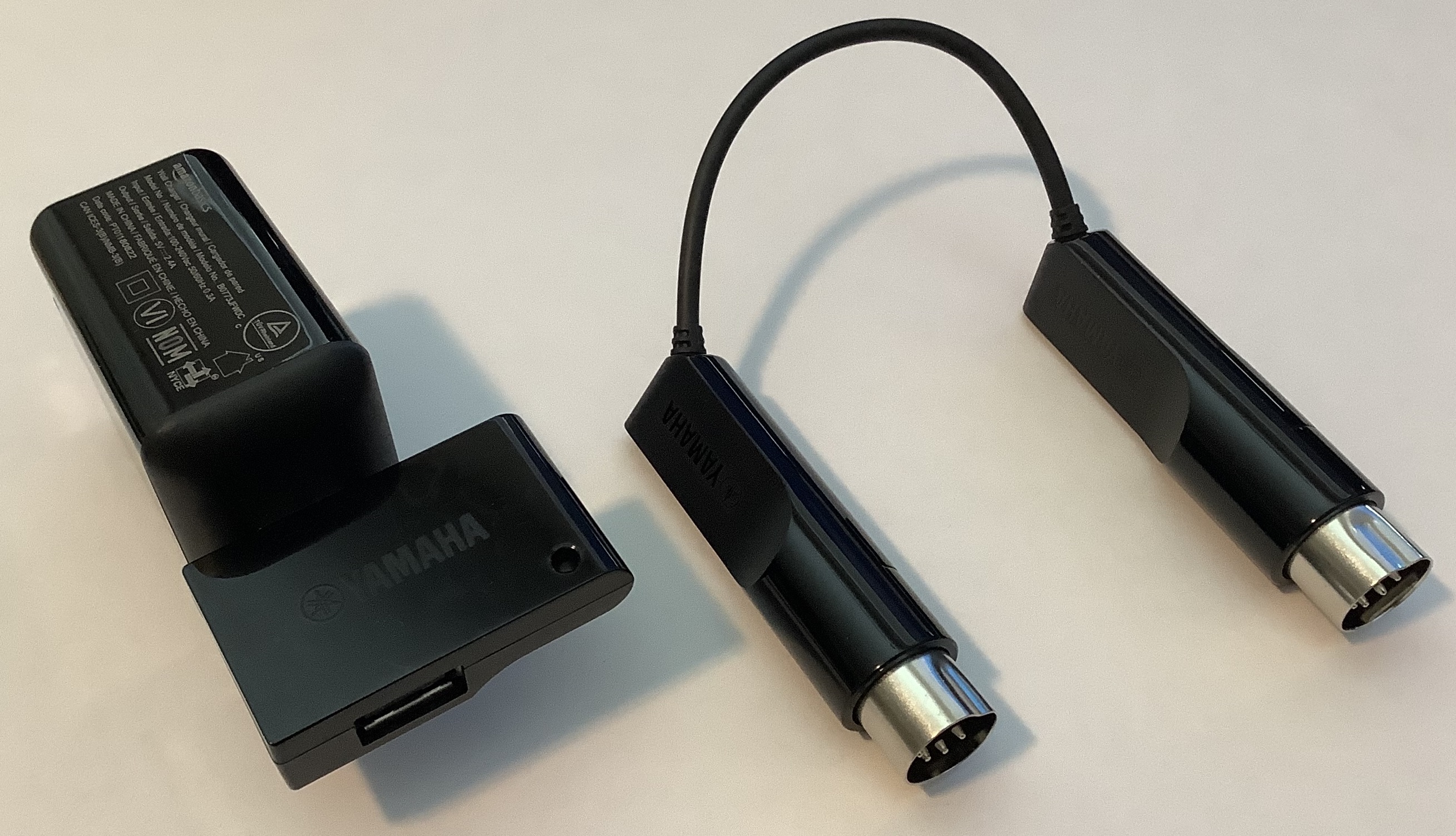
I also tried using “the natives” as Bluetooth MIDI controllers. All of the candidates have USB and/or 5-pin MIDI DIN ports, and can be fitted with Yamaha UD-BT01 and MD-BT01 wireless MIDI adapters. The candidate keyboards are battery-powered, so what the heck!

Yamaha UD-BT01 (with AC adapter) and UD-BT01 Bluetooth MIDI

To make a long story short, all candidates worked well with the Yamaha adapters and with Korg Module Pro on iPad — even the lowly, dirt-cheap PSS-A50. A few specific observations:

  • The Yamaha UB-BT01 not only does Bluetooth MIDI, it supplies power to the PSS-A50. If you must add a cable to connect the A50 to the UD-BT01, you might as well get power, too, and save batteries. If you own a PSS-A50 and want to go Bluetooth MIDI, don’t hesitate!
  • The Reface YC has the added bonus of an expression pedal input. An expression pedal is a vital part of my gig toolkit. Korg Module Pro will connect simultaneously to more than one Bluetooth MIDI source (like the BT200-S4 previously mentioned). In one experiment, I used Reface YC as my expression source while playing the black and whites on the SHS-500. Neat. I might add the new Boss EV-1-L wireless expression pedal once it ships.
  • I looked into expected battery life. The Korg Microkey Air is the best at 30 hours estimated life. The other solutions are burdened by tone generation and DSP. The added power-burn is unnecessary if we’re not using the internal synthesis engines.

Even though you take a power hit, an internal engine is a good back-up in case there is a technical problem with Bluetooth, the iPad or Module Pro.

    Instrument     Estimated battery life 
------------- ----------------------
Microkey Air 30 Hours
PSS-A50 20 Hours
SHS-500 10 Hours
Reface YC 5 Hours
microKorg XL+ 4 Hours

In terms of key feel and play-ability, all candidates are acceptable. The Yamaha HD mini-keys are more synth- and organ-like, and are good for legato (especially organ). The Korg Natural Touch mini-keys are more piano-like — good for striking, not quite as good as Yamaha HD for legato. Unlike Microkey Air 49, the other candidates are 37 keys and are too short for unfettered play.

                           Key dimensions 
--------------------
Instrument Width Length Depth
------------------ ----- ------ -----
Reface HD 19mm 88mm 9mm
Korg Natural Touch 20mm 80mm 8mm
MODX 21mm 133mm 10mm
Genos FSX 22mm 133mm 10mm

Check out these related blog posts:

Copyright © 2021 Paul J. Drongowski
Yamaha PSS-A50: Look inside

Let’s take a quick tour of the Yamaha PSS-A50.

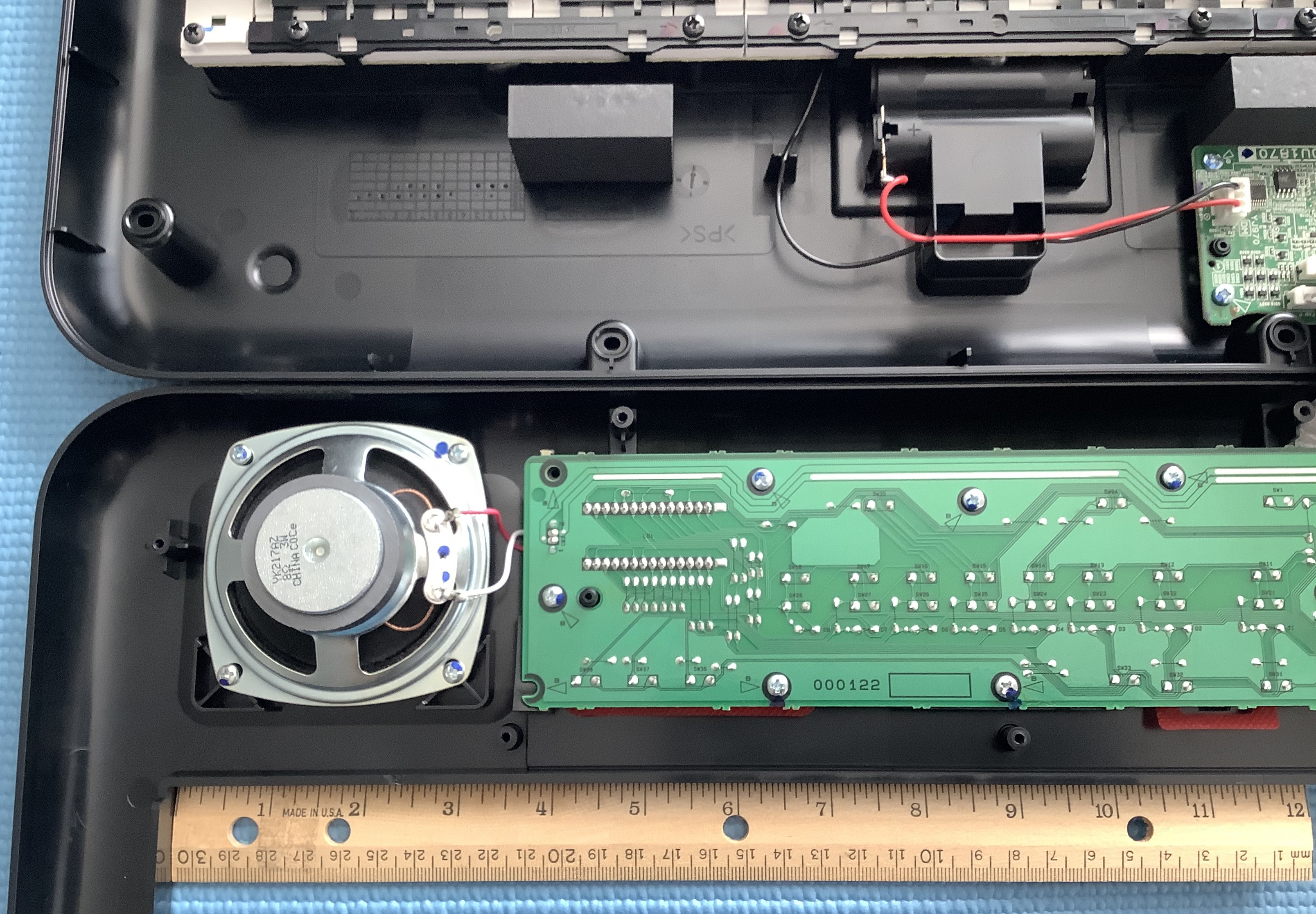
Yamaha PSS-A50 top and bottom [Click images to enlarge]

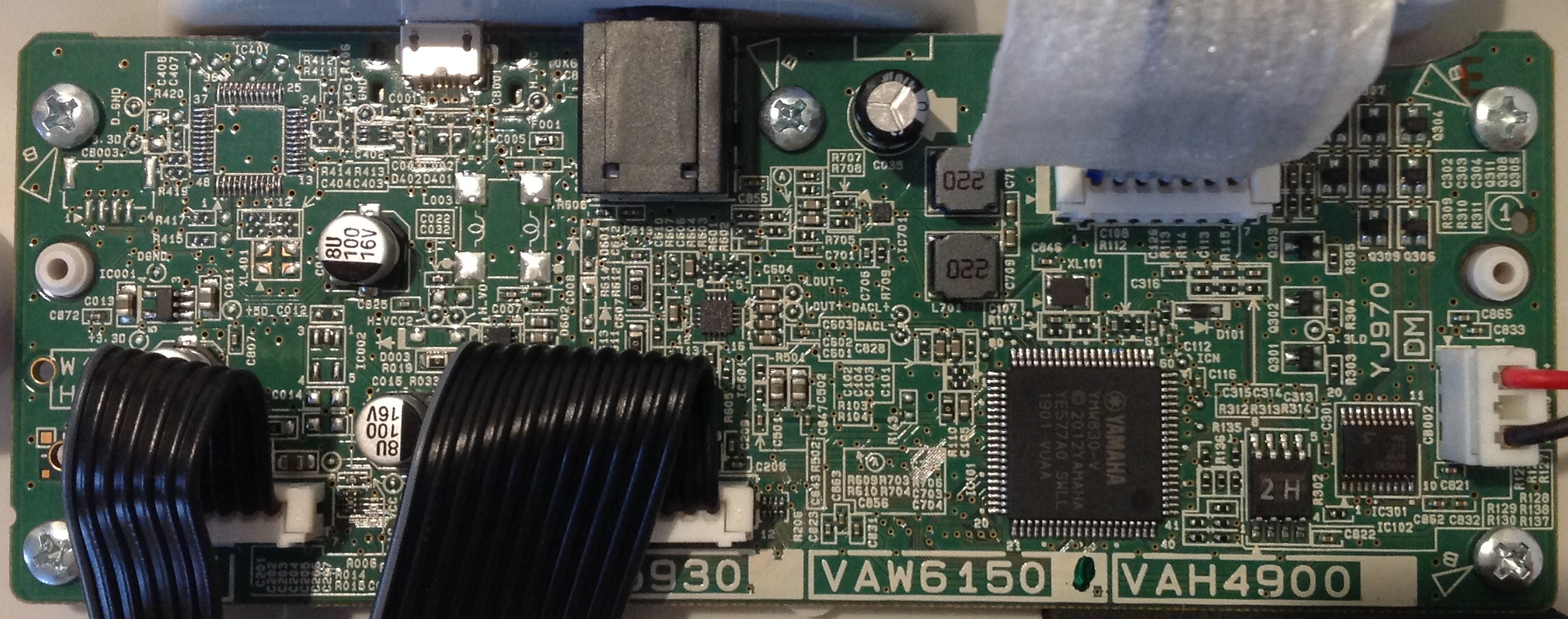
The A50 has two main boards: the digital and analog electronics board (DM) and the front panel board (PN). After removing nine screws — don’t forget the screw hidden in the battery compartment — the A50 splays into two halves: the bottom half containing the battery compartment, DM board and keybed, and the upper half containing the speaker and PN board. The battery connects to a JST XH connector on the DM board. Ribbon cables connect the keybed and the panel board to the DM board.

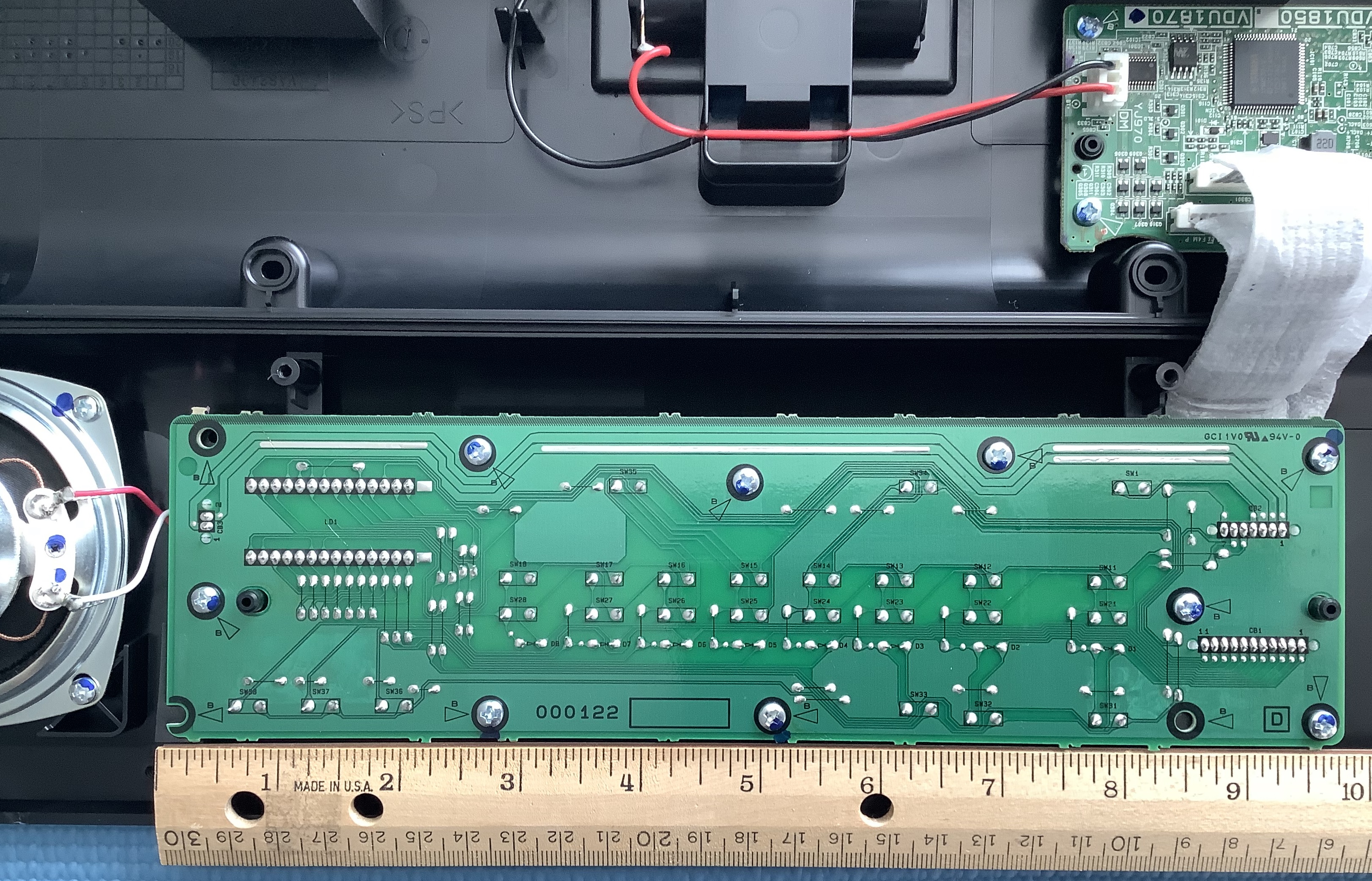
Yamaha PSS-A50 front panel board (PN)

The PN board has traces for the front panel buttons. The buttons are arranged into a 3 by 8 switch matrix: 3 drive lines and 8 sense lines. The power Standby/ON switch has two dedicated lines. The eight sense lines are shared with the three digit LED display. A further 3 lines are devoted to the display (for a total of eight lines). In addition to the front panel switch matrix, the PN board conducts audio signals to the speaker through two wide PCB traces.

I dare to say that the A50, PSS-E30 Remie and PSS-F30 have the same panel board. Only the front panel graphics and software differentiate the models in that regard.

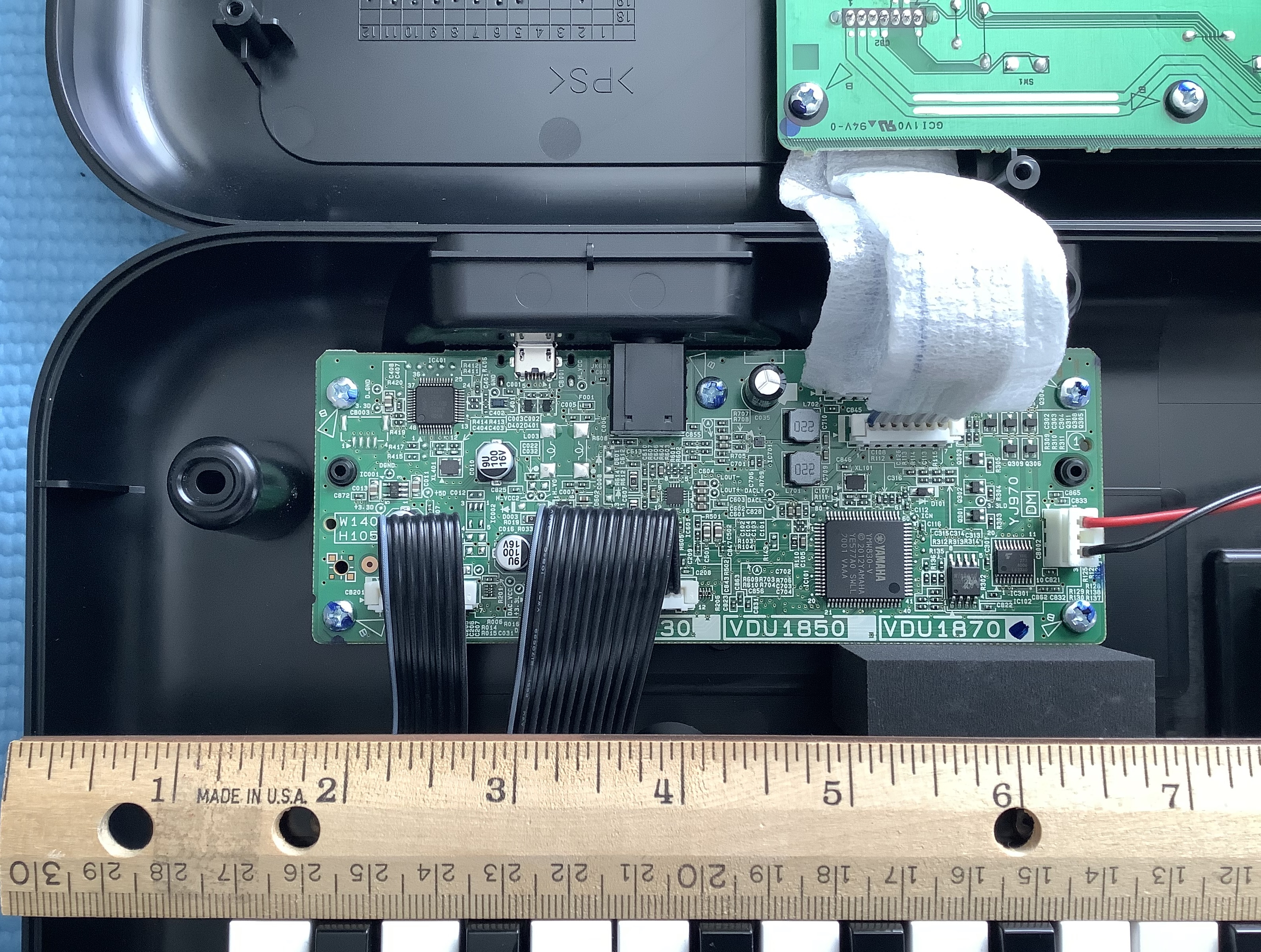
Yamaha PSS-A50 main electronics board (DM)

The DM electronics board is tiny and is packed with surface mount (SMT) components. Impressive! The main digital components are:

  • Yamaha YMW830-V: Processor and tone generator (IC101)
  • Winbond 25Q16JVS1M: 16Mbit Serial flash memory (IC102)
  • 74VHC273: 8-bit latch for display data (IC301)
  • NXP LPC11U13F/201: USB interface (IC401)

The YMW830-V is also known as “SWLL” and is a Yamaha proprietary system on a chip (SOC). The A50 has separate amplifiers for the speaker (IC701) and headphone output (IC601):

  • TI TPA6132A2RTER: Headphone amplifier (IC601)
  • Rohm BD27400GUL: Mono class-D power amplifier (IC701)
  • NJR NJM2740M: Dual operational amplifier (IC501)

The dual operational amplifier is part of the post-DAC low pass filter. Finally, the power-related components are:

  • TI TLV74333PDBVR: 3.3V regulator (IC001)
  • TI TPS63060DSCR: Switching regulator (IC004)
  • TI TPS25200DRVR: 5V eFuse/power switch (IC006)

The A50 must choose and switch between +5V USB power and battery power. That’s the role of the eFuse/power switch component.

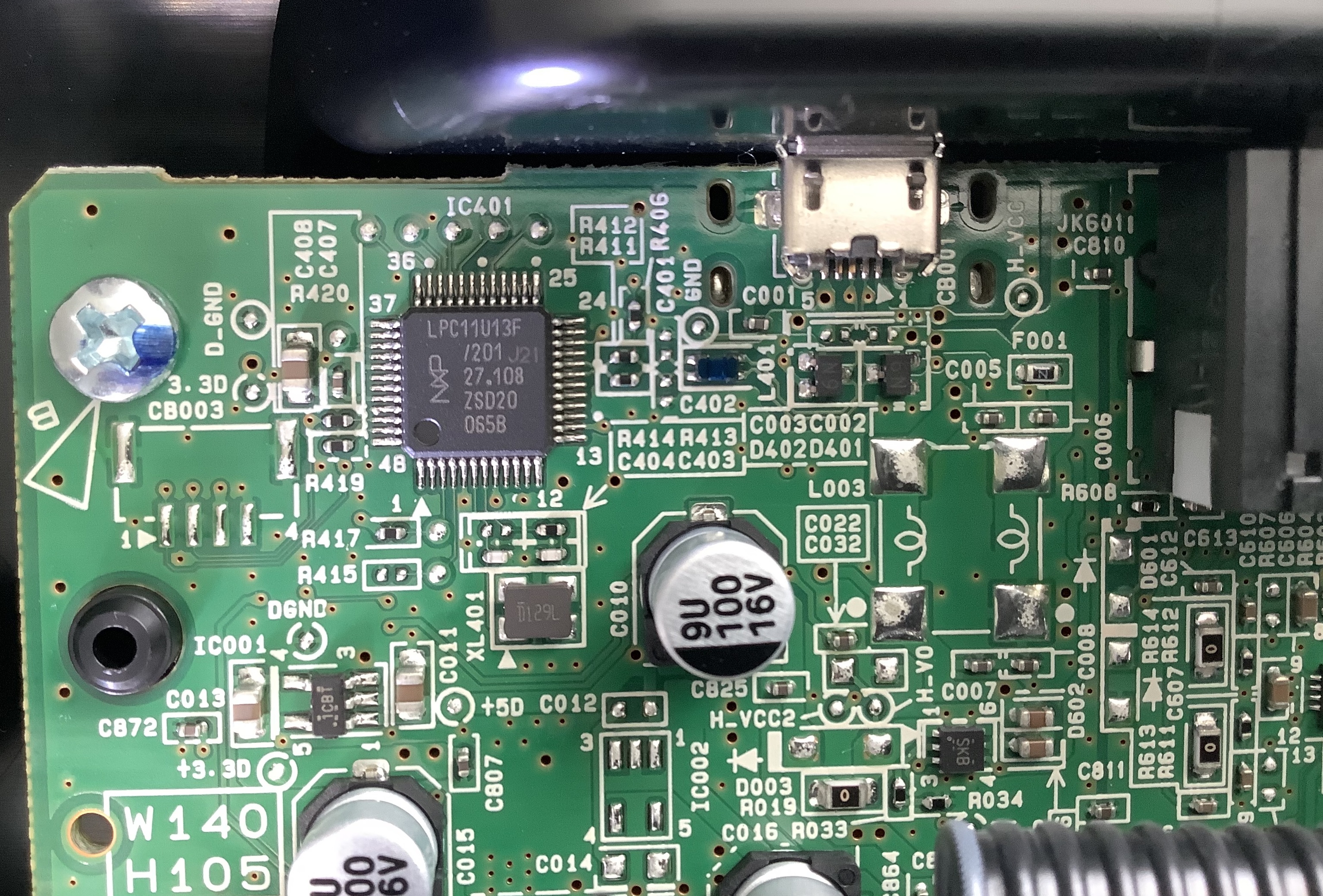
Yamaha PSS-A50 USB interface (NXP ARM MCU)

The NXP LPC11U13F is a bit of a surprise to me. It is an ARM Cortex-M0 32-bit microprocessor (MCU) with 24KB of flash memory. The SWLL sends and receives MIDI through its UART RX/TX ports. The ARM LPC converts simple MIDI from the SWLL to MIDI over USB. Using an ARM MCU to do the job seems like over-kill. It goes to show how far we have come as an industry when an MCU can be dedicated to such a mundane task!

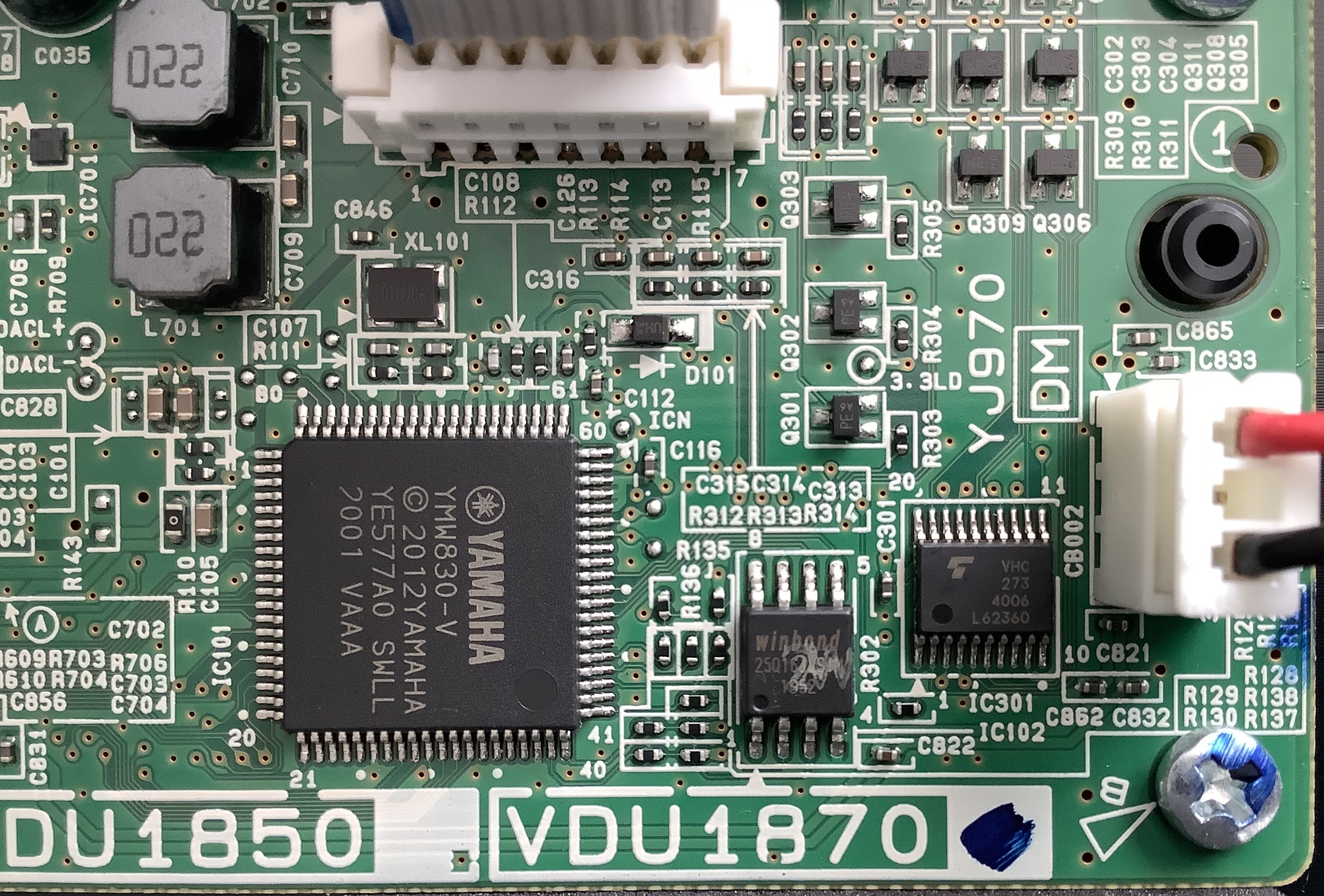
Yamaha PSS-A50 CPU (Yamaha YMW830-V SWLL)

The SWLL (YMW830-V) has many of the specs that we’ve come to know about Yamaha’s entry-level CPUs. The external crystal resonates at 16.9344MHz. The SWLL internal clock is 33.8688MHz and generates a 67.7376MHz master clock. If these numbers look odd to you, simply note that they are even multiples of 44,100Hz, the basic sample rate:

    67.7376MHz = 44,100Hz * 1,536

When an external DAC is used, the master clock provides the bit serial audio clock. 1,536 can be subdivided in all sorts of interesting ways depending upon sample word length.

The SWLL integrates host CPU, memory, tone generation, serial MIDI communication, keyboard and front panel scan ports, and display ports. The digital to analog converter (DAC) is also integrated into the SWLL. The SWLL is truly Yamaha’s low-cost system on a chip solution.

The SWLL loads its software and samples from a 16Mbit serial flash ROM. 2MBytes for software and samples is not much, so one wonders if the SWLL has a preprogrammed flash memory of its own?

With the exception of the ARM LPC chip, the A50, PSS-E30 Remie and PSS-F30 electronics are identical. The software and samples determine the product personality. Such a high degree of commonality allows Yamaha to manufacture PSS keyboards (in India) and sell them at a dirt cheap price. Hats off — the amount of technology at this price — less than $100USD — is simply astounding.

Copyright © 2021 Paul J. Drongowski
PSS-A50: Power to the people

Today’s topic — power — may seem rather mundane. To a modder, though, power gives our circuits life.

I’m going to make a few comments of general interest before diving into details that are relevant to the Yamaha PSS series keyboards, including the PSS-A50 and PSS-E30 Remie.

Most of us don’t think too much about keyboard power. Sure, we know where the AC adapter connects or how to insert batteries. The internal details are hidden from us.

However, did you really read the fine print in the Owner’s Manual? The front panel power button may be labelled “Standby/ON” instead of “OFF/ON”, and the difference is important. The PSS-A50 Owner’s Manual states, “Even when the Standby/On switch is in standby status (display is off), electricity is still flowing to the instrument at the minimum level.”

Yes, that Standby/ON switch is really a “soft” power switch. It does not physically disrupt the flow of electrical current from the AC adapter (battery or USB port). In the PSS series (and other keyboards, too), the Standby/ON switch sends a signal to the keyboard’s processor telling the software to change the current power state. For the technically inclined, the Standby/ON switch pulls one of the processor pins to ground and software detects the ACTIVE LOW signal.

The rest of the story gets complicated fast depending upon power saving techniques supported by the hardware. Let’s assume that we’re changing from ON to Standby. The processor generates a separate signal which switches off the power amplifier — a major drain on battery or external power. Software turns off the display, another power hog. Finally, software places the processor in a low-power state and waits for the Standby/ON switch to be pressed again. Going from Standby to ON, software turns everything back on.

From the user’s perspective, the transition from Standby to ON is fast. No waiting and let’s get playing! The constant low current flow does affect battery life, however. Ever wonder why the batteries drained sooner than expected even though you haven’t turned your keyboard on for a few weeks? The low current flow eventually drains the batteries.

Power management has implications for people intending to mod an instrument. I’m planning to add an audio delay or filter circuit to the A50. The add-on circuit will need to draw power. Ideally, I would like to switch the add-on circuit on and off with the front panel switch. But, where should I take power from the existing design? Is there a PCB pad or trace that is big enough for soldering? Is voltage regulated at that point? Getting power is not a no-brainer!

If you don’t have the instrument’s service manual and schematic, this analysis gets really hairy and uncertain. For the E30/A50, I’ve been working from the PSR-F50 manual available from Elektrotanya. The PSS series keyboards are a revamped PSR-F50 design.

I’m considering a Synthrotek Dev Delay for add-on. The Dev Delay has a 5V regulator and runs on battery power. My thought is to connect the Dev Delay directly to the A50’s batteries through its own power on/off switch. That way I don’t add to the standby drain on the batteries. It just means turning the delay on and off separately.

PSS-E30 Remie main board (battery connector at right)

Even better, the A50 main board (DM) has a removable battery connector. If I rustle up a compatible cable and connectors, I can tap into existing battery power without soldering. I was already planning to use a short 3.5mm patch cable to jump the headphone OUT to the Dev Delay IN. Again, no soldering to SMT traces, etc. I like “reversible” mods!

I had enough headaches and scars from soldering mod chips to game console boards back in the day. 🙂

I hope this discussion provided some useful advice — no matter what you mod.

Copyright © 2021 Paul J. Drongowski
Yamaha PSS-A50 Motion Effects

As I mentioned in my PSS-A50 review, the Yamaha PSS-A50 arpeggios date back to the first Motif keyboard (2001). Yamaha — like most manufacturers — recycle content and these arpeggios (arps) have (re-)appeared in several synthesizer and arranger products. The arps even made an appearance in the now unavailable Yamaha Synth Arp and Drum Pad application for Apple iPad.

If you were fortunate enough to buy the Synth Arp and Drum Pad app ($8 USD), don’t throw that joint out the window! As of this writing, the old app still runs on iOS.

The A50 resembles a hardware embodiment of the old arp app. The A50, however, has one trick up its sleeve that the app didn’t have — Motion Effects.

The PSS-A50 Motion Effects add a little animation to performances, arps and playback. There are three kinds of Motion Effects:

  1. Group A: Filter
  2. Group B: Pitch
  3. Group C: Modulation

The filter effects do things like filter sweeps. The pitch group includes pitch bends. The modulation group adds modulation and a little bit of everything else like slicing.

The A50 is an inexpensive little guy with simple synthesis hardware. All of the Motion Effects are implemented through MIDI, keeping hardware cost low. The Motion Effects themselves are based on the MIDI control arpeggios in the original Motif! This bit of recycling keeps development cost ultra-low.

Using a Motion Effect is easy. Select an effect, start playing, and press/hold the MOTION EFFECT button when you want to trigger the effect. The A50 then generates the MIDI needed to make the effect happen. Effects are selected by repeatedly pressing the MOTION EFFECT button while holding SHIFT. (Tip: Hold MOTION EFFECT in order to skip to the next effect group.)

Motion Effect MIDI messages are recorded and transmitted along with note ON/OFF and all the rest of the usual stuff. Thus, the A50 is a bit of an interesting controller as you could use it to add/record pitch bends, etc. to a DAW-based MIDI song or live performance.

Inquiring minds want to know, “How did they do that?” I recorded the MIDI messages produced by each of the Motion Effect types. I simply played a note on the keyboard and hit/held the MOTION EFFECT button. If you would like to hear the results for yourself, here is a ZIP file containing SMFs. Open the SMFs in a DAW and explore.

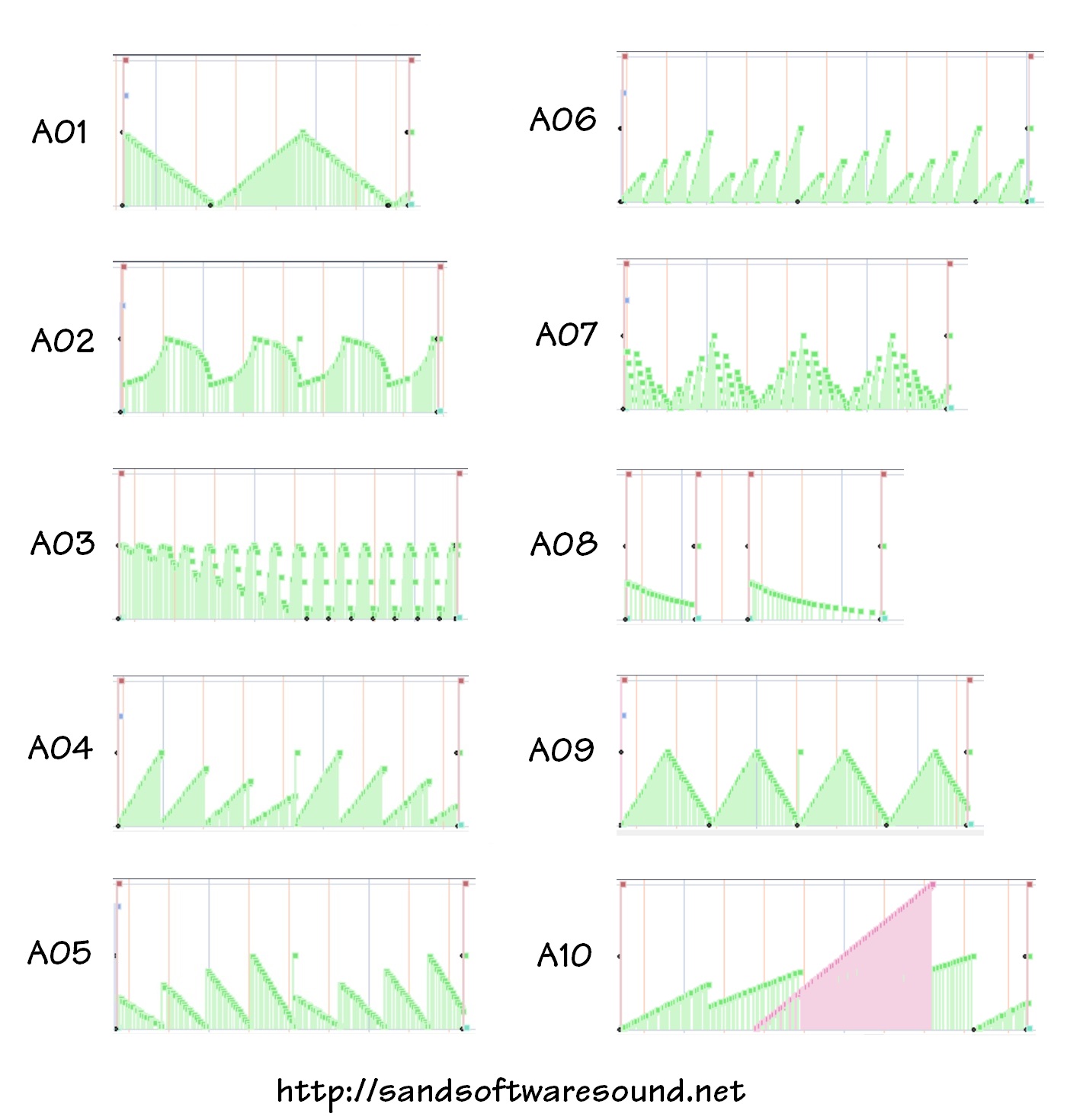
The filter group sends MIDI CC#74 (continuous control) messages. A09 and A10 toss in modulation (CC#1) for a little extra spice:

Group A FILTER 
A01 Filter 1 CC#74
A02 FIlter 2 CC#74
A03 Filter Wah CC#74
A04 Filter 3 CC#74
A05 Filter 4 CC#74
A06 Filter 5 CC#74
A07 Filter 6 CC#74
A08 Filter 7 CC#74
A09 Filter + Modulation 1 CC#74, CC#1
A10 Filter + Modulation 2 CC#74, CC#1

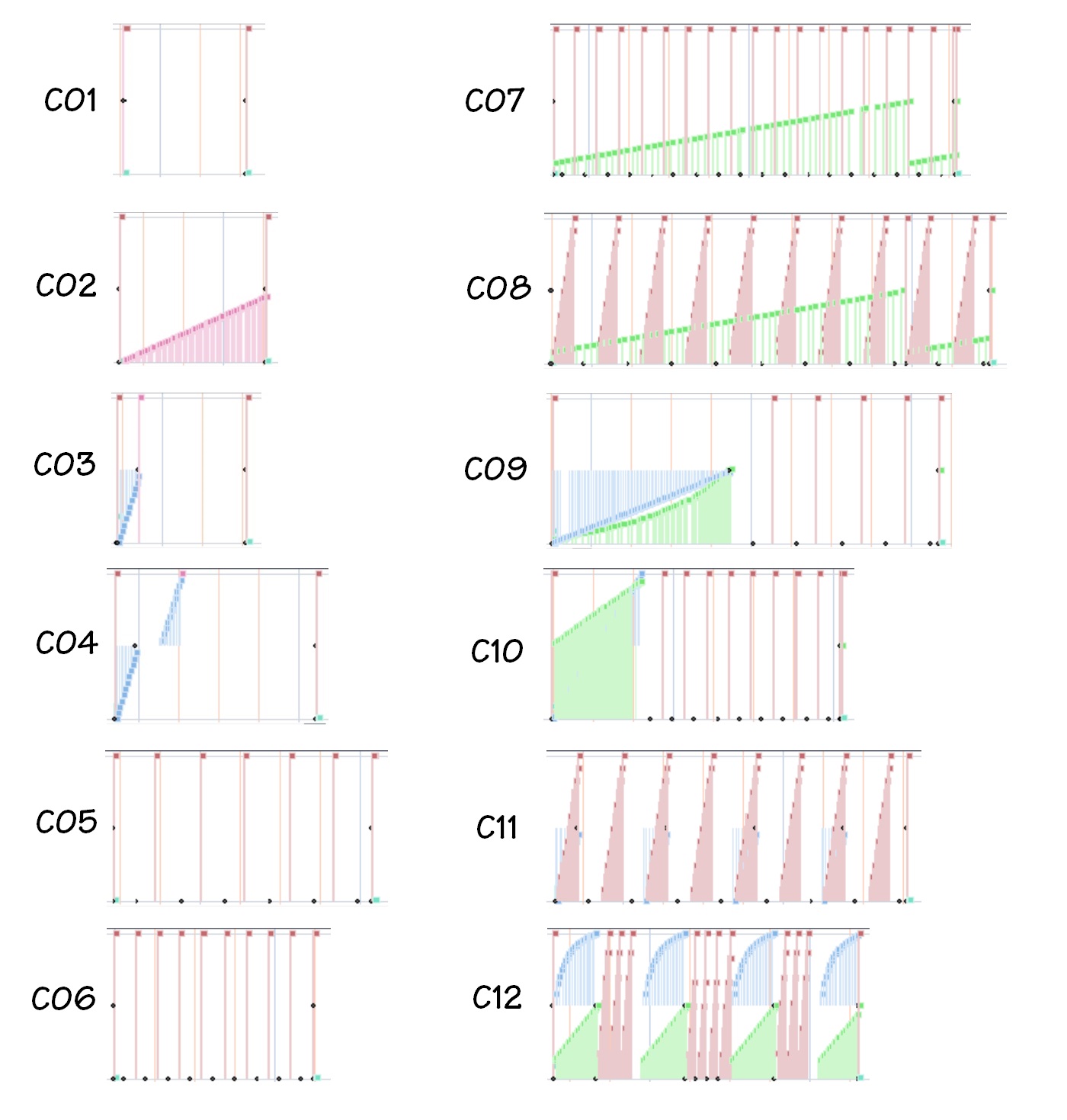
Since it’s often hard to describe sonic effects in words, here are miniature plots of the MIDI controller data for the filter (Group A) effects. [Click images to enlarge.]

Yamaha PSS-A50 Motion Effects (filter)

The pitch group sends MIDI pitch bend messages:

Group B PITCH 
B01 Pitch Whole-Note Up PB (wheel)
B02 Pitch Half-Note Up PB (wheel)
B03 Pitch Whole-Note Down PB (wheel)
B04 Pitch Half-Note Down PB (wheel)
B05 Choking Up PB (wheel)
B06 Choking Down PB (wheel)
B07 Pitch Down 1 PB (wheel)
B08 Pitch Down 2 PB (wheel)
B09 Pitch Up 1 PB (wheel)
B10 Pitch Up 2 PB (wheel)
B11 Pitch Up + Modulation PB (wheel), CC#1
B12 Pitch Up 3 PB (wheel)

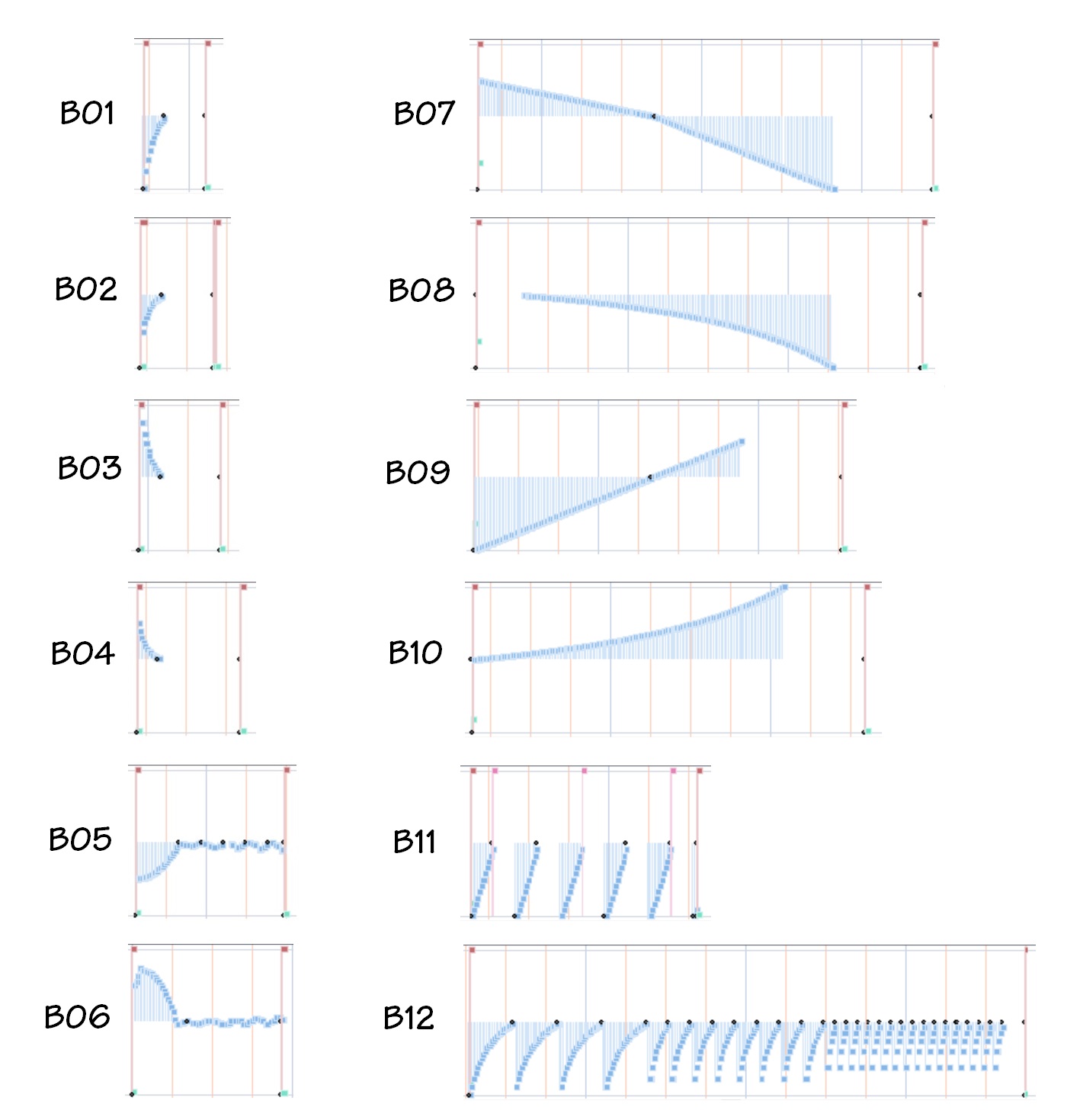
The first several pitch effects implement guitar-like bends. If you have trouble bending notes with a joystick or wheel, you might want to try the A50. You get a perfect bend every time — maybe too perfect. The plots below illustrate the PSS-A50 pitch (group B) effects.

Yamaha PSS-A50 Motion Effects (pitch bend)

The modulation group has some real variety to it. The simple modulation messages change pitch at a fixed rate; you cannot change the “LFO rate.”

Group C MODULATION 
C01 Modulation On 1 CC#1
C02 Modulation On 2 CC#1
C03 Pitch Up + Modulation On 1 PB, CC#1
C04 Pitch Up + Modulation On 2 PB, CC#1
C05 Expression Slice 1 CC#11
C06 Expression Slice 2 CC#11
C07 Expression Slice + Filter 1 CC#11, CC#74
C08 Expression Slice + Filter 2 CC#11, CC#74
C09 Pitch Up + Expression Slice 1 PB, CC#11, CC#74
C10 Pitch Up + Expression Slice 2 PB, CC#11, CC#74
C11 Pitch Up + Expression Slice 3 PB, CC#11
C12 Pitch Up + Expression Slice 4 PB, CC#11, CC#74

Slicing implements stutter-like effects using MIDI CC#11 expression messages (alternating volume ON and OFF). The plots below illustrate the modulation (group C) effects.

PSS-A50 Motion Effects (modulation)

Here’s a quick reference guide to the MIDI message types mentioned above:

  • PB Pitch Bend
  • CC#1 Modulation
  • CC#10 Pan (not supported by PSS-A50)
  • CC#11 Expression
  • CC#71 Harmonic Content (resonance)
  • CC#74 Brightness (cutoff)

If you would like more information about the Yamaha PSS-A50 MIDI implementation, check out the basics and advanced topics.

Copyright © 2021 Paul J. Drongowski
Yamaha PSS-A50 MIDI limitations

My last post about the Yamaha PSS-A50 MIDI implementation covered the basics. Now for a few advanced topics.

First, the bad news. The PSS-A50 does not have a way to save and restore recorded MIDI data. Thus, you can’t save a song and reload it later.

It is possible to SYNC a DAW (like Sonar) to the A50 and record MIDI data played back by the A50. I accomplished this task rather easily in Sonar. The A50 sends MIDI START, STOP and CLOCK. I simply configured Sonar to accept and sync to the A50. I armed the destination Sonar track, hit Sonar’s record button, and pressed the A50’s play button. Sonar recorded all incoming MIDI data to a single track. Sonar’s selective filtering made it easy to separate data in the track by channel.

Even if MIDI data is recorded to Sonar, there isn’t a way to play it back into the A50. The A50 does not recognize MIDI CLOCK, START or STOP.

Next, I tried MIDI bulk dump request messages. The A50 ignores them — no response. I also tried XG MIDI parameter request messages and they are ignored, too. I’m not too surprised because other entry-level arrangers ignore these kinds of messages, too. [The Yamaha SHS-500 Sonogenic is equally silent.]

In a moment of due diligence, I ran Musicsoft Downloader and it is unable to connect to the A50. Well, for $100, you can’t expect everything!

I experimented with reverb- and chorus-related messages. The A50 responds to MIDI CC#91 Reverb Level and CC#93 Chorus Level messages. However, you cannot change either the chorus or reverb type via standard XG parameter change messages. The chorus and reverb are pretty basic and I’m not really surprised.

In terms of quality, the chorus is just OK. The reverb sounds cheap when it is cranked up. As far as future mods are concerned, I’m inclined to beef up reverb and/or spatial enhancement. The Volca Mix’s enhancer made quite a difference in sound quality. Lacking stereo OUTs, the A50 sound doesn’t have much life by itself. (MIDI-wise, it doesn’t recognize CC#10 Pan.)

The PSS-A50 does respond to MIDI identity request:

    F0H 7EH 0nH 06H 01H F7H

In case you’re wondering, identity request and reply are how external software can query and identify external MIDI devices. When the A50 is pinged with an identity request, it responds with:

    F0H 7EH 7FH 06H 02H 43H 00H 41H ddH ddH mmH 00H 00H 7FH F7H 
dd: Device family number/code
mm: Version

F0 7E 7F 06 02 43 00 44 27 1F 00 00 00 7F F7
| | | | |
| | | | Version
| | Model
| Family
Yamaha

Hex 43 is Yamaha’s manufacturer/vendor code. Hex 44 identifies the device family: arrangers. Hex [27,1F] identifies the specific model within the device family.

I’m itching to examine the PSS-A50 motion effects. That’s the next stop.

Copyright © 2021 Paul J. Drongowski
Yamaha PSS-A50 MIDI notes

To learn more about the Yamaha PSS-A50‘s MIDI implementation, I monitored its MIDI output stream using MIDI Ox and Sonar. Here are my notes. They are quite terse!

After inital start-up, the A50 sends MIDI timing clock and active sensing messages.

The default transmit data and channel settings are:

    Assignment              Ch# 
---------------------- ---
Live keyboard: 1 [If OFF, no data is transmitted]
Live arpeggio sequence: 2
Recorded keyboard: 3
Recorded arpeggio seq: 4

Master volume is local. Pressing the Master Volume buttons does not send volume change messages (neither channel volume or MIDI master volume).

Changing Phrase Volume, however, sends channel volume on channel 3 and 4. Legends above keys show setting-related function: what setting, increment and decrement. This is very handy and avoids manual diving. Phrase Volume is changed using the assigned function keys.

Pressing a front panel voice button sends messages on both channel 1 and 2:

    Bank MSB (CC#0) 
Bank LSB (CC#32)
Program Change (PC)
Channel Volume (CC#7)
Reverb Depth (CC#91)
Chorus Depth (CC#93)

Not all voices have chorus applied and Chorus Depth is not sent for voices without chorus.

The keyboard sends note ON and note OFF messages on channel 1. The mini-keyboard is touch sensitive. it’s difficult to send the full 1-127 velocity range with the default touch response level (level 2).

Pressing the Sustain button has the following behavior:

  • Sends new release time when sustain button is pressed.
  • Release time messages are sent on both channel 1 and channel 2.
  • Turning sustain off resets the release time.

Pressing Portamento (SHIFT+SUSTAIN), has the following behavior:

  • Sends portamento time and portamento ON/OFF when SHIFT+PORTAMENTO buttons are pressed.
  • Portamento time and ON/OFF are sent on both channel 1 and 2.
  • Turning portamento off, sends new portamento status on channels 1 and 2.

Pressing ARP ON doesn’t send MIDI messages! Pressing ARP OFF sends messages on channel 2:

    Bank MSB (CC#0) 
Bank LSB (CC#32)
Program Change (PC)
Portamento
Release Time (channel 1 and 2)

It’s like the A50 software assumes that the arp voice is set-up and ready to go when the arpeggiator is turned ON. Then, the software resets certain parameters when the arpeggiator is turned OFF. The arpeggiator sends note ON/OFF on channel 2 (as determined by the MIDI channel assignments).

Pressing PLAY sends the following messages on channel 1 and 2:

    Start (FA) 
All Sound OFF (CC#120)

Pressing STOP sends the following messages:

    Stop (FC) 
GM Reset (System exclusive)
Messages to reset voice settings for channel 3 and 4

You can expect to see the following System Exclusive messages after song playback:

   F0 7E 7F 09 01 F7           GM Reset 
F0 43 10 4C 08 02 0C 40 F7 MULTI-PART Velocity Sense Depth (channel 3)
F0 43 10 4C 08 02 0D 40 F7 MULTI-PART Velocity Sense Offset (channel 3)
F0 43 10 4C 08 03 0C 40 F7 MULTI-PART Velocity Sense Depth (channel 4)
F0 43 10 4C 08 03 0D 40 F7 MULTI-PART Velocity Sense Offset (channel 4)

I’ve seen these XG MULTI-PART messages on other entry-level arrangers supporting the XG Lite conventions.

For Motion Effect A01 Filter 1, Pressing the Motion Effect button sends
these messages on channel 1 and 2:

    Pitch Bend Sensitivity (RPN 0,0)
Harmonic Content (CC#71)
Pitch Bend
Expression (CC#11)
Modulation (CC#1)
Brightness (CC#74)

Harmonic Content (filter resonance is increased to 100). The Brightness (cutoff) messages sweept the filter. Brightness is slowly modulated, i.e., it repeatedly slowly decreases and then increases.

Releasing the Motion Effect button sends messages on channel 1 and 2:

    Pitch bend 
Harmonic Content (CC#71)
Brightness (CC#74)
Modulation (CC#1)
Expression (CC#11)
Pitch Bend Sensitivity (RPN 0,0)

These messages reset the respective parameters to a default value.

For Motion Effect B01 Pitch Whole-Note Up, pressing the Motion Effect button sends these messages on channel 1 and 2:

    Pitch Bend Sensitivity 
Pitch Bend (center)
Expression
Modulation
Pitch Bend (multiple messages)

The Pitch Bend messages sweept the pitch up then down. Releasing the button resets Modulation, etc. to default values.

Pitch bend sensitivity is sent as an RPN (Registered Parameter Number) message:

    RPN (CC 0x64, CC 0x65) 
0,0 Pitch Bend Sensitivity

The Motion Effect feature is similar to something I built into my two-button Arduino-based MIDI controller. It’s a way to add articulation to live playing. I always wanted a way to play perfect pitch bends. 🙂

I was able to save my recorded MIDI data to Sonar. The A50 insists on sending MIDI clock, START and STOP, so I configured Sonar to receive and respond to external clock. The recorded MIDI data is sent on channels 3 and 4. Thanks to Sonar’s channel selection feature (via event filtering), I could separate the channel 3 and 4 data into two tracks. Another possible solution is to write the data as a MIDI Type 0 SMF and then read the SMF into Sonar. Sonar should separate the channel data into different tracks.

Copyright © 2021 Paul J. Drongowski
Summer NAMM 2021

Even though Summer NAMM 2021 is a live event, the global pandemic still has the business world topsy-turvy. The vaccinated parts of the United States are shaking off cob-webs, but large parts of the world remain in the grasp of COVID-19. Japan — a major source for electronic musical instruments — is in near crisis just as the Summer Olympics are due to start.

Thus, I don’t really expect much from Summer NAMM 2021. In the run-up to the show, vendors are mainly announcing product updates and upgrades. Manufacturers are highlighting previously announced instruments like the Korg Wavestate or Yamaha DGX-670 digital piano.

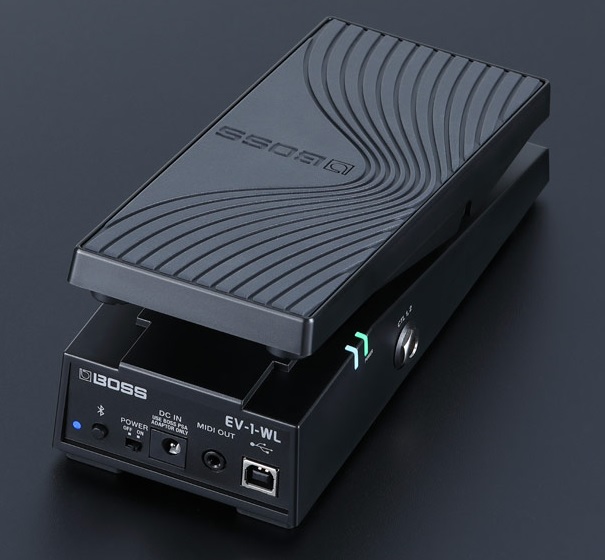
Truly new, is the Boss EV-1-WL wireless MIDI expression pedal. The price ain’t bad, $149USD, and it offers the chance to eliminate yet another cable in your live rig. Although it seems targeted for guitarists — being promoted through the Boss brand — the EV-1-WL might be a boon for keyboard players, too.

Boss EV-1-WL Wireless expression pedal

The EV-1-WL operates on two AA batteries or PSA-series power adapter. It cooks up MIDI three ways: Bluetooth, USB and 3.5mm TRS. Nice to have both wired and wireless options. According to Boss, all three can be used at the same time and are independently configured.

In addition to the rocking expression pedal, the EV-1-WL has a built-in top switch and two external footswitch inputs (1/4 inch TRS). Boss will provide an app to assign MIDI messages [quoting the Boss web page]:

  • Expression pedal with EXP SW on—CC# 1-31/64-95, value 0-127
  • Expression pedal with EXP SW off—CC# 1-31/64-95, value 0-127
  • Toe switch (EXP SW)—CC# 1-31/64-95, value 0-127
  • External footswitch 1 (CTL1)— CC# 1-31/64-95, value 0-127
  • External footswitch 2 (CTL2)— CC# 1-31/64-95, value 0-127
  • MIDI channel—1-16
  • Expression pedal curve—Normal, Slow1, Slow2, or Fast
  • EXP SW/CTL1/CTL2 mode—latch or momentary

I’m a little nervous about the EV-1-WL’s ability to rendezvous (pair) with any old Bluetooth device or interface adaptor. Boss state compatibility with their WM-1 5-pin adaptor and WM-1D USB-A dongle. However, will it interoperate with Yamaha’s MD-BT01, UD-BT01 or in-built Bluetooth MIDI (e.g., SHS-500 Sonogenic)? A 5-pin DIN MIDI cable is brand-agnostic.

The USB and Bluetooth MIDI world is rife with incompatibilities and the inability to make connection. A 5-pin MIDI cable is symmetric. A USB connection has a HOST end and a DEVICE end. Bluetooth has acceptors and initiators which must dance with each other when pairing. A MIDI cable simply connects an IN to OUT (and vice versa). Done.

Anyway, the EV-1-WL has got my attention and I look forward to the user manual and app. Hoping for the best…

Copyright © 2021 Paul J. Drongowski
Review: Yamaha PSS-A50

Before taking a screwdriver and soldering iron to the A50 (Ahem), I’d better write a short review first. 🙂

The Yamaha PSS series keyboards are inexpensive, entry-level instruments which are super lightweight, battery powered, portable and fun. The PSS line is like a small group of fantasy characters where each character has its own super-powers.

  • PSS-E30: A musical game keyboard for younger kids.
  • PSS-F30: “Honey, I shrunk the arranger” keyboard for people who want to play songs with an accompaniment.
  • PSS-A50: A phrase-based music machine which records and speaks MIDI over USB to your DAW or other computer- or table-based music applications.

Last year, I reviewed the Yamaha PSS-E30 Remie and passed it along to our grandson as a Christmas gift. Remie is suitable for young kids, but even Mom and Dad have fun with the musical games.

Yamaha PSS-A50 keyboard [Click to enlarge]

The PSS-A50 (henceforth “A50”) is aimed at people who want more flexibility than the fixed accompaniment styles in the PSS-F30. The A50 has 138 musical phrases — “arpeggios” in Yamaha-speak — that drive an in-built arpeggiator. Twenty-two arpeggios are drum patterns; the rest of the arpeggios are melodic, covering both instrument-specific riffs (strums, bass lines, chord comps) and general purpose phrases like up/down broken chords, etc.

Experienced Yamaha players have seen these arpeggios before. In fact, the A50 reminds me of the Yamaha Synth Arp & Drum Pad iOS application. Without getting into the details, you select a voice, select an arpeggio (“arp”), enable the arp, hit record, and go. If you check out Yamaha’s YouTube tutorials, you’ll see how easy it is to get started.

At this point, I suggest watching Keen On Keys excellent video. It covers all the basics, a brief teardown, and more. I won’t go into such details here. (This chap did a terrific job!) I learned quite a lot from this video including basic “how to use it” information.

Oh, how I long for such reviews in Electronic Music (once Keyboard mag), once again. Ken Hughes, where are you? After reading one of those old product reviews, you actually knew a little about playing the instrument. Now, pfffft!

The sounds

Let’s get down to brass tacks. Like Remie, you won’t get Yamahas top sounds. Shucks, it’s only $100 USD (street price).

Truth be told, even though I regarded the A50 as a candidate for mod projects, I wasn’t too wild about the sounds that I heard in on-line demos. I was hesitant to buy one. Once I got the A50 under my fingers, however, I warmed up.

Basically, the A50 and Remie samples and synth engine are at the same level. The A50 adds touch sensitivity and that, I suspect, makes the difference. Sure, the piano (for example) is uni-dimensional and you can hear it play the same sample louder or softer depending upon strike velocity. The overall effect is more musical, however. Weird how that works?!

The A50 audio OUT is mono. Reverb seems to be the only system effect. Even Yamaha’s cheapest chip implementations have chorus, so it may take a little MIDI magic to unlock that door. The whole sound can be sweetened by out-board effects like maybe a guitar pedal (e.g., TC Electronic Hall of Fame reverb) or a spatializer. I slung an A50 beat through the Korg Volca Mix stereo width and compression effects and got a rather nice result. The Volca Mix Hi/Lo Cut let me isolate the tops and kick, too. I strongly recommend adding external effects.

The A50 motion effects let you juice up your performances. I’m still exploring the motion effects and I’m glad to have them. The motion effects add a way to vary the sound during performance, avoiding a uni-dimensional sound. You get filter fun, pitch bends, slicing and all sorts of sonic mayhem. A few effect types would be good for Hawaiian pedal steel. 🙂 It would be nice to leave the auto wah ON in order to play two-handed funk — a small quibble.

The A50 size, features and price invite comparison against the Yamaha SHS-300 and SHS-500 Sonogenic. Unless you really want the keytar format, I don’t see the value in the SHS-300 versus the A50. I will bet dollars to donuts that the SHS-300 is based on the same chip and samples as the A50. Personally, phrase recording is more fun and creative than a pretend, low-budget, cheap build keytar. Speaker quality is probably a wash between the two and the A50 puts out 1.5W versus 0.7W.

The A50 against the SHS-500 is another story. The SHS-500 voices are definitely better quality. Although the SHS-500 LINE OUT is mono, you can look to its PHONE OUT for stereo. The SHS-500 has PSR E-series DSP effects, three forms of MIDI (USB, 5-pin, and Bluetooth), a General MIDI sound set (available via MIDI only), and jam mode integration with Chord Tracker. The SHS-500 beats the A50 on sound. On the other hand, I prefer the A50’s speaker versus the SHS-500. Of course, the SHS-500 is mainly for playing and doesn’t have an arpeggiator or recorder.

Build quality

One big factor is build quality. The SHS-500 is a solid instrument. The SHS-300 and A50 are cheap. Even though Yamaha specs call out “37 HQ (High Quality) mini keys” for all three keyboards, only the SHS-500 is up to the same quality as the Yamaha Reface series. Yamaha marketing may claim otherwise, but you can feel the difference. The Reface and SHS-500 will stand up to abuse — the SHS-300 and A50, not so much.

As to A50 build quality, the electronic boards and cabling look up to snuff. EMI shielding is absent. Audio quality on battery power or external USB power adapter is good and is reasonably quiet. Powered by my HP desktop, the A50 is susceptible to digital schmutz and produces loud noise through its audio out. One could put blame on the desktop, but nearly all computer switching power supplies are dreadfully noisy. USB powered instruments need better filtering on USB power rails.

In use

I want to use the A50 as a looper: put down a rhythm line and a bass, then jam. It takes a little bit of practice to make glitch-free loops. I wish the A50 applied “measure quantize” to recordings, that is, trim recordings to a clean measure timing boundary. Right now, you have to turn off recording by feel and hope you get it right.

While horsing around with MIDI (another subject for another day), I noticed that the A50 has four parts, each on its own MIDI channel:

  • Keyboard voice: Live, real time performance (Default: channel 1)
  • Arpeggio sequence: Live, real time arpeggiation (Default: channel 2)
  • Recorded keyboard: Recorded keyboard performance (Default: channel 3)
  • Recorded arpeggio sequence: Recorded arpeggio (Default: channel 4)

Hmmm, this makes me wonder if I can layer up to four parts? So far, I can layer 3 distinct musical parts. The fourth part is still elusive.

The main problem is no overdub. It is possible to record two parts at once: arpeggio plus keyboard performance. Thus, you can lay down a drum pattern (arpeggio) and a bass line (by hand). Then, loop the playback and play over the top. Seems like I should be able to add a live arpeggio to the stack.

Anyhow, I found this video (“Yamaha PSS A50 – Jazz Multi Track”) to be instructive. The trick is to get the arpeggio going, select a different instrument, arm record, and play on the first beat. Here is the procedure:

  1. Select drum voice (e.g., voice 39).
  2. Turn the arpeggiator ON.
  3. Select the arpeggio type (e.g., arpeggio 125).
  4. Hold a key to start the arpeggiator.
  5. Press ARP.HOLD to keep the drum pattern running.
  6. Select a bass voice (e.g., voice 14).
  7. Press REC to arm recording.
  8. Play the bass line over the drum pattern. Start playing in time with the drum pattern.
  9. Press REC to stop recording.
  10. Turn the arpeggiator OFF.
  11. Select a piano voice (e.g., voice 2).
  12. Press SHIFT+PLAY to start a looping playback.
  13. Jam over the playback.
  14. Press STOP to stop playback.

Recording doesn’t start until you begin to play the bass line. That locks the bass to the drum pattern. You need to stop recording just before the next loop iteration begins.

If you need some jazzy chords, try: GM7/E, Fm7/B, FM7/D, Em7/A (also notated as Em9, Bm11, Dm9, Am11).

Doggone it, seems like I should be able to layer live arpeggiator into that mix! I’ll keep trying.

Update: Practice makes perfect. Yes, you can get four lines going. I recorded drum and electric piano following the procedure above. With the recorded parts playing, I started a looping bass arpeggio. Finally, I solo’d over the three running parts. Neat, and as complex as you might want for a little practice jam.

Questions

As I begin to explore the A50 MIDI implementation, there are a number of unanswered questions. First and foremost, can I save and restore recorded MIDI data? Does the A50 respond to SysEx messages for reverb and chorus type? Can I drive the A50 with the old Synth Arp and Drum Pad application and make use of its range of arpeggios? Can I load my own simple backing tracks into the A50’s recorder memory?

The final word

After my initial reluctance, I’m glad that I bought the PSS-A50. Apparently, some folks aren’t so happy as A50s turn up as Open Box items quite frequently. Even though $100 is not much, you can save a few extra bucks if you’re willing to buy an open box item. Given the build quality, you might not want to chance it, tho’.

The A50 does not have a full General MIDI sound set. The sound set is close enough for rock and roll, however. Here is an MP3 of the A50 in action (Traffic’s Feelin’ Alright). Wish I could play that piano solo at the end …

Interested in more PSS-A50 content? Check out these posts:

Copyright © 2021 Paul J. Drongowski
Free DJX-II styles: Version 2

I’m happy to announce version 2 of my DJX-II styles for Yamaha Genos, Tyros and PSR arrangers.

These DJ styles are converted from the original Yamaha DJX-II patterns. If you would like to know more about the conversion process, please see: Mining the Yamaha DJX-II.

These are DJ styles, so they only respond to changes in the root note. The chord progressions are cooked into the patterns (just like intros and endings in regular PSR styles). I tried to find the best mapping from DJX-II patterns to style sections. Therefore, some of the DJXII styles have auto-fill, some do not. Longer “fill” patterns are assigned to the intro and ending sections which can play more than one measure.

Feel free to edit, rearrange and customize the styles in order to make them your own. I recommend Jørgen Sørensen’s excellent tools. Jørgen’s site also has documentation and tutorials about styles and style creation to help you along. Please check it out and support his work!

Click on this link to download the ZIP file.

Version 2 includes all of the files in the first collection. Version 2 adds Drum ‘n’ Bass, Disco, House and Trip Hop styles. The ZIP file includes a README.TXT file which should help you get started with the styles. I have also included PDF notation files for people who read music and want to know about the chord progressions, bass lines, and so forth.

Enjoy! The DJX-II style collection is free.

Copyright © 2021 Paul J. Drongowski