Fall 2026 new stuff is here already

So, how did my predictions (leaks) turn out?

Yamaha announced the new CK76 model this week. Expected price, $1,249.99, was right on.

Teenage Engineering announced previously leaked products and more!

  • EP-35 K.O. AMP: $399 USD, 399 Euro.
  • EP-127 K.O. PEDAL: $99 USD, 99 Euro
  • Amptenna: Surprise! 29 Euro
  • Handy Mic: Surprise! $29 USD, 29 Euro
  • 16GB USB Drive: Surprise! $29 USD

I did pretty a good job predicting TE’s prices. TE don’t want to cannibalize OB-4 Magic Radio sales ($679 for a stereo unit).

TE love cases and docks. The K.O. Dock Kit sticks EP devices to the EP-35 grill. The Amptenna enables an FM radio through the AMP’s EP port. The EP-35 Eyelet Bag, Pocket Bag, Strap and Cylinder Case give you places to store EP-35 stuff. Cases for cases. 🙂 You can buy the mic, dock, USB drive and Amptenna in a bundle for 89 Euro.

“Amptenna” is sure to trigger everyone’s spelling corrector.

Does the Handy Mic have any tricks like the EP-2350 TING? Since it’s cheaper than TING, nope. Handy Mic is an XLR electret condenser microphone with push-to-talk button. It requires phantom power.

The 16GB USB Drive accessory plugs into the K.O. AMP and plays back instrumental jam tracks (SIDE A). It also has drum loops, live breaks and beats (SIDE B). I hope the content migrates over to the EP samplers — as if I don’t have enough content for the EP-40 RIDDIM already. 🙂

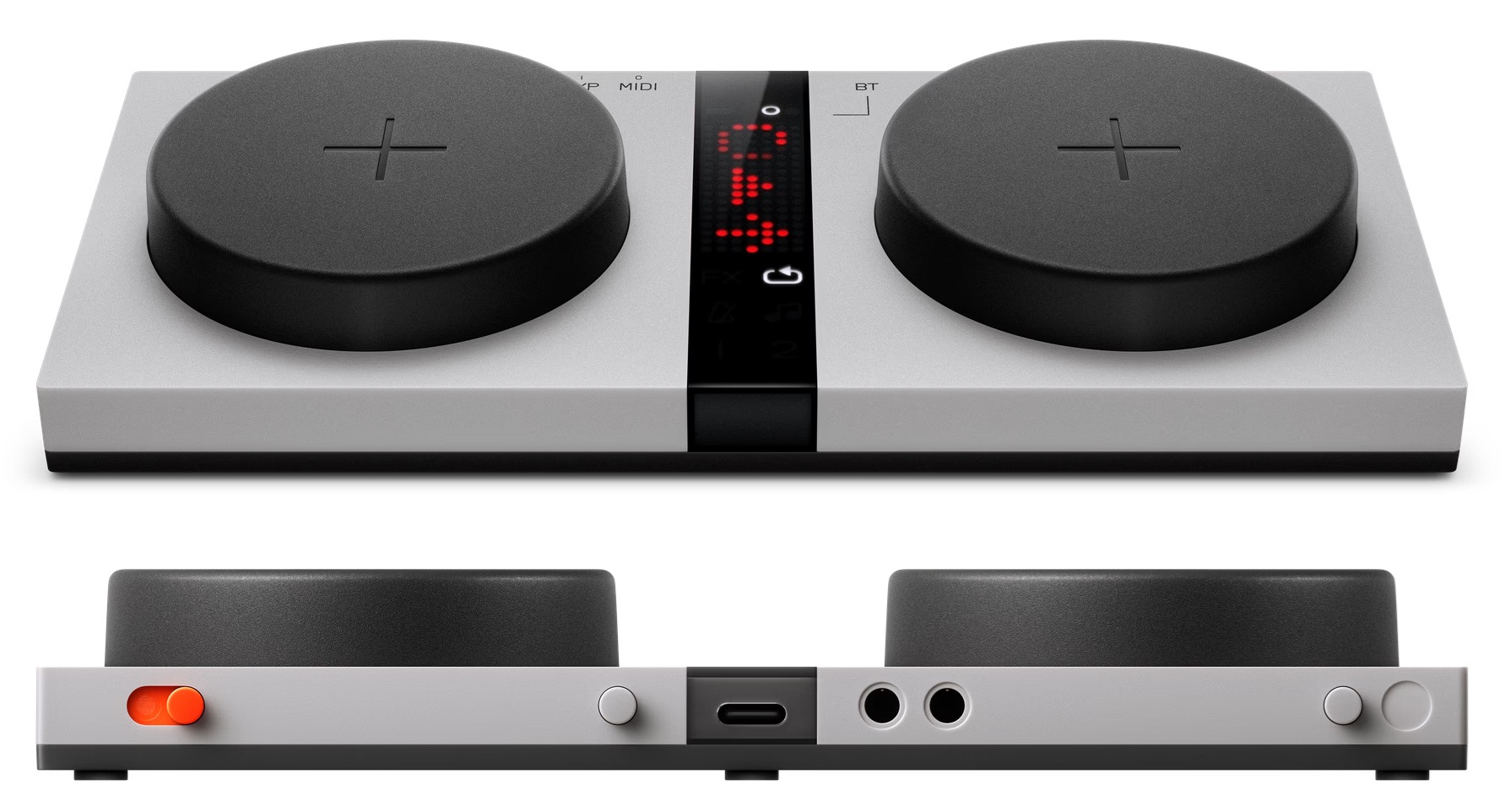
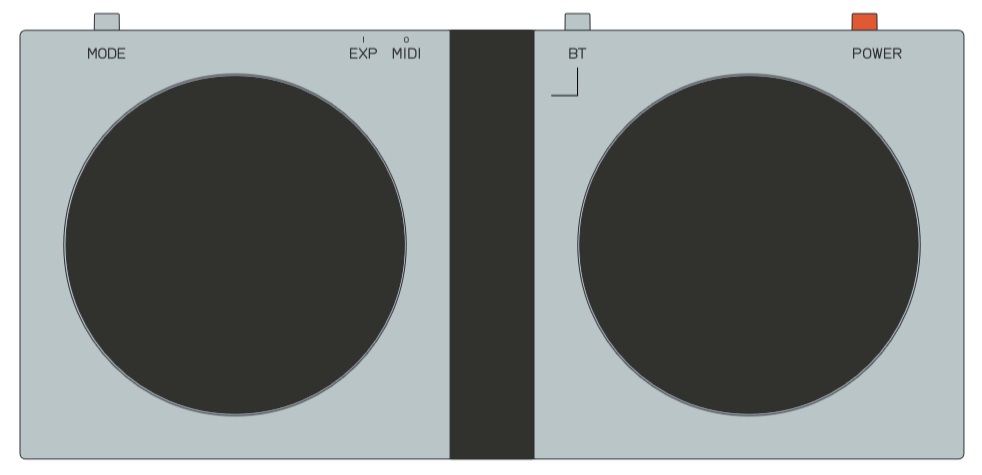
The two circular areas in the EP-127 K.O. PEDAL leak photo are pressure sensitive buttons for sending expression. Yep, the EP-127 has Bluetooth and! It includes a looper and a metronome. Basic specs from TE:

  • Wireless pedal controller for EP-35
  • Two pressure-sensitive buttons
  • FX, looper, metronome and playback control modes
  • Bluetooth LE and USB-C connectivity
  • MIDI and HID controller states
  • 3.5 mm expression pedal input
  • 3.5 mm MIDI out
  • Powered by 2x AAA batteries or USB-C
  • Dimensions: 176 x 84 x 26 mm
  • Weight: 0.2 kg

Teenage Engineering EP-127 K.O. PEDAL

As soon as I get a chance, I will dip into the K.O. Pedal and drop a few words about it. Its low price makes it a “no brainer.” The looper feature could be handy, especially if it retains loops in memory. I’m always trying to lighten my schlep and 0.5 pounds ain’t anything.

Winter holidays are coming…

I’ll close with a shameless plug for my EP-40 RIDDIM and EP-136 SIDEKICK PDFs.

Time passes…

Well, I did read the Teenage Engineering EP-127 K.O. PEDAL guide. I recommend reading it before buying to see if EP-127 is for you.

The big take-away: The EP-127 is first and foremost an accessory for the EP-35 K.O. AMP. The PEDAL itself does not possess looper, metronome or effects. Rather, the PEDAL controls the looper, metronome and effects inside the EP-35.

That makes the K.O. EP-35 AMP a sound beast that can loop, apply effects and so forth. It makes the EP-127 less desirable as it does not have any sound processing itself. TE don’t mislead; just be aware of what you’re buying.

The EP-127 can control external MIDI devices, instruments, modules and so forth (MIDI state). The PEDAL also can operate as a HID (Human Interface Device) controller (HID state), e.g., to flip screen pages. Again, read the MIDI and HID parts of the Guide carefully.

Out of the box, the EP-127 MIDI implementation is relatively limited. The MODE button cycles through four modes in the MIDI state:

Mode      Control/interaction        Channel CC/value range
--------- -------------------------- ------- ------------------
FX        Left button / force-press    1/2   CC#12 / 0-127
FX        Right button / force-press   1/2   CC#13 / 0-127
LOOP      Left button / press          1/2   CC#82 / 0 | 127
LOOP      Right button / press         1/2   CC#83 / 0 | 127
METRONOME Right button / press         1/2   Clock / Start | Stop
PLAYBACK  Left button / force-press    1/2   CC#1 / 0-127
PLAYBACK  Right button / force-press   1/2   CC#64 / 0 | 127

The EP-127 sends on either MIDI channel 1 or 2 (selected via the BT button). You can see that only the PLAYBACK mode is the most generally useful, sending modulation and sustain. The other MIDI CCs may or not be meaningful to the receiving MIDI device.

The EP-40 RIDDIM assigns CC#1 modulation to vibrate, CC#12 to FX parameter X, CC#13 to FX parameter Y, and CC#64 to sustain for key and legato voices. the EP-40 also should respond to CLOCK, Start and Stop. 3 modes out of 4 ain’t bad.

At the moment, the configuration is fixed. I hope Teenage Engineering will announce a configuration hack (via JSON?) like the effect hacks for EP samplers. Such a hack would make the EP-127 a more generally useful and desirable product.

Even better, it would be terrific if the EP-127 buttons could send MIDI notes. Those pressure sensitive buttons are dying to be finger-drum pads!

I always say, buy a product as it is today. Don’t buy something and hope for an update or a hack. In my own situation, I’m going to wait and see, especially since I have the Roland/Boss EV-1-WK among other options.

You may be curious about how EP devices dock to the EP-35 K.O. AMP, so here is one last snap.
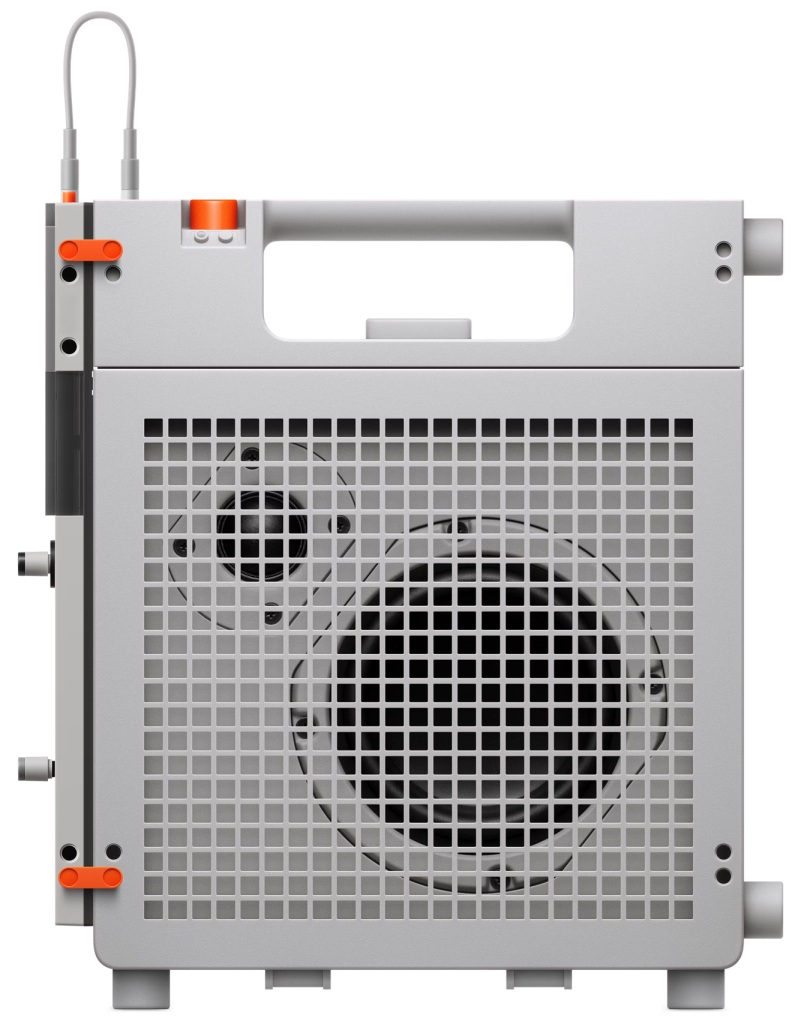
Teenage Engineering EP-35 K.O. AMP docked

The EP-35 form factor is designed to accommodate full- (e.g., EP sampler) and half-sized (e.g., SIDEKICK) EP devices. One hopes those pegs are strong! More and more, the K.O. AMP looks like a consumer product, not PRO.

Copyright © 2026 Paul J. Drongowski
Fall 2026 new stuff

I’m going to leave ancient keyboards behind (for a moment), and leap into the future. Well, the maybe future.

Dirty ca$h: CK76

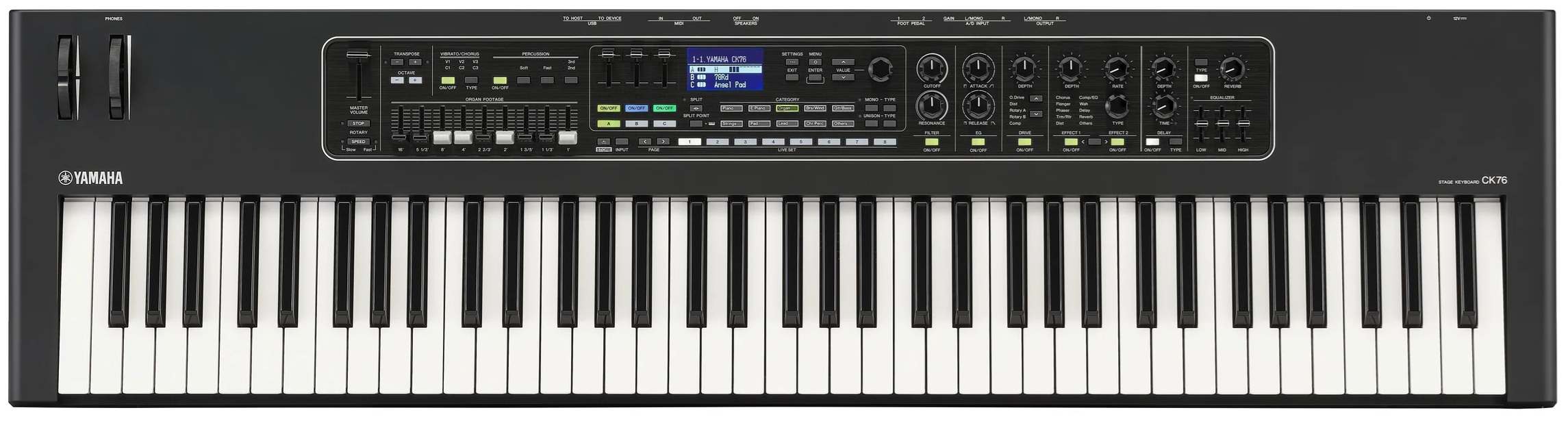
Update: CK76 is coming. Another slip of the tongue: “Positioned between the existing CK61 and CK88, CK76 addresses customer demand for a mid-sized performance keyboard that balances playability …” Advertised price: $1,249.99.

New Yamaha CK76 Stage Keyboard

Blake’s take: https://yamahasynth.com/learn/ck-series/blakes-take-introducing-ck76-ck-osv2-0/

Version 2 adds 3 new EP sounds and new Live Sets along with a few new features

Every now and again, an Internet search barfs up a tasty tidbit. Perhaps the Yamaha CK page cache is dirty, but two new CK-related offerings may be on the way:

  • A new 76-key model, CK76, in the CK line-up.
  • A version 2.0 CK update.

Let’s hope so. The Yamaha CK is a great value for budget-minded punters.

CK76 — Dirty cash I want you

CK61 and CK88 were announced in early 2023. We are due for a model refresh AKA “life extension” for the CK product line. If they had a 49-key CK that weighs less than 8 pounds, I would buy one in a heartbeat.

Pedal to the metal

I’m a fan of Teenage Engineering’s K.O. gear. Not long ago, I bought a K.O. Sidekick, too — and yes, I owe you a review. 🙂

TE know how to tease a credit card, and now, pictures of an EP-127 K.O.-PEDAL are making the rounds.

The K.O. EP samplers are ripe for accessorization. There is, of course, K.O.’s serial MIDI IN and OUT. The “BT” button in the picture screams Bluetooth. Perhaps Bluetooth MIDI is coming in a future EP update? CME make the CME WIDI EP MIDI interfaces, so TE does not need to re-invent that wheel.

TE label their inputs and outputs with tiny “I” and “O” markings. The picture suggests an expression (pedal) input and a MIDI output — no MIDI IN.

If — IF — the power switch position is similar to the EP-40, then the K.O.-PEDAL is about 18cm wide and 9cm deep. That is not very big. Perhaps the circular-disks are touch pads? That might open up the possibility of finger drumming. TE likes control gizmos.

I don’t think the K.O.-PEDAL will be very expensive, so start saving your pennies.

A place for your cold one

The other TE leak — and you have probably seen it already — is the TE EP-35 K.O.-AMP. It is a 35 Watt battery powered, portable instrument amplifier. There are many small personal instrument amplifiers like the Headrush FRFR-GO, Yamaha Stagepas 100BTR and a bajillion ultra-portable amps aimed at guitarists. Now TE will take the plunge.

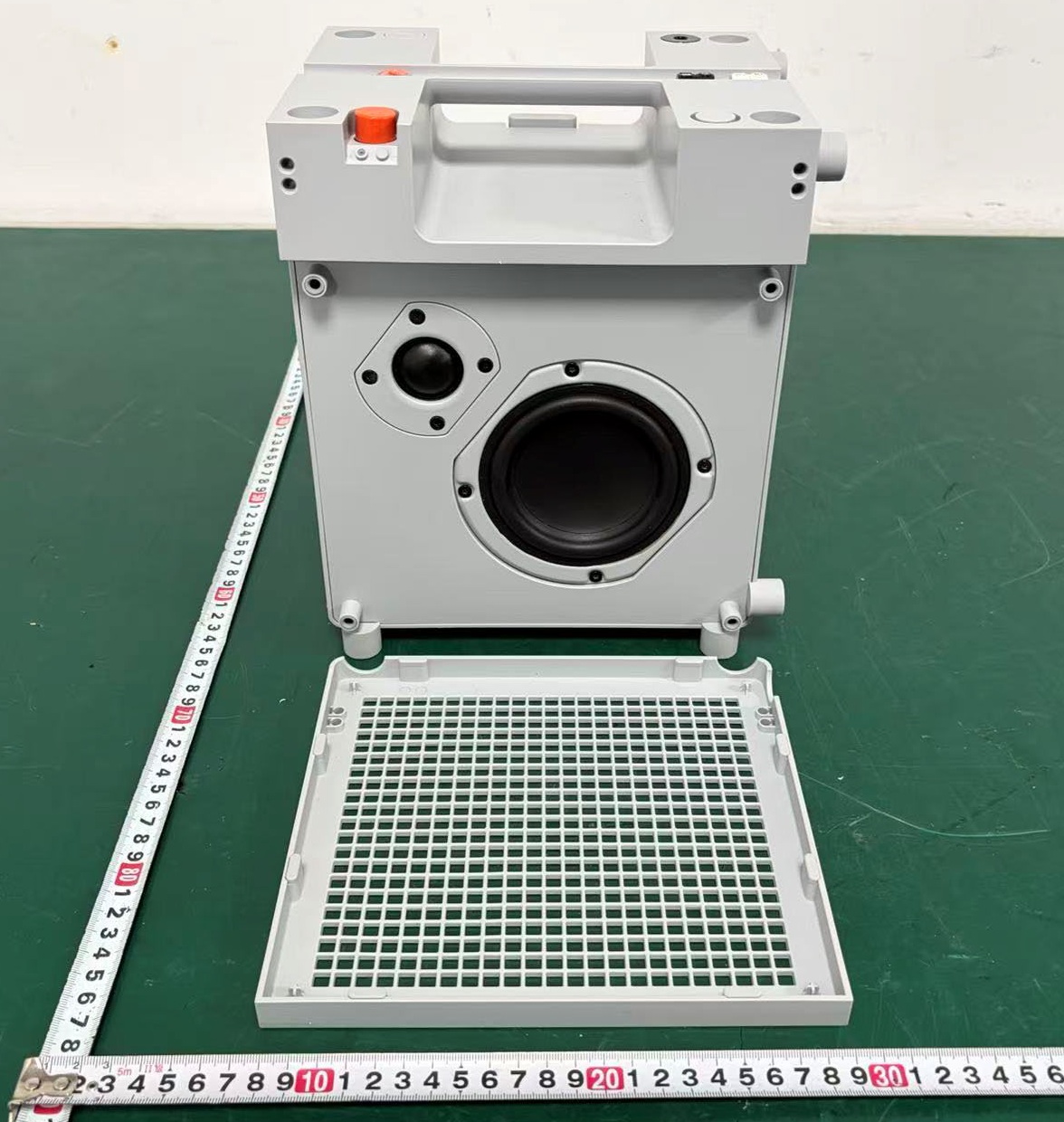
Teenage Engineering EP-35 K.O.-AMP

The K.O.-AMP has LINE IN, guitar IN and XLR MIC inputs. There are MIC effects and guitar effects which can be dialed in independently (those funky thumb dials). All can be directed to the LINE OUT. The MIC XLR can supply 48V phantom power.

There are two physical USB Type-C ports: a computer/phone port and an “EP-PLUG” port (with its own MODE button). The main goes-in, goes-out and controls are on the top panel with several more controls hidden in the “storage compartment.” The EP-PLUG port supports USB audio devices, USB thumb (flash) drives and EP-PLUG accessories. The EP samplers got full USB audio with the last update, so I would expect the EP samplers and the EP-126 K.O. SIDEKICK to communicate with the amp over USB. The SIDEKICK would be a sick mixer for the K.O.-AMP.

In terms of wireless, there are Bluetooth audio and FM radio (true old skool wireless). The K.O.-AMP can broadcast audio to other K.O.-AMPs in Auracast mode. No doubt, all of this wireless stuff necessitated FCC testing and approval.

I think the K.O.-AMP is aimed at consumers more so than gigging musicians. Key specs are:

  • Frequency response: 50Hz – 20 Khz (-6dB) TBD
  • Max SPL @ 1m: 94dB (TBD)

That’s not a lot of bass and not very loud. You should plan on buying two for stereo.

Looking at the measuring tapes (centimeters!) in the picture, the front bezel is about 21cm wide and deep. Doing a little ratio magic, the speaker diameter is 10cm. The tweeter is 3cm.

TE gear is always fun and sometimes price-y. I don’t see the K.O.-AMP undercutting TE’s OB-4 portable wireless stereo speaker. The OB-4 sells for $580 to $680 USD. A pair of K.O.-AMPs should cost about the same — maybe $340 USD each?

Copyright © 2026 Paul J. Drongowski
Free Yamaha DJX MIDI songs

Crate digging old keyboards is fun! I’ve been recording and collecting Yamaha DJX (PSR-D1) MIDI style patterns. To my knowledge, no one has made DJX MIDI patterns available. Now, for the first time, I offer a collection of DJX MIDI songs.

As mentioned in my earlier post, I recorded the MIDI songs while playing the DJX in STYLE mode. (DJX does not transmit MIDI in SONG mode.) Each DJX song has the following structure:

    Lead In | Beat A | Break AA | 
            | Beat A | Break AB |
            | Beat B | Break BB | 
            | Beat B | Break BA | Beat A | Lead Out

Each song is a pretty decent representation of a DJX style. Songs are about 30 bars long, give or take, depending upon Lead In and Lead Out length.

Each song has two Type 1 MIDI files: set-up (SU) and style data (RAW). The SU files contain MIDI set-up messages to select voices, set levels, and so forth. The RAW files contain style pattern data. You would probably change or discard the set-up messages anyway, so it made sense to separate set-up from patterns.

Click this link to download the ZIP.

With 160 plus files, I organized files into subdirectories according to DJX style category: INTRODUCTION, TRIP HOP, ELECTRO, etc. Each subdirectory has a short text file with details like style name, key, and BPM. Here’s the table from the ABSTRACT category:

                 BPM Key/scale  Notes/opinion
---------------- --- ---------  ------------------------
55  Digital Rock 132 Am7 minor  Rock. Phrase 3 track empty
56  Underground  130 Am7 minor  Up-tempo rock beat. Phrase 3 unused
57  Chill Out     78 Bm9 minor  Nice! Feels faster. 4-bar INTRO

--> All captures made in Cm
--> Loading a DJX style and pressing PLAY shows the native key/scale

The root note for all songs is “C” in order to make conversion easier. [I won’t need to keep track of original, pre-programmed key scales.] If you see an exclamation point, that style/song will get higher priority for conversion. In other words, I like its vibe.

The DJX is a bit of a weird, one-off creature. Even though it uses an XG synthesis engine, the MIDI channel/part assignments are not compatible with current Yamaha arranger keyboards. All of the DJX songs use DJX-specific drum kits (e.g., B900 kit, DJX kit, etc.) which do not follow typical XG or General MIDI note to instrument assignments.

Further, the recording process introduced time skew and you will need to correct MIDI event timing. Taken in total, the DJX songs are very raw and need significant re-work to make them usable. Read the DJX manual before working with these files. I recommend reading my earlier posts, too.

I am distributing these songs even though the collection is not complete; fourteen songs remain to be captured. For the moment, I want to focus on style conversion, that is, transforming these songs into PSR/Genos styles.

Caveats aside, have fun!

If you landed here looking for DJX-II styles and patterns, please see the following pages:

Copyright © Paul J. Drongowski

DJX capture: Status

Just wanted to post something — anything! — about my on-going project to capture and convert Yamaha DJX (PSR-D1) MIDI styles.

There are 100 DJX styles covering fourteen dance/EDM genres. That’s a lot of material to swallow and I now realize the gargantuan size of this task! I’ve captured roughly 65 styles so far and have completed 10 conversions.

I’ve streamlined the capture process by using SONAR templates. My capture template has all of the basics pre-set: track names, channel assignments, and clock resolution (480 PPQ). Every track is RECORD-enabled. Templates really cut down repetitive monkey-work and mouse clicks.

I also like the template approach to jump-starting conversion. For conversion, I take a converted style and delete its MIDI note and controller data. Then I import RAW MIDI data into the “shell.” Since I’m capturing DJX styles in a particular section order, I sometimes don’t need to adjust the MIDI markers in the shell. As all of the tracks are pointing to legitimate PSR/Genos voices, I can play the shell into Genos and immediately start tweaking.

The biggest time sink is drum note re-mapping. The DJX-specific drum kits have different note to instrument layouts than modern-day PSR/Genos drum kits. It takes significant time to identify each source drum instrument and move it to an appropriate target.

DJX has four drum parts (tracks) which Yamaha called Kick, Snare, Hi-Hat, and Percussion. Each part is assigned to its own MIDI channel: 9, 10, 3 and 4, respectively. So far, I’m keeping the parts separate sending them to channels 9, 10, 15 and 16, respectively.

Having a drum kit on Genos style channels 15 and 16 reveals an important gotcha. Genos will load and play the chosen drum kit on 15 or 16, but Genos will not let you assign a different drum kit — the mixer displays a blank page for 15 and 16 when a drum kit is assigned. Channels 15 and 16 are normally Phrase 1 and Phrase 2 in PSR style lingo and are intended for melodic instruments. The Genos/PSR user interface tries to enforce this intention. It will not let you select a drum kit on any style channel other than 9 (Sub Rhythm) and 10 (Main Rhythm).

The purpose of separate drum tracks is to allow real-time remixing and muting. I’m trying separate tracks, but maybe, someday, I will need to redirect all drum notes to channels 9 and 10. Just something to keep in mind.

Meanwhile, I will forge ahead! As soon as I collect a few more DJX styles, I will post the RAW MIDI data here.

Copyright © 2026 Paul J. Drongowski