Even though Winter NAMM 2022 is postponed (or just outright moved) to June, a few manufacturers are sticking to their release schedule.
Include Akai on the list of schedule keepers.
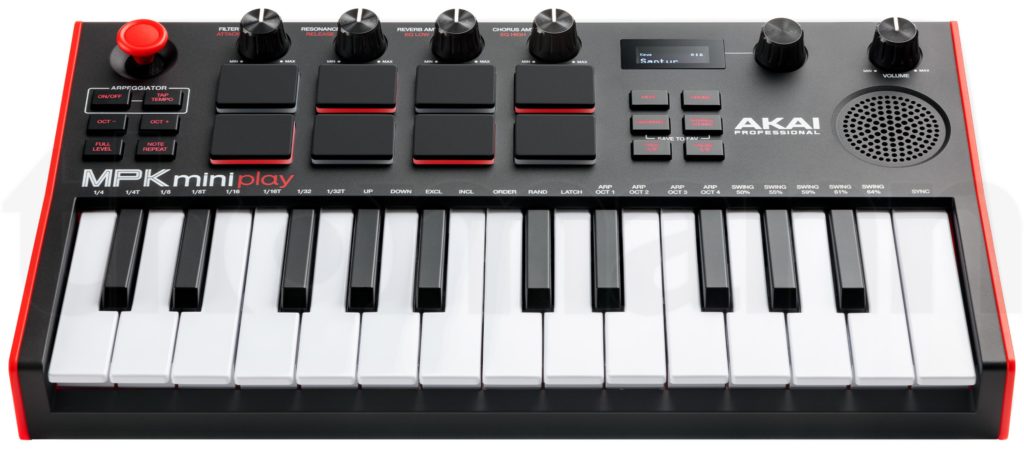
Akai have revamped the MPK mini play giving it a new front panel layout and a better speaker. The mini-keyboard has been upgraded to Gen-2, too. The new MPK mini play mk3 is slightly larger: 317 x 178 x 58mm versus 312 x 172 x 46mm. No strain, there.
Akai MPK mini play mk3
Other specs are largely the same. I would think the mk3 is based on the same mk1 sound engine (probably a Dream Synthesis SAM2635). The speaker is larger and is a welcome change.
I rather like the new layout. The control knobs are larger (?) with a modern appearance. Maybe, possibly, the knob placement may interfere with finger drumming? Internal (initial) control assignments are the same. Styling overall is more “noir.” No visible changes to the arpeggiator.
Thomann indicate price at 129 EURO. Thomann USA have a $124 USD price for USA customers.
If you fancied one before, now you’re spoilt with choice.
More than 100 internal drum and instrument sounds
Gen-2 keyboard with 25 velocity-sensitive mini keys
8 backlit MPC pads with Note Repeat and Full Level function (x2 banks)
4 controls for editing internal sounds or MIDI parameters (x2 banks)
built-in speaker
OLED Display
Pitch / Modulation Joystick
Arpeggiator
Connection for sustain pedal: 1/4inch jack
USB-B Port
Headphone output: 3.5mm jack
Dimensions (W x D x H): 317W x 178D x 58H mm
Weight: 860 g (1.9 pounds)
Software package: Akai Pro MPC Beats, AIR Music Tech Hybrid 3, Mini Grand, Velvet and Melodics learning software with 60 lessons
After visiting the U.S. Patent and Trademark site, I normally do a deep dive into a few patents. Given the upcoming announcement of Casio’s new keyboards (Casio CT-S1000V and CT-S500), time is of the essence. Thus, here is a short list of the most relevant recent Casio patents:
If you’re short on time, you might want to start with the starred (“*”) patents. Clearly, Casio have invested heavily in voice and instrument synthesis!
Of course, the usual caveats about patents and patent applications holds. Just because a company stakes out its intellectural property (IP) turf with a patent, does not mean they will build the technology into a finished product. Beware when drawing inferences!
A little background and context are needed. Please keep these points in mind when reading the Casio patents.
Casio have moved to a new generation of synthesis:
Acoustic and intelligent Resonator (AiR) sound source.
Multi-dimensional Morphing (changing volume and tone characteristics with variations in touch and passage of time).
Lossless audio compression.
Resonance system (string resonance, open string resonance, damper resonance, Aliquot resonance).
Acoustic and intelligent Xpression (AiX) sound source.
AiX evolved from AiR. AiR first appeared in Casio digital pianos. AiX first appeared in the CT-X series of portable keyboards. Both technologies are based on a new, proprietary, large scale integrated (LSI) processor. The Casio CT-S series, including the new models, exploits AiX technology.
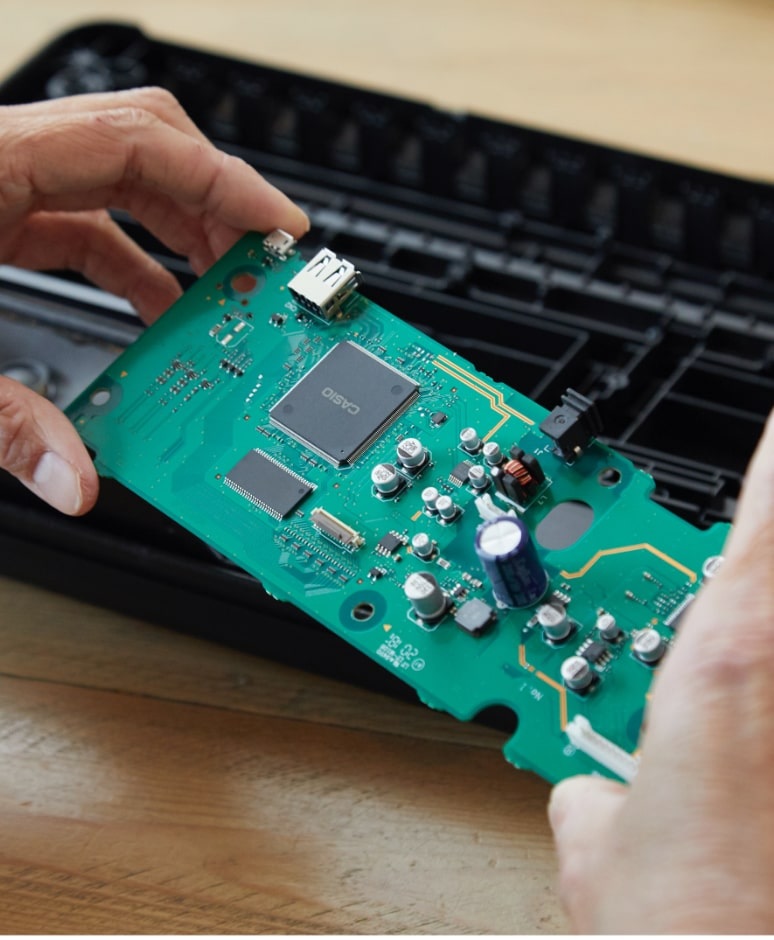
Casio CT-S1 printed circuit board [Casio]
Casio have always relied upon a very high degree of functional integration. Previously, a wide range of products were based on the custom uPD800468P-012 processor. This processor was a sizable beast with 180 pins integrating major functions like digital-to-analog (DAC) and analog-to-digital conversion (ADC). The main clock ran at 48MHz. This may seem slow to people accustomed to personal computer technology, but the low clock speed is power efficient — small power supplies and/or battery operation and no fans or heat sinks. You don’t really want to lug around a PC power supply and all of its cooling elements, do you?
The uPD800468P-012 has been replaced by a new LSI processor with even more pins! The CT-S1 main board is positively sparse. Where did all of the other components go?
Slight digression. Casio and Yamaha are manufacturing juggernauts who slug it out in portable keyboards and digital pianos. Entry-level products are notoriously price-sensitive and both companies work hard to wring cost out of entry-level (and mid-range) products.
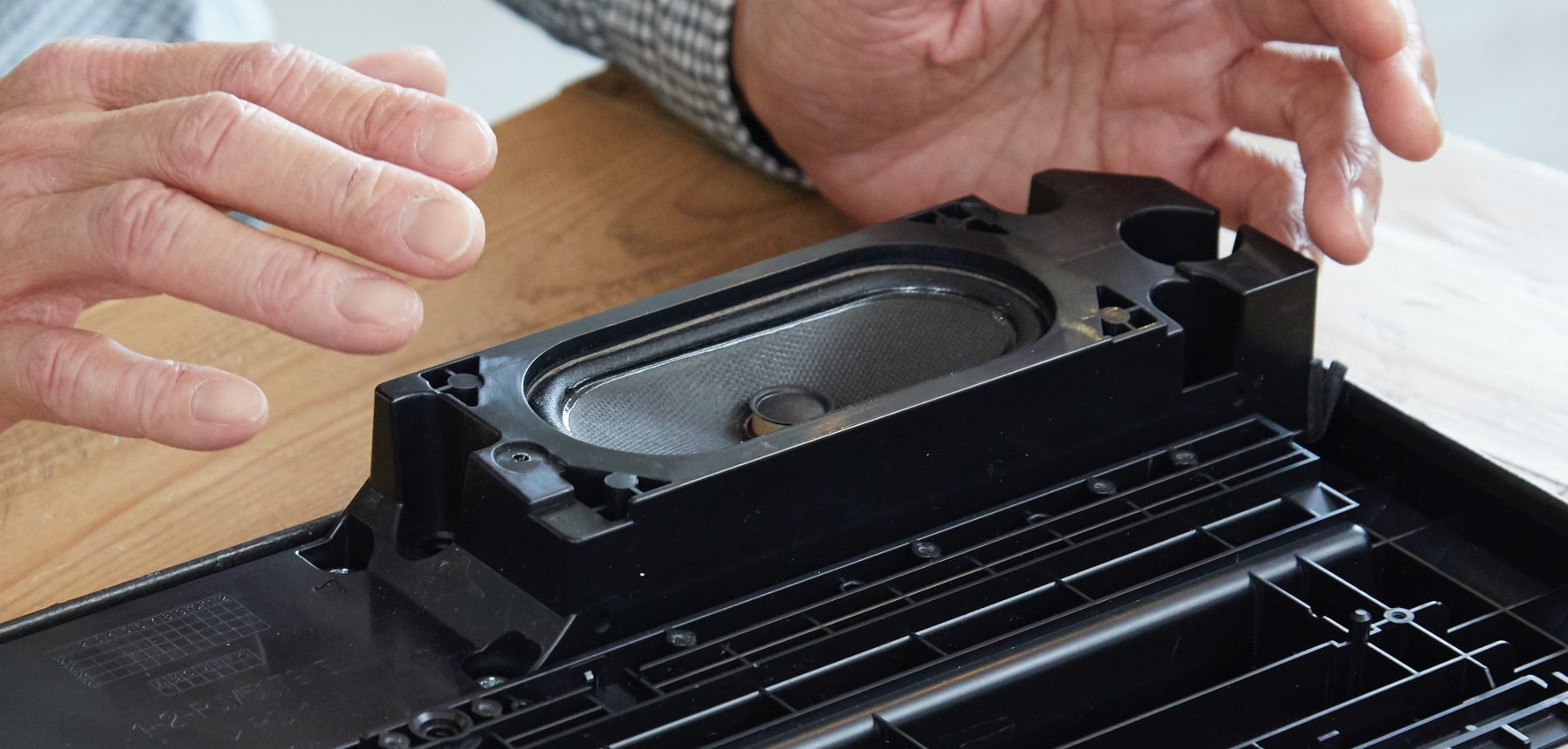
Casio ST-S1 speaker box [Casio]
Casio are pushing in other dimensions, not just LSI. With more waveform memory capacity, they have added “Advanced Tones” such as the new piano, clav, and organ samples in the popular CT-S1. They have also developed a horizontal bass-reflex speaker system for slim-line instruments. The system incorporates a new speaker box and elliptical speakers. Finally, Casio have developed their own low-latency Bluetooth audio and MIDI protocol.
For further information, I highly recommend the behind the scenes interview with the CT-S1 development team. Not only will you learn about the CT-S1, you’ll get a feeling for the “contact sport” of product engineering as the team try to balance conflicting design concerns.
[I hope that Casio don’t mind that I have reproduced a few of their pictures here.]
The forums are alive with rumors about the yet unannounced Casio CT-S1000V vocal synthesizer. Casio have posted a teaser video indicating a “January 2022” announcement date. I say “announcement” because the world-wide supply chain crisis will likely hold up deliveries.
As in the case of the rumored Yamaha PSR-EW425 (PSR-E473), enterprising souls have teased out pre-release images.
We do know that the CT-S1000V is based on Casio’s AiX synthesis technology. AiX is Casio’s latest generation of tone generation (large-scale integrated (LSI) circuitry). Their own teaser video has snippets of synthesized voice and/or vocoder. The teaser video is a flashdance by a four octave keyboard (pitch bend wheel and a few knobs.)
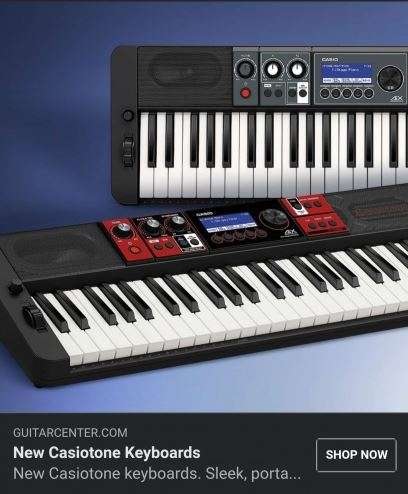
Casio CT-S1000V advertisement
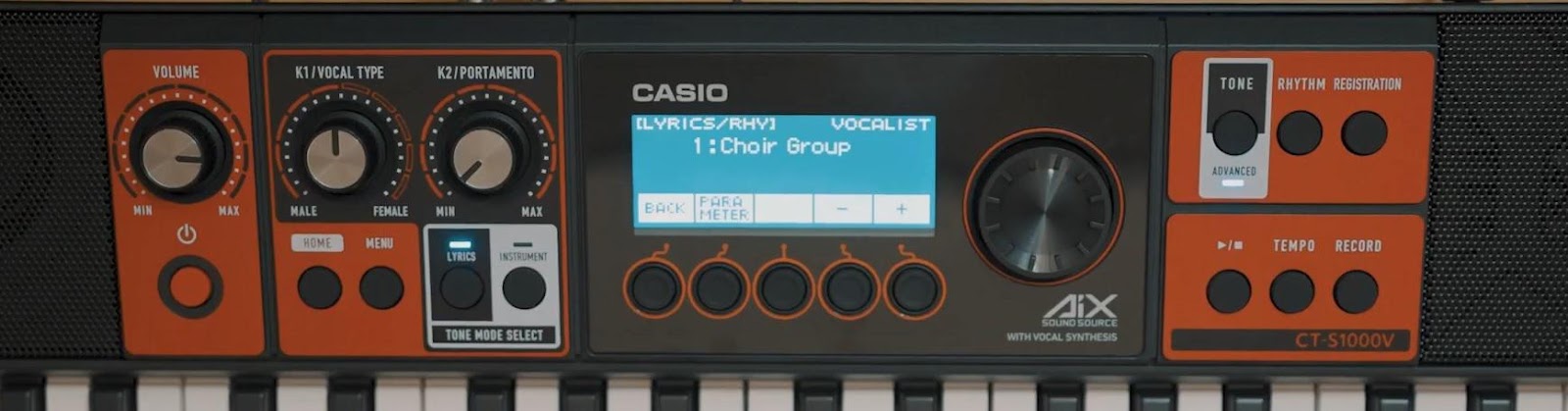
The Guitar Center snap shows black and red models with oval-ish built-in speakers. There are two live control knobs along with the usual master volume and data wheel controls. There are five buttons below the display for navigating the menu system. The keys are squared-off, more like unweighted piano keys than synth keys. The GC text mentions portability, so I would expect battery operation as well as AC adapter.
The knob legends are different on the red model and the gray (black) model. This suggests two new models. Perhaps the red CT-S1000V has voice synthesis and the grey (CT-S500) is solely instrument synthesis?
Casio CT-S1000V panel
The second image has more detail. The assignable live control knobs to the left of the display are labeled “K1/VOCAL TYPE” and “K2/PORTAMENTO”. The vocal type sweeps between MALE and FEMALE. The tone mode select switches choose LYRICS and INSTRUMENT. There is some rhythm and record capability.
Intriguingly, the panel is is labeled “AiX sound source with vocal synthesis”. Coupled with “lyrics” and “vocalist,” one thinks of voice synthesis. Is this instrument Casio’s answer to Yamaha’s VKB-100 VOCALOID™ keyboard?
Update: Casio have posted a new teaser video. Casio will be holding an event — CasioKeynote.com — on January 20, 2022 at 1PM EST. No, that’s not too early for me on the west coast, 10AM PST. 🙂
Counting keys in the new video, there must both 49- and 61-key models. If — if — the sound in the video is produced by the CT-S1000V in one pass, then it is capable of combining (playing) voice over music/rhythm parts.
There is also a new unofficial image showing the Casio CT-S1000V back panel. It’s blurry as heck, so have at it. The rear panel layout is very similar to the CT-S400. For that matter, the front panel has a similar flavor, too.
Casio CT-S1000V back panel
At least Casio aren’t waiting for Summer NAMM (June 3-5, 2022) to announce new product!
The ChordPro to Yamaha auto-accompaniment program, cp2mid, translates an extended ChordPro song file to a MIDI file containing Yamaha-compatible auto-accompaniment messages. The MIDI file is compatible with recent mid- and high-end Yamaha arranger workstations like Yamaha Genos™. Once you transfer the MIDI file to the arranger, it plays like any other Standard MIDI File (SMF). Instead of directly playing notes, however, it tells the arranger’s auto-accompaniment engine what to play: the style, the tempo, the chords and the section (intro, main, fill in, or ending). The arranger displays chords and lyrics in sync with play-back.
What can you do with ChordPro auto-accompaniment? Here’s a few ideas.
Play along with a song from the Web
ChordPro is one of the most widely used song formats on the Web. Pros and punters alike use ChordPro as shorthand lead sheets. You’ve probably seen formatted ChordPro songs like:
 G      G7          C         G
Amazing Grace! (how sweet the sound)
                         D
That saved a wretch like me!
  G        G7        C      G
I once was lost, but now am found,
    Em         D     G
Was blind, but now I see.
Presumably, a musician is already familiar with the song’s tempo and melody, needing only to follow and change chords in time.
In extended ChordPro, the chords are embedded within the lyric text:
[G]Amazing [G7] Grace! (how [C] sweet the [G] sound)
That [G] saved a [G]wretch like [D] me! [D]
I [G] once was [G7] lost, but [C] now am [G] found,
Was [Em] blind, but [D] now I [G] see. [G]
Chords are surrounded by square brackets. Here, we assume each chord is held for a single measure. Songs on the Web are very loose (flexible!) about time. Auto-accompaniment, however, is precise. You will probably need to tighten up timing when using a song file from the Web.
You’ll also see ChordPro directives in song files:
You’ll want to add the time signature, tempo, stylecode, and start_accomp directives to the song. The stylecode directive selects one of the hundreds of built-in arranger styles. (A convenient list of codes is included in the distribution.)
You can always leave out the stylecode and select the accompaniment style on the arranger keyboard itself. You can choose one of the preset styles or user styles. Thus, you can try out different arrangements or use a style of your own design.
Finally, extended ChordPro allows annotations which select an accompaniment section like an intro, main, fill-in or ending. Here is “Amazing Grace” ready to go:
# Verse [G][*MA] Amazing [G7] Grace! (how [C] sweet the [G] sound) That [G] saved a [G]wretch like [D] me! [D][*FA] I [G][*MA] once was [G7] lost, but [C] now am [G] found, Was [Em] blind, but [D] now I [G] see. [G][*FA]
# Ending [G][*EA]
Don’t forget to turn on the Lyric or Score display. Song chords and lyrics are displayed during play-back.
Jam
Auto-accompaniment is a tireless band! Plug in some chords and play along.
Here is a fast blues shuffle. Copy and paste the 12-bar sections as many times as you like. Change the accompaniment sections to build up energy as the tune progresses.
Experiment with different intros: [*IA], [*IB] or [*IC]. Try different endings: [*EA], [*EB] or [*EC]. An intro or ending will follow the preceding chord as if you played it on the keyboard itself. Generally, the A variations are one measure long. Length of the B and C variations depend on the chosen style. You will need to specify the root chord for each measure in order to keep play-back in sync.
Write a song of your own
Why not write a song of your own? Yamaha’s built-in Chord Step Edit is too detailed and clunky for songwriting. Use cp2mid instead.
[Cm7][*MA] My baby left me. [Cm7] [Cm7] Now I'm all alone. [Cm7][*FA] [Fm7][*MA] My baby left me. [Fm7] [Cm7] And I'm all alone. [Cm7][*FA] [Ab7][*MA] I still love her, [G7] [Cm7] Won't answer the phone. [Cm7][*FC]
[Cm7][*MB] It's about money, [Cm7] [Cm7] I know it's true. [Cm7][*FB] [Fm7][*MB] It's about money, [Fm7] [Cm7] I know it's true. [Cm7][*FB] [Ab7b5][*MB] Can't keep a job, [G7] [Cm7] I am so blue. [Cm7][*FC]
[Cm7][*EA]
It’s easy to change the chord progressions and song structure. Plus, the lyrics are all in front of you. Once the song is loaded, you have the freedom to change the tempo and style on the keyboard. Unlike Chord Step Edit, you can manually choose a user style; you aren’t limited to the preset styles.
Turn on Lyric or Score display. You’ll be able to sing and play along with your new song!
cp2mid doesn’t have a fancy graphical user interface (GUI). A GUI is too much for a simple tool that translates an extended ChordPro file into a Standard MIDI File (Type 0).
I’m distributing both Java source code and a JAR file. The JAR file contains the compiled Java — the Java executable, if you will. “JAR” is an acronym for “Java Archive” and is produced by the Java archive program (jar), which is part of the Java development environment (JDK). JAR is a way to package up a compiled Java program, hiding all of the interior classes, etc. An end user doesn’t really need to know about JAR.
Given the JAR file, enter the following command line to run cp2mid:
java -jar cp2mid.jar AFile.cho
“AFile.cho” is the name of an extended ChordPro file to be translated. You can hide the cp2mid.jar file within a Windows BAT file or shell file. Here is cp2mid.bat:
java -jar cp2mid.jar %1
Nothing complicated, here.
cp2mid recognizes the “.cho” file name extension. It does not recognize any other extensions. If you snag a ChordPro file from the Web, you may need to change its extension to “.cho”. cp2mid replaces “.cho” with “.mid” in order to make the MIDI file name. Thus, “AFile.cho” is translated to “AFile.mid”.
During development and testing, you can run cp2mid starting with the compiled classes, e.g., cp2mid.class. Enter the command line:
java cp2mid AFile.cho
to run cp2mid. The Java interpreter will look for “cp2mid.class” and the rest of the compiled classes needed by cp2mid. These compiled classes must be available in the same directory as cp2mid.class. “cp2mid”, by the way, is the main class in the application. You’ll need to specify the main class when creating a JAR file. Again, these steps are relevant only to developers.
Java classes
cp2mid has five Java classes:
cp2mid (cp2mid.java) Main class and driver
SongElement (SongElement.java) Basic element (parts) of a Song
Song (Song.java) Represents a ChordPro song in terms of SongElements
Song2mid (Song2mid.java) Translates the internal song representation to MIDI
MidiFile (MidiFile.java) Represents and manipulates a standard MIDI File (SMF)
The MidiFile class was used in an earlier prototype and still contains a bit of unused legacy code. This may change in future versions. The MidiFile class exploits the standard Java MIDI packages and classes. It creates a MIDI file and inserts MIDI messages (meta, SysEx and otherwise) into a MIDI file.
cp2mid is the boss. It calls on the other classes to do their jobs. Processing is broken into five phases:
Check and manipulate file names.
Read the ChordPro file into a String array, one line per array element.
Translate each line into one or more SongElements.
Translate the SongElements into MIDI.
Write the internal MIDI representation to a Type 0 SMF.
The translation phases do the heavy lifting.
Song and song elements
A Song is a list of SongElements. A SongElement represents one of several ChordPro song constituents:
Directive
Chord
Lyric
Line
Annotation
Comment
Tab
All SongElements have the same data members. Each SongElement has a tag which identifies its type. The type determines the validity and interpretation of the other data members.
The Song class translates extended ChordPro to a list of SongElements. This is, effectively, the intermediate, internal representation of a ChordPro song.
ChordPro directives begin with ‘{‘ and end with ‘}’. Usually ChordPro directives control song formating. Extended ChordPro uses key, tempo, time signature, style code, start accompaniment and stop accompaniment directives to issue MIDI messages that will control the accompaniment engine when the MIDI file is played back.
ChordPro chords and lyrics are what it’s all about. Chords begin with ‘[‘ and end with ‘]’. Chords are extended by an optional beat count which specifies how long the chord is held. A lyric is text and may be multiple syllables long (i.e., anything up to the next chord, annotation, or end of line.)
A line element is a marker for important end-of-lines. Line elements affect lyric formating.
Normally, a ChordPro annotation is text added to a song when it is displayed. Annotations begin with ‘*[‘ and end with ‘]’. Certain predefined annotations, e.g., [*MA], [*FA], etc. change the accompaniment section during play-back.
Comments are just that. cp2mid saves the text, but doesn’t do anything with it.
A ChordPro song may contain guitar tablature (tab). Right now, cp2mid ignores tablature. This has not been tested. I’m not sure how to handle or translate tablature as yet.
Song to MIDI
The Song2mid class translates the internal intermediate song representation to MIDI messages and adds the MIDI messages to a MIDI sequence. The MidiFile class helper functions create specific types of messages. Base MIDI message and sequence classes belong to the standard Java MIDI package.
The Song2mid class walks the SongElement list from front to back. Based on element type, it dispatches to an element type-specific handler. The handler adds one or more MIDI messages to the sequence.
I tried to encapsulate most of the “Yamaha-ness” in the Song2mid and MidiFile classes. ChordPro is very loose and forgiving when it comes to chord syntax. Song2mid recognizes only the 33 or so Yamaha chord types as defined in the Genos Data List PDF. If Song2mid doesn’t recognize a chord, it issues either a major or minor triad.
Example songs
I will distribute 15 example songs in extended ChordPro and MIDI format. Even if you don’t run cp2mid (or look at its implementation), please take a look at the extended ChordPro songs and try the MIDI files on your arranger. All sorts of fun and crazy things happen in real music (key changes, time signature changes, anticipation) and the examples demonstrate how to handle many exceptional situations. I chose certain songs as examples for testing because they are weird. 🙂
I tested the MIDI files on Genos and I’m curious about their behavior on other arranger keyboards. The MIDI files are similar to those generated by Yamaha ChordTracker. If your arranger plays ChordTracker MIDI files, it should play cp2mid MIDI files.
I don’t want to lead you on — it takes a fair bit of effort to take an Internet ChordPro file and whip it into shape. ChordPro as a formating tool is very lenient and forgiving. Accompaniment requires tighter semantics and precision like most “executable” computer stuff. It’s fun to whip a song into shape, but it requires work.
What to do with the ennui that sets in on New Years Day? Explore unexamined territory!
Yamaha Musicsoft Downloader is a valuable tool for Yamaha arranger keyboardists. Downloader lets you transfer MIDI song files, registrations file, text files, etc. between a Windows PC and a compatible Yamaha arranger keyboard. It even works with digital home pianos, too.
Most folks transfer their files using a USB jump drive. This isn’t a big deal when moving a few files maybe once or twice a day. When I’m developing a new style, however, I swap a drive quite frequently — dozens of times a day. All that physical swapping causes wear and tear on USB ports. I often use a short USB extender to reduce wear on the computer and/or instrument USB ports. I’d rather have a cheap cable fail than a USB port on a motherboard.
Downloader saves a lot of that wear and tear by copying data over a cable instead of a USB drive. Downloader supports both USB and good ole 5-pin MIDI transfers. Thus, folks who own older pre-USB keyboards can use Downloader, too.
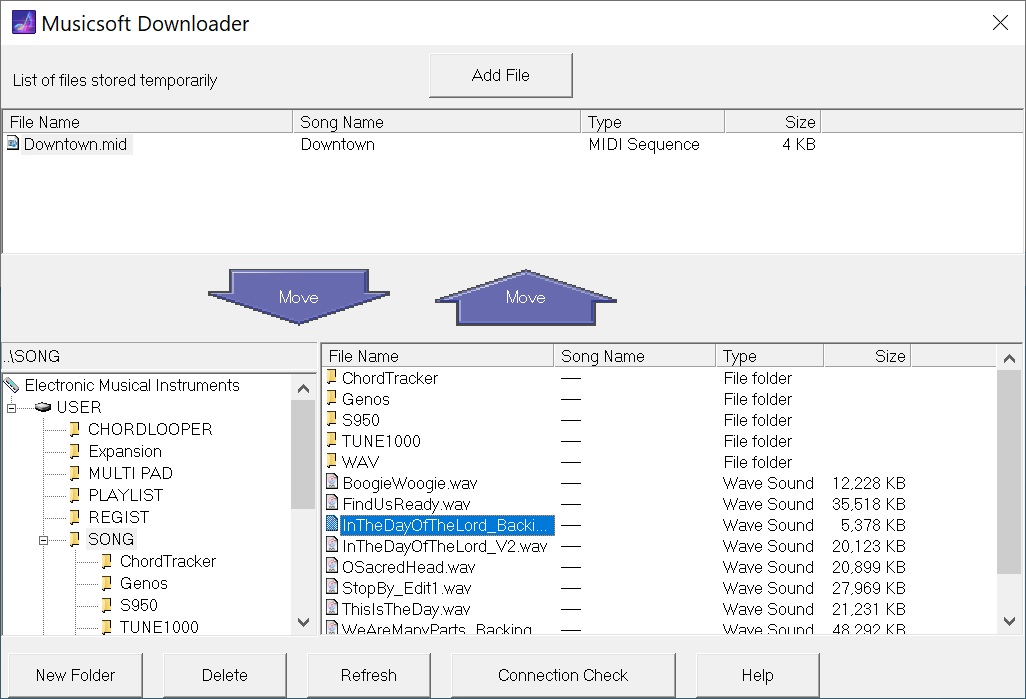
Downloader has been around a while — one reason why it’s backward compatible. The user interface is a little bit dated, but it works and who cares? To move a file, you add the file to the holding area at the top of the screen, then move the file to its final destination by pressing one of the big arrow buttons. Classic.
Yamaha Musicsoft Downloader in action
The screenshot shows Downloader connected to Genos over 5-pin MIDI. The file “Downtown.mid” is in the temporary storage area. The lower left hand panel navigates instruments, drives and directories. The lower right hand panel selects files within a directory.
So, how does it do the actual transfer?
Because Downloader is old skool, it does it with MIDI. (Even over USB.) Downloader was written back in the day when MIDI was king and could do anything and everything. As another example, I give you the MIDI Sample Dump Standard (SDS) for representing and transferring samples to/from early-day samplers.
Downloader performs a dance with the target instrument. Like SDS, Downloader and the target instrument follow a set of rules — a protocol — for communication. To my knowledge, Yamaha has never published this protocol. It’s all done via MIDI System Exclusive (SysEx) messages although you won’t find these message types in the instrument’s reference manual or data list file. Nonetheless, your instrument is smarter than you think!
Of course, a lot depends upon the storage and capability of the target instrument. Entry-level instruments may be oblivious to Downloader or maybe just transfer back-up files. Mid- to higher-end arrangers are fully capable.
I decided to get a taste of this hidden protocol by monitoring the exchange of MIDI SysEx messages between Downloader and Genos. I split the MIDI stream and watched the dance as Downloader makes contact with Genos and acquires top-level directory information. After watching this process several times, I tried sending my own SysEx messages via MIDI-OX. (What a great tool!)
Here is a typical start-up sequence. It shows Genos’ response for each SysEx message that I sent.
The first three out-bound messages test for a response. Downloader uses these messages as a connection check. The identity request message is a MIDI standard message for obtaining the identity of a musical device or instrument. Genos identifies itself as Yamaha (0x43) and model.
After getting the instrument identity, Downloader initiates the actual connection. When connected, the Genos display changes to a special background with the message: “Connected to the computer or smart device.” Genos is now listening for Downloader commands.
Thereafter, Downloader asks Genos for device, file and directory information. Here is the inquiry about top-level devices:
F0 43 50 00 05 0B 00 00 F7     Request drive 0 information
    Genos responds: F0 43 50 00 05 0B 01 42 00 00 05 00 55 53 45 52 F7
                                                         U  S  E  R
Yamaha arranger people will recognize the USER drive where all user directories and files are kept. Genos returns the name for device 0: “USER”. If you have a USB jump drive attached, you will see:
F0 43 50 00 05 0B 00 01 F7     Request drive 1 information
    Genos responds: F0 43 50 00 05 0B 01 42 00 00 05 00 55 53 42 31 F7
                                                         U  S  B  1
Makes me think that Genos tells Downloader how many devices are available — maybe in response to the connection command?
Moving on, Downloader interrogates Genos about the directories and files at the next level down in the file hierarchy.
You’ll notice that some command arguments and responses are ASCII characters, including the date and time stamps.
The number of subdirectories and files varies. So, Downloader and Genos go into a “loop” in which Downloader asks for the next entry (i.e., list item) and Genos responds with the entry’s information:
F0 43 50 00 05 05 00 F7        Request next dir list item
    Genos responds: F0 43 50 00 05 05 01 10 32 30 32 31 20 36 32 36 20 30
                                             2  0  2  1     6  2  6     0
                    34 34 35 34 03 01 00 00 00 06 00 53 4F 4E 47 00 00 F7
                     4  4  5  4                       S  O  N  G
This loop continues until the list of available items is empty:
F0 43 50 00 05 05 00 F7        Request next dir list item
    Genos responds: F0 43 50 00 05 7F 01 01 01 42 00 00 F7    End of list
Genos responds with a unique message saying “no more” (0x7F).
Finally, it’s time to close the connection:
F0 43 50 00 00 01 00 00 F7 Disconnect command
Genos drops the connection and returns to normal operation, that is, it displays its usual main screen.
Sharp-eyed readers have noted the “ChordTracker” subdirectory in the “SONG” directory. ChordTracker created this subdirectory when I transfered an accompaniment from my iPad to Genos. How did ChordTracker create the subdirectory and perform the transfer? That’s new territory (more SysEx) to explore!
Well, that was one way to stave off the New Year’s blues. 🙂
After investigating a wireless iPad-based rig for church gigs, I decided to take a 180 and try wired! The urge was inspired by a recent thread in the MusicPlayer Keyboard Forum about taming the rat’s nest of wires that engulf our keyboard set-ups.
I really detest the iPad 3.5mm audio jack on my 3rd generation iPad Air. That may sound like crazy-talk to people owning phones and iPads without a 3.5mm audio jack. However, the jack’s placement exposes an inserted 3.5mm plug to all sorts of physical and sonic abuse. Every time I pick up or move the iPad, the jarred plug causes all manner of crackles, pops and hum — at loud volume, no less.
Thus, an external USB audio interface is a necessity. I pulled out an old Behringer UCA222 2-in/2-out USB audio interface, which was my PC audio workhorse for many years. (Now replaced by a Yamaha AG-06 mixing console and audio interface). The UCA222 is not the best interface, but it’s inexpensive. Sweetwater is selling these for about $10USD and you can’t go wrong at that price.
Based on my success with UCA222, I put a Creative Labs Sound Blaster Play 3 external USB sound adapter on order ($20USD). The Play 3 is even smaller and will do 24-bit, 96kHz given driver and control panel support. The Play 3 is not spec’ed as IOS compatible, but folks are having success with Play 3 and iPad.
For extra credit, I would eventually like to control IK Multimedia B-3X with a Crumar D9U DIY drawbar controller. The D9U hasn’t seen much action lately and it would be good to get it into the mix. The D9U can do MIDI over USB through its micro USB port. That particular test must await another rainy (snowy?) day as I need to adapt the D9U Arduino sketch for B-3X.
Well, if you were counting, that’s four (4) MIDI devices. The Apple Lightning to USB 3 Camera Adapter has only one USB-A host port. Uh, oh. We need a hub. Fortunately, I have a few Sabrent HB-MCRM 4-port portable USB 2.0 hubs on hand. The Sabrent HB-MCRM is small, light and cheap (less than $10USD).
One could use an olde style Apple USB Camera Adapter, but why put yourself through the agony? Better to have the Lightning charge/power port than fight electrical current restrictions. BTW, I wish the Belkin RockStar™ had three ports: USB-A host, Lightning charge and 3.5mm audio.
It’s not rocket science, so plug it all in and success! Core MIDI merges the MIDI input streams together. Korg Module Pro and Crudebyte iSymphonic Orchestra respond to the Microkey Air and the Boss EV-1-WL expression pedal. I expect the D9U to function correctly, too, if I get its sketch right.
                                 S   <---->  Microkey Air 49
                                 a
                   Apple         b H <---->  EV-1-WL expression pedal
  iPad Air <---->   USB   <----> r u
                  Adapter        e b <---->  UCA222 audio
                                 n
                                 t   <---->  D9U drawbars
As to power, the EV-1-WL is not bus-powered. It needs either an external power adapter (9V 500mA center negative) or two AA batteries. The Korg Microkey Air and the Behringer UCA222 draw power from the Apple adapter through the Sabrent hub. (The Sabrent hub itself is not a powered hub, keeping things simple.)
A Lightning extension cable connects the Apple adapter to the iPad. This means only one cable to the iPad. The Lightning connector is reliably tight and eliminates the pops and crackles when moving the iPad. Most of the cabling sits on the floor out-of-sight.
As to audio connection, there are two options. Option 1 is running a long-ish unbalanced analog cable to the monitor. (The monitor is a Behringer B205D with a balanced XLR OUT to front-of-house.) Option 2 adds a USB extension cable between the hub and the audio interface (UCA222) for most of the distance with a short unbalanced cable from the interface to the monitor. Option 2 keeps things digital as long as possible, eliminating hum and other noise problems due to a long unbalanced cable run. Of course, there are limitations to USB extension (USB 2.0: 5M, USB 3.0: 3M).
Well, there you have it — an inexpensive, super-light, wired iPad rig. I haven’t found Bluetooth MIDI latency to be a problem, but wired latency should be less, if that is your concern. The USB approach seems to be less fiddly as to pairing, merging, etc.
If you’re curious about my wireless MIDI adventures, check out:
Work continues on my Java program to translate ChordPro songs to Yamaha accompaniment (SMF). The code is fairly stable and mostly I’ve been writing example songs in ChordPro format for testing. The range and variety of musical craziness is amazing: weird chords (“Superstition”, “Michelle”), changing time signatures (“Two Of Us”), changing key signatures (“My Girl”), unusual time signature (“Everybody Wants To Rule The World”), and more.
Today, I want to give a taste of what to expect. I plan to distribute the Java executable as a “jar” file and will also make the source code available. To keep things simple, the program runs from a command line — no graphical user interface:
java -jar cp2mid.jar ItsTooLate.cho
The program is named “cp2mid” and “cp2mid.jar” is the Java executable. We need to invoke java explicitly because it is an interpreted language and the executable consists of Java bytecodes.
The above command produces a Type 0 Standard MIDI File (SMF) named “ItsTooLate.mid”. This file must be sent to a Yamaha arranger like Genos™ by whatever means you have at your disposal, i.e., a USB flash drive or Yamaha Musicsoft Downloader.
Here is the first part of “ItsTooLate.cho”. The song begins with set-up directives including “{stylecode: }”, which selects the accompaniment style (“Cool8Beat”). You could leave out key, time, tempo, or stylecode and go with the current panel settings. This flexibility allows experiments with different tempos or different styles, including USER styles.
{t: It's Too Late } {key: Am} {artist:Carole King} {time: 4/4} {tempo: 104} # Style: Cool8Beat {stylecode: 5635}
{c: Verse 1} [Am7] Stayed in bed all morning just to [D6] pass the time. [Am7] There's something wrong here there can [D6] be no denying. [Am7] One of us is changing Or [Gm7] maybe we've just stopped [Fmaj7] trying. [Fmaj7][*FA]
{start_of_chorus} And it's too [Bbmaj7][*MB] late baby now [Fmaj7] it's too late Though we [Bbmaj7] really did try to [Fmaj7] make it. [Bbmaj7] Something inside has [Fmaj7] died And I can't hide [Dm7] and I just can't [Esus4:2][*FB] fake it. [E7#9:2] {end_of_chorus}
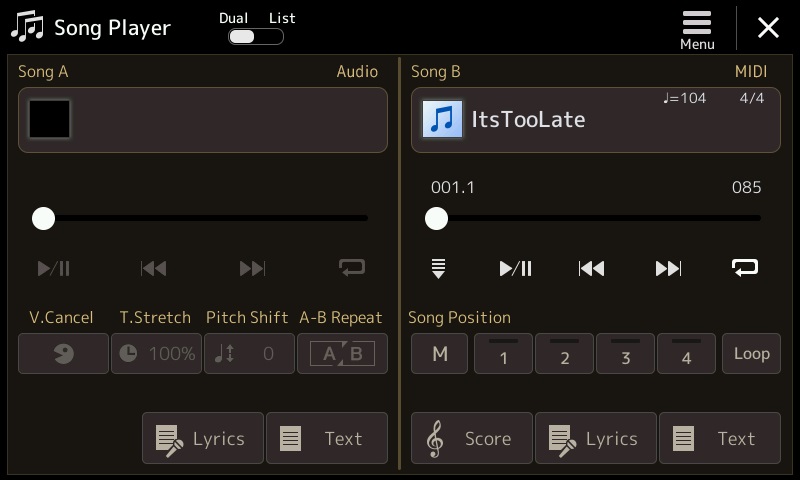
The screenshot above shows the Genos song player with “ItsTooLate.mid” loaded and ready. Choose either the Lyrics or Score display (optional). Then hit play!
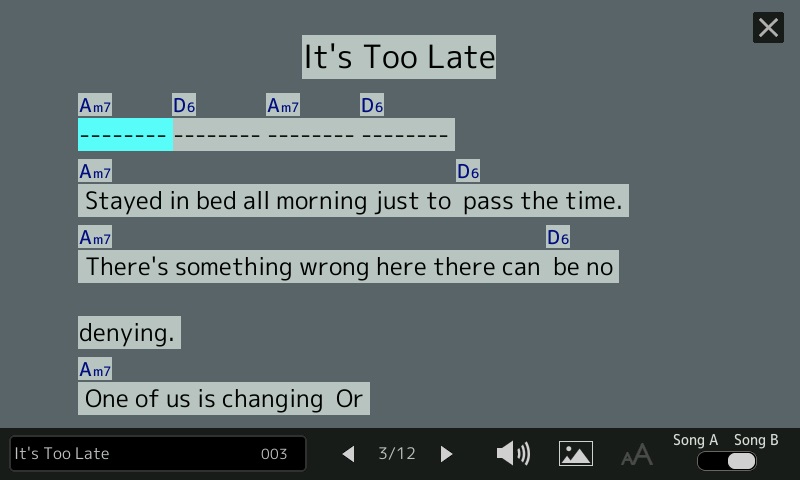
The next screenshot shows the Lyrics display. It should look familiar if you have played a Yamaha arranger. The arranger highlights the current lyric syllable or phrase in time with playback. Compare the screenshot with the ChordPro song and you’ll get an idea of what to expect for each ChordPro construct. A lyric phrase is not broken into syllables, but is associated with the chord preceding the phrase.
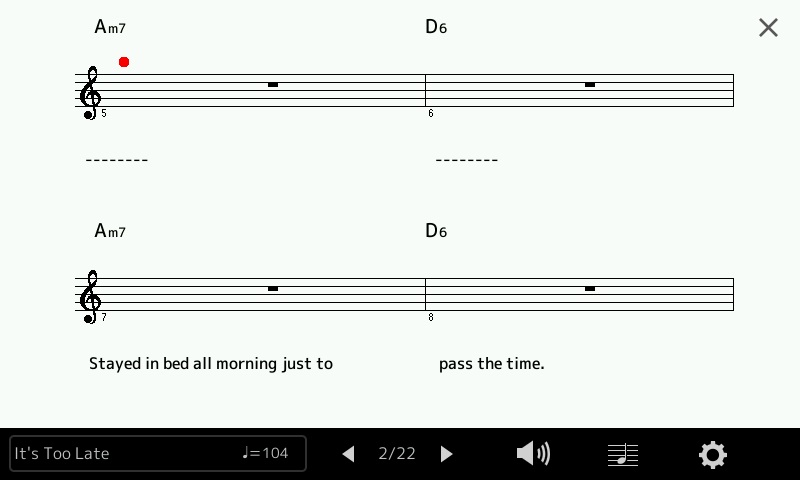
The following screenshot shows the Score display. It’s a different view of the same song. Lyrics appear below the staff and chords appear above. The time and key signature are displayed on the first page. Follow the bouncing ball during playback.
So, how does it sound? Listen to a quick demo (MP3) with me noodling on top.
That’s a taste of what’s ahead. I hope you will try cp2mid when it’s ready.
The MIDI file contains MIDI meta and SysEx (System Exclusive) messages which drive the Yamaha accompaniment engine. When the MIDI file is played back on a compatible Yamaha arranger keyboard (e.g., Genos), the keyboard generates an accompaniment as directed by the chord and section change messages in the MIDI file. It may sound odd to hear this, but the MIDI file doesn’t contain a single note ON or note OFF message! It’s all accomplished through control messages and the accompaniment is produced in real-time.
The MIDI file is a Type 0 Standard MIDI File. It starts with a bunch of set-up messages:
  F0 05 7E 7F 09 01 F7                           GM Reset
  F0 08 43 10 4C 00 00 7E 00 F7                  XG System ON
  FF 58 04 04 02 18 08                           Time signature
  FF 59 02 02 00                                 Key signature
  FF 51 03 07 EF eb                              Tempo
  F0 0D 43 73 01 51 05 00 03 04 00 00 2C 05 F7   Style code
  F0 04 43 60 7A F7                              Accompaniment Start
All of these message types are defined in the Yamaha Genos™ Data List PDF document. The messages beginning with “F0” are System Exclusive (SysEx) messages. Messages starting with “FF” are MIDI SMF meta messages. All messages are Yamaha proprietary (code “43”). The trick, of course, is filling in the correct values for the tempo, key, etc.
GM Reset and XG System ON initialize the tone generator. Time signature, key signature and tempo are SMF meta messages which control and arranger’s sequencing engine. The Style Code message selects one of the many built-in accompaniment styles. The Accompaniment Start message tells the accompaniment engine to get busy.
Once set-up is complete, the rest of the MIDI file consists of Chord, Lyric and Section Control messages. Again, these messages are all defined in the Genos Data List PDF document.
Here is a typical chord message:
F0 08 43 7E 02 37 08 37 7F F7 Chord Bm/B
It tells the accompaniment engine to play a B minor chord (0x37 0x08) with a B bass note (0x37 0x7F). The neatest thing about the ChordPro conversion program? It makes it easy to play and hear difficult to finger chords like slash chords and unusual chord types like Cminmaj7-9.
Lyrics are inserted into the MIDI file using the SMF Lyric meta message:
No attempt is made to separate lyric text into syllables or to assign syllables to individual beats. When a lyric phrase is encountered in the ChordPro file, the phrase is inserted right after the preceding Chord message, i.e., it has the same MIDI timestamp as the preceding Chord message.
A Section Control message selects the current accompaniment section (pattern). The following message:
F0 06 43 7E 00 09 7F F7 Section Control Main B: ON
selects the “MAIN B” section (0x09 0x7F). Because playback is fully automated, section changes are precise.
The penultimate message stops accompaniment:
F0 04 43 60 7D F7 Accompaniment Stop
The final SMF meta message ends the SMF sequencer track:
FF 2F 00 End Of Track (mandatory)
Overall, that’s a lot of power with just a few message types! Most of the Java code involves scanning the ChordPro input, book- and time-keeping. Java has a good MIDI library which makes coding easier.
As to time-keeping, all MIDI events (messages) have a timestamp. Messages issued from set-up directives before start_accomp occur in the first song measure. The start_accomp directive advances the MIDI clock to the first beat of the second measure. Thus, the first chord and lyric (if any) occurs at the beginning of the second measure. Thereafter, MIDI time advances in accord with each chord beat count (default: a full measure as determined by the current time signature).
Time to take the wrapping paper off my current development project.
It starts with ChordPro. ChordPro Format is perhaps the most popular notation for rock, pop, soul and folk tunes. A ChordPro format song contains lyrics and chords, usually formatted for easy display and reading. Strummers and plinkers everywhere use ChordPro songs as lead sheets.
It ends with Yamaha Genos, Tyros and PSR accompaniment. Genos — and other recent Yamaha arrangers — play MIDI files containing chords and lyrics. Genos displays either a running score or lyrics (plus chords) during playback.
What is missing is the bridge between ChordPro and Genos. My current project is the bridge. It translates an extended ChordPro file to a MIDI file which is compatible with Genos and other mid- to high-end Yamaha arranger keyboards. So far, I have a prototype up-and-running.
I emphasized the word “extended” because ChordPro format by itself is not sufficient for playback. The format does not have a precise notion of time. ChordPro relies on the musician to interpret the song on the fly. It assumes that the musician has heard the song before and knows when to change chords. As usual with computer stuff, playback needs more precise semantics. That’s where the extensions come into play.
Since there are a gazillion ChordPro songs on the Interwebs, I wanted to play back ChordPro files with as few modifications as possible. Thus, the first rule is “Each notated chord is held for one measure.” Of course, many songs change chords within a measure, too. (Even “Louie, Louie”!) Enter the first extension. A notated chord may have an optional beat count which specifies the number of beats to hold the chord, or more precisely, the number of time divisions (quarter notes or eigth notes) to hold the chord.
As I discovered during testing, existing ChordPro song files have a fair number of warts. Sometime the chord progressions are whack. The files often have random playing directions which ChordPro happily snarfs up as lyric text. ChordPro is very forgiving as it is primarily a formatting representation and tool. The initial goal — playing a ChordPro song with just a few additions — is unrealistic; expect to do some clean-ups.
Plain, unchanging accompaniment is pretty boring after a short while. Therefore, I added annotations for section changes, fills and breaks. Certain ChordPro directives are optional, but strongly recommended: key, tempo, and time signature. Tempo and time signature obviously guide playback speed and the interpretation of chord hold time. The key signature will set the arranger’s score display to the appropriate key.
Stylecode is an extension. It is a decimal number that selects the arranger accompaniment style, .e.g., 60sVintageRock, Oldies R&R, etc. A style name would be more convenient, but then I would need to develop a style name to code database for each arranger. Forget it; keep it simple. Besides, the PSR Tutorial site has such spreadsheets — just look up the style code yourself.
Start_accomp and stop_accomp are extensions, too. Start_accomp should (must) appear after all the basic playback settings are made. When the MIDI file is played back, the arranger will start or stop the accompaniment engine as directed. Start_accomp begins playback from the second measure; the first measure is reserved for set-up.
The translation program does not implement every and all ChordPro directive. It ignores formatting related directives and it doesn’t handle tablature (tab).
Let’s put all of this together and look at an example. Here is a snippet of “It’s Too Late” by Carole King.
{t: It's Too Late } {key: Am} {artist:Carole King} {time: 4/4} {tempo: 104} # Style: Cool8Beat {stylecode: 5635} {start_accomp}
{c: Verse 1} [Am7] Stayed in bed all morning just to [D6] pass the time. [Am7] There's something wrong here there can [D6] be no denying. [Am7] One of us is changing Or [Gm7] maybe we've just stopped [Fmaj7] trying. [Fmaj7][*FA]
{start_of_chorus} And it's too [Bbmaj7][*MB] late baby now [Fmaj7] it's too late Though we [Bbmaj7] really did try to [Fmaj7] make it. [Bbmaj7] Something inside has [Fmaj7] died And I can't hide [Dm7] and I just can't [Esus4:2][*FB] fake it.[E7#9:2] {end_of_chorus}
Lines beginning with ‘#’ are comments. Lines beginning with ‘{‘ are directives. Each directive must have a closing ‘}’ and consist of one line only. My translation tool supports the following simple directives:
title (or ‘t’): Song title
key: Song key
artist: Performing artist
composer: Song composer
copyright: Copyright information
comment (or ‘c’): Comment to be ignored
time: Time signature
tempo: Song tempo in BPM
stylecode: Yamaha style code (a decimal number)
start_accomp, stop_accomp: Starts and stops the accompaniment
As I mentioned, time, tempo and stylecode are optional, but necessary — unless you are willing to roll with the defaults. Start_accomp must be the final directive before the first chord and lyric in the song. Start_accomp generates the magic message needed to start accompaniment.
Chords look like regular ChordPro chords. Chord names are surrounded by square brackets, e.g., “[Am7]”. Nothing looks amiss until the end of the chorus, e.g., “[Esus4:2]” and “[E7#9:2]”. “:2” is a beat count. Each chord is held for two quarter notes — quarter notes because the number of divisions per bar (the “denominator”) of the time signature is four. It’s our job to make sure that the counts add up to a full measure in order to keep everything synchronized to measures.
The translation program (yet unnamed!) is very forgiving when it comes to chord spelling. However, it only recognizes and generates the 34 Yamaha chord types which are supported by Yamaha arrangers:
    Maj        7        min        minMaj      aug      dim
    Maj6       7sus4    min6       minMaj7     aug7     dim7
    Maj7       7b5      min7       minMaj7-9
    Maj7#11    7-9      min7b5
    Maj9       7#11     min9
    Maj7-9     7-13     min7-9
    Maj6-9     7b9      min7-11
    7aug       7aug
               8
               5
               sus2
               sus4
If the chord is not recognized, you will get a major or minor triad.
ChordPro allows annotations, that is, constructs beginning with “[*” and ending with “]”. Annotations ordinarily are playing instructions that are displayed in a pretty-printed ChordPro song. Annotations are extended with accompaniment section control commands:
Introduction: [*IA] [*IB] [*IC] [*ID]
Main section: [*MA] [*MB] [*MC] [*MD]
Fill in: [*FA] [*FB] [*FC] [*FD]
Break: [*BR]
Ending: [*EA] [*EB] [*EC] [*ED]
A section control command usually follows a chord and takes effect at the same time as the chord change.
I am currently experimenting with these directives to control lyric and chord formatting. Yamaha’s lyric display allows line breaks and page breaks. Start of chorus (abbreviated “{soc}”) generates a page break. I added a new directive pair for handling long instrumental breaks, e.g.,
Yamaha’s lyric display runs chords together when no lyric text is present. The new directive provides some separation between chords by generating filler lyric text (dashes, to be exact).
That’s the story. Testing continues. I will make the Java source code available as soon as possible. So far, so good. The concept works.