Yamaha Genos update v1.4

Yamaha have posted Genos™ update v1.4 to their support sites. I’m in the process of downloading and installing the update. [More later.]

Yamaha have also updated the Genos manuals and the AudioPhraser program. AudioPhraser definitely needed some touch-ups. Hopefully, there is a new version of Yamaha Expansion Manager (YEM) and ChordTracker just around the corner.

Looking through the list of changes, v1.4 is not the major update many punters are looking for. However, Yamaha’s strategic decision to issue updates for its flagship products is very welcome. This move brings Yamaha into parity with its major competitors (Korg, especially).

Here’s the list of changes from the Version History:

  • Some information displays have been added to the Home display.
  • Many additional functions have been included for assignment to individual controllers on the Live Control display and the Assignable display
  • You can now see the result of operations of the ASSIGNABLE buttons via the pop-up window.
  • It is now possible to output to an external display by connecting a commercially USB-display adapter. For details on the supported device list, download from the “Downloads” tab on the product site.
  • You can now select the content displayed on the external display, from the Utility display.
  • Changes: The maximum capacity per file of MIDI Song has been expanded to about 3 MB.
  • Changes: Disabled switching between Dual Player mode and Song List mode during Song playback.
  • Changes: Changed the buttons for display/operation on the Song List mode to the SONG B buttons instead of the SONG A buttons.
  • Changes: The font settings on the Lyrics display and the Text display are backed up and retained even after the power is turned off.
  • Changes: The “Song” item which can be selected on the Registration Memory window is divided into “MIDI Song” and “Audio Song.”
  • Changes: When operating the on-screen knobs and vertical sliders, the first touch will not change the value immediately, but only select (focus) it.
  • Changes: The Voice Guide function supports display changes of this version. Please download the latest Voice Guide file from the product site for the additional sounds to work properly.
  • Fixed a problem in which, under a certain situation, the Audio Section of Audio Style would not play back.
  • Fixed a problem in which, under a certain situation, an Audio Song longer than 80 minutes would not play correctly.
  • Fixed a problem in which the instrument would become unresponsive to operations when playing back a specific MIDI Song.
  • Fixed a problem in which the instrument response would slow down when certain Preset Wallpaper settings were selected.
  • Fixed a problem in which Initial Touch On/Off settings would not function properly when calling up a specific Registration Memory.
  • Fixed a problem in which, under a certain situation, the Registration Freeze function would not work properly.
  • Fixed a problem in which certain Music Finder Record files of Tyros series could not be imported.
  • Fixed a problem in which the Panel Sustain parameter seems to have an effect on the Left part because the Panel Sustain can be edited on the Voice Edit display for the Left part.
  • Fixed a problem in which the instrument would occasionally become unresponsive to operations when executing Search.
  • Fixed a problem in which the instrument would occasionally become unresponsive to operations when changing the mode of Wireless LAN.
  • Fixed a problem in which the instrument would become unresponsive to operations when the pop-up window is closed in certain situations.
  • Fixed a problem in which the instrument would become unresponsive to operations when saving a file in certain situations.
  • Fixed a problem in which characters would occasionally not be displayed correctly.

The previous firmware version cannot be restored after updating the firmware to this version (v1.4).

Well, I can confirm that the v1.4 update did not kill my Genos. 🙂 The Home page definitely displays more useful information. (Check out the link to the video to see what I mean.) I like the visual feedback as to where “the one” (downbeat) is. Some styles do not have a firm downbeat in MAIN A and I easily get lost.

I love having more assignable functions although nothing blows me away initially. The assignable functions are listed in the updated (e0) Genos Reference Manual starting on page 126. I’m glad to see the MIDI file size limit kicked up to 3MB. Controller intensive MIDI files can get pretty big.

Overall, I’m looking forward to improved stability. Yamaha gave us a few functional improvements, but nothing stunning. The list of bug fixes, however, shows attention to detail and quality. I will certainly miss the Genos while it’s in storage during the move!

Copyright © 2019 Paul J. Drongowski

Genos sound alike voices on MODX

I love kicking back in the afternoon and playing some old classic tunes from the 60s and beyond. The Yamaha Genos™ is a great machine for producing backing tracks and for jamming against them.

I spent a fair amount of time selecting the appropriate instrument for each cover tune. Now, I’d like to play the MODX over the same backing tracks and perhaps keep the same voices.

Time to play “What’s that voice?”

The Yamaha arranger keyboards and synthesizers share a lot of the same sonic DNA. This is a theme that I’ve written about in earlier blog posts. Sometimes the arranger voice and the MODX Performance share the same name. Sometimes you need to find a sound-alike. And, as I’ve learned, sometimes I need to do some MODX programming to get what I want.

The table below is a quick, rough correspondence between my favorite Genos voices and a MODX Performance (or two, or three). In the case of multiple mappings, the preferred Performance is marked with a star (“*”).

    MODX Performance         Genos Voice
    -----------------------  -----------------------
    TC Clean Pick            SingleCoilClean
    Clean Ballad Pick        SingleCoilClean
    TC Clean Pick            VintageAmp (BRITISH LEGEND CLEAN)
    Dual Coil Slap Vel       Slapback (ROCKABILLY))
    Clean Fingers            50sVintagePure (MULTI FX OLDIES DELAY)
    Melodic Jazz             JazzGuitarClean
    Fat Oil Jazz AF1&2       JazzArtistGuitar
    Jazz Blues               JazzGuitarAmp (MULTI FX OLDIES DELAY)
    Jazz Guitar              JazzGuitarClean (JAZZ COMBO)
    Crunchy Guitar           MetalMaster
    Hard Drive               MetalMaster
    Hard Ramp                MetalMaster

    Tenox Max                Rock Sax
    SoftTenorSaxLegato       SmoothTenorSax
    Sweet Flute AF1          JazzFlute
    Concert Flute            OrchestralFlute
    Latin Flutist*           OrchestralFlute
    Oboe1 AF1                OrchestralOboe
    Oboe2*                   OrchestralOboe
    Clarinet 1 AF1           OrchestralClarinet
    OrchClarinet             BalladClarinet
    Flute & Clari            Clarinet&Flutes
    Bluz Distort             BluesHarp
    FM Accordion 1           JazzAccordian

    Dynamic Brass            DynamicBrass
    Mixed Sax Section        SaxSection
    FM JP Brass              80sSynthBrass
    Simple Saw Brass         80sSynthBrass
    Flugelhorn               Flugelhorn

    Soft Case                70sSuitcaseTrem (E-PIANO TREMOLO)
    Rd Old                   70sSuitcaseClean
    Contempo*                SuitcaseEP
    Hard Vintage             SuitcaseEP
    Wr Rock                  70sVintageEP

    Vibraphone               Vibraphone
    Vibes                    JazzVibes

    Soft RnB                 SoftR&B
    Singleline 1             WireLead
    SingleLine 2*            WireLead
    WindSynth                WireLead
    VeloMaster               VelocityMaster
    Bleep Lead AF2           BleepLead
    Detuned Vintage          DetunedVintage
    FM Syn Lead 2*           FusionLead
    Straight RB              FusionLead
    Saw Lead                 FusionLead
    Dynamic Mini             BrightMini
    Whistle                  Whistle
    Early Lead               Oxygen
    Saw Lead                 Oxygen

    Big Strings              ButterStrings
    Analog                   AnalogPad
    Dark Light               DarkFatSaw
    VP Soft                  VPSoft
    Feeling                  LightPad
    Dark Atmo Pad            NewAtmosphere
    Angel Eyes               DarkAngelPad
    NighttrainToMunich       NightMotion
    Gospel Hmm               Mmh, GospelVoices
    Boy Choir MW Xfade       GothicVox

    All Out None             AllBarsOutFast
    Fully                    AllBarsOutFast
    Bowed Bars CV            CurvedBars, UpsideDownSmile
    Draw Organ               BalladOrgan
    Whiter Bars              WhiterBars
    Jazz 2nd Perc + C3       RotarySwitch
    Vx Full Bars*            60sOrgan, Italian60sOrgan
    Clean                    60sOrgan
    1967 Keys                60sOrgan

Even when the name matches (e.g., Bleep Lead), you’ll find slight differences in programming. The basic sound is there, but maybe one implementation will open up the filter dynamically, or maybe it will have a longer portamento time. These differences are easy to iron out, if they’re important at all.

Occasionally, a Performance and its corresponding Genos voice responds differently due to Expanded Articulation vs. Super Articulation programming. Such differences are fundamental to the arranger or synthesizer design. I’ll just need to keep mental notes about what to do where when playing, that is, push an assignable function button or some other gesture. If a Super Articulation voice is based on a Mega Voice, then chances are good that one can find a way to get a similar result on MODX using Expanded Articulation (XA).

Of course, the Super Articulation 2 (Articulated Element Modeling) technology does not carry over to MODX (Montage). Super Articulation 2 (SArt2) stitches successive notes together, blending tone heads, tails and bodies in real time depending upon the playing gesture. SArt2 requires additional samples and computation which are not implemented in MODX (Montage).

Not so easy are a few of the electric guitar voices. Electric guitar tone depends heavily upon the DSP effect chain. The Genos VintageAmp voice is a good example. It’s a single coil guitar driving the British Legend Clean effect. I couldn’t find a MODX preset to match. However, I quickly cooked up a Performance starting with the TC Clean Pick Performance (a single coil Telecaster). It was a piece of cake to put the British Legend clean effect into the signal chain. Voila — a new sound-alike Performance!

Copyright © 2019 Paul J. Drongowski

Genos/PSR organ registrations

I’m deep in another one of those “cross-platform” projects in which I share voice programming between Yamaha Genos™ and Yamaha MODX. In this case, I’m recreating some of the PSR/Genos “organ flutes” registrations on MODX.

“Organ flutes” is Yamaha-speak for drawbar organ emulation. Genos and S-series PSR arranger workstations implement two kinds of drawbar (Hammond B3) organ voices: normal sample playback voices and organ flutes voices. The organ flutes have their own drawbar user interface where the user can move virtual footage drawbars, including percussion. Organ flutes voices make use of a rotary speaker DSP effect while sample playback organ voices may have the rotary effect sampled-in instead of using a DSP effect. The chief disadvantage of sampled-in is the inability to smoothly change rotary speaker speeds (i.e., ramp up or ramp down between speeds). The abrupt speed change is very unrealistic. Of course, you can’t change the drawbar setting of a sampled-in voice either.

Everyone loves new organ registrations, so here is my go-to table of Yamaha presets. Vibrato is OFF in all cases.

Preset         Drawbars     VOL  RESP  4' 2 2/3'  2' LENG  Rotary effect
-------------- -----------  ---  ---- --- ------ --- ----  -------------
OrganFlutes    78 6600 000   8     0   8     0    0    6   DUAL ROT BRT
USDSmile       87 4323 468   8     0   0     0    0    0   DUAL ROT BRT
ReggaeBars     70 0000 008   8     0   0     0    0    0   DUAL ROT BRT
WarmTheatre    80 0605 000   8     0   0     0    0    0   DUAL ROT WRM
OrganPops      70 8000 000   8     0   8     0    0    8   DUAL ROT BRT
RockOrgan      65 5444 644   8     0   0     0    0    0   DUAL ROT BRT
SoulPercussion 70 0000 530   8     0   0     7    0    0   DUAL ROT BRT
GospelTruth    87 6000 568   8     0   0     0    0    0   DUAL ROT BRT
PadOrgan       00 8520 000   8     0   0     0    0    0   DUAL ROT WRM
FullOrgan      88 7677 788   8     0   0     0    0    0   DUAL ROT BRT

StringBars     48 0787 532   8     0   0     0    0    0   DUAL ROT BRT
LatinSpin      70 0003 443   8     0   0     0    0    0   DUAL ROT BRT
ShadyBars      68 8600 000   8     0   0     0    0    7   DUAL ROT BRT
FunkOrgan      83 5035 788   8     0   0     0    0    7   DUAL ROT BRT
BalladOrgan    86 7300 000   8     0   0     0    0    7   DUAL ROT WRM
RichBars       63 8457 530   8     0   0     0    0    0   DUAL ROT BRT
TrumpetBars    06 0786 540   8     0   0     0    0    0   DUAL ROT BRT
SoulBars       80 0050 578   8     0   0     0    0    0   DUAL ROT BRT
ClariBars      08 0080 760   8     0   0     0    0    0   DUAL ROT BRT
JazzSquabble   80 0008 888   8     0   0     0    0    0   DUAL ROT BRT

These are the registrations for Yamaha’s preset organ flutes voices.

The RESP, 4′, 2 2/3′, 2′ and LENG columns control envelope and percussion. The manual describes these parameters in the following way:

  • Response (RESP): Affects both the attack and release portion of the sound, increasing or decreasing the response time of the initial swell and release, based on the Footage controls. The higher the value, the slower the swell and release.
  • 4′, 2 2/3′, 2′: 4′ is second harmonic percussion level and 2 2/3′ is third harmonic percussion level.
  • Length (LENG): Controls the length of the percussion sound.

There is also an Attack switch to apply percussion to the first note or each note. For realism, I apply first note. Always.

The registrations above use the older rotary speaker effect algorithm which had two PSR/Genos presets: DUAL ROTARY BRIGHT and DUAL ROTARY WARM. I recommend trying the “new” rotary speaker algorithm if you got it (Montage, MODX, Genos).

Here are a few bonus registrations, just for grins:

Preset      Drawbars     VOL  RESP   4'  2 2/3'   2'  LENG  Rotary effect
----------- -----------  ---  ----  ---  ------  ---  ----  -------------
SmithPlus   88 8800 000   8     3    0      4     0     0   DUAL ROT WRM
Simmerin    83 0000 378   8     0    0      0     0     0   DUAL ROT WRM
MellowDee   80 4600 000   8     4    0      0     0     0   DUAL ROT BRT
Shoutin     66 8848 588   8     4    0      0     0     0   DUAL ROT WRM
WhistleStop 88 8000 008   8     3    0      0     0     0   DUAL ROT WRM
WhiterShade 68 8600 000   8     0    4      0     0     8   DUAL ROT WRM

If you want to ditch the sampled-in voices and use organ flutes instead, many of the Yamaha organ flutes presets are equivalent to a sampled-in voice. You just need to decode the names: WhiterBars → ShadyBars, Curved Bars → USDSmile, GospelOrgan (Legacy) → GospelTruth, etc. Save the registrations as Genos or PSR USER voices and use them in place of the sampled-in voices. Then, enjoy the rotary speaker ramp up and down!

Copyright © 2019 Paul J. Drongowski

Yamaha MODX gospel organ

I’ve been woodshedding an up-beat gospel tune, “Stop By, Lord” by Doris Wesley Bettis. It needs a brighter B3 registration than my typical church registrations. So, I turned to Genos™ for inspiration.

Two Genos voices stood out: GospelOrgan and UpsideDownSmile. They are similar and the drawbar settings form an arching curve (i.e., the upside down smile). Here are the registrations:

Genos GospelOrgan

     16   5 1/3  8    4   2 2/3   2   1 3/5  1 1/3   1   Perc
    ----  ----- ---  ---  -----  ---  -----  -----  ---  ----
      8     7    6    0     0     0     3      4     5    No

Genos UpsideDownSmile

     16   5 1/3  8    4   2 2/3   2   1 3/5  1 1/3   1   Perc
    ----  ----- ---  ---  -----  ---  -----  -----  ---  ----
      8     7    4    3     2     3     4      6     7    No

The UpsideDownSmile voice is at essence a brighter version of the GospelOrgan voice.

We need to translate the drawbar registrations (range [0:8]) into MODX Element levels (range [0:127]). The MODX factory patches use a range from 0 to 104. My own patches are using the range 0 to 127. Below is a table mapping each drawbar setting to the equivalent MODX Element level:

    1 * 13 =  13   1 * 16 =  16
    2 * 13 =  26   2 * 16 =  32
    3 * 13 =  39   3 * 16 =  48
    4 * 13 =  52   4 * 16 =  64
    5 * 13 =  65   5 * 16 =  80
    6 * 13 =  78   6 * 16 =  96
    7 * 13 =  91   7 * 16 = 112
    8 * 13 = 104   8 * 16 = 128

Take your pick: soft or hot.

I decided to implement each voice in its own MODX Part. Thus, we need to drop one of the drawbar harmonics in order to shoe horn the registration into eight Elements, the maximum number of individual elemental tones per Part. (Each Element is a drawbar footage.) A quick experiment on Genos found that I could drop the 2 2/3′ bar from the registrations without much sonic effect. It was pretty much buried in the harmonic mix.

The next table shows the Element levels for each MODX Performance.

Genos GospelOrgan

     16   5 1/3  8    4   2 2/3   2   1 3/5  1 1/3   1 
    ----  ----- ---  ---  -----  ---  -----  -----  ---
    104     91   78    0     0     0    39     52    65
    127    112   96    0     0     0    48     64    80

Genos UpsideDownSmile

     16   5 1/3  8    4   2 2/3   2   1 3/5  1 1/3   1 
    ----  ----- ---  ---  -----  ---  -----  -----  ---
    104     91   52   39    26    39    52     78    91
    127    112   64   48    32    48    64     96   112

The upper row in each case contains the Element levels over the range [0:104]. The lower row shows the Element levels over the range [0:127].

Starting with one of my church Performances, I created a three Part MODX Performance. There is one Part for the GospelOrgan setting and one Part for the UpsideDownSmile setting. The third part handles rotor noise, etc. I programmed two Scenes, one for each registration setting. Scene 1 mutes the UpsideDownSmile Part and Scene 2 mutes the GospelOrgan Part. Thus, I can switch between registrations by switching between Scenes. [In my next experiment, I’m going to try the SuperKnob to morph between registrations.]

Next up is the rotary speaker effect. Genos applies the REAL ROTARY effect:

                            USD Smile   Gospel
                            ---------   ------
    Drive                   2.5         4.0
    Tone                    8.5         10.0
    Low/High Balance        L<H1        L<H9
    Output Level            100         100
    Mic L-R Angle           180deg      120deg
    Input Level             +6dB        +6dB
    Modulation Intensity    63          63
    Slow-Fast Time of Horn  1.13        1.13
    Fast-Slow Time of Horn  0.97        0.97
    Woofer Speed Slow       43.5 RPM    43.5 RPM
    Horn Speed Slow         47.3 RPM    47.3 RPM
    Woofer Speed Fast       403.7 RPM   403.7 RPM
    Horn Speed Fast         464.3 RPM   464.3 RPM

REAL ROTARY is the “new” rotary speaker effect added in Montage. On MODX, this effect is called “Rotary Speaker 2”. The Tone parameter seems to function like a high-cut filter, BTW.

I prefer to slow the horn and rotor (woofer) down. Here is my LeslieChurch USER EFFECT preset on Genos:

    Woofer Speed Slow         40.2 RPM   0.67Hz
    Horn Speed Slow           48.0 RPM   0.80Hz
    Woofer Speed Fast         343.2 RPM  5.72Hz
    Horn Speed Fast           403.8 RPM  6.73Hz
    Slow-Fast Time of Woofer  47
    Slow-Fast Time of Horn    20
    Drive Low                 17
    Drive High                42
    Low/High Balance          L=H
    EQ Low Frequency          100Hz
    EQ Low Gain               -2dB
    EQ High Frequency         14kHz
    EQ High Gain              -12dB
    Mic L-R Angle             162deg

When moving between MODX and Genos, be prepared to convert RPM to Hertz and vice versa! Divide RPMs by 60 to get Hertz.

To complete the picture, let’s take a look at the MODX Rotary Speaker 2 presets. The MODX (Montage) has five presets:

  • Clean and Wide
  • Vintage Mono
  • Slow and Dirty
  • Full Drive
  • Broken Motors

The following table shows the parameter values for each preset.

                       Clean     Vint Mono  Slow Dirt  Full Dr  Broken
                       --------  ---------  ---------  -------  ------
Drive                  0.0       1.9        4.6        10.0     1.9
Tone                   6.0       4.4        5.4        8.0      7.5
Low/High Balance       R=H       R=H        R7>H       R=H      R<H11
Output Level           111       111        111        111      111
Mic L-R Angle          180deg    0deg       90deg      120deg   180deg
Input Level            +1.5dB    +1.5dB     +1.5dB     +1.5dB   +1.5dB
Modulation Intensity   63        20         25         19       63
Slow-Fast Time Horn    0.95      0.78       0.98       0.98     0.95
Fast-Slow Time Horn    0.92      0.78       0.92       0.92     0.92
Horn Speed Slow        42.3rpm   40.4       33.4       42.3     59.9
Horn Speed Fast        398.7rpm  403.7      398.7      398.7    270.0
Slow-Fast Time Woofer  1.22      1.43       1.38       1.21     1.33
Fast-Slow Time Woofer  1.86      1.78       1.87       1.87     2.00
Woofer Speed Slow      40.1rpm   39.4       30.6       40.1     22.7
Woofer Speed Fast      323.0rpm  338.1      323.0      323.0    254.9

If you have a Genos, you might want to give these a spin. As of Genos update v1.3, it isn’t possible to set the Slow-Fast and Fast-Slow times for the woofer. I hope that Yamaha fix this oversight.

With respect to the gospel organ Performance, I started with the “Clean and Wide” preset values, then dialed in a few tweaks.

Changing the effect algorithm affected the rotary speaker speed control routing. I needed to drop into the Part Common Mod/Control parameters to select the Mod Wheel source and to set its destination to “InsA SpdCtrl”. (Insert A is the rotary speaker effect algorithm.)

If you’re looking for a gospel organ sound on MODX (Montage), I hope this information will help you out.

Copyright © 2019 Paul J. Drongowski

Winter NAMM 2019: Random Youtube videos

I’m going to post a random selection of Youtube videos here as I stumble into them.

First up are a couple of Yamaha Sonogenic SHS-500. The first video featuring Gabriel Aldort from Yamaha is funny, but shows the essence of the Sonogenic — a fun instrument to play along with tunes. One tidbit — Android support is coming down the line. Does this mean a version of Chord Tracker for Android? Chord Tracker is an important ecosystem cornerstone for several Yamaha digital instruments.

The second Sonogenic video is in Polish. The demonstrator is clearly having fun and there are a few snippets of the instrument sounds. Gratefully, they ducked the vocal and ambient noise during the snippets so you can hear how the SHS-500 really sounds. The drums and eleectric piano aren’t bad.

Everybody’s main man Katsunori UJIIE gives us the run down on the Yamaha MODX synthesizer. Also, check out this blast from the past: UJIIE’s Reface CP demo. Man, that guy is creative! Can’t wait for his demo of the new Yamaha CP73/CP88 digital pianos. It’s no wonder that the street price on the CP and YC have remained firm while the DX and CS are heavily discounted from their initial price. The Reface CP is still a quick and cheap way to get SCM electric pianos (Spectral Component Modeling).

BTW, UJIIE has really mastered those Reface mini keys. I still use the Reface YC at rehearsals. So easy to schlep! I can set up and be ready to go in 60 seconds. Just give me a music stand with the Reface YC across my lap.

On February 12, Frank Ventresca at AudioworksCT hosted a Yamaha Genos™ demonstration and workshop featuring Yamaha Product Specialist Heratch Touresian. (Heratch was assisted by Maio Obregón, Yamaha District Manager.) Frank has posted the video on Youtube. It’s almost three hours long! Thank you Heratch and Frank.

Full disclosure: I purchased an PSR-S950 and Genos from Frank. A great experience both times.

Overall, you get a terrific overview of Genos and current owners will learn new tricks. The last half-hour or so shows off Genos as a songwriting tool. Today’s arrangers — especially Genos — are not your grandfather’s boom-chukka.

If you’re new to Genos, check out my Genos quick start. Also, click on the Genos tag to find all the other Genos-related content on my site.

Copyright © 2019 Paul J. Drongowski

Yamaha piano voice programming

Most of my live playing adds orchestral instruments or B-3 organ to our liturgical church group (synth plus 12-string guitar plus grand piano). Thus, I don’t dip into either acoustic piano or electric piano too often.

Recently, we prepared a number of gospel tunes in honor of Dr. Martin Luther King. Rather than jump to B-3, I decided to practice a few songs on electric piano. The release of the new Yamaha CP73/CP88 was nearly coincident, and naturally, I became curious about the implementation of acoustic and electric piano on MODX, the closest cousin to the CP73/CP88. It also gave me a chance to explore EP on Genos™ and to try using Genos as a controller for MODX.

MODX acoustic pianos

First, a dive into MODX acoustic pianos. Montage and MODX essentially have the same sound engine, modulo differences in polyphony and a few other details that aren’t relevant to this discussion. Therefore, anything I say about MODX should apply to Montage, too.

The basic voice programming unit in MODX is a Performance. A Performance is a versatile “container” for up to 16 Parts. Parts can be split, layered, mixed and so forth. Each Part is itself a powerful programming unit consisting of up to eight Elements, where each Element is a mini, sample-playback synthesizer. (Yeah, yeah, or it could be FM.) That, in a nutshell, is the hierarchical programming breakdown. In Yamaha-speak, each Element plays back a Waveform.

The deal is, contemporary high-quality piano voices need several levels of velocity switching in order to generate the wide dynamic range and timbre of an acoustic or electric piano. These voices are sometimes called “multi-strike” because each note is struck and sampled at several, carefully controlled velocities.

In the Yamaha voice architecture, each strike level is encoded in a Waveform. One Waveform (i.e., the samples associated with a single strike level) is assigned to an Element.

Let’s say that you want to create a highly detailed acoustic piano (e.g., Yamaha CFX) with nine strike levels and key-off sounds. Right away, you need more Elements than a single Part can provide! Thus, Yamaha implement the piano as a Performance consisting of multiple Parts.

Take the Montage/MODX CFX Concert Performance, for example. This Performance consists of four Parts:

Part 1 (six elements)

    El#  Waveform       VLo  VHi  NLo  NHi
    ---  -------------  ---  ---  ---  ---
     1   CFX ppp St       2   25  C-2   G8
     2   CFX pp St       20   35
     3   CFX p St        36   45
     4   CFX mp St       46   59
     5   CFX mf St       60   74
     6   CFX f St        75   92

Part 2  (three elements)

    El#  Waveform       VLo  VHi  NLo  NHi
    ---  -------------  ---  ---  ---  ---
     1   CFX ff St       93  110  C-2   G8
     2   CFX fff St     111  125
     3   CFX ffff St    126  127

Part 3 (eight elements)

    El#  Waveform       VLo  VHi  NLo  NHi
    ---  -------------  ---  ---  ---  ---
     1   CFX pp St        2   35  C-2   G8
     2   CFX p St        36   45
     3   CFX mp St       46   59
     4   CFX mf St       60   74
     5   CFX f St        75   92
     6   CFX ff St       93  110
     7   CFX fff St     111  125
     8   CFX ffff St    126  127

Part 4 (one element, XA control: Key Off)

    El#  Waveform       VLo  VHi  NLo  NHi
    ---  -------------  ---  ---  ---  ---
     1   CFX KeyOff St    1  127  C-2   G5

That’s 18 Elements total. The Elements in Part 3 are a layer on top of the Elements in Parts 1 and 2. The Elements in Part 3 have different filter programming (and maybe something I haven’t discovered yet…)

Perhaps the voice programmer could have squeezed everything into three Parts, but in for a penny, in for a pound. In terms of versatility and re-usability, it makes sense to split the Elements (and their Waveforms) into four Parts.

By the way, the Montage/MODX CFX Concert Performance employes the Damper Resonance DSP effect, which is the same algorithm (effect type) as Genos. Damper Resonance is [u]not[/u] the same as Clavinova’s Virtual Resonance Modeling (VRM). VRM is a step up. This is another topic which comes up frequently in forums.

On the other hand, the single part MODX CFX Stage Performance consists of eight elements:

    El#  Waveform       VLo  VHi  NLo  NHi
    ---  -------------  ---  ---  ---  ---
     1   CFX pp St        2   35  C-2   G5
     2   CFX mp St       36   59  C-2   G5
     3   CFX f St        60   92  C-2   G5
     4   CFX fff St      93  125  C-2   G5
     5   CFX ffff St    126  127  C-2   G5
     6   CFX mf St        2   59  G#5   G8
     7   CFX fff St      60  127  G#5   G8
     8   CFX KeyOff St    1  127  C-2   G5

Please take note of the key ranges. Up to G5, the CFX Stage has five strike levels. Above G5, the CFX Stage is a two strike piano. Good enough for rock and roll.

The Genos voice programming structure is more restricted than MODX. Each Genos voice has eight Elements. Thus, there is a fundamental limit to the number of strikes in a single Genos voice. I wouldn’t be surprised if the Genos CFX Concert Grand voice has similar programming. Proving this hypothesis would require carefully controlled experimentation and A/B listening.

Using Genos as a controller

Genos has a rather nice FSX action keybed which is better suited for acoustic and electric piano than MODX6 or MODX7. A weighted action is even better, of course. [I did rather enjoy playing the MODX8.] I don’t play piano often enough to deal with the extra physical weight of a hammer action keybed. You make your own bed and have to lay it in! With Genos on hand, it’s worth exploiting its FSX action as a controller.

MODX assigns a MIDI channel to each Part. The CFX Concert Performance has four Parts on MIDI channels 1, 2, 3 and 4. [This assignment is sometimes a source of frustration when sequencing with multi-Part Performances, but that’s a topic for another day.]

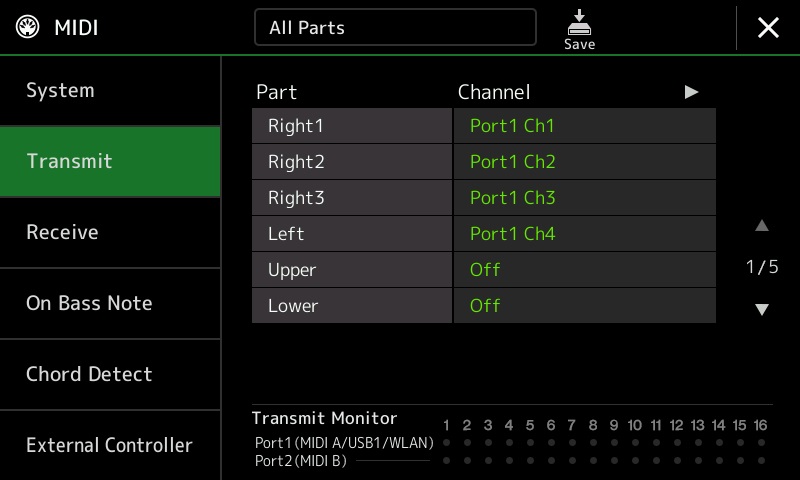
If we want to use Genos as a controller, we need to know the MIDI transmit channel assignments. By default, the Genos sends RIGHT1, RIGHT2, RIGHT3 and LEFT on MIDI channels 1, 2, 3, and 4 respectively, all on Port1 (AKA “MIDI A”).
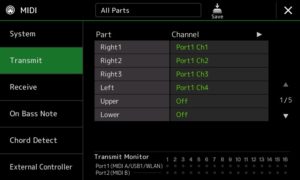
First, connect the Genos MIDI A OUT to the MODX MIDI IN using a standard 5-pin DIN MIDI cable. Select the MODX Performance. Next, turn on the Genos Parts (RIGHT1, etc.) which will send MIDI data to the MODX, using the PART ON/OFF buttons in the left right corner of the Genos front panel. Finally, play.

If you get surprised by what you hear, i.e., sounds are missing, then check the Genos MIDI transmit settings and the MODX MIDI receive settings. Use the Transmit Monitor on the Genos side to make sure that you are transmitting on the correct channels via MIDI A (Port 1).

When I connect Genos to MODX, I can the first three MODX Parts in the CFX Grand Performance by sending RIGHT1, RIGHT2 and RIGHT3 on MIDI channels 1, 2 and 3. You get a pretty decent concert grand. You won’t hear any of the key-off sounds because the Genos is not transmitting on channel 4.

MODX electric piano

Let’s take a brief look at one of my favorite MODX Rhodes piano Performances: Case 73 Soft. The Case 73 Soft Performance has two Parts:

Part 1 (eight elements)

    El#  Waveform       VLo  VHi  NLo  NHi
    ---  -------------  ---  ---  ---  ---
     1   Rd73 p           1   49  C-2   G8
     2   Rd73 mp         50   85  C-2   G8
     3   Rd73 mf         86  108  C-2   G8
     4   Rd73 f         109  119  C-2   G8
     5   Rd73 ff        120  127  C-2   G8
     6   Rd73 KeyOff      1  127  C-2   E3
     7   Rd73 KeyOff      1  127   F3   C7
     8   EP2 Hard1+     107  127  C-2   G8

Part 2 (five elements)

    El#  Waveform       VLo  VHi  NLo  NHi
    ---  -------------  ---  ---  ---  ---
     1   Rd KeyNoise p    1   84  C-2   G8
     2   Rd KeyNoise mf  85  116  C-2   G8
     3   Rd KeyNoise f  117  127  C-2   G8
     4   Rd KeyOff mf    86  116  C-2   G8
     5   Rd KeyOff f    117  127  C-2   G8

Part 1 produces the main Rhodes sound while Part 2 adds the key noises. Part 1 is probably good enough by itself for sequencing. Performance Rd73 has similar programming, but adds bark when struck hard.

In order to play this two part MODX Performance from Genos, turn on RIGHT1 and RIGHT2 in order to send MIDI data on Port 1 channels 1 and 2.

Just for grins, here’s the basic programming for the Neo R&B Clean Performance — another favorite.

Part 1 (five elements)

    El#  Waveform       VLo  VHi  NLo  NHi
    ---  -------------  ---  ---  ---  ---
     1   EP3 Soft1        2   80  C-2   G8
     2   EP3 Soft2       81  101  C-2   G8
     3   EP1 Med        102  127   F2   G8
     4   EP3 Hard1      102  127  C-2   E2
     5   EP Key Off       2  127  C-2   G8

Part 2 (five elements)

    El#  Waveform       VLo  VHi  NLo  NHi
    ---  -------------  ---  ---  ---  ---
     1   Rd KeyNoise f  119  127  C-2   G8
     2   Rd KeyNoise mf  76  118  C-2   G8
     3   Rd KeyNoise p    1   75  C-2   G8
     4   Rd KeyOff f    119  127  C-2   G8
     5   Rd KeyOff mf     1  118  C-2   G8

You can see that Part 2 is essentially a ready-made patch for dropping in key noises. I love the shimmering auto-pan coupled with the ensemble detune effect.

Genos commentary

These experiments invite comparison between Genos and MODX, of course.

The featured Genos electric piano is a Rhodes Suitcase. You get the same Rhodes in darker and brighter timbres, and processed by a variety of effects (tremolo, phaser, etc.) You need to dig back into the Legacy EPs to find other Rhodes-like variations. The MODX effects give it the edge over Genos; Montage/MODX allow a longer effects chain. The Genos Suitcase EP is good, but sounds like a one-trick pony after a while. The MODX offers a broader range of Rhodes sounds immediately.

Piano aficionados on the PSR Tutorial Forum sometimes complain about a “lack of depth” in the Genos CFX grand voices. Their complaints may be grounded in fact. A Genos voice is equivalent to an eight Element MODX Part. (Warning, the mix of product terminology may becoming confusing here.) Thus, Genos is limited to the complexity of the single-Part CFX Stage Performance, lacking the “beauty layer” (Part 3) of the CFX Concert Performance. This layer would add depth to the sound as it unrolls dynamically.

Given what we know about the CFX Concert programming, Yamaha could release a full CFX expansion pack for Genos. The full CFX voice would need RIGHT1, RIGHT2 and RIGHT3 to handle all of the extra elements and their layering. Only three parts are needed if the CFX key off waveform is moved to the second part which currently has only three active elements. The Genos player would need to enable RIGHT1, RIGHT2 and RIGHT3 to make all parts active, but this is a small price to pay and could be easily configured into a registration.

Summary

Well, there you have it. I hope that my analysis will help you to understand and better appreciate both MODX and Genos piano voices. The MODX waveform set is quite rich in EP sounds, so get cracking!

Copyright © 2019 Paul J. Drongowski

Genos to 60 in 4 seconds

Well, maybe two minutes. 🙂 Let’s say that you want to use Yamaha Genos™ solely as a synthesizer. Here’s a quick start or at least enough to get you familiar enough to get into the Owner’s Manual.

Turn accompaniment off

If you want to use Genos as a synth, I recommend turning the accompaniment features off. Accompaniment is all the AUTO stuff including styles, rhythm pattern and such. Press the ACMP button in the left hand corner of the front panel. If the light is off, accompaniment is off.

Select a new voice

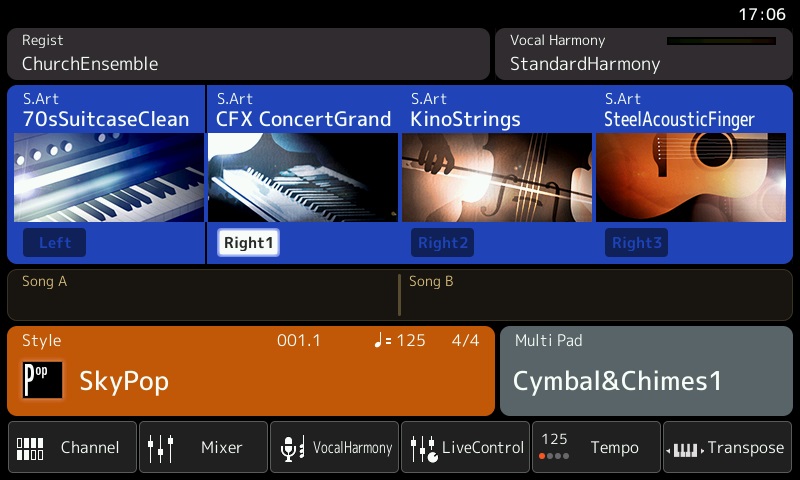
When you power on Genos, you’ll see the HOME screen as shown below. [Click images to enlarge.]

The HOME screen is a top-level view of Genos’ current configuration. From here, you can select a voice for each of Genos’s Parts: LEFT, RIGHT1, RIGHT2, and RIGHT3. (More about this in a second or two.)

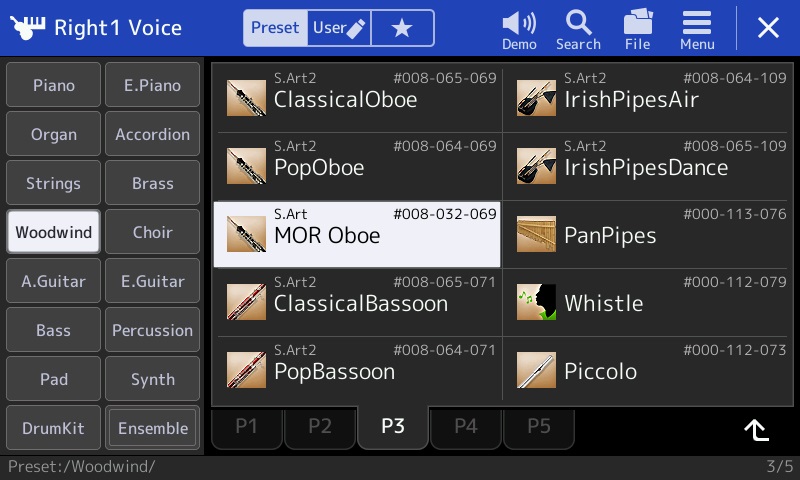
Touch the big square button for the CFX Concert Grand. In response, Genos displays the voice selection screen. The Part (RIGHT1) is shown in the upper left corner of the screen. Use the soft buttons on the left hand side of the screen to select a voice category. Then use the tabs (P1, etc.) to navigate through pages and pages of available instruments. Touch the instrument that you want to assign to the Part.

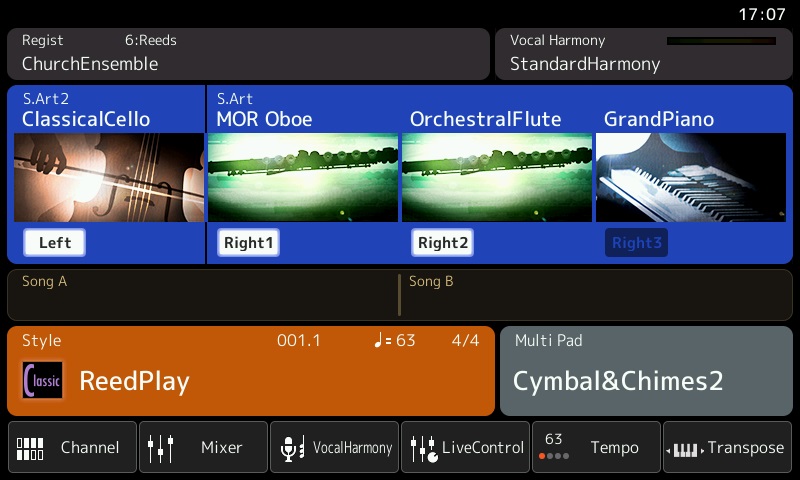
In the example above, I touched the Woodwind button, went to page 3 (P3) and selected the MOR Oboe voice. If you press the nice bright HOME button on the front panel (located just to the right of the screen), Genos will display the HOME screen and you will see the MOR Oboe voice assigned to RIGHT1. Those six bright gateway buttons are the most important shortcuts into the Genos menu system.

Parts is parts

The LEFT, RIGHT1, RIGHT2 and RIGHT3 business is a cut-down form of (Yamaha) synth parts and zones. Unlike a synth where you can create arbitrary keyboard zones, splits and layers, the Yamaha arranger concepts are more limited.

Each of LEFT, RIGHT1, RIGHT2 and RIGHT3 are voice parts which can be turned on and off. There are four voice select buttons and four voice on/off buttons in the lower right hand corner of the front panel. The voice select buttons choose the current Part for editing, etc. The voice on/off buttons turn the voice on and off, letting one add or remove a voice while playing.

LEFT, RIGHT1, RIGHT2 and RIGHT3, from the synth perspective, are also keyboard zones. In terms of voice splits, you can have a single left hand voice (LEFT) and up to three layered right hand voices (RIGHT1, RIGHT2 and RIGHT3). If you’re playing with accompaniment styles, chord recognition is often in the left hand and melody/comping is in the right hand. (This is a gross simplification; Genos has more capability for chord recognition than this.)

The screen shot below shows one of my orchestral splits. There is a cello in the left hand and there is an oboe plus flute layer in the right hand.

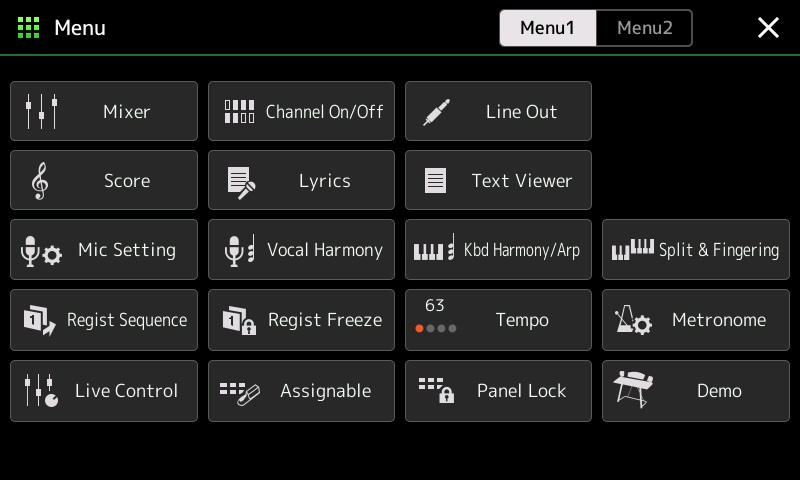
Ordinarily, the the split point is middle C. If you want to change the split point (and other aspects of the key layout), press the MENU gateway button on the front panel. Genos displays a page of buttons that lets you tweak tempo, transpose, MIDI, split point and fingering, and just about everything else which is Genos.

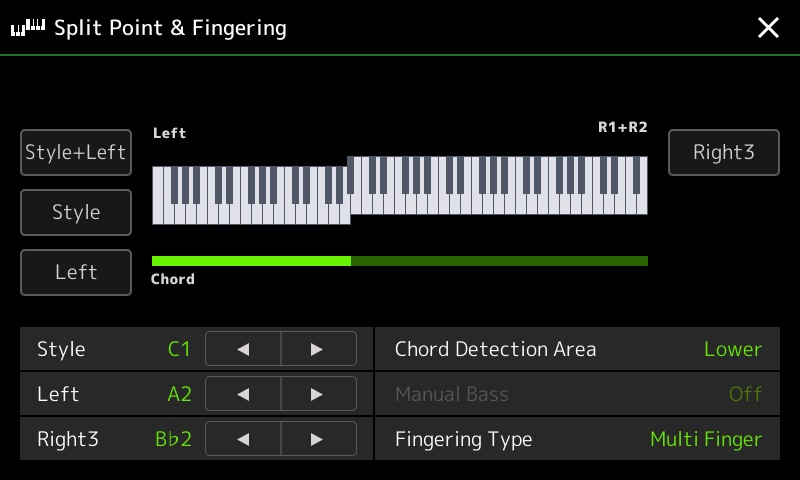
Touch the Split & Fingering button and Genos displays the screen giving control over the split point.

Press the arrow buttons to move the split point(s) around. Or, press and hold one of the three soft buttons on the left hand side of the screen. While holding one of those buttons, press the desired split point on the keyboard.

A word of caution — watch out for the RIGHT3 split point. Genos offers a little more flexibility for the RIGHT3 zone than the simple scenario that I’ve described here. Please see the Owner’s Manual page 49 for more details. Sometimes the RIGHT3 setting causes confusion. (Why don’t I hear…?)

How to remember settings

Now that you have a voice set-up, you’ll want to remember it. Genos remembers such things in registrations. A registration is a memory location that remembers all sorts of fun stuff: the current voices, the current style, tempo, MIXER settings, etc. The Owner’s Manual Chapter 7 goes into registrations in detail.

To save the current configuration, press the MEMORY button on the front panel. Then press one of the ten numbered registration buttons. The current configuration will be saved to that location (button).

Even though it’s beyond the scope of a two minute introduction, the ten registrations taken together constitute a registration bank. Genos can save and recall banks. I strongly recommend saving the entire bank to either the Genos internal memory or to a USB flash drive. Otherwise, it’s all to easy to lose your work by overwriting a button!

Extra credit

Keen eyed readers probably noticed the words “MIXER settings.” Yep, Genos has an on-screen mixer for balancing levels and other tweaks. Press the soft Mixer button at the bottom of the HOME screen to see more. BTW, when I use Genos as a synth, I set the STYLE level to zero in the MIXER. I’m paranoid and don’t want any unintended and unwanted auto accompaniment triggered when I’m playing Genos purely as a synth.

If you don’t want to deal with the MIXER, then grab those sliders and knobs! The LIVE CONTROL screen shows the currently assigned knob and slider parameters. The OLED display switches between slider and knob values whenever a slider or knob is moved. Use the KNOB ASSIGN and SLIDER ASSIGN front panel buttons to flip through parameter groups. The groups are configurable, but that is way beyond extra credit.

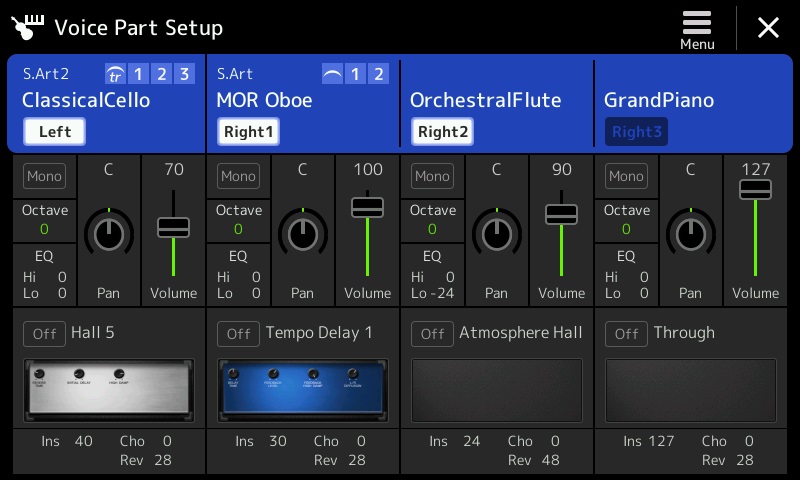
The Voice Part Setup screen is another way to tweak. Press the front panel VOICE gateway button. Genos displays the Voice Part Setup screen (below).

Here, you can turn Parts (voices) on and off, set levels, set pan, change the octave range, and change the DSP effect assigned to the voice. Peek and poke away!

Copyright &copy 2019 Paul J. Drongowski

MULTI FX: It’s for organ, too!

Every now and again, a question pops up on a forum that is worth reposting here. A member of the YamahaSynth.com MODX forum inquired about distortion effects for drawbar organ.

Yamaha has introduced new DSP effects with every generation of synth and arranger. Unless you don’t have a life (and I resemble that remark), you’re probably not steeped in the history of Yamaha effect algorithms (AKA “effect types”.) Some of the amp simulations (e.g., AMP SIM 1) have been around a loooooong time.

When it comes to distortion or overdrive, I start with the effects added with the Motif XF version 1.5 update:

    US COMBO
    JAZZ COMBO
    US HIGH GAIN
    BRITISH LEAD
    MULTI FX
    SMALL STEREO
    BRITISH COMBO
    BRITISH LEGEND

Of course, you’ll find these effects on Montage and MODX, too. BTW, These same effect types (algorithms) are available on Genos, Tyros 5 and a few other Yamaha arrangers. On arrangers, they are called “Real Distortion.” The arranger presets are voiced differently to fit the needs of arranger styles.

The “All 9 Bars!” Performance insert effects perform distortion and rotary speaker emulation. The effect routing is:

    Insert B --> Insert A

where Insert B is MULTI FX and Insert A is Rotary Speaker 1.

MULTI FX is effectively a chain of guitar pedal effects and is quite versatile. The effect parameters for “All 9 Bars!” are:

    1  Comp. Sustain   2.0
    2  Wah SW          Off
    3  Wah Pedal       0
    4  Dist SW         Clean
    5  Dist Drive      1.8
    6  Dist EQ         Hi Boost
    7  Dist Tone       1.5
    8  Dist Presence   5.0
    9  Output Level    100
   10  --
   11  Speaker Type    Twin
   12  LFO Speed       7.738Hz
   13  Phaser SW       Off
   14  Delay SW        Echo 1 St
   15  Delay Ctrl      40
   16  Delay Time      48

The Compressor Sustain stage is always on. Here, the Wah and Phaser are turned off. So, after the compressor, the rest of the chain applies distortion, amp simulation (Twin) and delay. Arranger people might want to try the MULTI FX with these parameter settings in order to spice up the rather polite drawbar organ voices. Then, crank the parameters!

There’s plenty to tweak here. I recommend reading Phil’s blog covering the new effects in Motif XF version 1.5:

https://yamahasynth.com/blog/exploringmotifxf15guitareffects

If MULTI FX doesn’t get the sound that your looking for, then maybe one of the other “Real Distortion” effects will get the job done.

Copyright © 2018 Paul J. Drongowski

MODX: Sampling Genos pipe organ

Sample Robot for Montage (SRM) is a very useful addition to the Yamaha MODX (Montage) product ecosystem. After my initial start-up experience:

I went on to produce two sampled pipe organ voices: Organ Prinzipal and Organ Pleno.

Prinzipal and Pleno

Anyone who sees a pipe organ — especially a cathedral-sized instrument — is immediately impressed by its large array of pipes. The open metal pipes are the principal pipes which give a pipe organ its distinctive sound. Pipes are arranged in ranks, kind of like the individual drawbars on a Hammond B3 organ (vice versa, really!) Hammond-ites know that the length of a pipe determines its pitch and that each rank has a reference pitch (measured in feet) that specifies the rank’s harmonic character when blended with other ranks.

I generally use pipe organ to lead congregational singing. Conventional wisdom for hymn accompaniment is simple: Use principal pipes with simple, foundational pitch: 8′, 4′ and 2′. Although this sounds plain vanilla, the sound is not cluttered by harmonics that may confuse the congregational ear. This kind of organ registration is often called a “principal chorus.” Due to the deep history of pipe organ in Western Europe, a French, German or Italian name may be used instead, e.g., “Prinzipal.”

Old school players understood the need to built energy and drama during a tune, too. Thus, an organist might add non-fundamental harmonics during the final verse and chorus. Think, Hammand organ “whistle”, 1 3/5′, 1 2/3′, etc. Often, a group of such ranks is brought in, a “mixture.” If the mixture consist of principal pipes, then the resulting registration is called a “full principal chorus.” This registration has many names, too, such as “Organo Pleno” or “Plein Jeu.”

In case you’re wondering, reed stops are rarely used for hymn accompaniment, if ever. Flute pipes are occasionally added for quiet meditative hymns. Principals are the real work horses.

Yamaha Musicsoft offers a terrific PSR expansion pack: Church Organ. Someone put a lot of love and care into this pack! I bought a PSR-S950 based upon the strength of the Church Organ pack. Fortunately, the PSR-S970 version of the pack also loads on Yamaha Genos™ and I’ve been able to take advantage of its sounds for practice and live play.

My goal here is to sample the Organ Prinzipal and Organ Pleno voices on Genos and to use those voices on MODX.

Sample, test, repeat

Sampling with SRM is reasonably straightforward. If you read my previous blog posts, then you already have the general drift. I recommend reading the SRM manual, too.

I liked the sampling strategy and key layout used in the Apple Symphony Orchestra pipe organs and arrived at a planned layout of keybanks:

KB#  Low  High  Center
---  ---  ----  ------
 1    C-2  C#0      C0
 2    D0    E0     D#0
 3    F0    G0     F#0
 4   G#0   A#0      A0
 5    B0   C#1      C1
 6    D1    E1     D#1
 7    F1    G1     F#1
 8   G#1   A#1      A1
 9    B1   C#2      C2
10    D2    E2     D#2
11    F2    G2     F#2
12   G#2   A#2      A2
13    B2   C#3      C3
14    D3    E3     D#3
15    F3    G3     F#3
16   G#3   A#3      A3
17    B3   C#4      C4
18    D4    E4     D#4
19    F4    G4     F#4
20   G#4   A#4      A4
21    B4   C#5      C5
22    D5    E5     D#5
23    F5    G8     F#5

In Sample Robot concepts, this means starting at C0 (MIDI note number 24) and sampling every three semi-tone steps up to C5 (MIDI note number 84). With the exception of the lowest and highest note, a sample is never transposed (pitch shifted) more than a single semi-tone. I also liked the long sample time in the Apple approach and settled on a 12 second capture time plus 0.5 seconds release (12.5 seconds total of capture). I didn’t use the release samples, but I wanted to see and hear them as a learning experience.

If you change the MIDI note range or step number in SRM, be sure to click the Step button! I got hung up and couldn’t figure out why SRM didn’t “see” new note range limits. This really should be mentioned prominently in the SRM manual. I assumed that SRM would simply take what it was given…

These basic sampling parameters can be set using the SRM project wizard. Or, you can set them individually on the various property tabs. I went through the wizard first, then fine tuned individual parameters later.

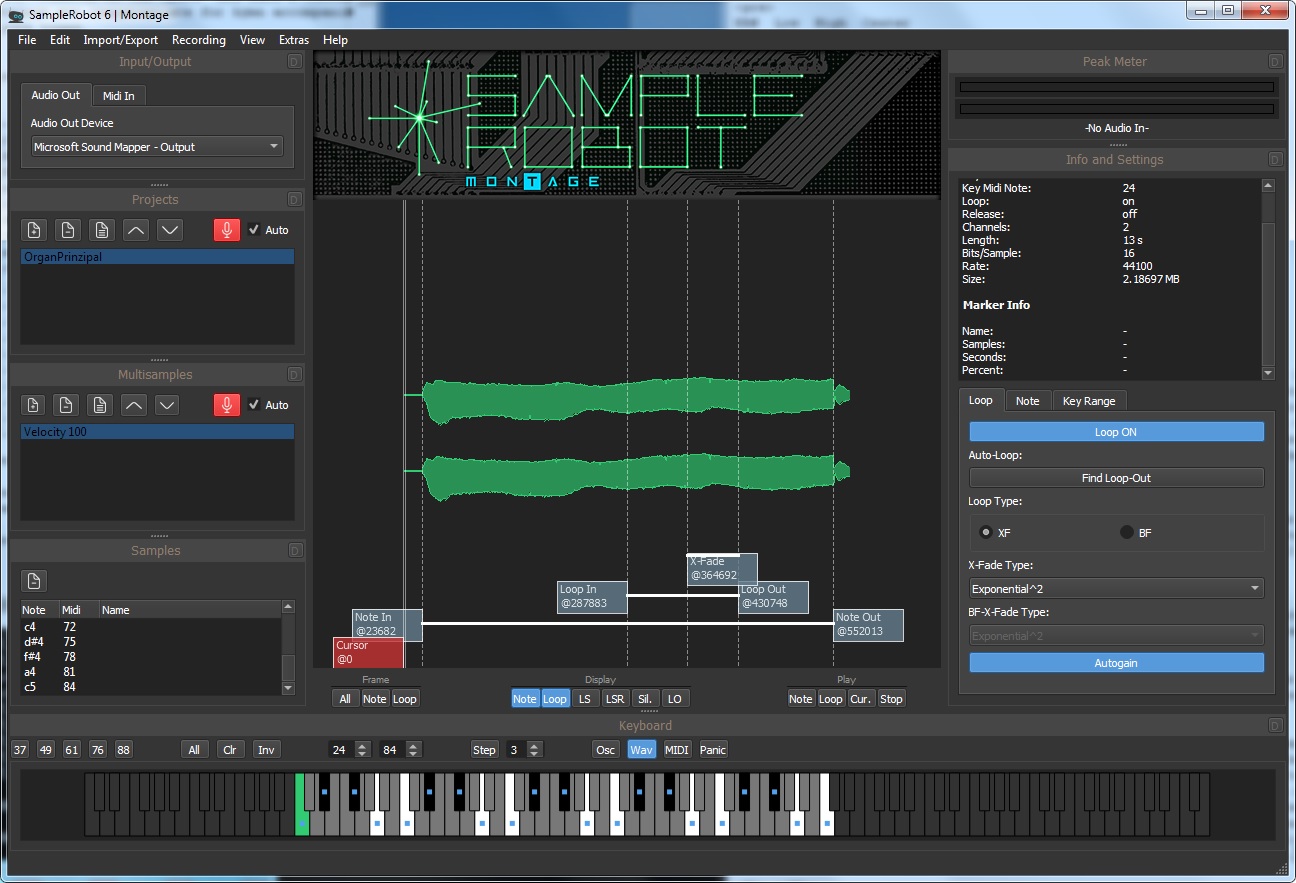
The virtual keyboard at the bottom of the screen shows the notes to be sampled (black and white) and the notes for which samples have been taken (notes with a blue square). The dark grey notes are not sampled. [Click on images to enlarge.]

Before going further, I must state that I made several attempts at sampling each voice. I decided to retain the volume differences (level nuances) across the multisample. I turned Auto-gain OFF and set the audio input level manually. Thanks to the waveform display, I could find any obviously clipped sample. I also did a spot check of questionable samples in Sound Forge Studio. I eventually arrived at a set of samples for each voice in which one (or a few samples) were max’ed and the rest of the samples in the set fell in line as synthesized by Genos. I believe this strategy preserved the natural levels across the pipe organ key range.

Loop quality

I let SRM do the looping. I know from experience that looping pipe organ samples is not easy and is very time consuming. Plus, I wanted to see how well SRM would do.

The Display buttons below the waveform pane control waveform annotations. Enable the Loop button and SRM shows the loop in (start) and loop out (end) points for a sample. I used the default cross-fade loop settings as shown in the screenshot.

SRM’s loops sound decent. There are a few samples where a bit of a surge could be heard, but no obvious bumps or clicks. SRM’s loops are shorter than the Apple loops and that is a little disappointing. However, there aren’t any short cycle loops that lose the dynamic timbral quality of a pipe organ. I think they are all useable as they are without any manual tweaking. My opinion is based upon what I auditioned in SRM and what I heard at the MODX keyboard itself.

Normalization and gain change

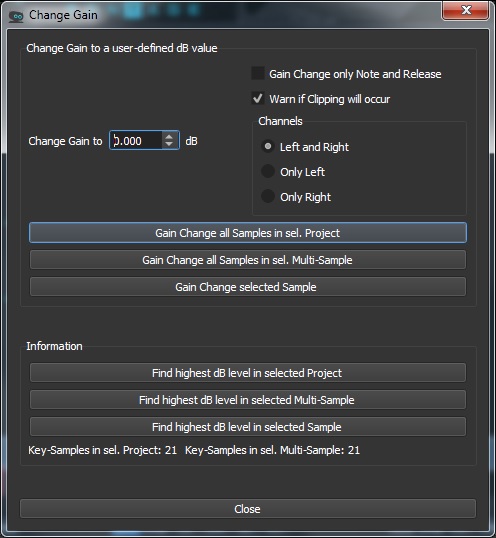
Really good thinking went into this part of SRM. SRM gives you several options for normalizing or applying a gain factor across one or all of the samples in a project. (Please see the manual for details.)

Normalization works as expected. It applies a gain factor that brings up the an entire sample such that the peak is 0dB or a custom peak level which you set.

Gain change is just what I needed for this project. I wanted to maintain the relative difference in level between samples — just make everything uniformly louder without introducing clipping distortion. In order to do this, I needed to know the highest dB level for a group of samples then apply a gain factor everywhere to pull all samples up. SRM provides a few different options for finding the overall peak level, e.g., “Find highest dB Level in selected Project”. Suggested improvement to SRM: After analyzing the samples, SRM should display the peak level for each sample in the property pane along with the sample’s other properties.

I like the option “Warn if clipping will occur.” Features like normalization and gain change would make SRM quite useful and necessary even when starting out with old samples borrowed from a VST software instrument. 🙂

Export and import

I exported each voice as a Montage LIBRARY file (X7L) and loaded each LIBRARY file into MODX. One nice MODX feature is the ability to audition Performances in a Library. This is a quick way to sanity check new waveforms (and underlying samples) on MODX.

There were several iterations at this stage, too. It took a few iterations to get the desired key range for sampling. The initial key range was one octave too high. I like to have three octaves in the left hand and two octaves in the right hand for hymn accompaniment as I’m faking organ pedals in the left hand. I used MIDI OX to check the high and low MIDI note numbers, then I reset the lower and upper note sampling limits in SRM.

Thankfully, any and all iterations are fast. SRM can sample the entire key range in about 5 to 6 minutes with the chosen capture time for each sample (12.5 seconds). This is welcome and needed time to get a cup and give my ears a rest!

Finishing and sanding

The new waveform needs to be incorporated into a finished MODX Performance because the SRM-generated Performance in the Library file is very, very basic. (Actually basic is a good thing for quality assurance and auditioning.)

In one of my earlier experiments, I had fashioned a pipe organ Performance (Plein Jeu). I repurposed the Performance even though I had long since blown away the Plein Jeu waveform.

My process has (roughly) the following steps:

  1. Load the LIBRARY file generated by SRM.
  2. Audition the generated Performance in the Library.
  3. Import the generated Performance and its waveform into USER memory.
  4. Select and edit an existing Performance, hopefully one which is close to the desired result.
  5. Save the new Performance under a new name.
  6. Edit the effects or any other Performance Common parameters.
  7. Edit the Part information within the Performance.
  8. Edit the elements in the new Performance to use the new waveform.
  9. Edit the new waveform to change its name (category and subcategory), to extend the lower note limit of the lowest key bank, and to extend the upper note limit of the highest key bank.
  10. Make any other necessary tweaks to the new waveform.
  11. Make tweaks to the Element programming or effects.
  12. Save the new Performance.

Clearly, prior experience with Performance and Part editing is a real plus at this stage. Ramp up slowly! Gain experience. Rome wasn’t built in a day.

OK, get ready for TMI. When you load a library, MODX seems to load incoming waveforms into wave memory on a contingency basis. This is why you can audition new Performance waveforms in a library. You can even make a contingent waveform part of a USER Performance. If you haven’t explicitly imported the Library Performance and its (contingent) waveform from the Library and you delete the Library, kiss the waveform good-bye; it’s deleted, too.

When you’re ready to commit to a new waveform, you must explicitly import the parent Performance and the new waveform within to USER Memory via the Data Utility.

A few comments for the developers

Nice work! Here are a few refinements.

Please add the ability to directly monitor the incoming sample stream. It would greatly aid set up and we can listen for audible clipping distortion when setting levels.

Display the peak level in sample properties. This will make it easy to find samples which are (potentially) clipped.

The Project Datapath in the Preferences dialog does not seem to apply everywhere and it isn’t persistent i.e., it is reset to the path “C\Users\xxx\Documents\SKYLIFE\SampleRobot6\Data.” This file path should be used consistently.

A native English speaker should take a quick pass through the manual, which is already pretty darned good. There are occasional spelling and simple grammatical errors (e.g., possessive versus plural). The same reviewer should check the application for spelling errors; there are misspelled words.

The manual should inform the user to press the Step button after changing the MIDI note limits for sampling.

What’s next?

When I A/B’ed the expansion pack organs against the Apple Symphony Orchestra pipe organ, I had to give the quality edge to Apple. I’ve already snagged another voice from the Symphony Orchestra Jam Pack. At the very least, I’ll use Sample Robot for Montage to change gain, to layout the key banks and to generate a Montage LIBRARY file. It shines at these operations and really speeds up the work.

Copyright © 2018 Paul J. Drongowski

MODX Theatre Orchestra

Today’s project is reconstructing one of my favorite voices stolen from Genos/PSR: TheatreOrchestra. This voice first appeared in Tyros 3, using waveforms that are roughly contemporaneous with Motif XS (MOX).

The following table summarizes the eight voice elements in TheatreOrchestra. The voice parameters are pulled from the Genos UVF file for the voice.

Element  Low  High Low  High    Vol  Shift  Waveform
-------  ---  ---- ---  ----  -----  -----  -----------------------
   0      C3   G8    1   127   -7.9      0  Flute2 Soft St L (5623)
   1      C3   G8    1   127   -9.8     12  Flute2 Soft St L (5623)
   2      C3   G8    1   127  -12.0      0  [Flute] (4951)
   3     C-2  F#3    1   127   -3.0    -12  Bassoon Hard (5626)
   4      E3   G8    1   127   -6.0    -12  Oboe2 Med V3 (5627)
   5      C5   G8    1   127  -21.4     24  [Glocken] (5124)
   6     C-2   G8    1    68   -9.0      0  p (5248)
   7     C-2   G8   69   127   -9.0      0  f (5249)

The volume (element levels) look a little bit curious and I conjecture that element levels are set relative to 0dB. We’ll need to convert these levels to the range [0:127] with 127 corresponding to 0dB. Naturally, we’ll let our ears be the ultimate judge.

The overall sound is dominated by the woodwinds: 3 flute elements, bassoon and oboe. The bassoon and oboe are transposed down one octave. This imparts a unique reedy character to the sound. However, the lower notes (left hand) get somewhat murky, so in the final voice, I leave the bassoon and oboe in their natural ranges to either side of middle C (approximately).

The string component is not strongly stated. Any old string ensemble would do. The waveform names in the UVF files are not super informative although I suspect use of the OrchStrgs waveforms which were introduced in Tyros 3 and Motif XS.

The glockenspiel adds a nice chime to the high end. The glock always sounds in the original Genos/PSR voice, becoming rather tiresome after a while. I prefer to switch the glock in and out. Also, piccolo is a good alternative, again, being switched in and out.

The next table summarized the eight voice elements in Theatre, a similar voice that I constructed for the MOX6.

Element   Low  High Low  High  Level  Shift  Waveform
-------  ----  ---- ---  ----  -----  -----  ----------------
   1       C2   G8    1   127     90      0  Flute2 Soft St
   2       C2   G8    1   127     80     12  Flute2 Med St
   3       C3   G8    1   127     40    -12  Flute Non-Vib Of
   4      C-2   B2    1   127    100      0  Contrabass R
   5       C3   G8    1   127     50      0  Solo Combi St
   6       C3   G8    1   127     80     24  Glockenspiel  AF2
   7       B2   G8    1   127     65     24  Piccolo       AF1
   8      A#2   G8    1   127    100      0  Oboe 1

The piccolo and glockenspiel are controlled by the Assignable Function buttons AF1 and AF2, respectively. The corresponding element sounds when an AF1 and/or AF2 button is enabled (turned on).

Contrabass and the Motif XS/MOX string Solo Combi replace the string ensemble. The contrabass lends a nice bottom to hold down the bass. It should be played sparsely in the left hand (i.e., no close clusters).

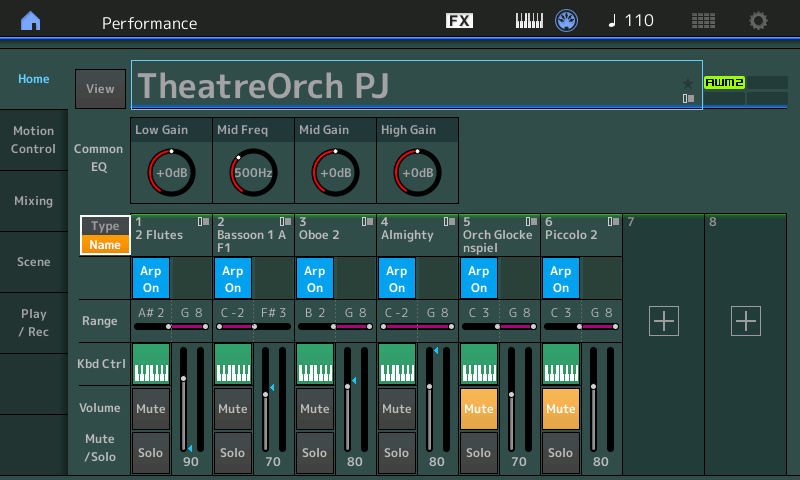
Finally, here is the TheatreOrch voice for MODX. On MOX, I tended to work exclusively in voice mode. MODX is modeless and all programming is made in a Performance. Thus, on MODX, I comp’ed several Performances into a single TheatreOrch Performance, then tweaked the individual Parts. [Click images to enlarge.]

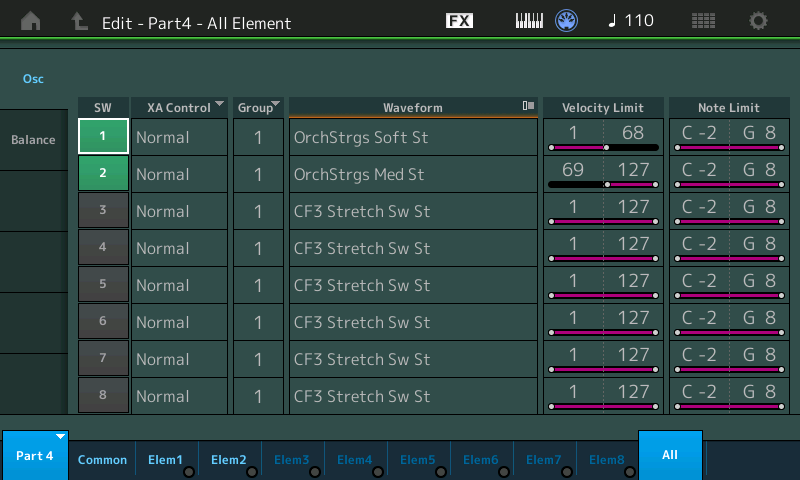
Although Performances are the first class citizens, I still dove into the Parts to make changes at the element level. The string Part is based on the Almighty Performance; I changed the waveforms to OrchStrgs Soft St and OrchStrgs Med St, splitting the patch into two velocity ranges: 1 to 68 and 69 to 127.

The new glockenspiel and piccolo waveforms are much better than Motif XS (MOX). The old glock sounded like a not very well cared for, used instrument bought in a pawn shop. The new glock rings nicely. A sweet alternative is the FM Glockenspiel. If I wasn’t such a traditionalist (!), I would have used it. Maybe in a future variation?

The flute Part (Part 1) is based on the 2 Flutes Performance. I employed older Performances for the oboe and bassoon, too. Since this voice is a blend, detailed isn’t too important and older, simpler voice programming doesn’t cut into polyphony as much as the newer detailed Performance. I prefer the new Performance for exposed solos when high quality is needed and polyphony is not likely to be an issue.

Instead of AF1 and AF2, I created four scenes. Scene 1 mutes both the glock and piccolo, Scene 2 enables the piccolo, Scene 3 enables the glock, and Scene 4 enables both the piccolo and glock. The MODX Scene buttons are close at hand and are an easy gesture away when making changes. The MODX assignable buttons, A.SW1 and A.SW2, are a longer reach.

As I work with MODX, I realize that I need to think more about building block Performances which can be combined (comp’ed) into bigger Performances. For example, it might have been better to start with 2 Oboes & Bassoon in one Part instead of separate oboe and bassoon in two Parts. Similarly, it might have been better to start with Wood Winds + Strings, which combines flutes and strings. By cutting two parts, I could have implemented the voice in four Parts, thereby making Seamless Sound Switching (SSS) possible. I may try this approach as a learning exercise.

Hope you enjoyed this brief dive into MODX Performance programming.

Copyright © 2018 Paul J. Drongowski

Bonus voice: Tutti

Let’s take a quick look at another interesting voice from arranger-land: Tutti. Tutti is a string and horn layer with Timpani in the left hand. High velocity left hand notes trigger a crash cymbal, too.

The following table summarizes the Genos voice programming.

El#  Low  High Low  High    Vol  Pan  Waveform
---  ---  ---- ---  ----  -----  ---  ------------------------
 0   C-2    G8   1   127  -25.9   -1  (4081)  Allegro Strings
 1   C-2    G8   1   127  -25.9    1  (4082)  Allegro Strings
 2   C-2    G8   1   127  -22.9    0  (4102)  French Horn
 3   C-2    F1   1   127  -14.6    0  (4222)  Timpani
 4   C-2    F1 106   127  -20.6    0  (4223)  Crash cymbal

I constructed a similar voice for MOX:

El#  Low  High Low  High    Vol  Pan  Waveform
---  ---  ---- ---  ----  -----  ---  -----------------------
 1   C-2   G8    1   127    105  L63  508  OrchStrgs Soft L
 2   C-2   G8    1   127    105  R63  511  OrchStrgs Soft R
 3   C-2   G8    1   127     90    0  621  French Horn St
 4   C-2   B1    1   127    127    0  137  Timpani Sw St        AF1 ON
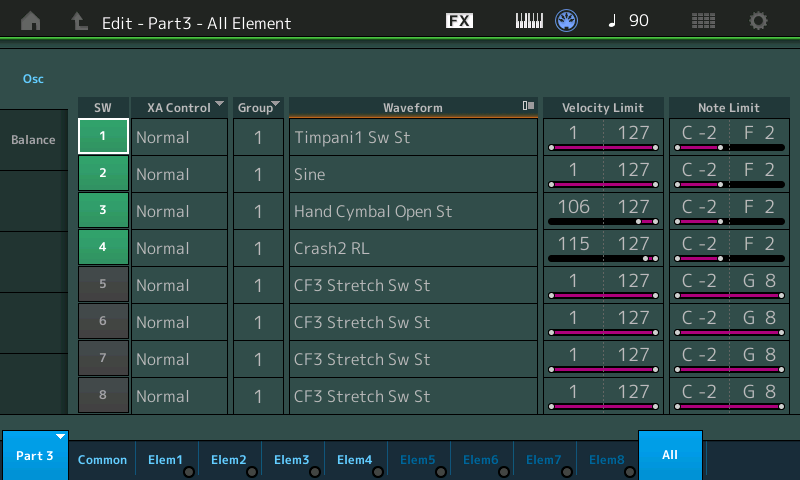
 5   C-2   B1  106   127     85    0  2479 Hand Cymbal Open St  AF1 ON
 6   C-2   B2    1   127    101    0       Snare Drum           AF2 ON

     AF1 ON: Enable element 4 Timpani and element 5 Hand Cymbal
     AF2 ON: Enable element 6 Snare Drum

The timpani and hand cymbal are enabled when Assignable Function button 1 (AF1) is on. I added a snare drum hit which is enabled by AF2.

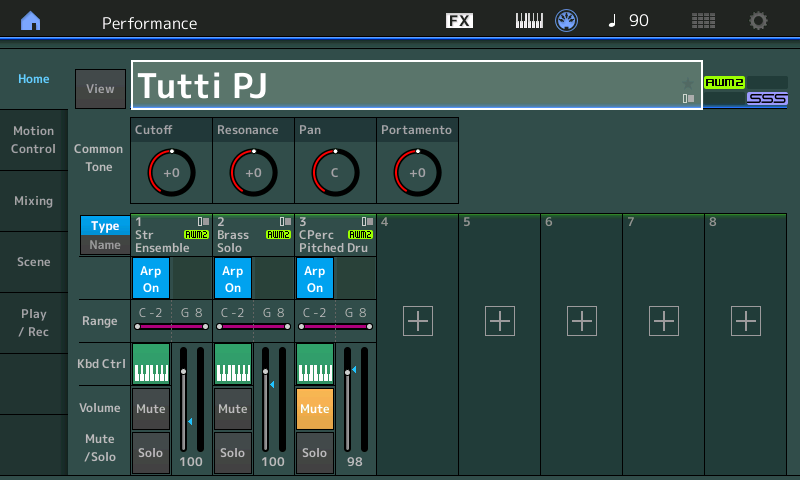
The screenshots below are a quick attempt to implement Tutti on MODX. I haven’t quite figured out the snare drum yet. First world problem: I love the Highland Snares kit and would like to use all of them!