The SWP70 tone generator

As I mentioned in an earlier post, the Yamaha PSR-S770 and PSR-S970 arranger workstations have a new tone generator (TG) integrated circuit (IC) — the SWP70. (“SWP” stands for “Standard Wave Processor.”) The SWP70 is a new TG family in a long line of Yamaha tone generators. The SWP70 replaces the SWP51L, which has been the mainstay in recent generations of Tyros, upper range PSR, Motif, and MOX series workstations.

The SWP70 has much in common with the SWP51L, but also some very significant differences. The SWP70’s external clock crystal frequency is 22.5792 MHz versus 11.2896 MHz for the SWP51L. This funky looking clock rate is a multiple of 44,100 Hz:

    22.5792MHz = 44,100Hz * 512

Samples are transferred to the DAC, etc. at a multiple of 44,100 Hz (Fs). Thus, it makes sense to derive Fs and its multiples from the chip-level master clock. The higher crystal frequency and faster memory read clocks lead me to believe that the SWP70 is clocked twice as fast as the SWP51L.

I am comparing SWP characteristics as deployed in the S970 (SWP70) and the S950 (SWP51L) workstations. This keeps the basis of comparison even although many characteristics (clock rates, DSP RAM size) are the same in higher end models like Tyros 5 or Motif. Higher end models employ two SWPs in master/slave relationship and both SWPs share the same wave memory. For more information about the PSR-S970 internal design, look here.

Five interfaces are essentially the same as the SWP51L:

  1. CPU interface: Communicate with the Main CPU (e.g., Renesas SH7731) via the parallel CPU bus.
  2. Serial audio: Send/receive audio data to/from the DAC, audio ADCs, and main CPU.
  3. Clock interface: Synchronize serial audio data transfers (generate multiples of Fs).
  4. DSP SDRAM interface: Store working data for effect processing.
  5. EBUS interface: Receive controller data messages (e.g., pedal input, keyboard input, pitch bend, modulation, live knobs, etc.) from front panel processors.

The DSP SDRAM is the same size: 4Mx16bits (8MBytes). The SWP70 read clock is 95.9616 MHz, while the SWP51L read clock is 45.1584 MHz. This is more evidence for a higher internal clock frequency.

The Tyros 4, Tyros 5 and S950 have an auxiliary DSP processor for vocal harmony. The microphone analog-to-digital (ADC) converter is routed directly to the auxiliary processor. Prior to these models, the microphone ADC is connected to the tone generator. With the SWP70, the S970’s microphone ADC is once again routed to the SWP70 and the auxiliary processor disappears from the design. Thus, vocal harmony processing (fully or partially) is located in the SWP70. See my post about SSP1 and SSP2 for further details.

The biggest change is the wave memory interface.

A little history is in order. The SWP51L (and its ancestors) were designed in the era of mask programmable ROM. I contend that tone generation is memory bandwidth limited and the earlier interface design is driven by the need for speed. The SWP51L (due to its evolved history) has two independent wave memory channels (HIGH and LOW). Each channel has a parallel address bus (32 bits) and a parallel data bus (16 bits). The two channels account for over 100 pins. (System cost is proportional to pin count.) The user-installed, 512/1024MB flash DIMMs plug directly onto the two channels.

The SWP70 wave memory interface takes advantage of new NAND flash memory technology. The interface is described in US patent application 2014/0123835 and is covered by Japanese patent 2012-244002. I analyzed the US patent application in an earlier post.

The SWP70 retains the HIGH port and LOW port structure. Each port communicates with an 8Gbit Spansion S34ML08G101TFI000 NAND flash device. Address and data are both communicated over an 8-bit serialized bus. This technique substantially decreases pin count and the resulting board-/system-level costs. Smart work.

I did not anticipate, however, the introduction of a new parallel memory interface called “wave-work”. The wave work interface communicates with a 16Mx16bit (32MBytes) Winbond W9825G6JH-6 SDRAM. The read clock is 95.9616 MHz.

The purpose of the wave work SDRAM is revealed by US Patent 9,040,800. This patent discloses a compression algorithm that is compatible with serialized access to the wave memory. The wave work SDRAM is a cache for compressed samples. The characteristics of the Spansion memory device give us a clue as to why a cache is required:

    Block erase time               3.5ms    Horrible (relative to SDRAM)
    Write time                     200us    Terrible
    Random access read time         30us    Bad
    Sequential access read time     25ns    Very good

As the patent explains, two (or more) samples are required to perform the interpolation while pitch-shifting. If there is only one tone generation channel, access is paged sequential. However, random access is required when there are multiple tone generation channels. (The patent mentions 256 channels.) Each channel may be playing a different voice or a different multi-sample within the same voice. One simply cannot sustain high polyphony through random access alone. The cache speeds up access to recently used pages of uncompressed samples.

The wave work interface takes additional pins, thus adding to board- and system-level costs. The overall pin count is still lower when compared to SWP51L. The penalty must be paid in order to use contemporary NAND flash devices with a serialized bus. This is the price for catching the current (and future) memory technology curve.

A few SWP70-related printed circuit board (PCB) positions are unpopulated (i.e., IC not installed) in the PSR-S970. There is an unpopulated position for a second Winbond W9825G6JH-6 wave work SDRAM which would expand the wave work memory to 32Mx16bit (64MBytes). A larger cache would be needed to support additional tone generation channels. Perhaps only half of the tone generation channels are enabled in the mid-grade PSR-S970 workstation.

There is what appears to a second separate wave work interface that is completely unpopulated. The intended memory device is a Winbond W9825G6JH-6, which is consistent with the existing wave work interface.

The PSR-S970 also has a stubbed out interface that is similar to the DSP SDRAM interface. The existing DSP SDRAM signals are labeled “H” for HIGH while the unused interface is labeled “L” for LOW. Perhaps only half of the hardware DSP processors are enabled for the mid-grade S970, waiting to be activated in future high-end Tyros and Motif products.

I refer to future high end products by the names of the current product lines. Yamaha may choose to rebrand future products (e.g., the much-rumored “Montage” trademark).

The Spansion S34ML08G2 8-Gb NAND device is Open NAND Flash Interface (ONFI) 1.0 compliant. The S34ML08G2 device is a dual-die stack of two S34ML04G2 die. The 8-bit I/O bus is tri-state allowing expansion e.g., multiple memory devices sharing the same I/O bus and control signals with at most device enabled at any time. The SWP70 has additional chip select pins that would support this kind of expansion. The current expansion flash DIMMs will no longer be needed or used.

In this note, I concentrated on observations and fact, not speculation about future products. I’ll leave that fun for another day!

All site content is Copyright © Paul J. Drongowski unless indicated otherwise.

SSP1 and SSP2: Designated hitter

One notable absence from the Yamaha PSR-S970 design is the “SSP2” integrated circuit (IC) which handles vocal harmony processing. The SSP1 and SSP2 appeared in the Tyros series and PSR series coincident with Vocal Harmony 2.

For you signal sleuths, the PSR-S950 and Tyros 5 microphone input is routed to an analog-to-digital converter (ADC) where the analog signal is sampled and digitized. The digital sample stream is sent to the SSP2 IC. The firmware munges on the samples and voila, the SSP2 produces a vocal harmony signal that is mixed with samples from the tone generator, etc. The SSP2 sends its results to the TG where effects and mixing are performed. The TG sends its output to the digital-to-analog converters (DAC) and digital amplifiers. The Tyros 4 has the same signal flow using an earlier model “SSP1” processor instead.

Previous machines with vocal harmony (e.g., Tyros 3 and earlier, PSR-S910 and earlier), routed the digitized microphone stream to a tone generator (TG) IC such as the SWP51L. Presumably, vocal harmony processing was performed in the TG IC. With the brand new SWP70 tone generator in the S970, the digitized microphone stream is sent to the SWP70. Looks like vocal harmony processing is folded into the SWP70 TG.

I didn’t give the SSP2 much thought or investigation, and just assumed that it was a gate array or something. On inspection, the pin-out resembles a Renesas embedded DSP processor with analog inputs and outputs, digital I/O, USB and all of the usual suspects. The SSP2 in the S950 has 2MBytes of NOR flash program ROM (organized 1Mx16bits) and 2MBytes of SDRAM (organized 1Mx16bits). The clock crystal is a leisurely 12.2884MHz although the SDRAM read clock is 84.7872MHz.

Mysteriously, a web search on the part numbers doesn’t turn up much information. The part numbers are:

    Schematic ID  Manufacturer?       Yamaha
    ------------  ------------------  --------
    SSP1          MB87S1280YHE        X6363A00
    SSP2          UPD800500F1-011-KN  YC706A0

The PSR-S950 parts list does not give a Yamaha order number for the SSP2. If the SSP2 fails, you’ll need to call Yamaha 24×7 directly.

A web search does turn up a few of the interesting places where the SSP has been seen. In addition to Tyros 4, Tyros 5 and S950, the SSP and SSP2 are featured in:

    PSR-S500 arranger (probable role: effects processor)
    EMX5016CF mixer (role: SPX effects and user interface)
    Steinberg UR22 audio interface
    Steinberg MR816 Firewire audio interface
    Yamaha THR modeling guitar amplifier

The SSP is Yamaha’s designated hitter when they need an odd bit of DSP work done.

PSR-S770 and S970 internal architecture

Yamaha just recently introduced the new PSR-S770 and PSR-S970 arranger workstations. As usual, I’m always anxious to dive into the service manual and see what’s up.

First, I’d like to thank Uli and capriz68 on the PSR Tutorial Forum for their help. Uli made a very nice table from my ramblings, so be sure to check it out there.

Without further introduction, here is a table comparing previous generation models (PSR-S750 and PSR-S950) against the new models.

                    PSR-S750  PSR-S950   PSR-S770  PSR-S970
                    --------  ---------  --------  ---------
Main CPU            SWX08     SH7731     SH7731    SH7731
Clock rate (MHz)    135.4752  256        320       320
Tone generator      SWP51L    SWP51L     SWP70     SWP70
Ext clock (MHz)     11.2896   11.2896    22.5792   22.5792
DSP SDRAM (MBytes)  8         8          8         8
DSP RCLK (MHz)      45.1584   45.1584    95.9616   95.9616
Mic ADC                       AK5381     PCM1803   AK5357
AUX IN ADC          AK5357    AK5381     AK5357    AK5381
DAC                 AK4396    AK4396     AK4396    AK4396
Digital amp         YDA164C   2*YDA164C  YDA164C   2*YDA164C
Wave ROM (MBytes)   256       256        512       2048
Wave SDRAM          N/A       N/A        32MBytes  32MBytes
SSP2 chip           No        Yes        No        No

The main CPU remains a Renasas SH4AL-DSP CPU. The clock speed is increased from 256MHz to the 320MHz, which is just shy of the rated maximum for the SH7731.

Wave memory is increased from 256MBytes (S950) to 512MBytes (S770) and 2GBytes (S970). Part of the S770 and S970 wave memory is reserved for expansion pack voices: 160 MBytes (S770) and 512 MBytes (S950). How Yamaha uses the rest of the memory is up to Yamaha. However, we are now in an era when we cannot compare products solely on the basis of physical wave memory size. Our ears and performance experience are more important than mere byte counts!

The S970 has two NAND flash memory devices labelled “audio style.” The devices are:

    4Gbit NAND flash = 512MBytes
    2GBit NAND flash = 256MBytes
                       ---------
    Total audio style  768MBytes

Yamaha specifies memory size in bits, so one must be careful to convert during analysis. The PSR-S950 has a NAND flash device labelled “Program ROM,” which presumably served the same purpose as well as holding the operating system image that is loaded at boot time. The S950 device capacity is 512MBytes (4Gbits). The S970 reserves 128MBytes for audio style expansion.

The upper mid-range model, i.e., the S970, is biamplified with two digital power amps. The older S950 is also biamplified. Not much change here.

The big news is that Yamaha have a new tone generator integrated circuit (IC), the SWP70. The SWP70 uses the serialized wave memory interface that I described in an earlier post. The SWP70 appears to operate at twice the speed of the older SWP51L. The SWP70 has implications for other future products, so I will analyze it in a separate post.

With respect to the PSR-S970, however, there is another evolutionary step. With the appearance of the new SWP70, there is also the disappearance of the SSP2 IC. The introduction of the SSP2 IC coincided with the introduction of Vocal Harmony 2 in both the Tyros line and the PSR-S950. It is reasonable to infer, then, that vocal harmony is implemented on board SSP2. With the PSR-S970, there are two possibilites.

  1. Vocal harmony is assigned to the now faster main CPU, or
  2. SSP2 functionality is integrated into the new SWP70.

The SWP70 is beefed up in other ways including a new wave working memory.

The future looks interesting as always!

Here are links to my articles on other members of the PSR and Tyros product families:
What’s inside of a Yamaha arranger?
A follow-up on the Yamaha SWP51
Yamaha arranger product family

All site content is Copyright © Paul J. Drongowski unless otherwise noted.

Chord Tracker revealed

I am using the Yamaha Chord Tracker app to figure out the chords to some tunes. Chord Tracker analyzes the music in an MP3/audio file and displays a chord chart. This is great for learning new tunes and working out arrangements.

Chord Tracker can do much, much more! Yamaha really needs to produce a manual for this app to reveal all of these functions. Here are some useful tips including how to send a MIDI file for a transcribed song to your Yamaha PSR/Tyros arranger for playback.

First off, you can change the chords in the chord chart. If you don’t like a chord, just tap the chord and select a new one. Chord Tracker does a pretty decent job of identifying chords in “simple” music. For example, it did a great job with Hot Chocolate’s “Every 1’s A Winner.” (My guilty pleasure.) It didn’t do such a good job with Groovy Waters downtempo “Wicked Game.” The jazz chords (Dm/Eb, come on, man) threw Chord Tracker off. No problem, just edit the chord chart.

Here’s a crazy idea. Use a DAW to produce a three minute song with one or two chords at the beginning. Transcribe the song with Chord Tracker. When you need to create a new song from scratch, edit the new chords. Presto, a chord chart editor.

Next, you can send the chord progression to your PSR/Tyros. The Yamaha web site touts wireless connection, but you can send the song file via wired USB. I transferred the chord progression to my S950 using the Apple Camera Connection kit. (My iPad is a gen 4 running iOS9, BTW.)

The Yamaha web page for Chord Tracker states that Chord Tracker is compatible with the currently listed “Related Products.” That is true. However, Chord Tracker worked successfully with the S950 (not listed). So, even though you don’t own the latest and greatest, please give this capability a try.

On the iPad side, you need to establish a connection from Chord Tracker to your keyboard. Plug in the Camera Connection Kit and USB cable first. Then select your instrument in the Connection box on Chord Tracker’s main screen.

Choose an audio song to transcribe to a chord chart and turn Chord Tracker loose. Once you have a chord chart, tap the upload icon, i.e., that square box with an arrow shooting upward. Then tap the “Send to Instrument” button. Chord Tracker pops up a dialog in which you can enter/change the name of the song file to be created on the arranger workstation. Tap SEND and Chord Tracker sends the song file to the arranger.

Chord Tracker stores the song file in the arranger’s internal drive. It creates a directory named “ChordTracker” and stores the song file in this directory. Any other song file that you create this way is stored in the “ChordTracker” directory.

Press the SONG SELECT button on the arranger to find and select the song file. Navigate to the USER tab of the internal drive and then press the corresponding button for the “ChordTracker” directory. Then press the corresponding button for the song file itself, e.g., “every1s”, which is the name that I gave to the “Every 1’s A Winner” song file.

Press the play button. The arranger will play back the song using the currently selected style and section. Now have fun changing the style, section, tempo and so forth. You can change the style, section, etc. in real time while the song plays, making it easy to tune the song to your sonic wishes.

Of course, you can dive into SONG CREATOR and tweak away. The System Exclusive TAB reveals much of the magic behind the scenes.

Chord Tracker generates three MIDI metadata records for time signature, key signature and tempo, followed by three System Exclusive messages:

    F0 7E 7F 09 01 F7             GM reset
    F0 43 10 4C 00 00 7E 00 F7    XG system ON
    F0 43 60 7A F7                Accompaniment start

The preamble is followed by a slew of Yamaha System Exclusive messages for the chord changes:

    F0 43 7E 02 34 00 34 7F F7    Chord control (F maj/F)
    F0 43 7E 00 08 7F F7          Section control (MAIN A ON)
    F0 43 7E 02 23 00 23 7F F7    Chord control (Eb maj/Eb)

Chord Tracker does not generate the Yamaha proprietary CdS1 chunk in the MIDI file. All playback is controlled by metadata and System Exclusive messages.

We can expect to see more of these kinds of features from Yamaha. They have a US patent (number 9,142,203) for a formatted chord chart and accompaniment generator. The generator is driven by a simple, free form text chord chart.

All site content is Copyright © P.J. Drongowski unless otherwise indicated.

Clear the decks?

Yamaha have announced a truly stellar promotion to move Motif XF workstations. The Motif XF Fully Loaded expansion pack includes a FireWire expansion board, two FL1024M memory modules and an USB drive filled with content including Chick Corea’s Mark V electric piano. (See the promotions page at the Yamaha web site for additional details.)

Wow! This promotion really caught my attention and if ever there was a time to upgrade to an XF, it’s now.

Of course, this aggressive promotion could also mean that a new synthesizer workstation will be announced in the not-too-distant future. Winter NAMM 2016, perhaps? Old inventory has got to go!

After the Reface surprise, I’ve given up predicting specific product features, especially based upon a (rumored) product name. The word “Reface,” for example, means something completely different to a saxophone player and, yes, Yamaha manufacture saxophones and mouthpieces. 🙂 So, “Montage”, harumph. I am willing to predict, however, that the next high-end workstation will have a new member of the Standard Wave Processor (SWP) family — the hardware chip that underlies the tone generation infrastructure. (See Serial Memory and Tone Generation.) This is big step for Yamaha because the current SWP51L, for example, is used in everything from mid-range arrangers, to MOX/MOXF, to Motif, to Clavinova.

Just taking in the gestalt of Yamaha’s recent patent filings, they have been actively building their portfolio in at least three areas: human vocal processing and synthesis (VOCALOID), music analysis and combined MIDI/audio accompaniment.

VOCALOID has been a commercially successful software product. The tech has, by the way, some similarities to the “connective” capabilities of Articulated Element Modeling (AEM), known more broadly as “Super Articulation 2” on Tyros. VOCALOID requires frequency domain signal processing, so unless Yamaha have knocked down some real computational barriers, VOCALOID will probably remain a non-real time synthesis technique.

“Music analysis” is a broad area and a rather vague term. At a fundamental level, this area includes beat (tempo) detection and scale and harmony (chord) detection. I think we already see some of these results at work in the Yamaha Chord Tracker app. Chord Tracker analyzes an audio song. It detects the tempo and beats, and partitions the song into measures. Chord Tracker identifies the chord on each beat and displays a simplified “fake sheet” for the song. Chord Tracker can send the “fake sheet” to a compatible arranger keyboard for playback.

Music analysis also includes high-level analysis such as extracting the high level characteristics of a piece of music. This kind of analysis could allow a rough categorization and comparison between snippets of music (similarity index). We haven’t seen the fruits of this technology (yet), but one could imagine a tool that suggests an accompaniment based on what the musician plays or based upon an existing musical work. BTW, the word “musician” here includes guitarists, woodwind players, etc. and not just keyboardists. The world-wide market for non-keyboard instruments is bigger than the market for keyboard-based instruments. (Guitars alone outsell keyboards nearly 2 to 1 in the United States.)

The third main area of exploration and filings is combined MIDI/audio accompaniment. Up to this point, Motif arpeggios are MIDI-like phrases, not audio. Arranger workstation styles are MIDI (SMF in a Halloween costume). Neither product works with MIDI and audio phrases in a transparent way like the very successful Ableton Live. Yamaha’s patent filings disclose arpeggio- and/or style-like accompaniment using a mix of MIDI and audio phrases. Audio phrases are warped in time and pitch to match the current tempo and key scale.

Now, let’s throw these technologies into a bag and shake them around. Imagine a compositional assistant that analyzes a piece of music (recorded or played live), determines tempo, beats, chord changes and more, and automatically whips up an accompaniment or track. MIDI and audio phrases are selected from a library based upon a similarity index between the reference track and phrases in the library. If this is Yamaha’s vision, then double wow! The combination of these technologies would raise the level of music composition substantially from it’s tedious, point-and-click existence. It finesses the problem of listening to the phrases in the Motif/MOX arpeggio library, selecting the most applicable phrases and combining them. DigiTech TRIO is already sniffing around this territory.

Naturally, patents do not imply product. Therein lies the danger of making predictions.

Which brings me, finally, to US Patent 8,779,267 (July 15, 2014). If someone can explain this patent to me, thanks. The invention seems to analyze an incoming musical signal (using some heavy DSP), generate almost ultra-sonic (>18KHz) “control tones,” and produce a multi-timbral accompaniment or track. Amazing stuff.

The near ultra-sonic technique is already in use. The AliveCor Mobile ECG monitor uses ultrasonic tones to communicate with iPhone/iPad. The AliveCor doesn’t require power-sucking Bluetooth (and its emissions certification.) The monitor runs on a CR2016 battery. The downside, in the case of AliveCor, is that its monitor pad must be near the mobile device for reliable communication.

All site content is Copyright © Paul J. Drongowski unless otherwise indicated.

Whither XG?

Once upon a time, the hardware tone module was king of “desktop music production.” A wide range of options were available from pro-level tone modules to desktop tone generators to ISA/PCI cards. The General MIDI (GM) standard came about in this era because people wanted to have consistent playback across hardware platforms.

Every manufacturer offered one or more modules. Two players — Roland and Yamaha — jumped in big. Each company offered desktop tone modules adhering to their own semi-proprietary extensions of the General MIDI standard. Roland had its GS while Yamaha had its XG.

Then, software plug-ins killed the tone module.

Native, computer-based signal processing became fast enough that hardware tone generation was no longer required.

Roland GS, meanwhile, has gone on relatively hard times. Today, Roland offers two products that are up-front GS: Mobile Studio Canvas and Sound Canvas for iOS. The Mobile Studio Canvas is a pricey little number that streets out at $429 USD. Not exactly cheap. Sound Canvas for iOS is an iOS app supporting Inter-App Audio and Audiobus. Roland claim that the app and its host can act as a tone module through a suitable Core MIDI compatible interface. Mobile Studio Canvas is $19.99 through the Apple App Store.

The Virtual Sound Canvas was a VST- and DXi-compatible, multi-timbral soft synth. Unfortunately, for desktop users, the Roland Virtual Sound Canvas (VSC-MP1) was discontinued.

Yamaha XG is battered, but is still breathing. XG-based hardware tone modules are nearly extinct. (Check ebay…) However, current arrangers from Yamaha offers XG compatibility, even if it’s only the XGlite subset. In fact, XG is the de facto voice architecture on arranger keyboards. Edit a voice on an arranger and you are tweaking XG parameters. Of course, this means that you must have space for an arranger on your desktop. A half-rack 1U tone module is far more compact and desktop-friendly.

“Pro” keyboardists still turn up their noses at GS, XG and arrangers. A large part of this is guilt by association with General MIDI. Beneath it all in Yamaha-land, the synths and the arrangers share hardware technology such as CPUs and tone generation circuits. XG is essentially a wrapper around pro-level samples and tone generation.

XG also lives at the heart of the Yamaha Mobile Music Sequencer (MMS) app. MMS has a software-based XG engine inside. It supports 9 reverb, 4 chorus and 26 variation effects. Yamaha cut down the XGlite sound set to just 42 GM voices plus 42 or so synth voices. In case you’re interested, I’ve documented many of the XG features in MMS here:

Mobile Music Sequencer Reference
Make music with MMS on PSR/TYROS

MMS demonstrates that it’s possible to host XG on an iPad with an ARM processor. Will Yamaha answer Roland’s Sound Canvas for iOS?

Needing an XG-compatible VST soft synth on Windows, I went in search of one and stumbled onto a retro cult. Turns out, there are a whole lot of other people who would like an XG-compatible VSTi on Windows, too.

First, there are enthusiasts who are trying to resurrect the S-YXG50 soft synthesizer on Windows 7 (and earlier). The S-YXG50 uses either a 2MByte or 4MByte wave table, so we’re not talking stellar sound quality. I experimented with S-YXG50 on Windows 7 with no success.

Then, there are enthusiasts who take old daughter boards (DB50XG or DB60XG) and fashion standalone tone modules from them. (Just add a power supply and a MIDI interface.) These daughter boards have a 4MByte wave table. Like XG tone modules, XG daughter boards are scarce as hen’s teeth.

The issue that always rears its head with this old tech is the availability of drivers. You can find the occasional Yamaha-based sound card or SW1000XG, but driver support usually stops with Windows XP (at best).

Finally, another sub-cult has discovered the joys of Yamaha MidRadio. MidRadio is a MIDI player application for Windows 8 (and earlier). It is XGlite compatible with 361 regular voices, 10 drum kits and 2 SFX kits. A few of the regular voices are so-called “panel voices” in the PSR E-series — an added bonus! Wave table size is about 11MBytes. And, guess what? It sounds pretty darned good. Here are links to the list of voices and effects in MidRadio version 7:

List of MidRadio voices and effects

If you try MidRadio, be prepared to use Google translate and be prepared to wade through a Japanese-only user interface.

A few intrepid souls discovered that the MidRadio sound engine (SGP2.DLL) is just a few bricks short of being a VST software instrument (VSTi). They developed a patch which turns the DLL into a VSTi. Yes, the patch works and I can send XG-compliant MIDI from Steinberg Cubase, Ableton Live and VSTHost to SGP2. It plays rather nicely.

In general, I do not recommend this approach. Anytime you download a patch from the Web and execute it, you put the privacy and security of your computer and its information at risk.

Given this enormous red flag, I wish that Yamaha would sell an XG-compatible VSTi for Windows and Mac. There are users waiting for properly a supported, street legal XG plug-in soft synth at a reasonable price. And certainly, we wouldn’t turn down a free one.

Serial memory and tone generation

Ah, September. Soon it will be time to speculate about new products at the Winter 2016 NAMM!

Every now and again, I take a pass through recent patent filings from Yamaha to get an idea about future product developments. Of course, the tech in a filing may never make it to product. However, a few common threads begin to appear over time.

This post starts with a patent application having the inauspicious title, “Sound Generation Apparatus.” This US application 2014/0123835 was filed on November 5, 2013 and is based on Japanese patent -244002, which was filed November 5, 2012.

First, a little background about the Yamaha tone generation architecture. Yamaha has used the same overall architecture for mid- and high-end workstations and tone modules since the mid-1990s. (TG-500, anyone?) These products employ one or more large scale integrated circuits for tone generation. Current versions of the tone generator IC, the SWP51L, has two dedicated memory channels for waveform data. Each channel has a 16-bit parallel data bus and a parallel address bus (24 or more bits wide). The parallel interface takes at least 40 pins per channel.

That’s a lot of incoming and outgoing connections (80 plus pins for both channels). IC packaging costs are in the range of $2.50 USD to $4.50 per pin. So, there is a direct relationship between the number of IC pins and manufacturing cost. Ultimately, this cost has a real effect on profit and the final price of the product.

The Yamaha patent application describes a serial interface for waveform memory in place of a parallel interface. The serial interface requires six pins per channel. Instead of 80 pins, the serial interface approach uses only 12, providing an 8 to 1 savings in packaging costs alone.

The application cites the Winbond 25Q series as the kind of flash memory to be supported by the serial interface. The largest 25Q device has a 64MByte capacity and can sustain a 40MByte/second transfer rate (quad SPI mode). This is nearly sufficient bandwidth to drive 128 44,100Hz stereo polyphonic voices (about 45MBytes/sec).

If you do the math that’s 128 times 44,100Hz times eight bytes. Two successive samples are required in order to perform interpolation although the oldest sample could be cached.

The product implications are interesting. At the low end of the scale (one or two channels), the device footprint is much smaller. The small size allows a corresponding decrease in the size of the product. Maybe a guitar pedal stomp box?

The high end of the scale is more intriguing. It becomes possible to build a tone generator IC with four or even eight independent channels of tone generation where each channel is driven by its own memory stream. We’re talking 1,024 polyphonic voices in the same LSI footprint as today’s SWP51L.

There are design implications for entry-level keyboard products, too. The SWL01 system on a chip (SOC) integrates both CPU and tone generator onto the same IC. Waveform data (samples) travel on the same bus as CPU instructions and data. A serial SPI interface requires only six pins and might let designers shift waveform storage from ROM on the system bus to a dedicated memory bus and channel. Software might be able to perform new tasks such as variation effects with more bandwidth available to the CPU on the system bus.

I feel confident to predict that the next generation of Standard Wave Processor (SWP) is in development. The SWP51L has been around for a while (including Tyros5). Here are a few key products and members of the SWP50 family:

    Product   Year  TG chip
    --------  ----  -------
    Tyros     2002  SWP50
    Motif XS  2007  SWP51
    Tyros 3   2008  SWP51B
    Tyros 5   2013  SWP51L

It is definitely time for a new design, not an incremental refresh.

Yamaha sees its internal integrated circuit capability as a strategic advantage. Up to this point, Yamaha have both designed and fabricated its own ICs. Last year, Yamaha transferred its fabrication line to Phenitec Semiconductor. Yep, Yamaha has gone fabless. This gets a huge capital expense off its balance sheet. It also means that Yamaha is under less pressure to reuse the same parts across product lines in order to get its IC manufacturing volume up. This is one reason why the SWP51 has had such long legs and why the SWL01 is used across all of the E-series arrangers. Volume, volume, volume! The pressure to (re)use Yamaha’s own IC solutions has been reduced.

We’ll see if Johnny can read (defenses) against Dick LeBeau. Go Browns!

Scat voices the newest Yamaha arrangers

The original Jazz Scat voices expansion pack for the Yamaha PSR-S950 arranger workstation remains a popular part of the site. With the Tyros5, Yamaha took a different direction and format for expansion packs. The new approach to expansion pack development and use is embodied in the Yamaha Expansion Manager, or “YEM” for short. Up to now, Tyros5 users have not been able to load and use the original Jazz Scat voices expansion pack.

That’s all changed! I’m pleased to announce the alpha test version of the Jazz Scat voices expansion pack for YEM-compatible Yamaha arranger workstations. The list of YEM-compatible arrangers include the Tyros5, PSR-S670, PSR-S770 and PSR-S970 workstations.

Why “alpha test?” At this time, I do not have access to a YEM-compatible workstation in order to do my own testing. (I’m happy with the S950, thanks.) In response to requests, however, I have produced a new YEM-compatible expansion pack. I’ve done as much testing as I can in YEM. Now, it’s your turn!

The expansion pack is in YEM project file format, sometimes called a “PPF file” because of its file extension. The PPF file must first be loaded into YEM. Once it is in YEM, you can send it to your keyboard, generate an install file (PPI format), copy voices to your own custom pack and even edit the voices themselves. That’s a lot of flexibility!

If you encounter problems, please post your issues to the PSR Tutorial Forum . If you are a PSR/Tyros user, you really should participate at the forum anyway. It’s a great place to meet other PSR/Tyros users and to learn new techniques.

Here is a link to the expansion pack. You need to download and UNZIP this file, read the README_PACK_YEM.TXT file, and then load the pack into the Yamaha Expansion Manager.

Both the scat voice expansion pack and the scat voice samples are released under a Creative Commons Attribution 4.0 International License.

Creative Commons License
ScatVoices and ScatVoice samples by Paul J. Drongowski are licensed under a Creative Commons Attribution 4.0 International License.

You are free to use the expansion pack voice or samples (even for commercial purposes) as long as you provide a link to http://sandsoftwaresound.net from your own web site AND/OR explicitly credit me in your creative work, e.g., “Scat samples/voice by Paul J. Drongowski”.

If you would like to know more about the sampling and voice design process, please read this post. The original S750/S950 compatible pack is here. Or, feel free to listen to the MP3 demo.

XG effects: SYSTEM mode

The last time that I took a look at Yamaha XG effects, I discussed using the VARIATION effect as a channel insertion effect. I’m now working on a PSR/Tyros style where I would like to apply an amp simulation effect to two channels. So, it’s time to learn about the configuration of VARIATION effects in SYSTEM mode. Even though I’m working on a style, you can apply these techniques to any Standard MIDI File (SMF) for play-back on an XG sound engine.

XG insertion effects are relatively easy to configure as the VARIATION effect is added to the signal chain of a single MIDI channel (XG part). Configuration of the VARIATION block as a SYSTEM effect takes more effort (i.e., more System Exclusive messages), but is well worth it. Now that I understand SYSTEM mode better, I may set up a DAW template for SYSTEM mode and use that template as my default effect configuration.

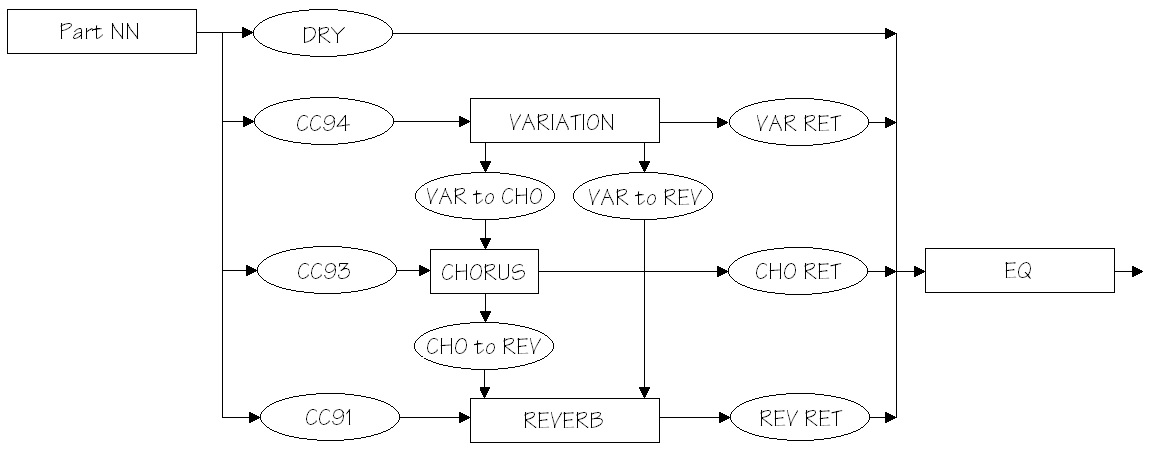
The diagram below shows the signal flow for the VARIATION, CHORUS and REVERB effect blocks when VARIATION is configured for SYSTEM mode. I show only one channel (Part NN) entering from the left in order to keep the diagram simple. Control “knobs” are drawn as ovals; these are XG/MIDI parameters under your control. The first four knobs — CC91, CC93, CC94 and DRY — are per-part parameters and need to be set for each of the sixteen channels (parts). The MIDI Continuous Controller (CC) knobs set the reverb, chorus and variation send levels for the part, respectively. In my project, I set the variation send (CC94) for two parts to non-zero levels and set CC94 for the remaining parts to zero. The non-zero levels pass the signal to the VARIATION block.

XG_System_Mode

The reverb, chorus and variation send levels are configured using MIDI Continuous Controller messages, but the DRY level is set using an XG System Exclusive (SysEx) message. Although this looks inconsistent, it follows Yamaha’s XG recommendations, i.e., use CC messages in preference to SysEx where possible. DRY level must be controlled using SysEx as no corresponding MIDI CC message is defined.

Please see the table at the end of this post for further message programming details.

The rest of the effect blocks and knobs are global (system-wide). The REVERB, CHORUS and VARIATION return levels (REV RET, CHO RET, and VAR RET) along with the DRY levels determine the amount and balance of effected and un-effected (dry) sound. All of the return levels default to 0dB (decimal 64 or 0x40 in hexadecimal notation). The default for each per-part DRY level is the maximum (decimal 127 or 0x7F). These default values enable signal flow right from the beginning and are a good starting point for experimentation and tuning. At least you are guaranteed to get some sound out of the effect section!

The VARIATION, CHORUS and REVERB blocks need to be configured through the usual XG SysEx voodoo. You need to select at least the effect type and be sure to configure the VARIATION effect for SYSTEM mode. In actual practice, you should do this before setting any send levels as the change to SYSTEM mode changes the level parameters to new default values.

Now the fun begins! The default configuration puts the three effect blocks in parallel. The inter-block send levels:

  • Send VARIATION to CHORUS (VAR to CHO)
  • Send VARIATION to REVERB (VAR to REV)
  • Send CHORUS to REVERB (CHO to REV)

establish serial effect routings between blocks. The level values determine the degree to which a series connection is made (i.e., how much signal is passed). Initially, all of these knobs are set to zero and the effects are full parallel. You can change these values to add reverb and/or chorus to the effected variation signal, for example, in the same way that you add reverb and/or chorus to a part.

The higher end arranger workstations offer a rich choice of CHORUS block effects — everything from chorus, phaser and flange to rotary speaker. Thus, you can create a long effect chain from VARIATION to CHORUS to REVERB, if you so desire. Want to phase a distorted guitar sound? You can!

The following tables summarize the low level details of effect programming. The addressable XG parameters must be set with the usual SysEx magic, e.g., F0 43 10 4C 02 01 40 4B 01 F7 to set the effect type.

Continuous Controller (Per part/channel)                    "Knob"

  CC91  Part/Channel REVERB SEND                            (CC91)
  CC92  
  CC93  Part/Channel CHORUS SEND                            (CC93)
  CC94  Part/Channel VARIATION SEND                         (CC94)

MULTI PART (per part/channel NN)

  Address   Parameter             Default
  --------  --------------------- -------
  08 NN 11  DRY LEVEL             0x7F                      (DRY)
  08 NN 12  CHORUS SEND           0x00
  08 NN 13  REVERB SEND           0x28 (decimal 40)
  08 NN 14  VARIATION SEND        0x00

REVERB effect block (global)

  Address   Parameter             Default
  --------  --------------------- -------
  02 01 00  REVERB TYPE           0x01, 0x00 (HALL1)
  02 01 0C  REVERB RETURN         0x40 (off:0x00, 0dB:0x40) (REV RET)
  02 01 0D  REVERB PAN            0x40 (center)

CHORUS effect block (global)

  Address   Parameter             Default
  --------  --------------------- -------
  02 01 20  CHORUS TYPE           0x41, 0x00 (CHORUS6)
  02 01 2C  CHORUS RETURN         0x40 (off:0x00, 0dB:0x40) (CHO RET)
  02 01 2D  CHORUS PAN            0x40 (center)
  02 01 2E  Send CHORUS to REVERB 0x00 (off, 0dB:0x40)      (CHO to REV)

VARIATION effect block (global)

  Address   Parameter             Default
  --------  --------------------- -------
  02 01 40  VARIATION TYPE        0x05, 0x00 (DELAY LCR2)
  02 01 56  VARIATION RETURN      0x40 (off:0x00, 0dB:0x40) (VAR RET)
  02 01 57  VARIATION PAN         0x40 (center)
  02 01 58  Send VAR to REVERB    0x00 (off, 0dB:0x40)      (VAR to REV)
  02 01 59  Send VAR to CHORUS    0x00 (off, 0dB:0x40)      (VAR to CHO)
  02 01 5A  VARIATION CONNECTION  0x00 (insert:0, system: 1)
  02 01 5B  VARIATION PART #      0x7F (off: 0x7F)

Arranger memory: One more time!

OK, OK, not everyone reads service manuals and schematics for their keyboard. However, I do get a little frustrated when posters compare apples to oranges, and make statements like “I can buy 1GByte for $1 (USD), so why is Yamaha so stingy with wave memory?”

Here is some information from the S750/S950 and Tyros5 service manuals and product data sheets. Please keep in mind that there are many different kinds of memory in an arranger. I’m going to focus on tone generation because that is the most relevant to wave memory size.

Both the S750/S950 and Tyros5 use proprietary Yamaha tone generator integrated circuits designated “SWP51L”. The S750/S950 designs use one SWP51L and the Tyros5 has two SWP51L chips. Each SWP51L has two dedicated memory ports (called “HIGH” and “LOW”) where each port consists of an address bus and a 16-bit parallel data bus.

In the S750/S950, each port is connected to a WAVE ROM:

    S750 WAVE ROM-L 1Gbit IC308   JS28F00AM29EWLA
    S750 WAVE ROM-H 1Gbit IC302   JS28F00AM29EWLA

That’s 128MBytes per device for a total of 256MBytes (2 times 128MBytes).

The Tyros5 microarchitecture is a little more complicated — the memory devices are shared between two SWP51Ls via separate shared address and data busses. There are six WAVE ROM integrated circuits:

    Tyros5 WAVE ROM-L0 1Gbit IC702   S29GL01GS10TFI020
    Tyros5 WAVE ROM-H0 1Gbit IC716   S29GL01GS10TFI020
    Tyros5 WAVE ROM-L1 1Gbit IC703   S29GL01GS10TFI020
    Tyros5 WAVE ROM-H1 1Gbit IC717   S29GL01GS10TFI020
    Tyros5 WAVE ROM-L2 1Gbit IC704   S29GL01GS10TFI020
    Tyros5 WAVE ROM-H2 1Gbit IC718   S29GL01GS10TFI020

That’s a total of 768MBytes (6 times 128MBytes).

Those cryptic names in the tables above identify the specific memory component. The components come from two vendors: Micro Technology and Spansion. Here are the gory details.

    Micron Technology JS28F00AM29EWLA  56-pin TSOP
        Parallel NOR Flash Embedded Memory
        Configurable width data bus (8- or 16-bits)
        Asynchronous random/page read
            Page access speed: 25ns
            Random access speed: 110ns
            Page size: 16 words or 32 bytes

    Spansion S29GL01GS10TFI020 56-bit TSOP

        GL-S MirrorBit Eclipse Flash Non-Volatile Memory
        S29GL01GS 1 Gbit (128 Mbyte)
        16-bit parallel data bus
        Asynchronous 32-byte page read
            Page access speed: 25ns
            Random access speed: 100ns
        Program and erase rates (i.e., write speed)
            Buffer Programming (512 bytes) 1.5 MB/s
            Sector Erase (128 kbytes) 477 kB/s

The read speed (25ns per 16-bit word in page mode) is much faster than write speed, and that’s OK in this application because the data is always read once it’s loaded/initialized. The SWP51L probably operates in page mode since the samples are accessed sequentially. Dunno ’bout you, but 25 nanoseconds per 16-bit word is darned fast. The access speed is MUCH higher than a typical USB flash drive.

Two 27-bit address busses and two 16-bit data busses are sent to/from the plug-in expansion board. These busses extend the two shared WAVE ROM busses. The expansion board needs to keep up with the high read rate.

Please note that the CPU does not get anywhere near the sample streams. That work is assigned to the SWP51Ls.

Hope this helps to clarify.