Review: Arturia Keylab Essential

Oh, did I fail to mention, I added an Arturia Keylab Essential 49 to my iPad rig. I wanted a super light-weight MIDI controller with knobs, sliders, and a minimum of 49 keys with good action. The Keylab Essential 49 fits the bill at 6.6 pounds (3kg), eight pads, nine encoders and nine faders (sliders). The street price is attractive, too: $229 USD. I had a good experience with the Arturia Keystep 32 and decided to give the Keylab Essential a go.

I use the Keystep mainly for control voltage (CV) and gate with littleBits synth modules. Mini-keys are OK for experiments, but not for real playing. If your Keystep keys get dirty, here’s a guide to Keystep teardown and cleaning.

Why the Keylab Essential after Korg Microkey Air joy? I gave the Air’s mini-keys the old college try and then some. First off, most mini-key instruments are three octaves and too short for two-fisted playing. The Microkey Air 49 has four octaves, making it much easier to play most tunes without finger gymnastics. [If you’re a pianist, we’re not even having this conversation!] Although the Microkey Air has Bluetooth MIDI built-in and is battery-powered — genuine plusses — it doesn’t have knobs/sliders for VST control. And, well, it still has those mini-keys.
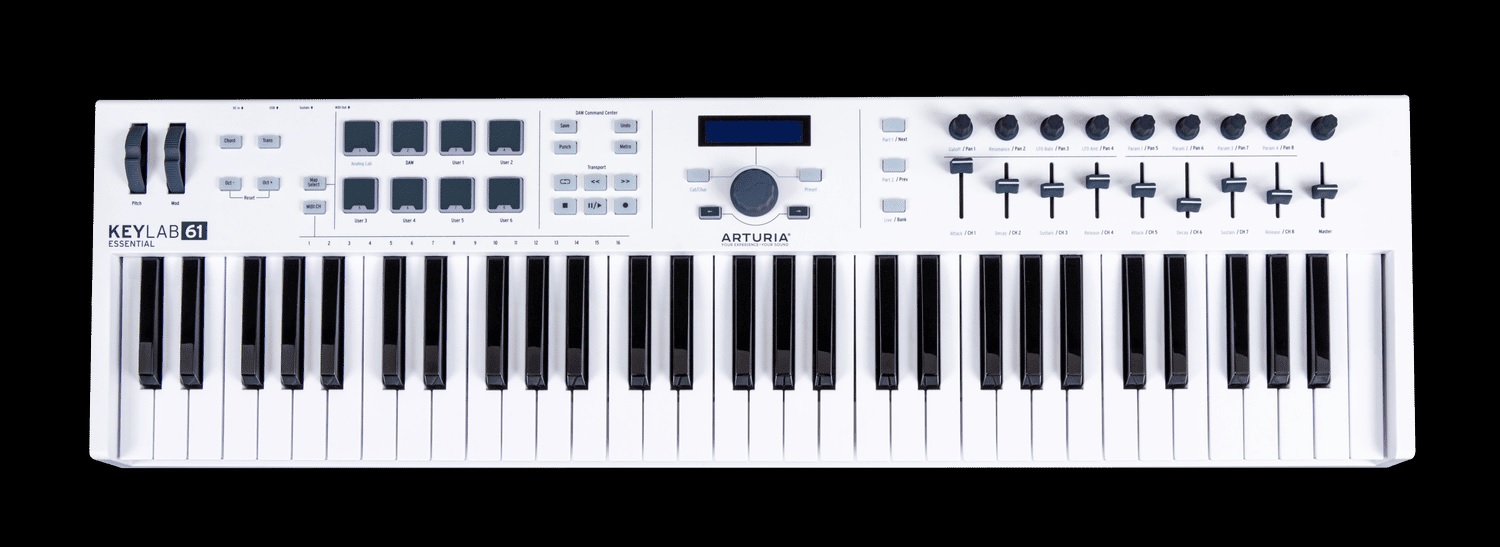
Arturia Keylab Essential 61

The Keylab Essential 49 is only three inches longer than the Microkey Air: 30.9″ versus 27.9″. Sure, the Keylab Essential is twice as deep, but them encoders and 30mm faders have to go somewhere! I will admit, the Keylab Essential is not a “lap board” like the Air; it needs a proper stand and power source.

The Keylab Essential key action is decent enough. Like the Keystep, it feels a bit soft. If you want a fast, crisp action, this isn’t the droid you’re looking for. Even though the Keylab Essentials are Arturia’s budget line, the encoders and faders feel sturdy with a reasonable amount of resistance.

I’m happy with the Keylab Essential and, yes, I’ll be keeping the Microkey Air, too. Here’s my short Keylab Essential wish list:

  • Battery power
  • Bluetooth MIDI
  • Expression input, not simply sustain (on/off)

Then again, the price would be higher and/or the build quality would be lower. No free lunch.

Analog Lab

I’m mainly interested in iPad (IK BX-3) and hardware (YC and Skulpt SE) control, not PC-based VSTs. However, Analog Lab is a fun leisure destination. Analog Lab and its integration with Keylab Essential are simply brilliant. Prepare to waste long hours jamming away with the best sounds of yester-year with lots of knob twisting and fader slamming.

Controlling Yamaha Reface YC

Yamaha Reface YC is one of my keeper keyboards. It’s been a handy companion at rehearsals and even a few church services. You’ve already heard my gripe about three octave mini-keyboards and Reface YC occupies that doghouse. No need to repeat.

Fortunately, Keylab Essential is almost made for Reface YC. [Dreamers, Yamaha has a full-size YC; forget a Reface re-issue.] Keylab Essential has a 5-pin MIDI OUT which links to the Reface YC dongle MIDI IN. Thank heavens for 5-pin MIDI.

Arturia provide their MIDI Control Center (MCC) app for configuration. The Keylab Essential has eight configuration slots: Analog Lab, DAW and six user slots. MCC communicates with Keylab Essential over USB. Fortunately, the 5-pin MIDI OUT operates concurrently with a USB connection back — no either/or.

Obviously, the faders map to the YC drawbars. Fortunately, the Keylab Essential faders have a drawbar mode, flipping low and high values. The Reface YC drawbars are controlled by MIDI continuous controller (CC) messages CC#102 to CC#110. It’s all right there in the Reface Data List PDF available on the Yamaha Web site.

Amazing how many people will ask a forum for such info. Please RTFM.

The rest of the front panel controls — waveform, rotary speed, vibrato/chorus, percussion, and effects — are under MIDI CC control, too. Keylab Essential has three switches (Part 1, Part 2, Live) which are mapped in the following way:

  • Vibrato/chorus select (CC#79)
  • Percussion on/off (CC#77)
  • Percussion harmonic (CC#112)

The switches are configured as toggles, so that the switch LEDs indicate individual switch state.

Rotary speed is interesting because Reface YC has four states: OFF, STOP, SLOW and FAST. By default, Reface YC modulation (CC#0) switches between SLOW and FAST. As an alternative to the wheel, I assigned OFF, STOP, SLOW and FAST to pads 5 through 8. It’s a shame that Keylab Essential doesn’t support radio buttons. If it did, one could make each pad in the group a toggle showing the current rotary speed state.

As I mentioned, Keylab Essential does not have an expression pedal input. Thus, I route a Yamaha FC-7 expression pedal to Reface YC directly. The Keylab Essential sustain input is still useful, however. I attach a sustain pedal and assign the sustain input to rotary speed (CC#19: SLOW and FAST). Momentary switch mode allows quick changes and speed bumps.

It’s worth noting here that rotary speed has four settings:

     CC#19       Value 
---------- -----
0 - OFF 0
1 - STOP 42
2 - SLOW 85
3 - FAST 127

Switching between SLOW and FAST means changing CC#19 between 85 and 127.

Making the rest of the story short, the remaining Reface YC parameters are assigned to the encoders. Waveform, vibrato/chorus depth and percussion length have five discrete settings each, i.e., they do not sweep continuously across 1 to 127. Expect to hear discrete changes (steps). The step values are: 0, 32, 64, 95, 127.

Vibrato/chorus does not have a Reface on/off switch. Vibrato or chorus are OFF when the vibrato/chorus depth is zero.

Here is a table which summarizes the control mappings:

--------------------------------  ---------------------------------------- 
Reface YC Arturia Essential 49
-------------------------------- ----------------------------------------
Rotary speed 19 0-127 Mod wheel, Pad 5-8 OFF, STOP, SLOW, FAST
Wave 80 0-127 Knob 1

16' 102 0-127 Slider 1
5 1/3' 103 0-127 Slider 2
8' 104 0-127 Slider 3
4' 105 0-127 Slider 4
2 2/3' 106 0-127 Slider 5
2' 107 0-127 Slider 6
1 3/5' 108 0-127 Slider 7
1 1/3' 109 0-127 Slider 8
1' 110 0-127 Slider Master

V/C type 79 0-63, 64-127 Switch Part 1
V/C depth 77 0-127 Knob 2
Perc on/off 111 0-63, 64-127 Switch Part 2
Perc harm 112 0-63, 64-127 Switch Part 3
Perc length 113 0-127 Knob 3

Effect Dist 18 0-127 Knob 7
Effect Reverb 91 0-127 Knob 8
Volume 7 0-127 Knob 9

Oh, yeah, don’t forget volume! With the Keylab Essential at hand, you’ll probably have the Reface YC out of reach at the end of its MIDI tether.

I intend to get into good trouble with the Arturia Keylab Essential. Expect future experiments with iPad, IK Multimedia BX-3 and Modal Skulpt SE.

Copyright © 2022 Paul J. Drongowski
New toys: Roland E-X50 and Moog Mavis

While Sud Claviers are teasing the release of a new arranger keyboard, Roland — of all manufacturers — have announced a new entry-level ($400) arranger: the Roland E-X50 arranger keyboard. And a new synth kit from Moog.

Arranger forums are anticipating a new Korg flagship arranger, the Korg Pa5x, on 30 June 2022. Sud Claviers France have taken the lead for European introductions before, as arranger keyboards are more popular in Europe and Asia than North America. Various Korg (and Yamaha!) forums have leaked images and video — a lot of it blurry. Fans are usually good at spotting fakes, but this time it looks to be real.

You’ll pay a high price for the Pa5x jewelry. The Roland E-X50 is for punters having an estimated $400 USD price. (The Pa5x will cost 10x that amount.)

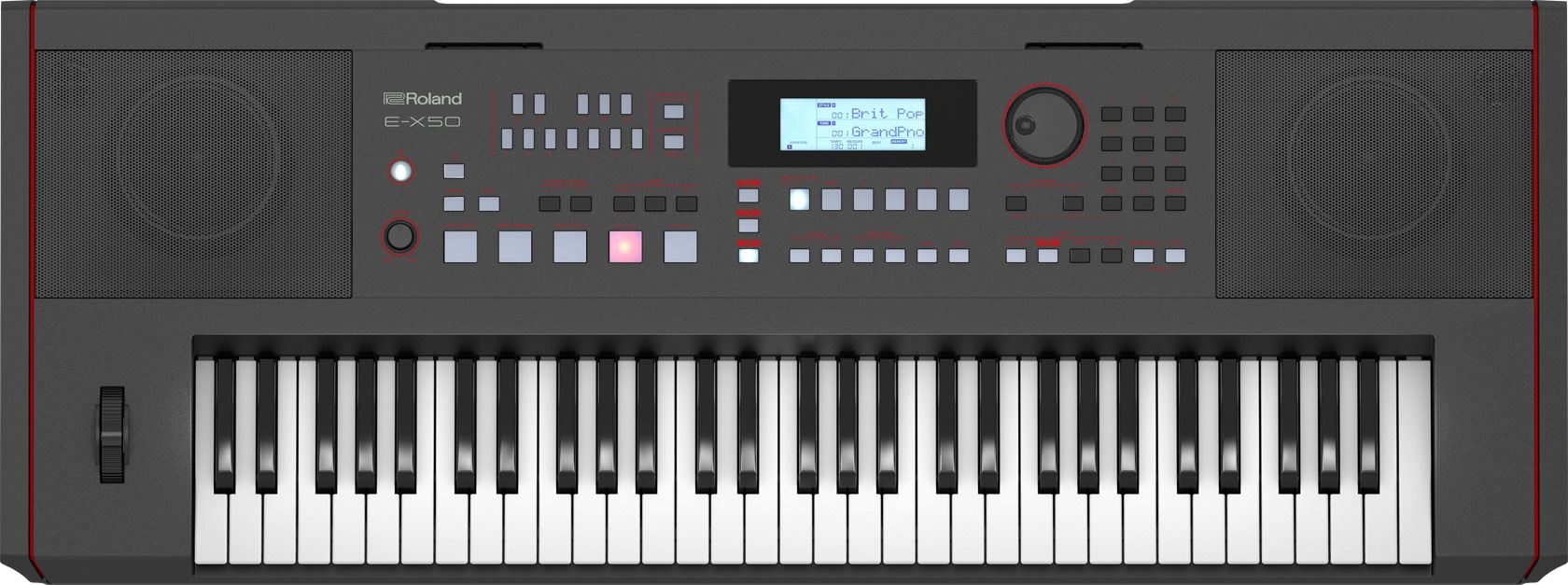
Roland E-X50 arranger keyboard

The E-X50 has a sleek, professional, squarish look to it, weighing 9.6kg (21.3 pounds). The new arranger kits out with 256 polyphony, 433 regular tones plus 256 GM2 tones and a total of 18 drum sets. Effects include equalization, chorus, reverb and delay. The stereo audio system is 10 Watts per side through a 12cm speaker and 3cm tweeter. With a 30 Watt power draw, it’s an AC adaptor; no battery power.

Bluetooth is built-in. The E-X50 has fixed formet LCD display which is typical for entry-level keyboards.

Auto-accompaniment and registration memory are on par with Yamaha, Casio, and Korg. Roland have not broken any new ground, here. The most novel feature is AUDIO PAD playback. The Scale Tune buttons are linked to WAV (or MP3) files on a USB drive. Striking one of the buttons plays back the associated audio file (one shot or loop). Unlike Yamaha arrangers which are notoriously picky about audio file format (16-bit, 44kHz stereo), the E-X50 supports a broad range of bit rates and sampling frequencies. (You’re still stuck with 16-bit samples, tho’.)

The E-X50 is supported by a free E-X Style Converter application (Windows and Macintosh), which converts a MIDI file to a style file compatible with the Roland E-X series.

Bottom line, the E-X50 offers an alternative to similar units from Korg and Yamaha. Every vendor has its own sound and this Roland may float your boat more so than Korg or Yamaha.

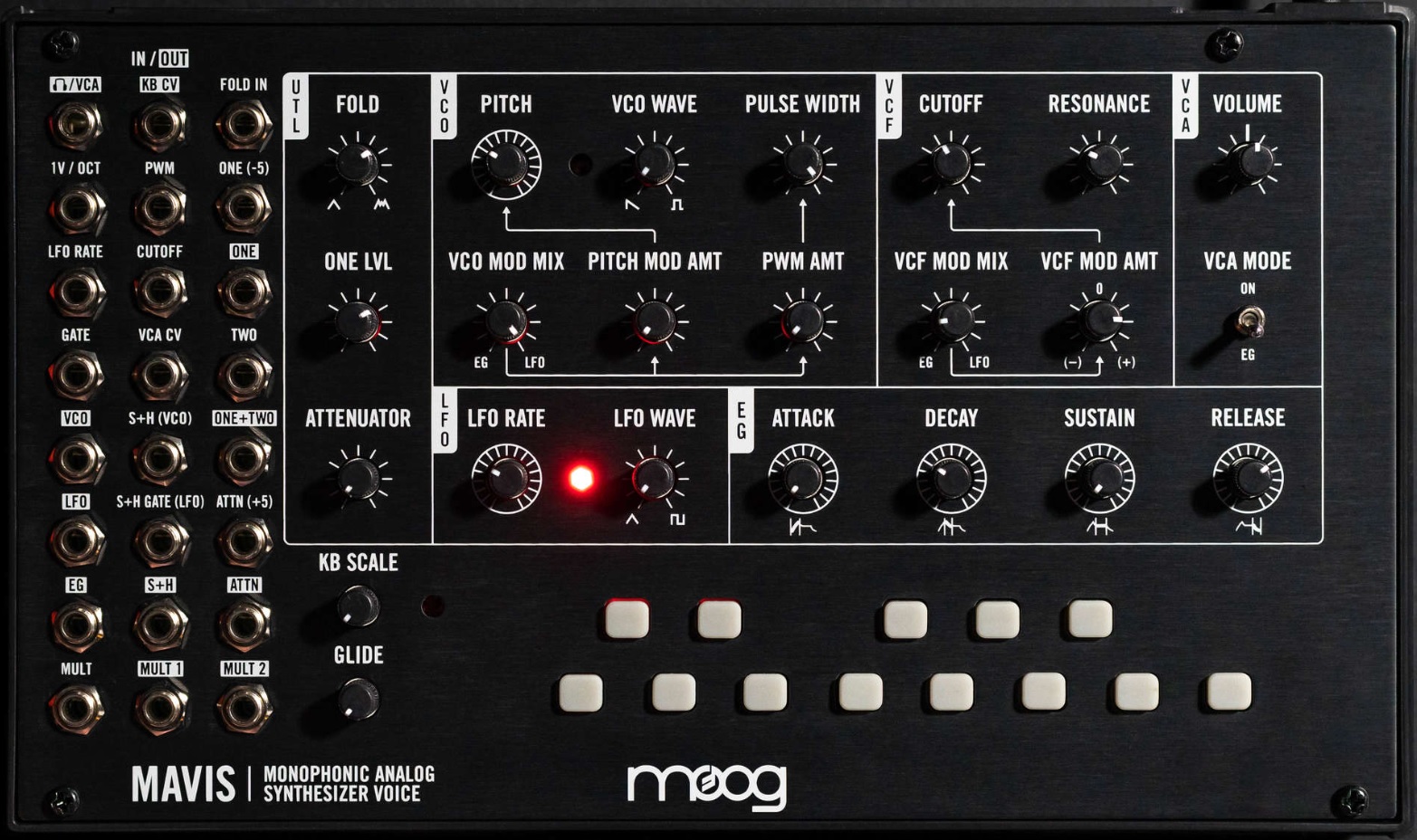
Moog Mavis is a new build-it-yourself monophonic analog synth kit from Moog. I rather like the looks of Mavis right off the top. The front panel screams “Moog”. It has a mess o’patch points (24-point CV controllable) on the left hand side of the front panel. The module is 44HP in case you want to rack it up. The Mavis form factor is compatible with earlier units like the DFAM.

Moog Mavis monophonic analog synth module

Mavis boasts the Moog “legendary oscillator and filter circuits,” adding a diode wave folder. The filter spec is -24 dB Moog Low Pass Ladder filter. Mavis has a built-in courtesy keyboard. Serious folk will be driving Mavis from external, 1 V/oct gear.

“Build-it-yourself” is more like assemble it yourself as the mainboard is fully wave soldered, etc. No soldering required.

Mavis is $349 USD. That seems a little price-y, but you get an entire monophonic synth signal chain. Near as I can tell, Mavis avoids the shortcomings of the Werkstatt-01. I almost bit on a Werkstatt-01 until I realized its interfacing limitations. And guess what? Mavis is already in stock at a few on-line retailers! Nice work, Moog.

Copyright © 2022 Paul J. Drongowski
Yamaha PSS-A50 stereo mod

I want to give a shout out to Lionel on the PSR Tutorial Forum. He posted a very nice PSS-A50 mod — stereo!

Yep, the PSS-A50 is stereo and, as Lionel discovered, the in-built samples are also stereo. Check out Lionel’s PSS-A50 stereo mod video. His video begins with a great close-up of his changes to the PSS-A50 digital main board (DM).

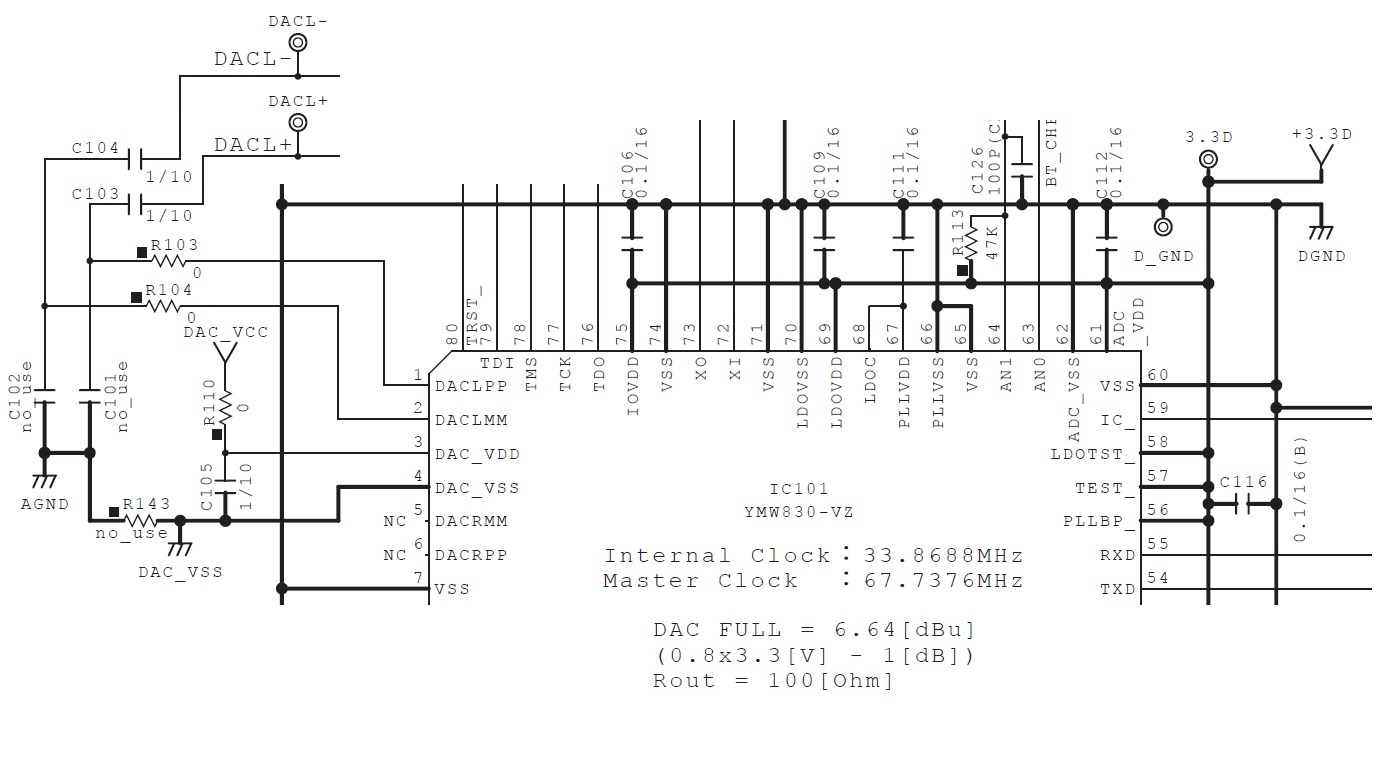
As noted in my PSS-A50 look inside, the central computer and tone generator is Yamaha’s SWLL processor (YMW830-V). The SWLL is a system-on-a-chip (SOC) which integrates the host CPU, working memory, key/display scanner, and tone generator. Just add a 37-key keyboard, display driver, 2MByte serial flash program/waveform ROM, USB controller, audio electronics and power electronics, and you have a complete ultra-low cost synthesizer.

The digital-to-audio converters (DAC) are integrated into the SWLL. The SWLL has six DAC-related pins:

  • DACLPP (pin 1)
  • DACLMM (pin 2)
  • DAC_VDD (pin 3)
  • DAC_VSS (pin 4)
  • DACRMM (pin 5)
  • DACRPP (pin 6)

DAC_VDD and DAC_VSS are conversion reference voltages. DAC_VDD is derived from DAC_VCC produced by a low drop-out voltage regulator (Texas Instruments TLV74333PDBVR). DAC_VSS is ground.

Yamaha SWLL (YMW830) DAC signals

DACLPP and DACLMM are differential audio signals for the left channel. DACRPP and DACRMM are differential audio signals for the right channel. DACRPP and DACRMM are left unconnected in the PSS-A50. There are two test points, DACL- and DACL+, on the printed circuit board (PCB), in case you would like to probe these signals.

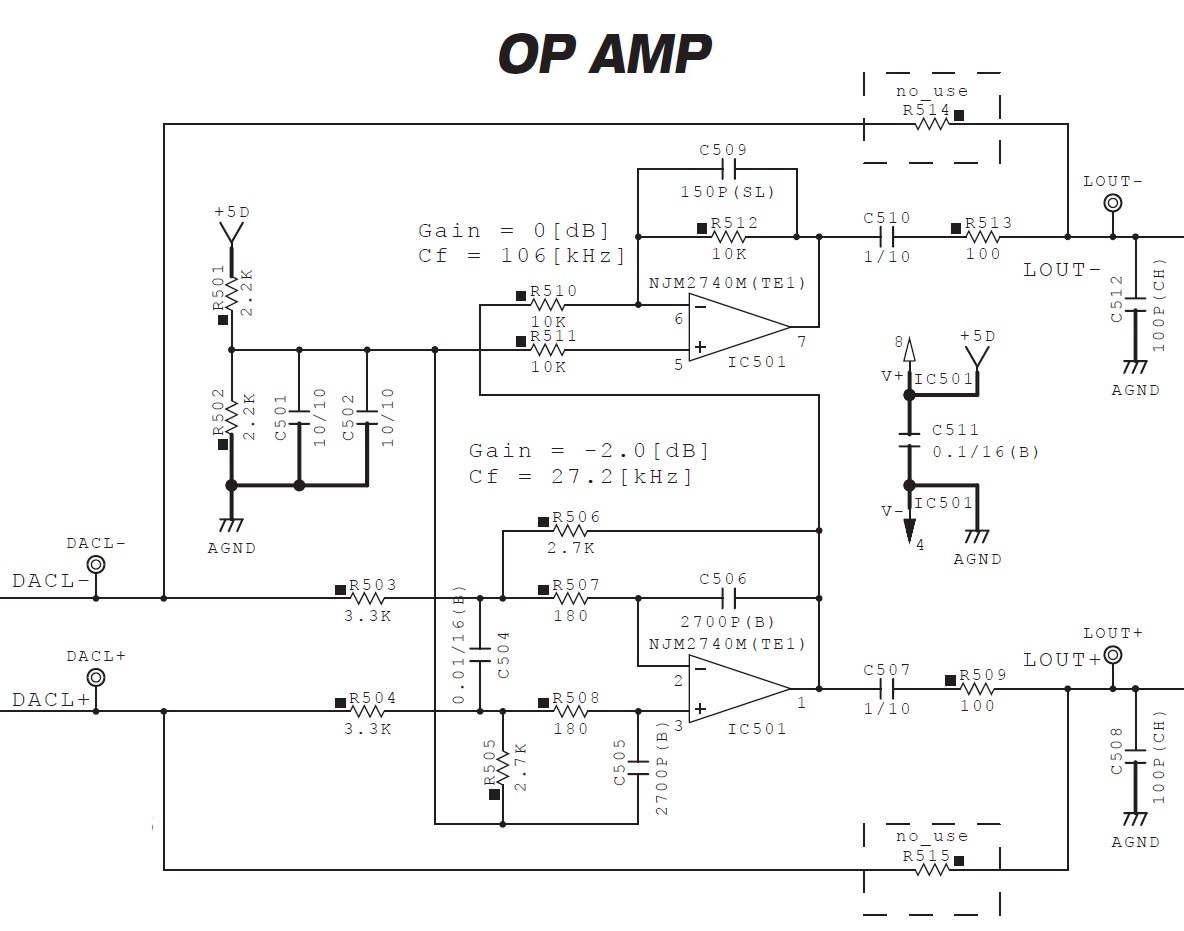
PSS-A50 post-DAC low pass filters

DACL+ and DACL- feed two operational amplifiers which are low pass filters. The low pass filters produce signals LOUT+ and LOUT-, which are sent to the plus and minus inputs of the headphone amplifier (TPA6132A2RTER) and speaker power amplifier (Rohm BD27400GUL). It’s differential audio signals all the way, presumably, to keep noise low.

The Texas Instruments TPA6132A2RTER is a 25 mW stereo headphone amplifier. The Rohm BD27400GUL is a low voltage class-D monaural speaker amplifier.

I have to admire Lionel’s construction skills as it is quite difficult to solder wires to a surface mount IC. Nice work replicating the stereo low pass filters, too.

Keep the Yamaha PSS-A50 hacks coming! Please don’t forget the PSS-A50 MIDI mod.

Here are some additional Yamaha PSS-related stories:

Copyright © 2022 Paul J. Drongowski
NAMM 2022: Your guess is as good as mine

Update: If you’re looking for information about the new Yamaha CK61 and CK88, see my specification and snap review articles.

With NAMM 2022 coming up (June 3-5), it’s time for rumors. 🙂

Yamaha filed for two new trademarks in June 2021. The trademarks are words in stylized form. The scope is “Musical instruments, namely, electronic musical keyboards, electronic organs, electronic music synthesizers, cases for musical instruments”.

Trademarks applied for and published soliciting opposition

The main marks are CK61â„¢ and CK88â„¢. The marks:

  • CK SIXTY ONE; CK SIX ONE; CK 61
  • CK EIGHTY EIGHT; CK EIGHT EIGHT; CK 88

are alternative forms.

The marks have been published, soliciting opposition as of 29 March 2022. Seems reasonable that a manufacturer would want the product identifier approved before making a zillion units with the name stamped on.

Let the speculation begin! Clearly, 61-key and 88-key keyboards are involved. Duh! “C” for “control”? Somewhat reminiscent of the old control synth product range? No 76 model?

The font is similar to the Yamaha Reface series marks. I’d love to see a merged all-in-one Reface-like keyboard with full-size keys. The MX series is getting a little long-in-the-tooth, so its replacement might be another possibility? Hope the price is reasonable…

When Reface YC and CP grew up, Yamaha kept the stylized names and font in the names of the YC and CP stage keyboards. Maybe a new stage keyboard in the Yamaha synth product group? A combined FM and virtual analog keyboard that doesn’t overlap the YC and CP models?

Copyright © 2022 Paul J. Drongowski
SDR flight tracking with ADS-B

Watching ADS-B “flight radar” has been cheap entertainment and a window into the larger world.

ADS-B, in case you didn’t know, is an alternative means for tracking aircraft. (“ADS-B” stands for “Automatic Dependent Surveillance-Broadcast”. Who came up with that acronym?) Aircraft carry an ADS-B transmitter which broadcasts identification and positional information. Aircraft are identified by a 24-bit ICAO address and (optional) call sign. In the case of commercial aircraft, the call sign is typically the airline and flight number. Position is determined by on-board GPS and altimeter data. So, the aircraft is telling ADS-B receivers where it is.

ADS-B is bi-directional, too. In some regions, aircraft may receive temporary flight restrictions (TFRs) and notices to airmen (NOTAMs), for example.

ADS-B data links operate at 1090MHz or 978MHz. 978MHz frequency reduces message congestion on 1090MHz. ADS-B on 1090 is essentially a modified Mode S transponder.

Since ADS-B operates on such high (UHF) frequencies, it is a line-of-sight system. If you have an ADS-B receiver, it will receive only aircraft in sight of the antenna (assuming sufficient signal strength). Because all ADS-B reception is local, web sites like Flight Radar 24 and ADS-B Exchange aggregate ADS-B data from receivers around the world and display current data on a map. That’s how they create the illusion of being global.

The airspace in eastern Europe has been especially interesting. The Ukraine war zone is dark as one might expect for contested — and dangerous — airspace. Occasionally you will see an aircraft fly into Ukraine and immediately kill it’s ADS-B transmission. Conversely, a pilot forgets to turn off ADS-B and you might spot a fighter near the border! Other popular aircraft for trackers include NATO AWACS, drones, tankers and cargo planes.

Let’s say you want to track aircraft in your own nearby airspace. If you have a software-defined radio (SDR) receiver, you’re most of the way there. I have successfully tracked flights in the northern Seattle area using both an RTL SDR Blog V3 radio and a nooelec Nano 2+ SDR. Comparing the two, the RTL SDR blog radio seems to have a wider range and is more responsive than the nooelec Nano 2+.

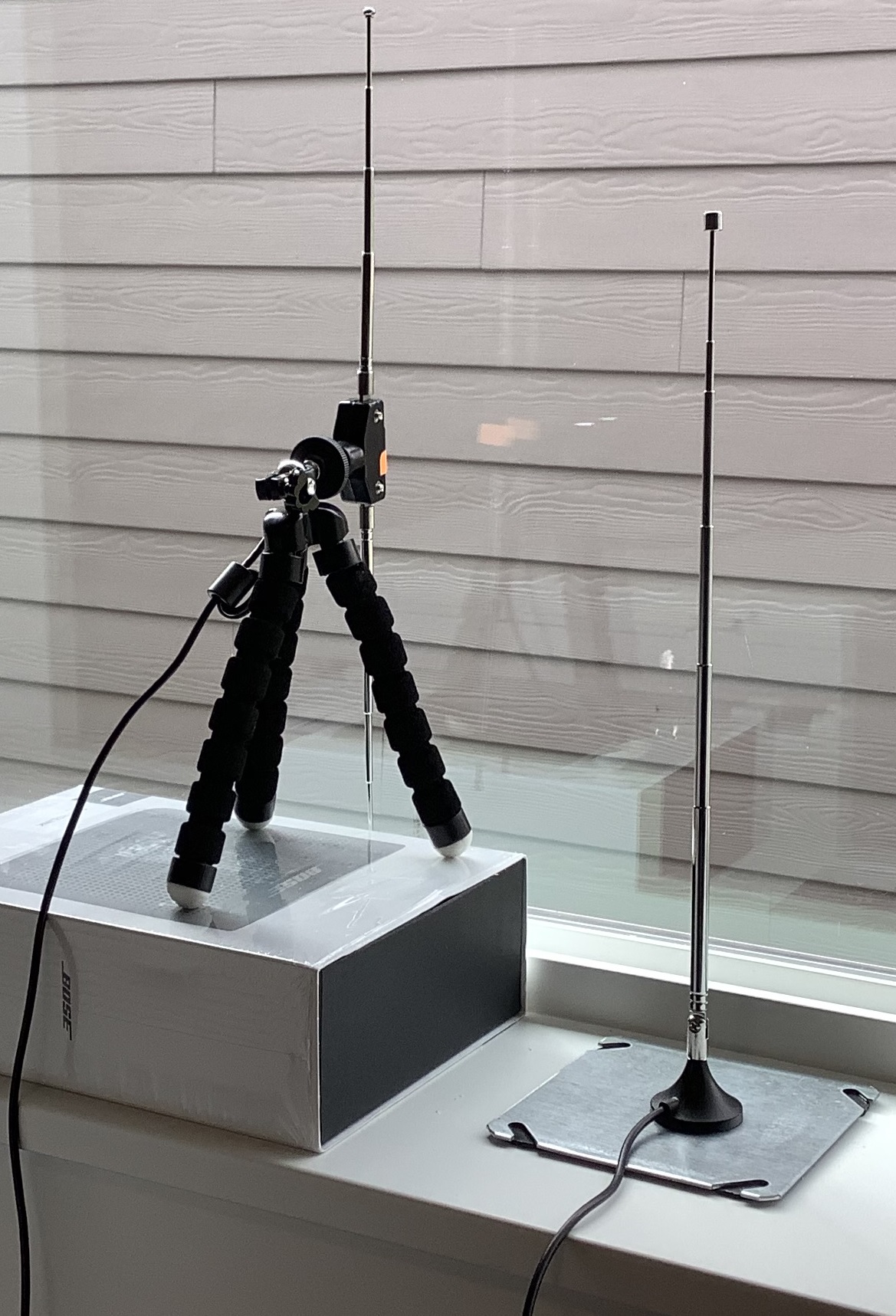
ADS-B at-home antennas

In addition to a receiver, you need an antenna. I used the bundled antennas which came with the receivers. The nooelec is a vertical whip antenna set to a 1090MHz full wave, 27.5cm. The RTL SDR antenna is a vertical dipole where each element is set to a half-wave. The difference in range may be due to the different antennas. Unfortunately, I don’t have the right coax adapters to mix and match. (Maybe after the next Amazon order.)

ADS-B radio signals are vertically polarized so get those antennas straight up and down!

Finally, the keyword in software-defined radio is “software.” You’ll need a program to tune the receiver, demodulate the ADS-B signal and display the ADS-B data (in either a table or on a map).

After seeing a positive review on the RTL SDR blog, I decided to try SDRangel on Windows 10. SDRangel has come a long way since I first took a look. SDRangel is set up differently than programs like AirSpy SDR# (SDR-sharp). To my point of view, SDR# and other programs like it are intended mainly for voice (audio) signal modes. They make great receivers for wide band FM, narrow band FM and AM. You’re on your own when it comes to digital modes like ADS-B. The SDR# signal processing chain is already set up like a radio and is pretty much ready to go after installation and launch.

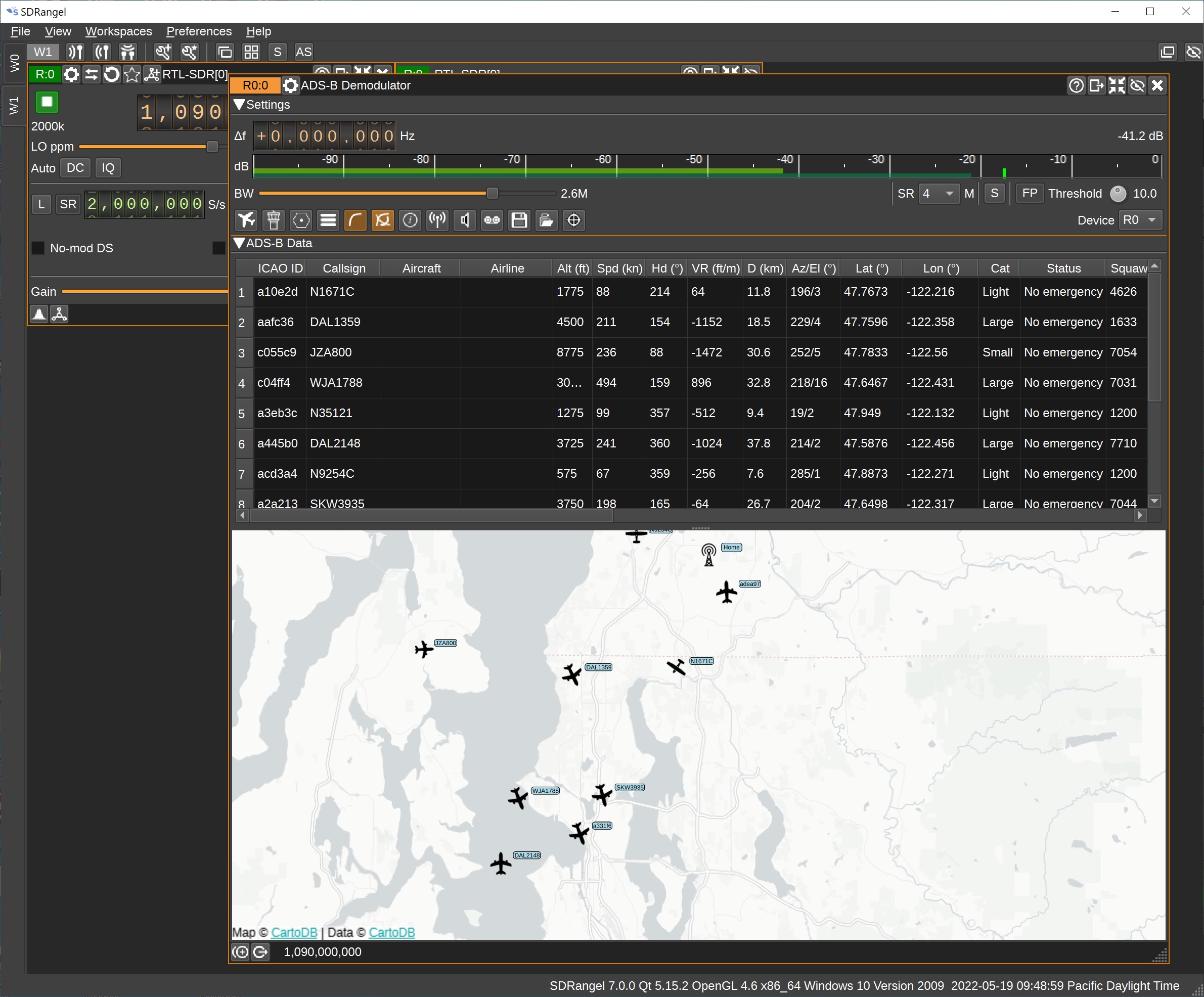
ADS-B via SDRangel (north Puget Sound/Seattle area)

SDRangel, on the other hand, requires a little bit of knowledge about the processing signal chain. First you create a workspace to hold the signal chain. Then you create a receiver to tune in a signal. Finally, you create one or more “channels” where each channel is a demodulator. SDRangel provides a wide range of demodulators (plug-ins), one of which is ADS-B.

I recommend trying an audio mode first, just to learn your way around SDRangel. I tuned in a local National Weather Service (NWS) station on 162.55MHz narrow band FM (NBFM) using the NBFM demodulator (plug-in). The NWS station is 24/7 and is fairly strong. None the less, I needed to raise the RF gain and turn off the squelch in order to hear anything. Not the same “out of the box” experience as SDR#.

Once set up, though, turning to ADS-B was a snap. I created a new workspace and put a receiver (tuned to 1090MHz) and ADS-B demodulator into it. I needed to increase the SDR sampling rate to 2,000,000 (hint: set the decimation factor to 1). If you don’t up the sampling rate, you’ll get a red warning message and no ADS-B data.

With this set-up, I can track flights in the north Puget Sound area. The antenna is indoors (house rules), but it will still see quite a few flights between the Sound to the west and the Cascade mountains to the east. I compared the SDRangel output with Flight Radar 24 and was satisfied. Because I was receiving on 1090MHz only, I am missing flights on 978MHz. More experiments to do one day. 🙂

Copyright © 2022 Paul J. Drongowski N2OQT
NAMM 2020: Casio sneak peek

Casio get arty!

Casio’s pre-NAMM 2022 press release mentions a few art projects to be released and shown during NAMM 2022, June 3-5.

Music Tapestry creates pictures from musical performances — a modern day color organ, for you old-timers like me. Music Tapestry is triggered by musical pitches and keyboard touch. Casio Sound Developer Hiroko Okuda — who helped developed Music Tapestry — will demonstrate it at the Casio booth.

Black and white example from U.S. Patent 10,803,844

Casio’s U.S. Patent 10,803,844 (October 2020) discloses a process to visualize musical performance. Hiroko Okuda is one of the inventors.

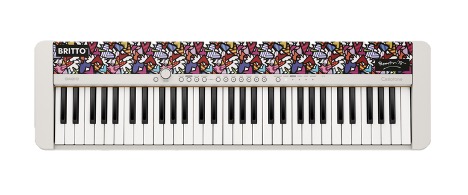
Casio CT-S1 FH limited edition — Britto Flowers & Hearts

If you think the Casio CT-S1 is too plain, try the “Flowers & Hearts” fabric by Brazilian pop artist Romero Britto. Casio will be selling a Limited Edition CT-S1 FH model (limited to 200 units at $500 USD).

Check out more of Britto’s work on-line!

Of course, Casio will be demonstrating their latest products including the Casio CT-S1000V with vocal synthesis. I’ll bet that the CT-S500 will be there, too. 🙂

Copyright © 2022 Paul J. Drongowski
Roland and Korg make candy

Superbooth 2022 is underway — candy for everyone!

Roland

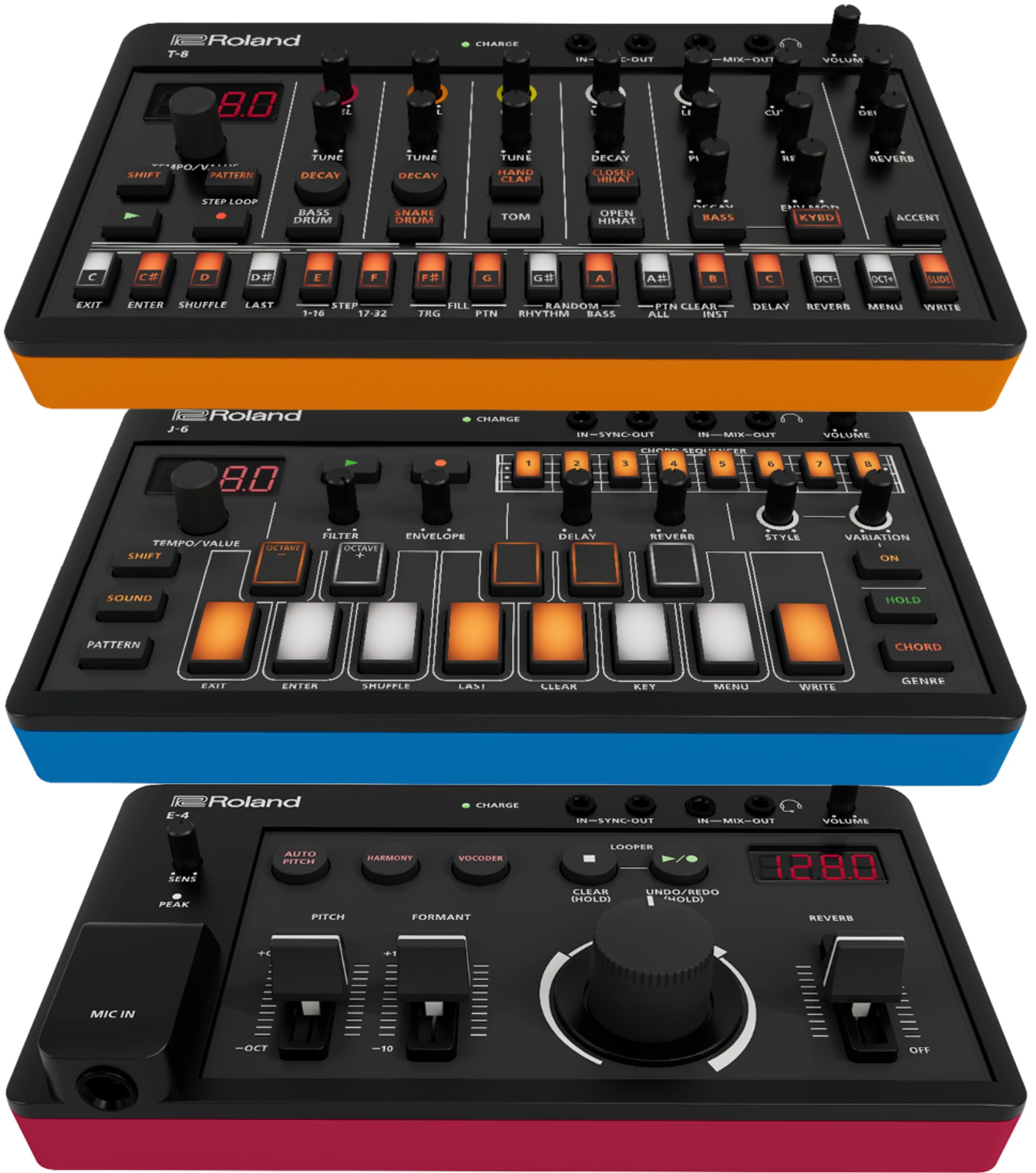
Roland’s new Aira Compact modules are a license to print money. Korg have successfully mined the low-cost, small module field with its Volca series. Now Roland have joined the fun. (“Aira” is pronounced “eye-ra”. OK.) These suckers are tiny!

Roland Aira Compact: T-8, J-6, E-4

There are three initial modules in the range:

  • T-8 Beat Machine
  • J-6 Chord Synthesizer
  • E-4 Voice Tweaker

I recommend Roland’s overview video. All of the modules have a built-in Li-ion battery (4.5 hour estimated operational time) charged via the micro-USB port. Throw in MIDI and SYNC, too, through mini-jacks.

Roland are smart to capitalize on their reputation in drum machines. The T-8 is a seven track machine: six rhythm tracks plus a TB-303 bass track.

The J-6 has a host of in-built chords and chord patterns organized into “Genres.” The interface seems to be well-thought out, especially for those less interested in theory and actually jamming black and whites. The J-6 has a 4-voice Analog Circuit Behavior (ACB) Juno-60 synth engine. The J-6 can be played from an external controller.

The E-4 Voice Tweaker is designed for voice mangling, but one should be able to run either signals into it, too.

The modules are hitting the street at $200 each. Somehow these kinds of modules find a way onto the studio. Almost by themselves…

Korg

As cute and colorful as the Rolands may be, The new Korg NTS-2 is at the top of my short-list.

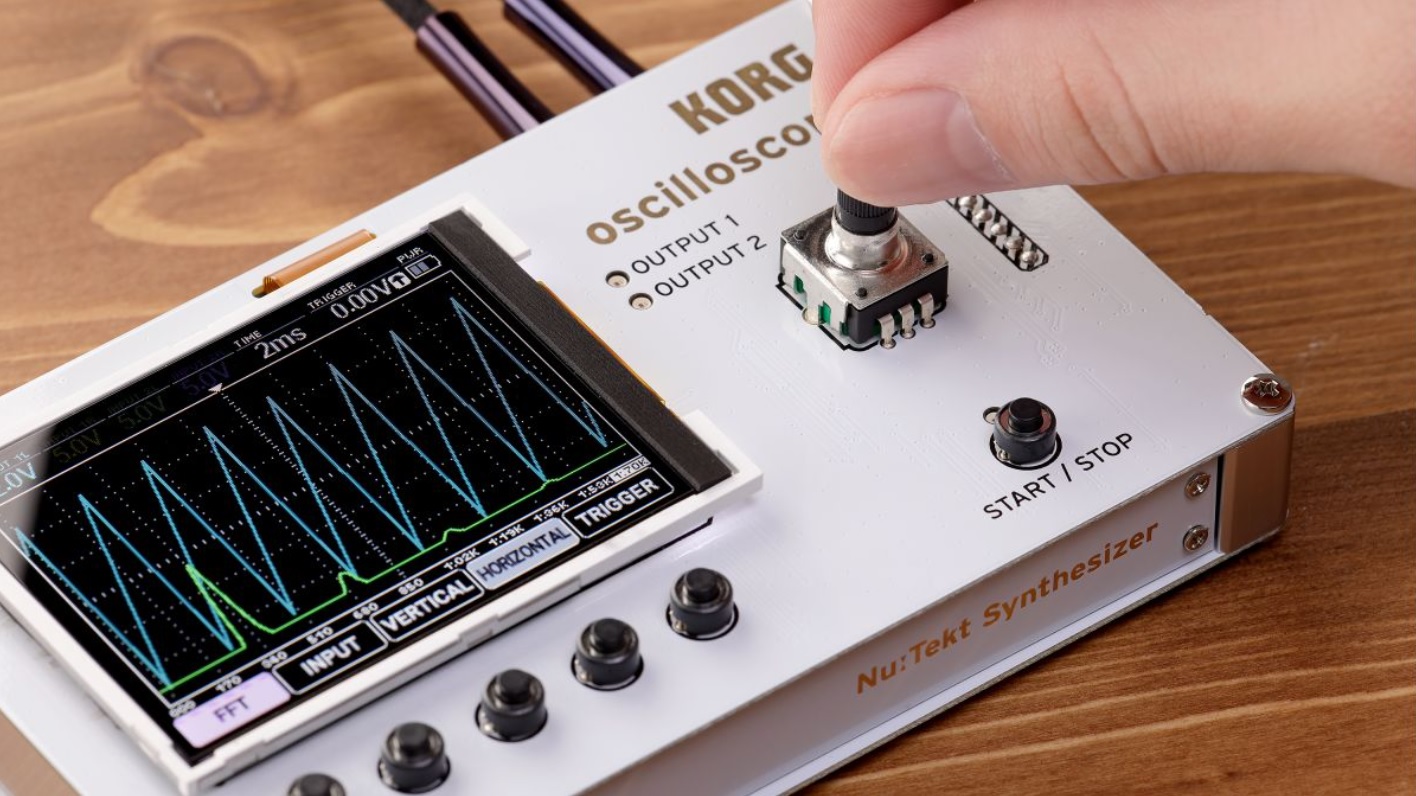
The Korg NTS-2 joins the NTS-1 mono synth in the Nu:Tekt product line. The NTS-2 is an attractive looking four channel oscilloscope. Punters are complaining about the price — $230 USD — but the this is a nicely featured oscilloscope plus tuner, plus FFT, plus spectrum analyzer. The NTS-2 has dual waveform generators which can act as add-on synth oscillators or LFOs. There’s some real development cost behind this thang.

Korg NTS-2 Oscilloscope

In terms of function, screen size and build quality, it beats my Gabotronics Xminilab Portable. The NTS-2 has a larger color screen and five soft function buttons. I’ve never been very successful with the Gabotronics as a stand-alone test instrument, so I’m hoping for better out of the NTS-2.

Unlike the NTS-1, the NTS-2 OSC can run on two AAA batteries (estimated two hours of operational time).

The NTS-2 will be bundled with a book: “Patch & Tweak With Korg” by Kim Bjørn (BJOOKS). The bundle is stamped “Limited Edition,” so Korg may eventually release NTS-2 on its own. Other books in the Patch & Tweak series cost about $45 USD. Maybe the NTS-2 alone will run $180?

Another consideration is test leads and probes. Korg assume the NTS-2 will be connected into your rig with patch cables. Korg do not mention probes, so if you need in-circuit measurements, you’re on your own. (Minor bummer.)

Copyright © 2022 Paul J. Drongowski

CT-S1000V: Tremolo EP

I spent a little time with the Casio CT-S1000V this morning, trying to dial in a mellow Rhodes EP with tremolo. The Stage E.Piano tone is nice, but has auto pan instead of tremolo. I like tremolo since I usually go MONO into the live sound system.

Studying presets is always informative. The DSP tones, by default, have an Active DSP chain pre-configured. The Active DSP chain for Stage E.Piano is:

Amp Cab          -> Auto Pan         -> Auto Pan 
---------------- ---------------- ----------------
Type: RD-MK2-PRE Rate: 68 Rate: 62
Vari: 1 Depth: 80 Depth: 80
Wet Level: 127 Waveform: Sine Waveform: Sine
Dry Level: 0 Manual: 0 Manual: 0
Bypass: OFF Wet Level: 70 Wet Level: 70
Dry Level: 100 Dry Level: 118
Bypass: OFF Bypass: OFF

Two Auto Pan stages? Well, let’s find this chain in the list of DSP combinations. What the? The default “Tone” DSP chain doesn’t appear in the DSP List!

The Trem 60’s EP has tremolo, so let’s take a look at its default Active DSP chain:

Amp Cab          -> Tremolo          -> Tremolo 
---------------- ---------------- ----------------
Type: WR-200-PRE Rate: 92 Rate: 92
Vari: 3 Depth: 64 Depth: 64
Wet Level: 112 Waveform: Sine Waveform: Sine
Dry Level: 0 Wet Level: 100 Wet Level: 100
Bypass: OFF Dry Level: 100 Dry Level: 100
Bypass: OFF Bypass: OFF

Two Tremolo stages and once again, such a DSP combination is not listed User Guide DSP List!

Well, DSP combi number 33, Drive Amp 2, is close to what we need. Starting with the Stage E.Piano tone, I changed it’s Active DSP programming to:

Drive          -> Tone Control   -> Amp Cab          -> Tremolo 
-------------- -------------- ---------------- ----------------
Type: Crunch3 Low Freq: 400 Type: RD-MK2-PRE Rate: 82
Gain: 70 Low Gain: +3 Vari: 1 Depth: 120
Out Level: 70 Mid Freq: 2.5k Wet Level: 100 Waveform: Sine
Wet Level: 127 Mid Gain: +5 Dry Level: 0 Wet Level: 70
Dry Level: 0 High Freq : 5k Bypass: OFF Dry Level: 60
Bypass: ON High Gain: 0 Bypass: OFF
In Level: 127
Wet Level: 68
Dry Level: 0
Bypass: OFF

The Bypass parameter comes to the rescue. I didn’t like any of the Clean drive types, so I disabled (bypassed) the drive stage.

The Tone Control boosts the MIDs adding warmth. The Amp Cab model is a Rhodes Mk2 preamp — the same model in the stock Stage E.Piano tone. These Tremolo settings just sound right to me. Of course, you’re welcome to play with any of these settings.

I uploaded updated registration banks, including the Stage E.Piano tremolo. Please see the CT-S free registrations page for a link to the ZIP file.

Have fun!

Copyright © 2022 Paul J. Drongowski
RTL-SDR: Earth ground are easy

If you’re into software defined radio and you’re looking for better HF reception, invest time in your antenna system and grounding.

I don’t have the space to string a dipole, so I’m working with a simple (random) long wire antenna. The long wire antenna is connected to an RTL-SDR receiver through a Nooelec Balun Nine One and a short length of coaxial cable. The long wire is connected to the antenna input on the balun.

Unfortunately, my early experiments with grounding did not work out very well. I tried connecting the balun ground port to various cold water pipes in the house. I do not recommend using house ground. House ground merely adds a mess o’noise to the original signal — bad, bad, bad. Thus, I left the balun ground unconnected and pressed on.

With the start of the war against Ukraine, I began monitoring HF, again, just to hear what I can hear on the left coast of North America. If you are interested in Europe and Ukraine specifically, I recommend the Wide-band Web SDR at the University of Twente in the Netherlands. Aside from radio access, there is an active chat area. Twente gets you much closer to the action.

Counterpoise

Counterpoise is a fancy name for wires or cables that substitute for an earth ground.

If you cannot connect to an earth ground, you should consider adding a counterpoise to your long wire antenna. Sounds like work, but it’s simple! Just connect another long wire to the ground side of the balun. String the counterpoise in the opposite physical direction of the long wire antenna. Done.

Consistent with my usual sleazy methods, I grabbed a 25 foot length of bell wire, twisted the pair at both ends, and connected one end to the balun ground. This quick and dirty counterpoise was good enough for +3dB or so in signal-to-noise ratio (SNR) as measured by Airspy SDR-Sharp.

A weeder?

My studio window is about 15 feet above ground, so it made sense to drop the bell wire out of the window and connect it to earth.

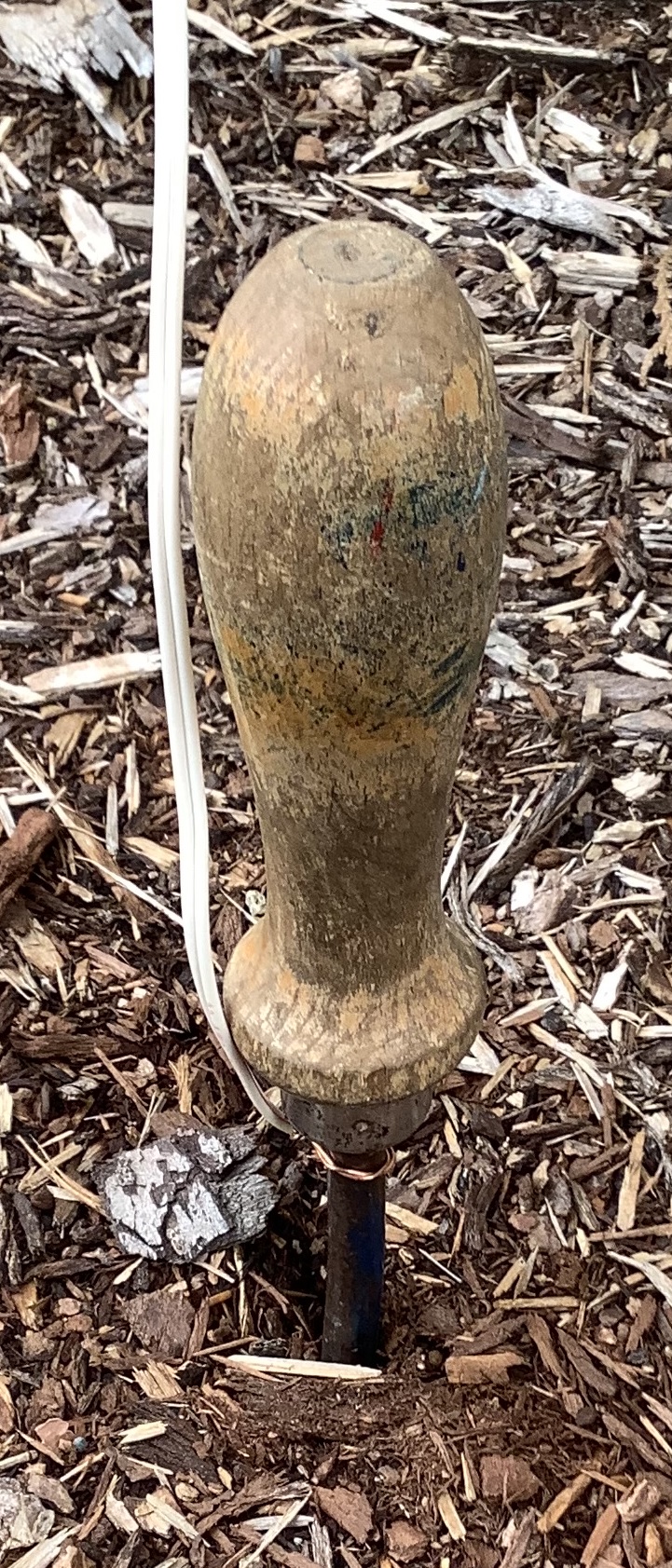
Really? A garden weeder for an earth ground rod!

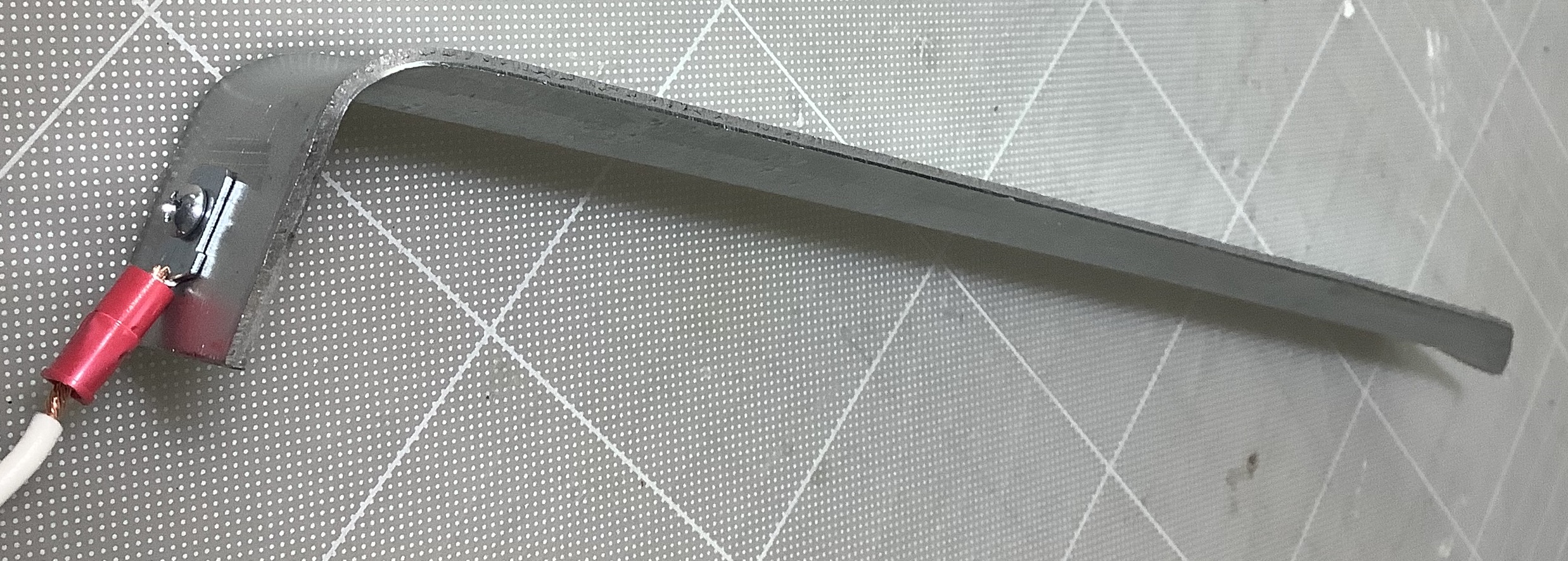
A good earth ground typically consists of 4 to 8 feet of grounding rod buried in the earth. I know there are drain pipes located in the ground beneath my window and frankly, planting 4 feet (8 feet!) of rod sounds like too much work. So, I grabbed a garden weeder — yes, a garden tool — and stuck it in the ground. Then I wrapped the end of the bell wire around the weeder.

This quick and literally dirty solution was good for about +12dB (or more) improvement in the SNR.

Metal edging stake

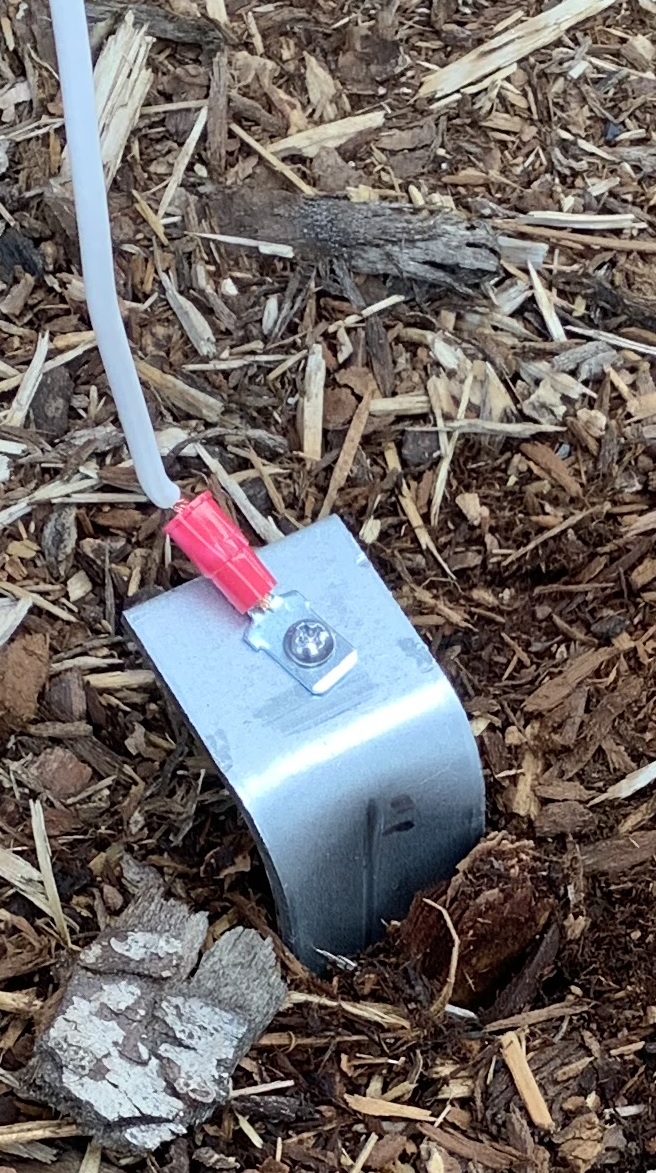
I didn’t want to expose the weeder to good old Pacific Northwest wet weather and found a cheap, simple substitute — a galvanized metal edging stake. Normally, one uses edging stakes in the garden. However, they are inexpensive and expose more surface area to the earth than a weeder. 🙂

Edging stake

I upgraded the bell wire to 16 gauge primary wire. Unfortunately, the primary wire makes it more difficult to close the sliding window into my studio. The bell wire is flatter and mushable.

Inexpensive edging stake earth ground

As to SNR, I’m getting similar results. Unless I get the gumption to drive a grounding rod, this is close enough for rock and roll. (73)

If you would like more help with software-defined radio (SDR), here are links to my earlier posts:

Copyright © 2022 Paul J. Drongowski, N2OQT

Casio CT-S1000V: Free registration banks

I hope today’s post will help liturgical musicians who want to play the Casio CT-S1000V and CT-S500 at church services. I invested a fair amount of effort building patches and registrations which fit contemporary and traditional church music. The sounds would also be compatible with soft pop and gospel-tinged genres, too.

I’ve gig-tested there sounds, having played them at services. So, if you would like to try them yourself, please download the ZIP file. The ZIP contains six CT-S registration files:

  1. RegBank01.RBK: Woodwinds
  2. RegBank02.RBK: Strings
  3. RegBank03.RBK: Horns / Brass
  4. RegBank04.RBK: Drawbar organs
  5. RegBank05.RBK: Pipe organs
  6. RegBank06.RBK: Miscellaneous

The sixth bank is a work in progress. The first five banks cover most of my needs, but there are always a few miscellaneous sounds that pop up.

Each CT-S1000V and CT-S500 registration has four slots (patches). The following table summarizes the registration and patch layout.

       1              2              3              4 
-------------- -------------- -------------- --------------
Bank 1 Horn+Wood Flute+Cla Wood Sect ChamberWinds
Bank 2 MellowStrings StereoStrings SoloViolin ChamberStrings
Bank 3 FrenchHorns NobleHorns HighSchool Tp + Tb
Bank 4 MellowGospel SoftGospel BrightChurch Simmering
Bank 5 Pipe Organ 3 Chapel Organ Organ Flute Bandoneon
Bank 6 SoftPad VoiceEnsemble StageE.Piano StageE.Piano Trem

I usually pre-select a bank and patch before each musical piece. Then I switch to a different patch within the same bank in order to add a different color. I wish it was a little easier to change registration bank on the fly. Maybe I’ll get better with practice.

Patch details

The CT-S patches are based on combinations which I used on old Roland JV- and XV- series gear. The following tables show the CT-S tones in each patch and the level for each tone. You’re welcome to tweak the levels using the BALANCE menu.

Woodwinds      Upper1            Upper2             Lower           
---------------- ----------------- ----------------
Horn+Wood English Horn 100 Fr.Horn Sect 110 Mellow Str.2 127
Flute+Cla Flute 1 100 VeloClarinet 100 Mellow Str.2 127
Wood Sect Flute & Oboe 100 VeloClarinet 100 Mellow Str.2 127
ChamberWinds Flute & Oboe 95 VeloSopranoSax 85 Mellow Str.2 127

Strings Upper1 Upper2 Lower
---------------- ----------------- ----------------
MellowStrings SlowStreoStr 100 Warm Pad 120
StereoStrings SlowStreoStr 120
SoloViolin Slow Violin 75 Mellow Str.2 90
ChamberStrings Chamber 100

Brass Upper1 Upper2 Lower
---------------- ----------------- ----------------
FrenchHorns French Horn 100 Fr.Horn Sect 80
NobleHorns Fr.Horn Sect 100 Flugelhorn 80
HighSchool Clarinet 100 Glockenspiel 80 French Horn 80
Tp + Tb Flugelhorn 100 Trombone 80 Tuba 80

B-3 Organ Upper1 Upper2 Lower
---------------- ----------------- ----------------
MellowGospel GospelOrgan2 127 Organ Bass 100
SoftGospel Rock Organ 2 127 Organ Bass 110
BrightChurch Elec.Organ 1 100 Organ Bass 127
Simmering Elec.Organ 6 110 Organ Bass 127

Pipe Organ Upper1 Upper2 Lower
---------------- ----------------- ----------------
Pipe Organ 3 Pipe Organ 3 100
Chapel Organ Chapel Organ 100
Organ Flute Organ Flute 120
Bandoneon Bandoneon 120

Pads Upper1 Upper2 Lower
---------------- ----------------- ----------------
SoftPad Soft Pad 127
VoiceEnsemble VoiceEnsembl 120

I dialed down the reverb in all cases and settled on the ROOM2 reverb type. These patches are intended for live playing in a reverberant church hall, so additional reverb is unnecessary. You might find the pipe organ patches to be waaay dry when compared with the factory tones. I removed the initial reflections and delay which create the impression of a large space — totally unwanted in a live church.

I added 3-band EQ (ACTIVE DSP) to the woodwind patches to add warmth and to reduce harshness. Feel free to tweak away!

For string patches, Knob 1 and 2 are assigned to attack time and release time, respectively. I had to decrease the release time to reduce a simulated reverb tail. Knob 3 is usually modulation.

For drawbar organ patches, Knob 1 is rotary speaker speed, Knob 2 is scanner vibrato/chorus and Knob 3 is rotary speaker brake. Drive Rotary (ACTIVE DSP) is enabled with ACTIVE DSP HOLD. Here are the Drive Rotary DSP parameters:

                                       BrightChurch 
Param MellowGospel SoftGospel Simmering
------- ------------ ---------- ------------
Type 2 2 2
OD Gain 30 42 42
OD Level 30 42 42
Speed SLOW SLOW SLOW
Brake ROTATE ROTATE ROTATE
FallAcel 35 35 20
RiseAcel 40 40 35
SlowRate 45 45 65
FastRate 95 95 100
Vib/Cho OFF OFF OFF
WetLevel 100 110 110
DryLevel 0 0 0
Bypass OFF OFF OFF

I programmed Organ Bass in the left hand because I didn’t care for the sound of the rotary speaker on notes below middle C (or so). Drive Rotary does not have a parameter for the horn/rotor balance — maybe that would help.

I hope these patches help you to get started with your own registrations!

Copyright © 2022 Paul J. Drongowski