Apple Music Memos: Snap Review

Just had to give Apple Music Memos a try.

Apple Music Memos records your performance, figures out the tempo and chord progression, and plays back the original audio plus a bass and drum accompaniment. Pretty neat.

After installing Music Memos on my iPad, I went up to the studio, turned on my Yamaha PSR-S950 arranger and launched Music Memos. I decided to try a 4/4 song with a simple chord progression — Van Morrison’s Brown Eyed Girl.

What did I learn? First, Music Memos needs a little time at the beginning of a track to figure out the tempo. It displays a vertical line which presumably shows the downbeat or chord change. If you try to keep good time, it will follow your changes. If…

Well, I ain’t no Hal Blaine when it comes to timekeeping! Turn on the S950’s metronome, set it for 110BPM and try again. Unfortunately, the loud sound of the metronome seemed to throw off the chord recognition, etc. Music Memo provides visual feedback of sound level by sending out waves (like a pebble in a pond) around its record button. I decreased the metronome volume so that it wouldn’t trigger Music Memos’ sound detector. The much louder piano sound still picked up.

The third try was the charm. I played a four bar lead in to give Music Memos a good, solid beat before kicking into the tune. I laid down a basic track by playing a piano chord on each downbeat. The second thing I learned is Music Memos does a good job with chord inversions, but doesn’t always recognize a dominant 7th. It got the root and major/minor triad OK, not the flat 7.

With the basic track in place, you can edit the chord progression and make fix-ups. I couldn’t find a way to straighten out timing which is why I resorted to the metronome method. Music Memos desperately needs a metronome even if it is a silent, visual metronome. Apple shouldn’t have any trouble adding this feature to the app.

Now for the fun part. There are two icons at the bottom of the screen: bass and drums. Tap the icons to turn on the accompaniment. If you hold an icon, Music Memos pops up a chart that let’s you change the overall characteristics of the bass or drum accompaniment. You can choose simple vs. complex, etc. I left the settings on the defaults.

OK, plug in the Boss MicroBR recorder, hit RECORD on the MicroBR, hit PLAY on Music Memos and lay down the organ part. True confession. The rehearsal was nice and loose. With the red light ON, things got yippy. It took six takes to get an acceptable demo track. (Hats off to the Wrecking Crew, again.)

Music Memos can probably do more tricks and it will take a little time and practice to work with it. (Drum accompaniment when laying down the initial track?) Here’s the quick demo track just to give you a taste. Total cheesiness is intentional! Musical Doritos. Cha-cha.

Some other goodies to appear at NAMM 2016

Hey, hey, just flipping through a few media press kits (NAMM 2016) and wanted to jot down some notables. This site is not just about Yamaha after all.

The Roland A-01 controls MIDI and CV/Gate-equipped analog gear, has a 192mm X 40mm LCD screen, onboard tone generator, built-in speaker and 16-step sequencer. The A-01 is battery or USB powered and snaps into the (optional) K-25m keyboard. The pair are shown in the image below. (Click images for higher resolution.) Connectivity includes standard MIDI IN/OUT and wireless MIDI via Bluetooth LE. Wonder what the BLE latency is like?

roland_a01

The tone generator is described as an “internal 8-bit CPU sound generator.” Your guess is as good as mine. Seems like a logical extension of the Roland Boutique line. Totally tiny and portable. (Tinny, too?)

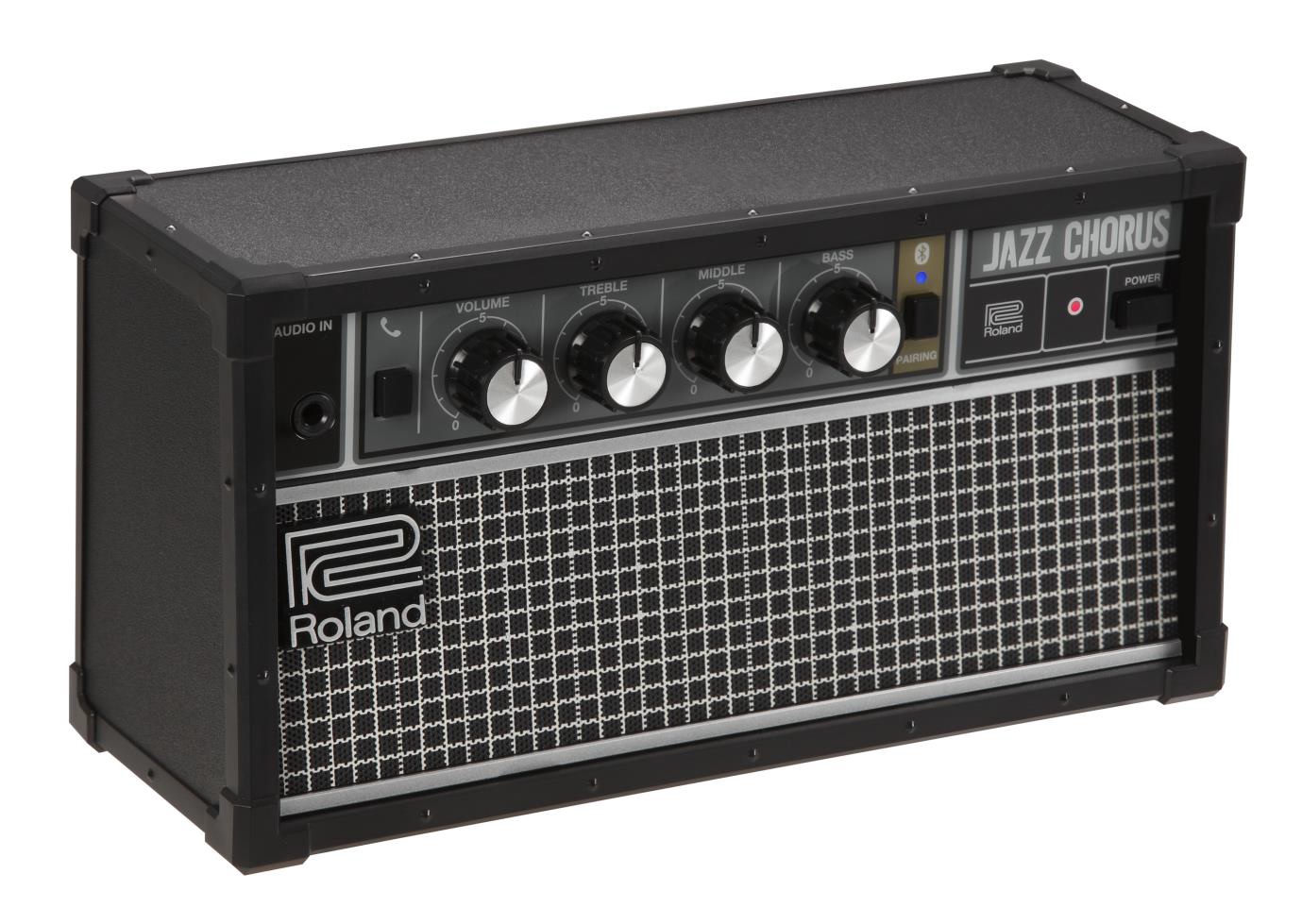
The Roland JC-01 Bluetooth Audio Speaker is a mini Jazz Chorus. The device purports to have a clean sound, an integrated, rechargeable battery, passive radiator, and a three-band EQ. No effects. You can even use it as a speakerphone!

roland_jc01

I’m a sucker for these little amps. The Blackstar Fly 3 Bass has my eye, too. I just hope that the Roland doesn’t carry its usual exorbitant Roland mini-amp price. We’ll have to put a keyboard through it and see if it’s up to the job. A nice beefy B3 patch usually reveals flatulence and boxiness in a hurry. The Fly 3 Bass might just carry the low end better than the mini-JC.

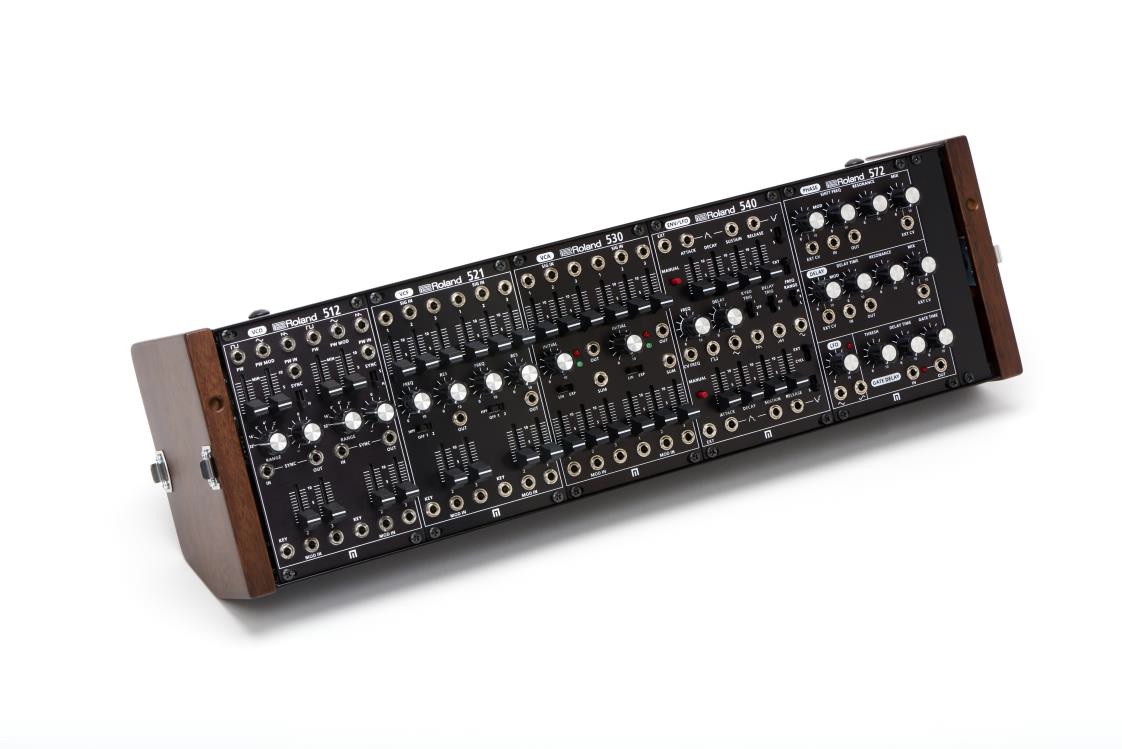
The Roland System 500 is a thing of beauty. I keep my old Electrix modules just because I like the light show in the rack. But, this is visual art.

roland_system500

As Will Smith said in Independence Day, “I have got to get me one of these!”

Boss has a few new, fun toys, too. The VO-1 Vocoder Pedal could do some serious damage to things other than guitar. And, it’s all in a stomp box. Speaking of stomp boxes, Singlular Sound released the BeatBuddy Mini with a lower street price than its bigger, er, buddy. The Mini does away with all of the external interfacing and extensibility — kind of a one-off pedal. Yes, folks, all those darned connectors and connections cost money and need to be tested in QA. I think we’re going to see more and more tech in pedals, especially accompaniment and backing. There’s money to be made in those darned [guitar] hills!

Maybe not at NAMM, but Apple announced its free Music Memos app. Here’s a few quick quotes:

Sometimes the best ideas come when you least expect them. When those moments happen, open Music Memos to record high-quality, uncompressed audio through the built-in mic in your iPhone, or connect an external microphone. Music Memos is optimized for acoustic guitar and piano, and it works with other musical instruments, too.

Music Memos automatically analyzes the basic arrangement and suggests chords you played for each track. Then you can hear how your music sounds with a realistic virtual drummer and bass player jamming along. If your performance speeds up or slows down, so does the band. You can even tweak the energy and performance of the drums or bass with a few simple controls.

To build in additional tracks and instruments for a professional-sounding mix, move your recordings into GarageBand on your iOS device, or GarageBand or Logic Pro X on your Mac.

Hmmm, looks like Yamaha Chord Tracker has competition! Yamaha have been very busy with audio analysis algorithms to detect beats, chords and the like, so we haven’t heard the last from them. Another app to consider — although it is currently pitched toward classical musicians — is Cadenza. Cadenza and Music Memos both track your tempo. All of that academic research on music analysis is beginning to bear fruit!

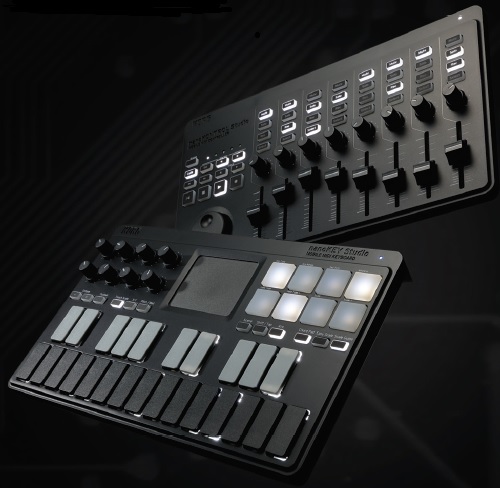
The Korg nanoKONTROL and nanoKEY Studio are too cute for school. Honey, I shrunk the Taktile. USB and Bluetooth LE. (Again, latency over BLE?) Both controllers are bundled with software.

korg_nano

I still like my Triton Taktile 49. The Korg software bundle with the Triton Taktile was a really sweet deal for the cash. Sometimes it’s worth it to buy a piece of kit just for the software. I bought an M-Audio Keystation Mini 32 (once) just to get Sibelius First. The bundle was cheaper than buying Sibelius First alone and I desperately needed a notation tool at the time. (Still like Sibelius First, too.)

Of course, there’s the Minilogue. It’s micro-analyzed to death in the forums, so no need to dive into that here. I like the inclusion of an oscilloscope, but I think one of the larger, inexpensive ‘scopes like the Xminilab Portable Small Mixed Signal Oscilloscope would display more information, have two inputs, be portable and be ready for action anywhere in the lab or studio.

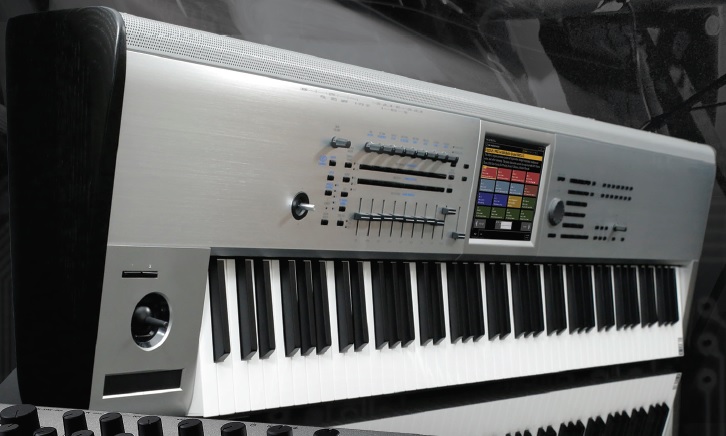
Finally, there’s the Korg Kronos Platinum. What a handsome beast! I noticed that the back panel is perforated which should help with airflow through the unit.

korg_kronos

Only 300 units will be sold in the U.S. market. I wonder if John Batiste will get to rock a Platinum on LSSC?

Dessert topping? Floor wax?

Ah, we’re starting to hit the silly phase of keyboard micro-analysis and Web discussion vis a vis the not yet, not quite announced Yamaha Montage.

So, is it a floor wax or a dessert topping? Should we follow the holy sandal or the holy gourd?

Any other comedy bits I can rip off? 🙂

Frankly, I will probably never touch the bits which are touted to be for “EDM.” I’m not angry or even mildly perturbed that Yamaha would put such “useless” features on my keyboard. It’s a big world. Thank heaven for those features because more people will buy the Montage making it easier for Yamaha to offer this product at a lower street price. And gasp, I may even come to learn, use and love some of those “EDM” features. At the same time, I want to thank all those guys doing covers at the Holiday Inn…

I’ve been drawing up a shopping list of sounds and features which I would like to see in the Montage or whatever keyboard that replaces/upgrades my MOX6. What are those sounds and features? They’re personal. Not secret — personal. Even the Motif XF6 is a candidate, because heck, the discount is only going to get sweeter after the Montage drops. So, I also drew up a list comparing the MOX6 against the XF based on the desired feature set.

After a day of God (gig) and football (play-offs), I took a fresh glance at the high rez screen shots. Some these pictures are making more sense to me now. (Click on any of these images to get full resolution.)

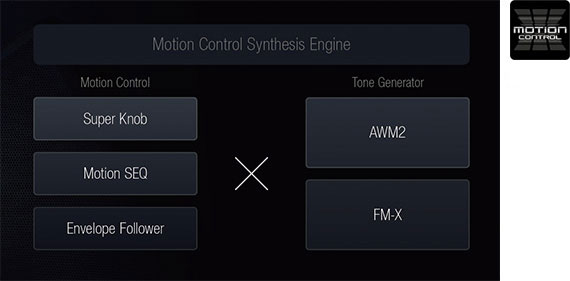
montage_motion

The Motion Control Synthesis Engine concept is a more concise and powerful way to think about all of those control assignments and parameters in the current Motif/MOX UI. The Super Knob, Motion SEQ and Envelope Follower sections twitch and tweeze parameters in the AWM2 and FM-X tone generators. The Motion SEQ and Envelope Follower add a dynamic aspect to the twitching and tweezing. The Motion SEQ can sync these changes to tempo — something that you don’t always get in Motif/MOX.

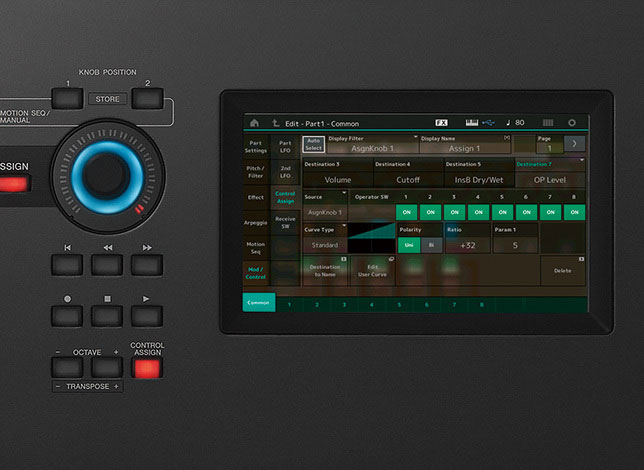
This afternoon, I was busy deconstructing the programming behind a few of the drawbar organ patches on the MOX. On the current products, you can tweak individual parameters using the mod wheel, assignable function buttons or assignable knobs. Conceivably, one could control a group of parameters from the mod wheeel, for example, but setting this up through the current UI is an exercise in tedious menu diving. If Yamaha got the Montage UI right, then it should be easier to assign multiple parameters to the Super Knob (or Motion SEQ or Envelope Follower).

montage_superknob

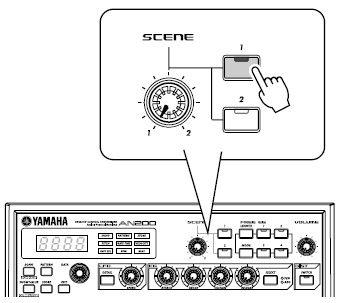
Further, the Super Knob appears to support morphing between two scenes where a scene is a particular configuration of one or more parameters, kind of like the old AN200/DX200. Let’s say you want to be able to morph from one organ drawbar setting to another. (Thanks, Bad Mister, for this idea.) If my interpetation is correct, then it should be possible to set up the first drawbar setting as scene 1, set up the second drawbar setting as scene 2, and then morph the drawbars between the two scenes. Cool. Maybe not as flexible as moving individual bars, but workable and low stress during the gig.

Ew, did I just use one of those “EDM” features? 🙂

BTW, parts of the screenshot to the right of the Super Knob should look familiar to Motif/MOX users. The Motif/MOX UI separates Voice and Performance editing into COMMON and per-PART (or per-ELEMENT) tabbed pages. This screenshot shows the COMMON page. The first vertical column of six touch buttons on the left-hand side of the screen replace the physical function buttons that selected tabs. The second vertical column of six touch buttons replace the old physical sub-function buttons. The sub-functions in the second column depend on the what’s selected in the first column. It’s all contextual. If you know how to navigate the Motif/MOX, this should be a breeze. It looks like this page edits the knob control assignment for an FM-X voice.

montage_best_of

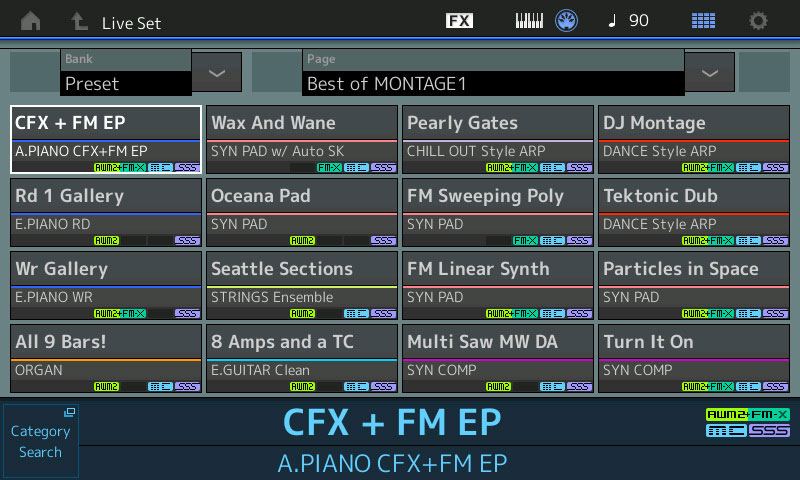
The Performance selection screenshot started to make more sense, too. The touch button in the upper left corner let’s us select the Performance bank. The touch button in the lower left does category search. No surprises. Each voice is tagged with up to four icons: AWM2, FM-X, MC, and SSS. The icons indicate the kind of Performance, that is, the tone generation method, Motion Control and SSS (Seamless Sound Switching).

On Saturday, I was trying to figure out the meaning of “All 9 Bars!” and how individual drawbars might be controlled. Given what I’ve inferred about the Motion Control Synthesis Engine, this Performance most likely morphs from one drawbar setting to another via the Super Knob. SSS comes into play when switching from one drawbar setting to the next such that the sound is not interrupted. Of course, this means that the number of parts is limited to eight maximum. Current Motif/MOX voices make use of waveforms like “Draw 1+3” and “Draw 2+4” to cover more than one tonewheel footage per tone generation element. It may be necessary to exploit such waveforms on the Montage, too. We’ll see.

The Seattle Sections Performance might be fun, too. Maybe it morphs from quiet strings to fortissimo? The crescendo could be gradual and tempo sync’ed — a musical effect that is difficult to play live through velocity (key dynamics).

montage_sequence

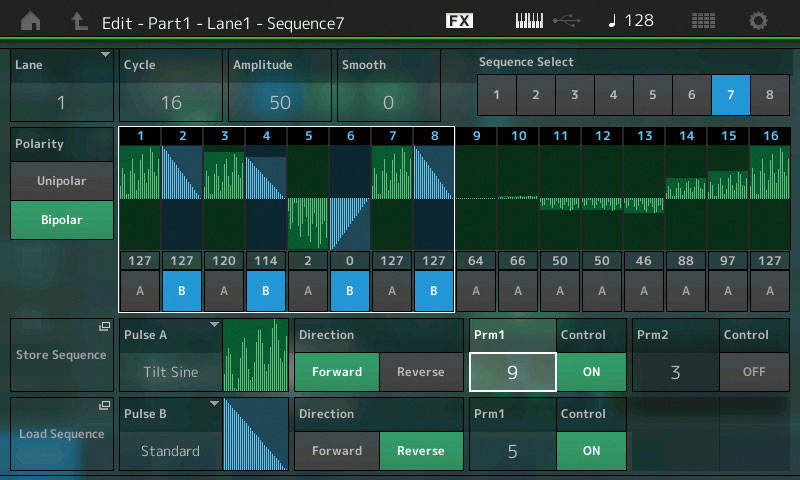
I’m rather surprised that folks are debating whether the Montage has a sequencer or not. Or whether the Montage has arpeggios or not. These features appear quite clearly in the screenshoots. There is even a physical “ARP ON/OFF” button on the front panel. Good thing it’s physical because you wouldn’t want to dig for that switch in a menu somewhere! The “lane” notion is just a way of dealing with limited vertical screen space. The UI probably uses lanes that fold up and hide rather than displaying all horizontal lanes and endlessly scrolling up and down. I’ll bet that the UI designers drew from Steinberg’s experience with Cubasis on iPad.

If one assumes that the screen captures are one-to-one, then the Montage native screen resolution is 800H by 480V pixels.

In closing, I must say that the graphic design is clean, modern and inviting. Yamaha have definitely been applying their experience with Cubasis and Mobile Music Sequencer.

Well, that’s it, folks! Like you, I’m waiting for the demo videos, manuals and a test drive. In the meantime, put on whatever moves you and chill. Maybe “Wicked Game” by Groovy Waters. Or “Lean On Me” from 20 Feet From Stardom and listen to Darlene Love testify. Peace.

Extra! Extra!

Here’s a blast from the past — quotes from the old AN200 manual about its Scene and FreeEG features.


AN200 Scene

While playing back a Pattern, turn the [SCENE] knob slowly, back and forth. Notice how the sound gradually “morphs” between 1 and 2 — in real time as you work the knob! Do this in sync with the rhythm and create your own shifting textures!

an200_scene

The exciting and powerful Scene feature lets you create and use two different Voices within a single Pattern. Most importantly, it lets you instantly switch between them or gradually “morph” from one to the other — all in real time. Now, it’s time for you to create a Scene or two of your own.


  1. Press SCENE button [1]. This is the Scene you’ll be working on first.

  2. Work the controls and get the sound you want for Scene 1. Any and all of the Synth knobs can be used.

  3. While holding down [STORE], press SCENE button [1].

  4. Do the same operation for Scene 2 — repeating Steps 1 – 3 above with SCENE button [2] this time.

AN200 FreeEG

The AN200 has so many real-time control features, it’s hard to get a grip on them all. Feel you need an extra pair of hands? Or maybe an extra two? No problem. Just use the amazing Free EG feature. The AN200 is packed with a lot of powerful recording functions — but none are quite as impressive as this. Free EG gives you up to four tracks for recording your knob moves — letting you incorporate real-time sound changes and knob moves as a part of the Pattern. So every time you play the Pattern, your knob changes play right along with it — just as you recorded them. We call this “Free EG” because it allows you to create unique, complex, continuous parameter changes that would be impossible to achieve with conventional EGs.


  1. Call up the desired Pattern, and press the red Record button.

  2. Select the Free EG track you want to record.

  3. Start the Pattern, and make your moves.

  4. To stop recording, press the Start/Stop button.

  5. To hear your Free EG recording, make sure that the appropriate track buttons are on, then press the Start/Stop button to play the Pattern.


So much better in hi-rez

Ahhhh, those folks at motifator.com! They have managed to access the high resolution images that accompanied the briefly revealed information on the Yamaha music production synthesizer pages. Thanks, folks. I’m sure that you will cruise over there to see all of the images. However, here are a few things that struck me.

The Motion Seq image is quite informative. As I suspected, the sequencer user interface has undergone a substantial revision. It is more “DAW-like” in appearance and operation. (Click on the images below to get full resolution.)

montage_sequence

It’s also clear — from the other images at motifator.com — that arpeggios (ARPs) have not gone away. I’m sure that Yamaha wants us to focus on the new product features first, rather than reading about old news.

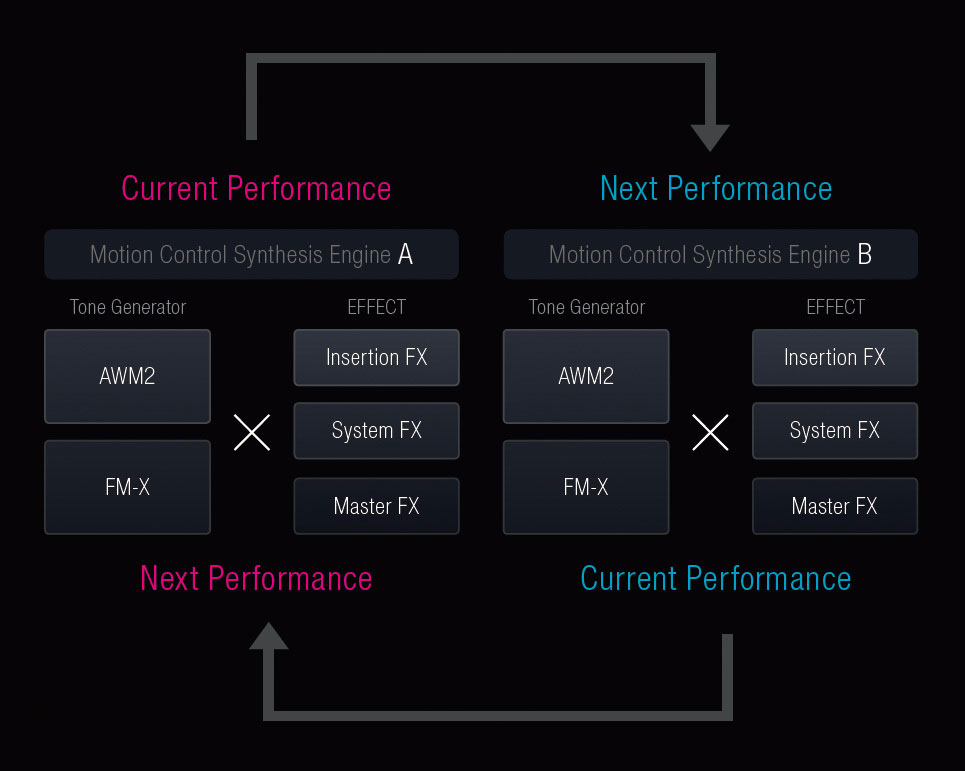
Seamless Sound Switching (SSS) effectively switches between two Performances (eight part maximum per Performance). The eight part limitation comes from the need to keep the currently playing voice and effects chain live in the tone generator while the second Performance parts are enabled. The elements and effect units assigned to the first Performance have to remain active and processing while the second Performance spins up.

montage_sss

I am very glad to see SSS as I often hold a chord at the end of a verse or refrain while bringing up a new patch. It’s hard to transition around the current sound cut-off while keeping a congregation in sync. (Worship musicians everywhere will rejoice.)

The snapshot of the voice selection page shows “Best of Montage” voices. Yamaha are clearly proud enough of the Rhodes and Wurlitzer electric pianos to include them in “The Best.” There is also an organ voice called “All 9 Bars!”. Oh, oh, this bodes well for those of us in need of good bread and butter sounds! Plus, I have got to play the bars. Still need to hear the rotary speaker effect…

montage_best_of

It will be interesting to discover if Yamaha have continued to mine the SuperArticulation voices and technology in the Tyros and upper-end PSR arranger workstations. The Motif XF added an SA-inspired tenor sax and hopefully, the improved wooodwinds will offer more treats. Bring me an SA jazz flute, Santa. Please?! 🙂

I can’t wait to play this machine! Looking better all the time.

We shouldn’t forget about the software side. Steinberg have not been sitting on their hands. Plus, the Yamaha Mobile Music Sequencer (MMS) has only seen bug fixes in the last few releases. Shall we see a new version of MMS? What do Cubase and Cubasis have in store for us? Any new and cool apps?

Through a gap in the curtain…

Another day, another brief slip. The following Yamaha Montage information is taken from a credible posting at the gearslutz.com web site. It adds to the information that was inadvertently revealed earlier. Of course, all news before the official unveiling is unverified! If I’m all wrong about this, I will be the first one to have a good laugh! A good laugh is healthy. 🙂

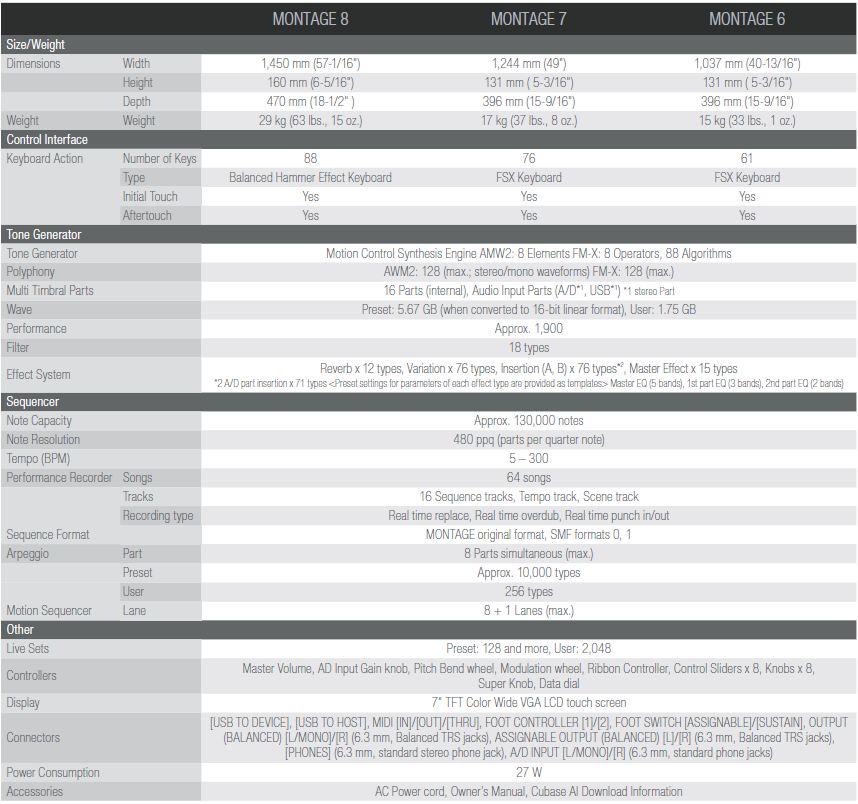
  • AWM2: 128-note, stereo polyphony.
  • New AWM2 waveforms: Yamaha CFX Premium Grand Piano, Bösendorfer Imperial Premium Grand Piano, strings, woodwinds.
  • FM-X: 128-note polyphony, 8-operator voice architecture.
  • FM voices taken from the DX and TX series.
  • DX-to-FM-X conversion utility is in development.
  • Seamless Sound Switching (SSS) for Performances with 8 or fewer parts; no more sound cut-off when changing performances.
  • Envelope follower to extract a routable, control envelope.
  • 1.75GByte of internal user flash memory.
  • Class compliant USB with multiple audio channels back to a DAW.
  • Sampling rate up to 192 kHz.
  • VCM effects including a compressor with sidechain; damper resonance.
  • Pure Analog Circuit (PAC) postprocesses after-DAC audio.
  • Eight rotary encoders and eight sliders.
  • Direct Control Assignment for convenient assignment of parameters to physical controls.
  • 61- and 76-note models have FSX action and aftertouch.
  • 88-key model has fully-weighted balanced hammer action and aftertouch.

Thank you, thank you, for SSS!

The 128 stereo polyphony for AWM2 is interesting given the way Yamaha assigns voice generation elements on the fly. Also, given Yamaha’s tone generation scheme, this is true polyphony. Not to diss the Kronos, but Korg have to publish a lot of fine print about voice/effect trade-offs because the Kronos synthesis engines and effects share the same x86 cores.

Hopefully, the stereo polyphony spec implies a greater use of stereo waveforms for AWM2 voices. Improved woodwinds would really be a God-send for me, not to mention the new acoustic pianos. No word on the electric pianos or B3 organ emulation, though, so I’m still holding my breath. SCM, where are you? The latest reveal mentions “synth libraries from yamahasynth.com.” It would be cool (and useful!) if Yamaha follows the path taken by Nord with their downloadable sound libraries. Aftermarket accessories and sounds drive sales as well as a thriving environment for third party developers. I hope the Montage ecosystem ramps up fast.

One poster noted that 1.75 GBytes of user flash memory is kind of an odd amount. The Montage uses the flash memory scheme that is employed in the most recent arrangers. The flash memory feeding the tone generator holds both the factory voice samples and user samples. Users basically get whatever space is left over from the factory set. Yamaha essentially reserves this much space in the physical memory for your own use.

The motion control and motion sequencer appear to be similar to features implemented in the old Yamaha AN200 and DX200 table-top groove boxes. These allow dynamic control of multiple parameters for sound “morphing.”

The Motion Control Synthesis Engine “unifies” the treatment of AWM2 and FM-X voices across zones and layers in a Performance. Transparency of operation is good.

The visual styling is very nice! Rakish. (Always wanted to use that word.) The Montage appears to be physically smaller than the Motif. Hopefully, the Montage weighs less, too. Yamaha may get slagged for the lack of readable panel markings in low stage light.

Overall, pretty good stuff and I can’t wait to hear more!

Yamaha has now released the official Montage teaser video. If you’re on their mailing list, check your in-box. Otherwise, cruise on over to Youtube. (I don’t usually post Youtube links. You know how to use the Interwebs.) The video confirms the images that we have seen so far.

Yamaha has also opened up the Montage forum on yamahasynth.com. No manuals, yet. 🙂

More than a few people noticed that sequencing capabilities have not been mentioned in the leaked promotional material. Right now, it’s hard to read anything into the absence of this information. We’ll need to stay tuned, but don’t Bogart that Motif/MOX yet! It’s still an incredible time to buy a Motif XF, BTW, with the “Fully Loaded” package and all.

In case you missed them, here are links to two of my earlier posts speculating about the Montage:

New Yamaha workstation at NAMM 2016?
(Re)take the stage

Some hits, some misses.

Yamaha Montage: First (leaked) glimpse

Looks like the first credible leak about the Yamaha Montage has appeared on the gearslutz.com web site. There is a post taken from the February 2016 issue of the Music Trades NAMM Show special edition, including a small amount of text paraphrased from a Yamaha press release. Here is a short list of product features taken from the leaked text:

  • 61-, 76- and 88-key models
  • New user interface with color touch screen
  • Two sound engines: AWM2 and FM-X
  • Ten times more wave memory
  • Two times the effects as Motif XF
  • Two times the polyphony
  • Motion Control Synthesizer Engine
  • Super Knob: A single knob to control multiple parameters at once
  • Integrated flash

The blurb has the link http://4wrd.it/Montage which leads to a page that is not yet enabled.

YamahaMontage

This information is consistent with my earlier analysis. The Montage uses integrated NAND flash (no more DIMMs!). Ten times the wave memory puts total wave memory around 8GBytes (compressed? uncompressed?). This memory will be shared between the factory sound set, libraries and user samples. Polyphony is 256 voices. The XF supports 16 effect units, so the Montage should have 32 effect units (reverb, chorus and insert) total.

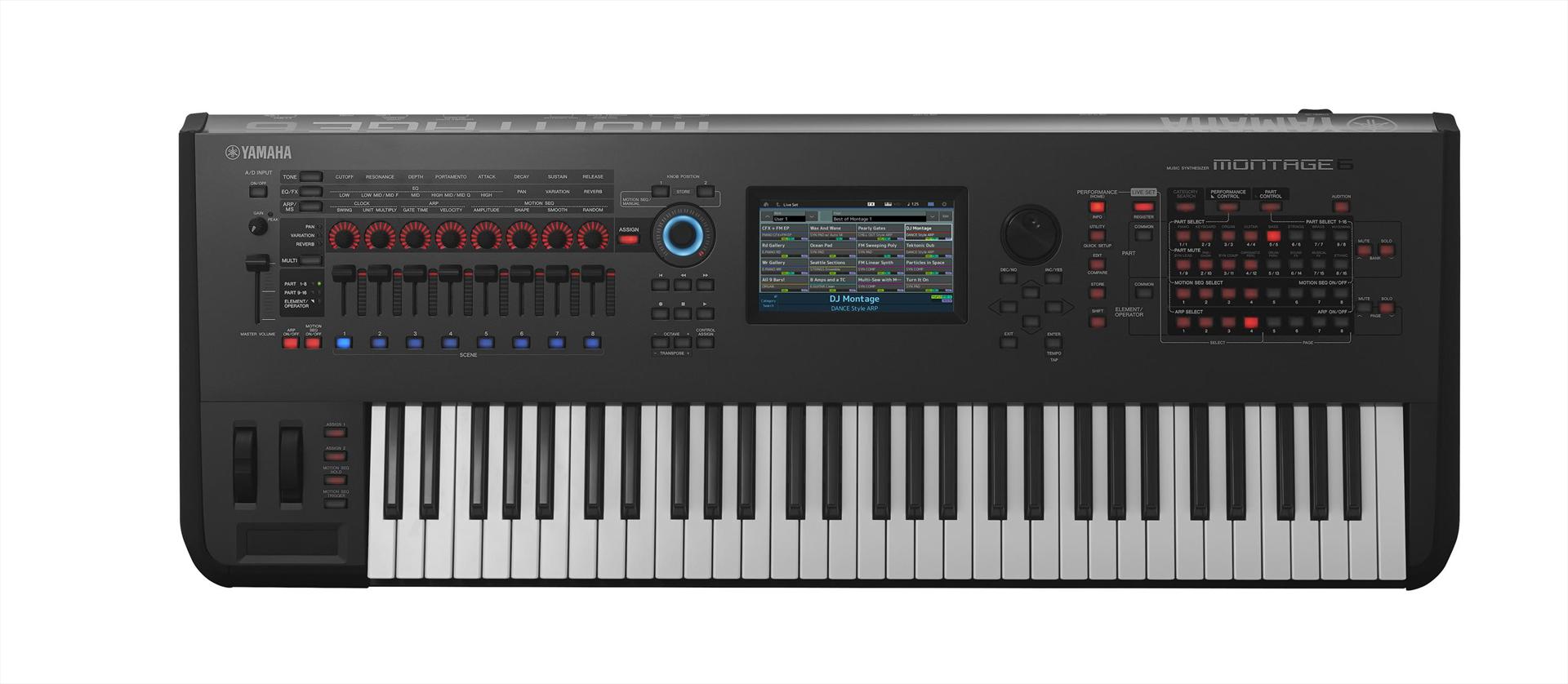
The picture shows a clean front panel where the touch screen has subsumed many of the front panel buttons on the XF. There are eight assignable part sliders and a master slider, along with (presumably assignable) eight knobs and buttons. The knobs and buttons are back-lit.

The Super Knob is also back-lit. It will be interesting to find out how this will be used in performance.

Of course, there are a zillion unknown details. Will the UI really be easy to use and navigate? Are there improved pianos and Spectral Component Modeling (SCM) electric pianos? Does the Montage continue phrase-oriented composition? How much internal flash memory is set aside for user samples? How much weight do we need to lug to the gig? What is the street price?

In case you missed them, here are links to two of my earlier posts speculating about the Montage:

New Yamaha workstation at NAMM 2016?
(Re)take the stage

(Re)take the stage

A good show starts in the dressing room
And work its way to the stage
— “Get Dressed” by George Clinton

With Winter NAMM 2016 just a few weeks away, I started thinking about how Yamaha might position a new synthesizer workstation (rumored to have the name “Montage”).

Motif has had a long run as a stage instrument favored by many professional touring musicians. It makes a good master controller for a backstage rig and has a wealth of great native sounds. The synth- and piano-key actions are extremely playable with good key-to-sound response.

Over the last few years, Nord and more recently Korg have been taking the stage away from Yamaha. The Nord Stage and Electro series are firmly established as gig boards and the Korg Kronos is coming on strong. Korg products seem to be sprouting everywhere on The Late Night with Stephen Colbert thanks to John Batiste — who can really rock ’em.

I doubt if Yamaha is willing to surrender the stage. This news may disappoint those players who are hoping for a mind-blowing (virtual) analog synthesizer. As a business-person, I would say, “Hmm, we made good money on the stage and in the studio with Motif. Let’s build on that success. Besides, there are plenty of ’boutique’ vendors who make great instruments, like Dave Smith.” Yamaha even granted the name “Sequential” back to Dave Smith.

Yamaha may see the Nord Stage and Korg Kronos as their primary competition for the stage in the synth workstation space. Both instruments combine multiple synthesis techniques into a single integrated package:

  • Wavetable synthesis including sample playback
  • Analog synthesis
  • Frequency Modulation (FM) synthesis
  • Acoustic and electric piano emulation
  • B3 and combo organ emulation

So, which pieces are missing in the current Motif XF? Are you thinking “Reface” yet?

Let’s look at these aspects in turn.

Wavetable synthesis and sample playback

More than a few Internet posters slag AWM (Advanced Wave Memory). I suspect that many of these people would like real analog or modeled analog instead. That’s OK by me because they probably need those sounds for their music. However, there is a wide customer base who need “traditional” instruments (brass, strings, woodwinds, etc.) where sample-playback still rules. AWM is a very successful sample-playback engine and I don’t see Yamaha abandoning AWM.

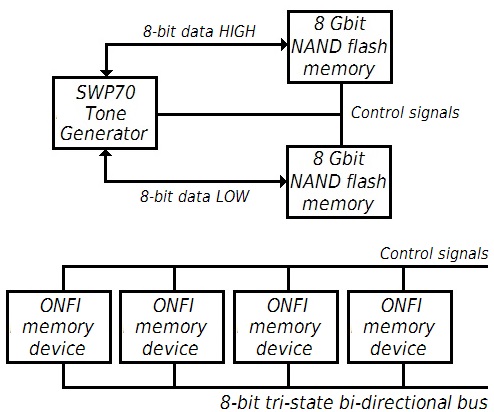
Yamaha have a new tone generation engine, the SWP70 . The SWP70 is already at work in the PSR-S970 and PSR-S770 arranger workstations . The SWP70 is more than a sample-playback engine as it also performs programmable digital signal processing for effects and more. The S970 implements Motif-quality sounds and effects including Virtual Circuit Modeling (VCM) and the Real Distortion effects that were added to Motif XF in the v1.5 update.

Other posters feel that an SSD is essential for sample streaming. SSD is only one approach, however, and that approach requires a SATA interface for sample I/O. SSD is not necessarily the cheapest design nor does it minimize latency. Yamaha deconstructed the SSD functionality, threw away the SATA interface cost and latency, implemented an Open NAND Flash Interface (ONFI), and embedded sample data caching into the SWP70. The SWP70 has all of the extensibility of NAND flash without the cost of the SATA controller and without SATA bus latency.

As demonstrated by the S970 and S770, the SWP70 is ready to roll for sample-playback and effects processing.

Analog synthesis and FM synthesis

I contend that the Reface products are a field test for SWP70-based synthesis methods that are not tested by the S970 and S770. I have not yet seen absolute evidence that Reface keyboards use the SWP70, but my suspicion is strong.

The Reface CS and Reface DX demonstrate analog physical modeling and 4-operator FM sound synthesis, probably using the SWP70. Please remember that the SWP70 is not just sample-playback; there are digital signal processors in there. These DSP units can be programmed for effects (reverb, etc.) or sound generation. A computer is a computer whether it is an x86 architecture machine or an embedded DSP. Both the Reface CS and Reface DX implement VCM effects, too.

Two more general points about the Reface line. First, the Reface keyboards use an ARM architecture (FM3) processor for control and user interface. This is a major departure from past Yamaha practice. Next, all four keyboards operate on battery power (six “AA” batteries). Low power operation is a significant engineering accomplishment and means that the SWP70 could be deployed in a wide range of portable products — not true of the previous generation SWP51L tone generator.

Acoustic and electric piano emulation

Yamaha demonstrated its commitment to the stage when it introduced the CP1 stage piano and its siblings. The CP1 was well-received.

The CP1 is a bit of a breakthrough product technically. The acoustic piano is implemented mainly through sample-playback. The CP1 physical wave memory is only 128 MBytes. Yamaha eventually released the CP1 acoustic piano samples for Motif XF as part of the Motif XF Premium Collection. We should expect a CP1-level piano or better in the new workstation.

Yamaha “got away” with so few samples overall because the CP1 electric pianos are implemented using Spectral Component Modeling (SCM). “SCM” covers a family of technologies including spectral modeling synthesis (SMS). SMS replaces gobs of samples with computation (AKA “modeling”). SMS eliminates the nasty sonic artifacts due to velocity switched sample-playback because, well, there aren’t any samples, just lots of computations to be performed very quickly.

The Reface CP uses SCM to implement its electric pianos. The Reface CP sounds great. (See my Reface CP snap review.) The Reface CP re-introduces Formulated Digital Sound Processing (FDSP) to model the electric piano pickup. I expect to see SCM electric pianos and a subset of FDSP in the new workstation.

B3 and combo organ emulation

B3 emulation has never been Motif’s strong suit. Nord, in particular, excel at B3 and rotary speaker emulation. Hopefully, Yamaha have addressed this defficiency by incorporating the Reface YC technology into their new workstation.

The Reface YC provides a live front panel that lets a player control the B3 drawbars, percussion, vibrato and rotary speaker on the fly. The ability to play the bars, etc. is essential to B3 technique. A few important improvements include a rotary speaker brake (STOP) position as well as SLOW and FAST, a vibrato/chorus section, and a full percussion section. Hopefully, the vibrato/chorus section emulates the Hammond vibrato/chorus scanner — an effect that is lacking in the Motif (and Tyros/PSR, for that matter).

The Reface YC implements B3 tonewheels through AWM. Is sample-playback better than Nord’s modeling? Of course, a lot rides on rotary speaker simulation, too. I can’t wait to find out. So far, I haven’t been able to find a Reface YC to try one out! If Yamaha wants to take the stage, again, it needs to nail this one.

The bottom line

Yamaha surely have the basic technology to make a machine for stage performers. Hopefully, they have implemented a user interface that is easy to learn, responsive and fun to play — kind of like the live front panels in the Reface series.

The Tyros and the new S770/S970 arrangers sport large displays. The S770 and S970 wide-screens are really nice. Lately, Yamaha have placed greater emphasis on skeuomorphic user interfaces with virtual knobs, sliders, etc. Whether Yamaha goes for a touch panel, only Yamaha knows at this point. It would be kind of cool to have virtual Reface front panels with finger-tweaking controls. But, would it be playable?

Sixteen days to go to Winter NAMM 2016 …

If you liked this article, you might enjoy:

New Yamaha workstation at NAMM 2016?
Reface YC and DX teardowns
The SWP70 tone generator
PSR-S770 and S970 internal architecture
Reface CP: Yes, I played one!

Copyright (c) 2016 Paul J. Drongowski

Reface YC and DX teardowns

Markus Fuller posted two Yamaha Reface teardowns (YC and DX) to Youtube:

In case you’re not familiar with the term “teardown,” think of a teardown as a casual tour through the insides of a keyboard.

Both Reface keyboards have an ARM FM3 handing the user interface panel. The switch to ARM is major news. In the past, Yamaha used Renesas H8 or SH4 microcontrollers for interface applications. They apparently have decided to ride the embedded cost curve and that curve leads to ARM, the current leader in low-power, high function embedded microcontrollers.

I wonder if Yamaha will adopt ARM in their entry-level keyboards? This would be a smart move. Yamaha currently use their own SWL01 processor in battery-powered entry-level products. Now that Yamaha have sold off their integrated circuit fabrication plant, they are free to move to off-the-shelf parts when it makes sense. ARM is the choice for battery-powered embedded devices. Further, the ARM-resident, XG-capable sound engine in Yamaha Mobile Music Sequencer has a better spec than the entry-level ‘boards. (MMS reference)

Both Reface keyboards have a large metal plate over one or more integrated circuits. This is the honey pot. 🙂 I understand Markus’s reluctance to remove the heat sink. This is, however, where the digital signal processing (DSP) is being performed. Apparently, Yamaha had a minor power dissipation problem and resolved it using a simple heat sink (no fan). Heat is an important product design problem; x86 fans take note. (More on x86 and instrument design.)

Here are some notes about the integrated circuits in the Reface YC:

Winbond W9864G6KH-6 SDRAM  (64Mbits)
    4Mx16 bits = 1M words x 4 banks x 16 bits (8MBytes equivalent)
    166MHz/CL3
    Parallel interface
    Burst-oriented accesses

Winbond W9812G6JH-6 SDRAM (128Mbits)
    8Mx16 bits = 2M words x 4 banks x 16 bits (16MBytes equivalent)
    Parallel interface
    166MHz/CL3
    Burst-oriented accesses

AKM AK4396VF (Asahi Kasei Microdevices Corporation)
    Digital-to-analog converter (DAC)
    24-bit 192KHz 128x oversampling
    I2S data interface
    Integrated digital filter

Texas Instruments / Burr Brown PCM1803A
    Stereo analog-to-digital converter
    24-bit, 64x or 128x oversampling
    I2S data interface

The circuits are all pretty typical for a Yamaha design. Not enough information here to indicate whether the SWP70 tone generator is in use or not. Yamaha have used W9864G6KH as DSP SDRAM in past designs.

I’m glad that Markus posts his teardowns. I like it when he zooms in and identifies the integrated circuits. One very small quibble with the YC teardown — I believe the “A” stands for “Acetone.”

While you’re here, catch my Reface CP snap review.

New Yamaha workstation at NAMM 2016?

True gearheads are already making predictions and plans for 2016 Winter NAMM, January 21-24, 2016. Winter NAMM rumors abound including “Montage,” the rumored name for the rumored new Yamaha synthesizer workstation.

See the list of new waveforms in the Montage and read my initial review of the Montage8. Update: May 10, 2016.

Find the latest links, pictures, rumors and facts here . Update: January 21, 2016.

Check out some new thoughts about the rumored workstation and preliminary comments . Update: January 18, 2016.

Many folks — myself included — anticipate the release of a new Yamaha synthesizer workstation at the next NAMM. Much has been made of the registered trademark “Montage.” I don’t really care too much about what they call it, as I care about what it will do.

Last month, I posted two articles about the new Yamaha tone generation chip called “SWP70”:

This chip made its first appearance in the new PSR-S770 and PSR-S970 arranger workstations. Lest anyone scoff, the S770 and S970 produce Motif-caliber sounds including the REAL DISTORTION effects added to the Motif XF by the v1.5 update. The previous tone generator (SWP51L) is used throughout the mid- and upper-range Yamaha keyboard products including Clavinova, MOX/MOXF, Motif XS/XF, and Tyros 4/5. The number of tone generator chips varies by product specification and, most notably, sets the maximum available polyphony. A new tone generator chip is a pretty big deal since it will have an impact on all mid- and high-grade electronic instruments across product lines.

My earlier article about the SWP70 is written from the perspective of a computer architect and is way too nerdy for normal people. 🙂 Let me break it down.

Musicians using VST plug-ins within a PC-based DAW are familiar with the concept of sample streaming. In the quest for greater realism and articulation, sample libraries have become huge. These libraries simply cannot fit into fast random access memory (RAM) for playback. As a work-around, a software instrument reads samples from a drive-based library on demand and only a small part of the entire library is resident in RAM at any given time. The process is often called “sample streaming” because the software instrument streams in the samples on demand from a large fast secondary memory like a Solid-State Drive (SSD). The Korg Kronos workstation caught everyone’s attention because it incorporates an x86-based software system that streams samples from an SSD. (For Kronos-related articles, look here and here.)

The SWP70 combines streaming with tone generation. It does not, however, use an SSD for storage. Rather, it subsumes the functionality of the SSD. A moment to explain…

An SSD consists of three major subsystems: SATA controller, temporary storage cache (RAM) and one or more NAND flash memory chips. The NAND flash memory chips typically adhere to the Open NAND Flash Interface (ONFI) standard. This allows expansion and standardized configurability. The SATA controller exchanges commands and data with a computer using the SATA bus protocol. The temporary storage cache holds data which is pre-read (cached) from the NAND flash chips. Caching is required because random access read to NAND flash is too slow; sequential paged access is much faster. Data must be prefetched in order to achieve anything like SATA 1 (2 or 3) transfer speed.

The SWP70 subsumes the SSD functionality. It has its own memory controller and has a side memory port to its own RAM for caching samples. The SWP70 reads samples from its ONFI-compatible NAND flash memory bus and stores the samples in its cache. The tone generation circuitry reads the samples from the cache when it needs them. The SWP70 solution is, effectively, sample streaming without the added cost and latency of SATA bus transfers. The samples coming into the SWP70 from flash are compressed, by the way, and the SWP70 decompresses them.

The SWP70 will very likely make an appearance in the new Yamaha synthesizer workstation. The S770 and S970 do not make full use of the SWP70, so we have yet to see what this chip is fully capable of. We can definitely expect:

  • Much larger wave memory (4GBytes minimum)
  • Greater polyphony (256 voices or more)
  • More simultaneous DSP effects (32 units or more)
  • The demise of the expensive expansion flash DIMMs

I would simply love it if the new workstation implemented some form of Super Articulation 2 voices (now supported by Tyros 5). The raw resources are there.

User-installed expansion memory may be a thing of the past. The current DIMMs plug into a two channel, full parallel memory interface. That interface is gone and the SWP70 communicates with flash NAND through an ONFI-compatible interface. The Motif and Tyros follow-ons will likely reserve space for user samples and expansion packs in built-in flash memory just like the new mid-range PSRs.

What does Yamaha intend to do with all of this polyphony? Current high-end models like the Tyros 5 use two tone generation chips. Yamaha could replace both chips with a single SWP70 and pocket the savings.

Another possibility is to provide advanced features for musical composition that combine MIDI and audio phrases. Here is a list of technologies covered by recent Yamaha patents and patent applications:

  • Beat detection and tracking
  • Chord detection
  • Synchronized playback of MIDI and audio
  • Combined audio/MIDI accompaniment (time-stretch and pitch-shift)
  • Object-oriented phrase-based composition on a time-line
  • Accompaniment generation from chord chart
  • Display musical score synchronized with audio accompaniment
  • Phrase analysis and selection (via similarity index)
  • Near ultra-sonic communication of control information
  • Search for rhythm pattern similar to reference pattern

A few of these technologies are covered by more than one patent — recurring themes, if you will. I could imagine a screen-based composition system that combines audio and MIDI phrases which are automatically selected from a database. The phrases are transparently time-stretched and pitch-shifted. Some of the compositional aids may be implemented in the workstation while others are tablet-based. The tablet communicates with the workstation over near ultra-sonic sound (no wires, no Bluetooth, no wi-fi, no time lag).

Sample-based tone generators already perform pitch-shifting. That’s how a single sample is stretched across multiple keys. A musical phrase can be pitch-shifted in the same way. As to time-stretching, stay tuned.

Some of these features, like accompaniment generation from a textual chord chart, are more likely to appear in a future arranger workstation product. Making product-specific predictions is a risky business, especially if you want to get it right!

Yamaha — the business — is keenly interested in growth and expanding markets. Management sees opportunity in growth markets like China. The need to combine audio phrases with MIDI is driven by non-Western music: time signatures other than 3/4 or 4/4, different scales, different playing techniques and articulations. These concerns are perhaps more relevant to the arranger product lines. However, phrase-based composition that manipulates and warps audio and MIDI transparently is a basic feature of many DAWs. (Think “Ableton Live.”)

One final theme seems to recur. Yamaha appear to be interested in analyzing and accompanying non-keyboard instruments. The market for guitar-driven accompaniment is much wider and deeper than today’s arranger workstations and is a lucrative target.

Here are links to a few earlier articles, including speculation about the new Yamaha synthesizer workstation:

These articles link to further background information. Of course, we’ll know a lot more once Winter NAMM 2016 is underway!

All site content Copyright © Paul J. Drongowski unless otherwise indicated.

Copy PSR DSP effects (part 4)

This is part 4 of a series of articles about DSP effects for electric pianos and other electrified instruments like guitar. The first three articles are:

This article covers two more techniques that should help you create and apply DSP effects to PSR/Tyros voices.

Beg, borrow and steal

As Picasso once said, “When there’s anything to steal, I steal.” I’m not encouraging larcency or piracy, but when there’s a good effect in an OTS or voice, copy and paste is the way to go.

I like writing these blog posts because they encourage me to learn more about PSR/Tyros features that I might have ignored or overlooked. Such is the case with the section titled “Disabling Automatic Selection of Voice Sets” in the Reference Manual. This features gives us a way to selectively copy certain aspects of a voice to another (new) voice.

This feature is like a “mini-freeze” that applies solely to VOICE SET, not entire registrations. Navigate to:

    FUNCTION > [E] REGIST SEQUENCE/FREEZE/VOICE SET

then TAB over to the VOICE SET page. There are four buttons at the bottom of the page controlling, respectively, four aspects of voice loading when a voice is selected:

    VOICE
    EFFECT
    EQ
    HARMONY/ECHO

When a button is ON, the corresponding voice parameter settings are loaded automatically from the selected voice. When a button is OFF, the corresponding voice parameters settings are not loaded.

So, if we set the button for EFFECT to OFF, we essentially “freeze” the current effect settings. When we load a new voice, the effects remain the same. This gives us a poor man’s copy and paste between voices.

Let’s say that we like the distortion effect on the “Clavi” voice and want to apply it to “VintageEP”. First, I load the Clavi voice to call up the DSP effect. Then, I navigate to the VOICE SET page (as described above) and turn the EFFECT button OFF. This freezes the effect part of the voice programming. Then, I select the VintageEP voice. Voila, the VintageEP voice plays using the distortion effect that was frozen.

Stop! Wait a minute!

Once you save the VintageEP voice to the USB drive or an OTS button, be sure to unfreeze the EFFECT aspect of voice loading. If you don’t do this, you will surely wonder why all of the voices you load are distorted!

Hey, where’s the loot?

The built-in voices are the most obvious source of inspiration for new basic voice plus effect combinations. Yamaha need to maintain backward compatible voices, however, and the older voices such as the electric pianos may not use the latest and greatest effects (e.g., REAL DISTORTION). The guitar voices tend to turn over more quickly and adopt the latest effects.

Backward compatibility is less of an issue for the OTS voices within styles. You are more likely to find new and interesting effects under the OTS buttons. Take the built-in “WahClavi” voice, for example. The built-in voice uses the old CLAVI TC.WAH effect. The “WahClavi” voice in the JazzFunk style, on the other hand, uses the new REAL DISTORTION multi-effect MLT CR WAH (Multi FX Crunch Wah).

The following table is a list of OTS voices showing the parent style and DSP effect. Follow this map to find buried treasure!

Voice            Style          S950 effect   Tyros 5 effect
---------------  -------------  ------------  -------------------------------
GrungeGuitar     JazzFunk       AMP1 HEAVY    British Combo Heavy
OverdriveWah     JazzFunk       MLT CR WAH    Multi FX Crunch Wah
VintageAmp       Soul           V_DIST SOLID  V_Dist Solid
Slapback         MotorCity      V_DIST ROCA   V_Dist Roca
SingleCoilClean  Live8Beat      CMP+OD+TDLY4  Compressor+Overdrive+TempoDelay4
JazzClean        KoolShuffle    V_DST JZ CLN  V_DistJz Cln
StageLead        HardRock       MLT DS SOLO   Multi FX Distortion Solo
EarlyLead        FunkPopRock    TEMPO AT.WAH  Tempo At.Wah+
MetalMaster      ContempRock    ST AMP DS     Small Stereo Distortion
ElectroAcoustic  AcousticRock   AMP1 CLASSIC  British Combo Classic
BluesyNight      70sGlamPiano   ST AMP VT     Small Stereo Vintage Amp
PureVintage      60sRock&Roll   MLT OLD DLY   Multi FX Oldies Delay

VintageEP        SoulBrothers   AMP1 CLASSIC  British Combo Classic
WahClavi         JazzFunk       MLT CR WAH    Multi FX Crunch Wah
SuitcaseEP       Live8Beat      CELESTE2      Celeste 2
ElectricPiano    FunkyGospel    EP AUTOPAN    EP Autopan
CP80             FunkPopRock    T_PHASER1     T Phaser 1
JazzVibes        DetroitPop2    VIBE VIBRATE  Vibe Vibrato
VintageEP        60sPopRock     EP TREMOLO    EP Tremolo

HoldItFast       LiveSoulBand   DIST SOFT2    Distortion Soft 2
WhiterBars       Soul           V_DIST CLS S  V_Dist Cls S
WhiterBarsFast   GospelSwing    ST AMP CLEAN  St Amp Clean
CurvedBars       MotorCity      ST 3BAND EQ   St 3Band EQ
EvenBars         FunkyGospel    ST 3BAND EQ   St 3Band EQ
AllBarsPhase     FunkPopRock    PHASER2       Phaser 2
ClassicBars      BluesRock      ST AMP CLEAN  St Amp Clean
Organ-a-Gogo     70sDisco2      V_DIST TWIN   V_Dist Twin
R&B Tremolo      60sVintageRock DIST HARD2    Distortion Hard 2
OrganFlutes      60sPopRock     AMP2 CLEAN    British Legend Clean
OrganFlutes      6-8SlowRock    ROTARY SP1    Dual Rot BRT

GrowlSax         SoulBrothers   V_DST S+DLY   V Distortion Soft + Delay
GrowlSax         MotorCity      V_DST H+DLY   V Distortion Hard + Delay
RockSax          LiveSoulBand   DST+DELAY1    Distortion + Delay 1
RockSax          HardRock       ST AMP CLEAN  St Amp Clean
Harmonica        6-8Soul        TEMPO AT.WAH  Tempo At.Wah+

Use the poor man’s copy and paste method to mix and match a basic voice sound with a DSP effect. The treasure map demonstrates how the Yamaha style programmers make use of the workstation’s sonic resources. There’s a lot to learn here!

Dry/Wet mix

I like to change voices by hitting the OTS buttons while jamming along with a tune. I have created more than 50 styles with customized OTS buttons to cover my current repetoire. The OTS buttons select the voice and effect combinations that are the most approprtiate for specific tunes (appropriate to my ears anyway).

Unfortunately, the kind of OTS voice and effect informaton that can be stored is limited by the S950’s operating system. (See the Voice Effect, Voice Set, and Mixing Console sections of the Parameter Chart in the Data List manual for the exact details.) An OTS button remembers:

  • DSP effect type (insertion type)
  • DSP ON/OFF
  • DSP variation ON/OFF
  • DSP variation value
  • DSP depth

for the RIGHT1, RIGHT2 and LEFT parts.

If you cast your mind back to Part 1, you know that there are a lot of parameters behind each effect. These parameters cannot be directly captured in an OTS button, which is why they must be stored in a USER EFFECT memory location as described in Part 2. You do get a fly-speck of tweakability by modifying the DSP variation value. Unfortunately, the parameter type is fixed.

The OTS restrictions are relieved or eliminated in the PSR-S970. Again, please see the Parameter Chart in the Data List manual.

Fortunately, OTS remembers DSP depth. The DSP depth controls the “dry/wet” mix, that is, the amount of uneffected (dry) and effected (wet) signal that is mixed together and sent further along (usually to the system-level chorus and/or reverb blocks).

Let’s say that you added a heavy distortion sound to the “SuitcaseEP” voice and you want to reduce the amount of distortion without changing the tone. (Guitar distortion is often waaaay too much for electric piano.) Simply dial down the DSP depth. This increases the amount of dry (clean) electric piano sound and decreases the amount of wet (distorted) electric piano sound. Voila, an electric piano with a bit of grit, not a fuzzed out shredder’s delight.

Here are the parameters for the DISTORTION presets DIST SOFT1 and DIST SOFT2.

                       DIST SOFT1  DIST SOFT2
                       ----------  ----------
    Drive                 16           7
    Amp Type             Tube        Combo
    LPF Cutoff          4.5 KHz     3.6 KHz
    Output Level          64          82
    Dry/Wet              D44>W      D<W63
    Edge (Clip Curve)     49          40

The built-in preset “Clavi” voice uses DIST SOFT1 to get its biting tone. Note that the DIST SOFT1 dry/wet mix has more dry signal than wet and that the DIST SOFT2 dry/wet mix has more wet signal than dry.

Here’s where things are cool, confusing, or both. The S950 seems to know when a DSP effect has a predefined dry/wet mix parameter. The parameter value tracks the DSP depth knob in the Mixing Console. Cool. The DSP depth knob is calibrated from 0 to 127 while the dry/wet parameter is calibrated from full dry (D63>W) to full wet (D<W63). Confusing. Internally, a 50-50 dry/wet mix (D=W) is represented by the value 64. The dry/wet mix is 50-50 (D=W) when the mixing console DSP depth knob is set to 64; the knob determines the internal value. (Pan gets munged in a similar way.)

As an exercise, I suggest applying the distortion effect in the built-in “Clavi” voice to “SuitcaseEP.” Then, use the DSP depth (dry/wet mix) to dial back (or dial up!) the distortion to taste.

A loose end

Some of you probably noticed that I didn’t say much about the “Wah Pedal” parameter belonging to the REAL DISTORTION multi-effect algorithm. This parameter can be swept by an XG “assignable controller.”

I didn’t say much about the “Wah Pedal” parameter because I was hoping to find a way to control this parameter from either the expression pedal input or an external MIDI controller. It may be possible to set up external control if a controller can utter the right SysEx mumbo-jumbo to set up an XG assignable controller. The process looks beastly and not very practical.

However, the S970 and Tyros 5 are capable of sweeping the wah pedal parameter. Please see the reference manual concerning “Footswitch / Foot Controller Settings”.