
Pre-review: Yamaha PSR-SX620

True to form, Yamaha dropped the new PSR-SX620 arranger workstation while I was in the wilds of Alaska. Thus, these comments are late to the party.

The PSR-SX620 is the “value” SX model in Yamaha’s mid-range arranger product line. The SX models vastly exceed the E-series in many dimensions, so I won’t make any comparisons to E-series. If you’re truly short on cash, E-series is your best and only option. The initial SX620 street price (AKA Minimum Advertised Price or MAP) is $1,249.99 USD. Oh, just call it $1,250! A thousand buck keyboard is not inexpensive and the SX620 is the “value” model with respect to the SX720, SX920 and Genos 2.
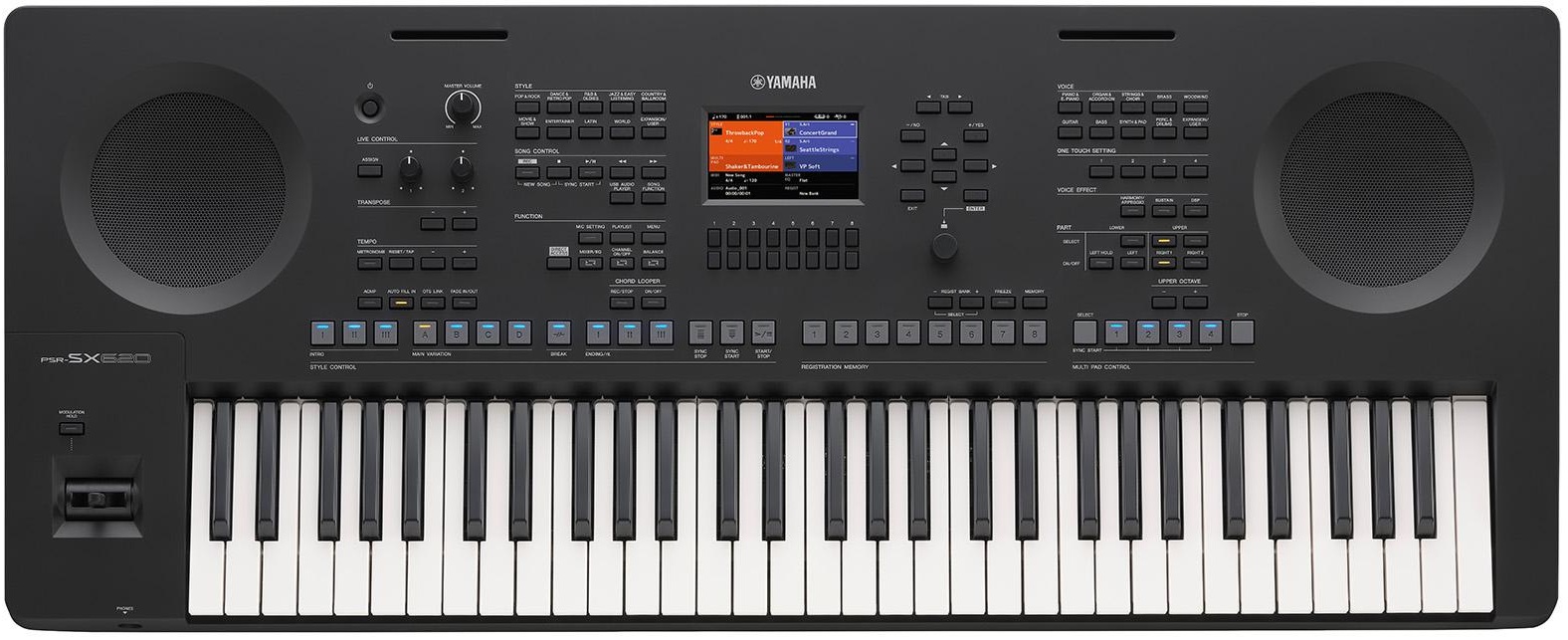
Yamaha PSR-SX620

Based on forum comments, SX prices vary greatly by geographic region. The SX620 does not always sit nicely below the SX720. Check the prices in your region as the delta between SX620 and SX720 may not be that big. It’s your call. The PSR-SX620 will be the top of the line portable keyboard in Japan; The SX620 is not on the Yamaha Japan web site at the time of this writing. If you want a more capable arranger-type keyboard in Japan, it’s STAGEA, baby.

Like the SX600 which it replaces, the SX620 has a decent enough spec:

  • 1,002 Voices + 51 Drum/SFX Kits + 480 XG Voices
  • 137 S.Articulation!, 34 MegaVoice, 31 Sweet!, 74 Cool!, 89 Live!
  • 450 preset styles
  • 416 Pro Styles, 33 Session Styles, 1 Free Play Style
  • Style File Format (SFF), Style File Format GE (SFF GE)
  • Chord Looper
  • Record to USB WAV only
  • Playback from USB WAV only

It’s the lightest SX model at 18 pounds. The SX620 does not have the newer FSB keybed and its non-touch color display is much smaller (4.3 inches) than SX720 and SX920.

The SX620 has Style Section Reset, but does not have Style Section Change Timing, Style Section Time Signature, and Style Dynamics Control. If you need these features, pony up for the bigger siblings.

The SX620 specs out pretty well in the DSP effects area. It offers roughly the same DSP effect presets as the other SX models. The SX920 is the king of the hill with VCM effects and 13 insert effects. The SX620 and SX720 allow 9 insert effects. Insert effects help make styles and MIDI songs come alive, so the more the merrier.
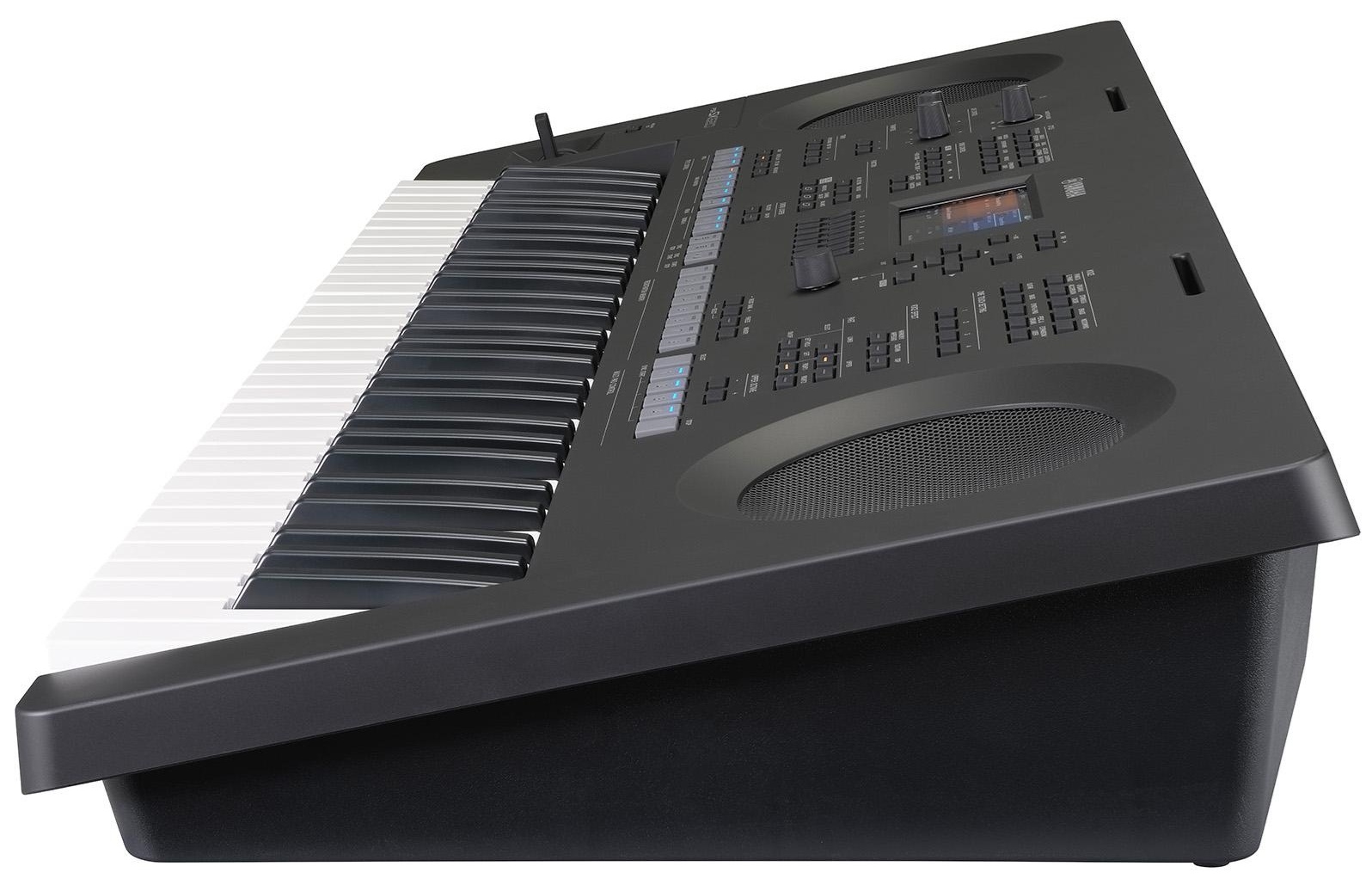
Yamaha PSR-SX620 side view

The SX620 has a redesigned speaker system with internal passive radiators. Each stereo channel has a 12cm speaker, 15 Watts per side. The bigger siblings add tweeters and bi-amplification (SX920). The redesigned necessitated a large front panel producing an “angry duck” kind of look. Some people are OK with the new front panel aesthetics, others dislike it intensely. Personally, the look is growing on me.

PSR-SX620 connectivity

Connectivity is more limited than its sibs. The SX620 doesn’t have 5-pin DIN MIDI or secondary LINE outputs. Otherwise, you won’t be wanting.

Memory capacity is another way Yamaha differentiates models:

  • 360 MB expansion memory (versus 1GB and 2GB)
  • 1 MB per Song (versus 3MB per Song)
  • 226 Multipad Banks x 4 Pads (versus 349 and 500 banks)
  • 500 (max.) Records per Playlist file (versus 2,500 records)

The older SX600 has 100 MB of expansion memory. Given the size of modern-day flash, these capacities always seem chintzy.

Voice-wise, the SX620 has 1,002 voices up from 850. 51 drum kits up from 43 kits. As to voice category, here’ a comparison against SX600:

  • 137 S.Articulation! (SX620) versus 73 (SX600)
  • 34 MegaVoice versus 27
  • 31 Sweet! versus 27
  • 74 Cool! versus 64
  • 89 Live! versus 71

Yamaha has a way of “promoting” voices to Super Articulation. Thus, you will find a few familiar sounds among the new SArt presets. Marketing and product tiering is a silly game sometimes.

Essentially, the SX620 has the S975 sound set. However, you will find a few surprise additions:

  • Pianosphere (Pianos & E.Piano)
  • PianoSweeper (Pianos & E.Piano)
  • LatinAccSuper (Organ & Accordion)
  • LatinAccForS (Organ & Accordion)

Yamaha voice names are not fully consistent from model to model (e.g., 80sSynthBrassProfit instead of BrassProfit), so your mileage may vary (YMMV). Plus, these guys can’t spell. Compare on the basis of MSB/LSB/PC number.

It isn’t strictly correct to say that the SX620 is exactly the S975 sound set. The SX620 picks up new guitar voices from its predecessor, the SX600:

  • CavacoLegato (Guitar)
  • CavacoRR (Guitar)
  • CavacoStrum (Guitar)
  • Cavaco (Guitar)
  • CavacoMute (Guitar)
  • ViolaCaipiraLegato (Guitar)
  • ViolaCaipiraRR (Guitar)
  • ViolaCaipiraStrum (Guitar)
  • ViolaCaipira (Guitar)
  • ViolaCaipiraMute (Guitar)
  • ViolaCaipiraSlide (Guitar)
  • Bandolim (Guitar)
  • BandolimTremolo (Guitar)
  • BandolimTouchTrem (Guitar)

The Megavoice listing reveals internal multi-samples. There you’ll find the Bandolim, Cavaquinho and ViolaCaipira in both the SX620 and SX600. These guitars are not on the S975.

I don’t compare bloops, bleeps or things that bang in the night. So, I’ll leave it to you to compare synth sounds and drum kits. New kits include: Punchy EDM kit and Trap kit.

As to new styles, you’re definitely on your own! Yamaha posted 20 style demo videos to the Yamaha Global channel on Youtube. If you have 25 minutes, a bunch of them are collected here. A few of the demo styles are on Genos 1, e.g., R&BSoulBallad, 12/8 PopBallad, Amazing Gospel. The styles are pretty much what we have come to expect from Yamaha’s style developers — studio-quality sound. Frankly, I couldn’t hear a huge qualitative difference between the SX620 demo videos and Genos 1.

I wish the SX620 display was bigger or that the videographer zoomed in. I want to cop their chord progressions. 🙂 Check out my page with free Chord Looper banks.

Speaking of chord progressions, SX620 has Chord Looper, one of my favorite features. The 12/8 PopBallad demo shows the Chord Looper in action. In this case, Chord Looper remembers the eight chord sequence beneath the ballad: F – Gm7 – Bb – C – Dm – F/A – Bb – C. Once set, Chord Looper handles the changes for the player who can concentrate on melody and fast fingering controls.

What conclusions can I draw without playing the darned thing? I played an S950 for a few years before upgrading to Genos 1. It made a lot of good music and I had a lot of fun with the S950. So much so, that I happily bought a Yamaha CSP-170 digital piano with a similar sound set (minus the high-end piano voices, of course). On the basis of sound quality, I don’t see how you can go wrong with the PSR-SX620.

Folks in the know recommend careful comparison shopping as far as price is concerned. If you can buy an SX720 for a small upward delta, do it. You will get more voices, styles, features and expansion memory. The ability to add new voices and styles is important because Yamaha is taking 5 to 6 years between full, major releases. Never rely on minor software updates; buy a keyboard as it is today.

Hopefully, demo units will roll out to stores shortly. In case you missed it, my site gave a sneak peek nearly four weeks before the official announcement. Keep it locked here.

Bonus: Chord progressions!

Rave (EDM) Main Floor

    |: Cm | Ab | Eb | Gm :|

Disco Pop

    |: Gm7 | Cm7 | Fm7 | Bb :|

R&B Soul Ballad

    |: Cm7 | Gm7 | AbMaj7 | Dm7(b5) :|

Reggaeton Groove

    |: Cm | Ab | Eb | Bb G7 :|

12/8 Pop Ballad

    |: F | Gm7 | Bb6 | C | Dm | F/A | Bb | C :|

Dance Pop

    |: Dm7 | Am7 | Gm7 | A7 :|

Amazing Gospel

    |: F | C/E | Gm7 | Csus4(7) :|

Copyright © 2026 Paul J. Drongowski
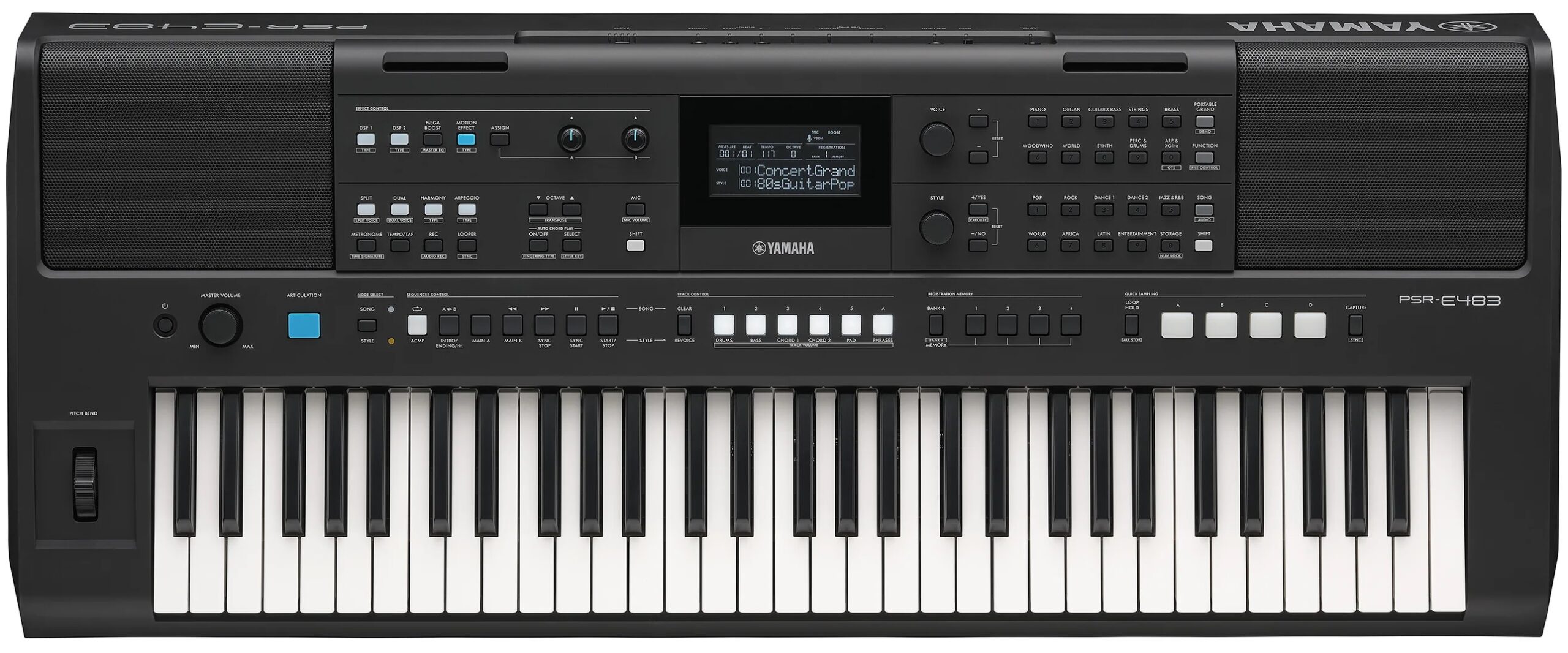
In praise of vibe

Just to show I’m alive!

One of my favorite projects is mining and reclaiming “lost” content from vintage beat boxes and such. I’ve shared results here — free downloads:

I spent some time messin’ with Yamaha Mobile Music Sequencer (MMS), searching for pleasant chord progressions. [Yamaha have discontinued the MMS app — bummer.] The MMS patterns are based on the Yamaha MM6/MM8 quasi-synths, quasi-arrangers. I reclaimed a bunch of MMS patterns and converted them to Genos/PSR styles.

As much as I like MMS, the patterns are missing that je ne sais pas. Some might say they are missing verve; let’s say they are missing vibe.

Vibe is the feeling of excitement when we hear music that moves us emotionally. The opposite of vibe, I guess, is “flat”, like beer, champagne or sode which has lost its fizz. The stuff may taste OK, but it’s missing the bubbles that tickle our tongue and nose.

Thus, I haven’t been motivated to polish and release the MMS-based styles. It takes energy to convert and create content — energy to get through the slog of production. Sad to say, the factory styles in my beloved QY70 are kinda flat, too.

Extrapolating a bit, lack of vibe may affect the way people feel about arranger workstations. Yeah, early arrangers had a certain cheese factor. However, today’s tone generators and effects are fully professional and contemporary mid- to high-end arranger keyboards are capable of polished results.

A lot of arranger folks prefer Korg arrangers over Yamaha saying “Korg has a live sound.” Part of that liveness is vibe. Yamaha are trying to move the needle with their newer styles. The new Genos2 R&B styles, for example, have a lot more vibe. They are well-played and Yamaha need to hire those style developers again!

The DJX-II has some of the best vibe-y patterns produced by Yamaha. That’s why I had fun converting DJX-II patterns to SEQTRAK. These patterns groove. As of this writing, the original DJX (PDR-D1) remains untapped. The DJX patterns (styles) are shorter than DJX-II with fewer variations and no cooked-in chord progressions. Still, the DJX (1998!) has more vibe than a typical arranger.

If you would like to learn more about contemporary music, I recommend the book “Switched on Pop” by Nate Sloan and Charlie Harding. The book is based on their podcast of the same name. It’s a popular musicology book that should appeal to musicians, songwriters and listeners alike. If you want to know where popular songs get their vibe and mojo, it’s a good read.

Copyright © 2026 Paul J. Drongowski

Pop demo styles for Yamaha

The new Yamaha PSR-E483 and PSR-E583 have new styles which have not yet been released for Genos and the SX series.

Since folks might be interested in hearing the new styles, Mark Wilburn and I teamed up to create a few quick and dirty Yamaha arranger styles based on the new E-series styles.

Please think of these styles as “demos“. They are far from perfect:

  • Two MAIN variations just like the E-series
  • One INTRO and one ENDING just like the E-series
  • E-series voices not the stellar Genos/SX voices
  • No effects beyond the basic E-series chorus and reverb
  • No chordal variations for INTRO/ENDING

If you have ever attempted style creation, you know how much work it is to add these features. That’s not an excuse — just admiration for Yamaha’s style developers! We expect Yamaha to bring these styles up to Genos/SX quality in the future. Thus, these styles today are “demos”.

If you would like to try the demo styles, here is the ZIP file (E-pop-v1.zip).

The ZIP extracts into a directory named “E-Pop”. E-Pop has three subdirectories:

  • Styles: What you have been waiting for (.STY files)
  • Source: Raw MIDI files and Cakewalk projects
  • MIDI: More raw MIDI song files (SMF Type 0)

If you want to try the styles, copy the .STY files to your arranger, load them up and play. The README.TXT file has some suggested chord progressions.

People who want to try their own hand at style creation will be interested in the Source and MIDI subdirectories. These subdirectories contain the raw MIDI files which we used to create the demos. Be sure to read the README text files for additional tips and information.

As to suggested song names, we drove ourselves crazy trying to match songs with the demo styles. Sometimes everything matched up, sometimes not. Please post your guesses on the Yamaha Musicians Forum where we lurk. 🙂

Have fun!

Copyright © 2026 Paul J. Drongowski
Yamaha PSR-I510 and PSR-I610 keyboards

Yamaha sent the PSR-E583 and PSR-E583 to India to find themselves. Like the Beatles, they came back changed.

You must check the PSR-I510 and PSR-I610 introductory video. Holy mother of funk! 🙂 Damn, I want more of that. More Indian demo tones.

The overview video with Karthick Devaraj has some sweet moments, too. [Dude can play.] Could you imagine if we had this ting during the 60s? Let me hear your sitars ringing out!

Yeah, yeah, I know. This is cultural appropriation on my part. 🙂

Now the PSR-I510 and PSR-I610 plug:

  • 887+ Voices, including 40+ Indian Voices
  • 382+ types of auto accompaniment Styles, including 60+ Indian Styles
  • 40+ Riyaz (Tabla/Mridangam & Tanpura) patterns
  • 65+ Songs, including 25+ Indian Songs
  • PSR-I510: 2×6 Watts; PSR-I610 2×12 Watts
  • Pitch bend wheel
  • Modulation wheel (PSR-I610 only)
  • Looper recording
  • Auto Chord Play
  • USB to Host (Type C), LINE OUT, MIC IN

Some of the Indian voices are Super Articulation Lite, e.g., S.Art Lite Santoor, Swarmandal. My friend Bharadwaj will be happy to see the Riyaz patterns.

This is the first time I had fun listening to demos all week.

Yamaha Global have posted a new MIDI Song to Style introduction video.

Copyright © 2026 Paul J. Drongowski
NAMM 2026: PSR-E483 and PSR-E583 announcement

Here are a few details about the upcoming Yamaha PSR-E483 and PSR-E583. Yamaha Global have released an overview video. Yamaha Global also have a longer walkthrough video.

  • 61-key velocity-sensitive keyboard
  • Over 860 voices including Super Articulation Lite voices
  • 345 accompaniment styles
  • Auto Chord Play plays pre-programmed chord progressions
  • 100 pre-programmed progressions or record your own
  • 41 DSP1 effetcs, 12 DSP2 effects, reverb, chorus, master EQ
  • Motion effects
  • Two assignable Live Control knobs
  • Pitch bend wheel
  • Looper to record and loop chord progressions, rhythmic parts, and melodic phrases
  • Quick Sampling to record short audio samples assigned to buttons
  • USB audio recorder (up to 80 minutes record time)
  • USB audio interface
  • E483: Two 6 Watt speaker (2 x 12cm) channels; E583: Two 12 Watt speaker (2 x 12cm) channels
  • Connections: Left and right line outputs, microphone input, AUX input, headphones, USB TO HOST (Type C) and USB TO DEVICE (Type A)
  • AC adapter power or AA batteries
  • MIDI Song To Style app

The PSR-E583 model as a modulation wheel and an expression pedal input. The PSR-E583 has more voices — 890 voices vs. 860 voices — including four more Super Articulation Lite voices (19 SArt vs. 15 SArt). PSR-E483 USA MSRP is $499 USD and MAP is $400. PSR-E583 MSRP is $599 and map is $490. Thus, the extra E583 goodies cost $90 more.

Yamaha PSR-E483 keyboard (NAMM 2026)

The PSR-E583 adds only 0.6 pound (0.3kg) of weight — 16.1 pounds (7.3kg) vs. 15.5 pounds (7.0kg). The E583 uses the larger PA300C 16V power supply while the E483 uses the PA-150 12V adapter. Whoa! Punters should take note of the different power requirements and should not interchange adapters!

Yamaha PSR-E483 keyboard (Rear)

The front panel and case have a clean, professional look in black. The redesigned LCD display has a “grid” format.

Yamaha PSR-E483 and PSR-E583 display (NAMM 2026)

If this sounds a lot like the older PSR-E473, well, you’re right. It is an incremental step, not a revolution. Still, Yamaha makes good quality instruments and the PSR-E483/E583 will make a good starting point for budget-conscious musicians. My own preference would be the PSR-E583 — I can’t live without an expression pedal!

Copyright © 2026 Paul J. Drongowski
NAMM 2026: Yamaha PSR-E483 and PSR-E583, updates

Yamaha promotions have mentioned PSR-E483 and PSR-E583 models before next week’s NAMM 2026 (January 20-24, 2026), so it’s a safe bet that they will appear from the fairy dust. Many budget-conscious punters have awaited new E-series models and will be happy to see them. No specs or details yet, but stay tuned.

Casper at Casper tutorSynth caught sight of a new Genos 2 Voice and Style Expansion Pack: “Back In Time”. Watch Casper’s video for more information. The pack looks like a “greatest hits” collection from early Yamaha arranger keyboards (e.g., PSR-2700, PSR-5700, PSR-6700, PSR-7000 and PSR-9000.

Genos and PSR users will be glad to get the updated MIDI Song to Style application (V1.2) — which will be announced, also. [Don’t look for it quite yet.] The update supports Windows 10/11, macOS 15 (Sequoia) and macOS 26 (Tahoe). Supported keyboard models are: Genos2, PSR-A5000, PSR-SX920, PSR-SX720, PSR-SX600, PSR-E583, PSR-E483, PSR-E383, PSR-EW320, PSR-EZ310 and PSR-I300.

Speaking of updates, the Yamaha CK61/CK88 have received update v1.10. The update adds the following new features:

  • Additional new MENU parameter: “Part SW Mode”.
  • Additional new SETTING parameter: “Pan”.
  • Additional new SETTING -> Rotary Speaker parameters: “Balance”, “Stereo/Mono”, “Speed”, “Acceleration” and “Transition”.
  • Additional new SETTING -> Audio Trigger -> Play Mode parameter: “Hold”.
  • Additional new shortcut operation to “Master Tune”.

And of course, “Fixed minor problems.” Download it today.

Yamaha SEQTRAK got a major update from v1.21 to v2.00. New features are:

  • Added “DrumKit” track type, allowing up to 7 drum sounds in a single track
  • Added “Synth” track type, enabling drum tracks to be used as synth tracks
  • Extended Bar Length button functionality to Drum tracks
  • Enabled value changes via ALL knob rotation while pressing the following buttons: VOL+/-, PAGE, SCALE, OCTAVE, KEY, BPM+/-, SWING

The SEQTRAK app is also bumped to v2.00. Check out the SEQTRAK update video.

MODX M OS v3.00 catches MODX M with Montage M (modulo reduced MODX M functionality). New features are:

  • Now supports Expanded Softsynth Plugin for MONTAGE M/MODX M.
  • New effect types (GS1 Ensemble & Tremolo, M/S EQ Compressor, CS Ring Modulator) have been added.
  • New waveforms (Clavi) and Performances have been added.
  • AN-X and FM-X parameters have been added to the Part LFO destination.
  • ESP Control has been added to DAW Remote.
  • Updated the initial control number settings for controllers used in DAW Remote.
  • Note Limit and Note Shift have been added to Scene, with support for External Part.

The MODX M update is available now. Here is Blake’s Take. Blake has been a busy lad writing Takes for the SEQTRAK and CK updates, too. All to be found on the YamahaSynth.com site. MODX M OS v3.0 demo by Masataka Kono (no talking, just playin’).

As Scott Hanson would say, “This is the witching hour.” Keep your eyes open as updates pop up like Spring flowers.

Copyright © 2026 Paul J. Drongowski
Roland Go:Keys mini-review

Maybe it’s the visual aesthetic which keeps drawing me back to the Roland GO:KEYS 3 and 5. Yes, it’s a box. The simple lines, however, are clean. The chassis colors are well-chosen and the turquoise is lovely. The pastel white keys are a good match.

With time on my hands, I dropped by Kennelly Keys in Everett, WA to give the sounds a try. With so many on-line demos, I decided to focus on playability and voice quality. The styles and chord patterns are hipper than Casio, Yamaha and Medeli. Roland are catering to younger players and contemporary genres. I could have a lot of fun jamming along to chill, downtempo, neo-soul, etc. with GO:KEYS.

Roland Go:keys 3

Today, however, it’s the Advent season church music for the week. Why not kill two birds with one stone and get today’s practice out of the way, too? The instruments are light-weight (max 5.5kg or 12.3 pounds). I could see taking one to church rehearsal (maybe a church gig) since they run on battery power and have built-in speakers.

The keys are piano-ish and are not synth-style keys. They are great for the more than decent acoustic pianos, electric pianos, pads, strings and orchestral instruments. If you have a chance to play a GO:KEYS (gen 2), take it. The keys compare favorably with the Casio CT-S500 and CT-S1000V.

Sonically, pianos are definitely a strength. Strings are good and you get a healthy selection of tones and articulations. (It ain’t VSL. 🙂 ) The pads surprised me. I found more usable simple pads than MODX. I don’t need or want tricked up pads. I didn’t have to look too hard to find them.

The orchestral instruments (e.g., oboe, clarinet) are passable. French horn ain’t bad. If this is your thing, too, I would look to the Roland Cloud and download the EXZ007 “EXZ Orchestra” expansion. The Orchestra expansion contains voices from the SR-JV Orchestral 1 and 2 boards, the Vocal Collection and more. I bought these boards back in the day for $200 USD a pop. Amazing.

Organ-wise, I got on with so-called pipe organ reasonably well. The quieter pipe organ voices are pleasing. The piano keys don’t get in the way if you are playing at a slow tempo and legato touch. Faster tempos may require adjustment. EXZ007 adds a few pipe organs, too, along with a raft of choirs from the old Vocal Collection. (Thank you, Eric Pershing.)

Hate to say it, but Hammond B-3 organs are a disappointment. None of the basic tones/registrations clicked with me (no pun intended). Further, who in the hell makes organ voices velocity sensitive? Yes, there are a few of those abominations.

Better drawbar organs are available in the EXZ008 “EXZ Vintage Keys” expansion. The EXZ008 contains the SR-JV Keyboards of the 60s and 70s (pianos, clav, B-3, combo organ) and a slew of vintage synths. The in-built “VK Rotary” effect is an improvement on the bog standard rotary effect which is really a chorus in cheap disguise.

Playing B is where the box piano keys got in the way. This could be a deal-breaker for organ-oriented players. Playing at a fast tempo felt wrong and I couldn’t adjust to the key response. Major yellow flag for me here. Bummer, everything was going so good.

Roland cannot be faulted for the keys. My Novation Launchkey 49 Mk4 has box piano keys and I have similar issues playing organ with them. I bought the Mk4 for playing AP/EP on a light, swappable MIDI controller in my studio. Think over your requirements and choose.

I spent most of my time playing the GO:KEYS 3 through its internal speakers. The 3 exhibits a lot of boxy-ness. Yes, I’m sure it sounds better through an external amp. The 5 is less boxy. Overall, not a big deal because I usually play through battery powered Yamaha Stagepas 100 or Headrush FRFR GO.

So, 3 or 5? The 5 has much better connectivity. It may seem a trivial matter, but the 5 front panel legends are easier to read than the turquoise. I flat out could not read the button labels on the turquoise and kept refering back to the white 5 nearby. Advantage 5.

Now for the big decider. The 5 can load EXZ expansions which include waveforms. The 3 can only load patches (voice meta-data) and styles. I would almost certainly acquire EXZ007 and/or EXZ008. Both expansions include waveforms, so GO:KEYS 5 it is.

I’m still sorting out Roland Cloud subscriptions and lifetime keys. I would likely get lifetime keys for EXZ007 and EXZ008. That’s an extra cost. Wait, there is another extra cost — downloading requires the Roland Cloud Connect wireless adapter. $124 USD Ka-ching. The adapter includes a 12 month Pro Membership, but still…

Overall, I’m favorable impressed by the current Roland GO:KEYS. If there was a model 5 with a synth-action keybed, I would buy one.

Right now, we are in the looming shadow of NAMM 2026 (January 20-24, 2026). Yamaha will almost certainly announce the next E-series 400 model sometime in the next few months. Plus, it’s time for Korg to update the i3, EK-50 and Kross. Logically, it’s better to hold off for NAMM and see what comes our way.

Copyright © 2025 Paul J. Drongowski

Gettin’ the itch to chop

I’m always in the mood for tiny noise makers and, possibly, mods. My latest fantasy is a good-sounding add-on module to be controlled by a Novation Launchkey 49 Mk4 or Arturia Keylab Essential 49 (both in my clutches).

So, round up the usual suspects! I thought about taking the Mototool to the Yamaha PSS-A50 since it has good mod potential. I’d like to keep the main board and front panel intact, ditching the mini-keyboard, After listening to the A50 sounds, I got cold feet! If I did go Dr. Frankenstein on it, the front panel plus main board combo would be larger than my goal.

I browsed through a zillion Yamaha and Casio service manuals and teardown videos. The now discontinued PSS series keyboards are the smallest having only two internal PCBs. The PSR-F50+ relatives have as many as five PCBs. Even the simplest looking Casios (e.g., CT-S1, CT-S100) have three boards or more. Nope.

Pocket Miku, AKA NSX-39, is a good candidate although one must be willing to sacrifice MIDI channel 1 to that atrocious Miku voice. I did a little deep diving on Japanese NSX sites and found a Real Acoustic Sound (RAS) sax demo that is every bit as good as an Articulated Element Modeling voice on Tyros. It’s a shame that Yamaha never pursued the RAS tech. NSX is pretty much dead to Yamaha, too, because every NSX link to a Yamaha site is a 404.

I A/B tested PSS-A50 voices against NSX-39. Same waveforms, I’m sure. The NSX-1 chip (YMW820) is a kissing cousin to the Yamaha SWLL (YMW830) in the now defunct PSS series. The NSX-1 has better effects, a full GM sound set, and a more capable XG implementation. Goes to show that Yamaha could be making a killer E-series machine, but chooses to make dumb marketing decisions.

The main drawbacks to either A50 or NSX-39 is MIDI communication. Both devices would require a 5-pin MIDI hack or a MIDI host.

SAM, where are you?

I also compared Dream SAM against the Yamaha SWLs. Specifically, I A/B’ed the Yamaha sounds against the MIDIPLUS miniEngine USB. The miniEngine combines a USB MIDI host, 2,500mAh rechargeable battery, and Dream SAM2553 synthesizer chip.

I honestly want to like the miniEngine, however, a few of its flaws are hard to overlook: serial (5-pin) MIDI doesn’t work, the audio output is a bit noisy and the SAM2553 sound doesn’t quite rise to Yamaha. The SAM has a nice Roland GS implementation, providing access to certain high-want parameters via MIDI CC and NRPN messages. Yamaha XG requires SysEx to access key parameters like REVERB type and CHORUS type, effectively putting those parameters out of the reach of most MIDI controllers (including mine).

Still, I can’t quit SAM. M5Stack sell the U187 MIDI unit for $14.50 USD. The U187 is tiny, has two 5-pin MIDI DIN connectors and is based on the SAM2695. After I threw in GROVE connectors, etc. and an M5Stack buck converter, the dust settled around $60 including tax, tariff and shipping. I’ll let you know how it goes.

CME H2MIDI Pro

And, speaking of MIDI hosts. I tried driving the A50 and NSX-39 through a DoReMiDi USB MIDI HOST UMH-20 from Yamaha MODX6. No Joy. I think the Active Sensing messages from the MODX make the DoReMiDi crazy and message transmission was sporadic.

I’ve had issues with the UMH-20 before. At this juncture, I cannot recommend the DoReMiDi.

I ordered and tried the CME H2MIDI Pro instead. No issues. CME know how to make MIDI devices! Plus, the H2MIDI can be configured to filter out Active Sensing, an important feature because Yamaha refuses to provide a software switch that turns off Active Sensing (despite many customer requests).

CME is a strong recommend.

SWLL update

A few intrepid investigators are deep-diving the Yamaha SWLL (and related) processors. The SWL processors are used extensively in the entry-level E-series keyboards. The SWLL is a super-low cost system on a chip which combines an AWM tone generator and an ARM7TDMI core.

In previous posts, I’ve danced around the specific host core in the SWL series. We now know, conclusively, it’s an ARM7TDMI core. Yamaha has been phasing out the old SH architecture cores in favor of ARM (and Linux). BTW, the CSP-100 series may be the last product based on SH. The CLP-800 employs the newest member of the SWX family, the SWX-100F. No doubt, it’s an ARM, too. CVP, on the other hand, is RIP.

Copyright © 2025 Paul J. Drongowski

Adafruit Feather: Megavoice key switching

More experiments and I have the initial cut of a simple key switching program for Yamaha MODX and Genos/PSR guitar Megavoices. The program is written in CircuitPython and runs on an AdaFruit Feather M4 Express. Here is a link to the ZIP file with the code.

Megavoice: Background information

MODX, Genos and mid-range PSR keyboards have Yamaha Megavoices. Megavoices combine several waveforms into a single voice (assigned to a single MIDI channel). They are intended mainly for arpeggios (Montage/MODX) and styles (Genos and PSR).

Generally, a Megavoice uses velocity switching to trigger waveforms. Some of the waveforms play ordinary notes, some play articulation notes, and others plays special instrument effects. Let’s take a look at the Nylon Guitar voice, which is implemented on both MODX and Genos. [Megavoice technology dates back to the early Motif and Tyros era, so I won’t be listing all of the models with Megavoice!] Many other guitar Megavoices (e.g., Concert Guitar, Clean Guitar) have the same velocity layout. Megavoice Nylon Guitar has the following velocity layers:

    Vel Lo  Vel Hi  Waveform      Key range
    ------  ------  ------------  -------------
       1      20    Open soft     C6 and below
      21      40    Open medium   C6 and below
      41      60    Open hard     C6 and below
      61      75    Dead          C6 and below
      76      90    Mute          C6 and below
      91     105    Hammer        C6 and below
     106     120    Slide         C6 and below
     121     127    Harmonics     C6 and below
       1     127    Strum noise   Above C6
       1     127    Fret noise    Above C8

MIDI note numbers 0 (C-2) to 96 (C6) comprise “playable” notes. Note numbers above 96 are instrumental effects: strum and fret noise. The strum and fret noises include the sound of a pick crossing the strings, body knocks, and sleeve noise (fingers sliding on strings).

As you can tell from the layout, if you try to play a Megavoice from the keyboard, you’ll have an interesting and maybe frustrating experience. No one really has the skill to control their key touch to reliably play an open hard note versus a dead note, etc. However, a sound designer can program different sounds into a MIDI track with precision, thereby making an expressive, realistic guitar part in a style or arpeggio. [Historical note: Many of the Motif ES/XS arpeggios were taken from PSR Megavoice styles!]

Genos, Tyros and PSR have a way of making the base waveforms playable: Super Articulation (SArt). The SArt engine monitors the incoming key strikes and, in real-time, chooses a destination waveform for each note. If you play in a detached manner, SArt triggers one of the open string waveforms (depending upon your strike velocity). If a second note occurs within a fourth with a slightly higher velocity, SArt plays a slide (up). SArt plays a body knock in response to the ART.1 and ART.2 buttons.

Clavinova CSP and CVP do not have articulation buttons. However, you can still join the fun. Select an S.Art guitar voice and tromp on the foot pedals!

Montage and MODX have Expanded Articulation (XA). It plays open notes as expected and relies on the ASSIGN 1 and ASSIGN 2 buttons to bring in an articulation like Slide or Harmonics. (Element programming allows more flexibility than this simple example, BTW.)

Feather MIDI event processor

In order to implement key switching, we need to break into the path from keyboard to tone generator. We want a chance to respond to incoming notes (key strokes) before the notes go to the tone generator (TG).

We can’t hack the hardware in MODX or Genos, but we can send MIDI messages from the keyboard (e.g., MODX MIDI OUT) to an external MIDI event processor which sends a modified MIDI message stream back to the instrument (e.g., MODX MIDI IN).

I described the hardware for an AdaFruit Feather-based MIDI event processor in an earlier post. The event processor consists of an AdaFruit M4 Express processor, MIDI I/O FeatherWing, OLED FeatherWing and Joystick FeatherWing. Up to this point, I haven’t exploited the OLED or joystick, so you could get away with a very tiny Processor plus MIDI I/O combination. It’s small and efficient enough to be powered by a LiPo battery!

The hook-up looks like this:

    ----------------         --------------       --------------
   |                |       |              |     |              |
   |         MIDI OUT ----> MIDI IN        ----> RX             |
   | MODX6          |       |  FeatherWing |     |  Feather M4  |
   |          MIDI IN ----> MIDI OUT       ----> TX             |
   |                |       |              |     |              |
    ----------------         --------------       --------------

The MIDI FeatherWing communicates with the Feather M4 Express over the serial I/O RX and TX ports. The Feather M4 Express communicates with the Mu editor and development environment on a Windows PC (not shown). Code is written in CircuitPython which is loaded into the Feather M4 from the PC over a USB communication link. The code can print status information via USB to the Mu environment — very handy when debugging.

Since this is a prototype, I’m trying to keep things simple. The MODX6 requires a little bit of manual configuration:

  • MIDI I/O directed to/from the 5-pin DIN connectors
  • MIDI LOCAL OFF (i.e., key events are not sent directly to the TG)
  • Nylon Guitar or other compatible guitar Megavoice selected on Part 1

That’s not too much to ask.

Key switching

It may be said that neither SArt or XA bring together all of the available articulation waveforms in a factory preset single voice (part). That’s where key switching can play a role.

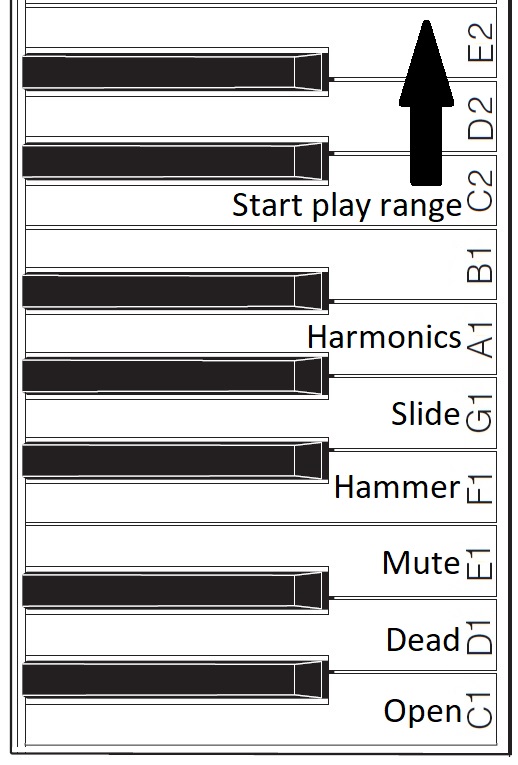
Basically, I want to assign a range of keys to switch between articulations and sounds. For my initial experiments, I assigned MIDI notes 36 to 47 to key switching duties. On MODX6 (61 keys), this key range covers the lowest octave of physical keys (the power-up default, without internal octave switching enabled). Articulations are assigned to keys as shown below.

Assigned key switch articulations

For now, I’m holding the black keys and B1 in reserve. One possibility, for example, is to assign body knocks to F#1, G#1 and A#1. We’ll see!

The articulation keys enable the assigned articulation. All keys from C2 and above play notes using the selected articulation. The articulation keys latch. So, if I strike E1 (Mute) and then strike a key in the play range, a muted guitar note will sound. All subsequent notes will be mute notes until I strike C1 (Open) and return to playing open strings.

I spent some time experimenting with Genos SArt voices in order to get ideas for enhancements. I will summarize my notes in a future post. Suffice it to say, Yamaha have some good ideas! It’s all a matter of code. 🙂

Copyright © 2025 Paul J. Drongowski

Smart Pianist, CSP and ChordPro

Yamaha repurposes hardware and software technology all the time. The Yamaha CSP series digital pianos (CSP-100 series and CSP-200 series) and Smart Pianist borrow a lot of technology from the Yamaha Genos and PSR arrangers. Yamaha Chord Tracker users know that Smart Pianist also has Chord Tracker technology inside.

Chord Tracker provides a number of Smart Pianist-like features. Chord Tracker analyzes an audio song, extracts its chords, and displays the chords in a chart. Like Smart Pianist, Chord Tracker follows the chord chart while playing back the original audio file. Pretty much anyone can use Chord Tracker in this way to figure out the chords to a song and play along.

Genos and PSR arranger people, however, get extra goodies. Chord Tracker can send the chords to the arranger for playback. Even better, you get to choose the accompaniment style. Want to re-imagine a song as a country tune? You can do it.

Extended ChordPro

Chord Tracker sends the chords to an arranger in a Standard MIDI File (SMF). Instead of notes, the chords are represented in Yamaha System Exclusive MIDI messages.

When I analyzed the file format and chord messages, my first thought was “ChordPro”!

You’ve probably seen ChordPro on the Interwebs. It’s that simple text format for song lyrics and chords. I extended ChordPro adding a few new features to make musical time explicit and precise. (Original ChordPro relies on the musician for time.) Then I wrote a Java program to translate an Extended ChordPro song to an SMF suitable for playback on a Yamaha arranger. Check out an Extended ChordPro demo.

Playback ChordPro Example

Well, guess what? Smart Pianist and CSP-170 can play back SMFs generated from Extended ChordPro songs.

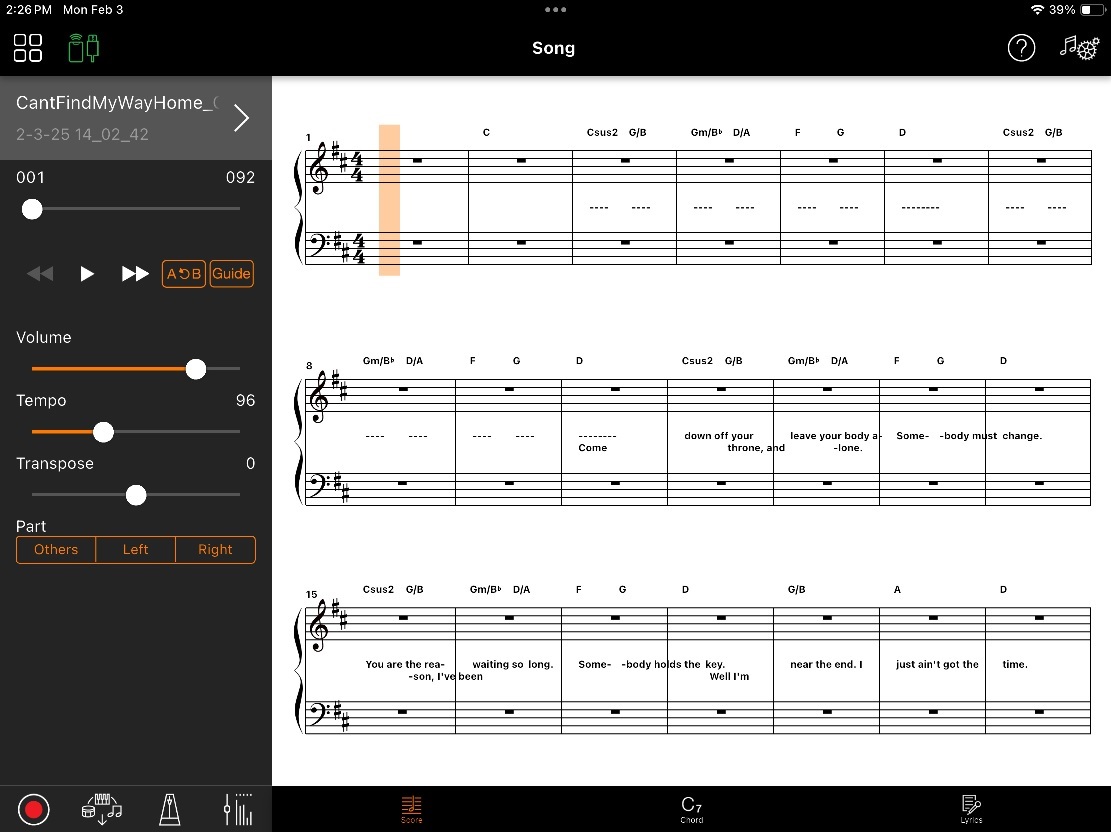
Here is a short ChordPro snippet for Steve Winwood’s “Can’t Find My Way Home”.

{t: Can't Find My Way Home}
{key: D}
{artist:Blind Faith}
{time: 4/4}
# Style: SongwriterBallad (stylecode: 5980)
{stylecode: 5980}
{tempo: 96}

{start_accomp}

# Introduction
[C][*IA]
{c: Introduction}
[Csus2:2][*MB] ---- [G/B:2] ---- [Gm/Bb:2] ---- [D/A:2] ---- 
[F:2] ---- [G:2] ---- [D] --------
[Csus2:2] ---- [G/B:2] ---- [Gm/Bb:2] ---- [D/A:2] ---- 
[F:2] ---- [G:2] ---- [D][*FB] --------

{c: Verse 1}
Come [Csus2:2][*MB] down off your [G/B:2] throne, and 
[Gm/Bb:2] leave your body a- [D/A:2] -lone.
[F:2] Some- [G:2] -body must [D] change.
[Csus2:2] You are the rea- [G/B:2] -son, I've been
[Gm/Bb:2] waiting so [D/A:2] long.
[F:2] Some- [G:2] -body holds the [D][*FC] key.

An Extended ChordPro song begins with a header containing the title, artist, key, tempo, time signature and auto-accompaniment style. After the header, you hit the {start_accomp} directive which tells the arranger (Genos, PSR or CSP) to start playing.

The rest of the Extended ChordPro file consists of chords, e.g.,

    [C]   [Csus2:2]   [G/B:2]   [Gm/Bb:2] ...

section control directives, e.g.,

    [*IA]  [*MB]   [*FC] ...

and lyrics (plain text). Oh, yeah, you can throw in comments, too, e.g.,

    {c: Introduction}
    {c: Verse 1}

The Java program (cp2mid) translates the chords, directives and lyrics into an arranger-ready Standard MIDI File.

So, what do we get after we import the SMF into Smart Pianist? The screenshot above [click to enlarge] is the score. The chord symbols and lyrics appear with the staves. There aren’t any notes because the SMF doesn’t have any notes; it’s contains only chords and lyrics.

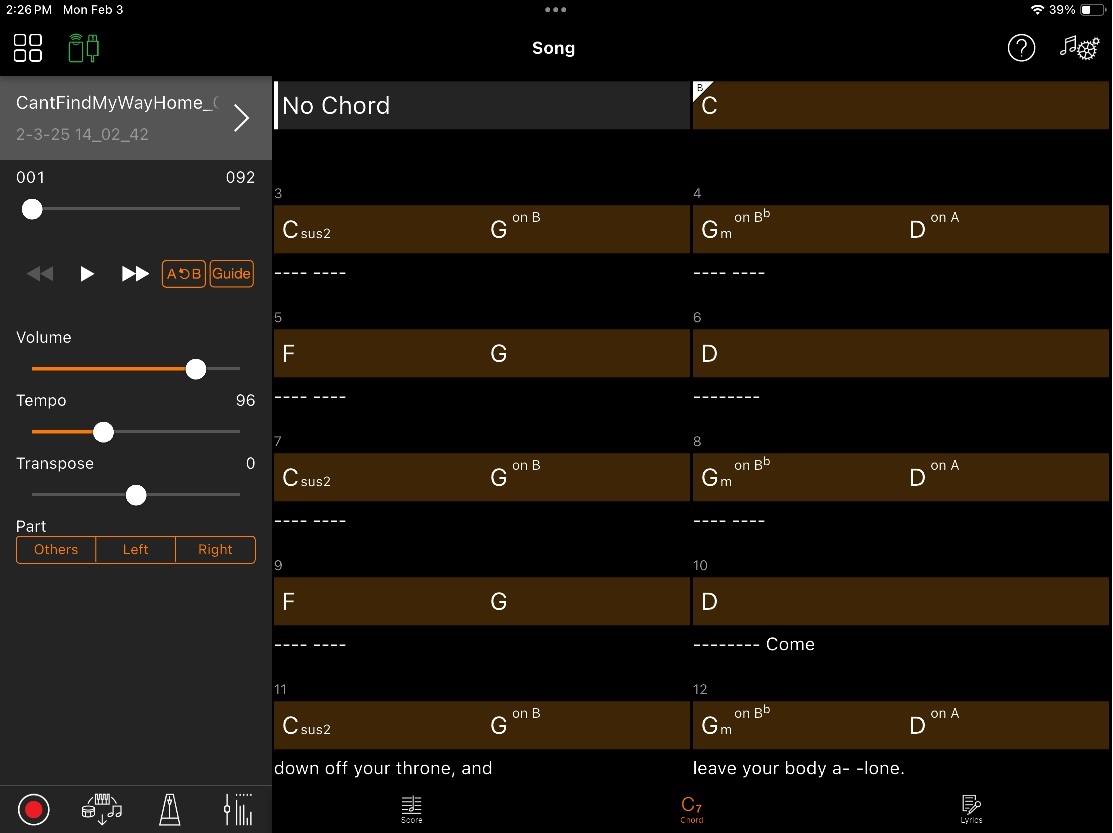
The chord chart looks familiar. But, hey! Smart Pianist display lyrics interspersed with chords. I never saw Chord Tracker do that.

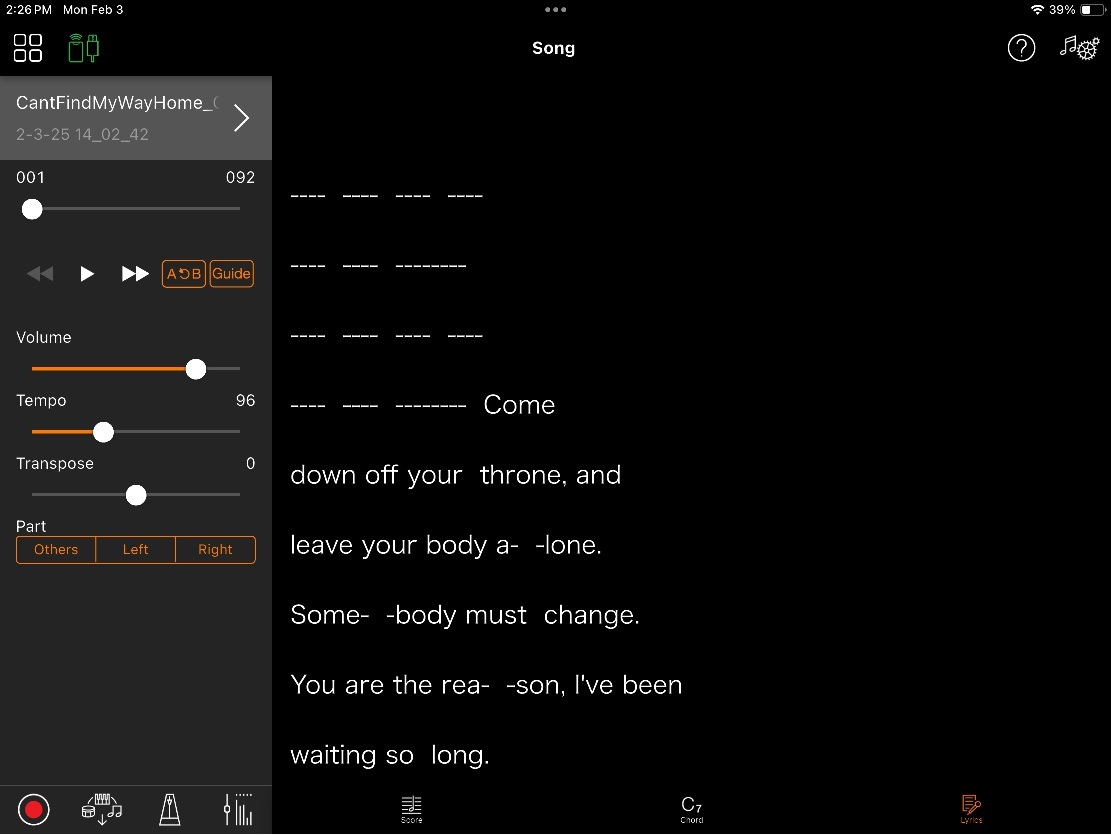
The final screenshot shows the lyrics alone. All of those dashes (“—-“) come from the Extended ChordPro song. They are placeholders during instrumental interludes.

Summary

Today’s example demonstrates a different way to use Smart Pianist and CSP digital pianos. If you own both a Yamaha arranger workstation and a CSP, you should be able to transfer Chord Tracker SMFs to Smart Pianist and the CSP.

If you want to know more about Extended ChordPro and its implementation, please see:

Copyright © 2025 Paul J. Drongowski
